What is ERP integration, and which pattern should you use?
What is ERP integration? It is connecting the ERP to CRM, ecommerce, banks and other apps so data moves between them without re-keying. Use native connectors for one standard flow, iPaaS for several systems, custom APIs for unusual logic, and an agent with an approval step for judgment work.
It is not ERP implementation, which is deploying the ERP itself. It is also not data migration, which moves history once. Our erp integration services start from that line: integration is the live, ongoing movement of data between systems that stay in use.
This guide is written for IT managers and RevOps leads who have to pick a pattern and defend it. You get a decision table, two worked examples and a build path you can hand to a team.
Which integration pattern fits your ERP?
Walk through your ERP, CRM and bank feeds with our team and leave knowing which of the four patterns suits each data flow.
Quick Answer What is ERP integration? It is the automatic exchange of records between your ERP and the systems around it, such as CRM, ecommerce, warehouse and bank feeds, so nobody re-types data. Choose the pattern by how many systems you connect, how fast data must move, and who will maintain the link.
What is ERP integration?
ERP integration links the system that holds your money, stock and orders to the systems where customers, shops and banks act. Without it, someone copies a won deal from the CRM into the ERP, then copies the invoice status back. Each copy is a chance for a typo, a delay or a duplicate customer.
IBM describes ERP integration the same way: connecting the ERP with other enterprise applications so data flows between them and silos disappear. The business case is simple. Every manual hand-off adds a delay to quote-to-cash and a place for errors to hide.
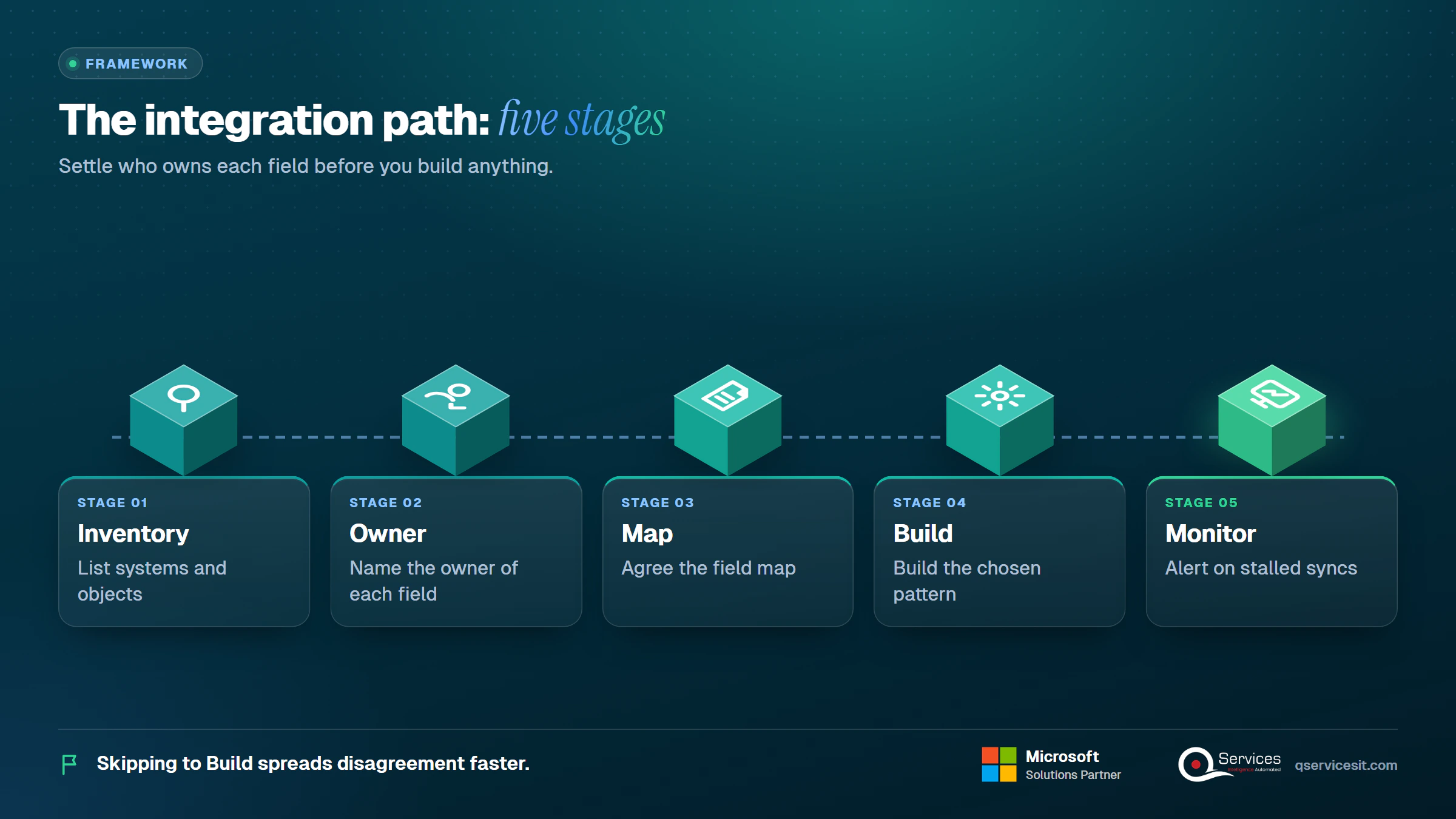
The QServices Framework Integration Path = Inventory → Owner → Map → Build → Monitor
Skipping to Build is the most common mistake. If nobody has named the owner of each field, the best connector in the world just spreads disagreement faster.
How does ERP integration work?
An integration reads a change in one system, translates it to the other system’s format, and writes it there. The change can be detected by a schedule (every hour), a trigger (a webhook when an order is saved) or a queue message. The translation is the field map. The write is an API call that must be safe to repeat.
The hard parts are rarely the call itself. They are naming which system wins a conflict, handling a timeout halfway through, and knowing when a sync has quietly stopped. We cover each below.
Native connectors vs iPaaS vs custom API vs agent: which pattern wins?
IBM lists three classic methods: point-to-point, enterprise service bus and iPaaS. We use four, organised by who builds the link and who approves the write. Custom API integration covers point-to-point, bus and event-driven work (webhooks, queues, change data capture). The fourth pattern is an agent sitting on top.
| Pattern |
Best fit |
Systems |
Latency |
Build effort |
Run cost |
Skills |
Failure mode |
| Native connector |
One standard flow |
2 |
Scheduled or near real time |
Days |
Low |
Admin |
Covers standard objects only |
| iPaaS |
Several systems, changing rules |
3 to 8 |
Minutes |
Weeks |
Medium (licence) |
Integration analyst |
Drifts back to point-to-point without governance |
| Custom API |
Unusual logic, high volume |
Any |
Seconds |
Many weeks |
Highest (maintenance) |
Developers |
Breaks when the ERP API version changes |
| Agent with approval |
Judgment work: matching, drafting, chasing |
Any, via the layers above |
Minutes plus approver time |
Weeks |
Medium |
Developer plus process owner |
Slower: a person approves each write |
Effort and cost columns are indicative, based on typical projects in our experience, not a quote. Note the last row: the agent pattern is the slowest per transaction because a person is in the loop. That is the price of safety, and it is worth paying only where a wrong write is expensive.
Key Insight Ten apps connected point to point need 45 links, because links grow as n(n-1)/2. Add an eleventh app and you need 10 more.
How is ERP integration different from implementation and data migration?
Implementation deploys and configures the ERP. Data migration moves historic records into it once, as in a move from Dynamics GP to Business Central. Integration runs every day after both, which is why monitoring belongs in the scope from the start.
Which data should flow between ERP, CRM, ecommerce and banks?
The rule of thumb: each object has one owner, and data flows one way out of the owner unless you define field-level ownership. Products, prices and financial account attributes usually flow from the ERP to the CRM. Quotes begin in the CRM. Orders and invoices are ERP-owned and flow back as status.
Which data should sync between ERP and CRM?
This is the core case for a RevOps reader. Our own guide to crm erp integration credit data shows what sales should see before they promise terms. The same logic applies to Dynamics 365 Sales, Salesforce and HubSpot:
| Object |
System of record |
Direction |
Trigger |
Conflict rule |
| Account (legal name, tax ID) |
ERP |
ERP to CRM |
On change |
ERP wins |
| Contact (name, email) |
CRM |
CRM to ERP |
On change |
Latest edit wins |
| Quote |
CRM |
CRM to ERP on acceptance |
Stage = Won |
CRM wins |
| Sales order |
ERP |
ERP to CRM status |
On post |
ERP wins |
| Invoice and payment status |
ERP |
ERP to CRM |
On post or hourly |
ERP wins |
| Credit limit, balance |
ERP |
ERP to CRM |
Hourly |
ERP wins |
Contact fields are the contested ones. Some teams make the CRM the master, others the ERP. Either works if you pick one and write it down.
What does a Business Central to CRM field map look like?
Here is worked example (a): order and invoice status from Business Central to a CRM. Business Central exposes sales orders and sales invoices through its REST API v2.0.
- A sales order is posted in Business Central, which fires a webhook.
- The integration reads the order by its system ID.
- It maps
number to the CRM order reference, customerNumber to the account key, status to order stage and totalAmountIncludingTax to order value.
- It writes to the CRM using the order number as the idempotency key, so a retry updates instead of duplicating.
- When the invoice posts,
remainingAmount and dueDate flow to the account record.
The field names above come from the API v2.0 entities in Microsoft’s reference. Check them against your own version before building.
What about erp integration with ecommerce and bank feeds?
For ecommerce, orders flow into the ERP and stock levels flow out. Business Central ships a Shopify connector for items, inventory, customers, orders and payouts, which makes this the best-supported native flow in that product.
For banks, ERPs import an end-of-day statement for posting and reconciliation. ISO 20022 camt.053 is the XML format replacing MT940 and BAI2, though variants differ by bank and country. Our post on automated bank reconciliation in Business Central shows where matching happens after the feed lands.
Pattern 1: when do native connectors fit?
A native connector is an integration the ERP or CRM vendor ships and supports. You configure it, you do not code it. Business Central lists built-in links to Dataverse, Dynamics 365 Sales, Field Service and Shopify, and recommends the REST API as its web service stack. Dynamics 365 Finance and Operations uses Dataverse dual-write for tight CRM sync.
How does data move through a native connector?
Usually on a schedule or on save, between two named systems, using a fixed field map you can adjust within limits. That makes it quick to stand up. A good first pass is two to five working days in our experience, including testing with bad data.
Where do native connectors break?
They cover standard objects well and rarely cover a full lifecycle. Custom fields, extra approval states and a third system quickly exceed what the settings page allows. Some are scheduled rather than real time, so a customer can see an old order status for an hour.
The erp integration native connectors vs ipaas question comes down to this: stay native while the flow is one standard object pair. Move to iPaaS when you start writing workarounds around the connector.
For Microsoft stacks, our overview of dynamics 365 erp integration lists the native options by product.
Pattern 2: is an iPaaS the right middle layer?
An iPaaS is a vendor-managed cloud service for building integrations across applications and data sources. It brings prebuilt connectors, a visual mapper, retry logic and a monitoring console. On the Microsoft side that means Power Automate, Azure Logic Apps, and Service Bus and Event Grid for messaging; our explainer on Azure Integration Services covers how they fit together.
When does an ERP iPaaS vs custom API choice favour iPaaS?
The erp ipaas vs custom api decision is mostly about who carries the maintenance. Choose iPaaS when you have several objects, complex transformation, three or more systems, or rules that change often. Cost shifts from engineering time to licensing, and in our experience a first iPaaS flow takes two to six weeks.
Real-World Scenario A typical case we see: a RevOps lead at a distributor runs Business Central, a CRM, an online shop and a bank feed. They built four direct links, which is 6 connections for 4 systems (n(n-1)/2). A customer renamed in the CRM then created a second customer in the ERP through the shop link, about 40 duplicates a month. The Owner stage catches it: the ERP owns legal name, so a middle layer reads that field only from the ERP and rejects edits from elsewhere.
What does an iPaaS cost you beyond the licence?
Per-connector licences creep. Premium Power Platform connectors, extra Logic Apps runs and a second environment all add up, so price the full flow, not the first one. Governance matters too: an iPaaS with no API standards slowly becomes point-to-point links hidden in a nicer interface.
You also need a way to see failures. Read integration monitoring for ERP sync failures before you choose the alerting path.
Pattern 3: when does custom API integration pay off?
Custom API integration means developers write code against the ERP’s own interfaces. It gives you the most control and the highest maintenance load. It pays off when volume is high, latency must be seconds, or the logic is too specific for a connector.
Which ERP APIs can you build against?
Business Central supports REST (API v2.0, recommended), OData and SOAP. Custom API integration for ERP systems elsewhere looks similar: SAP S/4HANA exposes OData and SOAP services, and NetSuite offers SuiteTalk REST and SOAP plus SuiteQL. Our guide to SYSPRO integration options and the note on legacy system integration cover older stacks.
For event-driven flows, use API v2.0 webhooks, or put Service Bus or Event Grid between systems so a slow consumer never blocks the ERP. The classic three-method list leaves this style out, yet it is often the right answer for erp api integration at volume.
What limits should you plan for in Business Central?
- API throttling: Business Central online returns an HTTP 429 when you exceed its operational limits, so your code must back off and retry.
- OData paging: responses are paged, so read in loops instead of one big call.
- Sandbox vs production: sandbox data and URLs differ, so keep endpoints in configuration.
- Licence cost per connector: premium connectors in Power Automate are licensed, so count them.
Verify each against Microsoft Learn for your version before you commit to a design.
What breaks custom integrations, and how do you fix it?
- Duplicate customers: match on tax ID or ERP number before create, never on name.
- Rate limits and retries: use exponential backoff and an idempotency key on every write.
- Versioned APIs: pin the version and test after each ERP update.
- Security: one service account per integration, with least privilege.
- Silent failure: alert on stalled queues, not just errors.
In our experience a custom integration for one object pair takes six to sixteen weeks, and the run cost never reaches zero.
Key Insight A custom integration is a product you now own. Budget for upgrades and on-call, not only the build.
Who owns each field when systems disagree?
Conflicting customer or payment data is where integrations break. Talk through your system-of-record choices with our team before you build.
Pattern 4: how does an AI agent with an approval step fit?
An AI agent with an approval step for ERP integration reads and proposes through the same APIs as every other pattern, and a person approves anything that posts money or changes a system of record. It is not a replacement for the first three patterns. It sits on top of them, so it needs the integration layer’s permissions, audit trail and retry.
What can an agent do, and what must stay behind approval?
Agents are good at judgment-heavy reading work: drafting a sales order from an email, chasing an overdue invoice, proposing a receipt match. They should not post a payment, write off a balance or create a first-time vendor alone.
A sensible tiering, which also follows the human intervention logic in the NIST AI Risk Management Framework:
- Read-only: automatic.
- Single-record writes: a person approves the exact payload.
- Journals and payments: dual control and a full audit trail.
Business Central’s own Payables Agent follows this shape: it prepares invoices for approval rather than authorising payment. Its agents run only on Business Central online, and its MCP server is read-only by default. Read our view on AI agent governance.
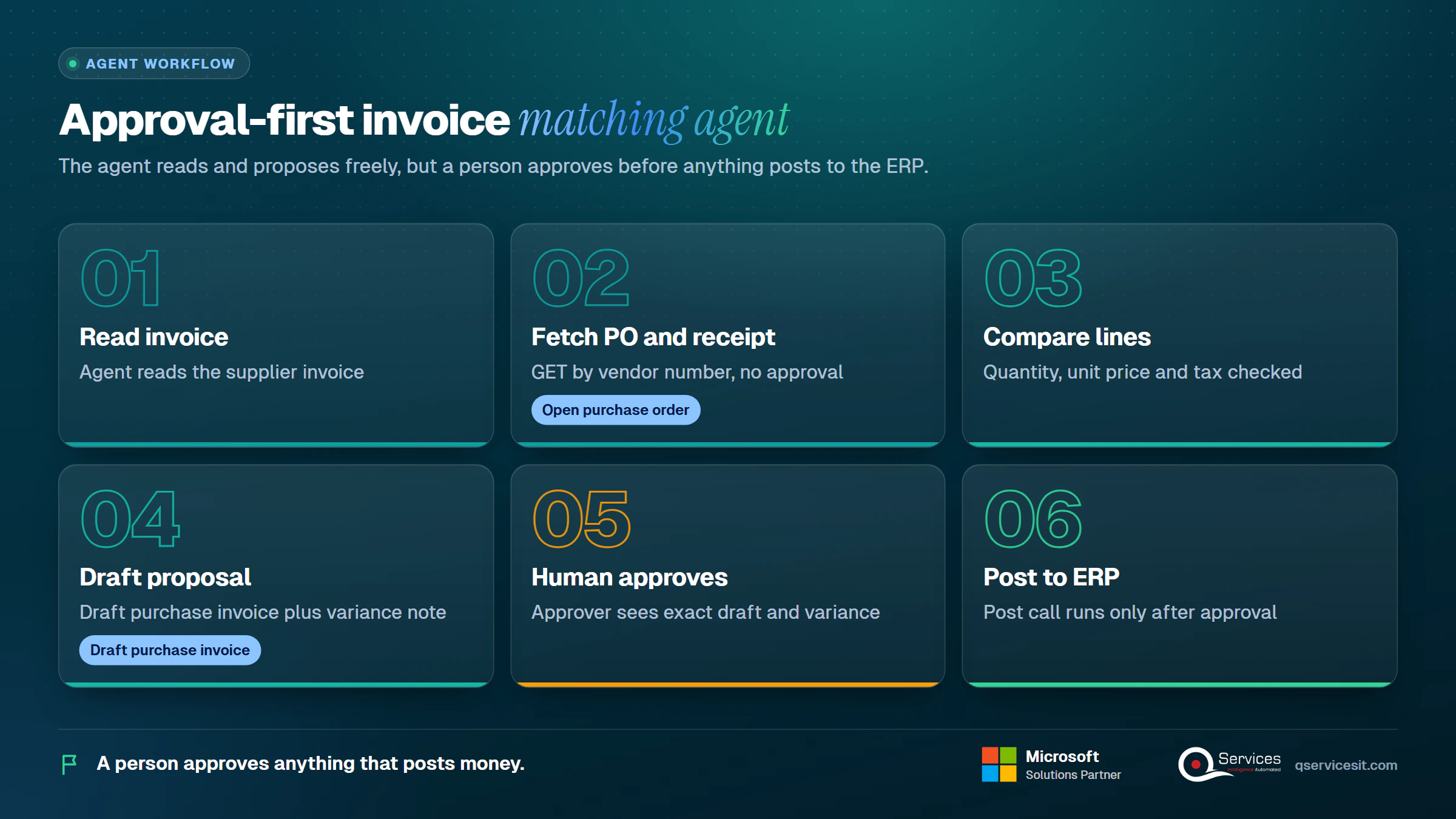
What does an invoice-to-PO matching agent look like?
Worked example (b): a supplier invoice arrives and the agent matches it to a purchase order.
- Read: it fetches the open purchase order and receipts by vendor number (a GET, no approval).
- Compare: it checks quantity, unit price and tax against the invoice lines.
- Propose: it writes a draft purchase invoice and a note listing any variance.
- Approve: the approver sees the exact draft and variance, and accepts or edits it. Only then does the post call run.
- Log: the approval, user and payload are stored.
A second approver is sensible above a set amount, and first-time vendors and tax treatment stay human-only. Clean duplicate vendors first, or the agent will match to the wrong one.
How do you choose the system of record for each field?
How to choose a system of record for ERP data: ask which team is accountable if the value is wrong, and give the field to that system. Money, legal and stock fields go to the ERP. Relationship and pipeline fields go to the CRM. These are working conventions, not standards, so write yours down.
What are the ERP system of record rules?
- One owner per field, not per object, where teams share an object.
- One-way flow from the owner. Two-way only with a written conflict rule.
- Latest edit wins only for low-risk fields such as phone number.
- Rejections are visible: a blocked write goes to a queue a person reads.
Which pattern fits your stack?
Run this checklist with your IT manager and RevOps lead:
- Systems: 2 systems means native or custom. 3 to 5 means iPaaS. 6 or more means iPaaS plus an API standard.
- Speed: nightly means files or scheduled native. Hourly means native or iPaaS. Seconds means custom API or events.
- Developers: none in-house means native or iPaaS. A team means custom is possible.
- ERP hosting: cloud favours connectors and iPaaS. On-prem may need a gateway or bus.
- Volume: a few hundred records a day suits anything. Tens of thousands a day favours events.
- Compliance: note audit and data-residency needs once, for US, EU and APAC rules alike, and favour patterns with an audit trail.
- Judgment work: matching and chasing suggest an agent with approval.
What are the 8 steps to build an ERP integration?
Durations are typical ranges from our projects, not guarantees.
- Inventory systems and objects. Owner: IT manager. Output: a list of systems and flows. 2 to 3 days.
- Name the system of record. Owner: RevOps and finance. Output: owner per field. 1 to 2 days.
- Map fields. Owner: analyst. Output: a signed field map. 2 to 5 days.
- Choose the pattern. Owner: IT manager. Output: a one-page decision. 1 day.
- Build in a sandbox. Owner: developer. Output: a working flow. 1 to 12 weeks by pattern.
- Test with bad data. Owner: QA. Output: a passed test list. 3 to 5 days.
- Cut over. Owner: IT manager. Output: a go-live with rollback plan. 1 day.
- Monitor. Owner: operations. Output: alerts and a weekly failure review. Ongoing.
What should you test before go-live?
- A duplicate record
- A null in a required field
- An API timeout
- A rate limit hit
- A partial failure halfway through a batch
- An ERP upgrade on a test copy
- A user without permission
When should you not integrate at all?
When one low-volume flow, say 20 records a week, is handled by a nightly CSV that someone checks. A build plus monitoring would cost more than the problem. Revisit when the volume or the error rate rises.
Standards & References
How does QServices approach ERP integration?
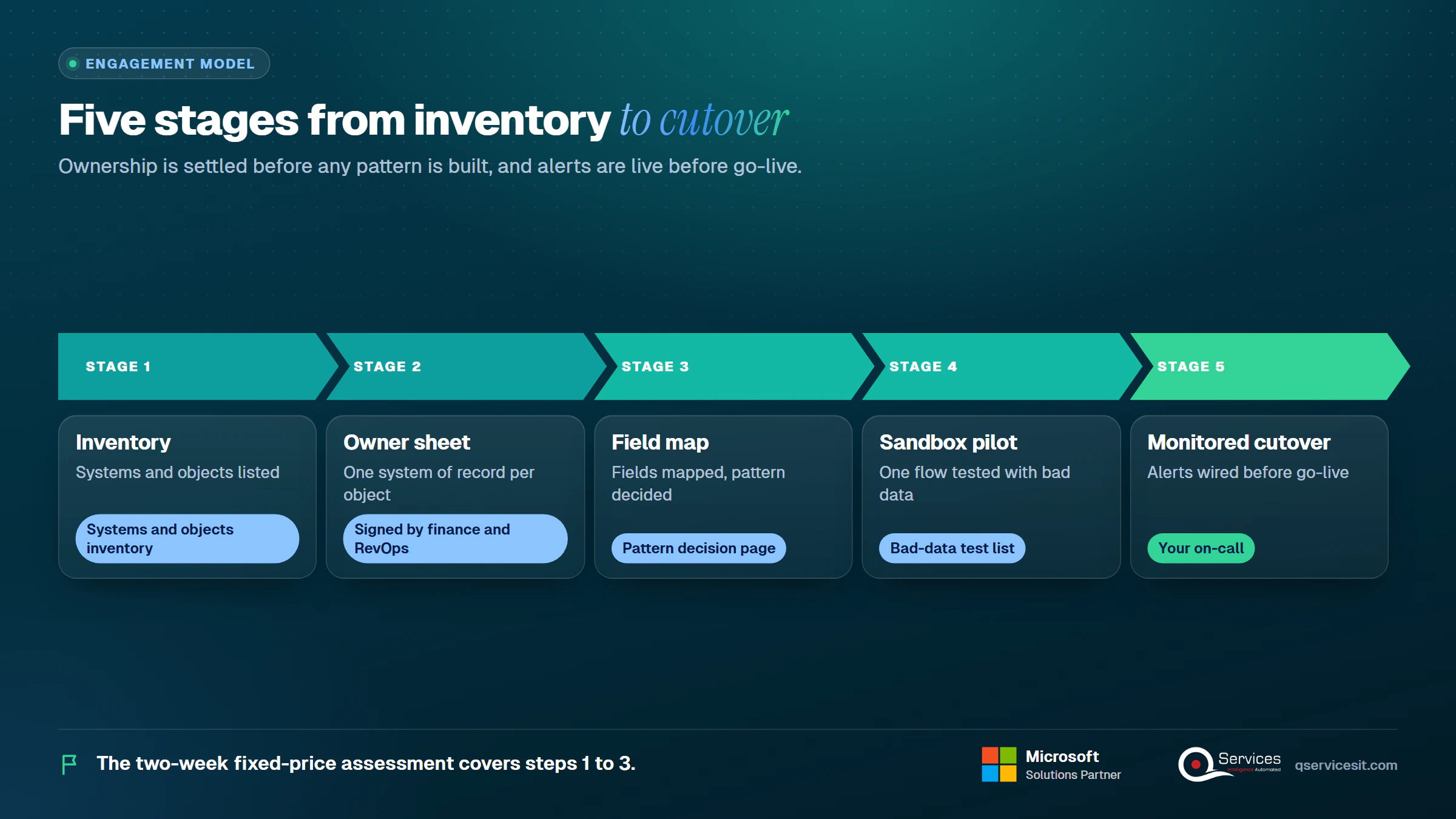
We start with the Inventory and Owner stages, because a pattern chosen before ownership is settled usually gets rebuilt. Agents run in your own Azure tenant, and an approval queue sits in front of anything that posts. Our ERP integration work follows these steps:
- A systems and objects inventory
- A system-of-record sheet signed by finance and RevOps
- A field map and a pattern decision page
- A pilot on one flow in a sandbox, with the bad-data test list
- Alerts wired to your on-call before cutover
The same team builds and runs it, and the two-week fixed-price assessment covers steps 1 to 3.
Implementation Checklist
- Every object has one named system of record
- Every synced field is in a signed field map
- Every write carries an idempotency key
- Service accounts have least-privilege roles
- Retries back off after a rate limit
- A person approves every agent write that posts money
- Failed syncs raise an alert to a named owner
- The test list passed in a sandbox
What should you do first about ERP integration?
Pilot one flow, order and invoice status between Business Central and your CRM, and measure re-keying hours, sync failures per week and time to correct a bad record. Then and we will tell you which of the four patterns fits it.

Written by Rohit Dabra
Co-Founder and CTO, QServices IT Solutions Pvt Ltd
Rohit Dabra is the Co-Founder and Chief Technology Officer at QServices, a software development company focused on building practical digital solutions for businesses. At QServices, Rohit works closely with startups and growing businesses to design and develop web platforms, mobile applications, and scalable cloud systems. He is particularly interested in automation and artificial intelligence, building systems that automate routine tasks for teams and organizations.
ERP integrationCRM integrationDynamics 365 Business CentralApproval-first agents
Talk to Our Experts
Frequently Asked Questions
Related Topics
Next step
Ready to pick your integration pattern?
Bring your system list and your pain points. We’ll map each flow to a pattern and show where an agent with an approval step fits.












 Trustpilot5.0★★★★★See reviewsGoodFirms5.0★★★★★45 verified reviews
 G25.0★★★★★See reviewsClutch5.0★★★★★Quality 5.0 · Schedule 4.8
 Google4.7★★★★★Mohali office
 Erik BrownBusiness owner and software engineerClient review
 Zoltan BodnarCFO, Yusen LogisticsGoodFirms
 Ranbeer MakinClientClient review
 Alex VanderElsClientClient review
 Philmore J.ClientClient review
 Michael WilliamsonPresident and CEO, United Way of Southeast LouisianaGoodFirms
 Steven LewisClientClient review
 Brian WallerPresident, Technology Association of IowaGoodFirms





