What is Dynamics 365 Copilot, and what can the finance plugin do?
Dynamics 365 Copilot is now the front door to your ERP: the finance plugin lets users query and act on ERP data from Copilot itself. It handles analysis and drafting, but a person still approves anything that posts.
Microsoft announced the update at Ignite 2026 on 17 November. This post is for the CFO, Controller or IT manager who wants the plain version: what the plugin does, what it needs before it works, what it skips, and where your own controls still apply.
We’ve read the announcement and the Microsoft Learn pages behind it. Where Microsoft’s own pages disagree, we say so rather than pick a number.
Which finance tasks can Copilot take on first?
Walk through your close, reconciliation and journal entry steps with our team and mark where an approval step belongs before anything posts.
Quick Answer Dynamics 365 Copilot is Microsoft’s assistant layer for ERP. Its Dynamics 365 ERP plugin lets finance users read, draft and update finance and operations data from Microsoft Copilot and Excel, within their security roles. It asks before it writes. It doesn’t replace your chart of accounts, controls or sign-off.
What did Microsoft announce at Ignite 2026, and is it generally available?
Ignite ran 17 to 20 November 2026 in San Francisco. In the post titled Microsoft Ignite 2026: Introducing Dynamics 365 in Copilot, on the Microsoft Dynamics 365 blog, Jeff Teper wrote that Copilot is ‘the new front door to Dynamics 365 and plugins make Copilot work for your business.’ A plugin, in Microsoft’s words, is packaged know-how for a job.
For finance teams that’s a Microsoft Ignite 2026 Dynamics 365 announcement with one practical meaning: you ask in Copilot, and Copilot reaches into the ERP for you. To keep the moving parts straight, we use one model throughout this post.
The QServices Framework Approval-First Finance Copilot = Ask → Read → Propose → Approve → Log
The order matters because the approval sits before anything is written, and the log comes last so an auditor can replay every step.
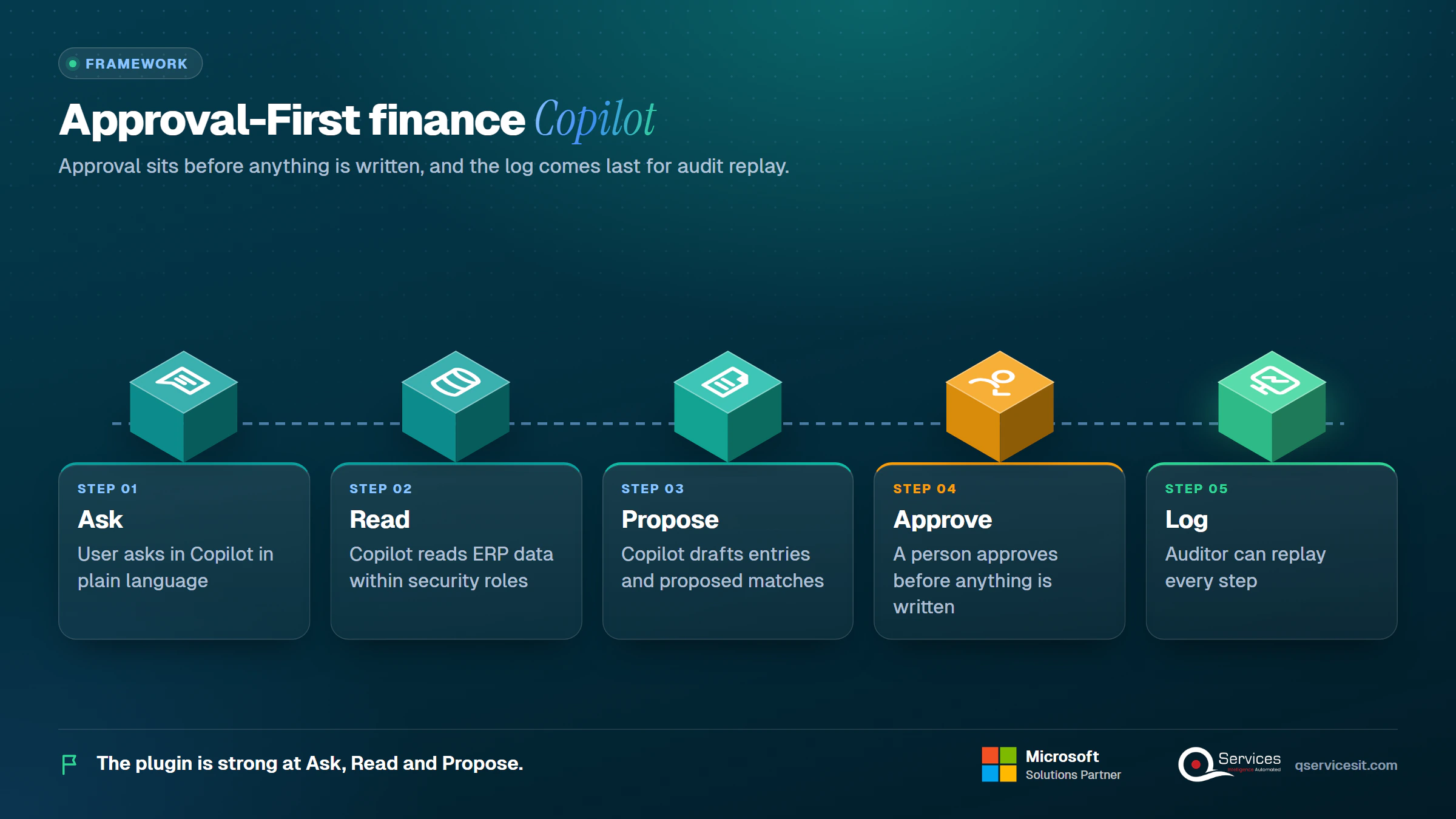
Every capability below maps to one of those five stages. The plugin is strong at Ask, Read and Propose. Approve and Log are where your policies decide how safe it is.
What are the dates and release status?
Status as we read it on 21 November 2026. Re-check each row on the named page before you commit to a plan.
| Item |
Status |
Where to verify |
| Dynamics 365 ERP apps plugin |
Generally available, updated at Ignite |
Microsoft Dynamics 365 blog, 17 Nov 2026 |
| Skills in the plugin |
‘More than 39’ on the blog; other pages give different counts |
Microsoft Learn (no page we read states a number) |
| Excel connectivity |
Expanded at Ignite |
Microsoft Dynamics 365 blog |
| Account Reconciliation Agent |
Preview |
Microsoft Learn, updated 19 Nov 2026 |
| Agent Accounts |
Public preview in December 2026 |
Ignite announcements |
| Dynamics 365 Activate for ERP (SAP ECC migration) |
Private preview |
Ignite announcements |
That answers the question about Dynamics 365 Copilot general availability: the ERP plugin is GA, but several neighbouring pieces aren’t.
Was the plugin new at Ignite, or just updated?
Updated. The blog says Microsoft is ‘updating’ the plugin with more than 39 finance and operations skills and wider Excel connectivity, which implies it existed before. Quote the skill count with its date, or say the count differs by page. One secondary recap cites 30 finance skills, which shows why we don’t treat any single figure as settled.
Key Insight Microsoft’s Ignite post names source-to-pay and journal entries as ERP examples. The words close and reconciliation don’t appear in it, so don’t tell your board that Microsoft announced a faster close.
What does the Dynamics 365 ERP plugin do inside Copilot and Excel?
The plugin lets Copilot Cowork reach finance and operations apps through the Dynamics 365 ERP MCP server. It does this with tools, and it filters those tools by the signed-in user’s security roles. If a role can’t see a form or field in the ERP, Copilot can’t use it either.
What does the Dynamics 365 ERP plugin do in Copilot, tool by tool?
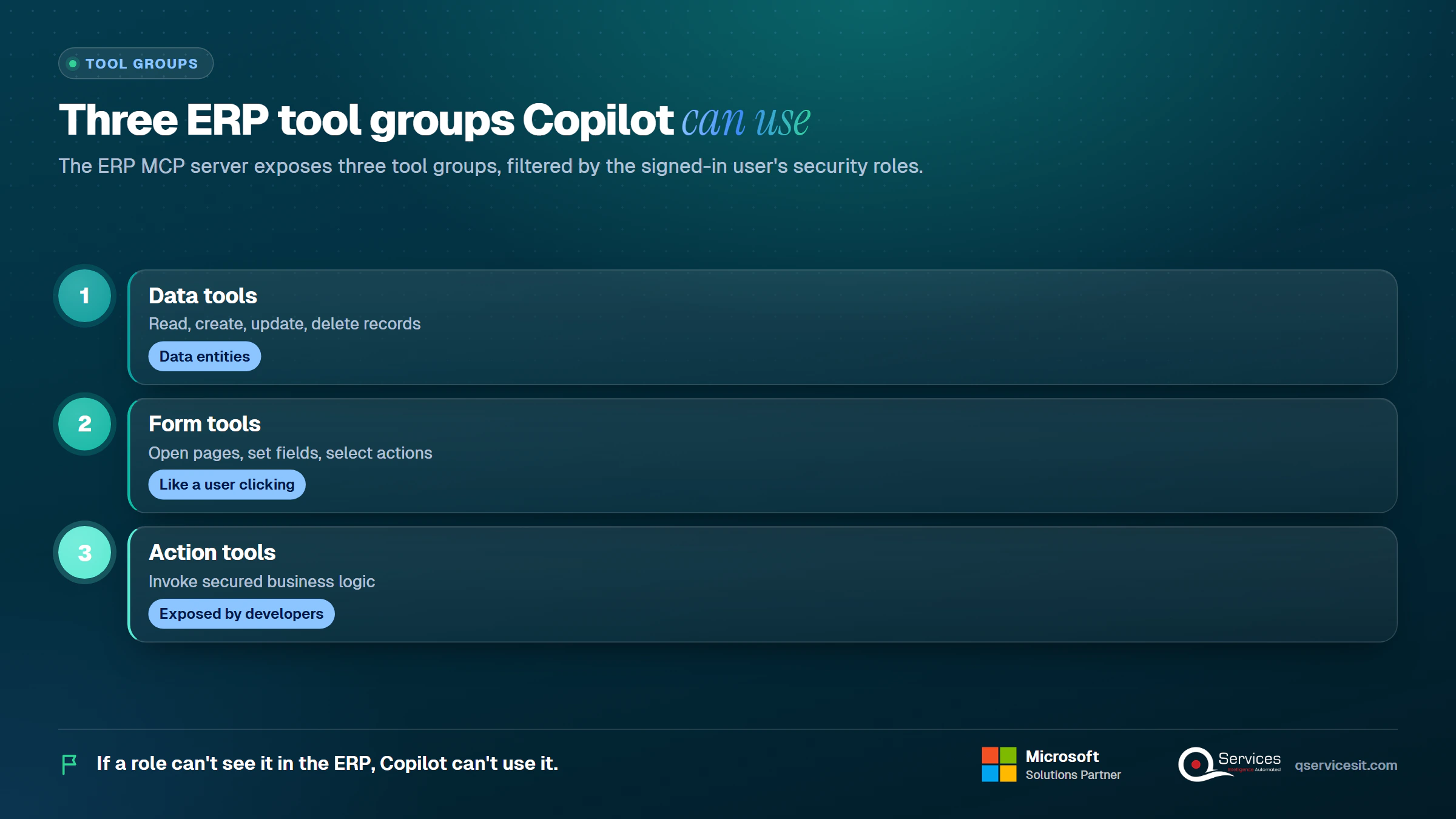
Microsoft Learn describes three tool groups. The server discovers them at runtime based on product version, configuration, extensions and permissions.
- Data tools read, create, update and delete records in data entities.
- Form tools open pages, set fields and select actions, the way a user clicks.
- Action tools invoke secured business logic that your developers expose.
Copilot also combines these with Work IQ, meaning your email, calendar, documents and spreadsheets. That’s how a Controller can ask a question that mixes a ledger balance with a spreadsheet from the plant.
The older static server, with 13 predefined tools, was set to retire on 1 October 2026 according to Microsoft Learn. If a partner built on it, ask what they moved to.
How does a purchase price variance question work in practice?
Here’s an illustrative example. The numbers are made up, so treat the shape of the answer as the point.
The Controller types: ‘Show purchase price variance for item family FAB-200 for October by vendor against standard cost, and flag any vendor more than 3% above standard.’
A good result is a short table: vendor, units received, average price against standard, variance percentage. For example, Vendor A at 4.2% above standard on 1,200 units, Vendor B at 0.8% on 3,400 units. It then flags Vendor A.
The plugin reads and explains. It doesn’t change the standard cost, and it can’t tell you whether Vendor A’s price rise was justified. That’s your buyer’s call.
What can Copilot do with journal entries in Dynamics 365?
The Ignite post says users can ‘prepare journal entries’ in plain language while respecting existing permissions and governance. Learn’s own example is a prompt to create a vendor invoice journal entry. So Copilot journal entries in Dynamics 365 are about drafting and entering records, with a prompt before it writes. Neither page we read describes posting-specific controls, so don’t assume any exist.
What do you need before it works: licences, cloud ERP, and Copilot Credits?
The licence stack is the part that surprises buyers. You need two licence layers plus metered usage, and an environment that qualifies.
Which licences are needed for the Dynamics 365 Copilot ERP plugin?
The Dynamics 365 Copilot licence requirements, per the enablement page on Microsoft Learn, come to two items per user:
- An active Microsoft 365 Copilot licence.
- A qualifying Dynamics 365 licence for finance and operations apps: Finance, Supply Chain Management, Commerce, Human Resources or Project Operations. Attach, Premium, trial and Team Member variants also qualify.
These don’t qualify: on-premises ERP licences, device-only plans, add-ons, and licences for Dynamics 365 products that aren’t finance and operations apps. Environments must be cloud: Tier 2 or above, or a Unified Developer Environment. Cloud Hosted Environments and on-premises aren’t supported. The minimum version is 10.0.47, 10.0.46 PQU-2 or 10.0.45 PQU-7.
How do Copilot Credits work in Dynamics 365?
Usage-based billing and Copilot Credits are configured for the users who use the plugin. Calls to the ERP MCP server can consume credits under the current MCP licensing rules, with exemptions for some premium licences. The figure we keep seeing for premium Finance and Supply Chain SKUs is 1,000 credits per user per month. Sources disagree on which SKUs get it, so confirm against your agreement, not a blog.
If you sit on an older on-prem system, the plugin isn’t an option today. Our Microsoft Dynamics 365 licensing guide covers how plans stack, and our Dynamics GP migration plan covers the move off GP before support ends in 2029.
What are the 6 steps to enable the plugin?
- Confirm the environment is cloud, Tier 2 or above (or a Unified Developer Environment), on a supported version.
- Confirm each pilot user has Microsoft 365 Copilot and a qualifying finance and operations licence.
- Enable Copilot Cowork for your tenant.
- Switch on ‘Dataverse data available in Microsoft Copilot’ in the Microsoft 365 admin center.
- Add the Cowork client ID on the Allowed MCP Clients page in the ERP.
- Configure usage billing and Copilot Credits for the pilot users, then test with one role.
In the EU, EFTA and UK, Anthropic models are off by default, so check which models your region allows.
Standards & References
What can manufacturers hand to it today?
A manufacturer’s finance work is half ledger, half shop floor. The plugin reads both through the ERP, but it doesn’t run your costing. Here’s our plain reading of Microsoft’s documentation. Where the documentation is silent, we say no.
| Manufacturing task |
Does Copilot touch it? |
What stays with you |
| Variance, standard vs actual |
Yes: reads and explains |
Costing setup and root cause |
| BOM and routing cost roll-ups |
No: the ERP costing run does it; Copilot can read the result |
Roll-up parameters |
| WIP and inventory valuation |
Read and summarise only |
The valuation run and its method |
| Purchase price variance |
Yes: query and rank |
Deciding what’s acceptable |
| Landed cost |
Partly: can read posted charges |
Allocation rules |
| Scrap and yield variances |
Read and summarise if posted |
Fixing the yield data |
| Subcontracting |
Not named by Microsoft: treat as no |
The whole process |
Our manufacturing work starts from this split. Copilot is good at asking questions of data that’s already clean.
How does Copilot help with bank reconciliation in Dynamics 365 Finance?
Bank reconciliation is where Copilot bank reconciliation in Dynamics 365 Finance earns attention, and it comes from the Account Reconciliation Agent, which is still in preview on Learn. It lets users accept or override each recommendation (create a journal entry, reverse, link, or accept without change) and logs each action on a timeline.
An illustrative month for a mid-size manufacturer, 400 statement lines:
- 312 lines (78%) arrive with a proposed match the reviewer accepts after a glance.
- 56 lines arrive with a lower-confidence match that needs a look at the remittance.
- 32 lines have no proposal, such as a bundled customer payment or a bank fee.
Those are example numbers, not a Microsoft benchmark. The point is that the reviewer’s time moves from 400 lines to about 90. For the Business Central version of the same idea, read our post on automated bank reconciliation in Business Central with Copilot.
How does Copilot help with month-end close in Dynamics 365?
Copilot for month-end close in Dynamics 365 helps on days that are mostly reading and writing, and does little on days that are mostly system runs. This is an illustrative six-day calendar, not a Microsoft schedule.
| Close day |
Task |
Copilot’s role |
| Day 1 |
Bank reconciliation |
Proposes matches (preview agent) |
| Day 2 |
Receipts and cut-off |
Lists open receipts; you decide accruals |
| Day 3 |
Inventory and WIP valuation |
None: the ERP runs stay yours |
| Day 4 |
Variance review |
Explains variances and ranks them |
| Day 5 |
Accrual journals |
Prepares drafts; a person approves |
| Day 6 |
Commentary and sign-off |
Drafts narrative; sign-off is yours |
If you want the end-to-end view of automating close tasks, see our month end close automation work and our month end close checklist.
Real-World Scenario A typical case we see: a Controller at a manufacturer with a 6-day close asks Copilot to prepare 14 accrual journals. After the first approval prompt she picks ‘Always allow’ to save clicks. Learn says that setting skips later prompts for similar actions within one conversation. Three of the 14 entries carry the wrong cost-centre dimension. In the Approve stage, a second person reviewing the batch would catch them. With the setting on, nobody does until the trial balance looks odd on day 5.
Unsure what your licences cover for Copilot?
Check your Dynamics 365 licences, cloud ERP version and Copilot Credits against the plugin’s requirements in a short call with our team.
What doesn't it cover yet: collections, cash application, and Business Central?
Three gaps matter to a finance team. Say them plainly to your steering group so nobody expects more than the announcement gave.
Does Dynamics 365 Business Central work with the Copilot plugin?
Not as far as we can confirm. The ERP plugin is scoped to finance and operations apps. The Learn list of non-qualifying licences excludes Dynamics 365 products that aren’t finance and operations apps, which would leave Business Central out, though no page names it. The Ignite post body doesn’t mention Business Central either.
Business Central has its own route: Copilot and agents that run on Business Central online only, plus a Business Central MCP server that is read-only by default (check the 2026 wave 1 release plan for current behaviour). If you run Business Central, see our guide to Business Central payment matching rules.
Why were collections and cash application missing from the announcement?
They weren’t named in it, and we didn’t find a Microsoft agent for either in Dynamics 365 Finance. We won’t say Microsoft has none. The plugin’s data tools can in principle touch receivables records, but a general tool isn’t a purpose-built agent with matching rules, remittance parsing and a review queue. For where AI does and doesn’t pay off in receivables, read our guide to AI in accounts receivable.
How do Copilot, the plugin and the agents differ?
The names blur. Verify the licence and status columns on Microsoft Learn before you buy.
| Option |
Where it runs |
What it does |
Licence and status |
| Copilot in Business Central |
Inside Business Central online |
In-app help such as analysis and autofill |
Business Central online; status varies by feature |
| Copilot in Finance and Supply Chain |
Inside the ERP |
In-app help on forms and records |
Qualifying ERP licence; verify per feature |
| Dynamics 365 ERP plugin |
Microsoft Copilot and Excel |
Query and act on ERP data |
Microsoft 365 Copilot plus ERP licence plus credits; GA |
| Finance solution in Microsoft Copilot (formerly Copilot for Finance) |
Microsoft 365 apps |
Finance workflows across Excel and email |
Verify on Learn |
| Agents (Payables, Expense, Sales Order, Account Reconciliation) |
Inside the ERP |
Work one task, human reviews |
Credit-metered; Account Reconciliation is preview |
When does a custom agent fit better than the plugin?
When your gap is specific: three-way match exceptions, intercompany, or custom costing. Here’s the honest trade-off.
| Factor |
Plugin or in-app Copilot |
Custom approval-first agent |
| Setup |
Enable and assign licences |
Needs an assessment and a build |
| Fit to your gap |
General purpose |
Built for your exceptions and rules |
| Cost |
Licence plus credits |
Build cost plus run cost, so higher |
| Skills needed |
Admin and finance power user |
Developer plus a finance owner, so more |
| Maintenance |
Microsoft updates it |
You own changes as the ERP updates, so worse |
| Audit trail |
Product timeline and logs |
An approval queue designed to your policy |
Where does an approval step still belong?
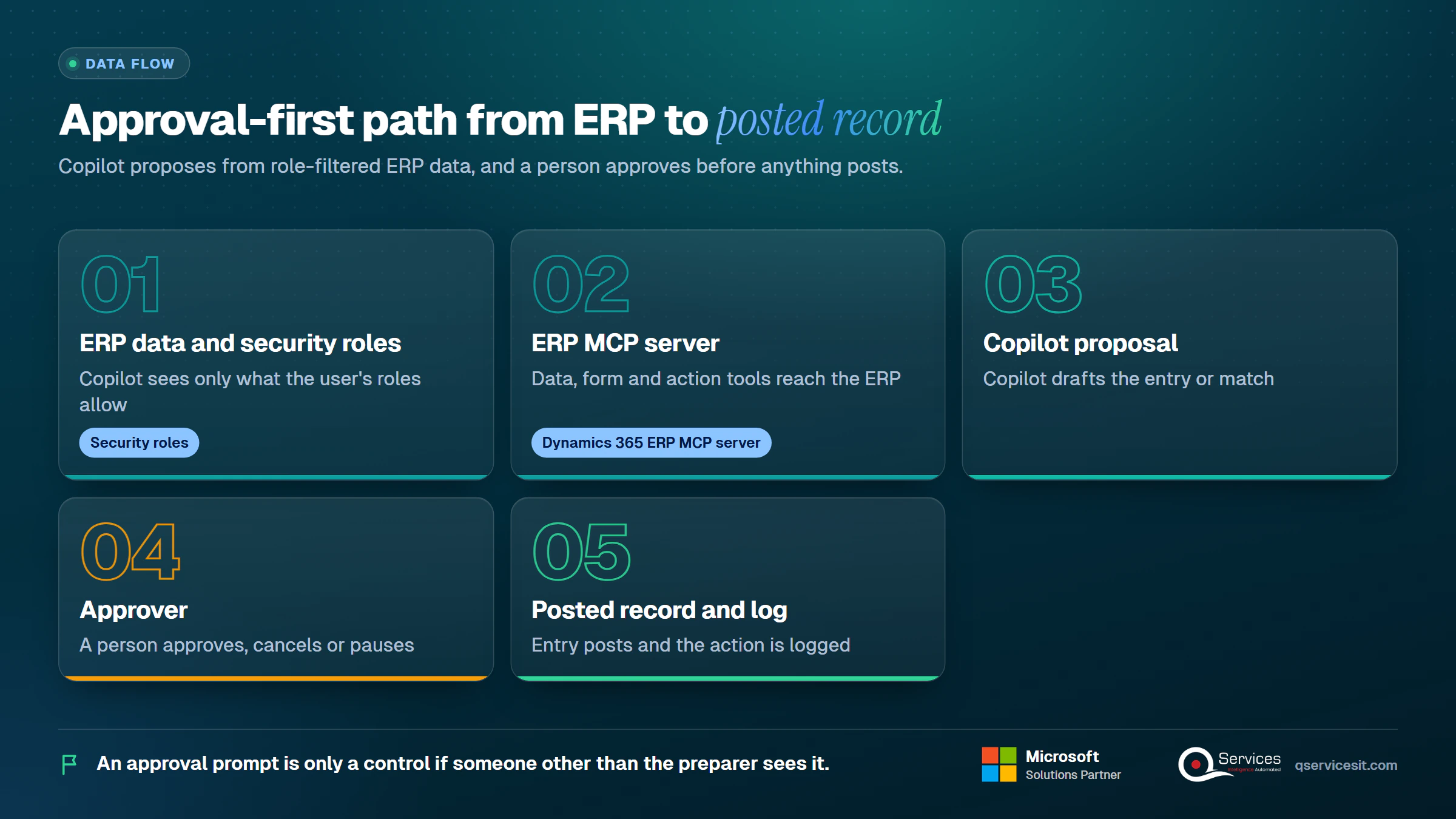
In the Approve stage, before any write reaches the ledger. Copilot’s behaviour gives you a start, and your policies finish the job.
Can Copilot post journal entries in Dynamics 365 on its own?
Not by default. Microsoft Learn says Copilot Cowork asks for approval before it takes actions on your behalf, and the user can approve, cancel or pause. The catch is the ‘Always allow’ setting, which weakens that step inside a conversation. Our position is approval-first agents in ERP: a person approves anything that posts money or changes a system.
Key Insight An approval prompt is only a control if someone other than the preparer sees it. Put ‘Always allow’ in your policy, and treat a preparer who clicks it as a segregation-of-duties question.
What does Copilot handle, and what do you still own?
| Copilot handles |
You still own |
| Reading and summarising ledger and subledger data |
Data quality, chart of accounts and dimensions |
| Drafting variance and close commentary |
Costing method choices |
| Proposing reconciliation matches |
Approval policies and thresholds |
| Preparing draft journal entries |
Segregation of duties |
| Respecting each user’s security roles |
Role design and who holds which role |
| Prompting before write actions |
Whether ‘Always allow’ is permitted |
| Listing exceptions |
Resolving exceptions, sign-off and audit evidence |
How do you review, reverse and log what Copilot did?
Illustrative example: a vendor invoice shows 500 units, the purchase order says 500, but the goods receipt says 480. The agent proposes one of three things: hold the invoice, match 480 and flag the 20-unit gap, or draft a debit note request. A human decides. The buyer checks whether the remaining 20 units are in transit.
To keep that auditable:
- Record who approved each proposal and when.
- Keep the original proposal and the final entry side by side.
- Reverse through a normal reversing entry, not a delete.
- Export the log monthly for your auditors.
- Add the agent or Copilot user to your segregation-of-duties matrix.
For the wider model, see our posts on AI agent governance and Microsoft Copilot deployment governance.
How does QServices approach dynamics 365 copilot?
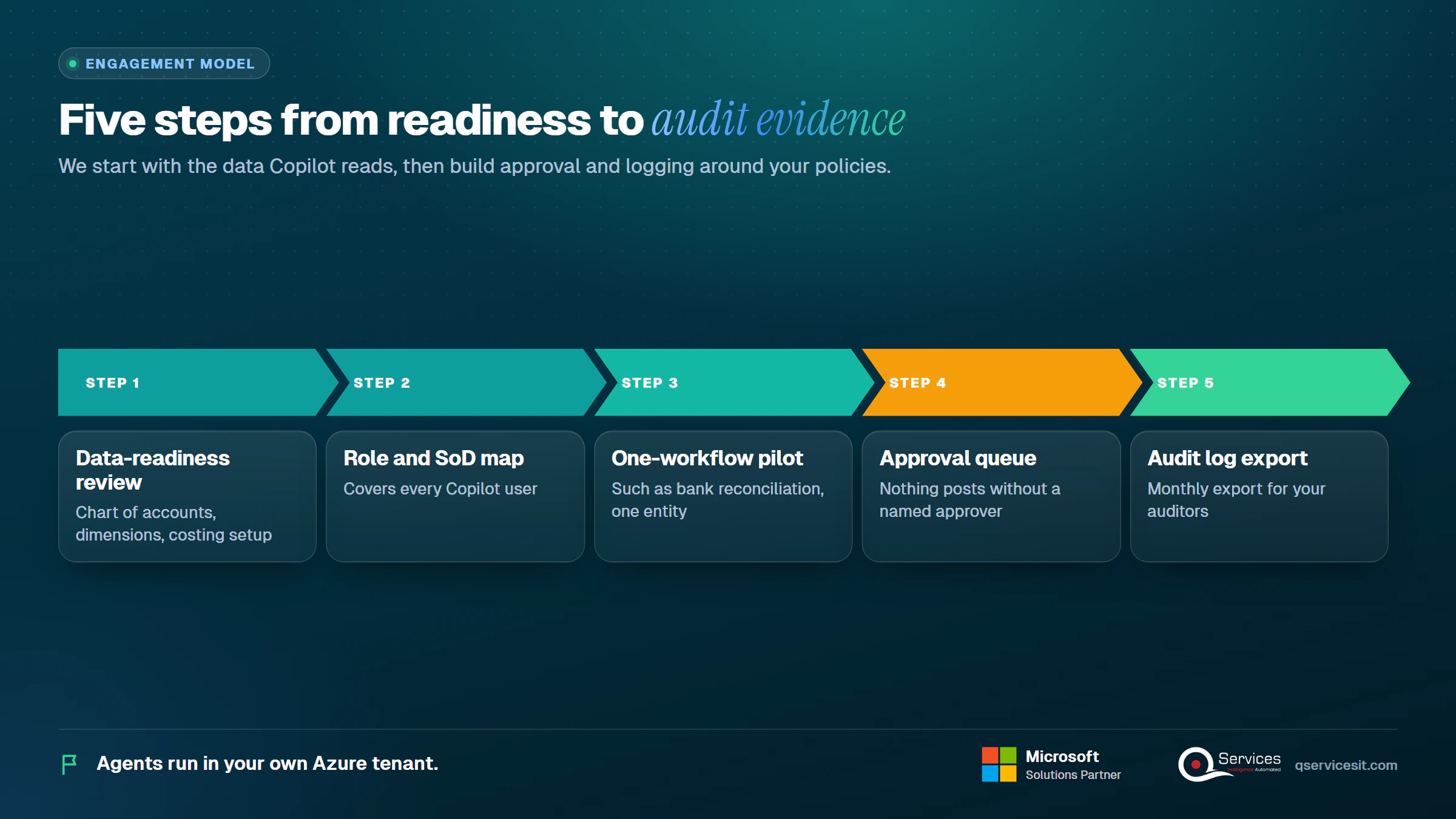
We start with the Read stage, because Copilot is only as good as the data it reads. Then we build the Approve and Log stages around your policies. The agents we build run in your own Azure tenant, and the same team builds and runs them.
- A data-readiness review of the chart of accounts, dimensions and costing setup.
- A role and segregation-of-duties map covering Copilot users.
- A pilot on one workflow, such as bank reconciliation for one entity.
- An approval queue so nothing posts without a named approver.
- A monthly log export for your auditors.
For custom gaps, see our AI agent development service.
Implementation Checklist
- Environment is cloud, Tier 2 or above, on a supported version
- Each pilot user holds Microsoft 365 Copilot and a qualifying ERP licence
- Allowed MCP Clients lists the Cowork client ID
- Chart of accounts and dimensions are reviewed and free of duplicates
- Costing method is documented per item group
- ‘Always allow’ is addressed in written policy
- Copilot users appear in the segregation-of-duties matrix
- A named approver and a log owner exist for each pilot workflow
What should you do first with Dynamics 365 Copilot?
Pick one workflow, bank reconciliation for a single entity, and measure time to reconcile, the share of lines accepted unchanged and exceptions per close. Keep the Ask, Read, Propose, Approve, Log order, with a person on every approval. Then and we’ll scope the pilot with you.

Written by Rohit Dabra
Co-Founder and CTO, QServices IT Solutions Pvt Ltd
Rohit Dabra is the Co-Founder and Chief Technology Officer at QServices, a software development company focused on building practical digital solutions for businesses. At QServices, Rohit works closely with startups and growing businesses to design and develop web platforms, mobile applications, and scalable cloud systems. He is particularly interested in automation and artificial intelligence, building systems that automate routine tasks for teams and organizations.
Dynamics 365ERP integrationFinance automationAI agents for ERP
Talk to Our Experts
Frequently Asked Questions
Related Topics
Next step
Want agents in your ERP, with approvals kept?
Bring your Dynamics 365 setup. We’ll map which finance steps an agent can prepare and which ones your team signs off before they post.















 Trustpilot5.0★★★★★See reviewsGoodFirms5.0★★★★★45 verified reviews
 G25.0★★★★★See reviewsClutch5.0★★★★★Quality 5.0 · Schedule 4.8
 Google4.7★★★★★Mohali office
 Erik BrownBusiness owner and software engineerClient review
 Zoltan BodnarCFO, Yusen LogisticsGoodFirms
 Ranbeer MakinClientClient review
 Alex VanderElsClientClient review
 Philmore J.ClientClient review
 Michael WilliamsonPresident and CEO, United Way of Southeast LouisianaGoodFirms
 Steven LewisClientClient review
 Brian WallerPresident, Technology Association of IowaGoodFirms