How do you manage business central collections without chasing every invoice by hand?
Business Central collections work like this: overdue customer ledger entries generate reminders or finance charge memos from terms you set, and a person issues them. The tools send letters by email or print, and they do not read replies, log promises or work disputes.
That gap matters most in distribution, where partial shipments, short pays and disputed freight charges all sit inside your accounts receivable collections queue. This guide sets up the native tools step by step with one worked example, shows exactly where they stop, and covers where an approval-first agent fits.
If you work with a business central partner, use this as the checklist for what to ask them to configure first.
Who reads the replies to your reminders?
Book a short call with our team to see how an approval-first collections agent drafts follow-ups in Business Central while your people approve every email.
Quick Answer Business Central collections combine reminder terms, reminder levels and finance charge terms. You assign them on the customer card, then run batch jobs to suggest, create and issue reminders. They handle letters well. They do not track promises, route disputes or prioritize who to call, so teams add an approval-first agent or an extension for that.
How does collections work in Business Central?
Collections start from customer ledger entries. Each open invoice carries a due date, and the reminder batch jobs compare that date to today. Microsoft Learn describes the standard receivables process as mostly manual, with tools to automate creating, issuing and sending reminders.
That suits a steady queue. It strains when 400 active accounts are paying in partials.
The QServices Framework Collections Loop = Age → Apply → Remind → Log → Escalate
The order matters because a reminder is only as good as the ledger behind it. Apply cash before you remind, and log every reply before you escalate, or the loop sends letters to customers who have already paid.
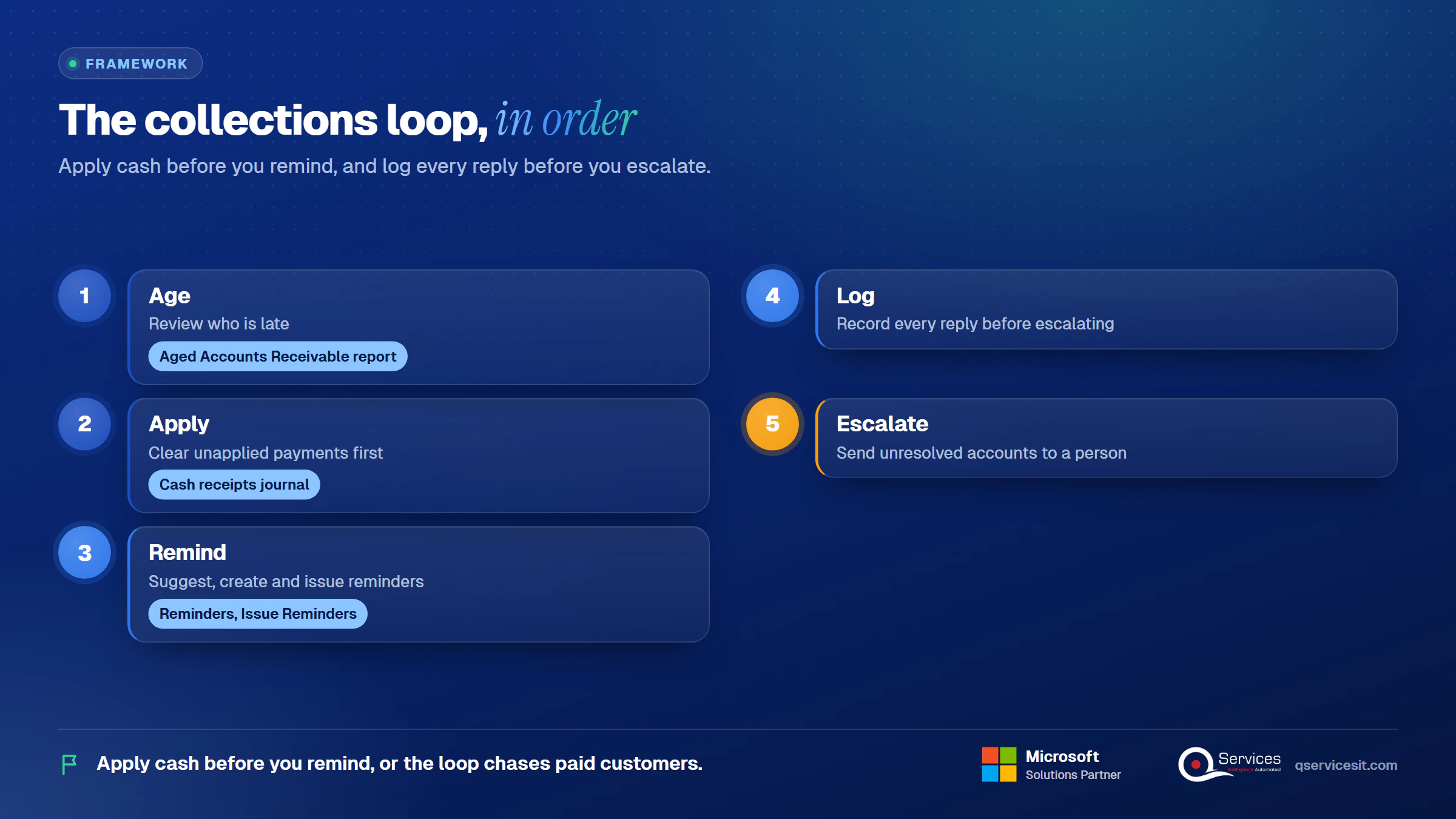
We use these five stage names through the rest of this post.
Which pages and fields drive Business Central collections?
Page names follow Microsoft Learn’s Business Central documentation, which we reviewed in November 2026. Confirm them in your own release with the Tell Me search.
- Customer Ledger Entries: Due Date, Remaining Amount, Open and On Hold fields.
- Customer Card, Payments FastTab: Reminder Terms Code and Fin. Charge Terms Code.
- Reminder Terms: one code per variant, each with Reminder Levels underneath.
- Reminders: the actions Suggest Reminder Lines, Create Reminders and Issue Reminders.
- Finance Charge Memos: the same suggest, create and issue steps for interest and fees.
- Aged Accounts Receivable report and Customer – Statement: your read on who is late.
What is the soft first step before any reminder?
The Customer Statement report. Microsoft notes companies often set the aging band to 30D (30, 60 and 90 days) and set Statement Style to Open Items. A statement is a polite nudge that adds no fee. For a customer one day past due, it is the right first touch.
How do you set up reminder terms and levels in Business Central?
Reminder terms drive the process, and each term can have an unlimited number of levels. Most companies use two or three. Each level has a grace period, a due date formula, and additional fees in local and foreign currency.
How to set up reminder terms in Business Central?
- Open Reminder Terms and create a code, for example
STD.
- Set Max. No. of Reminders so a customer cannot be chased forever.
- Open Levels and add a line for each reminder level.
- Fill Grace Period and Due Date Calculation, then the fees.
- Tick Calculate Interest only on the level where you want interest.
- Write the beginning and ending text for each level.
- Assign the code on the customer card.
If more reminders are created than levels exist, the highest level’s conditions apply, capped by Max. No. of Reminders.
What does a worked 3-level setup look like?
Our illustrative distributor has 400 active accounts, invoices from $1,200 to $40,000 and a 6-person AR team. All numbers below are illustrative.
| Level |
Days past due |
Fee |
Tone |
Action |
| 1 |
7 |
$0 |
Friendly: "This may have crossed with your payment." |
Email, AR analyst |
| 2 |
21 |
$25 flat |
Firm: invoice listed, new due date |
Email, call from the owner |
| 3 |
45 |
$50 flat plus interest |
Formal: terms cited, account review |
Manager review before issue |
On level 1, set Grace Period to 7D and Due Date Calculation to 14D. On level 2, set the grace period to 0D and Due Date Calculation to 24D. On level 3, use 0D again. In our setups the grace period at higher levels counts from the previous reminder’s due date, so test your version with one customer before you rely on it.
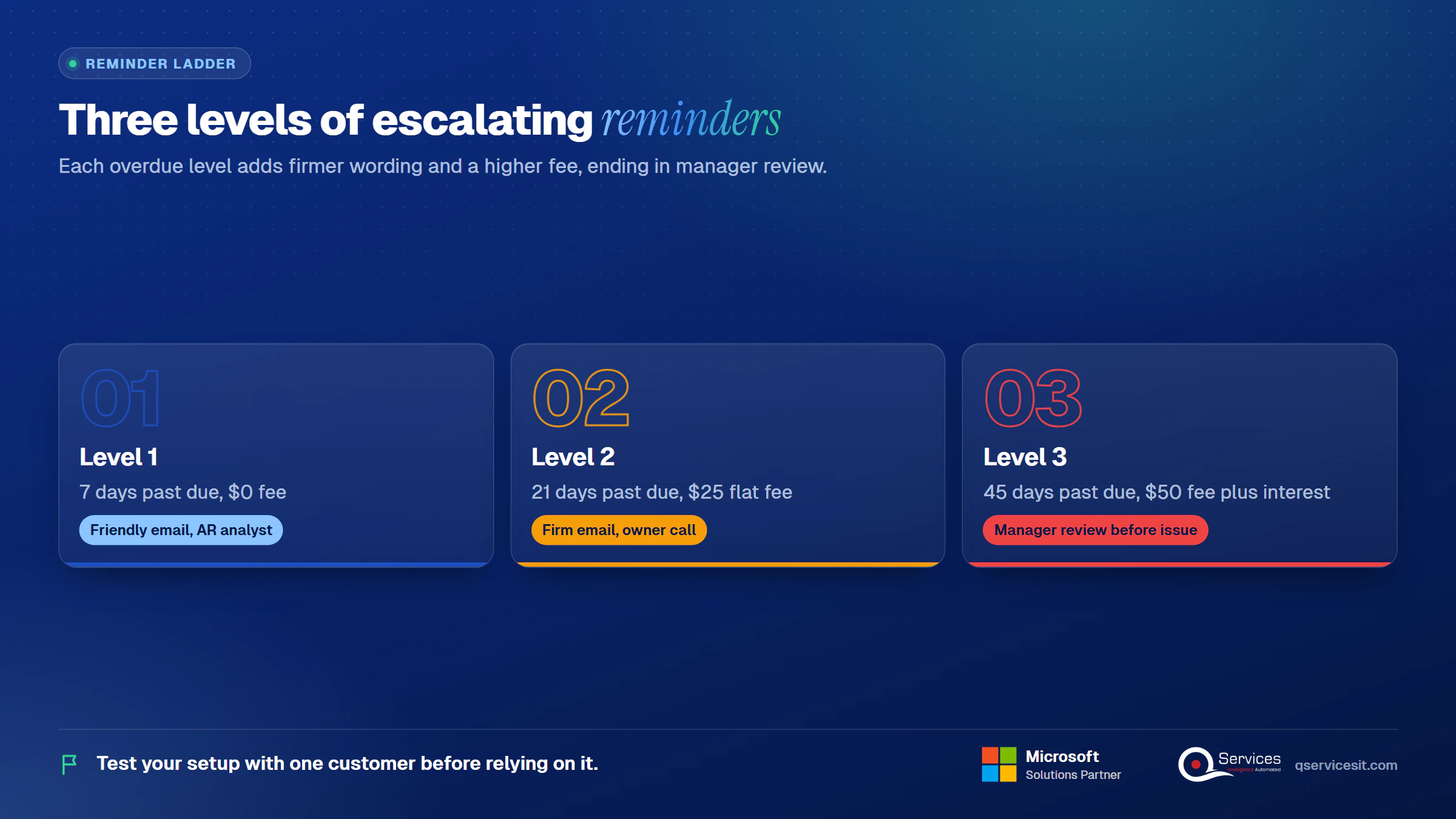
What does one $10,000 invoice look like on days 0, 7, 21 and 45?
- Day 0: the invoice hits its due date. Nothing is sent.
- Day 7: level 1 reminder, no fee. The text is friendly and lists the invoice.
- Day 21: level 2 reminder with the $25 fee. The tone is firm.
- Day 45: level 3 reminder with the $50 fee. Interest at 1.5% a month adds $225 (see the next section).
The same sequence is the skeleton for the dunning letter sequence templates we use for wording.
How do you run a reminder cycle in 7 steps?
- Age the ledger: review the Aged Accounts Receivable report.
- Apply cash: clear unapplied payments in the cash receipts journal.
- Open Reminders and choose Create Reminders.
- Set the document date and tick Only Entries with Overdue Amounts.
- Review the lines with Suggest Reminder Lines and edit or delete any that are wrong.
- Choose Issue Reminders to post fees and interest.
- Send by email or print, then check the Issued Reminders list.
Microsoft’s automation guide describes a create, issue and send flow on the Job Queue, with adjustable frequency and a log of each run. Set up email first.
Key Insight Automating the batch job before you clean the ledger only sends wrong letters faster. Run the cycle by hand for four weeks, fix every false reminder, then put it on the Job Queue.
When should you use finance charge terms in Business Central?
Use finance charge terms when you want to debit interest or fees on late invoices. Microsoft says to use finance charge memos to debit interest or fees without reminding the customer of overdue amounts. Interest on reminders covers open entries only.
How do business central finance charge terms for overdue invoices work?
Create a terms code per calculation and assign it to the customer through Fin. Charge Terms Code. Microsoft documents the interest calculation as overdue amount × (days overdue / interest period) × (interest rate / 100). Charges calculate only when you run the batch jobs.
The set-up fields to decide are the interest rate, the calculation method (average daily balance or closing balance), the grace period, and minimum and maximum amounts. Terms are held in local currency.
Worked example, illustrative: $10,000 × (30 / 30) × (1.5 / 100) = $150. At 45 days overdue it is $10,000 × (45 / 30) × 0.015 = $225.
On issue, the interest posts to the interest account on the customer posting group, and fees post to the additional fee account. Lines are editable before you issue them.
Reminder or finance charge memo: which one fits?
|
Reminder |
Finance charge memo |
| Purpose |
Chase overdue balances |
Debit interest or fees |
| Trigger |
Create Reminders batch job |
Create Finance Charge Memos batch job |
| Cost to customer |
Optional fee per level, optional interest |
Interest and fees |
| GL impact |
Fee and interest post on issue |
Interest and fee post on issue |
| Use when |
You want the customer to act now |
You want to charge without a chase letter |
Can you legally charge interest on overdue invoices?
It depends on your customer terms and your state. The US has no single federal cap, and state law governs late charges and finance charges. Consumer collection rules generally target consumer debt, not business invoices, but that point needs counsel. Write the policy with your Controller, put it in your customer terms, and confirm it with counsel before the first memo goes out.
What do business central reminders miss for distributors?
Reminders send letters. They do not run a collections process. For a distributor, the missing pieces show up in the same places every month.
What are the native gaps in business central collections for distributors?
- Email or print only, with no calls or SMS
- No dispute workflow or owner for a disputed invoice
- No promise to pay tracking in the core reminder flow
- No ranking of who to call first
- No escalation to a person when a customer ignores level 3
- The same letter for a $200 balance and a $200,000 balance
- No automatic stop when a payment is in transit or applied late
Distributors add their own cases: split invoices from partial shipments, freight and restocking fees on the invoice, customer deductions, pending credit memos, customers with several ship-to accounts, and net-30 and net-60 terms mixed on one account. Early-pay discounts matter too: a customer who takes the discount on time and short pays is not late, but the ledger sees an overdue remainder.
How do business central dispute tracking and promise to pay tracking work today?
The documentation we reviewed describes no logic for reading replies, extracting promises or working disputes. Customer ledger entries can carry a promised-to-pay date and dispute status in some setups, and Copilot for Finance in Outlook is described as drafting dunning emails and setting promised-to-pay dates, though Microsoft marks parts of it prerelease. Check your tenant before you rely on it.
Dynamics 365 Finance goes further with Disputed and Promised to pay tabs in its collections coordinator workspace. In Business Central, most teams use comments, collection notes or a custom field. For the dispute side, see customer deductions and reason codes and the short pay tracking guide.
Real-World Scenario A typical case we see: a distributor’s AR manager runs level 2 on a Monday. A $12,000 payment arrived Friday but sits as unapplied cash, so the customer gets a firm reminder with a $25 fee and calls the sales rep, angry. The ledger was wrong at the Apply stage, so the Remind stage fired on bad data. Applying cash first, and holding that customer’s entries, would have stopped it.
What should you check before you issue reminders?
Unapplied payments cause false reminders. Check the cash receipts journal and the customer’s open entries before every run. The payment matching rules post covers auto-apply, and unapplied cash covers the backlog.
Pre-issue checklist:
- Cash applied, including late and in-transit payments.
- Disputed invoices cleared or put On Hold.
- Holds reviewed on the customer and the ledger entry.
- Credit memos pending for the account reviewed.
- Contact emails checked on each customer card.
- Test run on one customer before the full batch.
A customer ledger entry with On Hold filled in will not generate a reminder, so use it deliberately.
Key Insight A reminder sent to a customer who already paid or disputed costs more than a late reminder. It costs a call, a credit note and some trust.
Where do reminder letters stop working?
Reminders go out, but replies and promises land in a shared inbox. Book a call to walk through how an approval queue picks them up for your team.
Does Microsoft ship a collections agent for Business Central?
Not that we found. Microsoft’s release plan lists a Payables Agent, a Sales Order Agent, an Expense Agent and Agent Designer for 2026 wave 1, and the wave 2 coverage we reviewed names no receivables or collections agent. That is the business central collections agent gap. Confirm against the 29.0 release notes before you plan around it.
Business Central Copilot and agents run only on Business Central online, so on-premises installations are out. Agent Designer lets customers build their own agents, with human approvals for critical operations.
What are your options: native, extension, SaaS or agent?
|
What it handles |
Suits |
Needs |
Limits |
| Native only |
Letters, fees, interest |
Under about 50 overdue invoices |
Terms and a clean ledger |
No disputes, promises or ranking |
| AppSource extension |
Notes, disputes, workflow |
Teams of 2 to 4 |
Licenses, testing |
Vendor-defined features |
| SaaS AR platform |
Portals, workflows, analytics |
Large queues, separate team |
Integration, new process |
A second system to run |
| Agent in BC |
Drafts, logs, flags, escalates |
Distributors with mixed terms |
Azure tenant, approval design |
Newer, needs governance, more setup effort than native |
The honest downside of the agent row is setup: it takes more design than switching on a batch job. Volume and team size decide, not price lists. A 6-person team on 400 accounts sits between the extension and agent rows.
How do you add an agent with an approval queue to Business Central collections?
An approval-first agent reads customer ledger entries, drafts a reminder for each overdue balance, and places it in a queue. A person approves, edits or rejects every email, and every hold, before anything sends. The agent never posts money or changes the ledger on its own. That is what makes AI in accounts receivable safe for a controller to sign off.
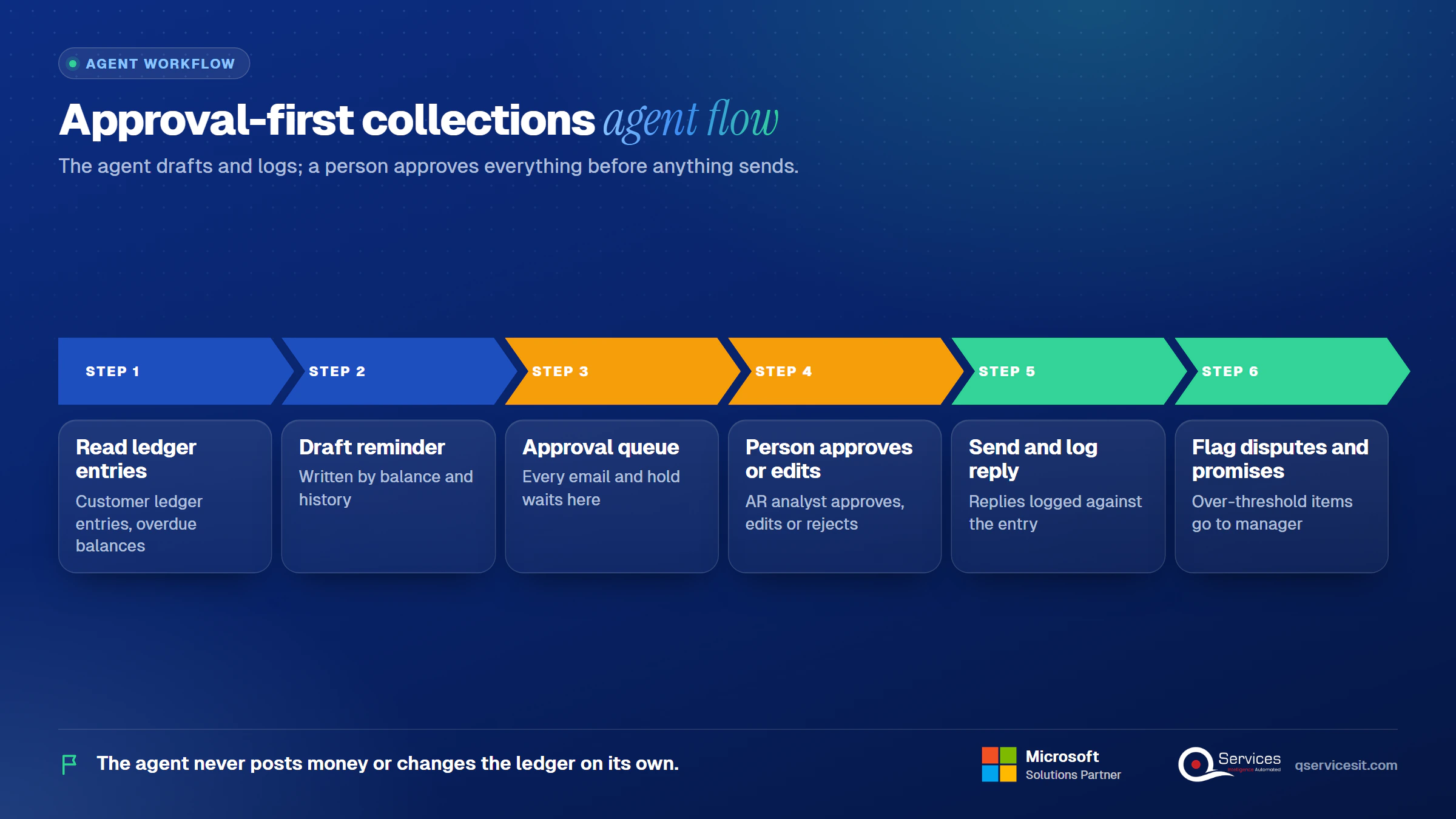
What does business central collections email approval look like?
The agent drafts a reminder using balance and history: a short note for a $1,200 invoice, a different one for a $40,000 balance with two broken promises. The AR analyst opens the queue, edits the line, and approves. Replies are logged back against the entry, disputes are flagged, and anything over a threshold goes to the manager.
What does the agent not replace?
- Your collections policy and your decision to charge interest
- The judgment call on a strategic customer
- Cash application, which still needs correct matching
- Legal review of terms and state rules
The same loop works for business central collections for distributors who also run a CRM, since the agent can log promises where sales will see them. For call wording, our collection call script for B2B is a good base.
Standards & References
How does QServices approach business central collections?
We start at the Age and Apply stages, because a clean ledger decides whether Remind helps or hurts. Then we add Log and Escalate in your own Azure tenant, with the same team building and running it. Our delivery steps:
- A review of customer ledger entries and unapplied cash.
- A reminder terms and levels design, tested on one customer.
- A finance charge terms policy agreed with your Controller.
- An agent drafting reminders into an approval queue.
- Promise and dispute logging wired to your CRM.
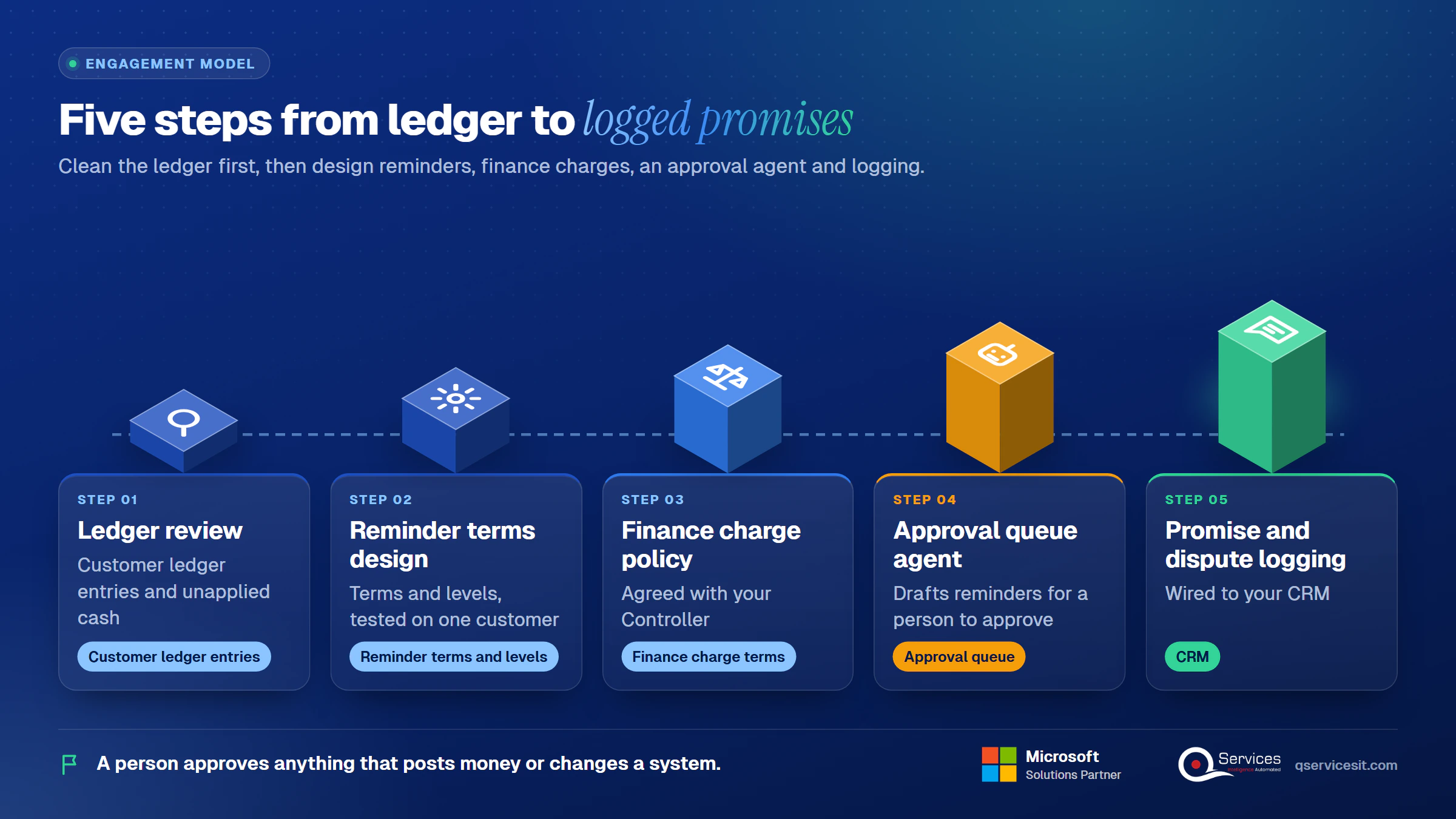
We cover this work under collections and disputes, and a person approves anything that posts money or changes a system.
Implementation Checklist
- Reminder Terms code assigned on every active customer card
- Max. No. of Reminders set on each reminder term
- Grace period and due date formula set for each of the 3 levels
- Calculate Interest ticked only on the level that charges it
- Fin. Charge Terms Code assigned where interest applies
- Email set up before any Job Queue run
- Cash applied before each reminder run
- One customer tested end to end before the full batch
What should you do first to get business central collections under control?
Pilot one segment, such as accounts over 30 days past due with balances under $5,000, and measure time to first touch, reminders sent in error and promises logged. For a ranked read on the rest of the queue, our AR KPI review gives you weekly numbers to compare. and we will walk through your ledger and your reminder terms.

Written by Rohit Dabra
Co-Founder and CTO, QServices IT Solutions Pvt Ltd
Rohit Dabra is the Co-Founder and Chief Technology Officer at QServices, a software development company focused on building practical digital solutions for businesses. At QServices, Rohit works closely with startups and growing businesses to design and develop web platforms, mobile applications, and scalable cloud systems. He is particularly interested in automation and artificial intelligence, building systems that automate routine tasks for teams and organizations.
Accounts receivableBusiness CentralERP integrationFinance automation
Talk to Our Experts
Frequently Asked Questions
Related Topics
Next step
Ready to close the gaps in your collections?
Talk with our team about adding drafted replies, promise tracking and dispute follow-up to Business Central, with a person approving each email and hold.



















 Trustpilot5.0★★★★★See reviewsGoodFirms5.0★★★★★45 verified reviews
 G25.0★★★★★See reviewsClutch5.0★★★★★Quality 5.0 · Schedule 4.8
 Google4.7★★★★★Mohali office
 Erik BrownBusiness owner and software engineerClient review
 Zoltan BodnarCFO, Yusen LogisticsGoodFirms
 Ranbeer MakinClientClient review
 Alex VanderElsClientClient review
 Philmore J.ClientClient review
 Michael WilliamsonPresident and CEO, United Way of Southeast LouisianaGoodFirms
 Steven LewisClientClient review
 Brian WallerPresident, Technology Association of IowaGoodFirms





