How do you automate sales order processing in an ERP?
Sales order processing automation is software and AI agents that capture a customer PO, validate it against ERP master data, create the sales order, and carry it through to invoice with no re-keying. A person approves each order before it’s released.
Our quote to cash automation work starts at this point, because every error made at order entry turns up weeks later in AR as a deduction or a payment nobody can match. This guide walks one PO through eight steps in ERP terms, mostly Business Central, with notes for Prophet 21, SYSPRO, SAP and NetSuite.
Last updated 16 November 2026.
Where do your orders go wrong before AR?
Walk through your own PO-to-invoice steps with our team and see which ones an approval-first agent could draft for your people to review.
Quick Answer Sales order processing automation captures each customer PO from email, EDI or a portal, matches the customer and items to ERP master data, checks price, terms and credit, and drafts the sales order. A person approves it before release. Shipping and invoicing then follow from the approved order without re-keying.
What does sales order processing automation cover?
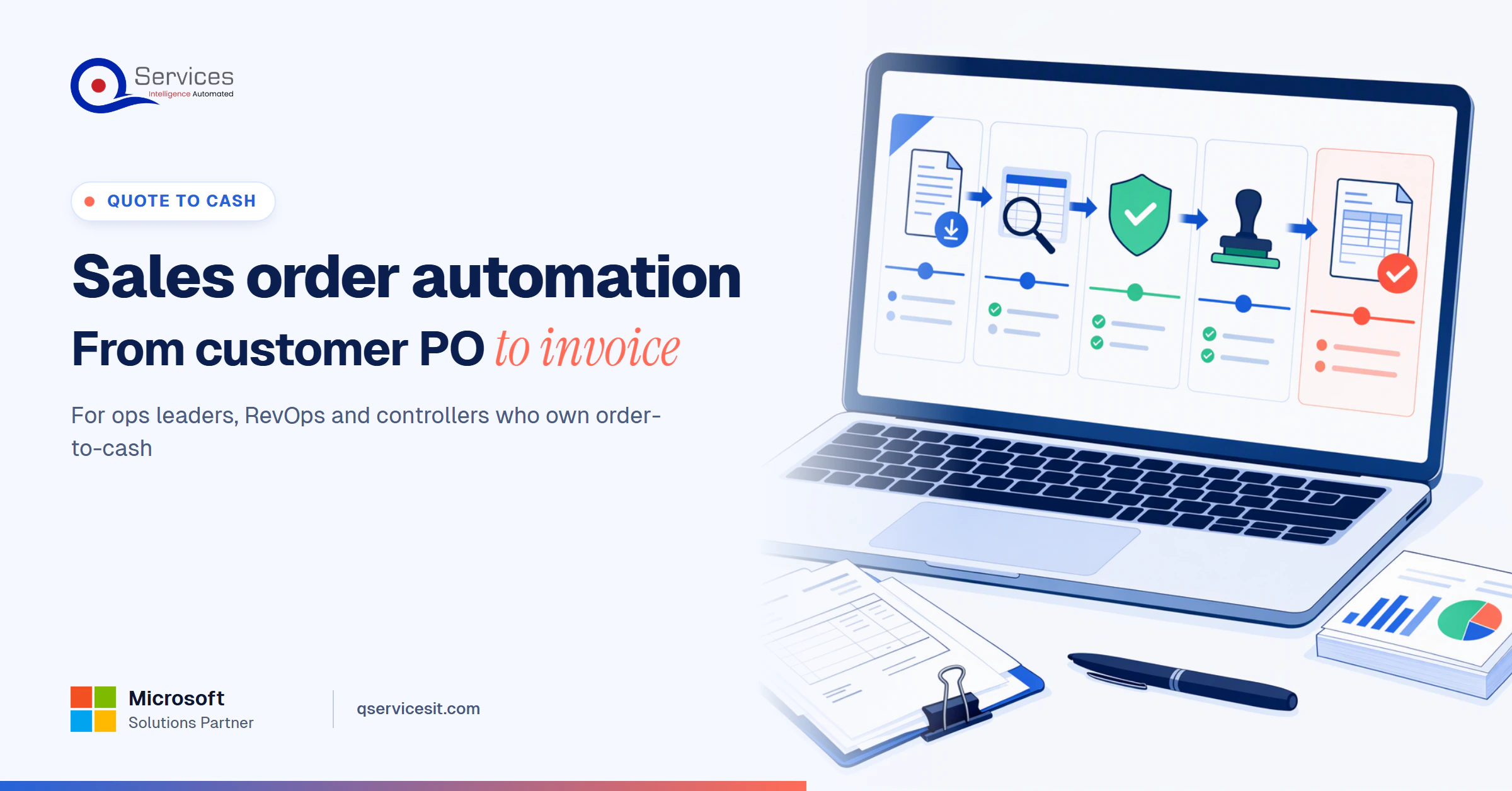
Sales order processing is everything between a customer sending a PO and the ERP posting an invoice: intake, matching, validation, order creation, fulfillment and billing. Automation removes the re-keying and checking between those points, so people handle only exceptions and approvals.
The easiest way to keep the whole chain in your head is one model. We use it with every client.
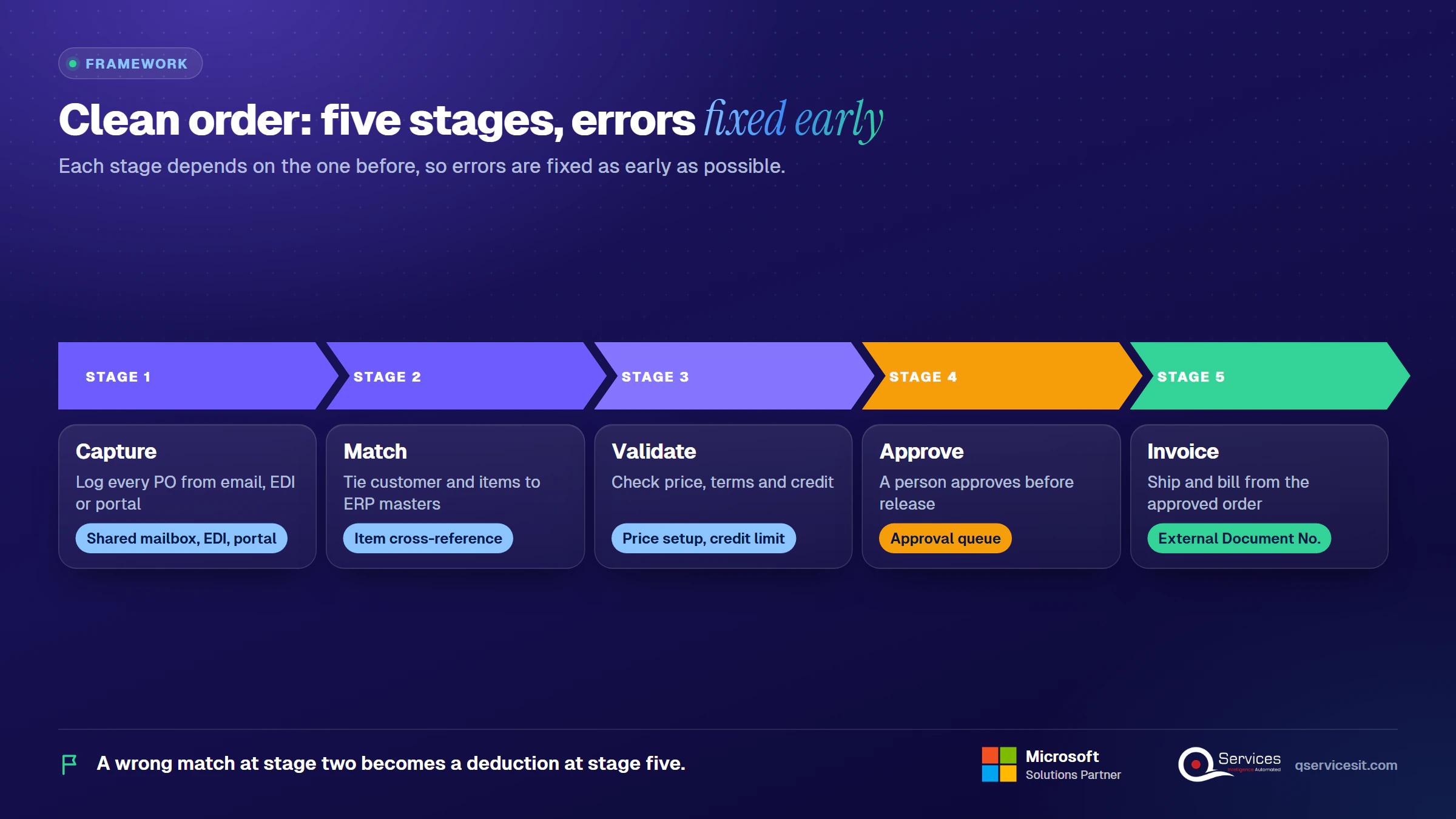
The QServices Framework Clean Order = Capture → Match → Validate → Approve → Invoice
Each stage depends on the one before it. A wrong match at stage two becomes a wrong price at stage three and a deduction at stage five, so we fix errors as early as possible.
What is sales order processing, and how is it different from order to cash?
Sales order processing is the front half of order to cash: from PO to shipped, invoiced order. Order to cash continues through collections and payment posting. If you want the full loop, see the order to cash process diagram. If your quotes feed these orders, the quote to cash process guide covers the earlier stage.
Which intake channels are easy and which are hard?
Channel difficulty decides how much of order intake automation you can make touchless. In our experience:
- EDI is the easiest to read because the fields are structured. It still needs price and item validation.
- Portal exports and spreadsheets are easy to parse, but column names and units change from customer to customer.
- Email with a PDF is the most common channel and a medium challenge. Layouts vary, and multi-page line tables and several POs in one PDF trip up extraction.
- Phone and fax are the hardest. Someone has to transcribe or scan first, and handwriting adds errors.
Key Insight The channel your customers use most is rarely the channel that’s easiest to automate. Start with the highest-volume customer, not the cleanest format.
What are the 8 steps of sales order processing from PO to invoice?
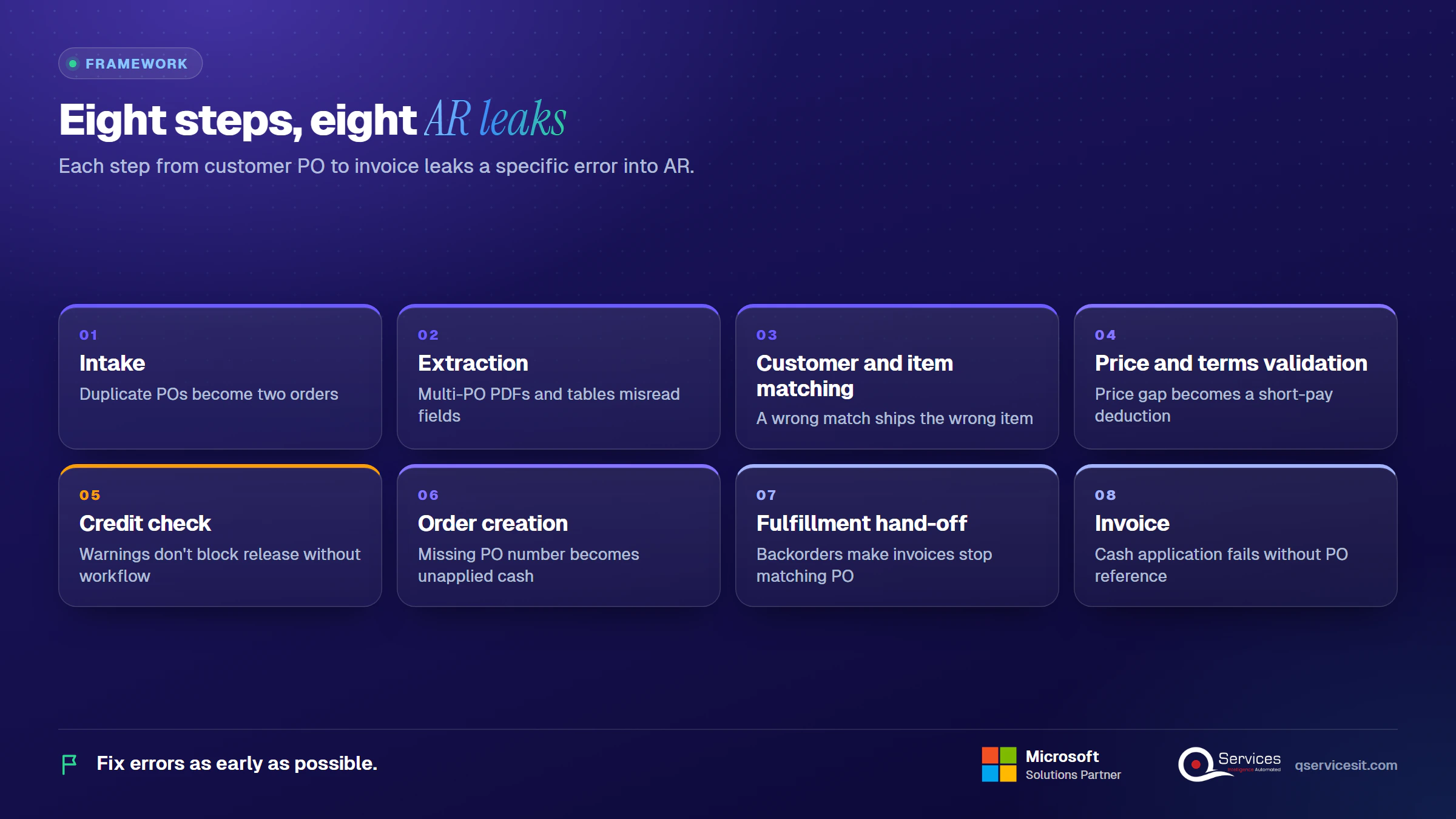
The eight steps are intake, extraction, customer and item matching, price and terms validation, credit check, order creation, fulfillment hand-off and invoice. Each leaks a specific error if it’s done badly, and the examples below use Business Central terms.
1. Where does the PO come in?
The agent watches a shared mailbox, EDI feed or portal export and logs every PO with a timestamp. The leak here is duplicates: the same PO sent twice becomes two orders unless the PO number is checked first.
2. How is the PO read?
Extraction turns the document into fields: PO number, ship-to, requested date, and each line’s item, quantity, unit and price. Multi-PO PDFs and multi-page tables are the usual failure points, so low-confidence fields go to a person.
3. How are the customer and items matched?
Microsoft’s Sales Order Agent matches the customer by sender email against contact cards, not by name. It matches items by exact identifier (item number, vendor item number, GTIN, cross-reference), then by attributes, then by fuzzy search. A wrong match here ships the wrong item.
4. Is the price right?
Business Central updates prices and discounts from customer and item price setups when criteria match. The agent compares that price to the PO. A gap is the start of a deduction: if the customer expects a lower price, they will short-pay the invoice later.
5. Is the customer good for the order?
Business Central’s credit warnings (none, credit limit, overdue balance, both) are informational and don’t block release. To enforce a hold, add a credit limit approval workflow. Exposure counts posted balances plus open orders and shipped-not-invoiced goods.
6. How is the sales order created?
The agent drafts the order and writes the customer’s PO number into External Document No. Turn on Ext. Doc. No. Mandatory in Sales & Receivables Setup so nothing posts without it. A missing PO number is how a payment later becomes unapplied cash.
7. What happens at shipping and backorders?
Posting a shipment uses Qty. to Ship, and Qty. to Invoice controls partial billing. If Shipping Advice is Complete, partial shipments can’t be posted. Backorders and partial shipments are where invoices stop matching the PO.
8. How does the invoice get paid?
Posting creates the shipment and invoice, and you can’t invoice from the Sales Orders page what hasn’t shipped. The customer then runs a three-way match of PO, receipt and invoice. Cash application is the Controller’s end of the chain, and it only works if steps 1 to 7 carried the PO reference through.
Where do pricing and PO errors start?
Most pricing and PO errors start at matching and validation, not at keying. A customer ID that points to the wrong price list, or an item in the wrong unit, produces a wrong order that looks correct on screen.
What does one PO look like end to end?
Here is a made-up PO (number 4471) with six lines, one price variance and one unit-of-measure issue, traced through the agent.
| Line |
What the PO says |
What the agent found |
Person’s decision |
| 1 |
40 EA, item matches by cross-reference |
Exact match, price equals setup |
Approved |
| 2 |
10 CS of fasteners |
ERP sells by EA, 12 per case. Converted to 120 EA, flagged |
Confirmed 120 EA |
| 3 |
25 EA, unit price 2.1% below contract |
Price variance beyond 1% tolerance, held |
Corrected to contract, emailed customer |
| 4 |
8 EA |
Exact match |
Approved |
| 5 |
60 EA |
Stock for 45, backorder 15 |
Approved partial with backorder |
| 6 |
12 EA |
Exact match |
Approved |
The agent drafted the order with the PO number in External Document No. and sent three lines straight through. The person reviewed three flagged lines in about two minutes, then released the order.
Real-World Scenario A typical case we see: a distributor’s sales ops lead keys about 60 emailed orders a day, and one customer’s PO prices run 2% under contract after a price-list change nobody updated. The naive approach keys the PO as written, ships, and invoices at the contract price. Months later the customer short-pays every invoice by the same amount. The Validate stage catches the gap at order entry and sends it to a person, so it’s corrected before the first shipment.
Why do wrong prices on sales orders cause deductions?
Customers pay what their own system says they owe. When your invoice differs from their PO price, they deduct the difference and move on. Our short pay tracking guide shows how to log each one by reason code, so you can see which price errors repeat.
How does order entry affect cash application later?
Order entry decides whether a payment can be matched. If the PO number, ship-to or invoice reference is wrong or missing in the ERP, the customer’s remittance doesn’t line up and the cash waits unapplied.
How do order entry errors cause unapplied cash?
How order entry errors cause unapplied cash comes down to references. Customers pay against their PO number. If the sales order holds a different one, or none, the payment has nothing to match against. Our unapplied cash backlog guide shows how these piles form and how to clear them.
What does clean order entry change in AR?
The effect is order entry errors in accounts receivable falling at the source: fewer deductions to chase, fewer unmatched payments and a smaller month-end backlog. DSO improves because disputes don’t add days to payment. We haven’t seen a reliable public benchmark for the size of that effect, so measure your own baseline first.
Which sales order entry automation steps can an agent take on?
An agent can take on capture, extraction, matching and drafting. A person should keep approval, price overrides and credit exceptions. The split depends on how reliable each step is with your data, not on what the software can technically attempt.
How do RPA, OCR and AI agents compare?
|
RPA bot |
OCR / extraction |
AI order intake agent |
| Reads unstructured PDFs |
No |
Yes, with templates |
Yes, without templates |
| Handles layout changes |
Breaks |
Needs retraining |
Usually copes |
| Matches items and customers |
Rule lookups only |
No |
Yes, with confidence scores |
| Explains its choices |
No |
Partly |
Yes, shows source text |
| Setup effort |
Low |
Medium |
Higher, needs clean masters |
The honest downside: an agent is the most demanding to set up, because it’s only as good as your item and customer masters.
Which exceptions need a person, and who owns them?
| Exception |
Cause |
Detection |
Action |
Owner |
| Duplicate PO |
Customer resends |
PO number already in ERP |
Hold and ask |
Sales ops |
| Customer ID mismatch |
New sender address |
No contact card match |
Confirm customer |
Sales ops |
| Unit-of-measure mismatch |
Case vs each |
Conversion flag |
Confirm quantity |
Sales ops |
| Price vs contract |
Old price list |
Variance over tolerance |
Correct or accept |
Sales manager |
| Partial shipment or backorder |
Stock short |
Availability check |
Split or hold |
Warehouse |
How does the approval queue work?
The agent scores each field. Fields above your confidence threshold pass; fields below it go to the queue. A sales ops person sees the original PDF next to the draft order, with the uncertain line highlighted and the proposed match. They accept, edit or reject. Nothing posts until they do.
Seeing pricing or PO errors in your deductions?
Pick one recurring error, like a wrong price or a missing PO number, and we’ll trace it back to the order step that caused it.
How does ERP sales order automation work in Business Central, SYSPRO and others?
The mechanics differ by system, but the pattern is the same: read the order, match to master data, draft in the ERP, approve, release. In Business Central, much of this exists already.
What does Business Central's Sales Order Agent do?
Per Microsoft Learn (updated October 2026), the agent monitors a designated mailbox and reads orders from PDF, PNG and JPG attachments. It creates a sales quote first, because quotes don’t affect planning, reservations or cash flow forecasts. Admins can set it to convert to orders directly. Reviewers confirm or stop each step, and it preserves the customer’s external document number.
It has limits. Microsoft documents that unit-of-measure conversions may produce wrong quantities and vague requests such as "I want them all" reduce accuracy. It bills in Copilot credits and stops processing new emails when they run out. Business Central Copilot and agents run only on Business Central online.
How do you set up a sales order approval workflow in Business Central?
A sales order approval workflow in Business Central starts from the credit limit approval template, since credit warnings alone don’t block release. Add approval limits by amount or customer group. Our Power Automate approvals work can add routing by region or product line.
How do you map PO fields to the ERP?
How to automate sales order entry in an ERP starts with a field map. Ours looks like this for Business Central:
| PO field |
ERP field |
Validation rule |
| PO number |
External Document No. |
Mandatory, unique per customer |
| Sender / bill-to |
Customer No. |
Matches contact card email |
| Item code |
Item No. / cross-reference |
Exact match first, then GTIN |
| Quantity and unit |
Quantity, Unit of Measure Code |
Converted via item UoM table |
| Unit price |
Unit Price |
Within 1% of price setup |
| Requested date |
Requested Delivery Date |
Checked against availability |
What about SYSPRO, Prophet 21, SAP and NetSuite?
SYSPRO sales order processing steps include price groups set in the order header (which can’t change once lines are captured), contract pricing, and credit checks that can place an order in suspense until a password-protected release. An order intake agent for Prophet 21 follows the same pattern, and we confirm price-book and PO-number behavior in Epicor’s documentation before building, because Epicor’s public pages say little on it. Prophet 21 on-prem support runs to 2029. SAP and NetSuite add price and order checks of their own: the agent drafts, the ERP’s checks still apply.
Who should approve a sales order before it is released?
Who approves depends on what’s at risk. Sales ops should approve routine orders, a sales manager price exceptions, and finance credit exceptions. An approval-first order intake agent proposes every action and a person approves anything that posts money or changes a system.
What controls does the order flow need?
- Audit trail: log the source document, every agent suggestion and who approved
- Segregation of duties: the person who approves a price override shouldn’t also post the invoice
- Approval limits: route orders over a set value to a second approver
- Credit holds: block release for customers over limit or on hold
- Tax and privacy: emailed POs hold customer data, so keep them in your own Azure tenant
Standards & References
What do the numbers look like before and after?
These figures are illustrative planning ranges from our client assessments, not guarantees. Your baseline matters more than ours.
|
Manual entry |
With an approval-first agent |
| Touches per order |
4 to 6 |
1 to 2 |
| Handling time per order |
8 to 12 minutes |
2 to 4 minutes (review) |
| Order-entry error rate |
1 to 4% of fields |
Lower, but never zero |
| Setup effort |
None |
Weeks of master data cleanup (worse) |
| Order-to-invoice days |
Baseline |
Often shorter |
To get cost per order, multiply handling minutes by your loaded cost per minute and add exception rework. A drop from 10 to 3 minutes is a 70% cut in handling time, before counting fewer deductions.
| KPI |
Formula |
| Touchless rate |
Orders with no edits ÷ total orders |
| Touches per order |
Human actions ÷ orders |
| Error rate |
Orders corrected after release ÷ orders |
| Order-to-invoice days |
Invoice date minus PO date |
What does a 30/60/90-day rollout look like?
| Days |
Scope |
| 1 to 30 |
Baseline 50 orders, clean item and customer masters |
| 31 to 60 |
Pilot one top customer with every order approved |
| 61 to 90 |
Widen to the top 10 customers |
Should you build, buy or extend the ERP?
Extend the ERP when it ships the feature (Business Central’s agent). Buy when you have many ERPs or channels. Build only when your order rules are unusual. Clean item and customer masters are the real blocker in all three.
How does QServices approach sales order processing automation?
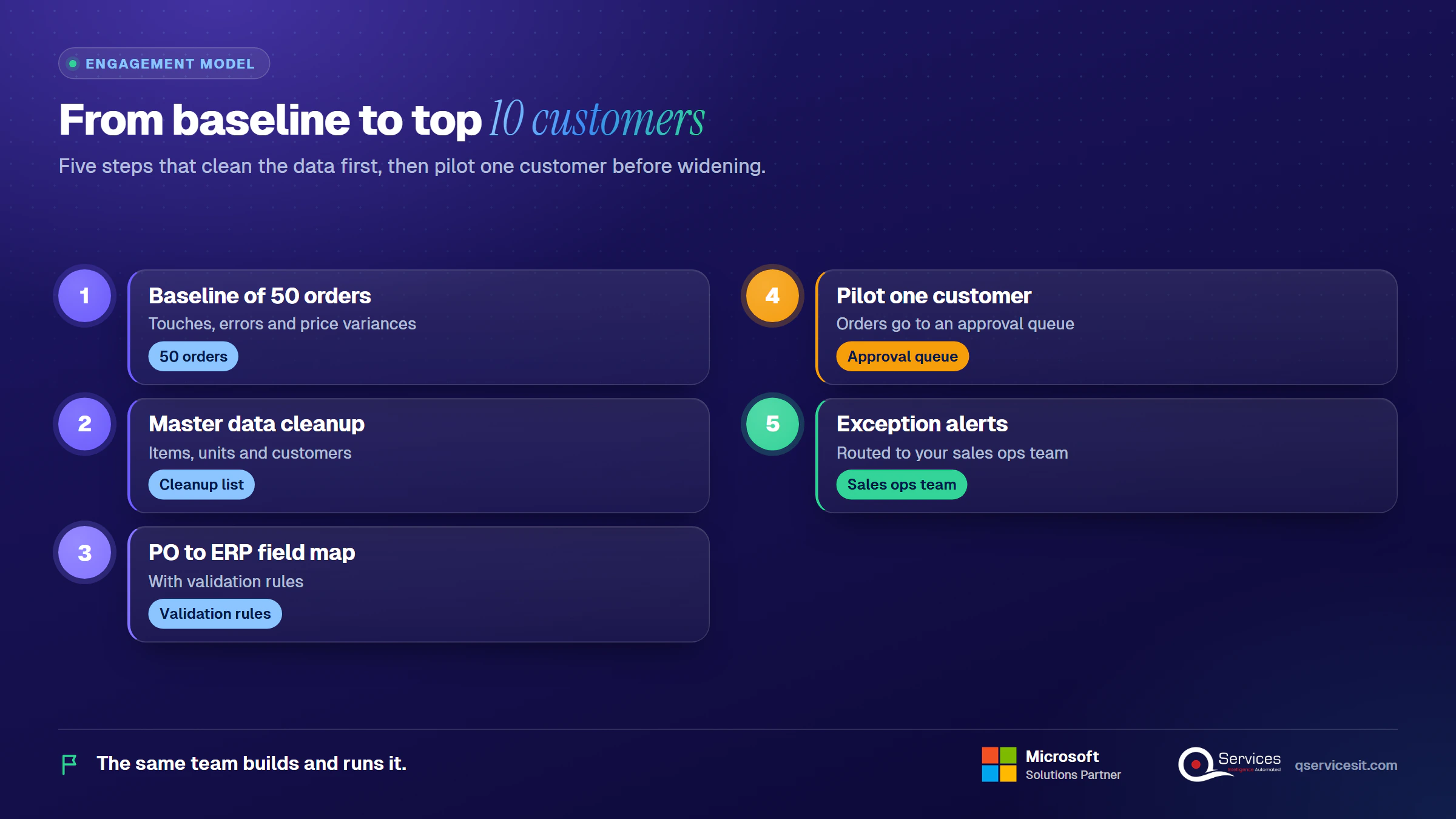
We start with the Match stage, because dirty masters sink every later step. Our AI agents sit inside your ERP and CRM and run in your own Azure tenant, so your team approves every action.
- A baseline of 50 orders showing touches, errors and price variances
- A master data cleanup list for items, units and customers
- A field map from PO to ERP fields, with validation rules
- A pilot on one customer’s orders with an approval queue
- Alerts for exceptions routed to your sales ops team
The same team builds and runs it.
Implementation Checklist
- Ext. Doc. No. Mandatory is on in Sales & Receivables Setup
- Item cross-references exist for each pilot customer’s part numbers
- Unit-of-measure conversions are set for every pilot item
- Price variance tolerance is agreed in writing
- Credit limit approval workflow is active
- Every agent-drafted order goes to an approval queue
- A named person owns each exception type
- Baseline of 50 orders is recorded before go-live
What should you do first to automate sales order processing?
Pilot your highest-volume customer for 30 days and measure touchless rate, error rate and order-to-invoice days. and we’ll go through your baseline orders with you.

Written by Rohit Dabra
Co-Founder and CTO, QServices IT Solutions Pvt Ltd
Rohit Dabra is the Co-Founder and Chief Technology Officer at QServices, a software development company focused on building practical digital solutions for businesses. At QServices, Rohit works closely with startups and growing businesses to design and develop web platforms, mobile applications, and scalable cloud systems. He is particularly interested in automation and artificial intelligence, building systems that automate routine tasks for teams and organizations.
ERP integrationOrder to cashFinance automationAI agents
Talk to Our Experts
Frequently Asked Questions
Related Topics
Next step
Ready to see order intake with approvals built in?
Bring a few real customer POs. We’ll show how an agent drafts the order inside your ERP while a person approves every release.













 Trustpilot5.0★★★★★See reviewsGoodFirms5.0★★★★★45 verified reviews
 G25.0★★★★★See reviewsClutch5.0★★★★★Quality 5.0 · Schedule 4.8
 Google4.7★★★★★Mohali office
 Erik BrownBusiness owner and software engineerClient review
 Zoltan BodnarCFO, Yusen LogisticsGoodFirms
 Ranbeer MakinClientClient review
 Alex VanderElsClientClient review
 Philmore J.ClientClient review
 Michael WilliamsonPresident and CEO, United Way of Southeast LouisianaGoodFirms
 Steven LewisClientClient review
 Brian WallerPresident, Technology Association of IowaGoodFirms





