How do you get EDI 850 purchase orders into Business Central automatically?
To get edi 850 purchase orders into Business Central automatically, translate each X12 850 into a sales order and check item, unit of measure, price and ship-to before it posts. Clean orders post on their own, and only exceptions go to a person.
Most distributors we talk to already receive 850s from their biggest customers. They still have someone opening the file, or a PDF printout of it, and typing it in. That’s the gap this post closes, with a sample 850, a field-level map and a list of the exceptions that really stall projects.
The approach below suits a distribution business running Dynamics 365 Business Central. The same logic carries over to Dynamics GP, NetSuite or Sage with different field names.
Is someone still keying your 850s by hand?
Bring one trading partner’s 850. We’ll walk through the mapping, the checks and the exceptions a person should review.
Quick Answer An EDI 850 is the X12 purchase order a customer sends you. In Business Central it should become a sales order without anyone typing it. A translator parses the file, the order is checked against item master, units of measure, price list and ship-to, and only exceptions reach a person for approval.
What is an EDI 850 in Business Central, and what does it contain?
An EDI 850 is the ANSI X12 purchase order transaction set used mainly in North America. The EDI 850 meaning is simple: the buyer’s system tells yours what to ship, how many, at what price and where. In Business Central, the target is a sales order.
The order-entry job has a shape that holds for every ERP. We use one sequence for it.
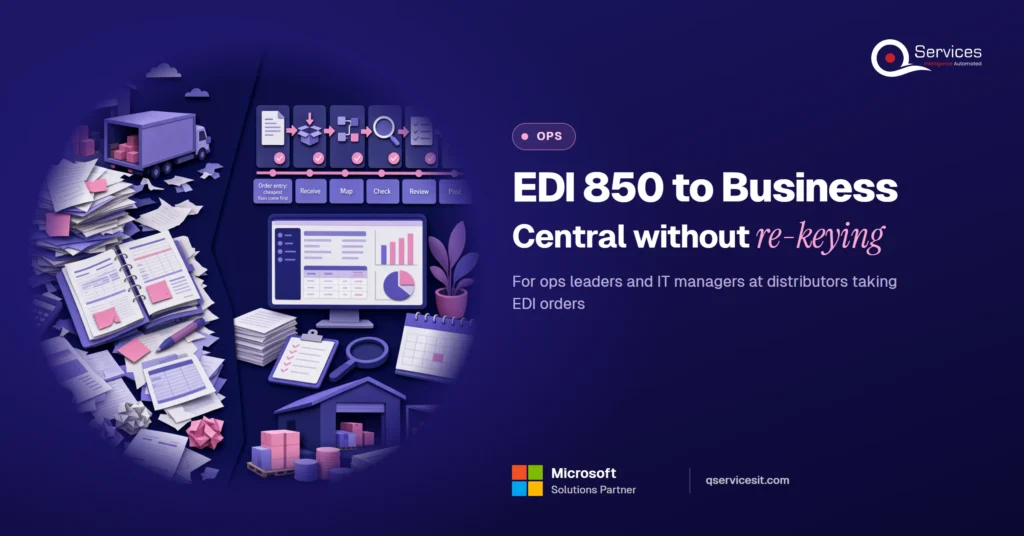
The QServices Framework EDI Order Entry = Receive → Map → Check → Review → Post → Acknowledge
The order matters because each stage is cheaper than the one after it. A wrong unit of measure caught at Check costs a minute. Caught after shipping, it costs a return.
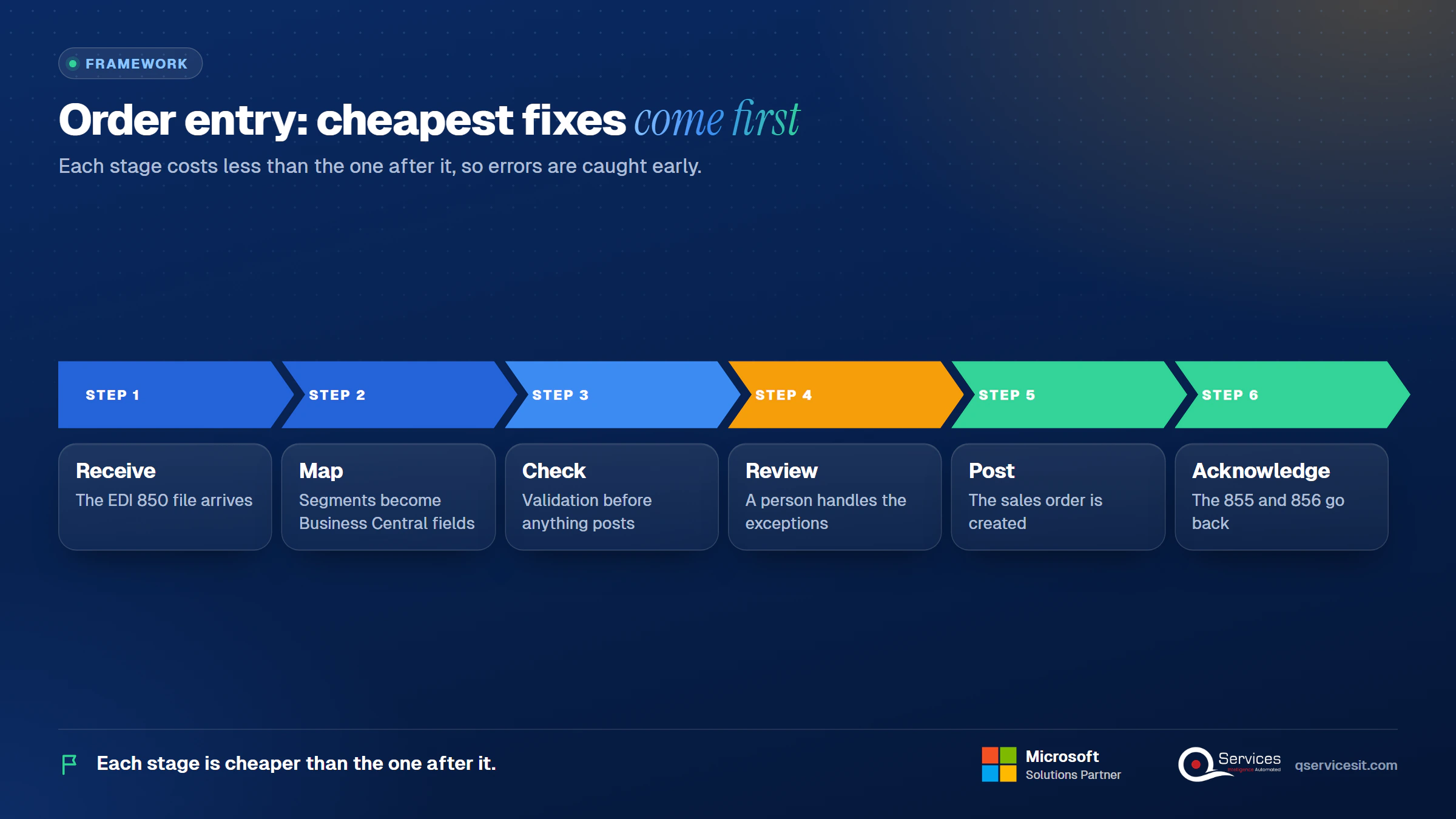
We’ll reuse those six stage names below. Receive is the file arriving. Map is turning segments into BC fields. Check is validation. Review is the person. Post is the sales order. Acknowledge is the 855 and 856 going back.
What are the EDI 850 segments and what does each one do?
The edi 850 segments you’ll meet most often are these. ISA, GS and ST open the envelope. BEG carries the PO number (BEG03) and PO date (BEG05). N1 loops name the parties, such as BT for bill-to and ST for ship-to. Each PO1 is one line, with line number (PO101) and quantity (PO102). CTT01 counts the PO1 lines, and SE, GE and IEA close the file.
Segment layouts shift between versions such as 4010 and 5010, and every trading partner’s implementation guide marks segments as Must use or Used. Treat the partner’s guide as the truth, not a generic spec. NIST’s federal guidance also notes that the 850 isn’t for changes or acknowledgments. Those belong to the 860 and 855.
How does X12 differ from EDIFACT ORDERS?
X12 is the North American standard and the 850 is its purchase order. EDIFACT is the international standard, and its equivalent is the ORDERS message. The business content is similar, but the segment names, separators and code lists differ, so a map built for one doesn’t transfer to the other. This post covers X12 only.
What is the full EDI document cycle around an 850?
The 850 is one of six documents in a normal order-to-cash exchange. Which ones a partner requires depends on the partner. For the cash end of the cycle, our post on edi 820 payment remittance erp covers posting the payment file.
| Document |
Direction |
Purpose |
Business Central document |
| 850 |
Inbound |
Purchase order |
Sales Order |
| 997 |
Outbound |
Technical receipt of the file |
None (translator handles it) |
| 855 |
Outbound |
Business acknowledgment of the order |
Order confirmation |
| 856 |
Outbound |
Advance ship notice |
Posted Sales Shipment |
| 810 |
Outbound |
Invoice |
Posted Sales Invoice |
| 820 |
Inbound |
Payment and remittance |
Payment journal |
The order to cash process shows where each of these sits. The 850 is the start, and it’s the step most teams still do by hand.
What does re-keying 850s actually cost?
Here’s an illustrative calculation, with assumptions stated. Say you receive 150 orders a day. Each takes 6 minutes to key and check. Over 250 working days that’s 150 × 6 = 900 minutes a day, or 15 hours. Over a year it’s about 3,750 hours, close to 1.8 full-time people at 2,080 hours each. Swap in your own order count and minutes.
The hours aren’t the worst of it. These are the error types that cost money:
- Wrong unit of measure. Cases keyed as each, or the reverse.
- Wrong ship-to. The right customer, the wrong store or DC.
- Price mismatch. The customer’s price and your price list disagree and nobody notices.
- Missed ship window. The order sat in a mailbox for a day.
Key Insight Order entry time is the visible cost of re-keying. The invisible cost is the error that ships. A 150-orders-a-day desk at a 1% error rate sends out 1 or 2 wrong orders every working day.
Which variant do you have: replenishment, drop-ship or distributor orders?
Retail replenishment, drop-ship and distributor-to-distributor 850s use the same transaction set but different rules. Drop-ship orders carry a consumer ship-to and tighter timing. Replenishment orders target a DC with a ship window. Distributor orders are usually closer to your own item numbers. We defer to each partner’s implementation guide for the exact segments and acknowledgment deadlines.
How do you map EDI 850 segments to a Business Central sales order?
Mapping is a table, not a mystery. Each X12 element lands in a Business Central field, and the edi 850 business central mapping below is the starting point we use. Field names vary by version and localization, so verify them in your own tenant.
| 850 segment |
What it carries |
Business Central field (verify in your version) |
| ISA / GS / ST |
Envelope, sender, receiver, control numbers |
Trading partner lookup, not stored on the order |
| BEG |
PO number, PO date, purpose code |
External Document No., Order Date |
| N1 BT / ST / BY |
Bill-to, ship-to, buying party |
Bill-to Customer No., Ship-to Code, Sell-to Customer No. |
| PO1 |
Line, quantity, UoM, price, BP/VP/UP IDs |
Line No., Quantity, Unit of Measure Code, Unit Price, Item Reference |
| DTM |
Requested ship or delivery date |
Requested Delivery Date, Shipment Date |
| ITD |
Terms |
Payment Terms Code |
| REF |
Department, vendor or customer references |
Your Reference |
| PID |
Product description |
Description |
| CTT |
Count of PO1 lines |
Hash-total check, not stored |
How to map EDI 850 to Business Central sales order, step by step?
Here’s how to get an 850 into a Business Central sales order in seven steps:
- Receive the file through your EDI provider, VAN or API endpoint, and keep the raw payload.
- Validate the envelope. Check the ISA/GS/ST structure, the SE segment count and the CTT line count.
- Identify the customer from the GLN or DUNS in the N1 or ISA to a Customer No.
- Translate each line. Match the customer item number to an Item Reference, the customer UoM to a Unit of Measure Code.
- Check price, ship-to and dates against your price list, Ship-to Addresses and lead times.
- Create the sales order if everything passes, or hold it in a review queue if not.
- Acknowledge. Return the 997 at once and the 855 on the partner’s timeline.
Why do cross-reference tables decide whether the project works?
Real projects stall here, not at the segment map. Four tables need to exist and stay current:
- Partner ID to Customer No. (GLN or DUNS).
- Customer item number to Item Reference. Business Central item references hold this link.
- Customer UoM code to BC Unit of Measure. Include a conversion factor where pack sizes differ.
- Customer ship-to code to Ship-to Address.
Build them from the last 90 days of orders, not from a blank sheet. Every exception that a person resolves should add a row, so the table grows from real traffic and the same miss never repeats. That’s the maintenance model: nobody sits down to update them.
Standards & References
Does Dynamics 365 Business Central EDI work natively?
As far as Microsoft’s documentation shows, Business Central supports e-documents for sales documents, including PEPPOL-format invoices, but it doesn’t describe X12 850 intake. Dynamics 365 Business Central EDI for X12 comes from add-ons and providers, and vendors in this space say they create sales orders from inbound 850s. Confirm any native-support claim on Microsoft Learn before you buy.
Which of the three ways to get 850s into Business Central fits you?
There are three routes. None is wrong, and a business central edi setup often combines two of them.
|
EDI provider or VAN with BC connector |
ISV EDI app inside BC |
Custom build (BC API or Power Automate) |
| Setup effort |
Moderate, mapping done by provider |
Moderate, mapping done in BC |
Highest, you build every map |
| Run cost model |
Per-document or monthly fee |
License plus per-partner fees |
Your team’s time and hosting |
| Control |
Provider owns the translator |
Shared |
You own everything |
| Partner onboarding |
Provider does most of it |
Mixed |
You do it all |
| Suits |
Many partners, little IT time |
BC-centric shops |
Few partners, strong developers |
| Main drawback |
Validation inside BC is thin |
Tied to one app’s roadmap |
Slowest to start, you maintain it |
| Approval-first agent on top |
Adds a review queue someone must clear daily |
Same |
Same, plus integration work |
Our view: pick the translator on partner count and IT capacity, then add a validation layer in front of the sales order. The last row is the honest cost. The queue means a person checks exceptions every day, and the first two weeks of tuning feel slower than a blind import.
What checks run before the order is created: item, UoM, price and ship-to?
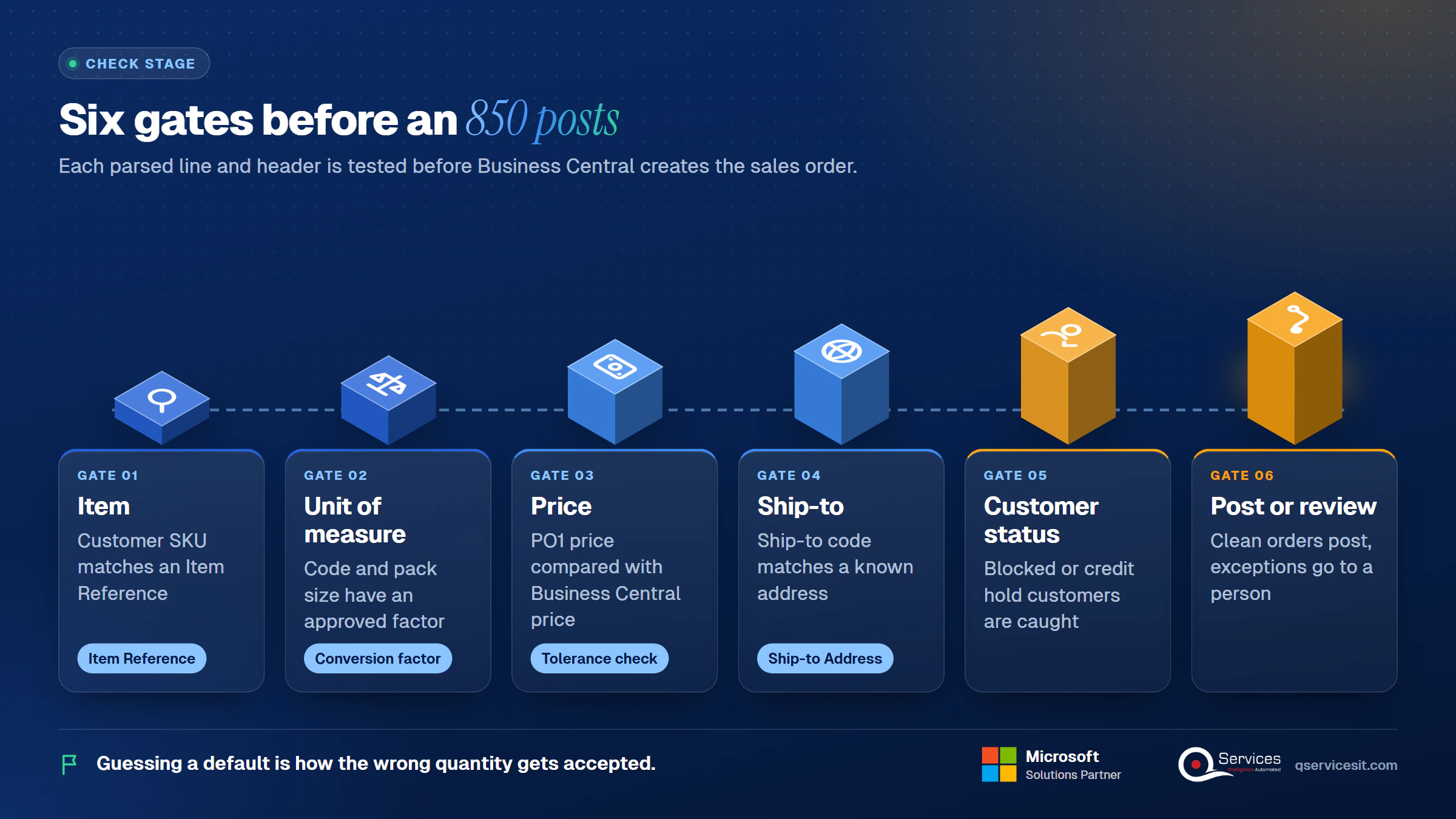
The Check stage is where an approval-first order entry agent earns its place. It reads the parsed 850 inside Business Central and tests each line before anything posts. It also tests the header, covering customer status, ship-to and date.
What causes an EDI 850 unit of measure mismatch?
An edi 850 unit of measure mismatch happens when the customer’s code (CA, DZ, EA) has no valid match on your item, or matches with a different pack size. A code crosswalk translates the code, but it doesn’t recalculate quantity or price. If the customer orders 6 DZ and you sell by each, you need a conversion factor of 12, and a line with no approved factor goes to review. Guessing a default is how the wrong quantity gets accepted.
How does an EDI 850 price check before order creation work?
An edi 850 price check before order creation compares the PO1 price with what Business Central would charge. Microsoft Learn describes the logic: BC checks the bill-to customer and item combination, then the unit of measure code, and considers prices with that code and prices with no code. If no customer price matches, the item unit price applies.
Set a tolerance, say 1% or a few cents, and flag anything outside it. Rounded prices are the usual noise: the customer’s 4-decimal price comes through at 2 decimals. The agent doesn’t change your prices. It flags the variance and a person decides.
Real-World Scenario A typical case we see: a distributor’s operations lead receives 120 EDI orders a day, and a customer starts sending paint by the dozen (DZ) where the item master holds each. In the manual flow, a clerk keys 6 as 6 each instead of 72. The shortfall surfaces only when the customer’s dock counts the delivery. With the Check stage in place, the DZ code has no approved conversion, the line is held, and the operations lead approves a factor of 12 once. Every later order from that customer passes untouched.
Can an agent handle the dynamics 365 business central edi checks without taking over?
Yes, with limits. The agent checks and routes. It isn’t the EDI translator, it doesn’t speak to the trading partner and it doesn’t decide on prices. A person approves anything that changes a system or posts money. Clean orders that pass every check post on their own.
Which exceptions should a person review?
Not every failure needs a conversation. Here are the top 10 reasons an 850 doesn’t become an order, with the owner. This is the core of an edi 850 exceptions review process.
| # |
Reason |
Cause |
Fix |
Owner |
| 1 |
Unknown sender |
GLN or DUNS not in the partner table |
Add partner and customer link |
Customer service |
| 2 |
Unknown customer item |
No Item Reference |
Create the reference |
Item master owner |
| 3 |
UoM not mapped |
Code or pack size differs |
Add conversion factor |
Item master owner |
| 4 |
Price variance |
Outside tolerance |
Approve or query customer |
Sales ops |
| 5 |
Rounded price |
Decimals truncated |
Raise tolerance or fix map |
EDI admin |
| 6 |
Duplicate PO number |
Resent file or revision sent as new 850 |
Compare to open order, hold |
Customer service |
| 7 |
Changed PO |
860 sent, or a second 850 for the same PO |
Update order, don’t create new |
Customer service |
| 8 |
Blocked customer or item |
Credit hold or blocked flag |
Release or decline |
Credit or item owner |
| 9 |
Unknown ship-to |
New store or DC code |
Add Ship-to Address |
Customer service |
| 10 |
Ship date too early |
Requested date before lead time |
Confirm new date with customer |
Sales ops |
Duplicates deserve special care. Some partners send revisions as a new 850 instead of an 860, so deduplicate on the PO number plus the PO date and route a match to a person. A second 850 treated as a new order is how duplicate shipments happen.
What does the worked example look like end to end?
Here’s a fictional 850, invented for this post. Harbor Restaurant Supply sends it to Larkspur Distribution, neither of which is real. It has 3 lines.
ISA*00*          *00*          *ZZ*HARBORSUPPLY   *ZZ*LARKSPURDIST   *261116*0942*U*00501*000000101*0*T*>~
GS*PO*HARBORSUPPLY*LARKSPURDIST*20261116*0942*1*X*005010~
ST*850*0001~
BEG*00*SA*PO48213**20261116~
REF*DP*220~
DTM*002*20261203~
N1*BT*HARBOR RESTAURANT SUPPLY*92*HRS01~
N1*ST*HARBOR RESTAURANT SUPPLY DC 2*92*DC02~
PO1*1*24*CA*38.50**BP*HX-1001~
PO1*2*10*EA*112.00**BP*HX-2040~
PO1*3*6*DZ*14.25**BP*HX-3300~
CTT*3~
SE*11*0001~
GE*1*1~
IEA*1*000000101~
The counts check out. Between ST and SE inclusive there are 11 segments: ST, BEG, REF, DTM, two N1, three PO1, CTT and SE, so SE01 is 11. CTT01 is 3 because there are 3 PO1 lines. Line totals are 24 × 38.50 = 924.00, 10 × 112.00 = 1,120.00 and 6 × 14.25 = 85.50.
Here’s the Business Central sales order the first two lines produce:
| Field |
Value |
Source |
| External Document No. |
PO48213 |
BEG03 |
| Order Date |
16 Nov 2026 |
BEG05 |
| Sell-to / Bill-to |
Customer C10450 |
N1 BT, qualifier 92 code HRS01 |
| Ship-to Code |
DC02 |
N1 ST |
| Requested Delivery Date |
3 Dec 2026 |
DTM 002 |
| Your Reference |
220 |
REF DP |
| Line 1 |
LD-1001, 24 CASE, 38.50 |
PO1 line 1, BP HX-1001 |
| Line 2 |
LD-2040, 10 PCS, 112.00 |
PO1 line 2, BP HX-2040 |
| Line 3 |
Held |
No Item Reference for HX-3300 |
Line 3 is the deliberate exception. The customer SKU HX-3300 has no Item Reference. The agent holds the whole order, suggests a likely item from the description, and shows the person the line, the candidate and the reason. The person approves LD-3300 and confirms a DZ factor of 12. The reference is saved, the order posts, and the next HX-3300 line passes alone.
How do you automate EDI 850 order entry for distributors without losing control?
To automate edi 850 order entry for distributors, automate the stages that don’t need judgment and keep a person on the ones that do. Receive, Map and Check run on their own. Review is a queue. Post happens only for clean orders or approved ones. That’s distributor edi order automation with a human decision wherever money or master data is involved.
When do you send the 855 and 856 back?
The 997 is a technical receipt and goes back as soon as the file is read. The 855 is the business answer and the 856 is the ship notice. The timing is set by the partner’s own spec, not by us. Vendors commonly cite an expectation of an 855 within about 24 hours, but treat that as a rule of thumb and check each partner’s guide.
On edi 850 vs 855: the 850 is the buyer’s order and the 855 is your reply to it, so the 855 can accept, change or reject lines. Late or missing 856s are a common source of retailer chargebacks, and some retailers publish their specs openly, so check each partner’s guide.
How does the EDI 855 and 856 acknowledgment from Business Central work?
The edi 855 and 856 acknowledgment from Business Central is generated from the sales order and the posted shipment. The translator turns the confirmed order into an 855 and the posted shipment into an 856. This is why the sales order and shipment need clean data: any error on the order flows straight into the acknowledgment. For the cash end of the same cycle, see Business Central payment matching.
What if an acknowledgment is rejected?
The partner’s 997 comes back with AK5 showing accepted (A) or rejected (R), and AK3 and AK4 identify the segment and element in error. Watch these. A failing sync should be caught before finance finds it, and our note on integration monitoring covers how.
Where do your 850 exceptions pile up?
Item, unit of measure and price mismatches cause most review work. Show us yours and we’ll map where an agent can help.
What does a go-live look like, and which metrics prove it works?
A go-live has four steps: partner testing and certification, a parallel run, cutover, and a 30-day review. Don’t skip the parallel run. Run the new flow and the old keying side by side for a week and compare every order.
Key Insight Run the parallel period on your noisiest customer first. If the agent holds the right 8 or 10 orders out of 100, you’ve proved the Check stage on real data.
Track these four metrics from day one:
| Metric |
How to measure |
What it tells you |
| Touchless order rate |
Orders posted without a person, divided by all 850s |
How much keying is really gone |
| Exception rate |
Orders held for review, divided by all 850s |
Where cross-references are thin |
| Order entry time |
Receipt to posted sales order |
Whether customers get fast acknowledgments |
| Ship-window misses |
Orders shipped after the requested date |
Whether speed turned into service |
A falling exception rate is the sign your tables are learning. If it’s flat after 30 days, the same cause is repeating, and the fix belongs in the map.
When can an agent handle the non-EDI orders too?
Not every customer sends EDI. Many still email a PDF or spreadsheet, and that work is the same Check and Review job without the translator. Microsoft documents a Sales Order Agent, labelled a preview, that reads customer emails from a shared mailbox, finds the customer, checks availability and prepares a quote that converts to an order. It doesn’t set prices or discounts, because Business Central logic does that, and it runs on Business Central online.
That covers part of the problem. If you’re on-premises, or you need item and UoM checks across both EDI and email orders in one queue, you’ll want your own validation layer. Poor text extraction is a common reason such agents get orders wrong, which we cover in PDF text extraction and AI agents. A person approves anything that posts or changes a record.
How does QServices approach EDI 850 order entry?
We start at Check, because that’s where the savings and the risk both sit. The Receive stage is usually a connector decision, so we make it after we’ve seen your orders. Our agents run in your own Azure tenant, and nothing posts until your team approves it. The same team builds and runs it. If you want help choosing between connectors, see our order entry automation service.
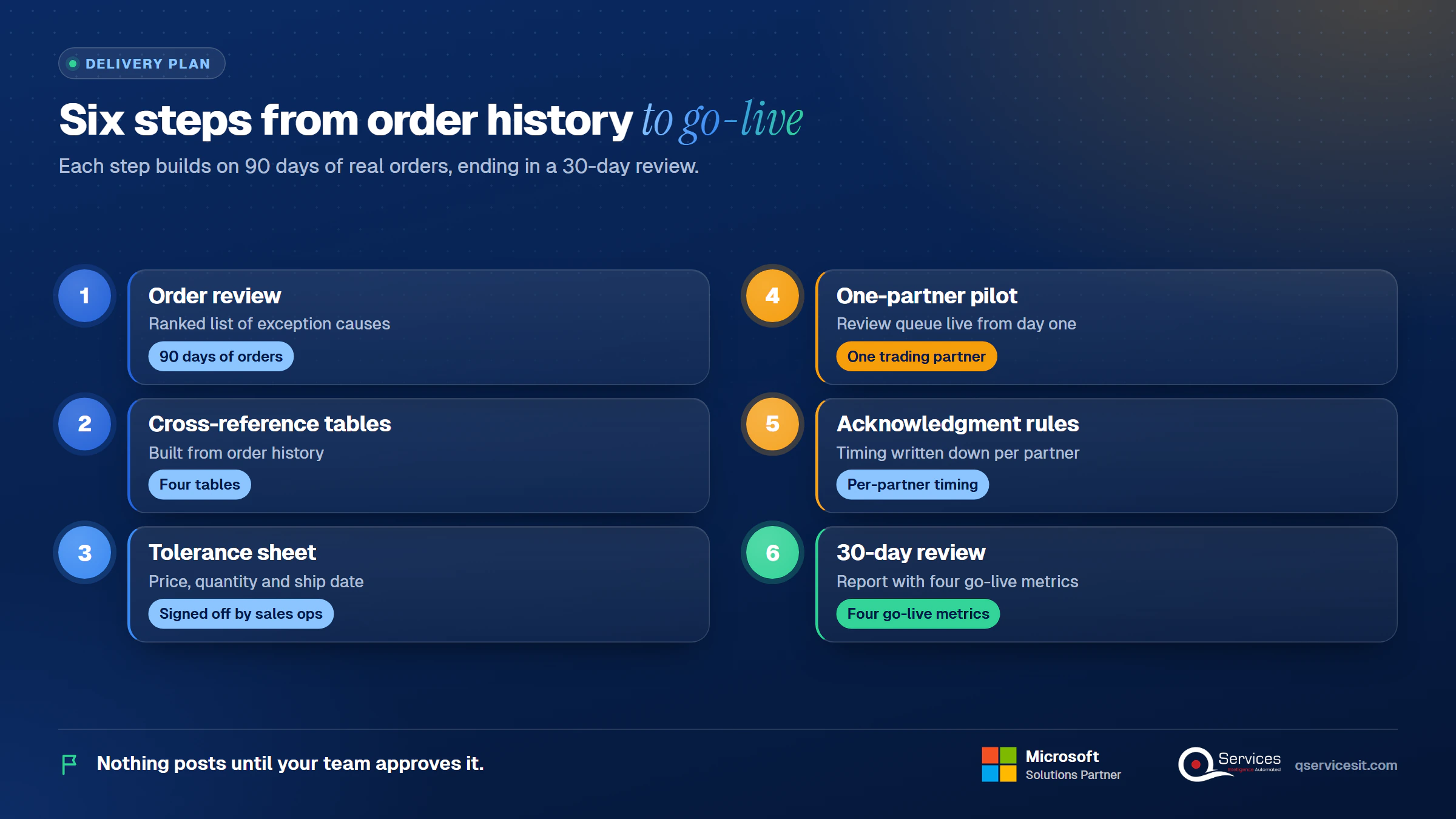
The delivery steps:
- A review of 90 days of orders, to produce a ranked list of exception causes
- The four cross-reference tables, built from that history
- A tolerance sheet for price, quantity and ship date, signed off by sales ops
- A pilot on one trading partner with the review queue live
- Acknowledgment timing rules written down per partner
- A 30-day review report with the four go-live metrics
Implementation Checklist
- Customer GLN or DUNS mapped to a Customer No. for every active partner
- Item Reference exists for every customer SKU on the last 90 days of orders
- Customer UoM codes mapped to BC units with conversion factors
- Every ship-to code matches a Ship-to Address
- Price tolerance written down and approved by sales ops
- Duplicate PO rule defined on PO number plus PO date
- 997 and 855 deadlines recorded from each partner’s guide
- A named person clears the review queue every working day
What should you do first to stop re-keying 850s?
Pilot one trading partner for 30 days, with Check and Review on, and measure touchless order rate, exception rate, order entry time and ship-window misses against your manual baseline. If you’d like a second pair of eyes on your maps and cross-references, .

Written by Rohit Dabra
Co-Founder and CTO, QServices IT Solutions Pvt Ltd
Rohit Dabra is the Co-Founder and Chief Technology Officer at QServices, a software development company focused on building practical digital solutions for businesses. At QServices, Rohit works closely with startups and growing businesses to design and develop web platforms, mobile applications, and scalable cloud systems. He is particularly interested in automation and artificial intelligence, building systems that automate routine tasks for teams and organizations.
ERP integrationEDI mappingBusiness CentralOrder to cash
Talk to Our Experts
Frequently Asked Questions
Related Topics
Next step
Ready to stop re-keying purchase orders?
Talk to our team about an approval-first agent that prepares Business Central sales orders while your people approve every one.


















 Trustpilot5.0★★★★★See reviewsGoodFirms5.0★★★★★45 verified reviews
 G25.0★★★★★See reviewsClutch5.0★★★★★Quality 5.0 · Schedule 4.8
 Google4.7★★★★★Mohali office
 Erik BrownBusiness owner and software engineerClient review
 Zoltan BodnarCFO, Yusen LogisticsGoodFirms
 Ranbeer MakinClientClient review
 Alex VanderElsClientClient review
 Philmore J.ClientClient review
 Michael WilliamsonPresident and CEO, United Way of Southeast LouisianaGoodFirms
 Steven LewisClientClient review
 Brian WallerPresident, Technology Association of IowaGoodFirms





