Is AI safe to use in finance and accounting?
Conditionally. The main AI risks in finance are wrong postings, leaked data, unexplainable decisions, runaway automation and vendor lock-in, and each one can be tested before an agent gets ledger access. A person approves anything that posts money or changes a system.
If you’re a controller weighing ai agent development services for Business Central, this post gives you seven checks. Each has a test, a pass mark and an owner. Is AI safe for finance teams? It is when the agent starts read-only and earns more access through evidence, not through a vendor demo.
Which of the seven risks is your gap?
Walk through the seven checks with our team and see which controls your Business Central setup already has and which it still needs.
Quick Answer AI risks in finance are manageable when every risk has a matching control. Give the agent its own read-only user, route every draft through human approval, cap what it can spend, log each action, test it in a sandbox on historical entries, and keep a kill switch. If a check fails, the agent doesn’t get ledger access.
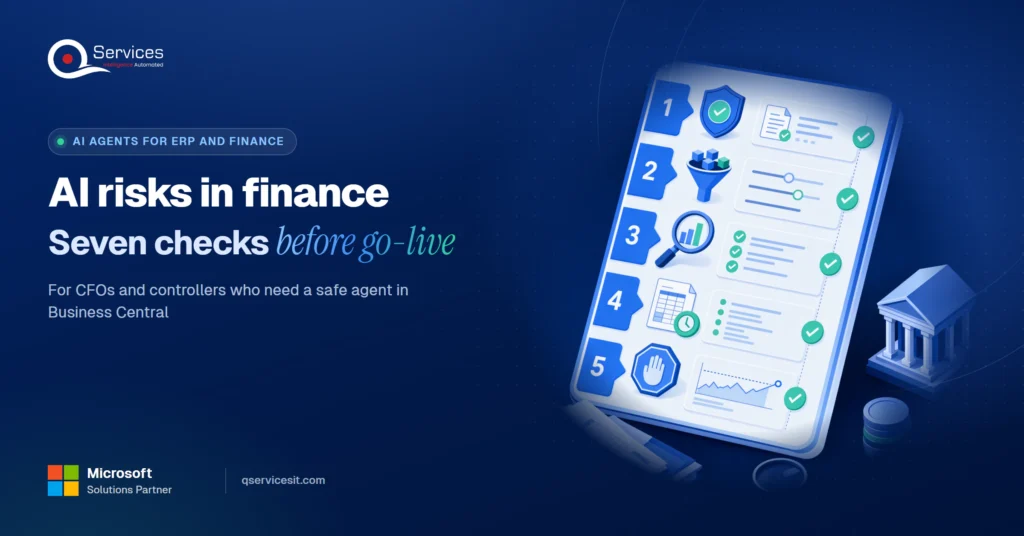
What are the 7 checks that make AI risks in finance testable?
Most lists of AI agent risks in finance stop at naming the risk. A controller needs a test. Each check below pairs a risk with a Business Central control, a pass/fail threshold and one named owner.
The thresholds are our starting points and are illustrative. Tune them to your own risk appetite and your auditor’s view.
The QServices Framework Approval-First Control = Scope → Limit → Prove → Log → Stop
The order matters. You can’t limit an agent whose scope is still open, and you shouldn’t test accuracy before limits exist. Logging comes before the stop switch because a kill switch is only useful if you can see what to stop.
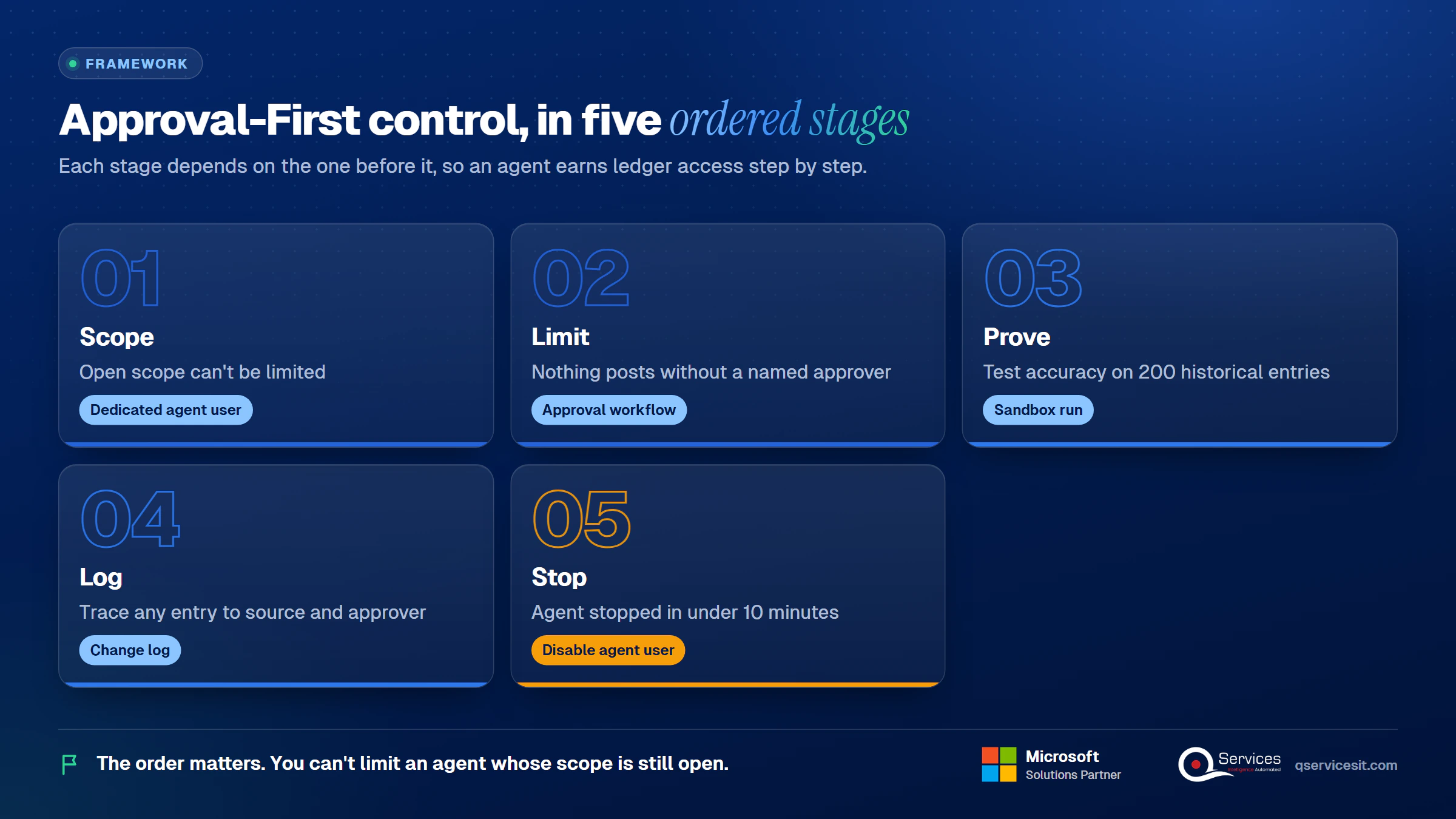
In short: Safe agent = Scope + Limit + Prove + Log + Stop. We reuse those five words through the rest of this post.
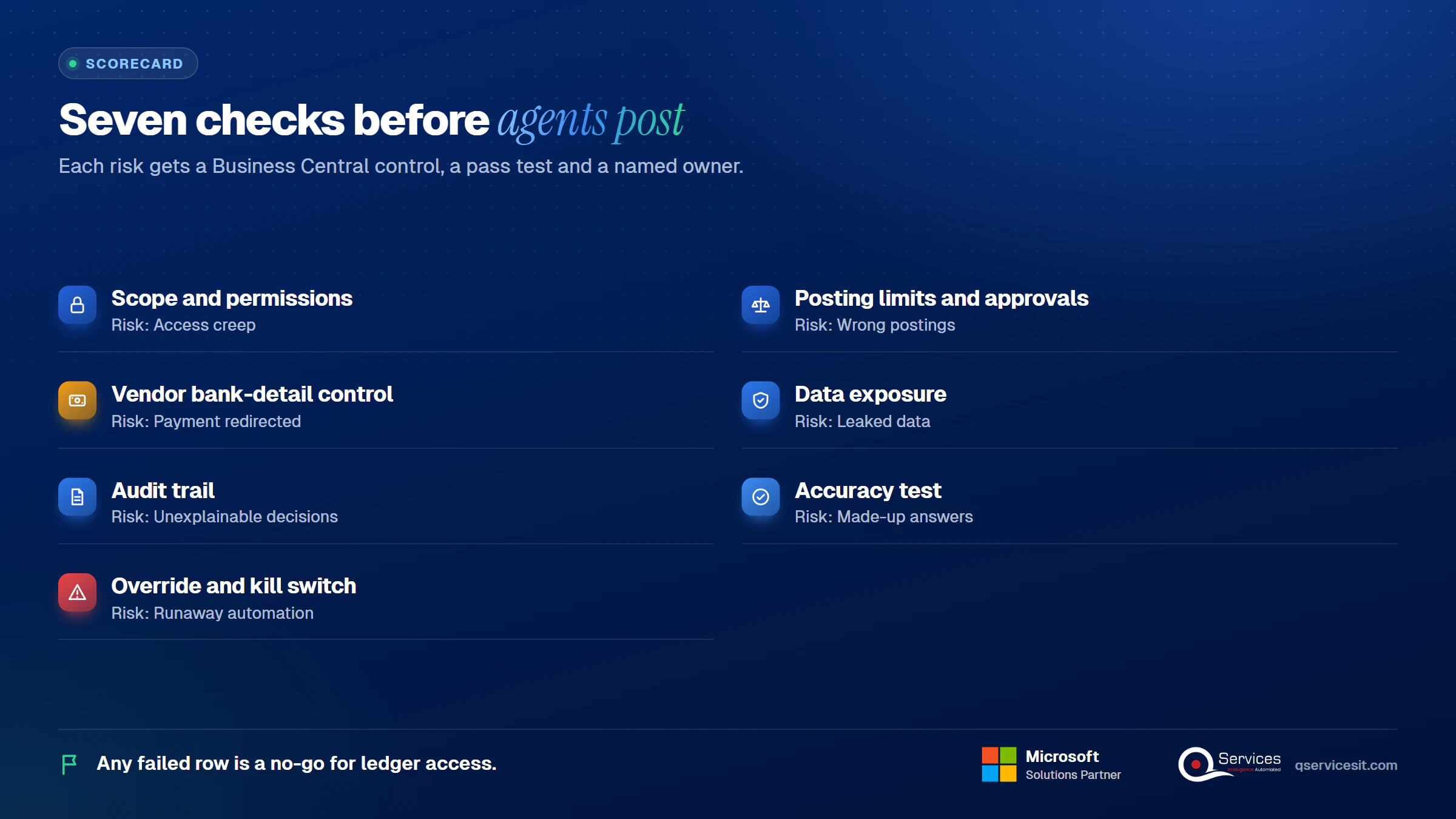
Which 7 checks go in the go/no-go scorecard?
This is the scorecard a CFO can sign. Any row that fails is a no-go for ledger access, though not for read-only use.
| Check |
Risk |
Business Central control |
Pass test |
Owner |
| 1. Scope and permissions |
Access creep |
Dedicated agent user, least-privilege permission set |
Agent can’t open any page outside its approved list |
IT admin |
| 2. Posting limits and approvals |
Wrong postings |
Journal batches left unposted, approval workflow, dimension validation |
0 entries posted without a named approver |
Controller |
| 3. Vendor bank-detail control |
Payment redirected |
Agent blocked from bank account fields, callback before any change |
100% of changes verified by callback |
AP lead |
| 4. Data exposure |
Leaked data |
Tenant boundary, data movement setting reviewed |
Signed data map, no unapproved data movement |
IT security lead |
| 5. Audit trail |
Unexplainable decisions |
Change log, agent user on every entry |
Any entry traced to source and approver in under 5 minutes |
Internal audit |
| 6. Accuracy test |
Made-up answers |
Sandbox run on historical entries |
Error rate at or under 2% on 200 entries |
Controller |
| 7. Override and kill switch |
Runaway automation |
Disable agent user, revoke permission set |
Agent stopped in under 10 minutes in a drill |
Finance systems owner |
Which tasks belong in read-only, draft, post-with-approval or autonomous tiers?
Think of four tiers. An agent moves up only when the checks above pass for the tier it sits in.
| Tier |
Typical Business Central tasks |
Honest trade-off |
| Read-only |
Answer aging questions, flag unmatched receipts, summarise variances |
Slowest payoff, because people still key everything |
| Draft |
Fill journal lines, prepare accrual journals, propose bank reconciliation matches |
Review time moves to the controller, and 200 lines is still work |
| Post with approval |
Release a journal after a named approver signs off |
Adds an approval queue that can bottleneck month-end |
| Autonomous |
Nothing that moves money or inventory value |
Faster, but one wrong rule repeats at machine speed |
Our view: stay at Draft for the first 60 days, and don’t use the autonomous tier for anything that posts. For the wider governance model, read why human-in-the-loop is non-negotiable for enterprise AI agents.
Key Insight An approval is only a control if the approver sees the source document and knows what to check. A rubber-stamp queue gives you a log of clicks, not assurance.
Risks 1 and 2: how do wrong postings and made-up answers happen?
Wrong postings come from an agent that reads a document correctly but applies the wrong account, dimension or period. Made-up answers come from a model that fills a gap with something plausible. Both are testable, and both belong to the Limit and Prove stages.
How does an agent miscode a $48,000 purchase, and which check catches it?
This example is illustrative. An invoice agent reads a supplier invoice for a $48,000 machine fixture and codes it to Repairs and Maintenance, because the description says install and the vendor usually bills service.
Check 2 catches it three ways:
- Account-category rule: any line above $5,000 coded to an expense account in a listed category goes to a review queue.
- Unposted batch: the agent only creates a draft, so nothing hits the ledger yet.
- Named approver: the controller sees the invoice image next to the coding and moves it to Machinery and Equipment.
If it had posted, the correcting entry would be a debit to Machinery and Equipment for $48,000 and a credit to Repairs and Maintenance for $48,000, plus a depreciation start date. Caught at draft stage, there’s no correction at all.
Real-World Scenario A typical case we see: a controller at a discrete manufacturer lets an agent propose month-end inventory valuation adjustments. The agent reads a BOM with an outdated routing and rolls standard cost up 6% low. On 1,200 units at $85 that is $6,120 of understated cost of goods sold, repeated every month. In the naive setup it posts directly. Under the Limit stage, the adjustment lands in an unposted journal batch with a variance threshold, so the controller sees the gap before close.
Why do AI agents invent answers, and how do you test accuracy before go-live?
Language models can state wrong numbers with full confidence. The NIST AI RMF and its Generative AI Profile call this confabulation and list it among the risks specific to generative AI. Academic benchmarks of multi-step financial arithmetic also show models getting sums wrong when they calculate unaided.
The fix is to ground the agent in ledger data and test it. Worked example 3, illustrative:
- Sandbox: copy production into a Business Central sandbox environment.
- Test set: the agent drafts accruals for 200 historical entries from the last six closes.
- Compare: each draft is matched against what was actually posted and approved.
- Accepted error rate: 2% (4 of 200), with zero errors above $10,000.
- Result and sign-off: 3 errors (1.5%), none above $2,400. The controller signs the result and it goes into the audit file.
Risks 3 and 4: how does data exposure or access creep happen in Business Central?
Data exposure is what the agent can see. Access creep is what it can do after a few months of small permission requests. Scope is the first stage because both start there.
What does read-only AI access in Business Central look like?
Read-only AI access in Business Central means a dedicated agent user with a permission set that grants read on the tables it needs and nothing else. Never run an agent under a shared admin login. Business Central Copilot and agents read data through standard access, so they see what the operating user sees, and scheduled agent tasks run with the overlap of the scheduler’s and the agent’s permissions.
Business Central agents run on the online version only. The Payables Agent has its own user identity, so its actions are attributed to it in audit trails. The Business Central MCP server is read-only by default. Check the "Allow data movement" setting too, because it has been on by default since update 25.0 and data movement depends on your region.
| Agent stage |
G/L |
AP |
AR |
Inventory |
Bank |
| Days 1-30: read-only |
Read |
Read |
Read |
Read |
Read, no writes |
| Days 31-60: draft |
Insert in unposted batches |
Draft purchase invoices |
Read |
Read |
Match proposals only |
| Days 61-90: limited posting |
Post only after approval |
Post only after approval |
Read |
Read |
No write to bank accounts |
For the security layer underneath, see our Azure OpenAI security controls to set before go-live. For rollout rules on Microsoft’s assistants, see the Copilot deployment governance checklist.
On the Microsoft Entra side, Entra Agent ID is the identity layer for Agent 365. Every agent identity needs a sponsor, so give each agent one accountable person, and add a manager where your setup allows it. Review the permission set every quarter.
How should a vendor bank-detail change email be handled?
An email arrives saying a supplier’s bank details changed. This is the classic payment-redirect trick, and it is the scenario the agent must never be able to act on. Illustrative before and after:
Before: the agent reads the email, updates the vendor bank account field, and the next payment run sends $63,500 to the new account.
After:
- The agent can only flag the email. The bank account fields are outside its permission set.
- A person calls the supplier on the number already in the vendor master, not the number in the email.
- A second person approves the change in Business Central.
- The change log records who changed what and when.
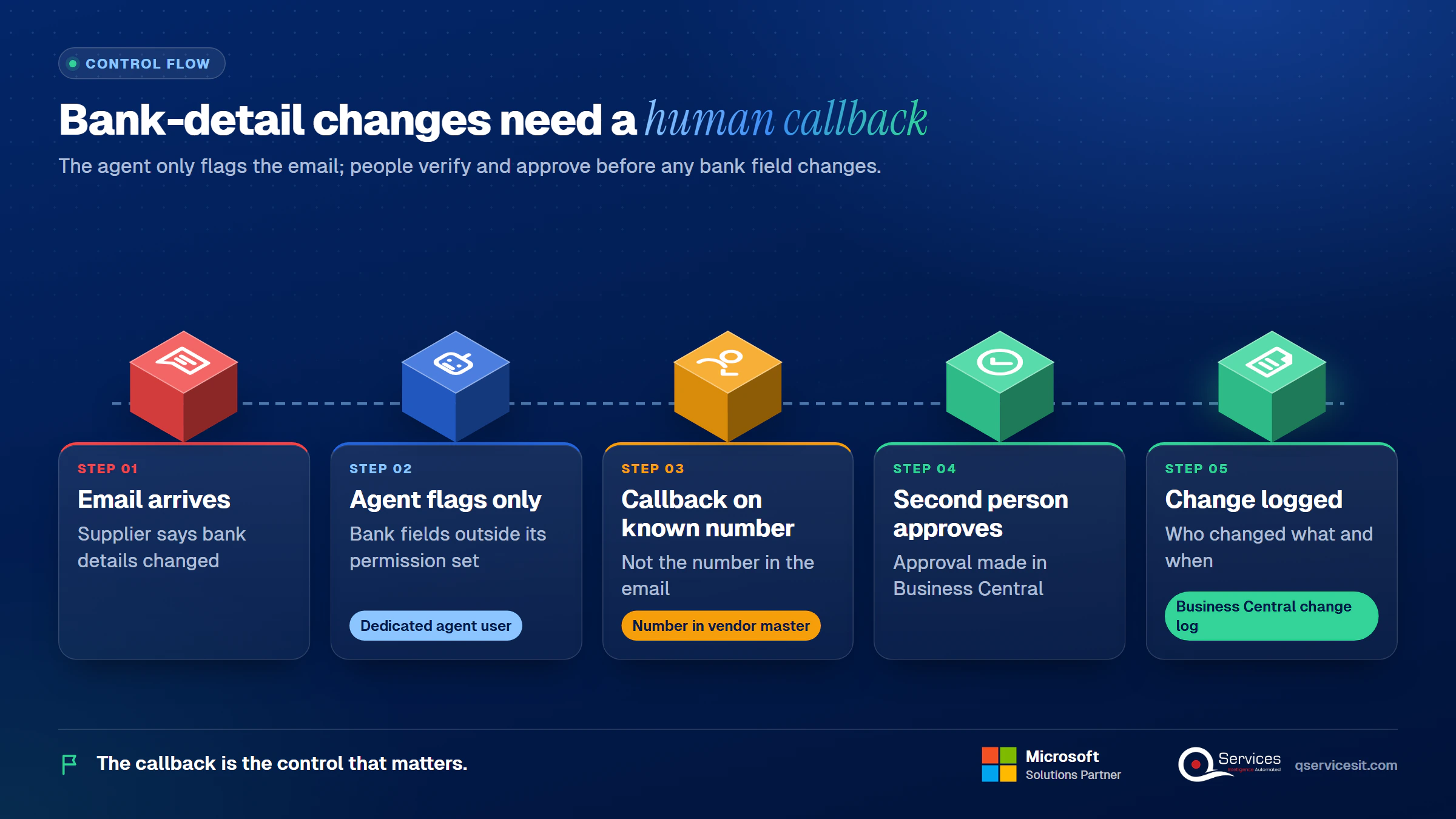
The callback is the control that matters. A deepfake or a spoofed mailbox can fool a reader, but it can’t answer a phone number you already hold.
How to control AI agents in ERP when intercompany and period-close are involved?
How to control AI agents in ERP gets harder across entities. Keep each agent scoped to one company, require an approver in the receiving entity for intercompany lines, and freeze agent drafting once the period is locked. The three-way match on purchase receipts stays with the system, not the agent: the agent can explain a mismatch but it can’t override one.
Risk 5: how do AI costs outrun value, and what do spending limits do?
Agents bill by use, and use is hard to predict. Identical tasks can burn very different amounts of compute, so a loop that retries a bad invoice 40 times costs money and returns nothing.
What do AI agent spending limits look like for a finance team?
AI agent spending limits for a finance team work at three levels: per task, per agent per month, and a hard stop. The Payables Agent’s billing example is 50 credits per invoice plus 5 per line, as of November 2026, so confirm it on Microsoft’s current pricing page. Illustrative arithmetic: 400 invoices a month at 4 lines each is 400 x (50 + 20) = 28,000 credits.
Set a budget slightly above that, with an alert at 80%. Microsoft announced Agent 365 spending limits with a hard cut-off, and the feature was in preview when we checked, so word it as announced, not guaranteed.
Key Insight Cap the cost per invoice, not just the monthly total. A monthly cap tells you something went wrong after the money is gone, and a per-task cap stops the retry loop on invoice number one.
How do you decide whether the agent pays for itself?
Compare the credits spent to the minutes saved, and track the exceptions. If reviewers reject more than 1 in 10 drafts, the review time may cost more than the agent saves. Our AI in accounts receivable guide covers what works and what’s hype on the receivables side.
Where would a wrong posting hurt most?
Pick one ledger process and talk it through with us. We’ll show how approval-first agents keep a person in charge of anything that posts money.
Risks 6 and 7: what audit trail gaps and lock-in should a controller expect?
Audit trail gaps mean you can’t explain why an entry exists. Lock-in means you can’t leave without rebuilding the controls. Both surface late, usually during an audit or a contract renewal.
What audit trail should an AI agent keep?
An AI audit trail should let you trace any entry from the ledger back to its source in minutes. Keep these five items for every action:
- The source document or data the agent read
- The rule or prompt version it applied
- The draft it produced
- The named human who approved, changed or rejected it
- The timestamp and the agent user that acted
Business Central’s change log and posted-entry traceability cover the last three. The first two need to be captured and kept by the agent setup. Entra also keeps sign-in and audit logs for agents, which gives security a second record.
How do SOX, NIST AI RMF, ISO/IEC 42001 and the EU AI Act apply to a controller?
None of these gives you a Business Central setting. They tell you what to be able to show.
- SOX internal controls: an agent that touches financial reporting is part of your controls. Segregation of duties and IT general controls apply to it as they do to any user or system, so one agent shouldn’t configure, execute and approve the same transaction.
- NIST AI RMF: a voluntary framework for governing and measuring AI risk. Use it as the vocabulary for your risk register.
- ISO/IEC 42001: a voluntary standard for an AI management system. It’s what you would certify against, if you chose to.
- EU AI Act: a regulation with risk-based obligations. Whether your use falls in scope depends on your entity and use case, so get legal advice before you assume.
Standards & References
How do you limit vendor lock-in with AI agents?
With an AI agent inside an ERP, lock-in moves from code to prompts, models and governance layers. Ask for the right to export your prompts, rules and logs in a usable format, and for termination rights if the vendor changes the model materially. Keep the controls in your own tenant so they survive a vendor swap.
What should a controller ask a vendor before go-live?
Here are the questions to ask an AI vendor before go-live. Ask them in writing, and keep the answers in the audit file.
- What data can the agent reach, and is it retained or used for training?
- Which actions can it take without human approval?
- Who in your organisation is accountable when it’s wrong?
- What’s the maximum credible loss, and how fast would we detect it?
- Can we test it in a sandbox before activation?
- What audit-log evidence can you give us, and for how long?
- What are the export and exit terms?
How do you stop an AI agent from posting wrong entries?
You stop it with three layers: the draft state, the approval, and the kill switch. If it misbehaves, disable the agent user, revoke its permission set and pause the Entra agent identity. Drill this once before go-live and time it. The pass mark is under 10 minutes.
How do you roll out in 30, 60 and 90 days?
This is the rollout we use, and the days are a guide, not a promise.
- Days 1-30, read-only: answer questions and flag exceptions. Pass checks 1, 4 and 5.
- Days 31-60, draft: unposted journals only. Pass checks 2, 3 and 6.
- Days 61-90, limited posting: post after named approval, one workflow, one entity. Pass check 7 with a live drill.
For receipts and bank work, see automated bank reconciliation in Business Central. For what to build first, see Copilot Studio agents for finance and operations.
How does QServices approach AI risk management in ERP?
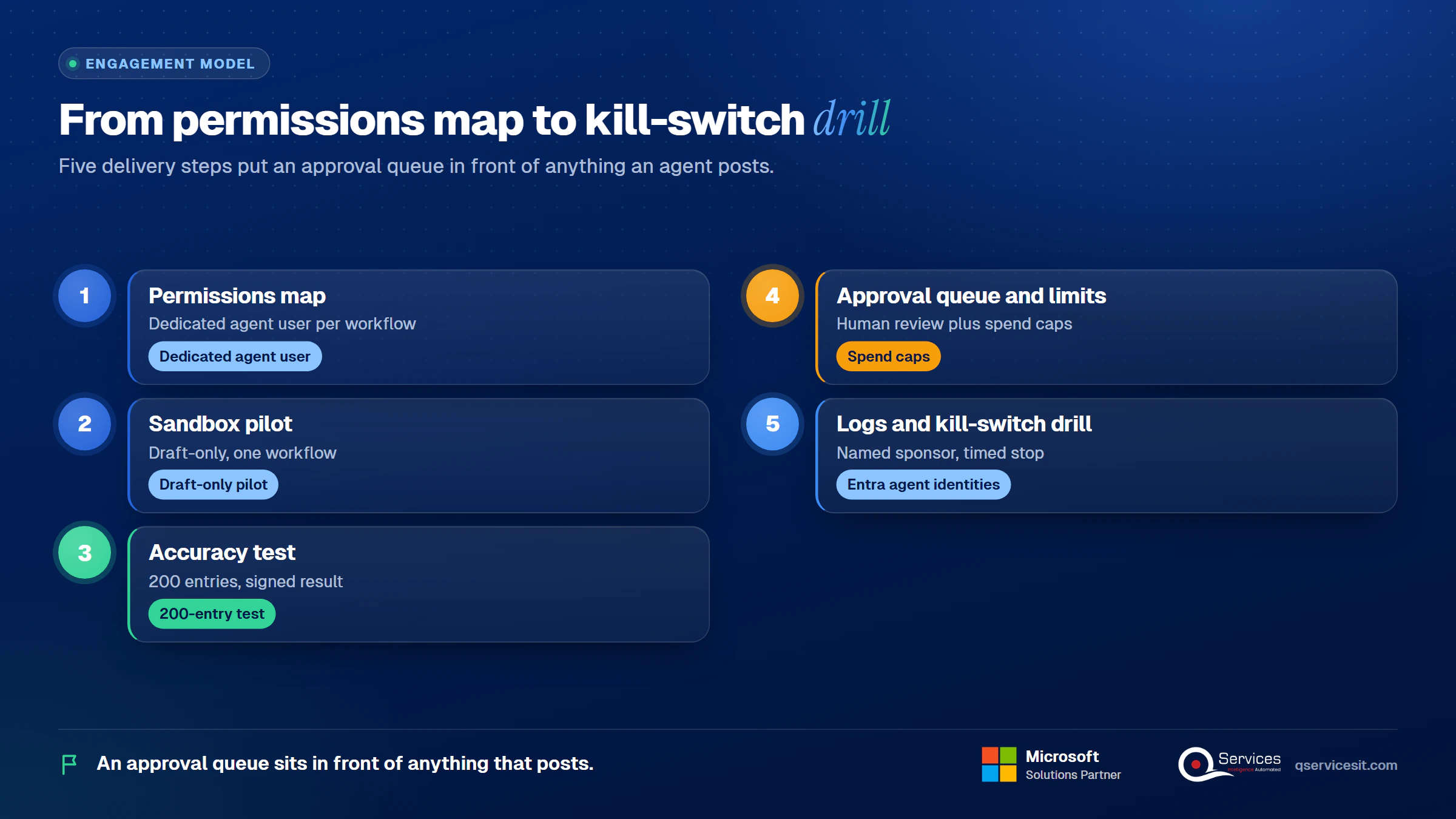
We start at Scope, because every other control depends on it. Agents run in the client’s own Azure tenant, and an approval queue sits in front of anything that posts, with human in the loop review on every draft. The same team builds and runs it.
- A permissions map and a dedicated agent user for each workflow
- A draft-only pilot on one workflow in a sandbox
- A 200-entry accuracy test with a signed result
- An approval queue with limits and spend caps
- Action logs and Entra agent identities tied to a named sponsor
- A kill-switch drill with a timed result
Implementation Checklist
- Agent runs under its own dedicated Business Central user
- Permission set grants read only on the tables it needs
- Journals created by the agent stay unposted until approved
- Vendor bank account fields are outside the agent’s permissions
- Every agent has a named sponsor in Entra Agent ID
- Per-task and monthly spend caps are set with an 80% alert
- A 200-entry sandbox test is signed off by the controller
- Kill-switch drill completed in under 10 minutes
What should you do first to test AI before it posts?
Pilot one workflow, month-end accruals in a sandbox, and measure error rate, time to approve and exceptions per 100 entries before anything goes near production. A person approves every entry it drafts. Then and we’ll run the seven checks against your setup.

Written by Rohit Dabra
Co-Founder and CTO, QServices IT Solutions Pvt Ltd
Rohit Dabra is the Co-Founder and Chief Technology Officer at QServices, a software development company focused on building practical digital solutions for businesses. At QServices, Rohit works closely with startups and growing businesses to design and develop web platforms, mobile applications, and scalable cloud systems. He is particularly interested in automation and artificial intelligence, building systems that automate routine tasks for teams and organizations.
ERP integrationFinance automationBusiness CentralAI agent governance
Talk to Our Experts
Frequently Asked Questions
Related Topics
Next step
Ready to test your controls before go-live?
Bring your approval steps and access list. We’ll map them to the seven checks and show where a person should sign off on every posting.














 Trustpilot5.0★★★★★See reviewsGoodFirms5.0★★★★★45 verified reviews
 G25.0★★★★★See reviewsClutch5.0★★★★★Quality 5.0 · Schedule 4.8
 Google4.7★★★★★Mohali office
 Erik BrownBusiness owner and software engineerClient review
 Zoltan BodnarCFO, Yusen LogisticsGoodFirms
 Ranbeer MakinClientClient review
 Alex VanderElsClientClient review
 Philmore J.ClientClient review
 Michael WilliamsonPresident and CEO, United Way of Southeast LouisianaGoodFirms
 Steven LewisClientClient review
 Brian WallerPresident, Technology Association of IowaGoodFirms