What is the allowance for doubtful accounts, and how do you calculate it?
The allowance for doubtful accounts is a contra-asset that reduces gross receivables to the amount you expect to collect. To calculate it, apply a loss rate to each bucket of your accounts receivable aging report, add the buckets up, then book only the difference from the balance already on the books.
This post takes a controller from the Business Central aging report to a number the auditor will accept. If you want the surrounding process, our accounts receivable automation work covers it. We also write the reserve entry the way we write every entry: an agent prepares it, a person approves it, and nothing posts without that approval.
Is your year-end reserve built on a spreadsheet?
Walk through how an agent can pull your aging buckets from the ERP and prepare the reserve calculation, while your team reviews and books it.
Want a second pair of eyes on your reserve before year-end? and we will walk through your aging with you.
Quick Answer The allowance for doubtful accounts is the contra-asset that cuts gross receivables to expected collections. Calculate it by grouping your aging report into buckets, multiplying each bucket by a loss rate built from write-off history and adjusted for current conditions, summing the results, and booking the difference from the existing balance.
What is the allowance for doubtful accounts, and why does it matter for distributors?
The allowance sits on the balance sheet as a credit that nets against receivables. Gross AR less the allowance equals net AR, which is the figure you expect to turn into cash. A distributor feels this more than most: thin margins, high invoice volume, many small customers, net 30 to 60 terms, and a steady flow of credit memos and rebates.
When the reserve is too low, profit is overstated until a big write-off lands. When it is too high, you hide earnings and invite a hard conversation with the auditor. This is the bad debt reserve most people mean, and it is built to be estimated, not guessed.
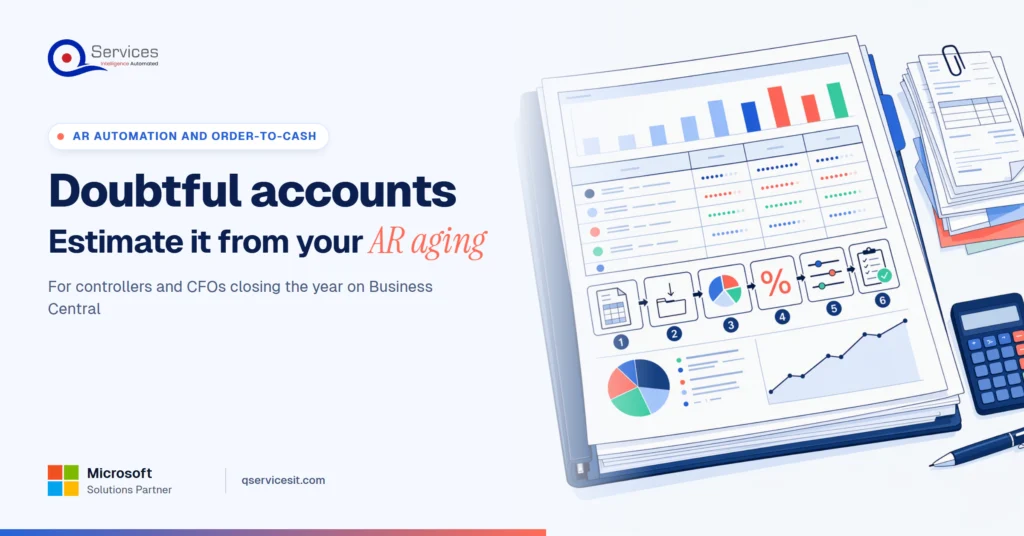
The QServices Framework Reserve Build = Extract → Segment → Rate → Adjust → Approve → Book
Pull the aging first, because every later stage depends on clean buckets. Rates come before adjustments, and a person approves before anything posts.
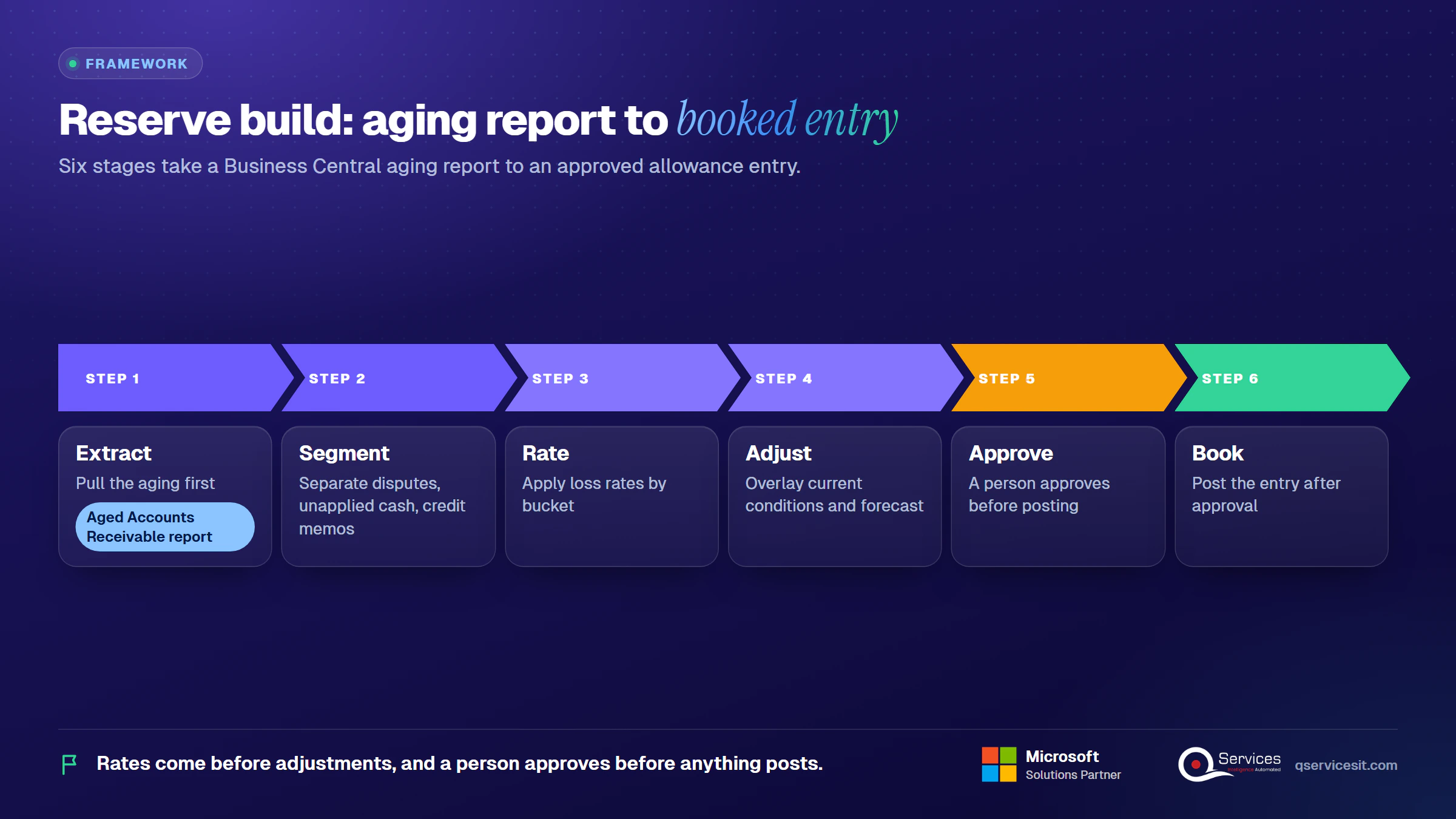
We reuse these six stage names through the rest of the post.
What is the balance-sheet presentation?
Gross AR shows first. The allowance appears beneath it as a deduction, and net AR is the result. Writing off a specific invoice debits the allowance and credits AR, so net AR does not move at that moment. Only the expense entry moves net AR and profit.
Why is a direct write-off not enough?
Under GAAP the direct write-off method breaks matching, because the expense lands long after the sale. It is, however, the method federal tax uses: a book reserve is not deductible, and tax follows actual write-offs. That creates a book-tax difference. Confirm the deferred tax treatment with your tax adviser.
Does CECL apply to trade receivables?
Yes. Trade receivables from revenue contracts are in scope of ASC 326-20, the CECL model. CECL replaced the incurred-loss approach with expected credit losses, so the allowance for credit losses now reflects what you expect over the life of the receivable, not only losses that have already happened.
The standard does not prescribe a method. For trade receivables, the common approach is an aging schedule with historical loss rates, sometimes called a provision matrix. Historical rates are then assessed against current conditions and reasonable and supportable forecasts.
What changed with ASU 2025-05?
ASU 2025-05, issued July 30, 2025, gives all entities a practical expedient for current receivables from revenue contracts: assume balance-sheet-date conditions persist for the remaining life of the receivable. Non-public entities may also consider cash collected after the balance sheet date, but only if they use the expedient. It applies to annual periods beginning after December 15, 2025, with early adoption allowed. For a calendar-year company, that generally makes December 2026 the first year. We did not work from the ASU text itself, so your controller should confirm the effective date and elections with the auditor.
What does CECL for trade receivables under ASC 326 look like in practice?
In practice, CECL for trade receivables under ASC 326 means documented loss rates per bucket, a written view of current conditions, and a forecast overlay you can defend. The codification includes an illustrative aging example (ASC 326-20-55-37 to 55-40) that you can mirror. Use your own history for the rates, because textbook rates are not yours.
Which allowance for doubtful accounts calculation method fits a distributor?
Five methods are in use. Here is how they compare for a distributor.
| Method |
Best for |
Data needed |
Accuracy |
Audit friendliness |
| Percentage of sales |
Quick, stable businesses |
Sales and past bad debt |
Low |
Weak, ignores AR quality |
| Aging method |
Distributors with many invoices |
Aging report, write-off history |
Good |
Strong |
| Specific identification |
Large or disputed accounts |
Account-level facts |
High for that account |
Strong, needs evidence |
| Risk classification |
Customers with credit scores |
Scores or risk tiers |
Good |
Medium, needs rating support |
| Roll-rate |
High volume, clean history |
Bucket-to-bucket movement |
High |
Medium, more modeling |
Our recommendation is the aging method with specific reserves for large disputed accounts. The honest downside: it takes more effort than a flat percentage. You need clean aging data, a rate table you refresh, and written support each quarter. The extra effort is what the auditor pays attention to.
How do you calculate the allowance using the aging method, step by step?
This is the aging method allowance from the Business Central aged receivables report to a booked number. It is also the answer to how to calculate allowance for doubtful accounts using aging.
- Run the aging as of period end. In Business Central, run the Aged Accounts Receivable report for the last day of the period.
- Age by due date, not posting date. Past-due days drive risk. Aging from the invoice date inflates the older buckets on net 60 terms.
- Set the buckets. Use current, 1-30, 31-60, 61-90 and 90+ days past due.
- Carve out disputes, unapplied cash and credit memos. Reserve disputed invoices separately. Net unapplied payments and credit memos against the right customers first, or you will reserve against money you already hold.
- Derive loss rates from 3 to 5 years of write-off history by bucket.
- Adjust for current conditions and forecast. Document each overlay with a number.
- Apply the rates. Multiply each bucket by its rate and add the specific reserves.
- Compare to the booked balance. If the allowance has a credit balance, book the difference. If it has a debit balance, add it to the required amount.
For the reading side, see our guide to AR aging report buckets.
What does a full worked example look like?
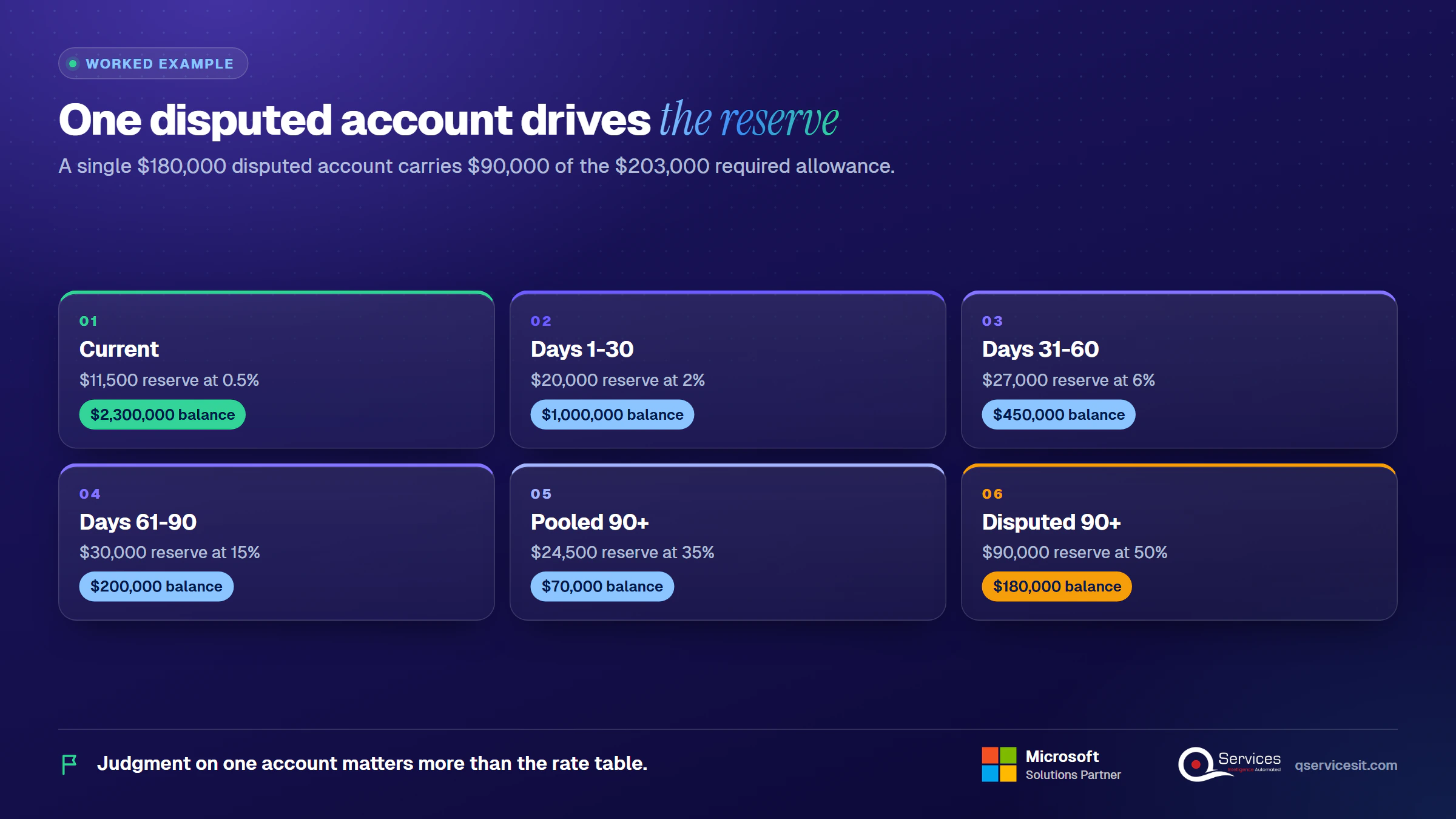
We will use one distributor throughout: $4.2M of gross AR, annual credit sales of $36.5M, and a $180K disputed account sitting in the 90+ bucket.
What is the allowance for doubtful accounts calculation on $4.2M?
The $180K dispute comes out of the 90+ pool and is reserved at 50%, based on the evidence on file.
| Bucket |
Balance |
Loss rate |
Reserve |
| Current |
$2,300,000 |
0.5% |
$11,500 |
| 1-30 days |
$1,000,000 |
2% |
$20,000 |
| 31-60 days |
$450,000 |
6% |
$27,000 |
| 61-90 days |
$200,000 |
15% |
$30,000 |
| 90+ (pooled) |
$70,000 |
35% |
$24,500 |
| 90+ (disputed, specific) |
$180,000 |
50% |
$90,000 |
| Total |
$4,200,000 |
4.83% |
$203,000 |
The required allowance is $203,000. The balance before true-up is a $150,000 credit, so the true-up is $53,000.
What are the journal entries for the allowance for doubtful accounts?
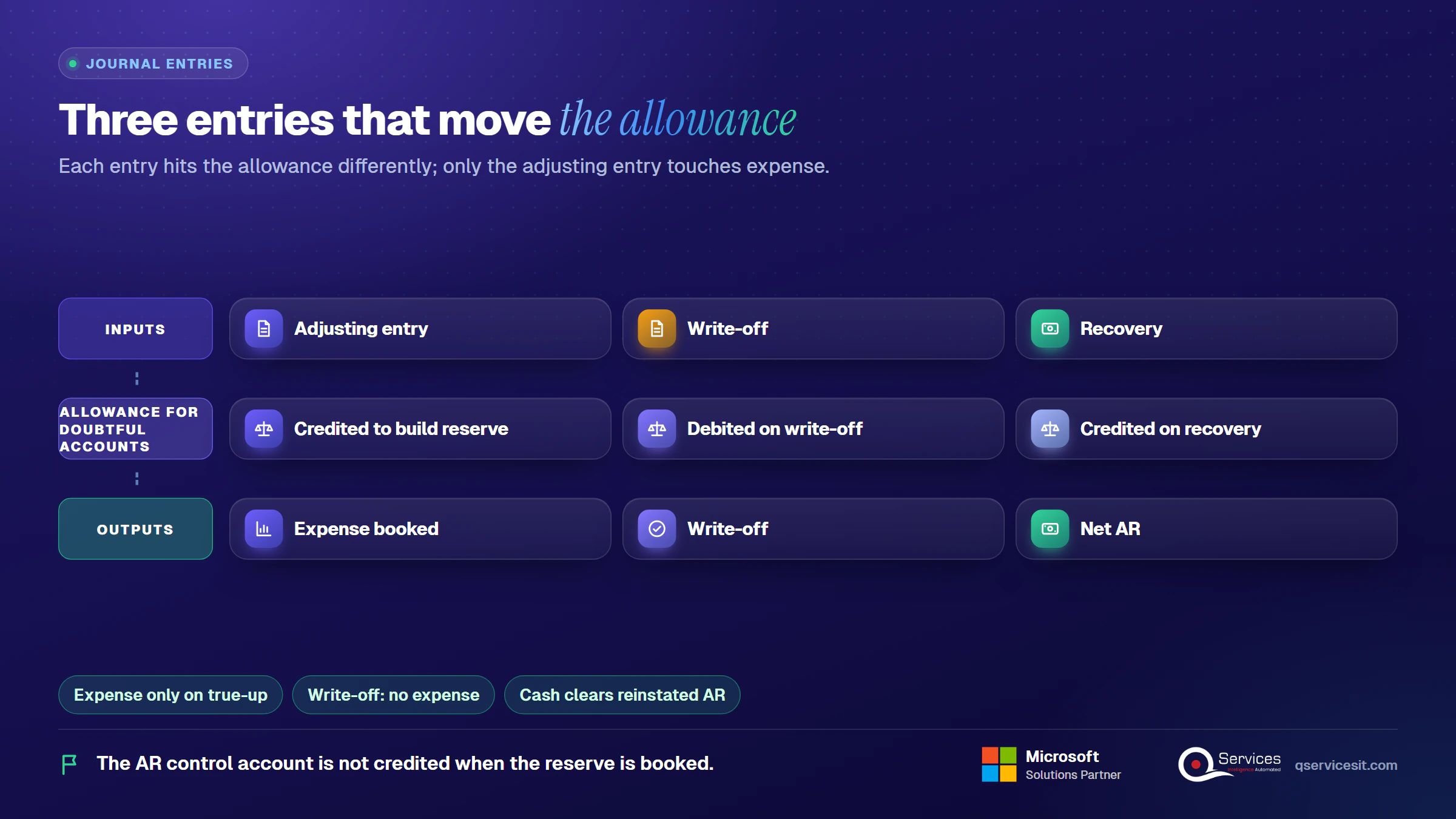
The journal entry for allowance for doubtful accounts has three common forms:
- Adjusting entry: debit Bad Debt Expense $53,000, credit Allowance for Doubtful Accounts $53,000.
- Write-off: debit Allowance, credit Accounts Receivable, with no expense hit.
- Recovery: reinstate the receivable (debit AR, credit Allowance), then record the cash receipt (debit Cash, credit AR).
The AR control account is not credited when the reserve is booked. Net AR after the true-up is $4,200,000 less $203,000, or $3,997,000.
How does the reserve affect DSO and what is the sensitivity?
DSO is usually computed on gross AR, so the reserve does not change it. On $36.5M of annual credit sales, $4.2M of AR is 42 days. For more on that metric, see our post on days sales outstanding.
Sensitivity: one point on the pooled 90+ rate moves the reserve by $700. If the disputed account were pooled instead of reserved by itself, one point would move it by $2,500. Ten points on the specific reserve moves it by $18,000. The judgment on that one account matters far more than the rate table.
What do the adequacy ratios say?
Assume $110,000 of write-offs this year. Expense for the year would be $163,000, which is $110,000 booked earlier plus the $53,000 true-up. Bad debt expense to write-offs is 1.48. Opening allowance to write-offs is 1.36. We offer no benchmark for either. Track your own over time and ask why a ratio moved.
How do you set loss rates per bucket?
Start with history. For each past year-end, take the balance in a bucket and divide the amount later written off from that balance by the starting balance. Then average across years. This is the loss rate per aging bucket that your provision matrix needs.
What does the 90+ derivation look like?
| Year-end |
90+ balance |
Later written off |
Loss rate |
| 2022 |
$200,000 |
$74,000 |
37% |
| 2023 |
$220,000 |
$70,400 |
32% |
| 2024 |
$240,000 |
$84,000 |
35% |
| 2025 |
$260,000 |
$91,000 |
35% |
Total written off is $319,400 on $920,000, or 34.7%, rounded to 35%. The simple average of the four yearly rates is 34.75%, so both land in the same place.
What is the roll-rate alternative?
Roll-rate tracks how much of each bucket moves into the next worse bucket in a month, then chains those percentages to a final loss. It reacts faster to deterioration but needs monthly snapshots.
How do you handle adjusting allowance for current conditions?
Adjusting allowance for current conditions means adding a documented overlay to the historical rate. Say a freight slowdown hits your largest customer segment: add 3 points to the 61-90 bucket, taking 15% to 18%, or $6,000 more on $200,000. If you hold conditions constant after the balance-sheet date, write that down too.
Key Insight In this example, a 10-point change on one disputed $180K account moves the reserve by $18,000, while a full point on the pooled 90+ bucket moves it by $700. Review the large accounts by hand before debating the rate table.
Real-World Scenario A typical case we see: a distributor’s controller applies a flat 2% to $4.2M of AR and books $84,000, because that is what last year’s number was. Meanwhile $250,000 sits past 90 days, including one $180,000 disputed account the sales rep says will "probably pay." The flat rate would under-reserve by roughly $119,000 against our $203,000 estimate. The Segment and Rate stages catch it, because the dispute is pulled out and reserved on its own evidence.
Pulling buckets by hand every quarter?
See how an agent reads the aging from Business Central, applies your loss rates and hands you a draft for review. Nothing posts until you approve.
What does Business Central give you, and what stays manual?
The Aged Accounts Receivable report (report 4402, Excel layout) groups customer ledger entries by an "Aged as of" date and a period length you set on the request page. Microsoft describes it as a gauge of collection reliability. It does not compute an allowance. Customer Ledger Entries holds the open items behind it, and Customer Statistics helps with account-level review. We will confirm the exact page names on a live tenant before publishing, so check them against your own version.
What you configure: payment terms, reminders, the allowance account in the General Ledger, and Customer Posting Groups. What stays manual: the loss rates, the overlays, and the approval. Business Central does not calculate a CECL reserve by itself. The monthly accrual is usually a recurring general journal that a person reviews. Write-offs go through a credit memo or a posting through a journal.
Standards & References
- PCAOB AS 2501: how auditors test accounting estimates like the allowance
- Business Central receivables: Microsoft’s documentation on receivables and aging in Business Central
Other ERPs differ. Dynamics GP ages against due date or document date per Receivables Management setup, and unapplied credits reduce the oldest bucket first. Check the setup before you trust the buckets.
How do AI agents help with the allowance for doubtful accounts?
An agent in your ERP can read the aging every night. It flags buckets whose rates drift from history, drafts the journal entry, assembles the support pack, and ranks collection calls by exposure. Approval-first reserve calculation is our design position: the agent prepares, a person books. Nothing posts without that person.
That is a design choice, not a cited standard. Most of the value is time: the Controller reviews a finished calculation instead of building one at 11 p.m. on the last day of the quarter.
What belongs on the month-end close and audit checklists?
Use this close checklist each month. It pairs well with our accounts receivable reconciliation routine.
- Cut off data at period end
- Reconcile the aging total to the GL control account
- Review disputes and unapplied cash
- Refresh rates at least quarterly
- Book the entry after approval
- Document the memo
- Retain evidence
What do auditors test for the allowance at year-end?
Auditors test your process, not just your arithmetic. Expect these requests:
- The aging as of year-end, reconciled to the GL
- The rate derivation and its source data
- Documentation of every overlay
- A hindsight comparison of last year’s allowance with subsequent write-offs
- Support for each specific reserve
- Evidence of review and approval
What mistakes make the allowance wrong?
- Aging by invoice date. On net 60 terms, this over-ages healthy invoices.
- Ignoring unapplied cash. You reserve against money already received. See unapplied cash.
- Double-counting disputes. A disputed invoice sits in a bucket and in a specific reserve.
- Leaving rates unchanged for years. Customers and conditions move.
- Using a flat percentage. It hides the old buckets.
- Ignoring credit memos. They reduce the balance you are reserving.
- Mixing bad debt expense with the allowance. One is a P&L line, the other a balance-sheet account.
- Treating the book allowance as tax-deductible. Tax follows actual write-offs.
How does QServices approach the allowance for doubtful accounts?
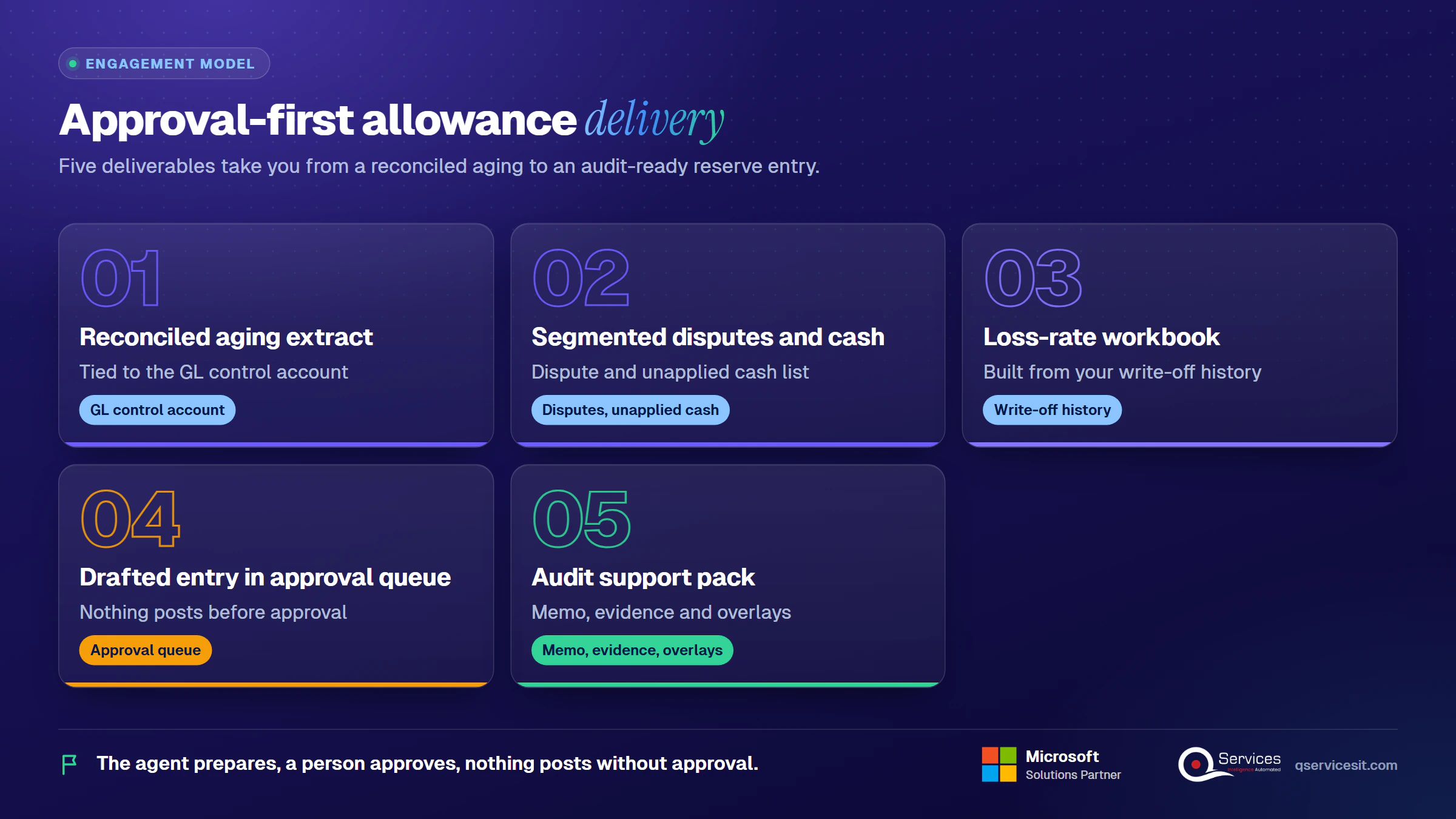
We start at the Extract and Segment stages, because a reserve built on dirty buckets is wrong however good the rates are. Here is what we run:
- A reconciled aging extract tied to the GL control account
- A segmented dispute and unapplied cash list
- A loss-rate workbook built from your write-off history
- A drafted journal entry in an approval queue before anything posts
- An audit support pack with the memo, evidence and overlays
The agents run in your own Azure tenant, and the same team builds and runs them. More detail is on our accounts receivable automation page.
Implementation Checklist
- Aging report runs as of period end and ages by due date
- Aging total reconciles to the AR control account
- Disputed invoices are reserved separately and excluded from the pool
- Unapplied payments and credit memos are netted first
- Loss rates trace to 3 to 5 years of write-off data
- Each overlay has a written number and reason
- A named person approves the entry before posting
- The support pack is saved for the auditor
What should you do first before year-end?
Pick one close cycle and pilot the reserve build on your Business Central aging, measuring time to prepare the entry, variance from last year’s allowance, and the number of auditor follow-up requests. and we will run your aging through the Reserve Build with you.

Written by Rohit Dabra
Co-Founder and CTO, QServices IT Solutions Pvt Ltd
Rohit Dabra is the Co-Founder and Chief Technology Officer at QServices, a software development company focused on building practical digital solutions for businesses. At QServices, Rohit works closely with startups and growing businesses to design and develop web platforms, mobile applications, and scalable cloud systems. He is particularly interested in automation and artificial intelligence, building systems that automate routine tasks for teams and organizations.
Accounts receivableERP integrationFinance automationBusiness Central
Talk to Our Experts
Frequently Asked Questions
Related Topics
Next step
Want the reserve calculation ready before close?
Tell us which ERP holds your aging. We’ll show how an approval-first agent prepares the numbers and a person books the entry.

















 Trustpilot5.0★★★★★See reviewsGoodFirms5.0★★★★★45 verified reviews
 G25.0★★★★★See reviewsClutch5.0★★★★★Quality 5.0 · Schedule 4.8
 Google4.7★★★★★Mohali office
 Erik BrownBusiness owner and software engineerClient review
 Zoltan BodnarCFO, Yusen LogisticsGoodFirms
 Ranbeer MakinClientClient review
 Alex VanderElsClientClient review
 Philmore J.ClientClient review
 Michael WilliamsonPresident and CEO, United Way of Southeast LouisianaGoodFirms
 Steven LewisClientClient review
 Brian WallerPresident, Technology Association of IowaGoodFirms