How do you match payments when the remittance is missing?
Remittance matching rules tell you what to try, in order, when a payment arrives without invoice detail: reference, amount combination, customer history, then classify differences and park the rest. Anything below your confidence line goes to a person, never straight to the ledger.
We run cash application automation for finance teams, and the same pattern shows up every time. The software is rarely the problem. The rules are unwritten, so each analyst matches differently.
This is the playbook we use, with Business Central as the reference ERP. Three worked examples carry real dollar figures. Updated 16 November 2026.
How many payments reach you with no invoice detail?
Bring a week of unmatched receipts. We’ll walk through which rules would have caught them and where an agent proposes while your team approves.
Quick Answer Remittance matching rules are an ordered list of tests that link a payment to the open invoices it settles. Try an exact invoice reference first, then a PO lookup, an amount combination, and customer history. Classify short pays, park low-confidence payments as unapplied cash, and chase the missing detail.
What are remittance matching rules?
Remittance matching rules are an ordered set of tests that decide which open invoices a customer payment settles, how much confidence the match deserves, and what happens when confidence is low. They run from the strongest evidence (an invoice number) to the weakest (a customer’s past habits), and they end in an exception queue, not a guess.
That is remittance matching in one sentence. Remittance advice matching is the same job when the advice exists. The rules matter most when it doesn’t.
Our view is blunt: write the order down before you buy or build anything. A matcher, whether a person or an agent, can only be as consistent as the rules it follows.
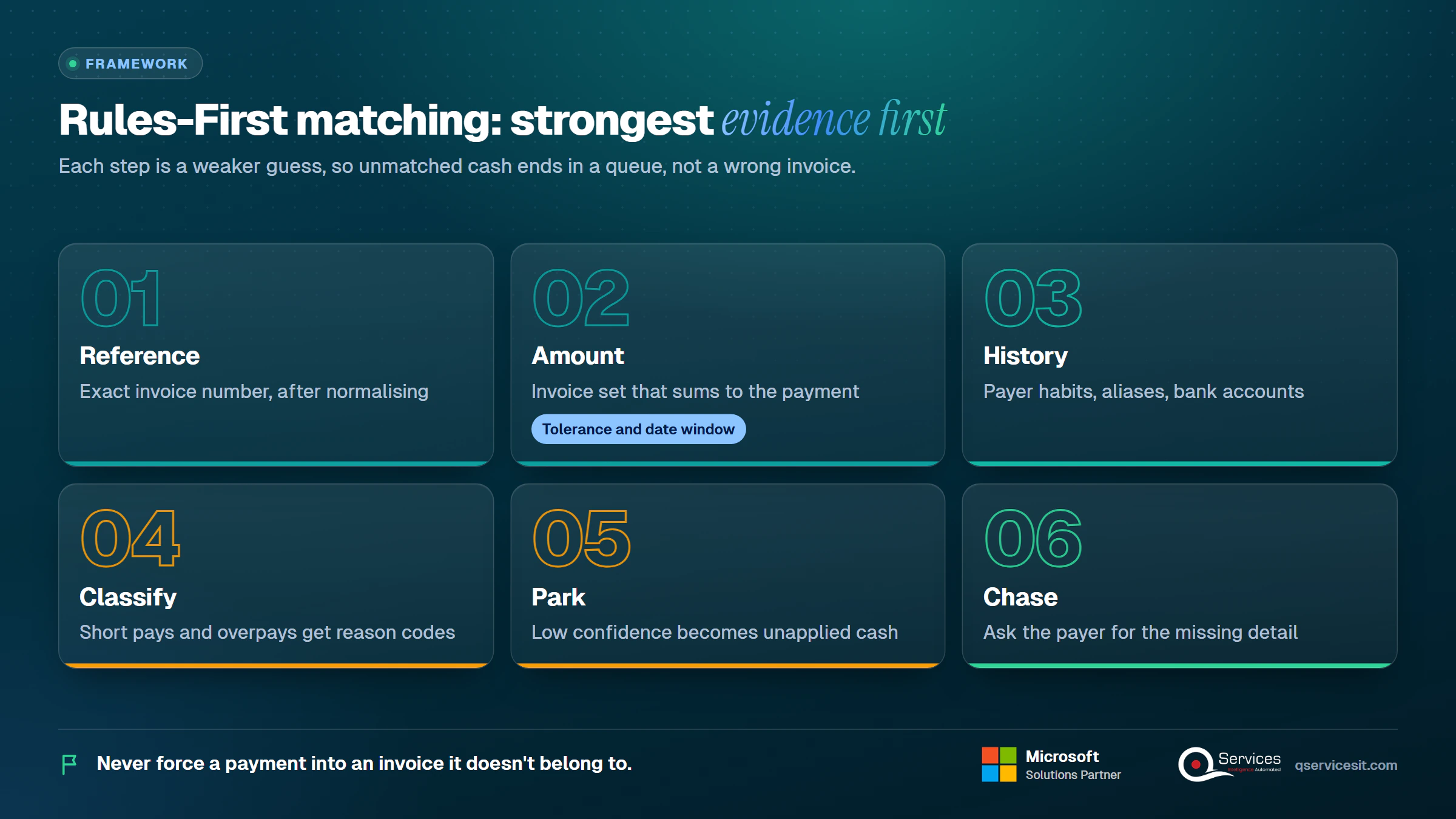
The QServices Framework Rules-First Matching = Reference → Amount → History → Classify → Park → Chase
Strong evidence comes first because each later step is a weaker guess. Classify, Park and Chase exist so that no payment is forced into an invoice it doesn’t belong to.
How does remittance matching relate to cash application?
Cash application is the whole job of posting a payment against receivables. Remittance matching is the decision inside it: which invoices does this money belong to? When teams talk about auto cash application, they mean software that makes that decision without a person. Our cash application process guide covers the six surrounding steps.
Why write the rules down at all?
Two analysts given the same unlabelled $48,000 payment will often pick different invoices. Written rules make the choice repeatable, auditable and teachable. They also make it safe to hand the easy 70 to 80 percent to an agent, because you’ve defined what easy means.
Why do payments arrive without usable remittance?
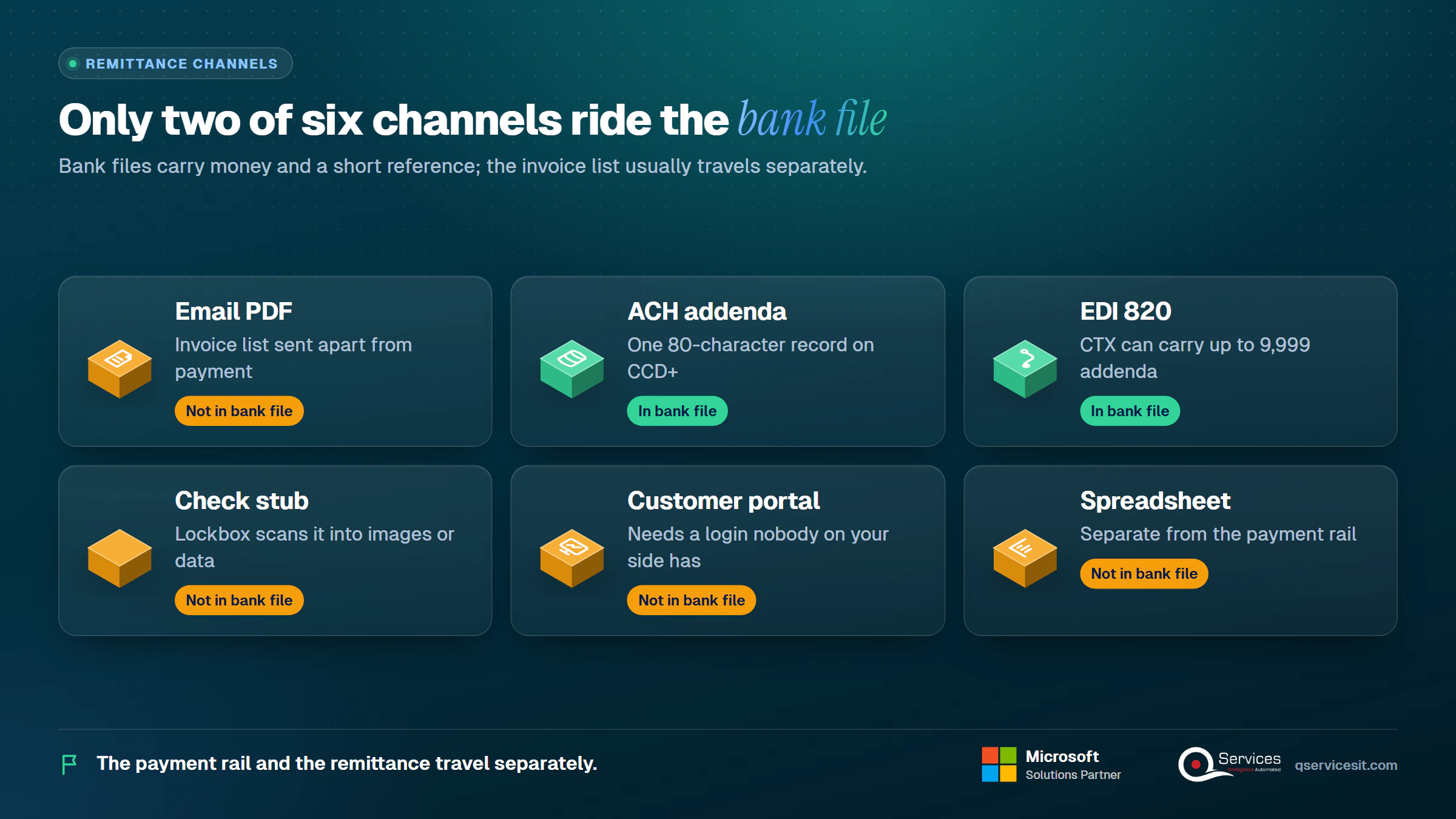
Because the payment rail and the remittance travel separately, and customers don’t always send the second one. A bank file carries money and a short reference. The invoice list lives in an email, a PDF, a portal or a check stub.
The limits are physical. A CCD+ ACH payment carries one 80-character addenda record, per the Nacha operating rules, which holds three or four invoice numbers at best. SEPA credit transfers carry a 140-character remittance field. MT940 statements often truncate or restructure what the payer typed. Banks also differ on whether they populate structured ISO 20022 references or free text.
How to match payments without remittance advice when the channel is the problem?
Start by finding out which channel each customer really uses. A customer who emails a PDF to a personal inbox is a routing problem, not a matching problem. A shared remittance mailbox fixes it for free. Our remittance advice template guide shows what to ask customers to include.
Why do customers pay without sending remittance details?
- Their AP system pays a batch and doesn’t generate advice
- The invoice list was sent to a different contact
- A portal requires a login nobody on your side has
- They short the payment and would rather not explain
What does US lockbox, ACH and EDI 820 change?
US lockbox services scan check stubs and pass you images or data. ACH CTX payments can carry up to 9,999 addenda records, often holding X12 820 data, which is why customers on EDI are the easiest to match. If you have trading partners sending 820s, read how to post the 820 payment file to your ERP first. Match those customers on the 820 and save the rules below for everyone else.
What are the 7 remittance matching rules, in the order to try them?
Here’s the list we hand cash application leads. Print it and pin it up.
- Exact reference match, after normalising the invoice number
- Resolve a PO or customer document number to an invoice
- Amount-combination match with tolerance and a date window
- Customer-history pattern
- Classify short pays and overpays
- Confidence threshold: park below the line as unapplied cash
- Chase the missing detail
| Rule |
Fires when |
Confidence |
Action |
Failure mode |
| 1. Reference |
Invoice number found in text |
High |
Apply |
Transposed or truncated digits |
| 2. PO lookup |
PO or customer doc number found |
High |
Resolve, then apply |
One PO, many invoices |
| 3. Amount combination |
No reference, amount fits a set |
Medium |
Propose |
Equal-amount ties |
| 4. History |
Payer, bank account or habit known |
Medium |
Propose |
Customer changed behaviour |
| 5. Classify |
Amount differs slightly |
Medium |
Apply plus reason code |
Real dispute hidden as a short pay |
| 6. Confidence |
Score under threshold |
Low |
Park as unapplied |
Parked too long |
| 7. Chase |
Unapplied past SLA |
n/a |
Email payer, check portal |
No reply |
1. Rule 1: Does the invoice number match exactly after normalising?
- When it fires: the payment text holds a string that looks like an invoice number.
- Confidence: high, if exactly one open invoice matches.
- Action: strip prefixes and leading zeros, fix obvious transpositions, complete truncated numbers (INV-001204 typed as 1204 or 12O4), then apply.
- Failure mode: the same short number exists for two customers. Always check the customer first.
2. Rule 2: Does the PO or customer document number resolve to an invoice?
- When it fires: the text shows a PO, delivery note or the customer’s own document number.
- Confidence: high for a one-to-one lookup, medium when the PO covers several invoices.
- Action: resolve through your order and invoice data, then apply the full set.
- Failure mode: a blanket PO covering twelve invoices. Send those to Rule 3 to find which subset was paid.
3. Rule 3: How do you match one payment to multiple invoices by amount?
To match one payment to multiple invoices, find the open-invoice set that sums to the payment, inside a tolerance and a date window, using oldest-first only as a tiebreak.
Worked example 1. A $48,215.40 ACH arrives with no remittance. The customer has six open invoices:
| Invoice |
Amount |
| INV-A |
$14,000.00 |
| INV-B |
$9,815.40 |
| INV-C |
$11,250.00 |
| INV-D |
$13,150.00 |
| INV-E |
$8,600.00 |
| INV-F |
$7,000.00 |
Six invoices give 64 possible subsets. Only A+B+C+D lands on $48,215.40 to the cent. The four are also the oldest four, and this customer has paid on a fortnightly run for the last six months, so history agrees. Two independent signals agree, so the match goes to the review band with high confidence.
The guardrail: if two different sets hit the same amount, the rule must not choose. It proposes both and stops. A hard rule for equal-amount ties is the cheapest protection you have against false matches.
4. Rule 4: Can customer history break the tie?
- When it fires: rules 1 to 3 gave nothing or more than one answer.
- Signals: the customer’s typical pay amount, a payer-name-to-customer alias table, and the remitting bank account mapped to a customer.
- Confidence: medium alone, high when paired with an amount match.
- Failure mode: a parent company paying for three subsidiaries. History says one customer, the money belongs to three. Our multi-entity cash application guide covers that case.
5. Rule 5: What are the matching rules for short pays and partial payments?
The matching rules for short pays and partial payments are about classifying the difference, not forcing it away. Each type gets a treatment, a threshold and a reason code.
Worked example 2. A customer pays $9,500 against a $10,000 invoice. Terms are 2/10 net 30, so an early-pay discount would be $200. The gap is $500, which is 5 percent, so it isn’t a discount. Classify it as a deduction.
Journal lines: Dr Bank $9,500, Cr Accounts Receivable $9,500, applied to the invoice. Then Dr Deductions in dispute $500, Cr Accounts Receivable $500, which keeps the balance visible and assigned to a reason code instead of written off. Our short pay tracking guide shows how to follow each one.
| Payment type |
Correct treatment |
Typical GL account |
| Early-pay discount |
Apply if within terms, then adjust |
Sales discounts |
| Deduction |
Apply cash, open dispute item |
Deductions in dispute (AR) |
| Netted credit memo |
Apply credit memo to the invoice set |
Accounts receivable |
| Bank fee |
Write off to expense under threshold |
Bank charges |
| FX difference |
Write off under threshold, review above |
FX gain or loss |
| Partial payment |
Apply to oldest or named invoice, leave balance open |
Accounts receivable |
Worked example 3. A customer remits $26,650 for four invoices ($8,200, $6,150, $5,400, $7,900 = $27,650) less a $1,200 credit memo. A $35 bank fee reduces the cash to $26,615. Net applied is $26,450. Add the $35 fee to bank charges and $26,650 is accounted for, leaving $200 unapplied. Park it with the reason ‘possible overpay, awaiting remittance’ and chase it. Never push it onto the next invoice just to clear the line.
6. Rule 6: What is the auto-apply threshold, and what happens below it?
The auto-apply threshold is the confidence score above which a match posts without a person. We usually start at 95 percent or higher, with a review band below it where a person approves. Under the review band, park the payment as unapplied cash with a reason. Never guess.
Parking isn’t failure. A payment parked with a reason is visible and owned. A payment forced onto the wrong invoice creates a false overdue balance and a wrong dunning letter, which costs a customer relationship.
Key Insight A wrong match is worse than a late match. Park low-confidence cash with a reason code and a due date, and you trade a few days of unapplied cash for zero false dunning letters.
7. Rule 7: How do you chase the missing detail?
Send the payer a targeted question, not a generic one: ‘We received $48,215.40 on 12 November, reference TRN-5521. Which invoices does it cover?’ Check portals the same day. Set SLAs: first chase within 24 hours of parking, second at 72 hours, escalation to the account owner after that.
Real-World Scenario A typical case we see: a cash application lead at a distributor receives 14 ACH payments with blank remittance on a Monday, worth $212,000 in total. In the naive approach an analyst applies each to the oldest invoices, and two customers receive dunning notices for invoices they already paid. With Rules-First Matching, Reference and Amount clear nine payments, History clears two, and three are parked in the Park stage with reasons. The Chase stage emails those three before lunch, and no dunning notice goes out.
What about oldest invoice first payment application?
Oldest invoice first payment application is a fallback, not a strategy. NetSuite’s default is to apply by amount first, then to the oldest invoice. It fits when a customer pays on account with no instructions. It fails when the customer has named invoices elsewhere, because you then clear the wrong items and leave the disputed one open. Use it as the final tiebreak in Rule 3, and only for customers you have told in writing.
How much difference should auto-match accept?
No standard threshold exists. Set tolerance settings for automatic payment matching per customer as an amount, a percentage, or both, and cap the amount. SAP applies both user and customer tolerances and the tighter one wins. IFS uses the lower of the percentage and the maximum amount. That conservative pattern is the one to copy.
Our suggested starting points, which you should test against your own data:
- Rounding and bank fees: up to $5, automatic, with a reason code
- Percentage tolerance: 1 percent capped at $50, automatic
- Anything higher: classify as a deduction or short pay and review
What does remittance matching tolerance really cost you?
A generous tolerance writes off real money. If a customer shorts $40 on every invoice, a $50 tolerance hides a pattern worth thousands a year. Report write-offs by customer monthly. When one customer shows up every week, lower their tolerance or open a dispute.
Key Insight Set tolerance by customer and cap it by amount. A percentage alone lets a $400,000 invoice slip $4,000 past you without a person ever seeing it.
What can Business Central match on its own, and where does it stop?
Business Central payment matching is better than many teams assume, but it works on text and amounts, not on judgement. Per Microsoft Learn on automatic application, the matching rules weigh related-party details (bank account, name, address), then transaction text against Document No. or External Document No., then the statement amount. Text matching needs more than four characters, and each rule carries a priority and a Low, Medium or High match confidence. A Review Required flag sends a line for manual review before posting. Check these against your version, since Microsoft notes rules can differ by implementation.
| Feature |
What it does |
Where it falls short |
| Payment Reconciliation Journal |
Imports bank lines and proposes matches |
Needs document text or a clean amount |
| Match Automatically |
Runs rules and sets confidence |
Doesn’t read email or PDF remittance |
| Apply Automatically |
Applies a payment to ledger entries |
Weak on multi-invoice amount combinations |
| Text-to-Account Mapping |
Maps recurring text to accounts |
Suits fees and recurring items, not customer invoices |
| Cash Receipt Journal |
Manual entry with Applies-to Doc. No. |
Slow, one payment at a time |
| Payment and discount tolerance |
Allows small differences to close entries |
Setup is per customer group, and reasons are limited |
Standards & References
Where do approval-first matching agents fit?
Approval-first matching agents sit in the gap between the bank line and the journal. An agent reads the email or PDF remittance, applies the seven rules, writes the proposed application into the Payment Reconciliation Journal, and logs its reasoning. A person approves anything that posts money or changes a system. In Dynamics 365 Finance and Sales, the agent also looks up accounts and invoices for context. That’s how every payment in its place becomes a routine, not a Monday scramble. Business Central Copilot and agents run on the online version only, so on-premises GP or NAV sites need a different route. See AI in accounts receivable for what is real and what is hype.
Where do your unmatched payments pile up?
If the exception queue grows faster than your team clears it, a short call can show which rules to automate first and which stay manual.
What goes to the exception queue and who clears it?
The exception queue for unmatched payments holds everything that didn’t clear Rules 1 to 6: parked unapplied cash, short pays, duplicates and disputed amounts. Each item needs an owner, a reason code and an age limit. Without them it’s a pile, and unapplied cash delays the month end close.
How should a payment application exception queue be sorted?
- By cause: unidentified, short pay, overpay, duplicate, FX
- By desk: classification decides who gets it
- By age, then dollar value: the oldest large item first
How do you apply unapplied payments, step by step?
- Open the item and read the park reason
- Check the shared remittance mailbox and customer portal
- Re-run Rules 1 to 4 with the new information
- Apply, or reclassify as a deduction or overpay
- Close the item with a reason code, or escalate at the SLA mark
How do you measure match rate week by week?
Measure first-pass match rate, not total match rate. First-pass is payments posted with no human touch divided by total payments. Total match rate counts manual fixes, so it flatters a team that is still doing everything by hand. Most published benchmarks come from vendors, so treat them as marketing and set targets from your own baseline.
| KPI |
Formula |
Suggested use |
| First-pass match rate |
Auto-posted payments ÷ total payments |
Track weekly, aim for steady gains |
| Unapplied cash % |
Unapplied balance ÷ total cash received |
Falling trend |
| Unapplied aging |
Items older than 24h, 72h, 7 days |
Nothing past SLA |
| Touch time per payment |
Analyst minutes ÷ payments handled |
Falling trend |
| Exception rate by cause |
Exceptions of one cause ÷ total exceptions |
Find the biggest cause |
| False-match rate |
Reversed matches ÷ auto-posted matches |
Near zero |
| DSO impact |
Change in days sales outstanding |
Quarterly view |
What does a Monday in cash application look like before and after?
Here’s an illustrative pattern, not a client result. Before written rules, 40 weak-remittance payments take about 11 minutes each, roughly 440 minutes. After, 30 payments clear in a 2-minute approval each (60 minutes), and 10 exceptions take 10 minutes each (100 minutes). That’s 160 minutes, and the 10 exceptions have owners and reason codes.
Key Insight If your false-match rate is above zero and you can’t see it, your match rate is a vanity number. Count reversals.
How does QServices approach remittance matching rules?
We start with the Reference and Amount stages, because that’s where a rules playbook pays back fastest, and we finish with Park and Chase so nothing posts on a guess. The agents run in your own Azure tenant, and your team approves everything before it posts.
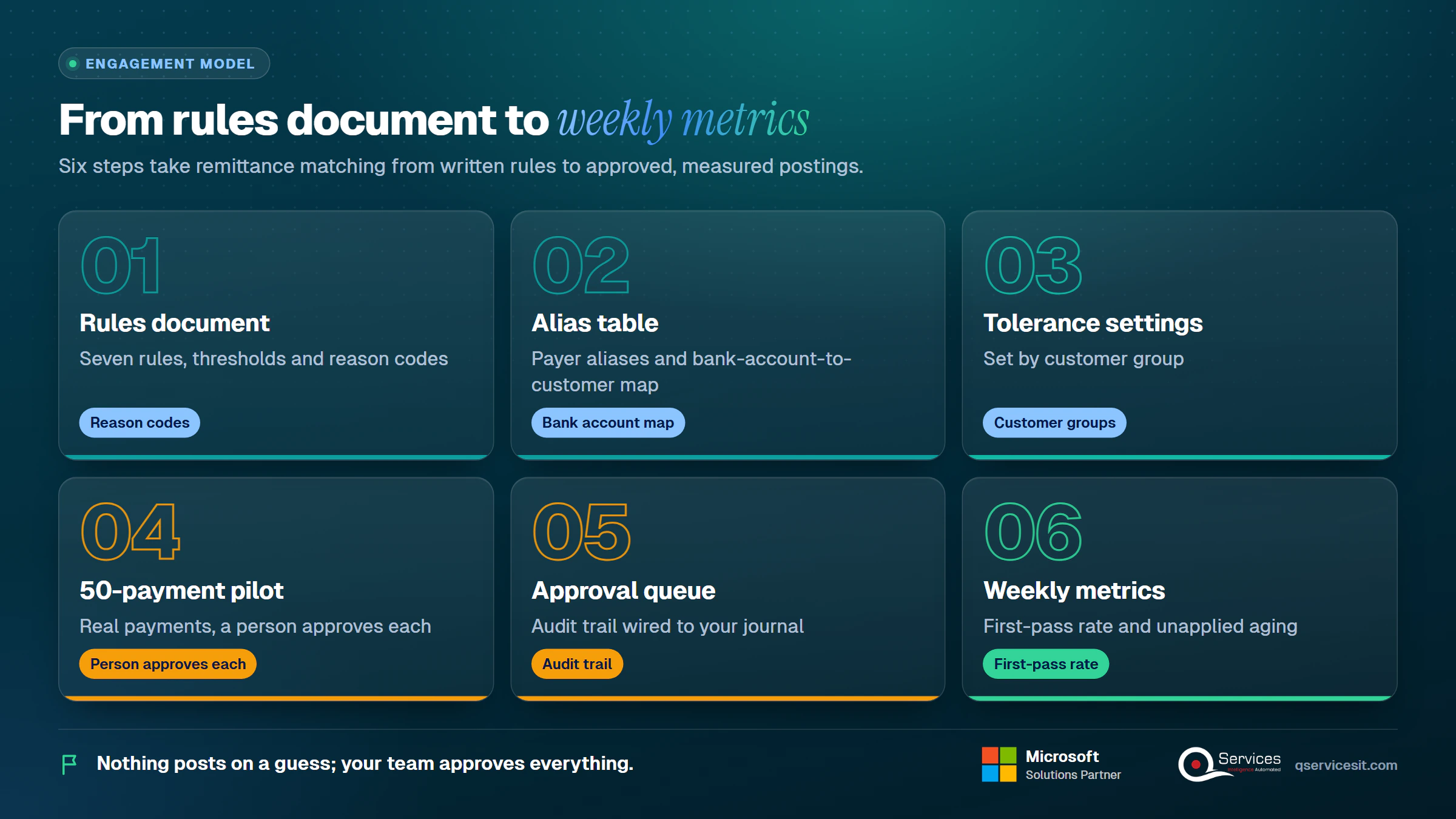
- A rules document with your seven rules, thresholds and reason codes
- A payer alias table and bank-account-to-customer map
- Tolerance settings by customer group
- A pilot on 50 real payments with a person approving each one
- Approval queue and audit trail wired to your journal
- A weekly metrics view for first-pass rate and unapplied aging
The same team builds and runs it, as part of our cash application automation work. Honest limit: rules 3 and 4 will produce false matches without the tie guardrail, and the first pilot always finds alias gaps.
Implementation Checklist
- Remittance mailbox is shared and monitored
- Invoice number normalisation rules are written down
- Payer alias table has the top 50 customers loaded
- Bank account mapping exists for every repeat payer
- Tolerance is set per customer group, with an amount cap
- Auto-apply threshold and review band are agreed in writing
- Equal-amount ties are set to stop, not choose
- 50-payment pilot has been reviewed line by line before go-live
What should you do first to clear your unapplied cash?
Write your seven rules, run them on 50 real payments, and measure first-pass match rate, false-match rate, unapplied aging and touch time per payment for two weeks. Then and we’ll review your rules with you.

Written by Rohit Dabra
Co-Founder and CTO, QServices IT Solutions Pvt Ltd
Rohit Dabra is the Co-Founder and Chief Technology Officer at QServices, a software development company focused on building practical digital solutions for businesses. At QServices, Rohit works closely with startups and growing businesses to design and develop web platforms, mobile applications, and scalable cloud systems. He is particularly interested in automation and artificial intelligence, building systems that automate routine tasks for teams and organizations.
Accounts receivableCash applicationERP integrationFinance automation
Talk to Our Experts
Frequently Asked Questions
Related Topics
Next step
Ready to put your matching rules in order?
Talk to our team about agents that sit inside your ERP, propose matches and wait for your approval before anything posts.
















 Trustpilot5.0★★★★★See reviewsGoodFirms5.0★★★★★45 verified reviews
 G25.0★★★★★See reviewsClutch5.0★★★★★Quality 5.0 · Schedule 4.8
 Google4.7★★★★★Mohali office
 Erik BrownBusiness owner and software engineerClient review
 Zoltan BodnarCFO, Yusen LogisticsGoodFirms
 Ranbeer MakinClientClient review
 Alex VanderElsClientClient review
 Philmore J.ClientClient review
 Michael WilliamsonPresident and CEO, United Way of Southeast LouisianaGoodFirms
 Steven LewisClientClient review
 Brian WallerPresident, Technology Association of IowaGoodFirms





