
AI service desk agent: triage, first answers, hand-over

Isometric illustration of a support ticket queue flowing through a triage agent that routes tickets to answer, review and engineer lanes, with a person approving at the final gate. - ai service desk agent
Summarize in:
Get an instant AI summary of this article

Introduction

An AI service desk agent reads each request, sorts it by category and urgency, and answers from your approved knowledge articles. It resolves low-risk questions alone and hands anything that changes a system to a person.

Most teams looking at it service desk automation want the same thing: fewer repeat tickets and a faster first reply, without handing the keys to a bot. This post shows the use case end to end, from triage to the hand-over rule.

In This Article, You'll Learn
  • What an IT helpdesk AI agent actually does with a ticket, step by step
  • How to route tickets by category and urgency without a rules maze
  • Why first answers fail when the knowledge base is stale
  • Six triggers that should send a ticket to a person
  • Which five actions must wait for human approval
  • Which metrics show real resolution, not just deflection

How many tickets wait on a first reply?

Book a short call with our team. We will look at your ticket flow and show where an agent could triage and draft first answers while your people stay in charge.

Book a 30-min call →

Quick Answer An AI service desk agent is software that reads incoming IT requests, classifies and prioritizes them, answers from approved knowledge articles, and collects missing details. It resolves low-risk requests itself and hands everything else to a person with the full context, so nobody asks the user to repeat themselves.

What does an AI service desk agent do?

What is an AI service desk agent? It is a worker that handles the first steps of every ticket: read, classify, answer, and hand over. It does not replace your analysts. It clears the repetitive front of the queue so they can spend time on problems that need judgment.

Microsoft’s IT Helpdesk template for Copilot Studio shows the shape of it. The agent answers from the organization’s own knowledge articles, creates a ticket when it cannot resolve the issue, and lets users check ticket status. Microsoft also warns that AI-generated content can contain mistakes and should be checked.

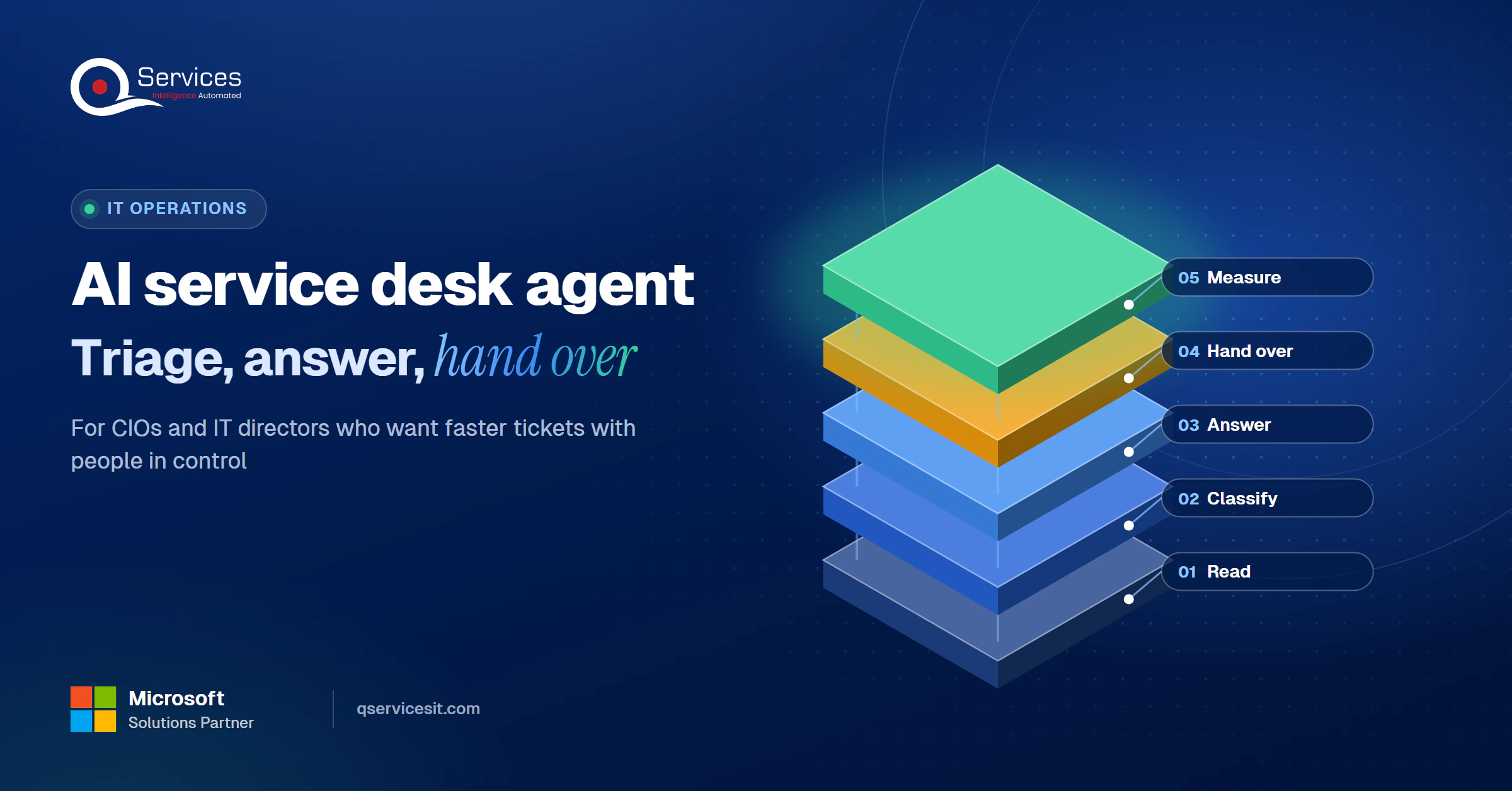
The QServices Framework Service Desk Path = Read → Classify → Answer → Hand over → Measure

The order matters because each stage limits the risk of the next one. An agent that classifies badly will answer from the wrong article, and an agent that cannot hand over will guess.
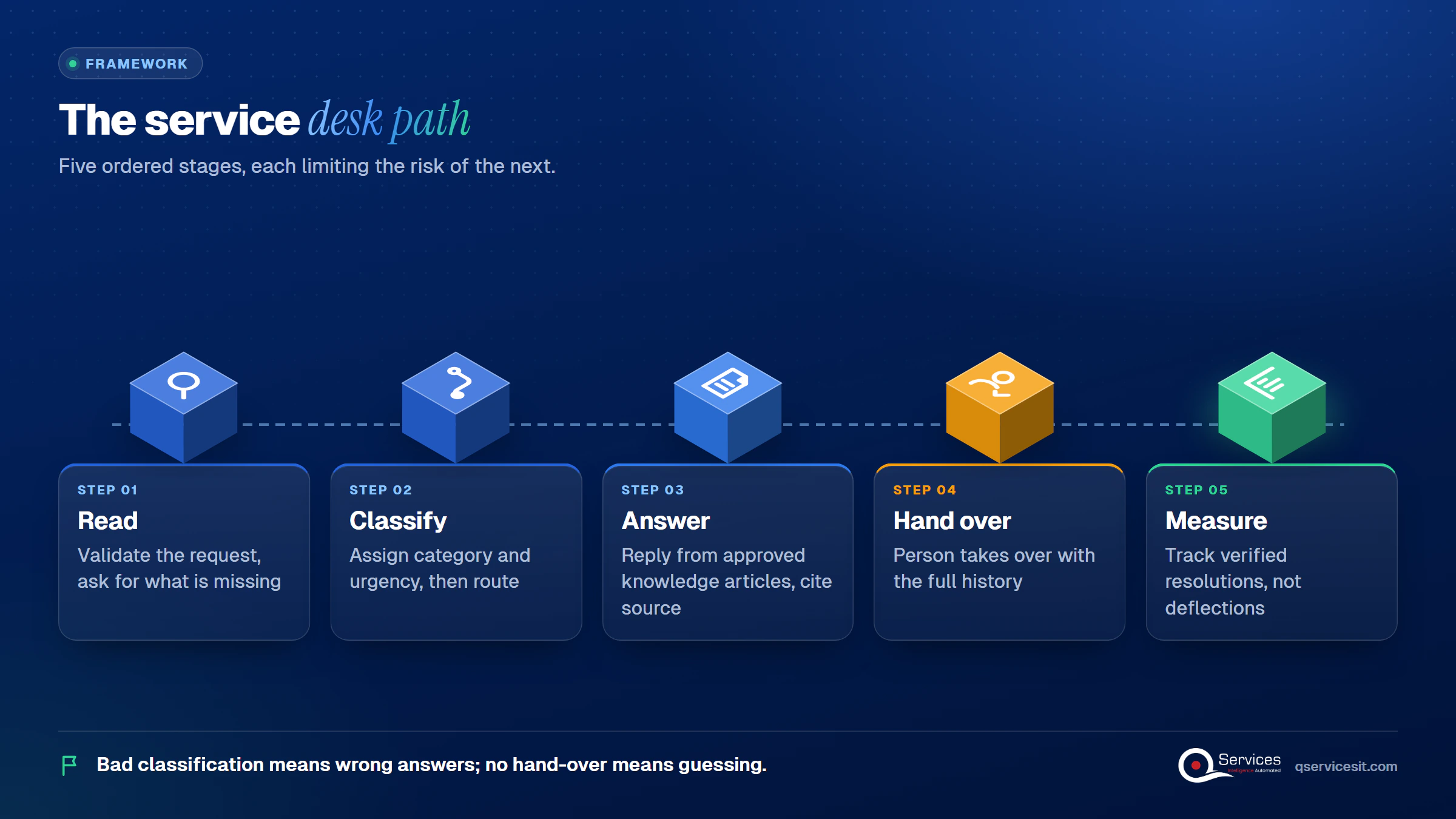
QServices Service Desk Path framework: Read → Classify → Answer → Hand over → Measure - ai service desk agent

Can an AI agent replace the IT service desk?

No. In our experience it takes over the first touch on routine requests, and your analysts keep everything that needs a decision. The AI service desk agent for US IT teams works best as the front door, with a person behind it.

How does an AI agent triage IT tickets?

AI agent ticket triage means the agent validates the request, assigns a category, sets a priority, and routes it. ITIL-style practice treats categorization and prioritization as the first service desk steps, and priority is commonly derived from impact and urgency.

Routing tickets by category and urgency

Routing tickets by category and urgency is the core of service desk triage. Ticket routing automation sends a VPN failure to the network queue and a broken laptop screen to the hardware queue, and it flags anything touching a VIP or an outage as urgent.

  • Check the record is complete, and ask the user for what is missing
  • Link repeat contacts to the open ticket instead of creating a duplicate
  • Send negative-sentiment messages straight to a person
  • Answer informational requests from the knowledge base

Rules-only routing vs an AI service desk agent

Rules-only routing AI service desk agent
Reads free-text requests Keyword match only Understands intent and context
Handles new request types Someone writes a new rule Classifies it from examples
Answers the user No Yes, from approved articles
Setup effort Low Higher: clean articles and a review queue first
Predictability Fully predictable Needs monitoring and thresholds

The honest downside is the setup row. The agent needs good articles and a review queue before it earns its keep. Teams not sure where to start can pick the ticket types with the most volume using process mining vs process discovery.

Real-World Scenario A typical case we see: an IT director at a 600-person US distributor finds 35 tickets waiting each morning, and 12 of them are the same Outlook sign-in question. In the naive setup, all 35 sit in one queue and the first reply takes hours. With the Classify stage in place, the 12 repeats are answered from one article, 4 urgent ones jump the line, and analysts open the day with 19 real tickets.

First answers from a knowledge base

First answers from a knowledge base are only as good as the articles behind them. Retrieval reduces made-up answers but does not remove them, and it cannot fix an article that is wrong or out of date.

How does an AI agent answer tickets from a knowledge base?

The agent searches approved articles, writes a short answer, and cites the article it used. If no article matches, it says so and hands over. Good knowledge base answers carry a link the user can open and a review date your team can audit.

Keeping articles fit for the agent

One source is rarely enough. An agent that sees only one knowledge repository will route well and still fail to resolve. Give it every approved source, mark owners and review dates, and retire what nobody maintains. Our post on building knowledge base bots with Copilot Studio and SharePoint covers the setup.

When should an AI agent hand over a ticket?

The service desk hand-over rule is simple: when the agent is unsure, or the next step changes something, a person takes over with the full history. ServiceNow documents this with confidence thresholds that separate automated action from human review.

Ticket escalation rules that work

Clear ticket escalation rules keep the agent honest. In Copilot Studio, hand-off can be triggered when intent is unknown or the user asks for a person, and the conversation history and context variables travel with it. By default the Escalate topic only shows a message, so live hand-off needs configuring.

Six triggers we set:

  1. Low confidence in the answer
  2. No matching article
  3. The user asks for a person
  4. Negative sentiment
  5. A missing or invalid record
  6. A repeat contact on the same issue

A good hand-over also shortens the first response time, because the analyst starts with what the AI already tried.

Where do your tickets stall before anyone reads them?

A 30-minute call can map your triage and routing steps, so you see which ones an agent can handle and which stay with a person.

Book a 30-min call →

What an AI service desk agent must never do alone

What an AI service desk agent must never do alone is anything that changes a system. Reading and drafting can run unattended. Changing needs human approval for system changes, every time.

Key Insight OWASP’s 2026 Top 10 for LLM applications ranks excessive agency third, up from sixth the year before. The fix is tightly scoped permissions and monitoring, not a smarter prompt.

Is it safe to let an AI agent reset passwords?

Not on its own. A password or MFA reset is an identity change, and a clever message can talk a model into it. The agent can collect the details and verify what it can, then queue the reset for a named person to approve.

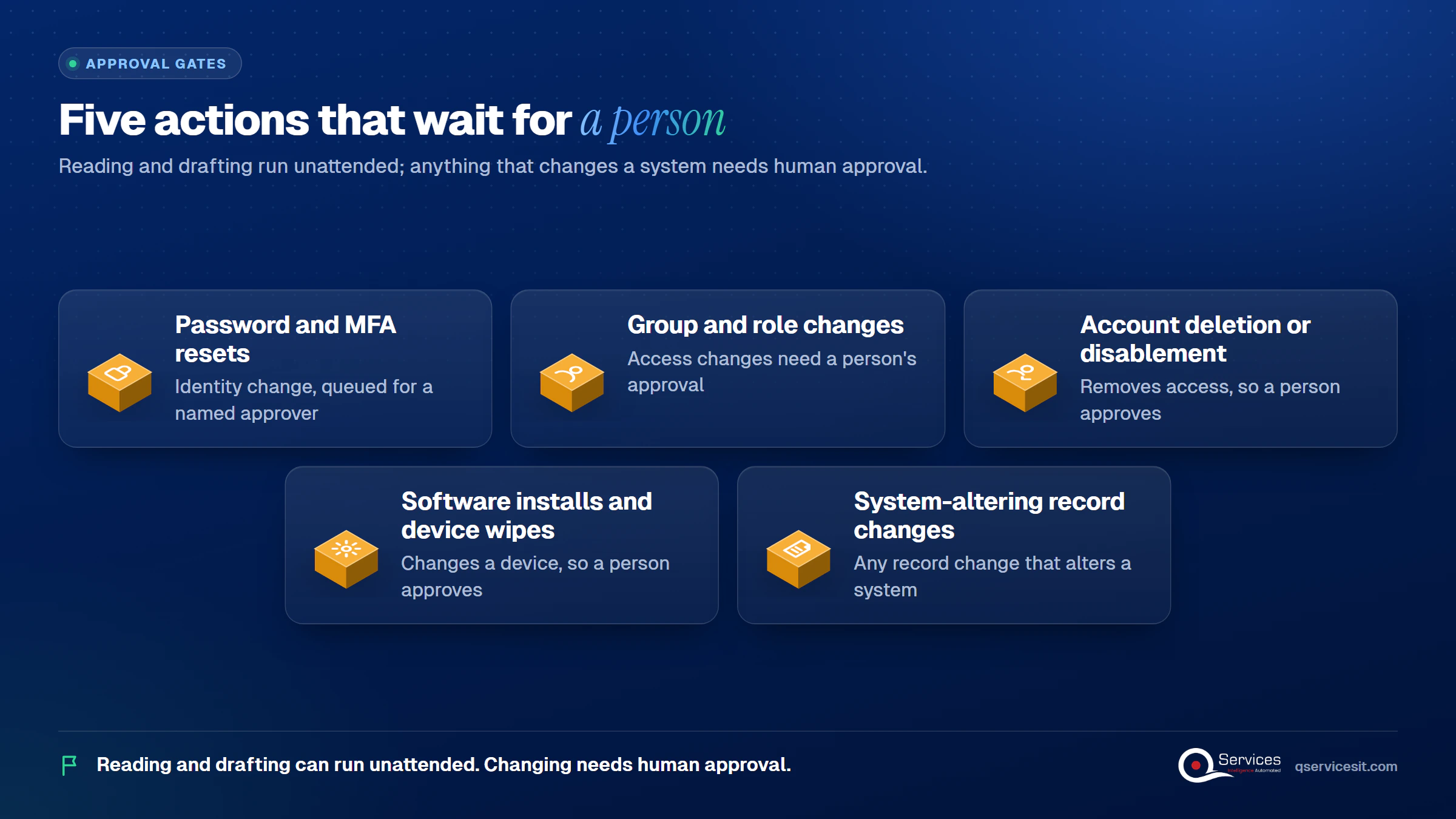
Five actions that wait for a person

Grid of exactly 5 actions that wait for human approval: password and MFA resets, group and role changes, account deletion or disablement, software installs or device wipes, ticket or record changes that alter a system - ai service desk agent
  • Password and MFA resets
  • Group and role changes
  • Account deletion or disablement
  • Software installs and device wipes
  • Any record change that alters a system

Accountability does not move to the bot either. In Moffatt v. Air Canada (2024 BCCRT 149), a tribunal rejected the argument that a chatbot was a separate legal entity. For more on the principle, read why human-in-the-loop is non-negotiable.

Standards & References

How to measure service desk agent accuracy

How to measure service desk agent accuracy: count verified resolutions and human corrections, not deflections. A desk can show high deflection while many users still come back, so track what stayed solved.

  • Service desk agent first answer accuracy: the share of first answers a reviewer marks correct
  • Routing accuracy: tickets a person re-routed, as a share of all routed
  • False-confidence rate: tickets the AI called resolved that reopened
  • Hand-over context: whether the analyst needed to re-ask anything
  • First response time and time to first human action after hand-over

Pair these with first contact resolution and SLA compliance. Do not copy a vendor’s deflection percentage as your target. Set your own baseline in the first month.

How QServices Approaches the AI Service Desk Agent

We start at Read and Classify, because routing errors are cheap to fix and answer errors are not. Our AI agents run in your own Azure tenant, and your team approves every action that changes a system. Our AI agent development work follows these steps:
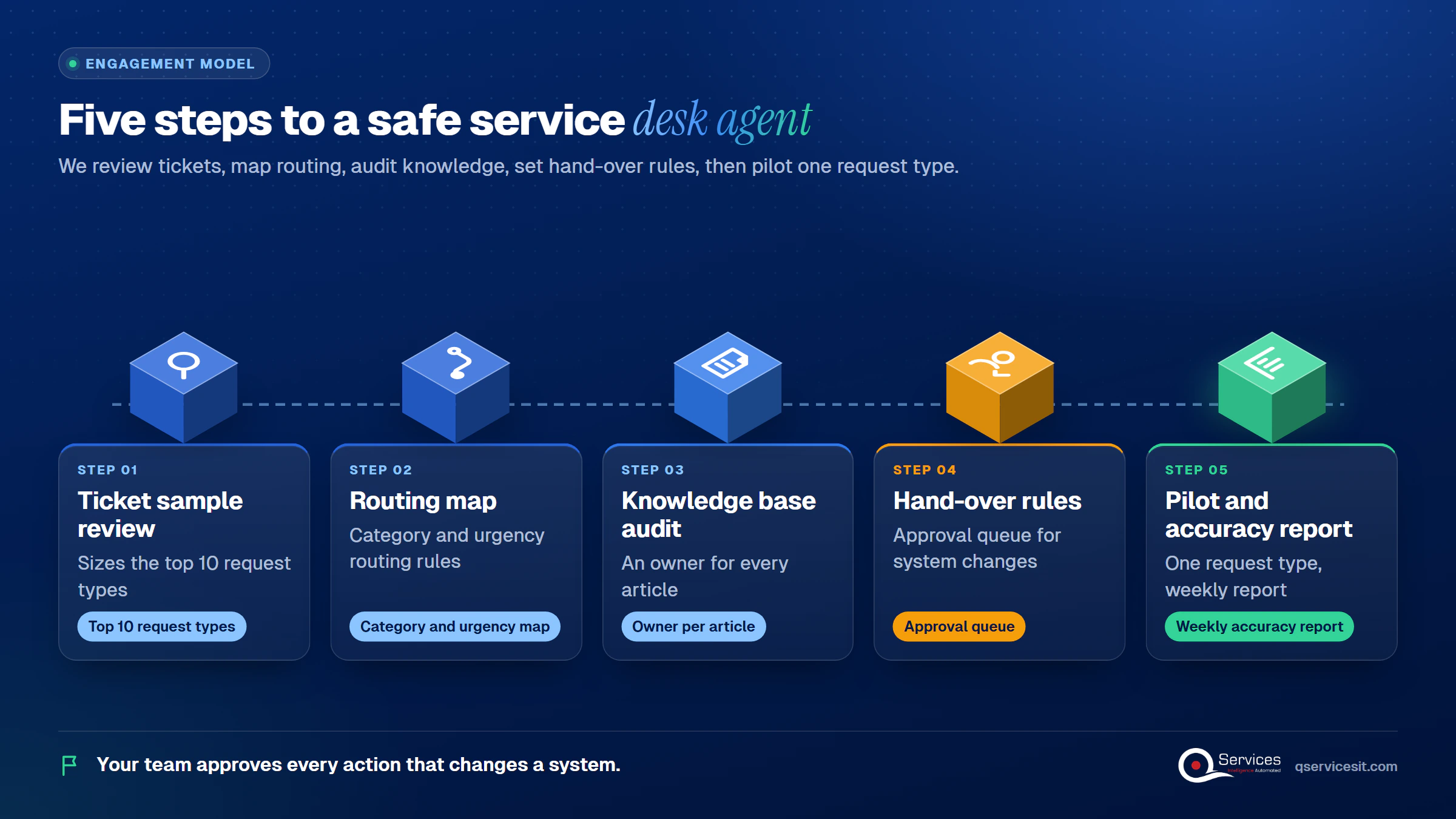
  1. A ticket sample review that sizes the top 10 request types
  2. A category and urgency map with ticket routing automation rules
  3. A knowledge base audit with an owner for every article
  4. A hand-over rule set and an approval queue for system changes
  5. A pilot on one request type, with a weekly accuracy report
How QServices delivers an AI service desk agent: ticket sample review → routing map → knowledge base audit → hand-over rules and approval queue → pilot and accuracy report

Implementation Checklist

  • Ticket categories and urgency levels are written down and agreed
  • Every knowledge article has an owner and a review date
  • The agent cites an article with each answer
  • A named person approves every password, MFA and role change
  • Hand-over passes full history to the analyst
  • A weekly report lists re-routed tickets and reopened tickets
  • The agent has read-only access outside the approval queue

Conclusion

An AI service desk agent earns trust by doing the first touch well and stopping at the line where a system would change. Pilot it on one request type, such as password help, and measure first answer accuracy, re-routed tickets, reopen rate and first response time. When you are ready, book a 30-min call and we will map your first pilot with you.

Rohit Dabra

Written by Rohit Dabra

Co-Founder and CTO, QServices IT Solutions Pvt Ltd

Rohit Dabra is the Co-Founder and Chief Technology Officer at QServices, a software development company focused on building practical digital solutions for businesses. At QServices, Rohit works closely with startups and growing businesses to design and develop web platforms, mobile applications, and scalable cloud systems. He is particularly interested in automation and artificial intelligence, building systems that automate routine tasks for teams and organizations.

IT operationsAI agent developmentWorkflow automationERP integration
Talk to Our Experts

Frequently Asked Questions

An AI service desk agent reads each request, classifies and prioritizes it, and answers from approved knowledge articles. It collects missing details and resolves low-risk requests. Anything that changes a system, or that it is unsure about, goes to a person with the full conversation attached.

It should not. A password or MFA reset changes identity access, so it needs human approval for system changes. The agent can gather and verify details, then queue the reset for a named person to approve.

Use a clear service desk hand-over rule: escalate on low confidence, no matching article, a request for a person, negative sentiment, a missing or invalid record, or a repeat contact on the same issue. Pass the full history so the user never repeats themselves.

Measure verified resolution, not deflection. Track first answer accuracy, routing accuracy against human corrections, reopen rate, hand-over context quality and first response time. Set your own baseline in the first month instead of copying a vendor benchmark.

Pick one high-volume request type, such as password help or VPN issues, and pilot there. Audit the matching knowledge articles, write the hand-over rules, and review accuracy weekly. A two-week fixed-price assessment with QServices can scope that first pilot.

Related Topics

Next step

Ready to give your service desk a first responder?

Talk to our team about a process assessment of your service desk. We map the tickets, the knowledge base and the hand-over points before any agent goes live.

Book a 30-min call →

Recent Articles

Globally Esteemed on Leading Rating Platforms

Earning Global Recognition: A Testament to Quality Work and Client Satisfaction. Our Business Thrives on Customer Partnership

5.0

5.0

5.0

5.0

What clients say

Rated 5.0 by the
people we've built for.

Every quote comes from a published review on GoodFirms, Clutch or our own site. Click a source to read the full review.

★★★★★
“QServices was highly professional, knowledgeable, and approachable. We continue to work with them on other projects.”
NHNicholas HoareCEO, Nextgen ClearingGoodFirms
★★★★★
“Quality assurance is often overlooked, but these guys take that very seriously. … their team of experienced, dedicated developers and highly skilled engineers quickly dissected and decomposed every problem and presented solutions and options that directly met my needs”

Erik BrownBusiness owner and software engineerClient review
★★★★★
“The supplier delivered the application on time and was responsive to our needs. He was also flexible, which allowed us to make changes on the fly.”

Zoltan BodnarCFO, Yusen LogisticsGoodFirms
★★★★★
“Thank you Sahil and team for wonderful collaboration right from day 0. … Highly recommend the developers.”

Ranbeer MakinClientClient review
★★★★★
“They are always looking for new ways to improve their products and services and to deliver value to their customers.”
OFOluwatosin FalolaSenior .NET Developer, POOLCORPClutch
★★★★★
“I have had an excellent experience working with QServices. We have a highly collaborative relationship and I value them not just as contractors but as partners.”

Alex VanderElsClientClient review
★★★★★
“Sahil undertakes every project with a high degree of professionalism. His communication style is unmatched and he is always available to resolve issues or just discuss the project.”

Philmore J.ClientClient review
★★★★★
“Responsive, patient and professional. Consistent weekly attention to our project, and new ideas we hadn't asked for.”

Michael WilliamsonPresident and CEO, United Way of Southeast LouisianaGoodFirms
★★★★★
“I have been working with them on a project for a year now … They have been able to solve problems that come up with bugs or development and able to communicate well with me.”

Steven LewisClientClient review
★★★★★
“We had been working on the app for two years. QServices built it in two months.”

Brian WallerPresident, Technology Association of IowaGoodFirms
★★★★★
“All projects were delivered on time and were fully completed upon delivery.”
RBRaine Marie BuenvendiaSr. Support Specialist, Arc.DevClutch
★★★★★
“They had excellent quality. The hypercare they provided after the project went live is exceptional.”

KKKrish KishorePresident, Zero Hour ConsultantsClutch
Book Appointment
Sahil kataria (1)
Sahil Kataria

Founder and CEO

amit Kumar
Amit Kumar

Chief Sales Officer

Talk To Sales

USA

+1 270-550-1166

flag

+1 270-550-1166

Phil J.
Phil J.Head of Engineering & Technology​
QServices Inc. undertakes every project with a high degree of professionalism. Their communication style is unmatched and they are always available to resolve issues or just discuss the project.​
Assured

Thank You

Thanks, we’ve got your details. A named member of our team will reply within one business day.