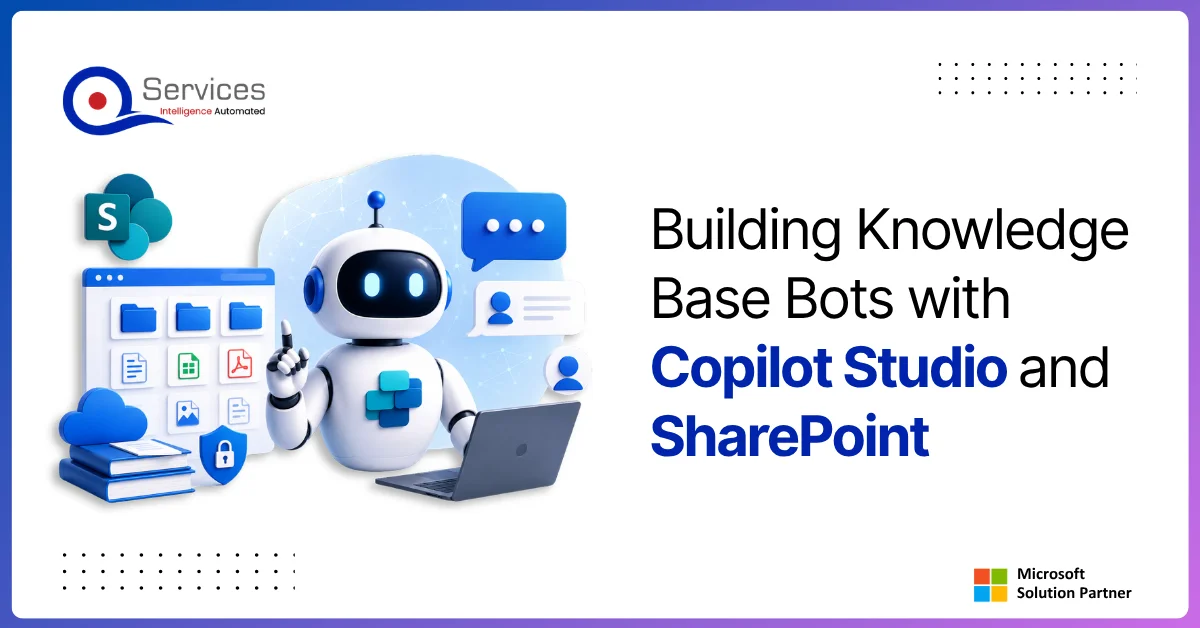
Copilot Studio and SharePoint together address a problem most Microsoft-first organizations recognize immediately: employees ask the same questions repeatedly, and the answers are buried in document libraries too sprawling to search effectively. Building a copilot studio sharepoint knowledge base bot turns that static content into a conversational interface that employees can query in plain language, any time of day. This guide covers the five-step build process, the Azure infrastructure decisions you need upfront, and how power platform governance keeps your deployment safe in production. QServices has used this exact approach across dozens of client engagements, including regulated industries where accuracy and audit trails are non-negotiable.
In This Article, You'll Learn
What Is Copilot Studio and Why SharePoint Makes the Perfect Knowledge Source?
How to Build a Copilot Studio SharePoint Knowledge Base Bot in 5 Steps
Azure Infrastructure and Security Considerations for Copilot Studio Deployments
Power Platform Governance for Copilot Studio SharePoint Bot Projects
Real-World Use Cases for Copilot Studio SharePoint Bots
Eager to discuss about your project?
Share your project idea with us. Together, we’ll transform your vision into an exceptional digital product!
What Is Copilot Studio and Why SharePoint Makes the Perfect Knowledge Source?
Microsoft Copilot Studio (formerly Power Virtual Agents) is a low-code bot-building platform within the Power Platform suite. It lets teams create, test, and deploy conversational AI agents without writing backend code. Since 2024, Copilot Studio includes native generative AI capability: point it at a document library and it synthesizes answers from actual document content, not just pre-built dialog topics. Microsoft's Copilot Studio documentation on Microsoft Learn covers the generative AI configuration in detail.
SharePoint is where most Microsoft organizations already store their knowledge: HR policies, SOPs, product manuals, compliance guides, and IT documentation. Connecting Copilot Studio to that content is architecturally simple, and both products are already licensed under Microsoft 365 for most enterprise customers, which makes the cost case straightforward.
How Copilot Studio Differs from Traditional Chatbot Tools
Traditional chatbots require pre-defined topics, hand-crafted responses, and constant maintenance for every new question variation. Copilot Studio's generative mode changes this: give it a SharePoint source, set guardrails, and it answers questions directly from the documents. That cuts initial build time from months to days for knowledge retrieval use cases.
The honest caveat: generative answers are only as accurate as the source documents. If your SharePoint library has outdated or contradictory content, the bot will surface that inconsistency. Content governance upstream is not optional, and it's usually where the real project effort lives.
Why SharePoint Is the Right Knowledge Source for Enterprise Bots
SharePoint's permission model maps directly to what you want from a bot: users only receive answers from documents they already have read access to. No separate access control layer needed. Compared to exporting documents into a third-party vector database, this is a meaningful security advantage that also simplifies your compliance posture.
SharePoint also supports metadata, version control, and approval workflows. All of these matter when you're managing bot content that thousands of employees query daily. The SharePoint administration and governance overview on Microsoft Learn is a practical starting point before you begin structuring your knowledge library.
How to Build a Copilot Studio SharePoint Knowledge Base Bot in 5 Steps
The 5 steps to build a Copilot Studio knowledge base bot are: structure your SharePoint library, create your bot in Copilot Studio, connect SharePoint as a generative AI source, configure Human-in-the-Loop governance controls, and deploy with Power Automate monitoring workflows.
Here is what each step involves in practice.
Step 1: Structure Your SharePoint Library and Permissions
Before opening Copilot Studio, clean up your SharePoint content. Create a dedicated document library (or a dedicated site) for bot-accessible material, separate from general file storage. This controls exactly what the bot can see and prevents it from surfacing internal drafts or obsolete documents.
Key actions at this stage:
Remove outdated documents that contradict current policy
Apply consistent metadata: topic, department, last-reviewed date
Set permissions so only the correct user groups have read access to the library
Enable content approval if documents need sign-off before going live
Teams that skip this preparation spend their first month post-launch fixing incorrect bot answers that trace back to stale SharePoint content. The content audit is not the exciting part, but it determines 80% of the bot's answer quality.
Key Insight The content audit is not the exciting part, but it determines 80% of the bot's answer quality.
Step 2: Create and Configure Your Bot in Copilot Studio
Sign into make.microsoft.com and create a new Copilot. Choose your language, name the bot, and select the correct Power Platform environment. Production environments should be separate from development environments, and DLP policies typically differ between them, so getting the environment right at this stage prevents policy conflicts later.
Configure the bot's identity upfront: welcome message, fallback behavior when no answer is found, and the escalation path to a human agent. A bot that says "I don't know" and stops is far less valuable than one that routes the employee to the right team or creates a support request automatically.
Step 3: Connect SharePoint as a Generative AI Knowledge Source
Inside your Copilot, navigate to Settings > Generative AI, enable generative answers, and add your SharePoint site URL as a knowledge source. Copilot Studio indexes the content and uses it to answer questions that don't match any pre-built topic.
Practical notes for this step:
You can add multiple SharePoint sites as knowledge sources
Content updates in SharePoint are reflected automatically without manual re-indexing
Specific libraries or folders can be excluded from the bot's scope
Test with edge-case questions and unusual phrasing before rolling out to users
Human-in-the-Loop governance ensures human approval at every deployment stage where the stakes require it. For enterprise bots, this means escalation topics that hand off to a live agent when the bot's confidence is low, when a query touches sensitive data, or when a user explicitly requests a human.
In Copilot Studio, you can configure:
Confidence thresholds that trigger automatic escalation to a human agent
Omnichannel integrations (Microsoft Teams, Dynamics 365 Customer Service) for seamless live handoff
Conversation logging for audit and compliance review
For organizations in regulated industries, this step is mandatory rather than optional. Power Platform governance framework controls at the environment level also apply here, including DLP policies that restrict which connectors the bot can use and which data it can pass between systems.
Step 5: Deploy and Monitor with Power Automate Consulting Workflows
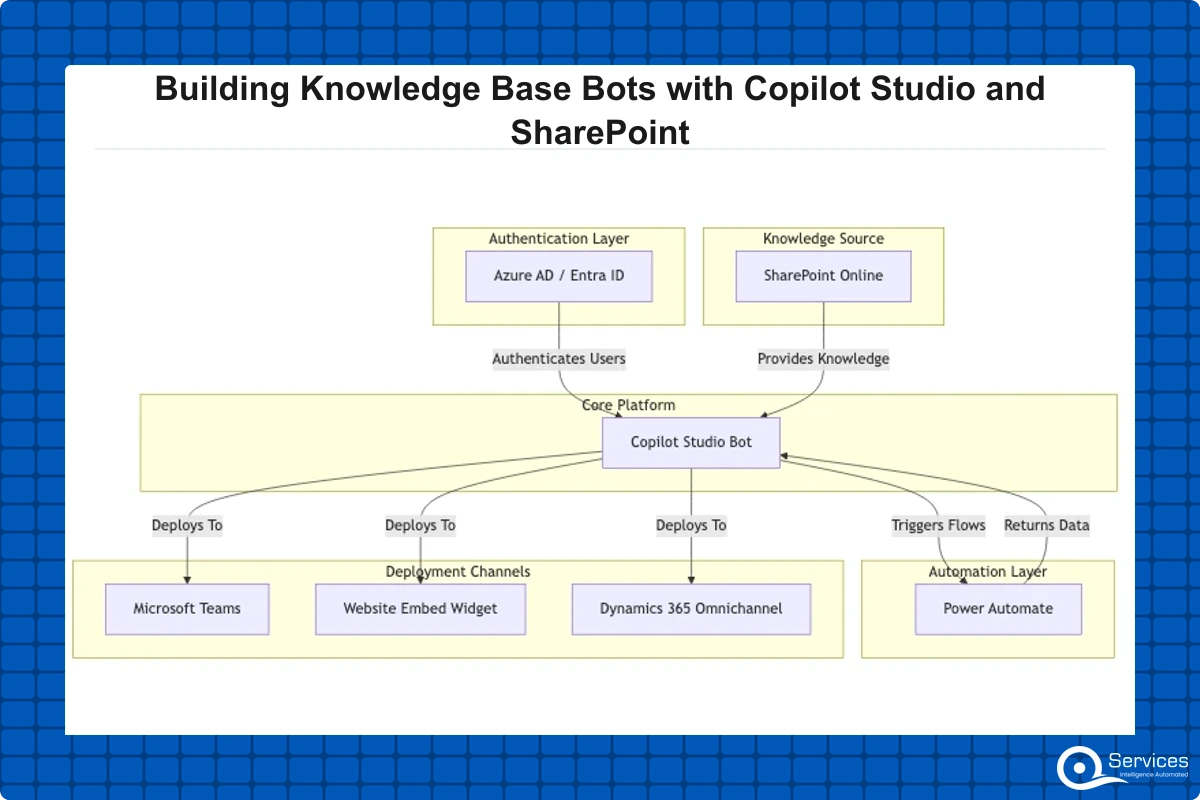
Deployment options include Microsoft Teams (embed the bot as a Teams app), a website widget (embed code), or a custom channel via the Direct Line API. For internal knowledge base bots, Teams is the right default in most cases: employees are already there, and the bot inherits your organization's MFA and conditional access policies automatically.
Post-deployment monitoring is where most teams underinvest. Copilot Studio's analytics dashboard surfaces top unrecognized queries, satisfaction ratings, and escalation rates. A Power Automate flow that sends a weekly digest of unanswered questions to the knowledge base owner closes the content feedback loop and keeps the SharePoint library current as the business changes.
If you're unsure how Power Automate fits alongside other tools in this workflow, Power Apps vs Power Automate clarifies where each tool applies and helps you plan the right automation layer for your deployment.
Azure Infrastructure and Security Considerations for Copilot Studio Deployments
Copilot Studio runs as a managed Microsoft service, so you don't manage compute directly. But the surrounding Azure infrastructure still requires attention, particularly if your organization is actively building out its Microsoft cloud environment or has recently completed an azure app modernization project.
Azure Architecture Review for Bot-Ready Environments
An azure architecture review before bot deployment should confirm:
Azure AD (Entra ID) is configured correctly with appropriate service principals and app registrations
Your Microsoft 365 tenant is connected to your Azure subscription if using Azure-integrated monitoring
Network and conditional access policies won't block bot traffic or authentication flows
If using custom channels, the Azure Bot Service registration is correctly set up and authorized
Organizations running a hybrid cloud azure setup often find that a Copilot Studio deployment reveals identity and network configuration gaps that existed undetected. Better to find those in a planned review than after launch day.
For teams in the middle of broader cloud transitions: the five phases of Azure migration are assess, plan, migrate, optimize, and govern. Copilot Studio deployments typically land in the optimize phase, once core infrastructure is stable. If you're planning to migrate on premise to azure and your Microsoft 365 environment is part of that work, an azure landing zone implementation that accounts for Microsoft 365 workloads from the start makes bot deployments cleaner downstream and avoids rework.
Azure Security Assessment Essentials Before Going Live
An azure security assessment for a Copilot Studio deployment typically covers:
Data residency: where conversation logs are stored and for how long
Authentication: whether users access the bot through Azure AD single sign-on
Connector security: if the bot calls external systems via Power Automate, are those connections secured with OAuth and stored credentials?
Monitoring: are bot activities logged to Azure Monitor or Microsoft Sentinel for anomaly detection?
QServices is a Microsoft Certified Solutions Partner specializing in Azure, and our security reviews consistently find that Teams-embedded bots face different security considerations than website-embedded bots. Teams bots inherit your organization's MFA and conditional access policies automatically. Website-embedded bots need additional authentication wiring to restrict access to authenticated users only.
Power Platform Governance for Copilot Studio SharePoint Bot Projects
Power platform governance directly affects what data the bot can access, which channels it can use, and who can modify its behavior after launch. Addressing this before the build begins is far less disruptive than retrofitting governance controls onto a deployed bot.
DLP Policies for Copilot Studio Channels
Data Loss Prevention (DLP) policies in Power Platform control which connectors can share data with each other. A bot using both SharePoint (classified as a business connector) and an external third-party API may be blocked by a DLP policy that separates business and non-business connectors.
Check your environment's DLP configuration before building. If you're working in a managed environment following Power Platform security best practices, you may need a connector reclassification or a policy exception from your Power Platform admin. Sorting this at the start costs an hour. Discovering it during user acceptance testing costs a sprint.
Azure Infrastructure Assessment and Bot Readiness Checks
An azure infrastructure assessment run before a Copilot Studio deployment typically checks:
Microsoft 365 license assignment (Copilot Studio requires specific licensing per user or per session)
SharePoint site storage limits and content quotas
Teams app deployment policies that control who can install apps in Teams
Power Platform environment capacity units available for the deployment
This pre-deployment review prevents the "works in dev, broken in prod" scenario that delays most mid-market bot rollouts by weeks. QServices includes this readiness check as standard in our power platform governance engagements, because the configuration issues it surfaces almost always exist and are invisible until they block a launch.
Real-World Use Cases for Copilot Studio SharePoint Bots
A well-built copilot studio sharepoint bot is more than a search interface with a chat wrapper. The use cases where these bots reduce operational workload meaningfully are often more specific than teams initially assume, and the ROI case is clearer when you look at actual deployment patterns.
HR Policy Bots for Healthcare and Banking
Healthcare organizations face constant repetitive policy questions: PTO accrual rules, credentialing documentation requirements, HIPAA training deadlines, and leave policies. A Copilot Studio bot connected to the HR SharePoint site handles 60-80% of these queries without HR staff involvement, based on QServices deployment benchmarks across healthcare clients.
Key Insight A Copilot Studio bot connected to the HR SharePoint site handles 60-80% of these queries without HR staff involvement, based on QServices deployment benchmarks across healthcare clients.
Banking and financial services firms have similar query volume with stricter traceability requirements. The bot's conversation logging combined with SharePoint's content versioning provides the audit trail compliance teams need for every policy answer the bot delivered, satisfying internal audit and regulatory review requirements.
QServices has completed 500+ Azure and Microsoft platform projects since 2014, including Copilot Studio deployments for clients in regulated industries where escalation controls and audit trails were regulatory requirements, not optional features.
IT Helpdesk Automation for Logistics and SaaS Companies
Logistics companies run 24/7 operations. An IT helpdesk bot that answers "how do I reset my VPN credentials?" or "what's the hardware request process?" at 3 AM without escalating to an on-call engineer has clear operational ROI. When the bot cannot answer, it creates a support ticket automatically via a Power Automate flow connected to the ITSM system.
SaaS companies benefit differently: internal tooling documentation changes constantly, and a SharePoint-connected bot keeps answers current as documents update, without a dedicated content maintenance team. Power apps development services and Copilot Studio bot development frequently go together in these environments, since teams want both self-service data entry applications and conversational knowledge retrieval in the same Power Platform toolset. Power bi consulting services can surface bot usage metrics alongside other operational KPIs, giving leadership a complete picture of knowledge base adoption across the organization.
How to Choose the Right Azure Consulting Partner for Your Bot Build
The technical work of building a Copilot Studio bot is accessible. The harder parts are governance design, integration with existing systems, and knowing when a bot is the right solution versus a Power Apps form or a SharePoint search improvement. That judgment is where a partner's experience shows.
What a Microsoft Azure Consulting Company Should Offer
A capable microsoft azure consulting company building Copilot Studio bots should audit your SharePoint content before development starts, design the escalation and governance model before writing a single bot topic, and handle Power Platform licensing and environment configuration correctly from the beginning.
Be cautious of partners who move straight to building topics without asking about your DLP policies, Teams deployment restrictions, or SharePoint content quality. Whether the engagement involves azure cloud migration services, azure devops consulting services, or a Power Platform rollout, the pre-work determines the outcome.
For teams considering lift and shift to azure projects that include Microsoft 365 workloads, the bot readiness questions above apply directly to the migration planning. Azure cost optimization consulting is also relevant post-deployment: Copilot Studio session-based licensing scales with usage, and monitoring that spend monthly prevents budget surprises as adoption grows.
QServices as an Azure Managed Services Provider for Bot Deployments
QServices is an azure managed services provider and Microsoft Certified Solutions Partner delivering azure app modernization, power platform development company engagements, and enterprise bot deployments since 2014.
Our Copilot Studio projects follow a four-week delivery model: one week for content audit and environment setup, one week for bot build and SharePoint integration, one week for governance configuration and testing, and one week for deployment and user training. Content remediation, when needed, runs in parallel with the build phase to avoid extending the timeline.
For organizations with broader Azure footprints, we integrate azure infrastructure assessment and azure security assessment work directly into the engagement scope. Copilot Studio projects frequently become the entry point for a wider Power Platform governance engagement, because the bot deployment surfaces configuration gaps that existed before anyone knew to look for them.
To understand where Copilot Studio bots fit alongside other Microsoft automation tools in an enterprise architecture, Power Automate vs Logic Apps vs Azure Functions gives a clear breakdown of each tool's appropriate scope and when to combine them.
Key Takeaways
Microsoft Copilot Studio (formerly Power Virtual Agents) is a low-code bot-building platform within the Power Platform suite.
The 5 steps to build a Copilot Studio knowledge base bot are: structure your SharePoint library, create your bot in Copilot Studio, connect SharePoint as a generative AI source, configure Human-in-the-Loop governance controls, and deploy with Power Automate monitoring workflows.
Copilot Studio runs as a managed Microsoft service, so you don't manage compute directly.
Power platform governance directly affects what data the bot can access, which channels it can use, and who can modify its behavior after launch.
A well-built copilot studio sharepoint bot is more than a search interface with a chat wrapper.
Conclusion
A copilot studio sharepoint knowledge base bot is one of the fastest-delivering investments in the Microsoft ecosystem. The technology is mature, the SharePoint integration is native to Microsoft 365, and the five-step process in this guide gives your team a clear path from content audit to production deployment. The parts that catch most organizations off guard are governance configuration and SharePoint content quality, not the bot build itself.
QServices' azure consulting services team has guided healthcare, banking, logistics, and SaaS organizations through exactly this process, from initial SharePoint audit through post-launch monitoring. If you're ready to start or want to validate your approach before committing budget, download the Copilot Studio Quickstart guide for our pre-deployment checklist, environment setup template, and governance configuration reference in one place.
The faster you start, the sooner your employees stop hunting through SharePoint manually.
Co-Founder and CTO, QServices IT Solutions Pvt Ltd
Rohit Dabra is the Co-Founder and Chief Technology Officer at QServices, a software development company focused on building practical digital solutions for businesses. At QServices, Rohit works closely with startups and growing businesses to design and develop web platforms, mobile applications, and scalable cloud systems. He is particularly interested in automation and artificial intelligence, building systems that automate routine tasks for teams and organizations.
Total costs depend on the scope of SharePoint content remediation and integration complexity. A focused internal knowledge base bot typically requires a four to eight week professional services engagement. Copilot Studio licensing is either per-user per month (included in some Microsoft 365 plans) or per-session for external-facing bots. Most mid-market organizations see project costs between $15,000 and $60,000 depending on content volume, governance requirements, and whether content audit work is included in scope.
Not for a basic deployment. Copilot Studio runs as a Microsoft-managed service within the Power Platform, and SharePoint is part of Microsoft 365, so a standalone Azure subscription is not required. However, if you want advanced monitoring via Azure Monitor, custom authentication flows via Azure AD app registrations, or Azure Bot Service for custom channel integrations beyond Teams and the web widget, an Azure subscription is needed for those specific components.
A focused knowledge base bot typically takes four to six weeks from kickoff to production deployment. The breakdown is approximately one week for SharePoint content audit and cleanup, one week for bot creation and SharePoint integration in Copilot Studio, one to two weeks for governance configuration and testing, and one week for deployment and user training. The content remediation phase is the most variable: organizations with clean, well-organized SharePoint libraries move faster than those with years of unmanaged document accumulation.
Yes. When Copilot Studio connects to SharePoint as a generative AI knowledge source, it respects the underlying SharePoint permissions of the authenticated user. Employees only receive answers drawn from documents they already have read access to. This is one of the key advantages of SharePoint as a knowledge source compared to exporting documents to a separate database, because no additional access control layer is needed and the security model is already understood by your IT team.
For internal bots used by employees who already hold Microsoft 365 licenses, Copilot Studio is licensed on a per-user per month basis and is included in certain Microsoft 365 and Power Platform bundles. For external-facing bots serving customers or partners who do not hold Microsoft 365 licenses, per-session licensing applies. The exact licensing configuration depends on your current Microsoft agreement and usage volume. Microsoft’s licensing documentation on learn.microsoft.com has current pricing, and a Microsoft licensing specialist or azure consulting services partner can confirm what applies to your tenant.
Copilot Studio is a low-code platform with native Power Platform integration, a graphical topic editor, and built-in generative AI support for SharePoint and other knowledge sources. Azure Bot Service is a developer-focused infrastructure layer for building bots with custom code and is better suited for complex custom logic, non-standard channels, or integration with non-Microsoft platforms. For SharePoint knowledge base bots in Microsoft-first environments, Copilot Studio is almost always the right choice because it delivers faster time to value and requires no custom backend development for the core knowledge retrieval use case.
Yes. Copilot Studio supports multiple knowledge sources in a single bot, including multiple SharePoint sites and site collections. You can also control scope at the topic level, directing certain question types to specific knowledge sources. This is particularly useful for organizations with separate SharePoint sites for different departments such as HR, IT, and Legal, where a single unified bot interface is desirable but the underlying knowledge libraries need to remain separated for governance and access control reasons.
Pint AE explained for UAE finance teams with one sample invoice: see which fields come from your ERP, which go missing, and how to test before go-live.
Days sales outstanding explained for CFOs: the formula, worked examples, named industry benchmarks, and why seasonal sales distort DSO. See what moves it.
Pint AE explained for UAE finance teams with one sample invoice: see which fields come from your ERP, which go missing, and how to test before go-live.
Days sales outstanding explained for CFOs: the formula, worked examples, named industry benchmarks, and why seasonal sales distort DSO. See what moves it.
Follow one payment through the cash application process, step by step, and see the exact moment it stalls so your AR team can clear unapplied cash faster.
Globally Esteemed on Leading Rating Platforms
Earning Global Recognition: A Testament to Quality Work and Client Satisfaction. Our Business Thrives on Customer Partnership
QServices Inc. undertakes every project with a high degree of professionalism. Their communication style is unmatched and they are always available to resolve issues or just discuss the project.
Turn the Microsoft Licenses
You Already Own Into an AI Workplace
Join our live webinar on Sept 24 and see five ways to automate meetings, approvals, and