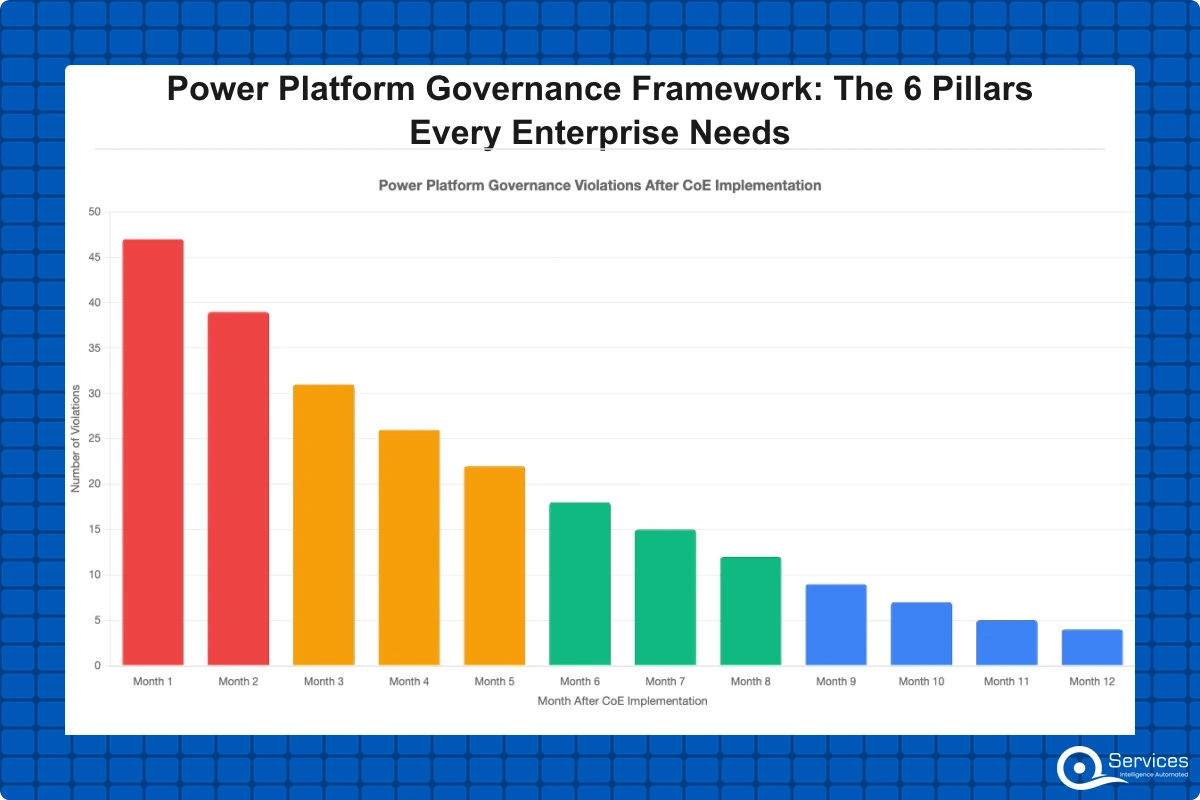
Power platform governance sits at the intersection of Microsoft's most powerful productivity tools and your organization's need for control. When companies let employees build automations and apps without structure, the results range from minor inconsistencies to full-scale compliance failures. This post covers the 6 foundational pillars of a working power platform governance framework, what breaks when each one is missing, and how to implement all of them without grinding your citizen developer program to a halt. We also cover how power automate consulting support fits into the picture for teams that need outside expertise to get this right.
Key Insight Power platform governance sits at the intersection of Microsoft's most powerful productivity tools and your organization's need for control.
In This Article, You'll Learn
What Is Power Platform Governance and Why Does It Break Down at Scale?
Pillar 1: Environment Strategy and Tenant Architecture
Pillar 2: DLP Policies and Data Protection Controls
Pillar 3: A Functioning Power Platform Center of Excellence
Pillar 4: Power Platform ALM Across Environments
Eager to discuss about your project?
Share your project idea with us. Together, we’ll transform your vision into an exceptional digital product!
What Is Power Platform Governance and Why Does It Break Down at Scale?
Power platform governance is the set of policies, processes, and tools that control how employees build, deploy, and share Power Apps, Power Automate flows, Power BI reports, and Power Pages sites within your Microsoft 365 tenant. Done well, it prevents rogue automations, data leaks, and compliance gaps without killing the productivity benefits that make the platform worth adopting in the first place.
The honest answer to why governance breaks down is that Microsoft's low-code environment makes it too easy to build things. A Power Apps canvas app can connect to Salesforce, SharePoint, and Gmail within an hour. A Power Automate flow can push sensitive HR data to an external service in minutes. Without guardrails, you get shadow IT at scale: hundreds of apps, flows, and reports that nobody in IT has seen or approved.
According to Microsoft's Power Platform admin documentation, organizations that deploy without governance policies experience significantly more data policy violations than those with structured DLP controls in place from the start.
The Real Cost of Shadow IT in Power Platform
Shadow IT power platform problems don't look like obvious breaches. They look like a finance analyst who built a Power Automate flow that exports budget data to a personal OneDrive folder for "convenience." They look like a regional office with 47 Power Apps, flows, and Power Pages sites that IT has never reviewed, each connecting to production databases with credentials that never expire.
The downstream risks include duplicate data stores, broken audit trails, and compliance exposure that surfaces during a GDPR or SOC 2 review. Our post on Shadow IT is Eating Your Power Platform: How to Take Back Control goes deeper on the specific failure patterns we see most often across mid-size enterprises.
Why Citizen Developer Programs Need Guardrails
Citizen developer governance isn't about restricting what employees can build. It's about making sure that what they build is secure, supportable, and doesn't duplicate effort already in production. The difference between a healthy citizen developer program and an ungoverned one is usually not the quality of the makers. It's the presence or absence of environment strategy, approval workflows, and training. Citizen developer programs need governance guardrails to prevent data silos and compliance gaps that accumulate invisibly until they become audit findings.
Pillar 1: Environment Strategy and Tenant Architecture
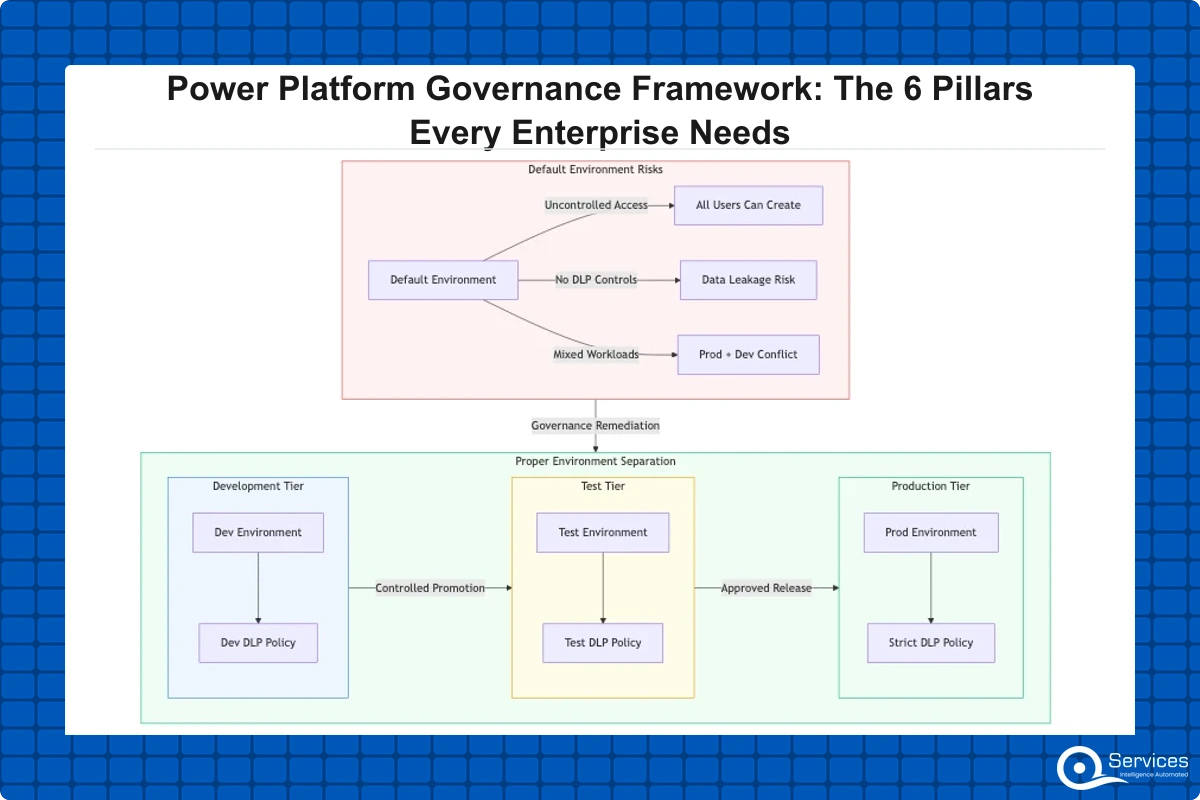
Every well-governed Power Platform tenant separates work into at least three environments: development, testing, and production. This sounds obvious, but most organizations skip it and deploy everything to the default environment, which is a shared space with no capacity limits, no DLP defaults, and no deployment controls.
The default environment is the single biggest source of shadow IT power platform problems. Every licensed user can create apps, flows, and Power Pages development projects in it. Those apps often connect to production data sources before anyone in IT has reviewed them. By the time IT discovers the exposure, the app may have dozens of active users.
Setting Up Dev, Test, and Production Environments
A proper environment strategy assigns each environment a purpose and restricts who can create resources in it. Developers build in isolated sandbox environments. Tested solutions promote through a staging environment before reaching production. The production environment uses stricter DLP policies and requires an approval process for any new connector or flow addition.
This structure also sets up proper power platform ALM (Application Lifecycle Management). Without separate environments, you cannot do version-controlled deployments, and every fix is a direct edit to production logic with no rollback path.
How Environment Segmentation Contains Security Risks
When you isolate environments properly, a misconfigured flow in development cannot reach production data. You can apply different DLP policies per environment tier, giving developers enough access to build and test while locking down production data to business-critical connectors only. This separation is also a prerequisite for any serious dataverse consulting engagement, because Dataverse security roles behave differently across environments and need explicit configuration in each one rather than inheriting defaults.
Pillar 2: DLP Policies and Data Protection Controls
Data Loss Prevention (DLP) policies are the rules that govern which connectors can share data with each other inside your Power Platform environment. They determine whether a Power Automate flow can, for example, combine data from Microsoft Teams with an external email service or push SharePoint list data to a consumer file-sharing tool.
Without DLP policies, your automations can freely move sensitive internal data to any third-party connector available in the Power Platform catalog. With proper policies, you define which connectors belong in the "Business" category (trusted, internal) and which belong in "Non-Business" (blocked from mixing with internal data) or "Blocked" entirely.
Microsoft's DLP connector classification framework covers the full technical setup. The practical application takes judgment: you cannot lock everything down or your citizen developers will build nothing useful, and you'll push them to find workarounds that create worse security gaps than the ones you're trying to close.
How to Set Up DLP Policies in Power Platform
Setup happens in the Power Platform admin center under "Data policies." You create a policy, classify your connectors into Business, Non-Business, or Blocked categories, and assign the policy to specific environments. The harder part is deciding the right policy for each environment tier. Production environments should restrict premium connectors and any third-party integrations not explicitly approved. Development environments can be more permissive to keep builders unblocked during prototyping.
A working rule: any connector that moves data outside your Microsoft tenant boundary needs explicit justification before it enters production. Connectors like SharePoint, Teams, Outlook, and Dataverse sit in the Business category by default. Consumer connectors like Gmail or Dropbox should be Non-Business or Blocked in production environments. The middle ground (Salesforce, SAP, ServiceNow) depends on whether you have formal integration agreements and documented data-sharing controls with those systems.
Pillar 3: A Functioning Power Platform Center of Excellence
The Power Platform Center of Excellence (CoE) is both a team structure and a toolkit. As a team, it is the group inside your IT or operations function responsible for setting standards, running training, and reviewing new solutions before deployment. As a toolkit, it is Microsoft's free set of apps, flows, and reports that give you visibility into what's being built across your entire tenant.
Key Insight As a toolkit, it is Microsoft's free set of apps, flows, and reports that give you visibility into what's being built across your entire tenant.
What the Microsoft CoE Toolkit Actually Includes
The Microsoft Power Platform CoE Starter Kit includes over 40 components: an inventory app that catalogs every app and flow in your tenant automatically, compliance flows that request business justification from makers before their solutions go live, Power BI governance dashboards showing risk by environment, and a maker onboarding process that trains new citizen developers before they create their first production solution.
QServices implements the Power Platform Center of Excellence using Microsoft's CoE toolkit as the foundation, then customizes the inventory and approval workflows to match each organization's risk tolerance and compliance requirements. This approach typically cuts the time to CoE launch from 3-4 months down to 3-4 weeks because you're extending an existing framework rather than building from scratch. For a step-by-step walkthrough, our guide on Setting Up a Power Platform Center of Excellence from Scratch covers the installation sequence and the most common pitfalls organizations hit during setup.
Governance Reporting with Power BI Dashboard Development
One of the most immediately useful CoE components is the Power BI dashboard development layer for governance reporting. The dashboards show which environments have the most apps, which connectors are most commonly used, which apps have no documented owner, and which flows have run zero times in the last 90 days but still have active premium connector allocations.
Power BI dashboard development for governance doesn't require complex data modeling work. The CoE toolkit feeds data into Dataverse tables automatically, and the included reports need only a workspace configuration and a dataset refresh schedule. The resulting dashboards give your CoE team a live view of risk rather than a manually assembled quarterly spreadsheet that's already three weeks out of date before anyone reads it.
Pillar 4: Power Platform ALM Across Environments
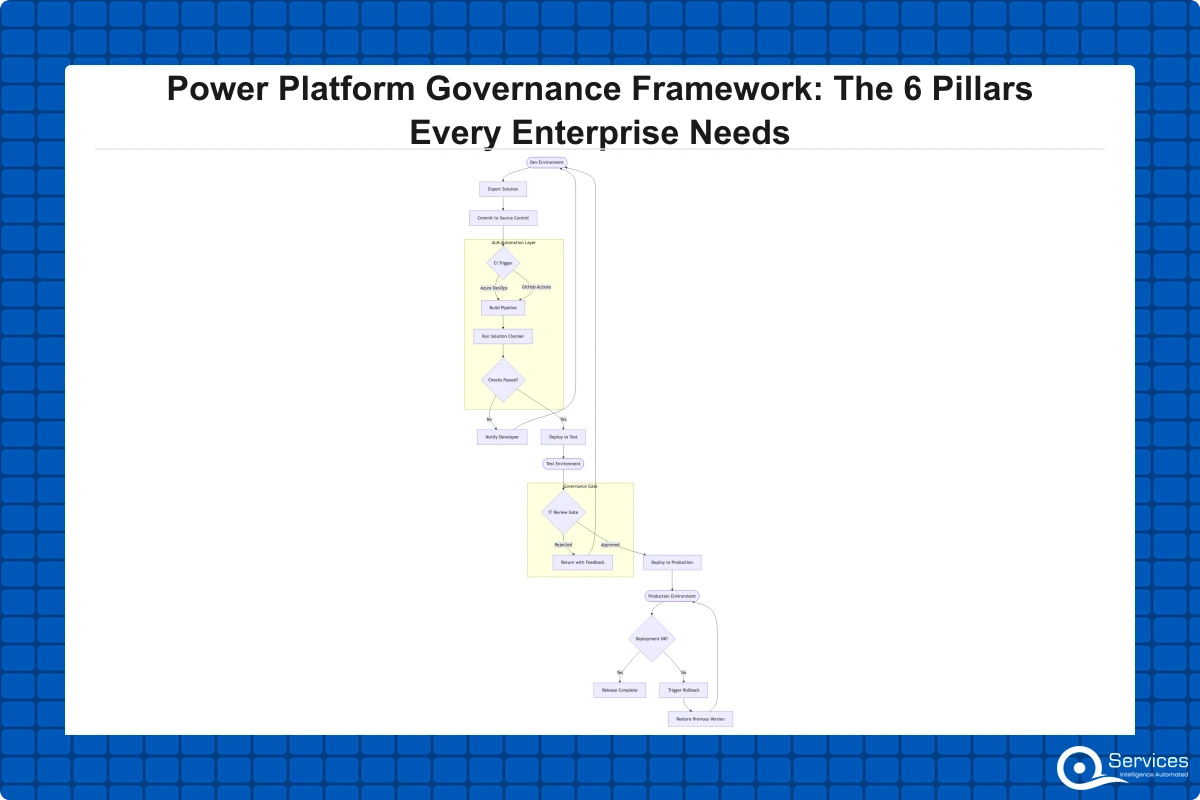
Power platform ALM is the practice of moving solutions (apps, flows, and customizations) from development through testing and into production using a controlled, repeatable process. Without it, you get the classic "works on my machine" problem applied to Power Apps: a flow that functions in the developer's personal environment but breaks in production because of different connection references, missing environment variables, or connector authentication that was tied to one person's credentials.
ALM in Power Platform centers on Solutions, which are containers that package apps, flows, Dataverse tables, and environment variables together as a single deployable unit. When you build inside a solution and use environment variables and connection references throughout, your solution can deploy to any environment without manual reconfiguration.
Why ALM Prevents Power Apps Production Disasters
The most common disaster pattern: a developer exports an app directly from their personal environment and imports it to production, hardcoding SharePoint site URLs, list names, and connection strings in the process. Three weeks later, a SharePoint migration breaks every app deployed this way. There is no clean rollback. IT spends two days manually updating each app.
ALM with proper solution packaging and environment variables prevents this entirely. The app references an environment variable for the SharePoint site URL, which holds different values in dev, test, and production. When the SharePoint migration happens, you update one environment variable and the app keeps running. If you're also deciding between Power Automate and Logic Apps for enterprise integration, our post on Power Automate vs Logic Apps: 7 key differences for 2026 covers when ALM complexity should influence that architecture choice.
Pillar 5: Citizen Developer Governance and Maker Certification
Citizen developer governance works by building checkpoints into the maker journey rather than policing makers after the fact. The goal is to make it easy to do the right thing and genuinely hard to accidentally create compliance risks without anyone noticing.
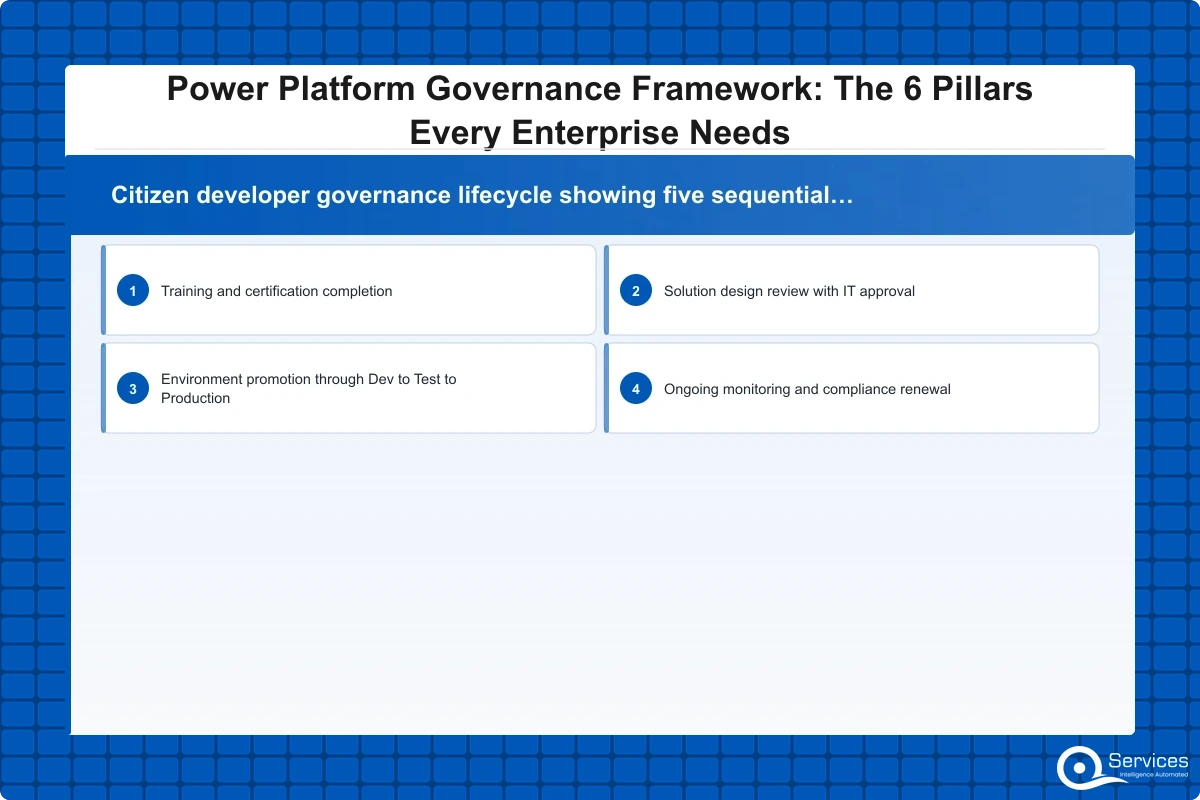
In practice, this means three things: a maker onboarding process that sets expectations before someone builds their first app, a solution review process that creates a lightweight approval gate before production deployments, and an ongoing monitoring process that flags apps and flows that have grown beyond their original documented scope.
Power Apps Canvas vs Model-Driven Apps: The Governance Question
The power apps canvas vs model driven question isn't purely technical. Canvas apps connect to any data source and can bypass data validation logic entirely since they don't enforce a schema the way Dataverse does. Model-driven apps are built on Dataverse, which provides built-in role-based access control, field-level security, and audit logging that works without any custom code from the maker.
Key Insight The power apps canvas vs model driven question isn't purely technical.
For any app that touches sensitive data (HR records, financial data, customer PII), a model-driven approach with dataverse consulting support gives you far better governance coverage. Canvas apps are better suited for simple workflows, field data collection, and quick tools connecting to a single SharePoint list or Excel file. The compliance consequence is real: if your regulatory environment requires audit logs, model-driven apps on Dataverse generate them automatically. Canvas apps require the maker to add logging logic manually, which most makers skip entirely because nothing in the tool forces it.
Building a Maker Certification Program
A maker certification program doesn't need to be complex to be effective. A 2-hour session covering your environment strategy, DLP policy rules, solution packaging requirements, and the deployment review process is enough to reduce governance violations significantly. The key is clarity: makers need to know exactly which types of apps require IT review before deployment. A simple attendance tracker needs a different review level than a Power Pages development project serving external customers or a canvas app reading directly from a production SQL database containing customer financial data.
Pillar 6: Monitoring, Automation, and Continuous Compliance
A governance framework that requires humans to manually review everything eventually stops working. The sixth pillar is what makes the other five self-sustaining: monitoring flows that check for policy violations continuously, dashboards that surface risk in real time, and automated nudges that catch makers before they cross a compliance line rather than after an audit surfaces the problem.
Power Automate Workflow Examples for Governance
Power automate workflow examples for governance include three patterns we use consistently. First, a compliance questionnaire flow that triggers automatically when a maker creates an app using a premium connector, requiring them to document the business justification before the connector stays active. Second, a weekly inventory flow that identifies apps with no documented owner in the CoE inventory and sends ownership confirmation requests to the listed creator. Third, a detection flow that flags when a canvas app directly connects to a production SQL server instead of going through an API layer or Dataverse, which then triggers an IT review rather than letting the connection persist silently.
These flows use the CoE toolkit's Dataverse tables and the Power Platform for Admins connector. No custom development required beyond configuration. The net effect is that your power platform governance process runs continuously rather than only during quarterly audits when violations are already months old.
Power Platform governance prevents shadow IT through DLP policies, environment strategies, and approval workflows working as an integrated system. Each pillar supports the others: DLP without environment segmentation is porous at the boundaries, and a CoE without monitoring goes stale within months as new apps accumulate faster than the team can manually review them.
How Do You Choose the Right Power Platform Development Company?
If you're building these six pillars for the first time, the scope is broader than most internal IT teams expect. Environment strategy decisions affect licensing costs directly. DLP policy design requires detailed knowledge of which connectors your business-critical systems actually use. CoE toolkit installation and customization typically takes 2-4 weeks of focused work from someone who has done it before. ALM pipeline setup requires Azure DevOps or GitHub Actions experience alongside Power Platform expertise, which is a combination most IT generalists don't have.
A qualified power platform development company should show you their CoE deployments and the governance metrics that improved afterward, their DLP policy templates for your industry vertical, and their ALM pipeline configuration for solution deployment. References from organizations in your sector matter because governance design for healthcare looks substantively different from financial services DLP policy work. Power apps development services that bundle governance setup alongside application development are more efficient than purchasing governance consulting after your apps are already in production and the shadow IT has already accumulated.
The NIST Cybersecurity Framework recommends building security and governance controls into the initial design of any system rather than retrofitting them after deployment. The same principle applies directly to Power Platform: governance built in from the start costs a fraction of governance applied to an existing ungoverned tenant with hundreds of apps to audit. Power pages development projects especially need governance from day one since they expose data and workflows to external users outside your Microsoft tenant boundary.
What Good Governance Implementation Actually Looks Like
A governance implementation for a typical mid-size enterprise takes 4-8 weeks. Weeks 1-2 cover environment design, licensing review, and DLP policy drafting based on your connector inventory. Weeks 3-4 cover CoE toolkit installation, Dataverse configuration, and maker onboarding process setup. Weeks 5-6 cover ALM pipeline configuration and migration of existing apps from unmanaged into solution packages. Weeks 7-8 cover training delivery, governance dashboard review, and formal handoff to the internal CoE team with documented runbooks.
If you're building applications alongside governance work, custom power apps development for priority use cases can run in parallel with the governance foundation without slowing either track. Our post on Custom Power Apps Development: Use Cases, Costs, and What to Expect covers what this parallel workstream looks like in practice. Power bi consulting services often overlap with governance work too, since a custom governance reporting layer built on Dataverse audit logs gives your CoE team visibility that the standard CoE toolkit dashboards don't fully cover.
Key Takeaways
Power platform governance is the set of policies, processes, and tools that control how employees build, deploy, and share Power Apps, Power Automate flows, Power BI reports, and Power Pages sites within your Microsoft 365 tenant.
Every well-governed Power Platform tenant separates work into at least three environments: development, testing, and production.
Data Loss Prevention (DLP) policies are the rules that govern which connectors can share data with each other inside your Power Platform environment.
The Power Platform Center of Excellence (CoE) is both a team structure and a toolkit.
Power platform ALM is the practice of moving solutions (apps, flows, and customizations) from development through testing and into production using a controlled, repeatable process.
Conclusion
Power platform governance isn't a one-time project. It's an ongoing capability: policies that need updating as Microsoft releases new connectors, a CoE team that needs to stay engaged as maker adoption grows across the organization, and monitoring flows that need adjustment as your business processes evolve.
The 6 pillars covered here (environment strategy, DLP policies, Center of Excellence, power platform ALM, citizen developer governance, and continuous monitoring) are interdependent by design. You can implement them incrementally, starting with environment segmentation and DLP, then adding the CoE toolkit, then ALM pipelines. But skipping any one pillar permanently creates a gap in your governance posture that shadow IT will fill.
If your current power platform governance setup has gaps, start with an audit: understand what's running in your default environment, which connectors your makers are actively using, and whether your DLP policies match your actual data classification requirements. That honest starting point is more useful than a perfect governance framework designed for a company you're not yet.
Ready to build a governance foundation that scales with your citizen developer program? Talk to our power automate consulting and Power Platform team at QServices.
Co-Founder and CTO, QServices IT Solutions Pvt Ltd
Rohit Dabra is the Co-Founder and Chief Technology Officer at QServices, a software development company focused on building practical digital solutions for businesses. At QServices, Rohit works closely with startups and growing businesses to design and develop web platforms, mobile applications, and scalable cloud systems. He is particularly interested in automation and artificial intelligence, building systems that automate routine tasks for teams and organizations.
Power Platform governance is the set of policies, processes, and tools that control how employees build, deploy, and share Power Apps, Power Automate flows, Power BI reports, and Power Pages sites within a Microsoft 365 tenant. It includes DLP policies that restrict data movement between connectors, environment strategies that separate development from production, a Center of Excellence team that reviews and approves new solutions, and ALM pipelines that control how apps move from development into production. Without governance, organizations accumulate shadow IT, compliance gaps, and uncontrolled data flows to external services that only surface during audits.
Power Platform governance prevents shadow IT through three core controls working together: DLP policies that restrict which connectors can share data and block unapproved external services by default, environment strategies that limit who can deploy apps and flows to production environments, and CoE monitoring flows that automatically inventory every app, flow, and Power Pages site in your tenant continuously. The CoE toolkit also includes compliance questionnaire flows that require makers to justify any new premium connector usage before their solution goes live, catching shadow IT at creation rather than discovery.
For organizations using Microsoft 365, Dynamics 365, or Azure, Power BI is almost always the better choice. It connects natively to SharePoint, Teams, Dataverse, Azure SQL, and the full Microsoft ecosystem without additional connector licensing overhead. It also integrates directly with the Power Platform CoE toolkit for governance reporting dashboards. Tableau offers stronger visualization capabilities for complex standalone analytics teams, but the licensing cost and integration effort rarely justify the switch when your data lives primarily in Microsoft systems. Power BI consulting services for Microsoft-heavy environments consistently deliver faster time-to-value and lower total cost of ownership than comparable Tableau implementations.
Power Apps supports two distinct application types. Canvas apps are flexible, quick-to-build tools that connect to SharePoint lists, Excel files, SQL databases, or external APIs without requiring a structured data model. Common examples include expense submission forms, field inspection tools, inventory trackers, leave management systems, and approval workflows. Model-driven apps are built on Dataverse and suit complex data management scenarios like CRM systems, case management tools, compliance tracking applications, and anything requiring structured relationships between data entities. Both types run on mobile devices, browsers, and Microsoft Teams. For governance purposes, model-driven apps are preferable for sensitive data because they provide automatic audit logging and role-based access control through Dataverse without any custom code.
Power Platform development costs vary significantly by scope and complexity. A simple canvas app using existing SharePoint data typically costs $5,000-$15,000 with a qualified power platform development company handling build and testing. A model-driven app with Dataverse customization, integrations, and governance setup ranges from $15,000-$50,000. Full governance framework implementation covering CoE toolkit, DLP policies, ALM pipelines, and environment setup typically costs $20,000-$60,000 depending on tenant size and the number of existing apps requiring inventory and solution migration. Microsoft Power Apps licensing starts at $5 per user per app per month, or $20 per user per month for unlimited apps through the Power Apps Premium license.
A Power Platform Center of Excellence (CoE) is the governance team and toolkit that oversees how Power Platform is used across an organization. The team sets policies, approves new solutions, trains citizen developers, and monitors for compliance issues on an ongoing basis. The toolkit, provided free by Microsoft, includes an inventory app that catalogs every app and flow in your tenant, compliance flows requiring business justification from makers before solutions go live, maker onboarding templates, and Power BI governance dashboards. QServices implements the Power Platform Center of Excellence using Microsoft’s CoE toolkit as the foundation, customizing the inventory and approval workflows to match each organization’s specific risk profile and compliance requirements.
Use a canvas app when you need a flexible, quick-to-build tool that connects to existing data sources like SharePoint, Excel, or SQL without restructuring your data model. Use a model-driven app when your use case requires complex data relationships, audit logging, role-based access control at the field level, or tight integration with Dynamics 365. For power apps canvas vs model driven decisions from a governance standpoint, model-driven apps on Dataverse are the safer choice for any app touching sensitive data because they provide automatic audit trails and field-level security without requiring the maker to build logging logic manually. Canvas apps are better suited for simple forms, field tools, and low-sensitivity internal workflows.
Business intelligence consulting services should give a mid-market company a governed way to make decisions. Attractive dashboards are only the visible part. The useful outcome is a system in which source data, metric definitions, access, releases, ownership, and support still work after the consultants leave.
In a Microsoft Solutions Partner vs Microsoft Partner comparison, the difference is validation. A company can participate in the Microsoft AI Cloud Partner Program without holding a customer-facing Solutions Partner designation. A designated Solutions Partner has met Microsoft’s current threshold in a specific solution pathway: at least 70 out of 100 partner capability points, with more than zero points in every required metric, based on performance, skilling, and customer success data recorded in Partner Center.
Business intelligence consulting services should give a mid-market company a governed way to make decisions. Attractive dashboards are only the visible part. The useful outcome is a system in which source data, metric definitions, access, releases, ownership, and support still work after the consultants leave.
In a Microsoft Solutions Partner vs Microsoft Partner comparison, the difference is validation. A company can participate in the Microsoft AI Cloud Partner Program without holding a customer-facing Solutions Partner designation. A designated Solutions Partner has met Microsoft’s current threshold in a specific solution pathway: at least 70 out of 100 partner capability points, with more than zero points in every required metric, based on performance, skilling, and customer success data recorded in Partner Center.