Picking a dynamics 365 implementation partner without a structured evaluation process is one of the most expensive mistakes a mid-size business can make. The software license is the easy part. Getting D365 configured, customized, and genuinely adopted by your teams is where projects succeed or fail, and your implementation partner controls nearly all of that. This post gives you 10 concrete criteria to compare vendors before you commit budget, explains what drives crm implementation cost beyond the initial quote, and covers the questions most buyers forget to ask until six months into a troubled rollout.
In This Article, You'll Learn
Why Most D365 Rollouts Struggle (and Who Is Actually Responsible)
What Dynamics 365 Modules Do You Actually Need?
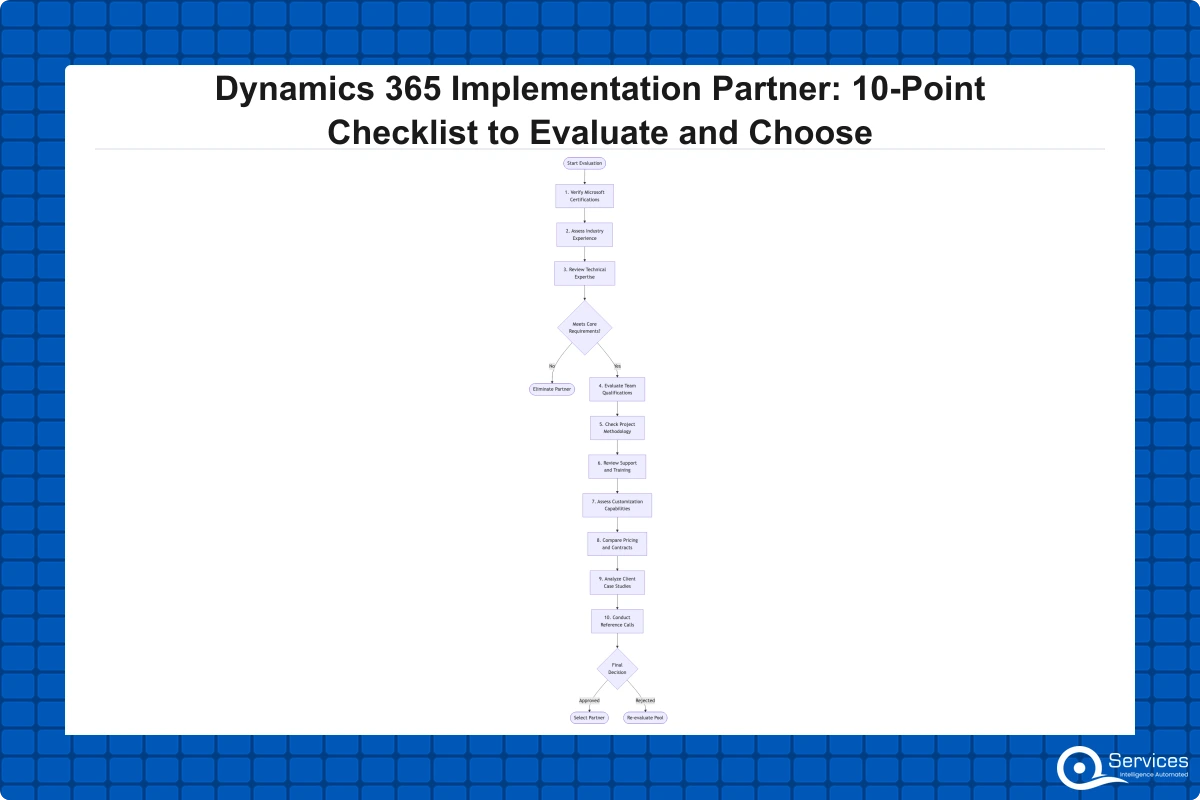
The 10-Point Checklist to Evaluate a Dynamics 365 Implementation Partner
How Much Does Dynamics 365 Implementation Cost?
Dynamics 365 Integration and Migration: Where Most Partners Cut Corners
Eager to discuss about your project?
Share your project idea with us. Together, we’ll transform your vision into an exceptional digital product!
Why Most D365 Rollouts Struggle (and Who Is Actually Responsible)
This is not a platform problem. Microsoft Dynamics 365 is a proven product with a global install base across healthcare, logistics, financial services, and manufacturing. When implementations fail, the cause is almost always the same: the wrong partner. Industry research, including findings from Gartner, consistently shows that more than half of enterprise ERP and CRM projects exceed original budget or timeline. Dynamics 365 follows the same pattern.
The platform covers CRM, ERP, finance, supply chain, field service, and more. That scope is its strength. It is also why partner selection matters this much. A firm that misreads your requirements or overcustomizes the wrong areas leaves you with a system your team avoids.
What a Failed Dynamics 365 CRM Implementation Actually Looks Like
A broken dynamics 365 crm implementation does not announce itself with an error message. It shows up as low adoption: sales reps logging deals in spreadsheets, service agents maintaining a parallel Outlook calendar, finance teams running month-end in Excel because the D365 data is unreliable. By the time this is visible to leadership, the implementation partner is usually long gone.
The Case for Structured Evaluation Before You Sign
Two to three weeks of due diligence before partner selection prevents months of remediation work afterward. The 10-point checklist below is the framework we apply at QServices when assessing our own readiness for a new engagement. It works equally well in reverse when you are evaluating us or any other vendor.
What Dynamics 365 Modules Do You Actually Need?
You cannot evaluate a partner without knowing which part of the platform you are purchasing. The Dynamics 365 suite is a collection of distinct applications that share a common data platform. It is not one monolithic system, and partners specialize differently across the product range.
Dynamics 365 Business Central vs D365 Finance and Operations
Dynamics 365 Business Central is built for small to mid-size businesses, typically 10-300 users. It combines ERP, accounting, inventory, and basic CRM in a single product. Deployment is faster and less complex than Finance and Operations. For companies evaluating dynamics 365 for small business requirements with 10-100 users, Business Central is almost always the right starting point.
D365 Finance and Operations (now called Finance and Supply Chain Management) targets enterprises with 300-plus users, multi-entity legal structures, complex manufacturing, or global operations. A d365 finance and operations rollout demands significantly more configuration time and a partner with deeper technical credentials. Never assume that a partner experienced in Business Central has equivalent capability in Finance and Operations. They are different products with different implementation methodologies.
The Microsoft Dynamics 365 documentation covers the module boundaries clearly if you need a starting point for mapping your requirements to the right product.
CRM, Sales, Customer Service, and Field Service Modules
The CRM-side modules (Dynamics 365 Sales, Customer Service, Field Service, Marketing and Customer Insights) carry their own complexity, particularly around data migration from legacy platforms and integration with telephony, ticketing, and marketing tools. A partner who specializes in ERP may not have the CRM depth your project needs. Know your primary module before you shortlist vendors.
The 10-Point Checklist to Evaluate a Dynamics 365 Implementation Partner
Use this during vendor interviews. Score each partner 1-10 per criterion, then compare totals. Do not skip point 10. Reference calls are the single most predictive indicator of delivery quality, and most buyers never make them.
Points 1-3: Credentials and Sector Experience
1. Microsoft Certified Solutions Partner status
Check the Microsoft Partner Network directly to verify the vendor's current designation. "Microsoft Partner" is a broad category that includes resellers with minimal technical training. You want a firm with Solution Partner for Business Applications or active specializations in Dynamics 365. QServices is a Microsoft Certified Solutions Partner for Dynamics 365 with 500-plus projects delivered since 2014, which provides a verifiable delivery track record rather than a marketing claim.
2. Module-specific project count in the past 24 months
Ask for a concrete number: how many go-lives have they completed in your specific module over the past two years? Fewer than five recent live projects in your module is a warning sign. Fewer than three is a disqualifying factor unless you are accepting a significant cost reduction in exchange for being a reference account.
3. Industry vertical expertise
Dynamics 365 consulting services for healthcare configure the system very differently from logistics or financial services implementations. Compliance requirements, data models, and integration patterns all vary by sector. A partner who has never touched your industry's regulatory context will learn on your project's timeline and budget. For a sense of how vertical expertise changes the technical approach, our post on supply chain visibility for mid-size logistics companies illustrates the difference between generic ERP thinking and sector-specific architecture.
Points 4-6: Technical Depth and Customization Capabilities
4. Dynamics 365 customization depth
Ask for two or three examples of custom development work, not just configuration. Configuration is changing a field label or enabling a standard workflow. Dynamics 365 customization means writing business logic in Power Fx, building custom tables, or extending the data model with purpose-built entities. If your requirements list includes anything beyond out-of-the-box features, verify the partner can actually develop in the platform, not just configure it.
5. Integration architecture and methodology
Most D365 deployments connect to two or three external systems at minimum: an existing ERP, an e-commerce platform, a data warehouse, or a telephony system. Ask the partner to describe their dynamics 365 integration services approach in detail. Do they use Azure API Management for enterprise-grade connectivity? Power Automate for lighter automation scenarios? Custom connectors? Partners without a documented integration methodology improvise, and improvised integrations are the most common source of post-go-live instability. Our Power Automate workflow examples show what well-structured automation looks like at the implementation level.
6. Data migration methodology
Data migration is where implementations quietly break down. Corrupted or incomplete data moved into a clean system is still corrupted, but now it is more visible and harder to correct. Ask whether the partner has documented dynamics 365 migration services procedures. How do they handle data cleansing before import? What validation tools confirm data integrity after migration? Partners who describe migration as "just an export-import step" will underestimate both effort and timeline.
Points 7-10: Commercial Terms, Governance, and References
7. CRM implementation cost transparency
Any partner can quote a number. The real question is what that number covers. Ask for a line-item breakdown: discovery, design, configuration, dynamics 365 customization work, data migration, testing, training, go-live support, and post-go-live hypercare. Then ask explicitly: what happens when scope changes? Partners offering only time-and-materials contracts place all budget risk on you. A fixed-scope agreement with a defined change-control process is more defensible for both parties.
8. Post-go-live support model
Go-live is not the finish line. The 30-90 days after deployment surface issues that testing does not catch. Ask: what does the standard hypercare period cover, and for how long? What does ongoing support cost after that? Is there a named account contact or a generic ticketing queue? Partners who exit after go-live create a support gap that is both expensive and disruptive to fill with a new vendor.
9. Project methodology and change governance
How does the partner run engagements day to day? Ask about sprint cadence, how change requests are documented and priced, who owns the change log, and how issues escalate to leadership. A partner who cannot describe their methodology concretely does not have a formal one. Our piece on human-in-the-loop delivery governance explains the framework we apply across every engagement if you want a benchmark for what rigorous process looks like.
10. Verifiable references in your industry with go-live confirmation
This is non-negotiable. Ask for three references from clients in your sector where the project went live within original timeline and budget. Then call them, and ask: what went wrong during the project, and how did the partner respond? That answer tells you more than any polished case study. Partners who offer written testimonials instead of direct reference contact are not worth pursuing further.
How Much Does Dynamics 365 Implementation Cost?
The answer depends on scope, but here are realistic ranges based on what we typically see across our own Dynamics 365 engagements:
Project Type
Users
Timeline
Estimated Cost (USD)
Business Central (basic SMB)
10-50
2-4 months
$30,000-$75,000
Business Central (mid-market)
50-150
4-8 months
$75,000-$200,000
D365 Sales / CRM module
20-100
3-6 months
$40,000-$120,000
Finance & Operations (enterprise)
150+
9-18 months
$200,000-$800,000+
Full multi-module suite
200+
12-24 months
$500,000-$2M+
Dynamics 365 implementation typically takes 3-18 months depending on modules, users, and customization complexity. These figures cover implementation services only. Software licensing, Azure infrastructure, and user training add to the total.
What Drives CRM Implementation Cost Above Initial Estimates
Three factors inflate crm implementation cost beyond what partners originally quote more reliably than any other:
Late-discovered scope: Requirements not documented during discovery. A compressed or skipped blueprint phase produces this problem on almost every project that experiences budget overruns. Investing in a thorough discovery phase upfront costs far less than rescoping mid-project.
Poor data quality: Companies with five years of fragmented records in Salesforce or a legacy system spend 2-4 times longer on migration than companies with clean, structured data. A data quality audit before the project starts saves significantly more than it costs.
Integration sprawl: Each additional external system connected to D365 adds roughly 15-25% to implementation effort. Mapping all required integrations before you finalize scope with the partner prevents the most common source of mid-project surprises.
Dynamics 365 Integration and Migration: Where Most Partners Cut Corners
Two technical areas separate strong Dynamics 365 consulting services from average ones: integration architecture and data migration. Both are consistently underestimated in initial project scopes, and both have an outsized effect on go-live quality.
Dynamics 365 Integration Services: What Good Architecture Looks Like
A well-integrated D365 environment uses a consistent integration layer rather than point-to-point API calls between every connected system. Partners with mature dynamics 365 integration services will propose an integration architecture at the start of the project, document it, and own it through go-live. Ask to see an integration architecture diagram from a recent similar project. If they cannot produce one, their approach is improvised.
Power Platform plays a significant role in most D365 integration architectures. Power Automate handles many light integration scenarios without custom code, and building this capability on a governed foundation matters for long-term maintainability. Our post on building a Power Platform Center of Excellence explains how to create that foundation before integrations proliferate beyond your team's control.
Dynamics 365 Migration Services from Salesforce and Legacy Platforms
Dynamics 365 migration services from Salesforce require a specific skill set that general D365 partners often lack. Salesforce and Dynamics 365 have different data models, different relationship structures, and different field naming conventions. A partner who has not run a Salesforce-to-D365 migration before will underestimate the data transformation work by a wide margin.
Ask for the partner's migration methodology document. If they describe the process as "we export from the old system and import to D365," that signals they have not done this at scale. The migration phase typically accounts for 20-35% of total project effort on a CRM migration. Partners who treat it as an afterthought almost always push go-live timelines by 4-8 weeks.
Key Insight The migration phase typically accounts for 20-35% of total project effort on a CRM migration.
Dynamics 365 vs Salesforce: Choosing the Right Platform First
This decision should happen before you shortlist partners, not after. If your organization already runs Microsoft 365, Azure, or Teams, Dynamics 365 typically delivers better total cost of ownership because of native licensing bundles and pre-built connectors across the Microsoft stack.
If your team runs Salesforce today and is considering a move, plan for 3-6 months of data transformation work, parallel operation, and user retraining before decommissioning the old system. The dynamics 365 vs salesforce decision ultimately depends on your existing Microsoft investment and your long-term ERP and CRM roadmap. For a full side-by-side analysis, our Dynamics 365 vs Salesforce comparison for 2026 covers feature gaps, licensing economics, and the specific scenarios where each platform wins.
When Dynamics 365 for Small Business Makes Financial Sense
For companies with 10-100 users and a Microsoft 365 subscription already in place, dynamics 365 for small business deployments through Business Central can come in at 30-40% lower total cost than a comparable Salesforce Professional implementation when you factor in bundled licensing. The integration with Outlook, Teams, and SharePoint is native and requires no third-party connectors, which also reduces ongoing maintenance overhead. If your team is already living in Microsoft tools, the productivity gains from a unified data environment are faster to realize than on any competing CRM platform.
Key Insight For companies with 10-100 users and a Microsoft 365 subscription already in place, dynamics 365 for small business deployments through Business Central can come in at 30-40% lower total cost than a comparable Salesforce Professional implementation when you factor in bundled licensing.
Key Takeaways
This is not a platform problem.
You cannot evaluate a partner without knowing which part of the platform you are purchasing.
Use this during vendor interviews.
The answer depends on scope, but here are realistic ranges based on what we typically see across our own Dynamics 365 engagements:
Two technical areas separate strong Dynamics 365 consulting services from average ones: integration architecture and data migration.
Conclusion
Choosing a dynamics 365 implementation partner is not a standard procurement exercise. The partner you select will make more consequential technical decisions about your business than your own team will during the project. The 10-point checklist in this post gives you a framework that goes beyond certifications: module-specific track record, data migration rigor, integration architecture, post-go-live support, and verifiable references that you actually call.
Get the platform decision right first. Know which D365 modules your requirements call for. Then run every vendor through this checklist, score them honestly, and speak with their references before you sign anything. The dynamics 365 consulting services market has hundreds of vendors with wide variation in delivery quality. Credentials matter, but delivery history matters more.
If you want to benchmark your evaluation against a Microsoft Certified Solutions Partner with 500-plus Dynamics 365 projects delivered, review our implementation approach and delivery metrics before you finalize your shortlist.
Co-Founder and CTO, QServices IT Solutions Pvt Ltd
Rohit Dabra is the Co-Founder and Chief Technology Officer at QServices, a software development company focused on building practical digital solutions for businesses. At QServices, Rohit works closely with startups and growing businesses to design and develop web platforms, mobile applications, and scalable cloud systems. He is particularly interested in automation and artificial intelligence, building systems that automate routine tasks for teams and organizations.
Dynamics 365 implementation cost ranges from $30,000 for a basic Business Central deployment (10-50 users) to $2 million or more for a full multi-module enterprise rollout. A sales-focused D365 CRM implementation typically falls between $40,000 and $120,000. The main factors that drive crm implementation cost are the number of modules selected, customization complexity, data migration scope, and the number of external system integrations required. These figures cover implementation services only and do not include software licensing or user training.
Dynamics 365 implementation typically takes 3-18 months depending on modules, users, and customization complexity. A basic Business Central project for a small company can go live in 2-4 months. A Finance and Operations rollout for a 300-plus user enterprise commonly takes 9-18 months. Multi-module deployments spanning both CRM and ERP can run 12-24 months. Data migration quality and integration complexity are the two factors that most reliably extend timelines beyond initial estimates.
Neither is universally better. Dynamics 365 is typically the stronger choice for organizations already running Microsoft 365, Azure, or Teams, because of native integration and bundled licensing savings. Salesforce has a broader third-party app ecosystem and more mature AppExchange marketplace. The practical decision comes down to your existing technology stack: if you are already embedded in Microsoft tools, the dynamics 365 vs salesforce comparison almost always favors D365 on total cost of ownership. If your operations depend on Salesforce-native apps, migration costs must factor into the comparison.
Dynamics 365 Business Central is Microsoft’s ERP solution designed for small to mid-size businesses with 10-300 users. It combines accounting, inventory management, supply chain, project management, and basic CRM in a single platform. It is the most common entry point for companies new to the Microsoft Dynamics ecosystem, and a qualified dynamics 365 business central partner can typically deliver a standard implementation in 2-8 months depending on company size and customization requirements. It is distinct from D365 Finance and Operations, which targets larger enterprise deployments.
Evaluate partners on 10 criteria: Microsoft Certified Solutions Partner status, module-specific project count in the past 24 months, industry vertical expertise, dynamics 365 customization depth, integration architecture methodology, data migration process, crm implementation cost transparency with line-item scope, post-go-live support model, project governance methodology, and verifiable client references in your sector. Always call references directly and ask what went wrong during their project and how the partner handled it. That answer is more informative than any case study or sales presentation.
Dynamics 365 includes: Business Central (SMB ERP and CRM), Finance, Supply Chain Management, Sales (CRM), Customer Service, Field Service, Marketing (Customer Insights), Project Operations, Human Resources, and Commerce. Each module addresses a specific business function and can be licensed independently or in combination. D365 Business Central is designed for SMBs with 10-300 users; Finance and Operations targets enterprises with 300-plus users. The AEO keyword here is understanding that these are separate products sharing a common Dataverse data platform, not features of a single application.
Yes, and this is one of Dynamics 365’s strongest technical advantages. D365 shares the same underlying Microsoft Dataverse data platform as Power Platform. This means Power Apps can extend D365 with custom applications without custom code, Power Automate can automate D365 workflows natively, and Power BI connects directly to D365 data for real-time reporting. These dynamics 365 integration services capabilities are built in rather than bolt-on, which reduces both implementation effort and ongoing maintenance cost compared to competing platforms that require third-party connectors for the same functionality.
Business intelligence consulting services should give a mid-market company a governed way to make decisions. Attractive dashboards are only the visible part. The useful outcome is a system in which source data, metric definitions, access, releases, ownership, and support still work after the consultants leave.
In a Microsoft Solutions Partner vs Microsoft Partner comparison, the difference is validation. A company can participate in the Microsoft AI Cloud Partner Program without holding a customer-facing Solutions Partner designation. A designated Solutions Partner has met Microsoft’s current threshold in a specific solution pathway: at least 70 out of 100 partner capability points, with more than zero points in every required metric, based on performance, skilling, and customer success data recorded in Partner Center.
How do you build a legacy application modernization strategy for Azure? A legacy application modernization strategy assigns the right treatment to each workload, then sequences the work around business value, technical evidence, and operational risk. For Azure, that means choosing among retire, retain, rehost, replatform, refactor, rearchitect, rebuild, and replace instead of treating cloud migration as a blanket mandate. Direct Answer A legacy application modernization strategy for Azure should classify
Eager to discuss about your project?
Share your project idea with us. Together, we’ll transform your vision into an exceptional digital product!
Business intelligence consulting services should give a mid-market company a governed way to make decisions. Attractive dashboards are only the visible part. The useful outcome is a system in which source data, metric definitions, access, releases, ownership, and support still work after the consultants leave.
In a Microsoft Solutions Partner vs Microsoft Partner comparison, the difference is validation. A company can participate in the Microsoft AI Cloud Partner Program without holding a customer-facing Solutions Partner designation. A designated Solutions Partner has met Microsoft’s current threshold in a specific solution pathway: at least 70 out of 100 partner capability points, with more than zero points in every required metric, based on performance, skilling, and customer success data recorded in Partner Center.