A successful dynamics 365 crm implementation can cut sales cycle time by 30% and reduce manual data entry by up to 70%, yet more than half of CRM projects still run over budget or miss key milestones. The difference between a smooth rollout and a stalled one almost always comes down to preparation, not technology. This guide breaks the process into six clearly defined phases, covering everything from initial scoping to post-go-live support. We'll also cover what the project realistically costs, how to pick the right dynamics 365 implementation partner, and where dynamics 365 customization fits into the timeline.
Key Insight A successful dynamics 365 crm implementation can cut sales cycle time by 30% and reduce manual data entry by up to 70%, yet more than half of CRM projects still run over budget or miss key milestones.
In This Article, You'll Learn
What Is Dynamics 365 CRM and Who Needs Implementation?
The 6 Phases of a Successful Dynamics 365 CRM Implementation
Dynamics 365 CRM Implementation Cost: What Should You Budget?
Dynamics 365 Customization: Making It Work for Your Industry
Choosing Your Dynamics 365 Implementation Partner
Eager to discuss about your project?
Share your project idea with us. Together, we’ll transform your vision into an exceptional digital product!
What Is Dynamics 365 CRM and Who Needs Implementation?
Dynamics 365 is Microsoft's cloud-based suite of business applications covering sales, customer service, field service, finance, supply chain, and more. The "CRM" side refers primarily to the Sales, Customer Service, and Marketing apps, but most organizations implement multiple modules from day one. The platform sits inside the Microsoft ecosystem alongside Power Platform, Azure, and Microsoft 365, which means existing data and workflows connect without major rework.
The Core Modules of Dynamics 365
Dynamics 365 is not a single product. The suite includes:
Sales: Pipeline management, AI-powered lead scoring, forecasting
Customer Service: Case management, omnichannel support, SLA tracking
Project Operations: Resource management, project accounting, time and expense tracking
Most mid-size companies start with Sales plus Customer Service plus Finance. Healthcare organizations often add Field Service. Logistics companies typically combine Supply Chain Management with Finance. The right starting point depends on where your biggest process bottlenecks sit today.
D365 Finance and Operations vs Business Central: Which Fits You?
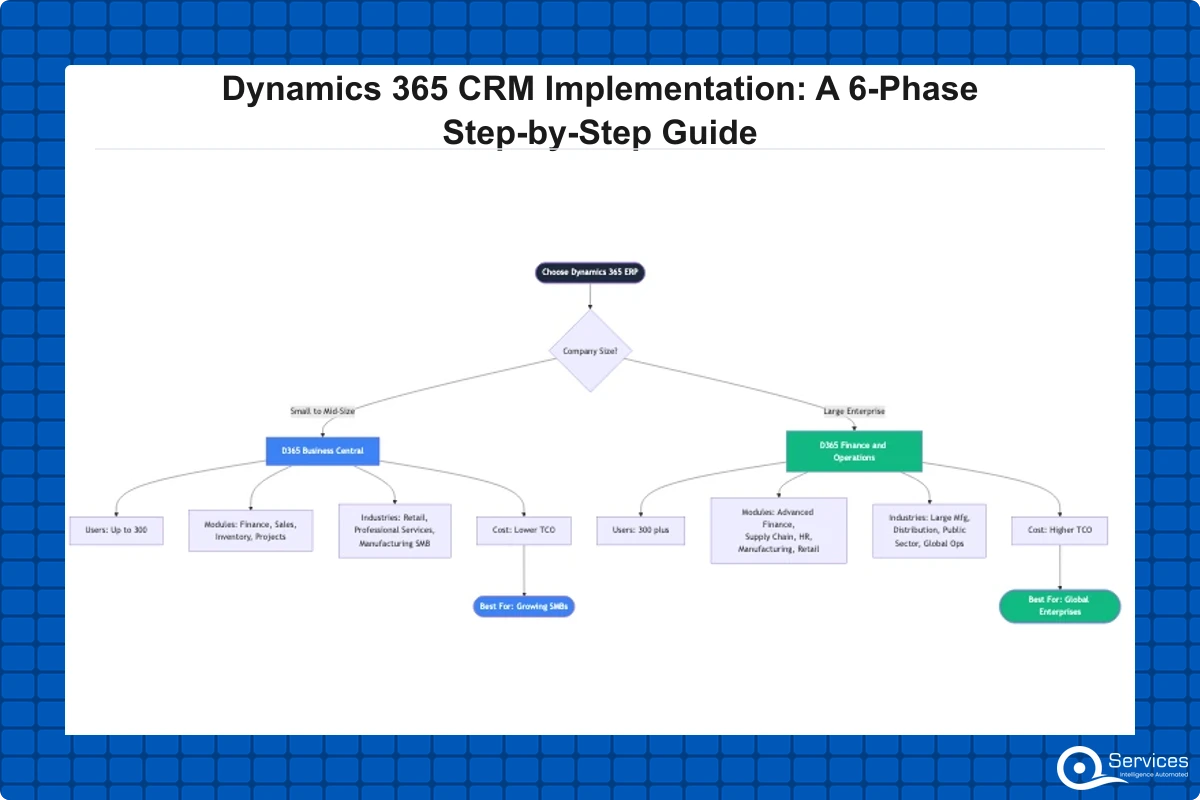
This is the first question most prospects ask. D365 Business Central is designed for SMBs with 10 to 300 users, while d365 finance and operations targets enterprises with 300+ users and complex multi-entity, multi-currency requirements. If you're running a mid-size manufacturing or distribution company, Business Central covers the ERP basics plus light CRM without the overhead of a full F&O deployment. As a dynamics 365 business central partner, QServices has seen companies try to skip Business Central and jump straight to Finance and Operations, only to spend 6-12 extra months on features they didn't actually need.
The 6 Phases of a Successful Dynamics 365 CRM Implementation
Dynamics 365 implementation typically takes 3-18 months depending on modules, users, and customization complexity. That range is wide, and the variance almost always traces back to how rigorously each phase is executed.
Phase 1: Discovery and Requirements Gathering
This phase (typically 2-4 weeks) is where most projects either set themselves up for success or plant the seeds of future delays. Activities include stakeholder interviews, process mapping workshops, a data audit, and an integration inventory. You need to know which systems Dynamics 365 will connect to before anyone writes a configuration spec. The output is a Business Requirements Document (BRD) and a high-level solution architecture. If your dynamics 365 consulting services provider skips the BRD or produces something under 15 pages for a mid-size company, treat that as a warning sign.
Phase 2: Solution Design and Architecture
With requirements documented, the project team designs the Dynamics 365 architecture: which modules to deploy, security roles, data model customizations, integration mappings, and the data migration strategy. Your dynamics 365 implementation partner produces a detailed Design Document and Project Plan with milestones. The design phase runs 2-6 weeks depending on integration count and whether custom entities are required. The key decision here: where to use out-of-the-box configuration versus where to apply code-level dynamics 365 customization.
Phase 3: Configuration and Dynamics 365 Customization
This is the longest phase for most projects, running 6-16 weeks. The team builds the solution in a sandbox environment according to the design document.
Configuration covers business process flows, forms, dashboards, security roles, and automated workflows. If your team already uses Power Automate for business process automation, this layer is familiar territory and many standard automations transfer directly.
Dynamics 365 customization goes further, involving custom entities, plugins (server-side code), JavaScript web resources, and Canvas or model-driven Power Apps. Customization adds capability but also adds upgrade risk. Every plugin that touches the Dynamics core needs maintaining across version updates.
Phase 4: Data Migration and Integration Setup
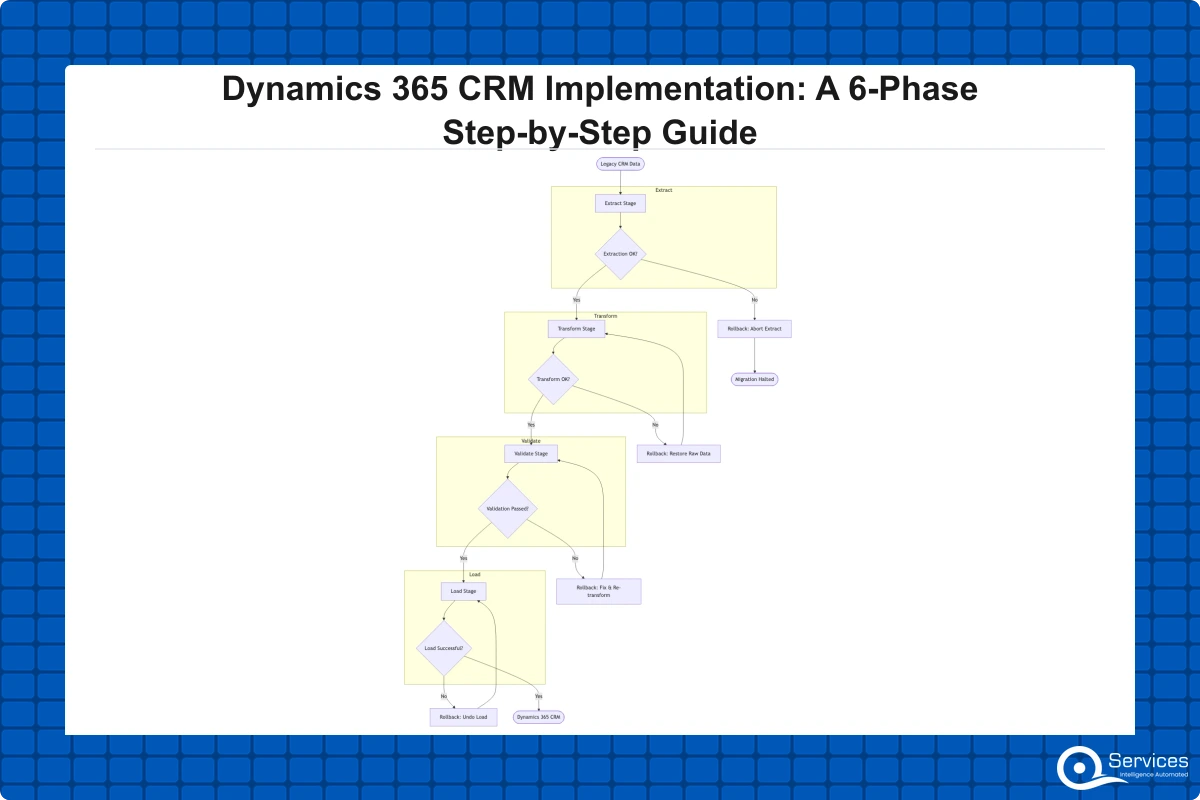
Data migration is where projects most often stall. Most companies underestimate the time required to clean, map, and validate legacy data before it moves into Dynamics 365. Dynamics 365 migration services typically cover three categories: contact and account data from a legacy CRM, transactional data (orders, invoices, support tickets), and reference data (products, territories, price lists).
Dynamics 365 integration services using Azure Integration Services or the built-in Dataverse APIs handle most connection scenarios. According to Microsoft's Dynamics 365 documentation, the Dataverse APIs and Dual-Write capabilities provide the technical foundation for most integration scenarios without requiring custom middleware.
Phase 5: Testing, Training, and Change Management
Testing runs in parallel with the tail end of Phase 4. The three layers are:
Unit testing: Each configured component works as designed
Integration testing: Dynamics 365 correctly exchanges data with connected systems
User acceptance testing (UAT): End users validate the solution against their actual daily workflows
Budget at least 3-4 weeks for UAT and leave room for a remediation cycle before go-live. Change management is the most frequently underinvested part of any dynamics 365 crm implementation. According to Gartner's research on CRM adoption, organizations with structured change management programs see up to 3x higher user adoption at go-live compared to those relying on training alone.
Phase 6: Go-Live and Ongoing Support
Go-live is the beginning of the most fragile period in any CRM deployment, not the end of the project. A controlled cutover plan, a hypercare period of 2-4 weeks, and a clear escalation path for critical issues are non-negotiable. After hypercare, most organizations keep a dynamics 365 consulting services provider on retainer for 3-6 months post-go-live to handle configuration adjustments, user feedback, and minor changes that emerge once real data flows through the system.
Dynamics 365 CRM Implementation Cost: What Should You Budget?
In our client engagements, crm implementation cost typically ranges from $25,000 to over $500,000 depending on scope. Most early estimates are either padded by the vendor or too low before scope creep arrives. For a detailed breakdown based on actual project data, our post on Dynamics 365 implementation costs and realistic timelines covers specifics by industry and module combination.
Key Insight In our client engagements, crm implementation cost typically ranges from $25,000 to over $500,000 depending on scope.
Cost Factors That Shift Your Budget
Five variables move the needle most on crm implementation cost:
Number of modules: Adding Finance to a Sales + Service deployment can double project cost
Integration count: In our experience, each custom integration adds $5,000-$20,000 depending on system complexity
Data migration scope: Migrating 5 years of order history from SAP is fundamentally different from migrating 10,000 contacts from a basic CRM
Dynamics 365 customization depth: In our experience, a plugin-heavy layer adds 30-50% to build costs and ongoing maintenance overhead
User count and training complexity: Training 50 users differs significantly from training 500 across multiple regions
Typical Cost Ranges by Company Size
Based on our project engagements, here's what budgets typically look like:
Company Size
Implementation Budget
Timeline
SMB (10-50 users)
$25,000 – $75,000
3-5 months
Mid-Market (50-200 users)
$75,000 – $200,000
5-10 months
Enterprise (200-500+ users)
$200,000 – $500,000+
9-18 months
These figures cover implementation services only. Microsoft Dynamics 365 licensing is separate and typically runs $65-$210 per user per month depending on your module combination, as of 2026.
Key Insight Microsoft Dynamics 365 licensing is separate and typically runs $65-$210 per user per month depending on your module combination, as of 2026.
Dynamics 365 Customization: Making It Work for Your Industry
Out of the box, Dynamics 365 covers roughly 70% of what most companies need. The remaining 30% is where dynamics 365 customization decisions carry real weight, and those decisions have long-term cost implications. Many organizations over-customize in Phase 3, turning a 6-month project into a 12-month one.
When to Customize vs When to Configure
The rule: configure first, customize last, and avoid code-level customization when a no-code workaround exists that doesn't compromise the business process. No-code configuration options include custom fields and entities in Dataverse, business rules, automated Power Automate workflows, custom dashboards, and business process flows with stage-gating. The Power Platform governance framework your IT team establishes around Dynamics 365 determines how sustainable the customization layer becomes over the next 3-5 years.
Code-level dynamics 365 customization makes sense for real-time server-side logic Power Automate can't handle, complex pricing engines or multi-level approval hierarchies, or industry-specific compliance audit logging. For dynamics 365 for small business deployments specifically, staying in the configuration zone is almost always the right call. Code-level customizations add maintenance costs that smaller internal teams typically can't absorb without ongoing partner support.
Choosing Your Dynamics 365 Implementation Partner
Choosing the wrong dynamics 365 implementation partner is the fastest way to derail a project. Microsoft's partner ecosystem has thousands of certified resellers, but the quality gap between a top-tier firm and an average one shows up most clearly during UAT and go-live. QServices is a Microsoft Certified Solutions Partner for Dynamics 365 with 500+ projects delivered since 2014, but don't rely on claims alone.
What Certifications and Track Record to Look For
A credible dynamics 365 implementation partner should have:
Microsoft Solutions Partner designation in Business Applications (not just pre-2022 Silver/Gold status)
Verifiable project references in your industry vertical, not generic case studies
A defined methodology with deliverables at each phase gate
In-house technical resources for customization work (not subcontracted)
Post-go-live support SLAs documented before you sign the contract
Ask shortlisted partners for the certification count of the team members assigned to your specific project, not the firm's total headcount. For a broader evaluation framework, these 10 questions for evaluating a Microsoft consulting partner apply directly to Dynamics 365 partner selection.
Red Flags to Watch Out For
Avoid any dynamics 365 consulting services provider who:
Gives a fixed-price quote without running a discovery workshop first
Can't name the specific senior consultant leading your project
Has no references in your industry sector
Quotes below $30,000 for a multi-module enterprise deployment
Promises go-live in under 8 weeks for anything beyond a basic Sales-only rollout
Dynamics 365 Integration Services and Migration Planning
Most Dynamics 365 deployments replace or sit alongside existing systems, which means dynamics 365 integration services and migration planning carry as much risk as the implementation itself. Getting this wrong creates data quality problems that take months to untangle after go-live.
For companies moving off Salesforce, dynamics 365 migration services cover data extraction, field mapping, picklist normalization, relationship preservation, and historical record import. The average Salesforce-to-D365 migration for a mid-size company takes 4-8 weeks of dedicated data work, separate from the broader implementation timeline.
Dynamics 365 vs Salesforce: Which Platform Wins in 2026?
The dynamics 365 vs salesforce question comes up in almost every evaluation. Salesforce wins on third-party app marketplace depth and non-Microsoft ecosystem integrations. Dynamics 365 wins on Microsoft 365/Teams/Azure integration, total cost of ownership for Microsoft-heavy organizations, and the breadth of the Business Applications suite covering both CRM and ERP in a single platform.
Our detailed Dynamics 365 vs Salesforce comparison for 2026 covers the full analysis. The short version: if your company runs on Azure, uses Microsoft 365, and wants ERP plus CRM in the same platform, Dynamics 365 is the stronger long-term choice. One practical note: switching from Salesforce mid-contract has real costs, including a 2-3 month parallel-run period that needs to be factored into your dynamics 365 migration services timeline.
Key Takeaways
Dynamics 365 is Microsoft's cloud-based suite of business applications covering sales, customer service, field service, finance, supply chain, and more.
Dynamics 365 implementation typically takes 3-18 months depending on modules, users, and customization complexity.
In our client engagements, crm implementation cost typically ranges from $25,000 to over $500,000 depending on scope.
Out of the box, Dynamics 365 covers roughly 70% of what most companies need.
Choosing the wrong dynamics 365 implementation partner is the fastest way to derail a project.
Conclusion
A successful dynamics 365 crm implementation depends less on the technology itself and more on the rigor you bring to each phase. Discovery that skips key stakeholders, customization that ignores upgrade risk, and go-live without a hypercare plan all produce the same outcome: a project that technically launches but fails to deliver the adoption and ROI the business expected.
The six phases covered here give you a repeatable framework whether you're deploying Sales and Service for a 50-person team or rolling out d365 finance and operations for a 400-person enterprise. Pair that with a realistic crm implementation cost model and a qualified dynamics 365 implementation partner, and the project has every condition it needs to succeed. QServices is a Microsoft Certified Solutions Partner for Dynamics 365 with 500+ projects delivered since 2014. Contact our team for a candid scoping conversation.
Co-Founder and CTO, QServices IT Solutions Pvt Ltd
Rohit Dabra is the Co-Founder and Chief Technology Officer at QServices, a software development company focused on building practical digital solutions for businesses. At QServices, Rohit works closely with startups and growing businesses to design and develop web platforms, mobile applications, and scalable cloud systems. He is particularly interested in automation and artificial intelligence, building systems that automate routine tasks for teams and organizations.
Dynamics 365 CRM implementation costs range from $25,000 for a small business Sales-only deployment to over $500,000 for a full enterprise rollout with Finance, Supply Chain, and multiple integrations. The biggest cost drivers are module count, integration complexity, data migration scope, and customization depth. Microsoft Dynamics 365 licensing ($65-$210 per user per month) is separate from implementation fees.
Dynamics 365 implementation typically takes 3-18 months depending on modules, users, and customization complexity. A simple Sales and Customer Service deployment for under 50 users can go live in 3-5 months. A multi-module enterprise rollout with Finance and Operations, extensive integrations, and 200+ users typically takes 9-18 months. The six-phase structure (discovery, design, configuration, data migration, testing, go-live) applies regardless of scope.
Neither platform is universally better. Dynamics 365 has a clear advantage for companies already using Microsoft 365, Azure, and Power Platform, offering tighter integration and lower total cost of ownership within the Microsoft ecosystem. Salesforce has a larger third-party app marketplace and broader non-Microsoft integrations. For mid-size to enterprise companies running Microsoft infrastructure, Dynamics 365 typically delivers better long-term ROI and a single platform for both CRM and ERP.
Dynamics 365 Business Central is an ERP and CRM solution designed for small to mid-size businesses with 10-300 users. It covers finance, inventory, sales, purchasing, and project management in a single cloud platform. It is distinct from Dynamics 365 Finance and Operations, which targets larger enterprises with 300+ users and more complex multi-entity, multi-currency requirements.
Look for a Microsoft Solutions Partner with a Business Applications designation, verifiable references in your industry, and a defined methodology with deliverables at each phase gate. Avoid partners who quote without a discovery workshop, cannot name the project lead, or promise unrealistically fast timelines. Ask specifically about the certifications held by the team members assigned to your project, not the firm’s total headcount.
Dynamics 365 includes Sales, Customer Service, Customer Insights (Marketing), Field Service, Finance, Supply Chain Management, and Project Operations. Most mid-size companies start with Sales, Customer Service, and Finance. The right module combination depends on your industry, process gaps, and integration requirements. D365 Business Central bundles ERP and light CRM for SMBs, while Finance and Operations serves enterprise ERP needs.
Yes. Dynamics 365 is built on Microsoft Dataverse, which is the same data platform used by Power Platform. This means Power Automate workflows, Power BI dashboards, and Power Apps canvas apps connect to Dynamics 365 data natively without custom APIs. Most integration scenarios between Dynamics 365 and Power Platform require configuration rather than custom code, making the combined platform significantly more cost-effective for Microsoft-ecosystem organizations.
Business intelligence consulting services should give a mid-market company a governed way to make decisions. Attractive dashboards are only the visible part. The useful outcome is a system in which source data, metric definitions, access, releases, ownership, and support still work after the consultants leave.
In a Microsoft Solutions Partner vs Microsoft Partner comparison, the difference is validation. A company can participate in the Microsoft AI Cloud Partner Program without holding a customer-facing Solutions Partner designation. A designated Solutions Partner has met Microsoft’s current threshold in a specific solution pathway: at least 70 out of 100 partner capability points, with more than zero points in every required metric, based on performance, skilling, and customer success data recorded in Partner Center.
How do you build a legacy application modernization strategy for Azure? A legacy application modernization strategy assigns the right treatment to each workload, then sequences the work around business value, technical evidence, and operational risk. For Azure, that means choosing among retire, retain, rehost, replatform, refactor, rearchitect, rebuild, and replace instead of treating cloud migration as a blanket mandate. Direct Answer A legacy application modernization strategy for Azure should classify
Eager to discuss about your project?
Share your project idea with us. Together, we’ll transform your vision into an exceptional digital product!
Business intelligence consulting services should give a mid-market company a governed way to make decisions. Attractive dashboards are only the visible part. The useful outcome is a system in which source data, metric definitions, access, releases, ownership, and support still work after the consultants leave.
In a Microsoft Solutions Partner vs Microsoft Partner comparison, the difference is validation. A company can participate in the Microsoft AI Cloud Partner Program without holding a customer-facing Solutions Partner designation. A designated Solutions Partner has met Microsoft’s current threshold in a specific solution pathway: at least 70 out of 100 partner capability points, with more than zero points in every required metric, based on performance, skilling, and customer success data recorded in Partner Center.