Building a power platform center of excellence is the difference between an organization where Power Apps and Power Automate create genuine business value, and one where those tools produce 200 unmanaged apps that nobody can audit. We have helped companies in healthcare, logistics, and banking stand up CoEs from scratch, and the pattern is consistent: organizations that skip the structure phase spend 18 months cleaning up what citizen developers built without guardrails. This guide walks through the five phases we use to build and run a functioning CoE, including the governance pieces most vendors overlook, the ALM setup that enables professional-grade delivery, and the metrics that tell you whether the program is working.
In This Article, You'll Learn
What Is a Power Platform Center of Excellence?
Phase 1: Lay the Foundation for Your Power Platform CoE
Phase 2: Power Platform Governance and DLP Policy Design
Phase 3: Train Citizen Developers and Build the App Factory
Phase 4: Power Platform ALM and Professional-Grade Development
Eager to discuss about your project?
Share your project idea with us. Together, we’ll transform your vision into an exceptional digital product!
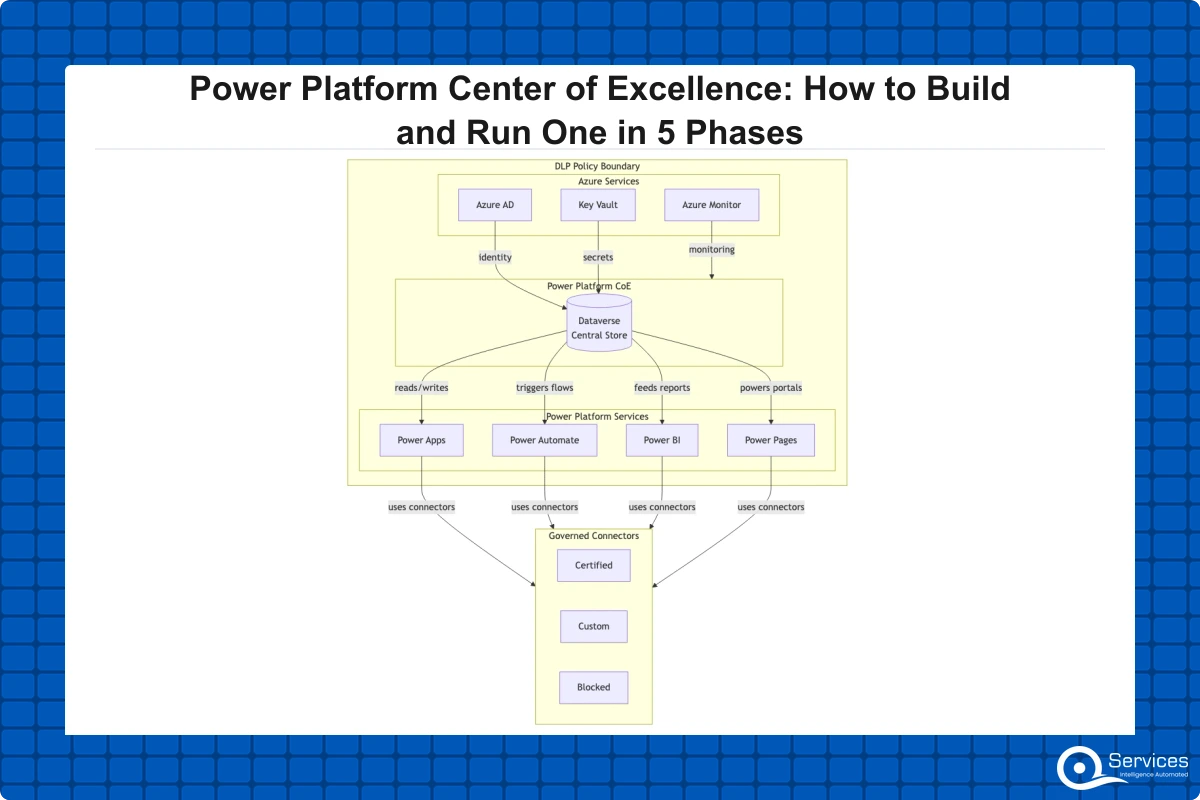
A power platform center of excellence is a dedicated team, set of processes, and technical governance framework that manages how an organization builds, deploys, and maintains apps and automations on Microsoft Power Platform. It covers Power Apps, Power Automate, Power BI, Power Pages, and the underlying Dataverse environment.
The term gets used loosely. Some teams call a SharePoint site with a few guidelines a 'CoE.' A real CoE has four things: a named owner, documented policies that are technically enforced, a training program for citizen developers, and a pipeline for monitoring what runs across your environments.
Microsoft ships a free CoE Starter Kit that provides dashboards, templates, and starter policies. It is a good starting point, not a finished product.
Why Most CoEs Stall at Phase One
The honest answer is sponsorship. Most CoE initiatives start with an IT manager who discovers 80 ungoverned apps in the default environment, builds a policy document, sends an email, and then nothing changes because there is no executive mandate to enforce anything. A CoE without enforcement capability is just documentation.
Core Functions of a Power Platform CoE
A mature power platform center of excellence consistently handles five responsibilities:
Environment management: Controls which environments exist and what connectors are permitted in each
DLP policy enforcement: Defines what services Power Automate and Power Apps can connect to
App lifecycle management: Governs how apps move from development to production
Citizen developer enablement: Provides training, templates, and access to professional help
Usage reporting: Tracks active apps, owners, and compliance risks
Phase 1: Lay the Foundation for Your Power Platform CoE
Every successful power platform center of excellence starts with two questions: who owns this, and what problem are we solving? Answering both before touching the tooling is what separates CoEs that take hold from ones that stall.
Selecting Executive Sponsors and Naming an Owner
A CoE without an executive sponsor fails within six months. The sponsor does not need to understand DLP configuration. They need to enforce the governance decisions the CoE makes, including telling a business unit director that their environment is getting restructured.
The CoE owner is a separate role, typically a senior IT architect or Power Platform lead. At a company with 500 to 2,000 employees, this is usually a half-time role in the first year. Effective citizen developer governance requires both a named owner and a clear escalation path when policies are violated.
Choosing Your Environment Strategy
The environment strategy is the most consequential technical decision in phase one. The three-tier model Microsoft recommends separates environments by purpose:
Default environment: Personal productivity only, no business-critical apps
Sandbox environments: Development and testing, scoped per team or project
Production environments: Approved apps with formal change control
Most organizations start flat, with everyone deploying to the default environment. After a CoE is established, migrating apps out of default is a multi-month project. Starting with the right structure costs almost nothing and saves significant remediation work.
Phase 2: Power Platform Governance and DLP Policy Design
Power platform governance is the collection of policies, processes, and controls that determine what can be built, where it can run, and who can access which data. Without it, shadow IT grows: apps built outside IT visibility, connecting to data sources that violate compliance policies.
Power Platform governance prevents shadow IT through DLP policies, environment strategies, and approval workflows. For organizations in healthcare, banking, or logistics, this is not optional guidance. It is a compliance requirement the CoE makes technically enforceable.
How DLP Policies Prevent Shadow IT in Power Platform
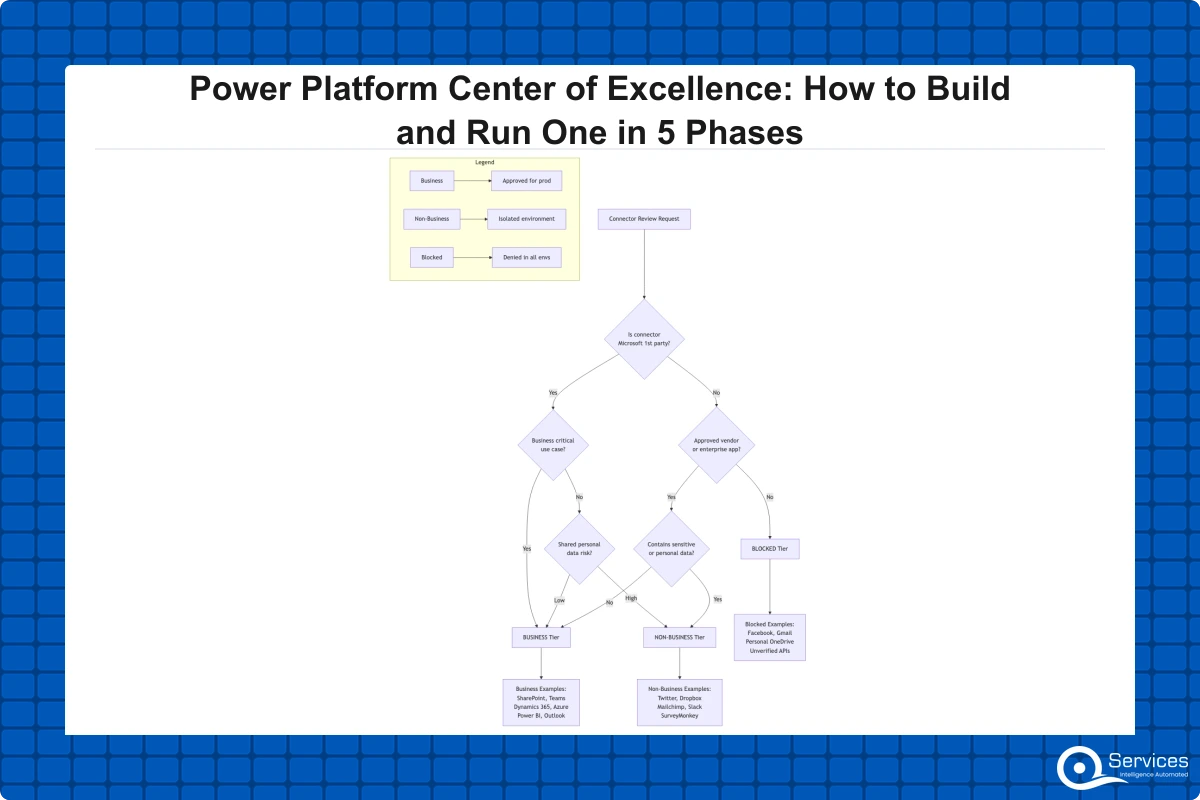
DLP (Data Loss Prevention) policies in Power Platform control which connectors can be combined in a single app or flow. A properly configured policy blocks any flow from connecting SharePoint to a consumer Gmail account, closing a common data exfiltration path.
Our DLP Policies in Power Platform guide covers the specific settings we use for healthcare and financial services clients. The three connector tiers are:
Business (allowed): Enterprise connectors such as Dataverse, SharePoint, Teams, and Outlook
Non-business (restricted): Consumer services including Twitter, Dropbox, and personal email
Blocked: Completely prohibited connectors for sensitive environments
Managing Shadow IT in Power Platform
Shadow IT with Power Platform is a predictable outcome when you license Power Apps and Power Automate across your organization without governance. Flows pull HR data into personal OneDrive accounts. Canvas apps bypass your IT helpdesk. Eventually an auditor finds it.
The CoE Starter Kit's app quarantine feature automatically suspends apps that have not been reviewed, prompting owners to re-attest compliance. In our client engagements, this single feature has consistently reduced unreviewed app counts within the first 90 days of CoE launch.
Phase 3: Train Citizen Developers and Build the App Factory
Citizen developer governance is not about preventing people from building things. It is about channeling that energy productively. Organizations that over-restrict citizen developers end up with the same shadow IT problem, just less visible because workarounds happen in Excel and email instead of Power Apps. Getting citizen developer governance right is what separates a CoE that grows adoption from one that stifles it.
Power Apps Canvas vs Model-Driven: Which Should You Use?
One of the first decisions every builder faces is the power apps canvas vs model driven choice. This comes up in nearly every power apps development services engagement we start.
Canvas apps work better when:
You need full control over the UI layout
The app has two to four screens
Data comes from multiple non-Dataverse sources
The builder is new to the platform
Model-driven apps work better when:
The app centers on Dataverse data with complex entity relationships
You need built-in forms and views without building them manually
IT staff, not business users, will maintain it long-term
For citizen developer programs, canvas apps are usually the right starting point. Model-driven apps require Dataverse schema knowledge most business users do not have yet.
Power Automate Workflow Examples That Deliver Fast ROI
The fastest wins in any citizen developer program come from Power Automate. These power automate workflow examples consistently deliver measurable results within weeks:
Approval routing: Replacing email-based approval chains reduces average decision time from three days to four hours
Form-to-SharePoint routing: Automatically routing submissions to the right folder, notifying stakeholders, and logging to a tracking list
Scheduled report emails: Pulling data from Dataverse or SQL and sending formatted summaries each morning
IT request intake automation: Replacing shared inboxes with structured flows that route requests and track SLA response times
Our power automate consulting work almost always starts with these four flow types because they are fast to build, straightforward to govern, and immediately visible to business stakeholders.
Phase 4: Power Platform ALM and Professional-Grade Development
Phase four is where the CoE stops being a governance program and becomes a delivery platform. Power platform ALM is the practice of applying software engineering discipline to Power Platform: version control, automated testing, deployment pipelines, and environment promotion.
Power Platform ALM with Azure DevOps
Power platform ALM with Azure DevOps uses the Power Platform Build Tools extension to automate solution export, run validation checks, and promote solutions from development to test to production. This replaces the 'send the solution zip to the admin' deployment model that most ungoverned CoEs still rely on.
The four components of a mature ALM pipeline:
Solution-aware development: All apps and flows built inside Power Platform solutions, not the default environment
Source control: Solution files committed to Azure DevOps or GitHub on every merge
Automated deployment: Pipelines promote solutions after passing automated checks
Environment variables: Environment-specific values managed outside the solution itself
Deployment errors drop, rollback becomes reliable, and auditors get a complete deployment history without manual tracking.
When You Need Custom Power Apps Development
Citizen developers can build a lot, but there is a ceiling. Custom power apps development from a professional team makes sense when:
The app needs to integrate with complex APIs or legacy systems via custom connectors
You need PCF (Power Apps Component Framework) controls that standard controls cannot provide
The app will serve 1,000 or more daily users and performance optimization matters
HIPAA or PCI-DSS compliance requirements need formal security review documentation
Phase 5: Scale, Measure, and Continuously Improve
Phase five is ongoing. A power platform center of excellence does not have a finish line. It has metrics that tell you whether it is working and processes that let you improve over time.
Power BI Dashboard Development for CoE Metrics
Power BI dashboard development for CoE reporting typically tracks four metric categories:
Category
Example Metrics
Adoption
Active apps per month, new builders trained, flows created
Governance health
Apps with active owners, DLP violations, quarantined apps
Hours saved, manual processes automated, business units served
Our power bi consulting services team builds these dashboards on top of CoE Starter Kit data, giving leadership a live view of platform health. Power BI dashboard development at this stage often surfaces insights organizations did not know to look for, such as which business units have high app creation rates but zero governance coverage.
Power Pages Development and Dataverse Consulting
As the CoE matures, organizations extend beyond the Microsoft 365 boundary. Power pages development is the natural next step for external-facing portals built on Dataverse: dealer portals, vendor onboarding sites, patient intake forms, and partner self-service tools.
Dataverse consulting at this stage involves designing the data model that powers both internal apps and external portals. Citizen developer programs need governance guardrails to prevent data silos and compliance gaps, and a well-structured Dataverse schema is the foundational guardrail that makes the rest of the CoE's policies enforceable. Good dataverse consulting also means planning for power pages development from the start, not retrofitting external access into a schema designed only for internal apps.
How Much Does Power Platform Development Cost?
The honest answer is it depends on scope, but these benchmarks hold across most mid-size organizations:
CoE setup and governance: In our engagements, initial implementation including environment configuration, DLP policies, CoE Starter Kit deployment, and admin training typically runs $15,000 to $40,000.
Key Insight CoE setup and governance: In our engagements, initial implementation including environment configuration, DLP policies, CoE Starter Kit deployment, and admin training typically runs $15,000 to $40,000.
Citizen developer training program: In our engagements, a structured four to eight week program covering 20 to 50 employees typically runs $5,000 to $15,000.
Power Automate consulting and workflow development: In our engagements, complex multi-system integrations beyond citizen developer capabilities typically run $3,000 to $10,000 per project.
Key Insight Power Automate consulting and workflow development: In our engagements, complex multi-system integrations beyond citizen developer capabilities typically run $3,000 to $10,000 per project.
Custom app development: In our engagements, pricing typically ranges from $8,000 to $50,000 or more per application. Our custom power apps development work for logistics clients typically runs $20,000 to $35,000 for a mid-complexity operations app.
Power BI dashboard development: In our engagements, dashboard suites typically run $3,000 to $12,000 depending on data source complexity.
Key Insight Power BI dashboard development: In our engagements, dashboard suites typically run $3,000 to $12,000 depending on data source complexity.
In our engagements, a full CoE implementation with professional oversight over six to twelve months typically totals $60,000 to $120,000, or roughly $2,000 to $4,000 per week of program investment. In our experience, organizations that keep the citizen developer program producing results tend to recover that investment within six months.
The right power platform development company combines governance expertise with technical depth. Governance-only vendors cannot help when citizen developers hit the limits of what they can build without professional code. Development-only vendors build great apps but leave you with an ungoverned environment in 18 months.
QServices implements Power Platform Center of Excellence using Microsoft's CoE toolkit as the foundation, then layers in custom governance processes, power platform ALM pipelines, and training programs based on each organization's industry and compliance requirements. Our Power Platform Governance Framework post covers the six pillars we use as a baseline for every engagement.
Key Takeaways
A power platform center of excellence is a dedicated team, set of processes, and technical governance framework that manages how an organization builds, deploys, and maintains apps and automations on Microsoft Power Platform.
Every successful power platform center of excellence starts with two questions: who owns this, and what problem are we solving?
Power platform governance is the collection of policies, processes, and controls that determine what can be built, where it can run, and who can access which data.
Citizen developer governance is not about preventing people from building things.
Phase four is where the CoE stops being a governance program and becomes a delivery platform.
Conclusion
A power platform center of excellence is a long-running program, not a one-time project. It gets more valuable as more people build on the platform. The five phases described here (foundation, governance, citizen enablement, ALM, and scaling) are not strictly sequential. Most organizations run phases two and three in parallel once phase one is complete.
The most important action you can take today is naming a CoE owner. Without a named owner and executive support, governance tools sit unused and training materials go stale. With that foundation in place, even a minimal CoE significantly reduces the compliance and operational risk that comes from giving an organization access to a low-code platform without citizen developer governance guardrails.
If you are starting from scratch or recovering an ungoverned environment, both scenarios are manageable. Start with our guide to setting up a Power Platform Center of Excellence from scratch and reach out if you want a structured assessment of where your current environment stands.
Co-Founder and CTO, QServices IT Solutions Pvt Ltd
Rohit Dabra is the Co-Founder and Chief Technology Officer at QServices, a software development company focused on building practical digital solutions for businesses. At QServices, Rohit works closely with startups and growing businesses to design and develop web platforms, mobile applications, and scalable cloud systems. He is particularly interested in automation and artificial intelligence, building systems that automate routine tasks for teams and organizations.
A Power Platform Center of Excellence (CoE) is a dedicated team, set of processes, and technical governance framework that manages how an organization builds, deploys, and maintains apps and automations on Microsoft Power Platform. It covers Power Apps, Power Automate, Power BI, Power Pages, and Dataverse. A real CoE includes a named owner, technically enforced policies, citizen developer training, and environment usage monitoring.
Power Platform governance is the collection of policies, processes, and controls that determine what can be built on the platform, where it runs, and who can access which data. It includes DLP policies that restrict connector combinations, environment strategies that separate development from production, and approval workflows that control what gets deployed. Power Platform governance prevents shadow IT through DLP policies, environment strategies, and approval workflows, making it a compliance requirement in regulated industries.
Preventing shadow IT with Power Platform requires three controls working together: DLP policies that restrict which connectors can be used together, a structured environment strategy that keeps users out of the default environment for business apps, and the CoE Starter Kit’s app quarantine feature that automatically suspends unreviewed apps. Organizations implementing all three typically reduce unreviewed app counts by 60 to 70 percent within 90 days.
Choose a canvas app when you need full UI control, the app has two to four screens, data comes from multiple sources, or the builder is new to Power Apps. Choose a model-driven app when the app is data-heavy with complex Dataverse relationships, you need built-in forms and views, or IT staff will maintain it long-term. For most citizen developer programs, canvas apps are the right starting point because they require less Dataverse expertise.
Navigate to the Power Platform Admin Center, select Data Policies, and create a new policy. Assign it to the target environments, then classify connectors into three buckets: Business (allowed enterprise connectors like SharePoint and Teams), Non-business (consumer services to restrict), and Blocked (completely prohibited connectors). Start restrictive in production and more permissive in sandbox environments. Our detailed guide covers the exact connector classifications we use for healthcare and financial services deployments.
The highest-ROI Power Automate workflow examples are: approval routing flows that cut decision time from days to hours, form-to-SharePoint routing that replaces manual filing, scheduled report emails that pull from Dataverse or SQL each morning, and IT request intake flows that replace shared inboxes with SLA-tracked queues. These four types deliver measurable time savings within the first week and are straightforward to govern within a CoE framework.
Benchmarks for mid-size organizations: CoE setup and governance runs $15,000 to $40,000. A citizen developer training program costs $5,000 to $15,000 for 20 to 50 employees. Custom Power Apps development ranges from $8,000 to $50,000 per application. Power BI dashboard development runs $3,000 to $12,000 per suite. A full CoE implementation over six to twelve months typically totals $60,000 to $120,000 including licenses, professional services, and training.
Business intelligence consulting services should give a mid-market company a governed way to make decisions. Attractive dashboards are only the visible part. The useful outcome is a system in which source data, metric definitions, access, releases, ownership, and support still work after the consultants leave.
In a Microsoft Solutions Partner vs Microsoft Partner comparison, the difference is validation. A company can participate in the Microsoft AI Cloud Partner Program without holding a customer-facing Solutions Partner designation. A designated Solutions Partner has met Microsoft’s current threshold in a specific solution pathway: at least 70 out of 100 partner capability points, with more than zero points in every required metric, based on performance, skilling, and customer success data recorded in Partner Center.
Business intelligence consulting services should give a mid-market company a governed way to make decisions. Attractive dashboards are only the visible part. The useful outcome is a system in which source data, metric definitions, access, releases, ownership, and support still work after the consultants leave.
In a Microsoft Solutions Partner vs Microsoft Partner comparison, the difference is validation. A company can participate in the Microsoft AI Cloud Partner Program without holding a customer-facing Solutions Partner designation. A designated Solutions Partner has met Microsoft’s current threshold in a specific solution pathway: at least 70 out of 100 partner capability points, with more than zero points in every required metric, based on performance, skilling, and customer success data recorded in Partner Center.