.NET application modernization sits at the center of every serious Microsoft-stack technology roadmap in 2026. Applications built on .NET Framework 4.x are accumulating technical debt that makes them progressively more expensive to maintain, harder to extend, and incompatible with modern cloud infrastructure. The cost of Windows Server licensing alone runs 35-50% higher than equivalent Linux-based workloads on Azure. Whether you're evaluating a dotnet development company to lead this work or building the capability internally, the path from legacy .NET to cloud-native .NET 9 is well-established enough that you don't need to improvise it.
Key Insight The cost of Windows Server licensing alone runs 35-50% higher than equivalent Linux-based workloads on Azure.
This guide covers a five-phase roadmap that enterprise teams actually use to migrate from legacy .NET codebases to cloud-native applications, without a big-bang rewrite or months of business disruption. Each phase has a defined scope, clear outputs, and honest estimates of time and complexity.
In This Article, You'll Learn
Why .NET Application Modernization Can't Wait
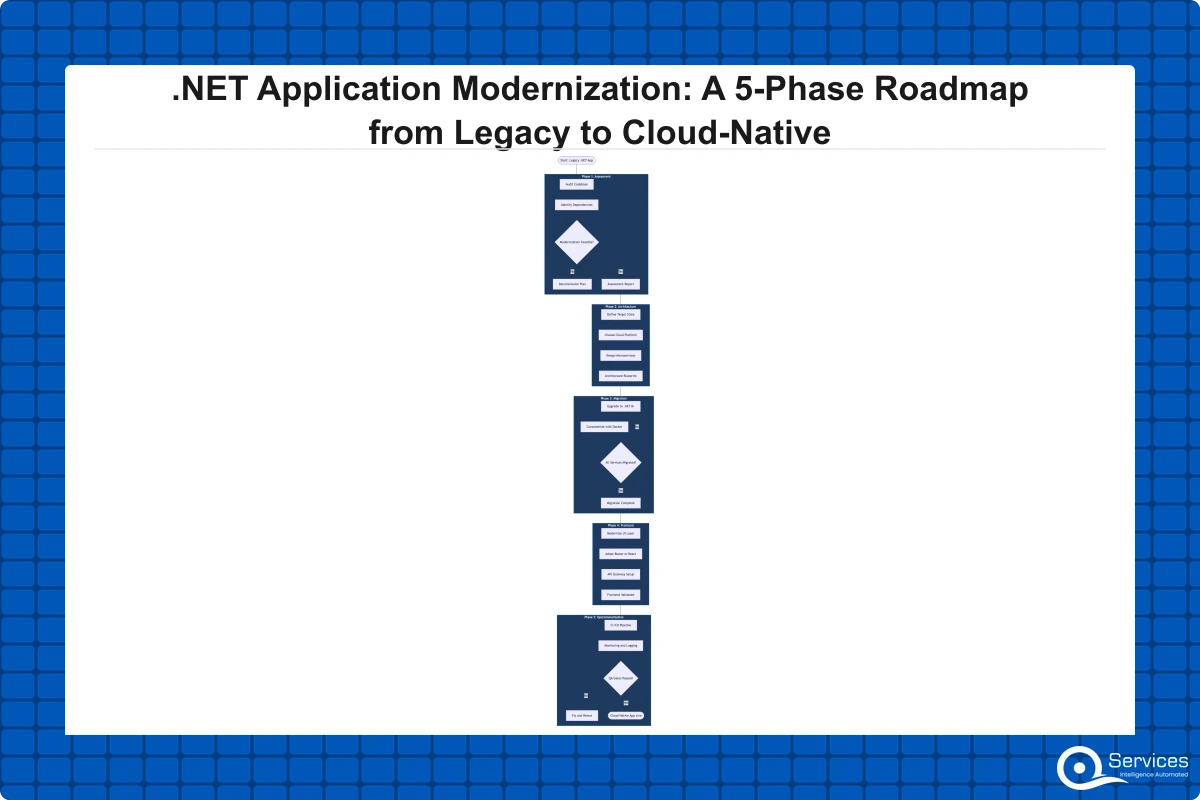
Phase 1: Assess Your Legacy App Modernization Baseline
Phase 2: Architect for .NET Microservices and API-First Design
Phase 3: Execute the .NET 9 Migration with Zero Downtime
Phase 4: Frontend Modernization with Blazor Development Services
Eager to discuss about your project?
Share your project idea with us. Together, we’ll transform your vision into an exceptional digital product!
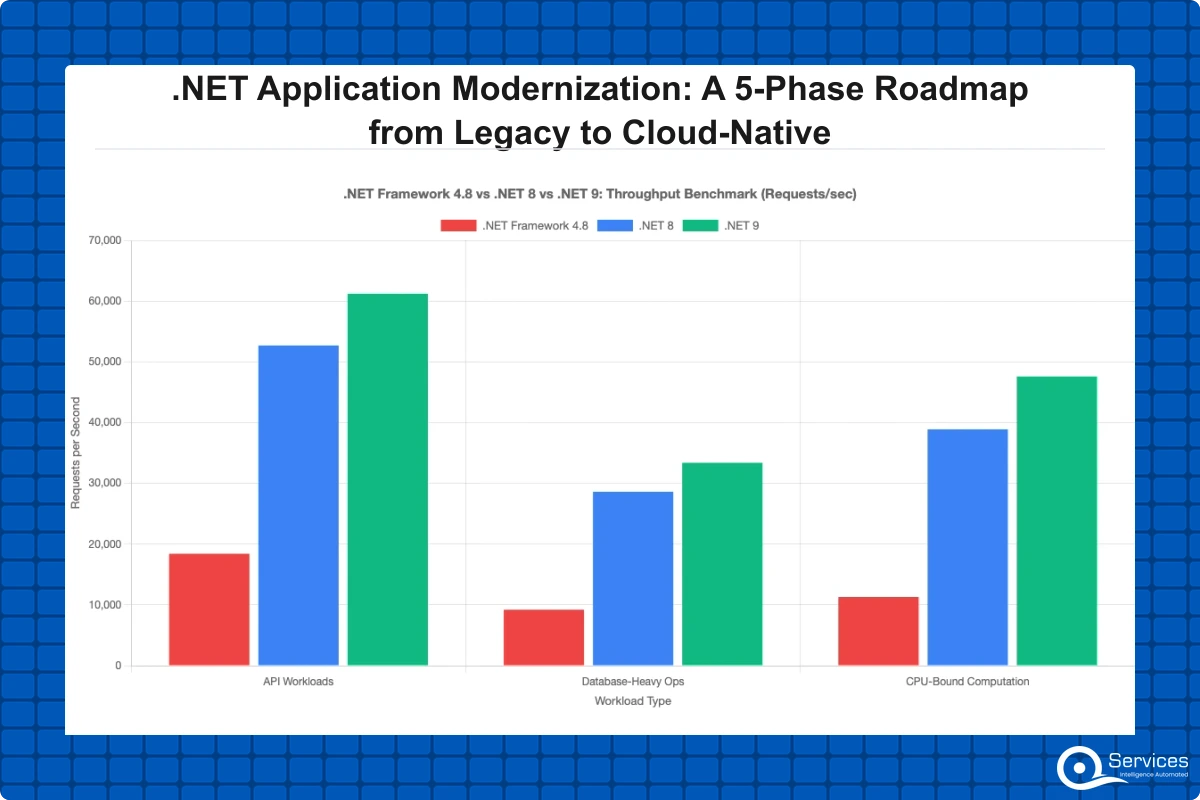
The business case for .NET application modernization becomes concrete when you quantify it. Microsoft ended mainstream support for .NET Framework 4.6.x and earlier, and while extended security updates exist for some versions through 2032, those cover security patches only: no performance improvements, no new runtime features, no Linux or container compatibility.
Teams on these stacks are frozen while the rest of the ecosystem moves forward.
The Hidden Cost of Running .NET Framework in 2026
The most visible cost is infrastructure. .NET Framework apps require Windows Server, which carries a licensing premium that Linux-based containers don't. In our client engagements, a Windows-based Azure VM fleet routinely costs tens of thousands of dollars more per year in licensing premium alone than an equivalent Linux footprint, before storage and networking.
The invisible costs are often larger. Developer onboarding slows when the toolchain is unfamiliar to engineers trained on modern .NET. Third-party packages drop .NET Framework support first. Integration with modern identity providers, event streaming platforms, and observability tools requires increasingly complex workarounds that add weeks to each project cycle.
When Technical Debt Becomes a Business Risk
Technical debt crosses a line when it blocks product decisions rather than just slowing them. If adding a new API endpoint requires touching six tightly-coupled modules and a three-week regression cycle, that is a competitive risk, not a maintenance item. In regulated industries like banking and healthcare, legacy .NET Framework stacks create direct compliance exposure: SBOM requirements in enterprise procurement now flag unmaintained framework versions as security risks.
Phase 1: Assess Your Legacy App Modernization Baseline
You cannot plan a migration without knowing what you are migrating. Phase 1 builds a complete picture of your application portfolio before anyone writes new code. For any .NET application modernization program, this assessment prevents the common mistake of migrating the wrong applications first. A skilled enterprise application development team separates the modernization candidates from the retirement candidates here.
Application Portfolio Scoring
Score each application across four dimensions: business criticality, technical debt level, change frequency, and cloud readiness. A 1-5 scale works well. Applications scoring high on business criticality and high on technical debt are the highest-priority candidates. Applications scoring low on both are retirement or consolidation candidates.
Most enterprises find 25-35% of their portfolio could be retired entirely. Doing this analysis upfront reduces modernization scope and makes the remaining phases cheaper.
Key Insight Most enterprises find 25-35% of their portfolio could be retired entirely.
Identifying Modernization Candidates
The goal is not to modernize everything, but to modernize the right things. A custom software development company with genuine legacy app modernization experience will tell you that lift-and-shift (moving an app to the cloud without changing its architecture) is sometimes the correct answer. For applications with stable business logic and infrequent change, lift-and-shift buys time without the cost of structural migration.
The output of Phase 1 is a prioritized backlog of modernization candidates, each with an estimated complexity score and a clear rationale for whether it should be modernized, lifted-and-shifted, or retired.
Phase 2: Architect for .NET Microservices and API-First Design
Architecture decisions in Phase 2 determine whether your migration reduces technical debt or creates new varieties of it. This is where .NET microservices consulting experience makes a measurable difference, and where working with an experienced dotnet development company pays for itself in avoided rework.
Choosing the Right Decomposition Strategy
Not every .NET monolith should become 30 microservices. The failure pattern we see most often is teams decomposing along technical layers (controllers, services, repositories) rather than business capabilities. Domain-driven design gives you the vocabulary to decompose correctly: identify bounded contexts in your domain, then let those contexts guide service boundaries.
For a logistics platform, that means separating order management, carrier routing, and billing into distinct services because those domains change at different rates and are owned by different teams. For a healthcare application, clinical workflows and patient administration typically have different regulatory requirements that make them natural service boundaries.
API Development Services and Contract-First Design
Once service boundaries are defined, design APIs before building them. Write OpenAPI specifications first, get stakeholder sign-off, then implement against the contract. API development services teams typically pair this approach with a versioning strategy from day one, so the API can evolve without breaking existing consumers.
This discipline catches frontend-backend contract disagreements in a two-hour spec review rather than a two-week integration rework. For teams building APIs consumed by Blazor frontends or mobile clients, the value is immediate.
Phase 3: Execute the .NET 9 Migration with Zero Downtime
The migration phase is where most .NET application modernization programs succeed or stall. A .NET 9 migration requires a concrete sequencing strategy, not just a list of breaking changes to resolve.
The Strangler Fig Migration Path in Practice
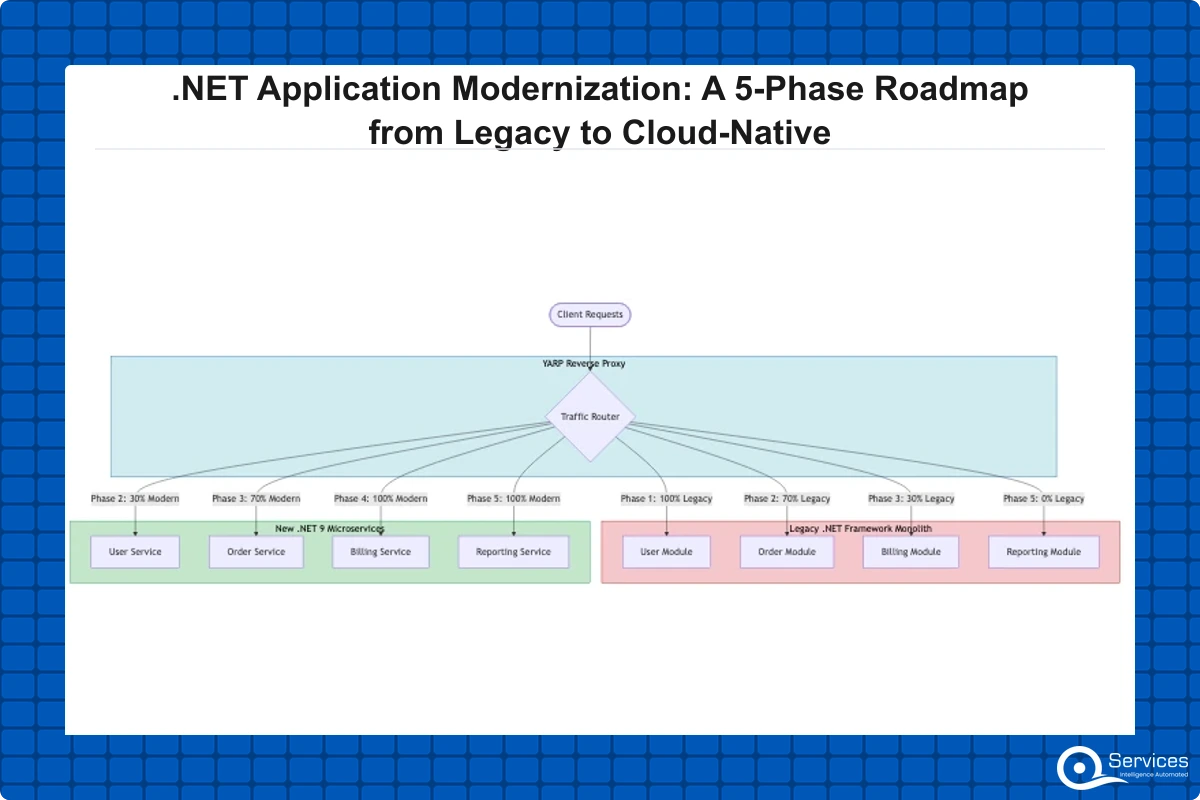
The strangler fig pattern works by routing new traffic through new .NET 9 components while legacy .NET Framework components continue serving existing traffic. You shift load gradually using a reverse proxy (YARP, NGINX, or Azure API Management).
In practice: identify the service with the lowest coupling and highest change frequency, build it on .NET 9, route 5% of traffic to it, validate behavior and performance, then increase to 100%. Retire the legacy component. Repeat for the next bounded context. Microsoft's official .NET porting documentation covers the compatibility analyzers that surface breaking changes before they reach production.
Key Insight In practice: identify the service with the lowest coupling and highest change frequency, build it on .NET 9, route 5% of traffic to it, validate behavior and performance, then increase to 100%.
Handling Data Layer Migrations Safely
The data layer is where most .NET 9 migrations hit unexpected friction. Entity Framework Core differs from EF6 in meaningful ways: lazy loading is opt-in, LINQ translation has changed, and some EF6 patterns have no direct EF Core equivalent. Run both ORM versions in parallel during transition, using integration tests to validate query output equivalence before switching the new service to full traffic.
For asp.net development services teams managing the migration, this dual-ORM period typically lasts 4-8 weeks per bounded context. Skipping validation and discovering data integrity issues in production is significantly more expensive than moving carefully.
Phase 4: Frontend Modernization with Blazor Development Services
Frontend modernization is most effective when sequenced alongside the backend migration, not deferred as a separate project. Blazor development services have matured substantially with .NET 8 and 9, and for teams already invested in the C# ecosystem, Blazor is a serious option for enterprise web UI.
Blazor Server vs. Blazor WASM: Which Model Fits Your App?
Blazor Server renders UI on the server and pushes updates to the browser via SignalR. It's ideal for internal enterprise apps on corporate networks where server-side control is preferred. Blazor WASM runs C# directly in the browser via WebAssembly, making it suitable for public-facing apps where server roundtrip latency would visibly hurt the experience.
The Blazor render mode system in .NET 8+ lets you mix both models within a single application, selecting the approach per component. Our post on Blazor vs React for Enterprise Apps covers the full decision criteria, including when the component ecosystem gap actually matters for your project.
When Blazor Beats React for Enterprise Teams
Blazer's strongest argument is in line-of-business applications where the team is predominantly C# developers. Sharing validation logic, models, and business rules between frontend and backend through shared class libraries eliminates an entire category of contract bugs. Teams report 20-30% fewer integration defects compared to maintaining parallel TypeScript and C# model definitions.
The honest tradeoff: Blazor WASM has larger initial bundle sizes and a smaller component ecosystem than React. For consumer-facing apps with heavy SEO requirements, React remains the stronger choice. For internal dashboards, data-entry workflows, and admin portals built by C# teams, Blazor development services deliver faster results.
Phase 5: Operationalize with DevOps, Observability, and Governance
Getting to production on .NET 9 is not the finish line. Operationalization determines whether the modernized system delivers measurably better outcomes than the legacy one.
CI/CD Pipelines for Modernized .NET Applications
A modernized application without automated deployment pipelines is just technical debt of a different kind. The pipeline should cover: unit and integration test gates, Roslyn static analysis, container image builds with vulnerability scanning, staging deployment with automated smoke tests, and production deployment using canary or blue-green strategy.
Both Azure DevOps and GitHub Actions support .NET 9 natively. Our comparison of Azure DevOps vs GitHub Actions covers which tool fits different team structures and regulated-industry compliance requirements.
Observability and Human-in-the-Loop Governance
Distributed systems fail in distributed ways. Structured logging, distributed tracing via OpenTelemetry, and metric collection are not optional post-modernization: they're what make the system operable when something fails at 2 AM. Teams that skip this layer consistently spend three to four weeks retrofitting it after services are in production.
QServices specializes in .NET modernization with Human-in-the-Loop governance for enterprise applications. Every sprint produces a working, tested increment that a business stakeholder can review before the next phase begins. This prevents the 18-month big-bang tunnel that ends most enterprise rewrite programs. Our HITL governance principles explain how this works in practice.
How Long Does .NET Application Modernization Actually Take?
The honest answer is that it depends on scope, but there are reliable ranges. A single line-of-business application with 50,000-100,000 lines of code and three to five natural service boundaries typically completes all five phases in 4-6 months when resourced correctly. A full enterprise portfolio with 15-20 applications is a 2-3 year program structured as a series of shorter delivery cycles.
What Drives the Timeline More Than Code Volume
The biggest variable is organizational readiness, not code complexity. Teams with automated test coverage (even 40-50% is a useful floor for legacy apps) migrate 30-40% faster than teams starting from zero. Database schema complexity is the second-largest factor: applications with 500+ tables and significant stored procedure business logic consistently exceed initial estimates by 30-50%.
Any dotnet development company worth engaging can give you a defensible timeline estimate after a structured 2-week discovery sprint. Any number quoted before that discovery work is guesswork, regardless of how confidently it is delivered.
What Is the Strangler Fig Pattern for .NET Application Modernization?
The strangler fig pattern is an incremental migration approach where new functionality is built on the target platform while the legacy system continues running, with traffic gradually shifted from old to new until the legacy system can be safely retired.
Named by Martin Fowler, the strangler fig pattern is the dominant approach for legacy app modernization because it eliminates the need for a high-risk cutover event. Legacy .NET Framework modernization uses this pattern to incrementally replace components without a full rewrite, maintaining business continuity throughout. YARP (Yet Another Reverse Proxy) is the preferred .NET-native routing layer: it's built on .NET 9, configurable in C#, and integrates cleanly with existing ASP.NET Core middleware.
Step-by-Step: Applying Strangler Fig to a .NET Monolith
Place a reverse proxy in front of the existing monolith with no changes to the monolith itself
Identify the first bounded context to extract: lowest coupling, highest change frequency
Build the new .NET 9 service alongside the existing monolith
Route 5% of relevant traffic to the new service and monitor performance and behavior
Validate equivalence; increase traffic to 25%, then 50%, then 100%
Retire the corresponding monolith code once traffic is fully migrated
Repeat for the next bounded context
The typical cycle per bounded context is 6-10 weeks for a medium-complexity service.
Common Pitfalls in Enterprise Application Development Modernization Projects
Even well-funded enterprise application development initiatives stall. The failure modes are consistent enough to predict in advance.
Over-engineering the target architecture. Teams design for 10x their current load before the new services have served a single production request. This adds months of infrastructure work that delivers no immediate business value. Build for your actual load with reasonable headroom, then scale when metrics tell you to.
Skipping observability until the end. Distributed systems without tracing and structured logging are debugging nightmares. Teams that defer observability work spend three to four weeks retrofitting it after services are already in production, and that retrofitting is harder than building it in from Phase 3 forward.
Treating modernization as a one-time project. .NET application modernization delivers the most value as a continuous engineering practice. The codebase modernized today will need attention again in 3-5 years as .NET continues evolving. Organizations that build these habits into their delivery culture stay ahead of debt. Those that don't find themselves scheduling another large modernization program in 4-5 years.
The business case for .NET application modernization becomes concrete when you quantify it.
You cannot plan a migration without knowing what you are migrating.
Architecture decisions in Phase 2 determine whether your migration reduces technical debt or creates new varieties of it.
The migration phase is where most .NET application modernization programs succeed or stall.
Frontend modernization is most effective when sequenced alongside the backend migration, not deferred as a separate project.
Conclusion
.NET application modernization is fundamentally an organizational sequencing challenge with a technology component. The five phases in this roadmap (assessment, architecture, migration, frontend modernization, and operationalization) give enterprise teams a credible incremental path from .NET Framework to cloud-native .NET 9 without the big-bang risk that ends most rewrite programs before they deliver.
The teams that succeed use the strangler fig pattern to migrate incrementally, invest in observability from the first service boundary, maintain human governance checkpoints throughout each sprint, and treat each phase as a discrete delivery with measurable outcomes. Whether you're evaluating asp.net development services partners or building .NET microservices consulting capacity in-house, this structured approach separates 6-month programs that ship from 2-year programs that stall.
QServices specializes in .NET application modernization for mid-market and enterprise teams in healthcare, logistics, banking, and SaaS. Our 5-day Blueprint Sprint is the fastest way to get a realistic scope, timeline, and cost estimate without committing to a full engagement.
Co-Founder and CTO, QServices IT Solutions Pvt Ltd
Rohit Dabra is the Co-Founder and Chief Technology Officer at QServices, a software development company focused on building practical digital solutions for businesses. At QServices, Rohit works closely with startups and growing businesses to design and develop web platforms, mobile applications, and scalable cloud systems. He is particularly interested in automation and artificial intelligence, building systems that automate routine tasks for teams and organizations.
In most cases, modernize incrementally rather than rewrite. Full rewrites are high-risk because the new system must replicate all behaviors of the existing one, including undocumented edge cases built up over years. The strangler fig pattern gives you a better path: migrate one bounded context at a time to .NET 9 while the existing system keeps running. Reserve a full rewrite only for applications under 30,000 lines of code with no reusable business logic and a clear greenfield architecture in mind.
The strangler fig pattern is an incremental migration approach where new .NET 9 services are built alongside the existing .NET Framework monolith. A reverse proxy (YARP is the standard .NET-native option) routes traffic to either the old or new service, with the percentage going to the new service increasing as it is validated. Once a bounded context is fully migrated, the legacy code for that context is retired. The cycle repeats until the entire monolith has been replaced, with zero high-risk cutover events.
Start with Microsoft’s .NET Upgrade Assistant tool, which analyzes your codebase and flags compatibility issues. Focus first on class libraries and shared projects, which typically have fewer dependencies than web applications. Migrate incrementally rather than all at once, using the strangler fig pattern to route traffic to new .NET 9 services while the legacy system continues running. Plan specifically for Entity Framework Core differences in LINQ behavior and lazy loading, and run integration tests against both ORM versions in parallel before switching fully.
Blazor is a strong choice for internal enterprise applications where the development team is predominantly C# developers. Sharing models, validation logic, and business rules between frontend and backend through shared class libraries reduces integration defects by 20-30% compared to maintaining parallel TypeScript and C# definitions. Blazor Server suits corporate-network internal apps; Blazor WASM suits apps that need client-side execution. For public-facing applications with strong SEO requirements and heavy third-party component dependencies, React or Next.js remains the stronger choice.
A single line-of-business application with 50,000 to 100,000 lines of code and three to five natural service boundaries typically completes all five modernization phases in four to six months when resourced correctly. A full enterprise portfolio of 15-20 applications is a two to three year program. The biggest timeline driver is organizational readiness: teams with automated test coverage migrate 30-40% faster than those starting from zero. Complex database schemas with hundreds of tables and significant stored procedure logic consistently extend timelines beyond initial estimates.
It depends on team size, organizational structure, and how frequently different parts of the application change. Microservices make sense when different domains are owned by different teams, change at different rates, or have different scaling requirements. A monolith is the right starting point for teams with fewer than 15 developers or applications with tightly coupled business logic. For most .NET modernization projects, a modular monolith (a single deployment unit with clear internal boundaries) is the right intermediate step before full microservices decomposition.
A .NET microservices consulting engagement typically covers domain decomposition (identifying bounded contexts via domain-driven design), API contract design (OpenAPI specifications and versioning strategy), infrastructure setup (containerization, Kubernetes or Azure Container Apps), data strategy (separate databases per service or schema ownership within a shared database), and observability (distributed tracing with OpenTelemetry, structured logging, metric collection). Most engagements begin with a discovery phase that produces a target architecture document before any migration work begins.
Business intelligence consulting services should give a mid-market company a governed way to make decisions. Attractive dashboards are only the visible part. The useful outcome is a system in which source data, metric definitions, access, releases, ownership, and support still work after the consultants leave.
In a Microsoft Solutions Partner vs Microsoft Partner comparison, the difference is validation. A company can participate in the Microsoft AI Cloud Partner Program without holding a customer-facing Solutions Partner designation. A designated Solutions Partner has met Microsoft’s current threshold in a specific solution pathway: at least 70 out of 100 partner capability points, with more than zero points in every required metric, based on performance, skilling, and customer success data recorded in Partner Center.
How do you build a legacy application modernization strategy for Azure? A legacy application modernization strategy assigns the right treatment to each workload, then sequences the work around business value, technical evidence, and operational risk. For Azure, that means choosing among retire, retain, rehost, replatform, refactor, rearchitect, rebuild, and replace instead of treating cloud migration as a blanket mandate. Direct Answer A legacy application modernization strategy for Azure should classify
Eager to discuss about your project?
Share your project idea with us. Together, we’ll transform your vision into an exceptional digital product!
Business intelligence consulting services should give a mid-market company a governed way to make decisions. Attractive dashboards are only the visible part. The useful outcome is a system in which source data, metric definitions, access, releases, ownership, and support still work after the consultants leave.
In a Microsoft Solutions Partner vs Microsoft Partner comparison, the difference is validation. A company can participate in the Microsoft AI Cloud Partner Program without holding a customer-facing Solutions Partner designation. A designated Solutions Partner has met Microsoft’s current threshold in a specific solution pathway: at least 70 out of 100 partner capability points, with more than zero points in every required metric, based on performance, skilling, and customer success data recorded in Partner Center.