Finding the right dotnet development company can take weeks of calls, proposals, and portfolio reviews that still leave you uncertain. This guide cuts through the noise by laying out exactly what separates competent vendors from genuine partners, what specific services you should expect, and which questions to ask before signing anything.
Whether you're building a new enterprise application from scratch, moving a legacy ASP.NET Framework monolith to .NET 9, or adding Blazor to a React-heavy frontend team, the selection criteria shift depending on the problem you're actually solving. By the end of this guide, you'll know what to look for, what to avoid, and how to structure your evaluation.
In This Article, You'll Learn
What to Look for in a .NET Development Company
ASP.NET Development Services: What's Actually Included
How to Decide: .NET Application Modernization vs. Full Rewrite
Blazor Development Services: When C# Replaces JavaScript
.NET Microservices Consulting: Moving Beyond the Monolith
Eager to discuss about your project?
Share your project idea with us. Together, we’ll transform your vision into an exceptional digital product!
The first filter is straightforward: does the company work in the Microsoft ecosystem full-time, or is .NET one of fifteen stacks they cover? Generalists can deliver, but Microsoft's stack has enough depth, from Azure integration to Blazor to MAUI, that dedicated experience matters. A team that shipped Blazor Server last month moves faster than one reading the docs as they go.
Microsoft Partner Status and Certifications
A legitimate dotnet development company will hold at minimum a Microsoft Solutions Partner designation in the "Digital and App Innovation (Azure)" category. This is not just a logo. It requires verified customer references, certified engineers on staff, and annual renewal. Ask vendors to show their current Partner Center profile, not a screenshot from a pitch deck.
Certifications to look for on the engineering team: AZ-204 (Azure Developer Associate), AZ-400 (DevOps Engineer Expert), and role-specific certs for Blazor or microservices if those are relevant to your project. Beyond credentials, Human-in-the-Loop governance practices are an increasingly important differentiator, especially for regulated industries that need documented approval workflows built into delivery.
Team Composition and Delivery Model
Staff augmentation is not the same as a fixed-price project team, and neither is the same as a dedicated pod with a product manager. Be explicit about what model you're buying. For enterprise application development, a dedicated team with sprint reviews you attend is usually safer than time-and-materials arrangements where scope drifts weekly.
Ask specifically: who is the tech lead, and can you speak to them before the contract? The salesperson's answer to this question tells you more than their slide deck.
Human-in-the-Loop Governance Practices
As AI-assisted coding tools become standard in development shops, the governance question matters more than it did three years ago. A vendor using GitHub Copilot without a documented review process is introducing risk you cannot audit. Look for vendors who publish their delivery metrics and can show you an approval workflow for AI-generated code. This matters especially for banking and healthcare clients, where compliance failures happen at the process level, not the code level.
ASP.NET Development Services: What's Actually Included
"ASP.NET development services" is one of those phrases that means very different things depending on who's saying it. Here's what a mature dotnet development company should deliver under that umbrella.
Web API and MVC Application Development
ASP.NET Core is the foundation for most modern .NET web applications. Your vendor should be building RESTful APIs using minimal API patterns or controller-based architectures, with clean separation between application layers. Ask to see a sample project structure. If you see business logic sitting inside controllers, that's worth flagging early.
Minimal APIs, introduced in .NET 6 and refined through .NET 9, are now the preferred pattern for high-throughput endpoints. According to Microsoft's ASP.NET Core documentation, minimal APIs reduce startup overhead significantly compared to the MVC controller pattern, making them the right default for new api development services projects targeting performance at scale.
Authentication, Authorization, and Security
A production ASP.NET application needs identity management handled correctly from day one. This means ASP.NET Core Identity or integration with Azure Active Directory (now Microsoft Entra ID), role-based and policy-based authorization, and proper secret management via Azure Key Vault. Security reviews should happen before deployment, not after. For payment-adjacent or healthcare applications, understanding the PCI-DSS compliant Azure architecture requirements early shapes design decisions that are expensive to change later.
Scalability Planning from Day One
Experienced asp.net development services teams do not treat scalability as a future problem. They design stateless APIs from the start, configure horizontal scaling via Azure App Service or AKS, and establish load testing baselines before launch. The cost of retrofitting this after go-live is always higher than building it in.
How to Decide: .NET Application Modernization vs. Full Rewrite
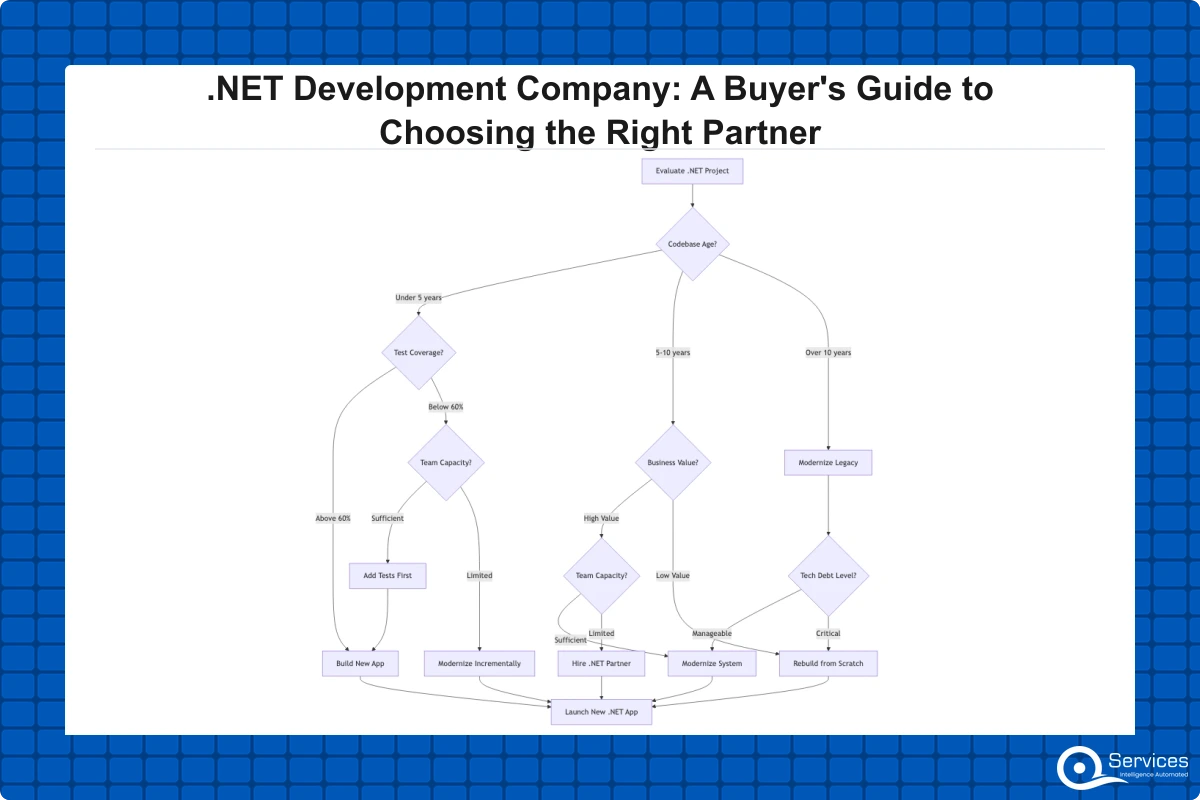
This is the most common question IT directors inherit when they take over an application running .NET Framework 4.x on a server that hasn't been patched since 2019. The honest answer: it depends on the code quality, not the age.
The Strangler Fig Pattern Explained
Legacy .NET Framework modernization uses the strangler fig pattern to incrementally replace components without a full rewrite. The strangler fig approach, named after a tree that grows around its host, means you wrap the existing application in a new .NET 8 or .NET 9 facade. Traffic routes to the new system where new code exists and falls through to the legacy system everywhere else. Over 12 to 18 months, you replace the old system one module at a time.
This is lower risk than a big-bang rewrite for most legacy app modernization projects because the business keeps running throughout. The tradeoff is that it requires discipline and a team that can hold two architectural contexts in their heads at once.
When a Rewrite Makes More Sense
A full rewrite is justified when: the existing codebase has no test coverage and the business logic is opaque, the data model is so denormalized that it cannot be migrated without rebuilding it anyway, or the technology debt has accumulated to the point where maintaining the old system while building the new one costs more than a clean break. In practice, this applies to roughly 20% of legacy modernization projects. The rest are strangler fig candidates.
Key Insight In practice, this applies to roughly 20% of legacy modernization projects.
Risk Management During .NET Application Modernization
.NET application modernization projects fail for organizational reasons more often than technical ones. Scope creep kills timelines. Setting clear module boundaries before work begins, with explicit acceptance criteria for each extracted service, is how you prevent a 12-month project from becoming a 36-month one. If you want a structured approach to scoping, the 5-Day Blueprint Sprint is one framework that works well at this stage.
Blazor Development Services: When C# Replaces JavaScript
Blazer is a genuine alternative to JavaScript frameworks for enterprise teams that already live in C#. It is not a novelty. Microsoft runs Blazor in production, and enterprises across financial services and healthcare are shipping it. The question is not whether Blazor is production-ready. It is. The question is whether it fits your team and your use case.
Blazor Server vs. Blazor WebAssembly
Blazor Server renders UI on the server with SignalR; Blazor WASM runs C# directly in the browser via WebAssembly. The practical difference:
Blazor Server works well for internal enterprise applications where latency is controlled and you want thin clients. It keeps sensitive logic server-side and supports a wider range of browsers.
Blazor WASM suits offline-capable applications or scenarios where you need to reduce server load. First load times are longer because the .NET runtime must download, but subsequent interactions are fast and server-independent.
A capable blazor development services team makes this recommendation based on your latency profile, security model, and offline requirements, not on whichever option they have more recent experience with.
Blazor vs. React for Enterprise Internal Apps
If your team is ten backend C# developers and two JavaScript generalists, Blazor reduces context switching and lets your whole team own the UI layer. If you have a strong React team and complex animation or third-party widget requirements, React still has a deeper ecosystem for those specific scenarios. The full technical comparison is worth reading before making this call: Blazor vs React for Enterprise Apps: When Each One Wins.
.NET Microservices Consulting: Moving Beyond the Monolith
Not every enterprise application needs microservices. This is something vendors rarely say because it does not sell consulting hours. The honest framing: microservices solve specific scaling and team autonomy problems. If you do not have those problems, you are adding operational complexity without benefit.
When Microservices Actually Make Sense
.NET microservices consulting delivers value when: different parts of your application have genuinely different scaling requirements (your order processing service needs 50x the capacity of your reporting service), different teams need to deploy independently without coordinating releases, or you are extracting bounded domains from a monolith that has become a deployment bottleneck. In our client engagements, a 15-person team shipping a SaaS product typically benefits more from a well-structured modular monolith than from Kubernetes and twelve separately deployed services.
Service Communication and API Gateway Design
When microservices are the right answer, .NET developers have strong tooling available. gRPC works well for high-throughput internal service communication where both sides are .NET and you control the schema. HTTP/REST with api development services patterns works for external-facing APIs where consumer diversity matters. Azure API Management handles rate limiting, authentication, and routing at the gateway layer. Message brokers like Azure Service Bus or RabbitMQ handle async workflows without tight coupling.
Regulated industries, particularly banking, have specific requirements around audit trails and message ordering that affect these architecture choices. For those environments, HITL governance for banking with OCC and FDIC compliance built into delivery is worth reviewing before finalizing the architecture.
How to Evaluate a .NET 9 Migration Partner
.NET 9 released in November 2024 with meaningful performance improvements in JIT compilation, garbage collection, and HTTP throughput. .NET Framework 4.8 applications are now two major platform paradigms behind. The migration path is well-documented through Microsoft's .NET Upgrade Assistant, but execution quality varies considerably between vendors.
Performance Gains from Modern .NET
The performance case for .NET 9 migration is concrete. Microsoft's own benchmarks show .NET 9 HTTP throughput improvements of 20 to 40% over .NET 6 on comparable workloads, with lower memory allocations per request. For high-traffic APIs running on 50 or more App Service instances, that translates directly to lower Azure compute spend. .NET application modernization, in this sense, pays for itself through infrastructure savings over 18 to 24 months, and Azure cost optimization strategies compound those gains further.
Key Insight Microsoft's own benchmarks show .NET 9 HTTP throughput improvements of 20 to 40% over .NET 6 on comparable workloads, with lower memory allocations per request.
Migration Timeline and Risk Factors
A realistic .NET 9 migration for a mid-size enterprise application takes 3 to 9 months depending on:
Number of third-party NuGet dependencies with Framework-specific packages that lack .NET Core equivalents
Use of Windows-specific APIs such as WCF or WebForms that have no direct Core equivalent
Existing test coverage (no tests means significantly higher regression risk)
Whether the team can dedicate capacity to migration or must run it in parallel with feature delivery
Any vendor quoting under 8 weeks for a significant legacy app modernization project either has not analyzed the codebase or is setting up a change order conversation.
API Development Services and the API-First Approach
API-first means the API contract is designed and agreed before implementation begins. This sounds obvious, but most teams still design APIs as an afterthought of their backend models. API-first development forces better separation between frontend and backend teams, enables parallel development tracks, and produces interfaces that external consumers can actually use without reverse engineering.
REST vs. gRPC vs. GraphQL in .NET
For most enterprise application development scenarios, REST remains the pragmatic default. It is widely understood, easy to document with Swagger and OpenAPI, and supported everywhere. gRPC is the right choice when you need low-latency internal service calls and control both sides of the connection. GraphQL fits when you have diverse client types with genuinely different data requirements and want to avoid over-fetching or multiple round trips.
A custom software development company worth hiring recommends based on your consumption patterns, not on whichever technology their team implemented most recently.
API Governance and Documentation
Production APIs need governance: a versioning strategy (URL-based or header-based), deprecation policies communicated to consumers before breaking changes, rate limiting enforced at the gateway, and OpenAPI specs generated from code rather than maintained manually. The last point matters because manually maintained specs drift from implementation within weeks. Tools like Swashbuckle or NSwag generate accurate specs from attributes and eliminate that drift entirely.
Key Takeaways
The first filter is straightforward: does the company work in the Microsoft ecosystem full-time, or is .NET one of fifteen stacks they cover?
"ASP.NET development services" is one of those phrases that means very different things depending on who's saying it.
This is the most common question IT directors inherit when they take over an application running .NET Framework 4.x on a server that hasn't been patched since 2019.
Blazer is a genuine alternative to JavaScript frameworks for enterprise teams that already live in C#.
Not every enterprise application needs microservices.
Conclusion
Choosing a dotnet development company comes down to three things: does this vendor understand your industry's compliance requirements, do they have real production experience with the specific .NET capabilities you need (asp.net development services, blazor development services, .net microservices consulting, or legacy app modernization), and do their delivery practices match your organization's governance expectations?
The vendor who answers "what does your code review process look like for AI-assisted development?" with a specific process is more trustworthy than the one who shows you a client logo wall. Technical skill is table stakes at this point. Delivery discipline is what separates genuine partners from body shops.
QServices specializes in .NET modernization with Human-in-the-Loop governance for enterprise applications, bringing Microsoft stack expertise with transparent delivery metrics and documented approval workflows across healthcare, banking, logistics, and SaaS sectors. If you are evaluating a .NET 9 migration or scoping new enterprise application development, start with a structured technical assessment rather than a proposal. It takes five days and eliminates the ambiguity that causes most projects to miss their budgets.
Co-Founder and CTO, QServices IT Solutions Pvt Ltd
Rohit Dabra is the Co-Founder and Chief Technology Officer at QServices, a software development company focused on building practical digital solutions for businesses. At QServices, Rohit works closely with startups and growing businesses to design and develop web platforms, mobile applications, and scalable cloud systems. He is particularly interested in automation and artificial intelligence, building systems that automate routine tasks for teams and organizations.
For most legacy .NET Framework applications, incremental modernization using the strangler fig pattern is lower risk than a full rewrite. A rewrite makes sense only when the codebase has no test coverage, the data model must be rebuilt anyway, or the cost of maintaining the old system while building the new one exceeds a clean break. In practice, roughly 80% of legacy app modernization projects are strangler fig candidates, not rewrites.
The strangler fig pattern is an incremental migration strategy where a new .NET 8 or .NET 9 application wraps the legacy system. Traffic routes to the new code where it exists and falls through to the old system everywhere else. Over 12 to 18 months, you replace the legacy system one bounded module at a time until it is fully decommissioned, with no big-bang cutover and minimal business disruption.
A realistic .NET 9 migration for a mid-size enterprise application takes 3 to 9 months. Key variables are the number of Framework-specific NuGet dependencies, use of Windows-only APIs like WCF or WebForms, existing test coverage, and whether the team can dedicate full capacity or must run migration alongside active feature work. Any vendor quoting under 8 weeks for a significant application has not done a proper codebase assessment.
Yes, Blazor is production-ready for enterprise internal applications. Blazor Server is well-suited for internal tooling where latency is controlled and security requires keeping logic server-side. Blazor WASM suits offline-capable apps. If your team is primarily C# developers, Blazor removes the JavaScript context switch and lets the full team own the UI layer. The trade-off is a smaller third-party component ecosystem compared to React.
Custom .NET software development costs vary widely based on complexity, team size, and engagement model. A dedicated team engagement for a mid-size enterprise application typically runs $15,000 to $60,000 per month depending on geography and seniority mix. Fixed-price projects for well-scoped applications start around $50,000. Legacy app modernization projects for large codebases can run $200,000 to $800,000 over 6 to 18 months. Any accurate estimate requires a structured technical assessment of the existing system first.
.NET microservices consulting delivers value when different parts of your application have genuinely different scaling requirements, different teams need to deploy independently, or you are extracting bounded domains from a monolith that has become a deployment bottleneck. If your team is fewer than 20 people or your application does not have distinct scaling domains, a well-structured modular monolith almost always serves you better than the operational overhead of a microservices deployment.
Look for vendors who can show documented sprint review processes with client checkpoints, an explicit code review workflow for AI-assisted development, published delivery metrics (velocity, defect rates, on-time delivery), and audit trails for architectural decisions. For regulated industries, ask specifically how the vendor handles compliance documentation during development. Vendors who cannot describe their governance process clearly have not formalized it, which becomes your risk.
Business intelligence consulting services should give a mid-market company a governed way to make decisions. Attractive dashboards are only the visible part. The useful outcome is a system in which source data, metric definitions, access, releases, ownership, and support still work after the consultants leave.
In a Microsoft Solutions Partner vs Microsoft Partner comparison, the difference is validation. A company can participate in the Microsoft AI Cloud Partner Program without holding a customer-facing Solutions Partner designation. A designated Solutions Partner has met Microsoft’s current threshold in a specific solution pathway: at least 70 out of 100 partner capability points, with more than zero points in every required metric, based on performance, skilling, and customer success data recorded in Partner Center.
How do you build a legacy application modernization strategy for Azure? A legacy application modernization strategy assigns the right treatment to each workload, then sequences the work around business value, technical evidence, and operational risk. For Azure, that means choosing among retire, retain, rehost, replatform, refactor, rearchitect, rebuild, and replace instead of treating cloud migration as a blanket mandate. Direct Answer A legacy application modernization strategy for Azure should classify
Eager to discuss about your project?
Share your project idea with us. Together, we’ll transform your vision into an exceptional digital product!
Business intelligence consulting services should give a mid-market company a governed way to make decisions. Attractive dashboards are only the visible part. The useful outcome is a system in which source data, metric definitions, access, releases, ownership, and support still work after the consultants leave.
In a Microsoft Solutions Partner vs Microsoft Partner comparison, the difference is validation. A company can participate in the Microsoft AI Cloud Partner Program without holding a customer-facing Solutions Partner designation. A designated Solutions Partner has met Microsoft’s current threshold in a specific solution pathway: at least 70 out of 100 partner capability points, with more than zero points in every required metric, based on performance, skilling, and customer success data recorded in Partner Center.