Dynamics 365 customization is the decision that shapes every Microsoft implementation project from day one. Companies evaluate the platform, run a proof of concept, then hit the first real fork: configure what ships out of the box, or build something new? The answer affects your timeline, your CRM implementation cost, and how much your technical team spends on maintenance for the next several years. This guide gives you a clear framework for making that call, whether you are deploying Dynamics 365 Sales, Customer Service, Business Central, or Finance.
In This Article, You'll Learn
What Is the Difference Between Configuration and Customization in Dynamics 365?
How to Know When Configuration Is Enough
Dynamics 365 Customization: What the Options Actually Are
What Dynamics 365 Configuration Actually Covers
The Real CRM Implementation Cost: Customization vs Configuration
Eager to discuss about your project?
Share your project idea with us. Together, we’ll transform your vision into an exceptional digital product!
What Is the Difference Between Configuration and Customization in Dynamics 365?
The short answer: configuration uses what Microsoft built; customization extends or replaces it. The line between them matters more than most project briefs acknowledge.
Configuration: Working Within the Platform
Configuration covers everything you can change through the Power Platform or Dynamics 365 admin UI without writing code. Business rules, workflows, security roles, forms, views, dashboards, calculated fields, and data model extensions (adding new tables and columns to Dataverse) all fall here. You make changes through make.powerapps.com or the D365 settings area, package them in a solution, and deploy.
The key advantage of staying in configuration is upgrade safety. Microsoft releases two major D365 wave updates each year. Configured changes ride through those releases without regression testing. That is not always true for custom code.
Why This Decision Drives Your CRM Implementation Cost
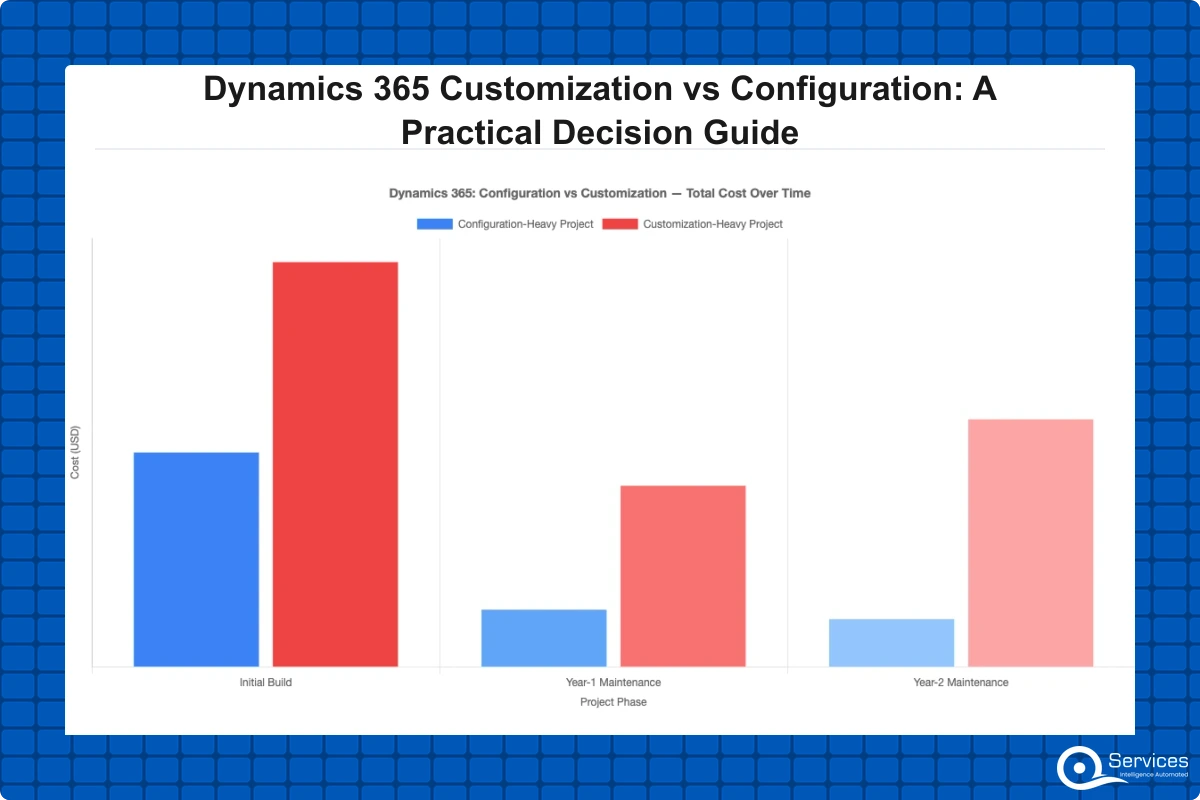
A project that is 80% configuration and 20% customization will cost less to build and significantly less to maintain than one that is flipped the other way. CRM implementation cost differences are not always obvious upfront, but they compound. Every custom plugin needs developer review and testing against each platform update. Documentation grows. You end up needing a specialist developer on retainer just to keep things running.
Key Insight A project that is 80% configuration and 20% customization will cost less to build and significantly less to maintain than one that is flipped the other way.
CRM implementations that lean heavily on customization see maintenance costs rise as a share of total ownership. Gartner's CRM research consistently identifies ongoing support and upgrades as the largest cost driver in enterprise CRM deployments, and customization accelerates that curve.
How to Know When Configuration Is Enough
The mistake most teams make is reaching for custom development before fully exploring the platform's standard capabilities. Configuration covers more ground than most people expect.
Map Your Process to Standard Capabilities First
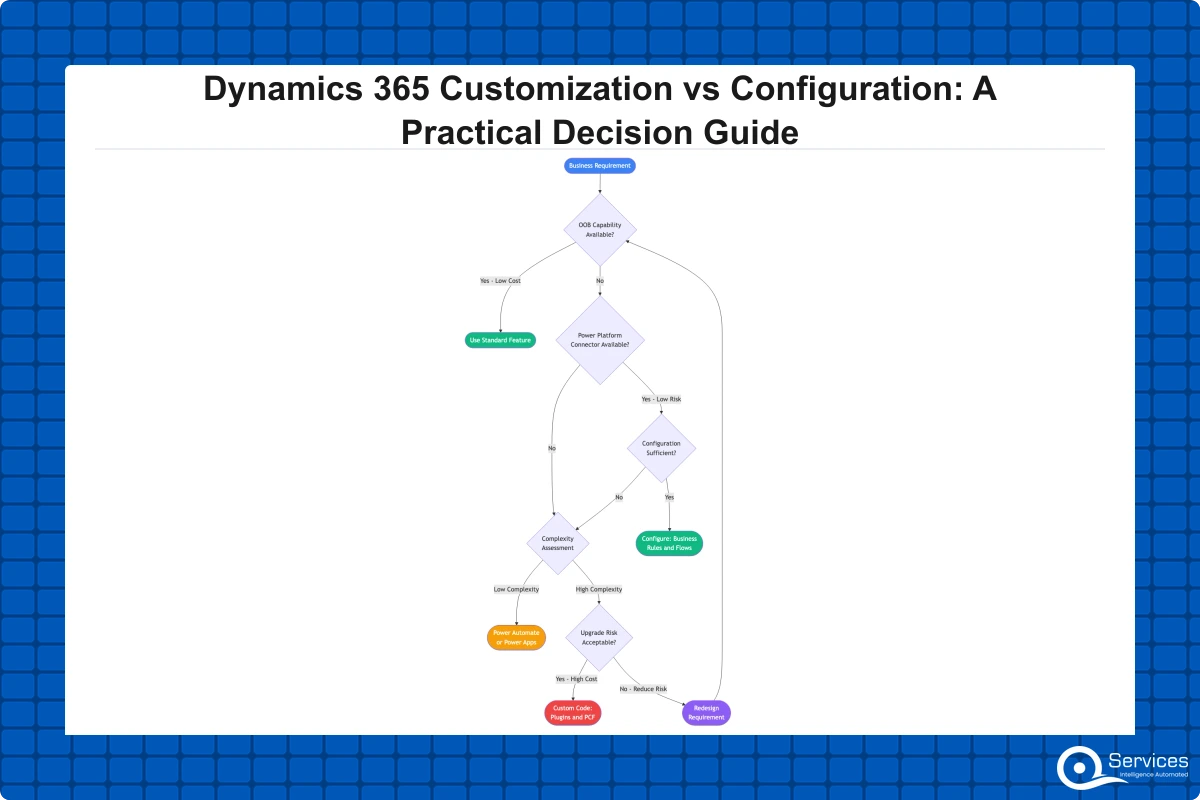
Before any development work starts, walk your business process inside Dynamics 365. Use the standard sales stages, the case routing engine in Customer Service, or the purchase order flow in Business Central. Ask: does this out-of-the-box flow match at least 70% of what the business actually does? If yes, configure it. Gaps can often be closed with Power Automate flows, business rules, or calculated fields.
Key Insight Ask: does this out-of-the-box flow match at least 70% of what the business actually does?
For a mid-market dynamics 365 crm implementation, this exercise alone can save 40 to 60 development hours before the project starts. That translates directly to lower CRM implementation cost before any code is written.
Dynamics 365 for Small Business: Configuration Covers Most Needs
Dynamics 365 for small business deployments (typically 10 to 150 seats on Business Central or Dynamics 365 Sales) rarely need custom code. The platform is mature enough that most small business workflows fit natively. If your team is debating customization for a 20-person sales team, ask whether the business process itself needs to change before the software does.
When configuration genuinely cannot meet a requirement, you will see clear signals: business rule logic that requires conditional branching Dataverse rules cannot handle, real-time integration with a third-party system that has no certified Power Platform connector, or UI requirements that only PCF (Power Apps Component Framework) can deliver. Those are real customization triggers. Preference for how things have always been done is not.
Dynamics 365 Customization: What the Options Actually Are
When configuration genuinely is not enough, D365 gives you structured extension points rather than open-ended code insertion. Understanding these options helps you scope accurately and set realistic budgets.
Plugins and Custom Workflow Activities
Server-side plugins execute synchronous or asynchronous logic when records are created, updated, or deleted in Dataverse. They are powerful but fragile if written carelessly. A plugin that throws an unhandled exception blocks the user's save operation with a generic error message, which is bad for adoption.
The working rule: if a plugin can be replaced with a Power Automate cloud flow, replace it. Flows are visible to functional consultants, editable without redeployment, and survive platform updates without recompilation. Our Power Automate Workflow Examples: 10 Real Business Use Cases with Setup Steps covers several integration patterns that keep projects in the configuration zone longer than most teams expect.
Dynamics 365 Integration Services: Connecting External Systems
Dynamics 365 integration services are one of the most common reasons projects cross from configuration into customization territory. You need D365 to talk to a logistics platform, a banking core system, or a custom ERP. If the target system has a certified connector in Power Platform, use it. If not, you are looking at custom Azure Functions, Azure Service Bus, or Logic Apps.
This is where the dynamics 365 consulting services team earns its keep. Evaluating connector options before defaulting to custom code is the difference between a 2-week integration task and a 3-month development project.
PCF Controls and Canvas App Embeds
Sometimes the issue is not the data model; it is the UI. Power Apps Component Framework (PCF) lets you build React-based controls that drop into model-driven apps. Canvas app embeds let you surface rich custom forms inside a D365 record. Both are technically customizations, but they are lighter than server-side code and do not affect business logic or upgrade safety.
What Dynamics 365 Configuration Actually Covers
It is worth mapping how much ground configuration covers before any code is written. Most teams underestimate this significantly.
Business Rules, Flows, and Calculated Fields
Standard Dataverse business rules can show or hide fields, lock fields, set default values, and display error messages based on conditions. For most sales qualification logic, lead scoring, and case priority rules, this is enough. Power Automate cloud flows extend this into approval routing, email triggers, cross-entity record updates, and record cloning without any C# code.
Calculated fields and rollup fields handle aggregations across related records without custom plugins. Many teams write plugins for calculations that a rollup field would handle in 10 minutes of configuration work.
Data Model Extensions Through Configuration
Adding new tables, custom columns, and relationships in Dataverse is configuration, not customization. That distinction matters. Most projects can extend the data model significantly without writing any code. Security roles and field-level security are also pure configuration. Lock down a sensitive field with field-level security before writing a plugin to prevent edits.
The Real CRM Implementation Cost: Customization vs Configuration
The financial case for configuration-first becomes clear when you account for the full lifecycle, not just the initial build.
Dynamics 365 Migration Services and Technical Debt
Teams evaluating dynamics 365 migration services from Salesforce or a legacy CRM hit the customization question immediately. Those that over-customized their previous platform often make the mistake of migrating technical debt into D365 instead of challenging whether the custom logic was ever necessary.
The right migration approach: treat the move as a clean-slate process review. Bring the data, but challenge every piece of custom logic before rebuilding it. Dynamics 365 migration services that skip this step deliver an expensive version of the same problems at a new address.
How a Dynamics 365 Implementation Partner Structures the Decision
A qualified dynamics 365 implementation partner runs a fit-gap analysis before writing any code. They map requirements to out-of-the-box capabilities, flag genuine gaps, and present three options: configure around the gap, customize to fill it, or change the business process. The third option is often the right one and the hardest sell.
Key Insight Sometimes the right answer is to configure 90%, accept a 10% gap, and revisit in six months after users have adopted the core system.
Module-Specific Decisions: Business Central vs Finance and Operations
The right customization philosophy depends on which D365 module you are deploying. The two halves of the platform have genuinely different approaches, and conflating them creates unrealistic expectations.
Dynamics 365 Business Central Partner: A Configuration-First Platform
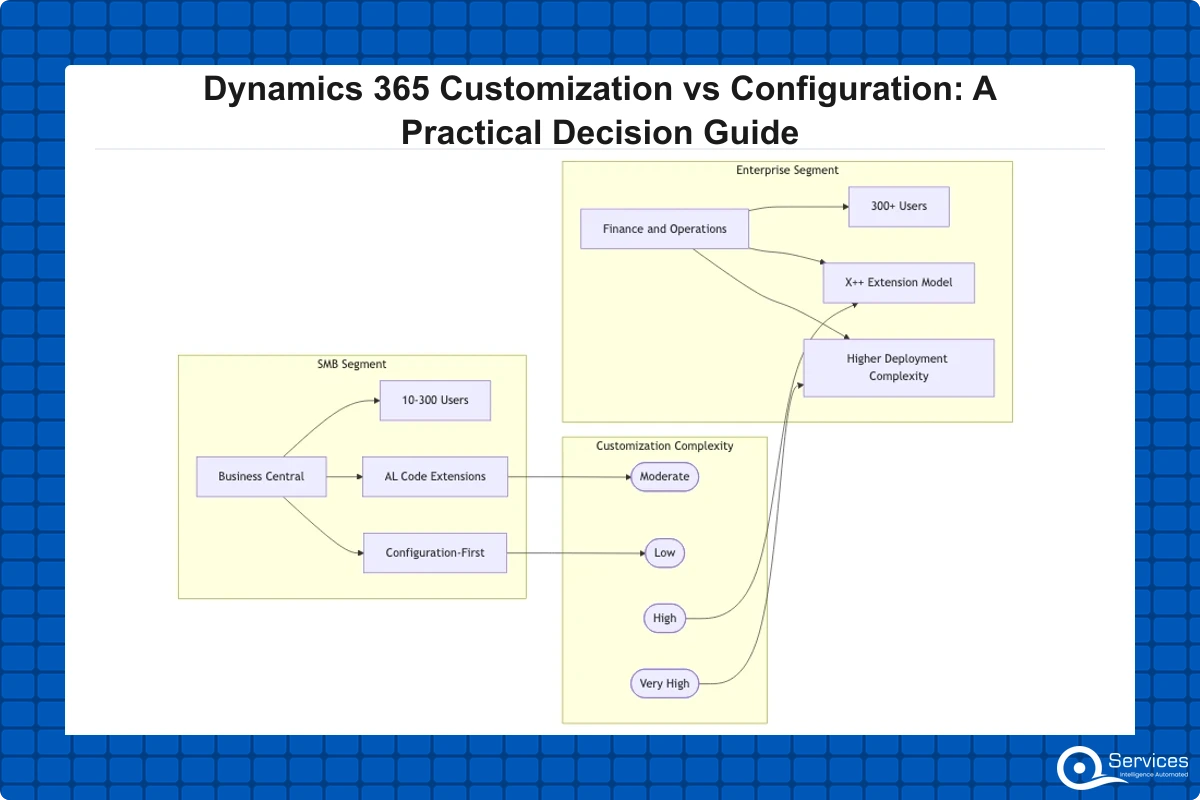
Business Central is the ERP built for SMBs, and it is designed to be extended through AL code extensions rather than core modifications. A certified dynamics 365 business central partner will tell you that most Business Central implementations for companies under 200 users need very little custom AL code. The platform covers financials, inventory, purchasing, and project management with enough flexibility for most mid-market requirements.
D365 Business Central is designed for SMBs with 10 to 300 users; Finance and Operations targets enterprises with 300+ users needing multi-entity, multi-currency, and complex regulatory compliance. That distinction drives the customization philosophy from day one.
D365 Finance and Operations: Where Customization Gets Complex
D365 Finance and Operations is a different story. It is a full enterprise ERP with a mature extension model using X++ code, but the complexity is substantially higher. Our deep-dive on D365 Finance and Operations: Key Modules, Implementation Guide, and ROI covers the module landscape in detail.
Dynamics 365 implementation for Finance typically runs 6 to 18 months. The more customization involved, the closer to 18 months. Dynamics 365 implementation typically takes 3 to 18 months depending on modules, users, and customization complexity, and Finance and Operations projects almost always land in the upper half of that range.
Dynamics 365 vs Salesforce: How Customization Compares
Every platform evaluation includes the dynamics 365 vs salesforce question, and customization depth is a real part of that comparison. Salesforce's Apex and Lightning Web Component stack is well-established with a large developer community. Dynamics 365 offers the Power Platform (Power Apps, Power Automate, Power BI) which covers a broader range of use cases beyond CRM.
The honest comparison: Salesforce is easier to staff with freelance developers. Dynamics 365 integration services are tighter for Microsoft-stack organizations running Teams, SharePoint, Azure Active Directory, and Power BI. If your company runs on Microsoft 365 and Azure, the D365 integration story is genuinely better and the total stack cost is typically lower.
How to Choose a Dynamics 365 Implementation Partner for This Decision
Choosing dynamics 365 consulting services is not just about certifications. You want a partner who pushes back on unnecessary customization. The best consultants say you do not need custom code for that rather than billing hours on something configuration would solve.
QServices is a Microsoft Certified Solutions Partner for Dynamics 365 with 500+ projects delivered since 2014. In our experience, the configuration-vs-customization decision deserves its own structured workshop before the implementation plan is written.
What to Ask Your Prospective Partner
Ask these five questions before signing any statement of work:
What percentage of requirements do you expect to meet through configuration alone? A good partner has a specific number, not a vague answer.
How do you handle Microsoft release waves? Do custom components need retesting? They should have a documented upgrade validation process.
What is your policy on recommending process change over customization? Partners who never push back are padding hours.
Can I see your fit-gap methodology? It should be a documented process, not a spreadsheet built for your project.
Do you have references in my industry? A dynamics 365 crm implementation in healthcare looks very different from logistics or banking.
A partner who estimates 60%+ customization on a first D365 implementation for a company that has never deployed the platform is a red flag. It usually means they have not done proper fit-gap work, or they are scoping to maximize development hours.
Microsoft's Dynamics 365 Success by Design framework mandates a solution blueprint review that includes a customization risk assessment for all enterprise projects. If your partner has not mentioned Success by Design, that tells you something. Microsoft's Dynamics 365 implementation guidance also explicitly recommends starting with standard capabilities before extending. Configuration-first is not just our recommendation; it is Microsoft's.
Key Takeaways
The short answer: configuration uses what Microsoft built; customization extends or replaces it.
The mistake most teams make is reaching for custom development before fully exploring the platform's standard capabilities.
When configuration genuinely is not enough, D365 gives you structured extension points rather than open-ended code insertion.
It is worth mapping how much ground configuration covers before any code is written.
The financial case for configuration-first becomes clear when you account for the full lifecycle, not just the initial build.
Conclusion
Dynamics 365 customization is sometimes the right answer, but it should be the last resort rather than the first response to a business requirement. The organizations that get the most out of D365 are the ones that invest time in fit-gap analysis, configure aggressively, and treat customization as a deliberate tradeoff with documented rationale.
The CRM implementation cost of a configuration-first approach is lower at every phase: initial build, upgrade cycles, and ongoing maintenance. If you are heading into a D365 implementation without a clear conversation about where configuration ends and customization begins, that conversation needs to happen before the project kicks off.
QServices has helped 500+ organizations make this call across Business Central, Finance, Sales, and Customer Service. Start with our Dynamics 365 Implementation Partner: 10-Point Checklist to understand what to look for before signing any statement of work.
Co-Founder and CTO, QServices IT Solutions Pvt Ltd
Rohit Dabra is the Co-Founder and Chief Technology Officer at QServices, a software development company focused on building practical digital solutions for businesses. At QServices, Rohit works closely with startups and growing businesses to design and develop web platforms, mobile applications, and scalable cloud systems. He is particularly interested in automation and artificial intelligence, building systems that automate routine tasks for teams and organizations.
Configuration should be your starting point in almost every case. It is faster to deploy, cheaper to maintain, and safer from an upgrade perspective. Dynamics 365 customization makes sense when a genuine business requirement cannot be met through configuration, Power Automate, or a process change. A proper fit-gap analysis, completed before any development work starts, should identify those gaps clearly and justify each customization decision.
Customization typically doubles or triples the initial build cost and significantly increases long-term maintenance expenses. Every custom plugin, PCF control, or Azure Function requires developer review with each Microsoft platform update. A configuration-heavy mid-market implementation might run $50,000 to $150,000; the same scope with heavy customization can reach $200,000 to $500,000 or more, not counting ongoing support costs for each release cycle.
Configuration uses built-in platform tools including business rules, Power Automate flows, forms, and data model extensions in Dataverse without writing code. Customization involves server-side plugins, PCF controls, Azure Function integrations, or X++ extensions in Finance and Operations. Configuration changes survive Microsoft platform updates automatically; customizations require regression testing and developer review with each major release.
Dynamics 365 implementation typically takes 3 to 18 months depending on modules, users, and customization complexity. A configuration-heavy Business Central deployment for an SMB might complete in 3 to 6 months. A Finance and Operations implementation with significant customization often runs 12 to 18 months. Each major custom component typically adds 4 to 8 weeks of development and testing to the timeline.
D365 Business Central is designed for SMBs with 10 to 300 users. It covers financials, inventory, purchasing, and project management with a configuration-first approach and AL code for extensions. Finance and Operations targets enterprises with 300+ users needing multi-entity, multi-currency, and complex regulatory compliance. It uses X++ for extensions and has a significantly more complex deployment and upgrade model than Business Central.
Yes, in many cases. Power Platform includes over 1,000 certified connectors covering systems like Salesforce, SAP, ServiceNow, and Google Workspace. When a certified connector exists, integration is a configuration task. When no connector is available, dynamics 365 integration services using Azure Functions, Service Bus, or Logic Apps cross into customization territory. Evaluating connector availability before assuming custom code is needed can save weeks of development time and significant budget.
Ask for the fit-gap analysis results. A partner doing the job properly will show you exactly which requirements map to standard capabilities and which genuinely require custom code. If they estimate more than 50% customization for a first D365 deployment without a detailed gap justification for each item, push back. Microsoft’s Success by Design framework requires a customization risk assessment on enterprise projects specifically to prevent over-engineering at the outset.
Business intelligence consulting services should give a mid-market company a governed way to make decisions. Attractive dashboards are only the visible part. The useful outcome is a system in which source data, metric definitions, access, releases, ownership, and support still work after the consultants leave.
In a Microsoft Solutions Partner vs Microsoft Partner comparison, the difference is validation. A company can participate in the Microsoft AI Cloud Partner Program without holding a customer-facing Solutions Partner designation. A designated Solutions Partner has met Microsoft’s current threshold in a specific solution pathway: at least 70 out of 100 partner capability points, with more than zero points in every required metric, based on performance, skilling, and customer success data recorded in Partner Center.
How do you build a legacy application modernization strategy for Azure? A legacy application modernization strategy assigns the right treatment to each workload, then sequences the work around business value, technical evidence, and operational risk. For Azure, that means choosing among retire, retain, rehost, replatform, refactor, rearchitect, rebuild, and replace instead of treating cloud migration as a blanket mandate. Direct Answer A legacy application modernization strategy for Azure should classify
Eager to discuss about your project?
Share your project idea with us. Together, we’ll transform your vision into an exceptional digital product!
Business intelligence consulting services should give a mid-market company a governed way to make decisions. Attractive dashboards are only the visible part. The useful outcome is a system in which source data, metric definitions, access, releases, ownership, and support still work after the consultants leave.
In a Microsoft Solutions Partner vs Microsoft Partner comparison, the difference is validation. A company can participate in the Microsoft AI Cloud Partner Program without holding a customer-facing Solutions Partner designation. A designated Solutions Partner has met Microsoft’s current threshold in a specific solution pathway: at least 70 out of 100 partner capability points, with more than zero points in every required metric, based on performance, skilling, and customer success data recorded in Partner Center.