
Lead routing: get every inbound lead to the right rep fast

Isometric illustration of inbound leads flowing through an enrichment step and a routing hub into separate rep queues, with an approval checkpoint on one lane. - lead routing
Summarize in:
Get an instant AI summary of this article

Introduction

Lead routing means capturing each inbound lead, deduping and enriching it, matching it to an existing account, applying ordered rules, and alerting the owner in your CRM. Keep a fallback queue and a timer so nothing sits unclaimed.

Most teams have a version of this and it still leaks. Our ai agents for sales read the inquiry, match it to an account and propose an owner inside your CRM, and your team approves every reassignment.

This guide covers B2B lead routing rules, data prep and metrics for US sales and marketing ops teams.

In This Article, You'll Learn
  • Why the slowest leads, not the average, decide your pipeline
  • The 4 lead routing rules and the order to run them
  • How enrichment fixes the blank fields that cause misroutes
  • How to match a new lead to the account a rep already owns
  • Where an AI agent beats a rule, and where a rule is enough
  • Which metrics tell you routing is working

How long does a new lead wait for the right rep?

We map your lead flow, from form fill to first touch, and show which steps a rule covers and which need an agent with a person approving.

Book a 30-min call →

Quick Answer Lead routing is the automatic assignment of each inbound lead to a rep, team or queue using ordered rules. The best order is existing account owner first, then territory or segment, then round robin as the fallback. Enrich the lead first, alert the rep at once, and track median time to first touch against an SLA.

Why Does Speed to Lead Matter for Lead Routing?

Speed to lead is the time between a buyer raising a hand and a person making first contact. HBR’s 2011 article The Short Life of Online Sales Leads is the most cited source on it: leads contacted within the first hour qualified far more often than leads contacted later.

The famous five-minute multipliers (100x contact, 21x qualification) trace back to a small 2007 study. We treat them as directional, not as hard facts.

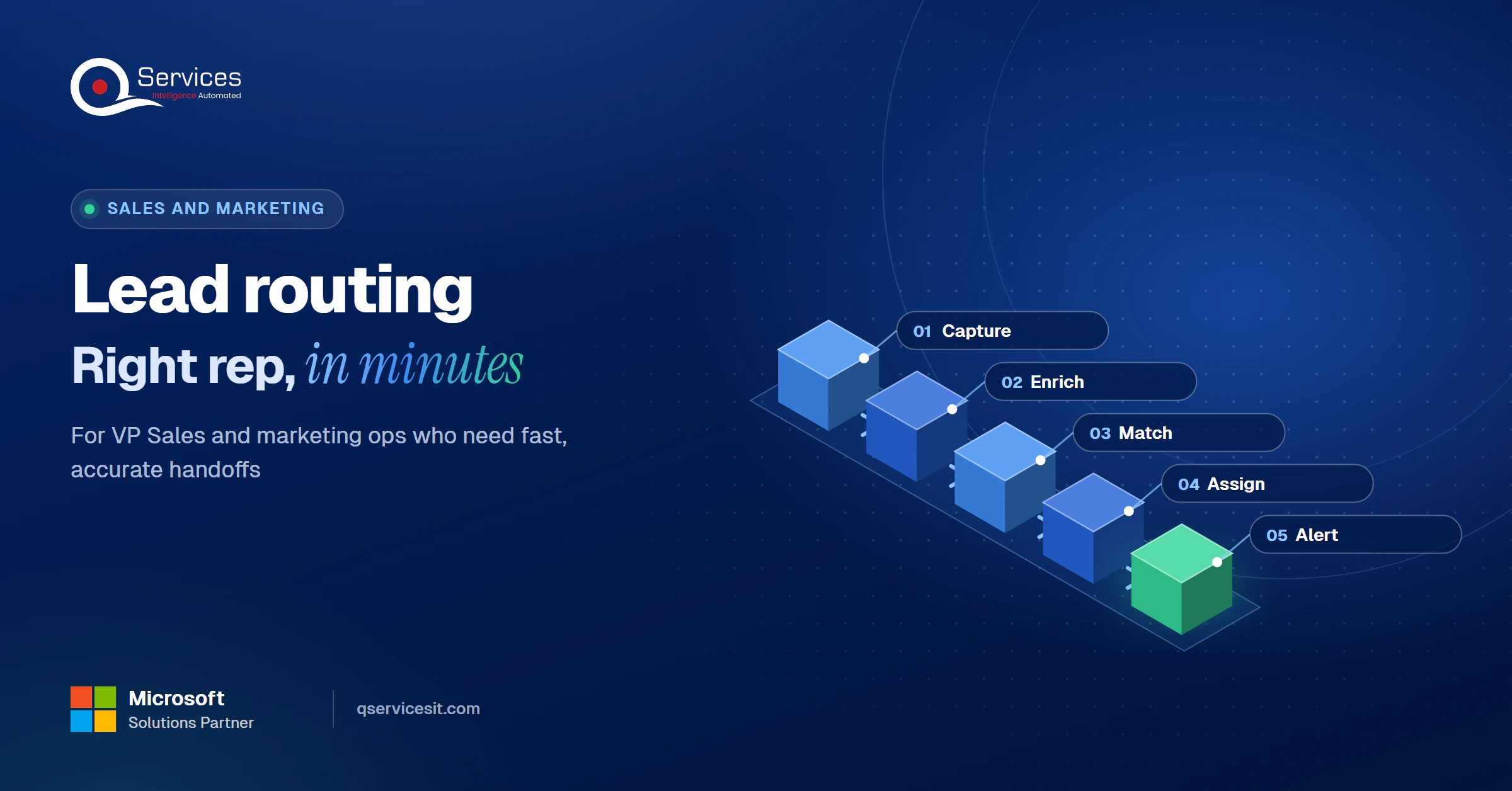
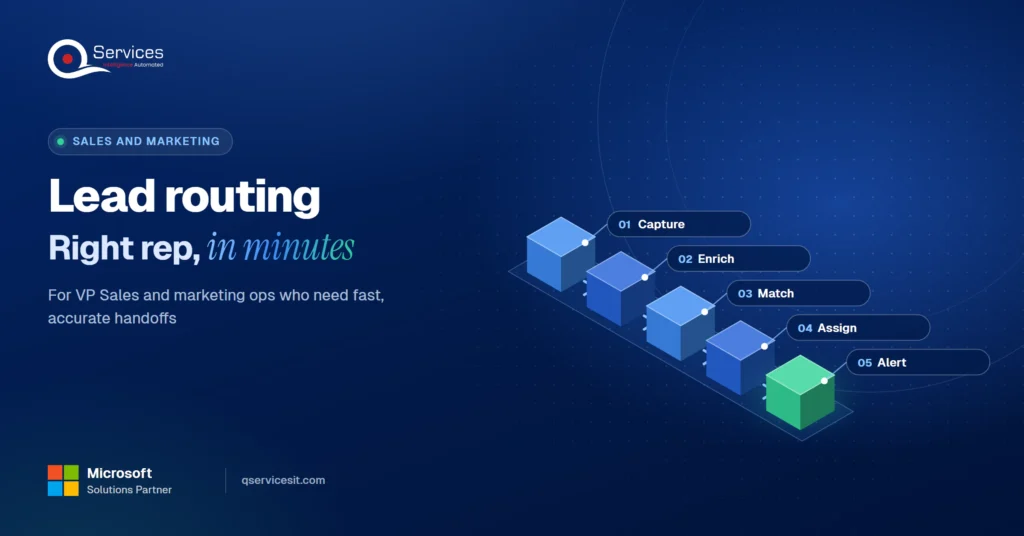
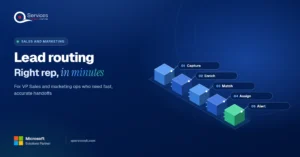
The QServices Framework Lead Routing = Capture → Enrich → Match → Assign → Alert

The order matters because each stage depends on the fields the one before it fills. Assign before Match and you hand a customer’s new contact to a stranger.
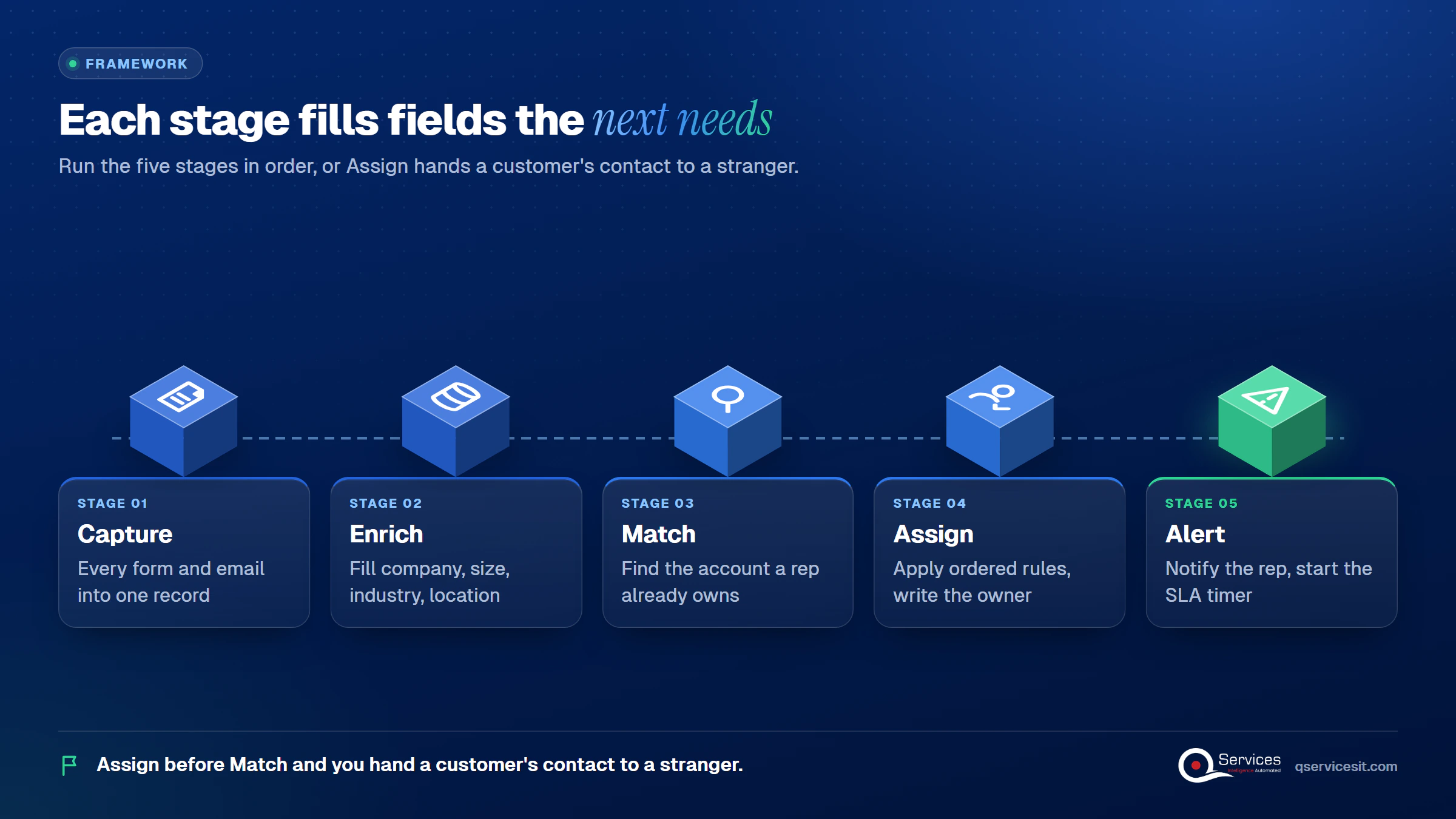
QServices Lead Routing framework: Capture → Enrich → Match → Assign → Alert

These are the starting response targets we use:

  • Demo or pricing request: under 5 minutes
  • Contact-sales form: under 15 minutes
  • Gated content download: same business day
  • Webinar registrant: within 24 hours

Key Insight Averages hide the leads that go cold. A team averaging 6 minutes can still have one in five leads waiting 45 minutes or more, so judge routing by the slow tail.

4 Lead Routing Rules That Work

Lead routing rules for B2B sales teams are ordered entries where the first match wins, so sequence is the whole design. Microsoft’s Dynamics 365 Sales documentation says the same: assignment rules run from the top of the list and stop at the first match.

1. Round robin lead distribution

Round robin lead distribution gives the next lead to the rep who has waited longest. It balances load for small teams with similar lead quality. Alone, it ignores territory, expertise and lead value, so use it as the fallback.

2. Territory-based lead routing

Territory-based lead routing maps country, state or region to an owner. It needs standard location fields and a rule for HQ versus subsidiary, or one company lands with two reps.

3. Segment-based rules

Segment rules route by employee band, revenue or industry. Blank values cause silent misroutes, so send blanks to a review queue and not to a default rep.

4. Account-based lead routing

Account-based lead routing sends a new contact at an existing account to its current owner. It stops two reps emailing the same buyer, and it should run first.
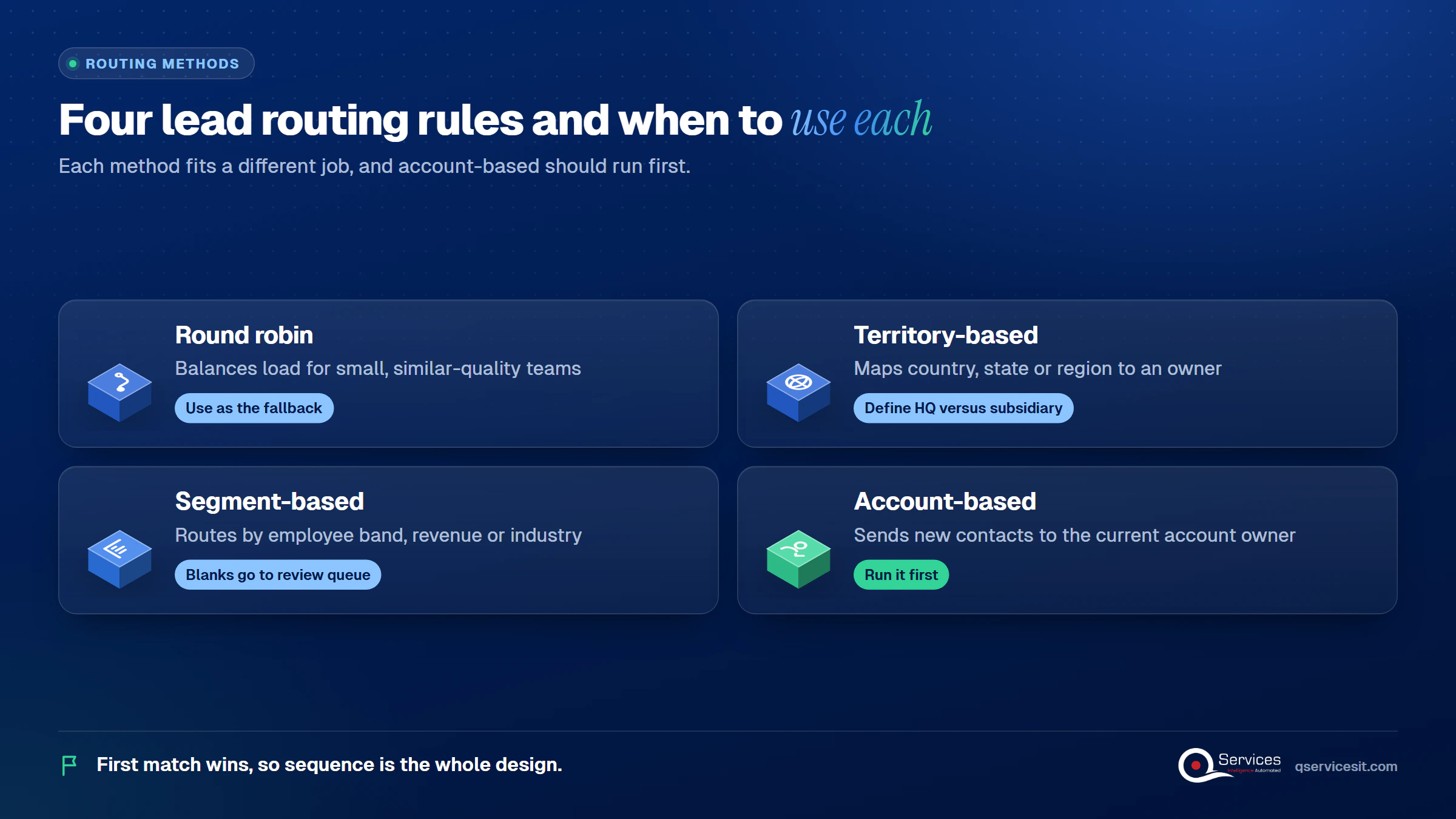
Grid of exactly 4 routing methods: Round robin, Territory-based, Segment-based, Account-based, each with its best use - lead routing

Round robin vs territory lead routing comes down to effort versus fairness to the buyer. The hybrid order (account owner, then territory or segment, then round robin) matches buyers to the right rep but costs more to run.

Factor Round robin alone Hybrid order
Setup effort Hours Days to weeks, plus rule upkeep
Data needed Almost none Clean location, size and account fields
Duplicate outreach Common Rare, account owner wins
Rep expertise match None Strong
Failure mode Wrong rep, fast A blank field leaves the lead unassigned

Here is how to set up lead routing in a CRM, in order:

  1. Capture every form and email into one lead record and dedupe on email.
  2. Enrich company, size, industry and location.
  3. Check for an existing account or open deal and send the lead to that owner.
  4. Apply territory or segment rules, then round robin for what is left.
  5. Write the owner to the CRM, alert the rep and start an SLA timer with a fallback queue.

You can build this CRM lead routing workflow natively, or through workflow automation when several systems are involved. Microsoft’s rules can skip sellers with no capacity or working hours, and otherwise leave the lead unassigned. Always define the fallback.
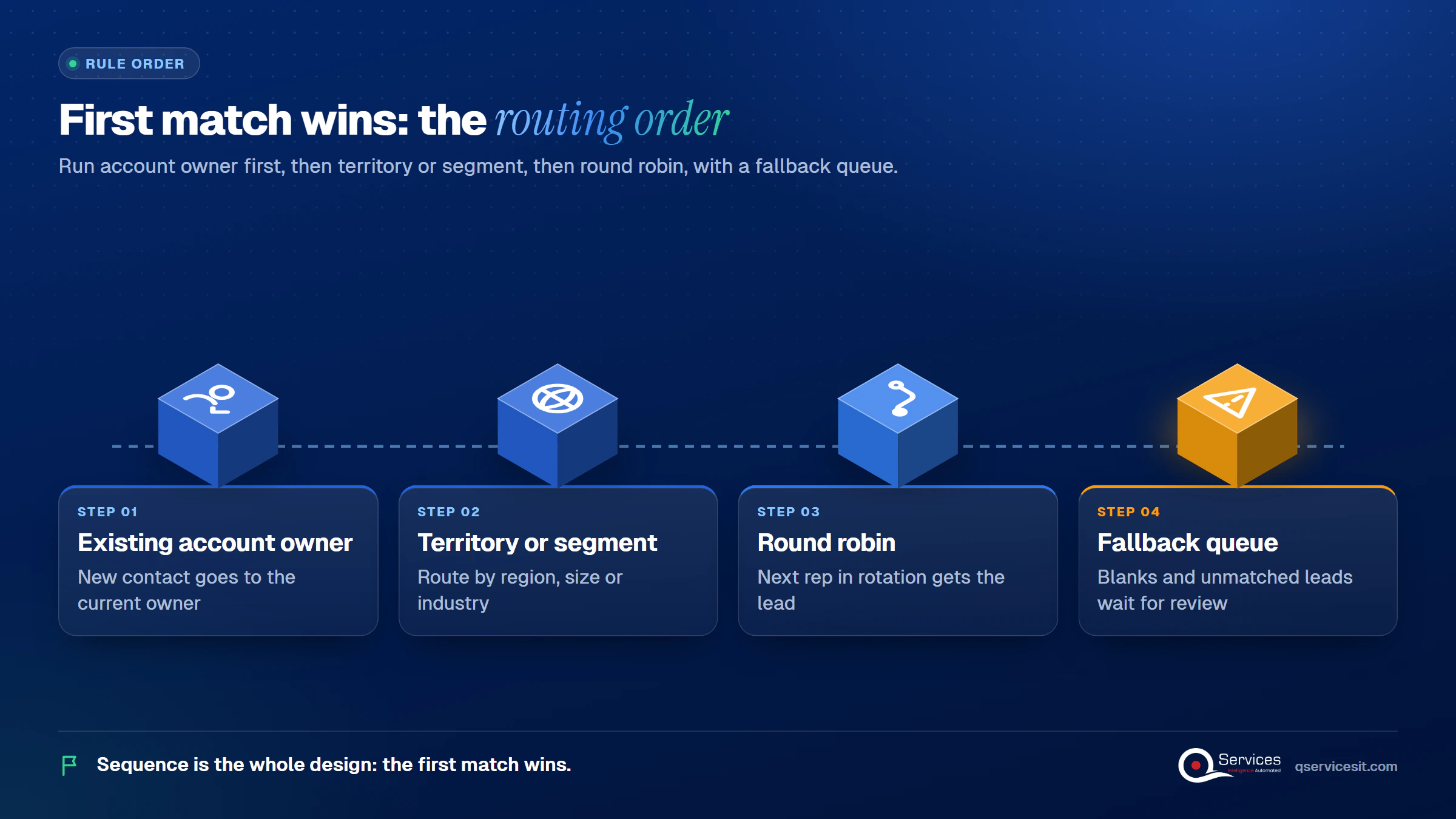
Lead routing order of rules: Existing account owner → Territory or segment → Round robin → Fallback queue

Standards & References

Lead Enrichment Before Routing: Fill the Fields First

Lead enrichment before routing fills company, size, industry and location so the rules have something to read. Routing problems are mostly data problems: misroutes come from blank or stale fields, not from the assignment logic.

Enrich at capture, before any rule runs. Three jobs matter most:

  • Resolve personal email addresses (a Gmail form fill) to a business identity.
  • Fill the four routing fields: company, employee band, industry, location.
  • Flag records that stay blank and send them to a review queue.

The honest trade-off: enrichment costs money per record, and accuracy varies by provider. Test two providers on 200 of your own leads before you commit.

Key Insight If a routing rule reads a field, that field needs a fill-rate target. A rule on employee count is only as good as the share of leads that arrive with one.

How Do You Match Inbound Leads to Existing Accounts?

To match inbound leads to existing accounts, compare email domain, normalized company name and website against your account list before assigning anyone. A match sends the lead to the account owner, whatever the territory says.

  • Match across objects: check lead to account and contact, not only lead to lead.
  • Handle subsidiaries: companies sharing a domain may need parent and child handling, not a merge.
  • Fuzzy-match narrowly: compare company names only inside a bucket that already shares a domain.

Real-World Scenario A typical case we see: a sales ops lead at a US software company gets 60 inbound forms a day. A buyer at a 400-person fintech writes from a Gmail address and types her company as Acme Pay. The account on file is Acme Payments Inc., owned by an AE who is mid-negotiation. Under plain round robin, a new SDR cold-emails that buyer within the hour. The Match stage catches the name variant, sends the lead to the AE and alerts them.

Once the owner is right, the same record can carry into quote to cash automation, so the quote and invoice go out under the same name.

Is your CRM matching leads to the wrong accounts?

Duplicate accounts and missing fields send leads to the wrong rep. A short assessment shows where matching breaks and what an agent could read and propose.

Book a 30-min call →

Where Does an AI Agent Help With Lead Routing?

A rule is enough when the field is clean and the decision is a lookup: country to territory, employee band to segment, named account to owner, next rep in rotation. Do not pay for an agent there.

An agent earns its place on unstructured input:

  • Reading a free-text inquiry to pull out intent, product interest and urgency.
  • Separating buyers from spam, job seekers and vendors.
  • Resolving a company written as a name variant to the right account.
  • Drafting context for the rep, as in AI automation for lead qualification.

Two cautions. Inbound text can carry prompt injection, so screen it before the agent scores or routes. And keep the CRM as the system of record with a deterministic fallback rule. In our builds the agent runs in your own Azure tenant, and a person approves anything that changes an owner or another system.

How Do You Measure Lead Routing?

Measure lead routing by time from lead creation to first attempt and first contact, reported as median and P90, plus the share of leads handled inside your SLA.

How to measure lead response time

Start the clock at form submission or lead creation. Stop it at the first attempt and again at the first real contact. Break results down by source, owner and hour of day, because a 3 a.m. form and a Monday 9 a.m. form fail for different reasons.

Which metrics show routing is working?

  • Percent within SLA: our target is 90% or higher.
  • Routing accuracy: leads that stay with their first owner.
  • Unassigned leads: the share sitting in the fallback queue.
  • Manual reassignment rate: above 3% is our sign the rules need work.

How QServices Approaches Lead Routing

We start at Match, because that is where most leaks are, and then work outward through Enrich and Assign. Our process assessment covers these steps:
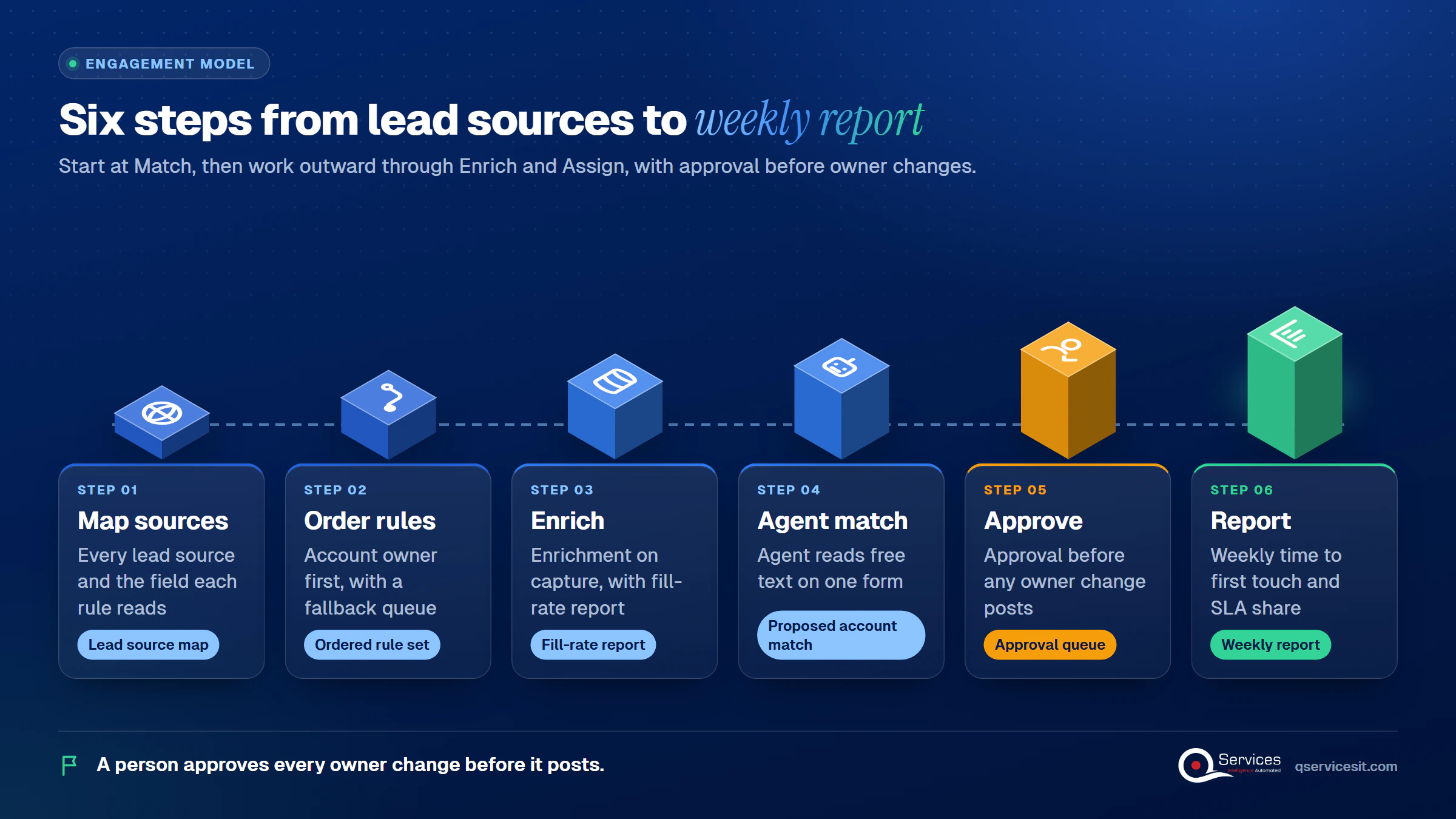
  1. A map of every lead source and the field each rule reads.
  2. An ordered rule set with account owner first and a fallback queue.
  3. Enrichment on capture, with a fill-rate report.
  4. An agent on one form to read free text and propose the account match.
  5. An approval queue before any owner change posts.
  6. A weekly report of median time to first touch and percent within SLA.
How QServices delivers lead routing: Map sources → Order rules → Enrich → Agent match → Approve → Report

Implementation Checklist

  • Every lead source lands in one CRM object
  • Duplicates are merged on email at capture
  • Company, size, industry and location are enriched before assignment
  • Account match runs before territory and round robin
  • Blank routing fields go to a review queue, not a default rep
  • A fallback queue and SLA timer exist for every rule
  • Median and P90 time to first touch are reported weekly

Conclusion

Lead routing pays off fastest when you pilot it on one form, such as contact-sales, and measure median time to first touch, percent within SLA and manual reassignment rate. Run it for a few weeks before widening. When you are ready, book a 30-min call and we will map your current routing against the five stages.

Rohit Dabra

Written by Rohit Dabra

Co-Founder and CTO, QServices IT Solutions Pvt Ltd

Rohit Dabra is the Co-Founder and Chief Technology Officer at QServices, a software development company focused on building practical digital solutions for businesses. At QServices, Rohit works closely with startups and growing businesses to design and develop web platforms, mobile applications, and scalable cloud systems. He is particularly interested in automation and artificial intelligence, building systems that automate routine tasks for teams and organizations.

CRM integrationSales automationAI agent developmentWorkflow automation
Talk to Our Experts

Frequently Asked Questions

Lead routing is the automatic assignment of each inbound lead to a rep, team or queue, using rules based on territory, company size, product interest, account ownership or rep availability. How lead routing works in practice: capture and dedupe the lead, enrich it, match it to an existing account, apply ordered rules, write the owner to the CRM and alert the rep.

It depends on the lead type. Our starting targets are under 5 minutes for a demo or pricing request, under 15 minutes for a contact-sales form, the same business day for gated content and within 24 hours for a webinar registrant. Measure median and P90 time to first touch, because averages hide the slow leads.

Match each new lead to an account by email domain, normalized company name and website before any territory or round robin rule runs. If an account or open deal exists, the account owner wins. Handle subsidiaries with parent and child logic, not a merge, and send unmatched leads to the next rules.

Partly. A plain rule is enough for lookups such as country to territory or next rep in rotation. An agent helps with free-text inquiries, spam filtering and name-variant account matching. Screen inbound text for prompt injection, keep a deterministic fallback, and have a person approve owner changes.

Pilot on one form, such as contact-sales. Put account owner first, territory or segment second and round robin last, add a fallback queue and an SLA timer, and track median time to first touch, percent within SLA and manual reassignment rate. In our experience a single-form pilot takes a few weeks.

Related Topics

Next step

Where do your inbound leads stall today?

Bring one week of inbound leads. We’ll trace each to its rep, find the slow handoffs and sketch routing that your team approves.

Book a 30-min call →

Recent Articles

Globally Esteemed on Leading Rating Platforms

Earning Global Recognition: A Testament to Quality Work and Client Satisfaction. Our Business Thrives on Customer Partnership

5.0

5.0

5.0

5.0

What clients say

Rated 5.0 by the
people we've built for.

Every quote comes from a published review on GoodFirms, Clutch or our own site. Click a source to read the full review.

★★★★★
“QServices was highly professional, knowledgeable, and approachable. We continue to work with them on other projects.”
NHNicholas HoareCEO, Nextgen ClearingGoodFirms
★★★★★
“Quality assurance is often overlooked, but these guys take that very seriously. … their team of experienced, dedicated developers and highly skilled engineers quickly dissected and decomposed every problem and presented solutions and options that directly met my needs”

Erik BrownBusiness owner and software engineerClient review
★★★★★
“The supplier delivered the application on time and was responsive to our needs. He was also flexible, which allowed us to make changes on the fly.”

Zoltan BodnarCFO, Yusen LogisticsGoodFirms
★★★★★
“Thank you Sahil and team for wonderful collaboration right from day 0. … Highly recommend the developers.”

Ranbeer MakinClientClient review
★★★★★
“They are always looking for new ways to improve their products and services and to deliver value to their customers.”
OFOluwatosin FalolaSenior .NET Developer, POOLCORPClutch
★★★★★
“I have had an excellent experience working with QServices. We have a highly collaborative relationship and I value them not just as contractors but as partners.”

Alex VanderElsClientClient review
★★★★★
“Sahil undertakes every project with a high degree of professionalism. His communication style is unmatched and he is always available to resolve issues or just discuss the project.”

Philmore J.ClientClient review
★★★★★
“Responsive, patient and professional. Consistent weekly attention to our project, and new ideas we hadn't asked for.”

Michael WilliamsonPresident and CEO, United Way of Southeast LouisianaGoodFirms
★★★★★
“I have been working with them on a project for a year now … They have been able to solve problems that come up with bugs or development and able to communicate well with me.”

Steven LewisClientClient review
★★★★★
“We had been working on the app for two years. QServices built it in two months.”

Brian WallerPresident, Technology Association of IowaGoodFirms
★★★★★
“All projects were delivered on time and were fully completed upon delivery.”
RBRaine Marie BuenvendiaSr. Support Specialist, Arc.DevClutch
★★★★★
“They had excellent quality. The hypercare they provided after the project went live is exceptional.”

KKKrish KishorePresident, Zero Hour ConsultantsClutch
Book Appointment
Sahil kataria (1)
Sahil Kataria

Founder and CEO

amit Kumar
Amit Kumar

Chief Sales Officer

Talk To Sales

USA

+1 270-550-1166

flag

+1 270-550-1166

Phil J.
Phil J.Head of Engineering & Technology​
QServices Inc. undertakes every project with a high degree of professionalism. Their communication style is unmatched and they are always available to resolve issues or just discuss the project.​
Assured

Thank You

Thanks, we’ve got your details. A named member of our team will reply within one business day.