What is unapplied cash, and why does it matter to your books?
What is unapplied cash? It’s a customer payment you’ve recorded but not yet matched to the invoices it pays. It’s a credit in your books, held as a liability-like or contra-AR balance, while the cash itself is a debit to the bank.
The split matters because the bank balance is right and the receivables ledger is wrong. Invoices that are really paid stay open, and the customer gets a dunning email for money you already hold. Good cash application automation shrinks the gap, but the accounting rules come first.
This guide covers the debit and credit logic, the four journal entries, Business Central steps, and the policy a Controller should sign.
How much of your cash is sitting unapplied?
Bring your oldest unapplied receipts to a short call. We’ll show where they sit in your ERP and how an approval-first agent proposes the match.
Quick Answer What is unapplied cash? It’s money a customer has paid that you’ve received and posted to the bank but haven’t matched to a specific invoice. You book it as Dr Bank, Cr Unapplied Cash. It stays a credit, usually presented as a liability, until you apply, refund or properly release it.
Is unapplied cash a debit or a credit?
Unapplied cash is a credit. The money you receive is a debit to the bank account. The unapplied cash account, which holds the matching entry until an invoice is chosen, carries a credit balance. Applying it later moves the credit out of the holding account and into accounts receivable.
That’s the short answer to whether unapplied cash is a debit or credit. The rest of this post is about doing it well. Before the detail, here’s the model we use for every unapplied cash decision.
The QServices Framework Unapplied Cash Control = Capture → Identify → Match → Approve → Post
The order matters because posting is the only step that changes the ledger. If a payment is posted before someone has identified the payer and approved the match, you’ve moved the error into receivables where it’s harder to find.
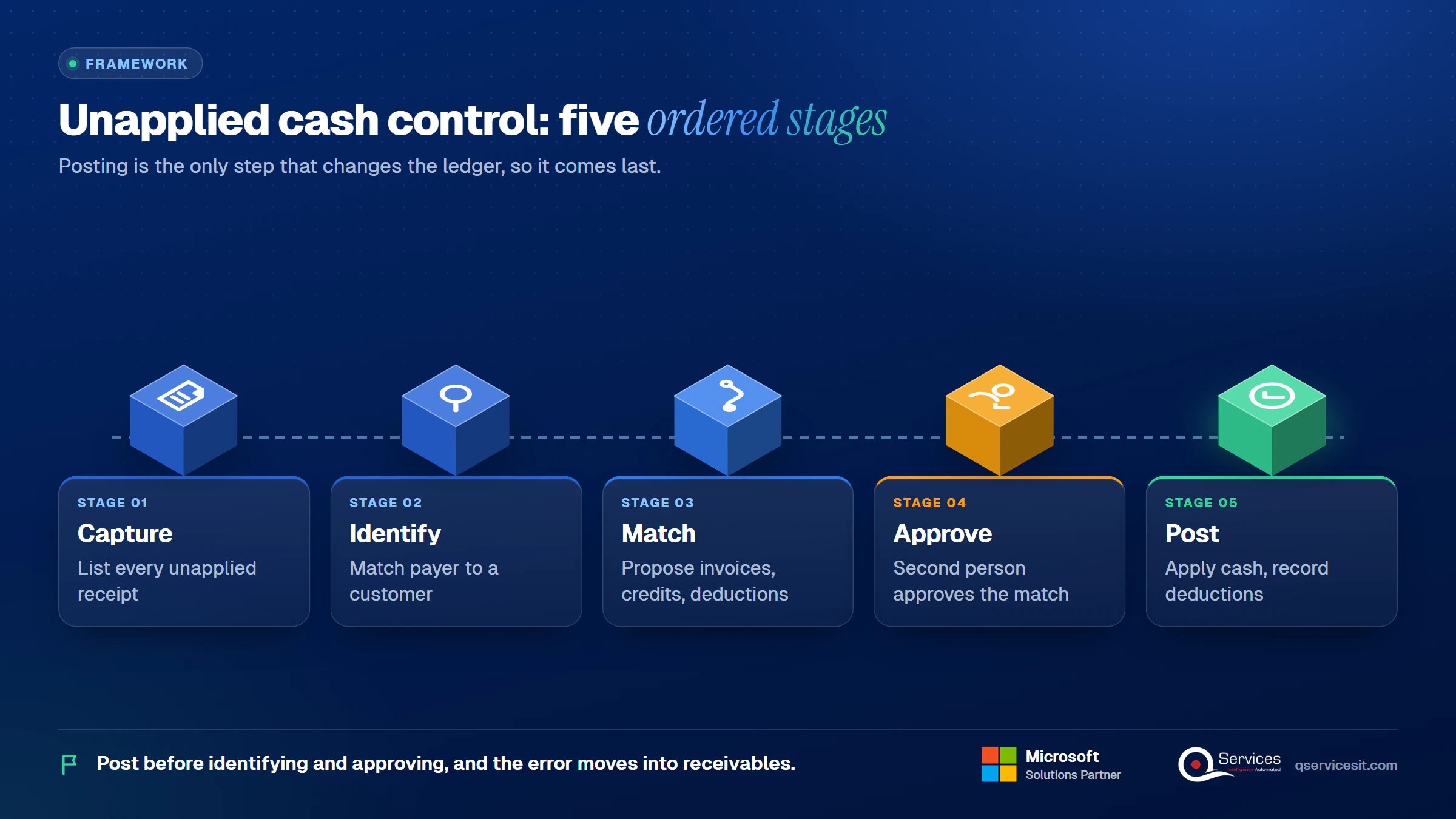
In short: Unapplied Cash Control = Capture + Identify + Match + Approve + Post. We’ll reuse these five stage names below.
What does an unapplied cash credit balance mean on the customer account?
An unapplied cash credit balance means the customer has paid more than the invoices you’ve told the ledger about. The customer’s account shows a credit entry that nothing has closed against. Until it’s matched, the invoices it should settle still look overdue.
In most ERPs the credit sits in the same customer ledger as the open invoices. That’s why aging reports look worse than reality, and why we cover that effect below.
How is unapplied cash different from unapplied credit, suspense and prepayments?
These terms get mixed up, including by vendors who treat them as the same thing. Here’s the split we use.
| Term |
What it is |
Usual home |
| Unapplied cash |
Payment received, customer known, no invoice chosen yet |
Unapplied cash account or customer credit |
| Unapplied credit |
The credit balance left on the customer account after that payment |
Customer ledger, shown with the cash |
| Unidentified cash / suspense |
Money received, payer not known |
Suspense or clearing account |
| On-account cash |
Payment posted to the customer, not to a specific invoice |
Customer ledger credit |
| Customer deposit / prepayment |
Money paid before any invoice exists |
Customer deposits liability |
The practical difference is knowledge. With unapplied cash you know who paid. With suspense you don’t, so Identify comes before anything else.
Key Insight An unapplied payment is never revenue and never a reduction of bad debt. It’s cash that belongs to a customer until an invoice, a refund or a documented legal release says otherwise.
Why does unapplied cash usually sit as a liability?
Because you hold money you haven’t earned against any specific invoice. Until that match exists, you may owe the customer an application or a refund. That obligation is what makes the unapplied cash liability treatment sensible.
US GAAP treats consideration received from a customer as a liability until the related event happens. For a plain overpayment we found no authoritative paragraph that addresses it directly, so treat the liability view as a well-supported practice and an inference, and confirm it with your auditor.
Where does unapplied cash sit on the balance sheet?
There are two accepted presentations, and the choice depends on who the credit belongs to.
- Contra-AR (netted in receivables): fine for a short-lived credit that will be applied to an open invoice of the same customer, and the amount is small.
- Current liability: use it when the credit is material, will likely be refunded, or can’t be matched to an open invoice of that customer.
Credit balances shouldn’t be netted against other customers’ debit balances unless they’re immaterial. Netting understates receivables and hides what you owe. At month-end, cut off your presentation at the closing date and look at every customer with a net credit.
In practice, we’d move any credit older than the month or any credit on an account with no open invoices into a liability line.
Does IFRS treat it differently?
Only slightly. IAS 1 generally prohibits offsetting assets and liabilities, so the liability presentation is the safer default. IFRS 18 replaces IAS 1 for annual periods beginning on or after 1 January 2027, so check how your policy reads under it.
What causes unapplied customer payments?
Most unapplied payments come from eight causes. Each has an owner, which is why they get fixed.
| Cause |
Symptom |
Fix |
Owner |
| Missing remittance |
Wire with no invoice numbers |
Request remittance, check CRM contacts |
AR specialist |
| Overpayment |
Customer pays more than the invoice |
Apply to other open invoices or refund |
AR manager |
| Short payment |
Less than invoiced, no reason |
Record deduction, route to dispute |
AR manager |
| Payer differs from customer |
Parent or third party pays |
Map payer to the billing account |
AR specialist |
| Duplicate payment |
Same amount paid twice |
Refund the second payment |
AR manager |
| Prepayment or deposit |
Cash arrives before the invoice |
Hold as deposit, apply on invoicing |
Controller |
| Invoice not posted yet |
Payment precedes the invoice in the ledger |
Post the invoice, then match |
Billing |
| Keying or bank-feed error |
Wrong customer, wrong amount |
Reverse and re-post |
AR specialist |
For the monthly backlog side of this, see our guide to unapplied cash and how to clear the backlog.
What does an unapplied balance break downstream?
Five things break, in this order:
- AR aging inflates. Paid invoices stay in the 31-60 or 61-90 bucket.
- Dunning goes to customers who already paid. That damages the relationship fast.
- DSO is distorted. Open invoices that are really paid push days sales outstanding up.
- The cash forecast has a gap. You’ve got cash in the bank that collections reports don’t count.
- Auditors flag it. Old credits with no resolution become findings.
The month-end effect gets its own treatment in why unapplied cash delays the month end close.
How do you book the unapplied cash journal entry, step by step?
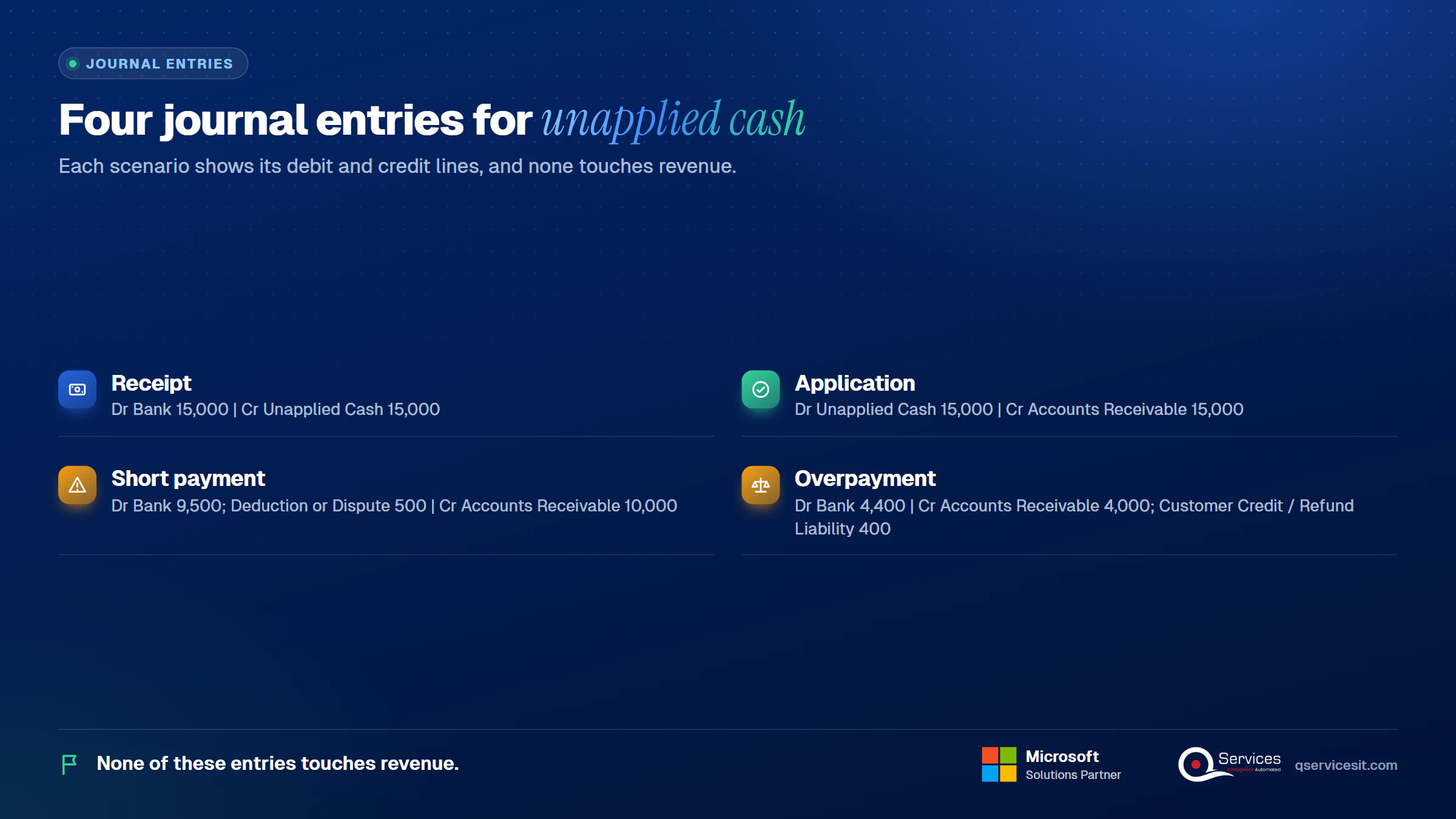
There are four entries. Together they cover the unapplied cash journal entry from receipt to final application. Amounts here are examples.
| Scenario |
Debit |
Credit |
| 1. Receipt ($15,000 arrives, no match yet) |
Bank 15,000 |
Unapplied Cash 15,000 |
| 2. Application (matched to invoices) |
Unapplied Cash 15,000 |
Accounts Receivable 15,000 |
| 3. Short payment ($10,000 invoice, $9,500 paid) |
Bank 9,500; Deduction or Dispute 500 |
Accounts Receivable 10,000 |
| 4. Overpayment ($4,000 invoice, $4,400 paid) |
Bank 4,400 |
Accounts Receivable 4,000; Customer Credit / Refund Liability 400 |
None of these entries touches revenue. If your first entry goes to revenue or other income, something is wrong.
What is an unapplied cash journal entry example with real numbers?
Here’s the primary unapplied cash journal entry example. A customer wires $15,000 on 3 March with no remittance.
- 3 March, receipt: Dr Bank 15,000, Cr Unapplied Cash 15,000.
- 5 March, remittance arrives: it covers invoice A ($9,000) and invoice B ($6,000).
- 5 March, application: Dr Unapplied Cash 15,000, Cr Accounts Receivable 15,000.
The unapplied account is back to zero and both invoices close. The two-step approach gives you a timestamped record of when cash arrived and when it was matched. That gap is the number auditors and Controllers watch.
How do you handle a short payment, an overpayment and a duplicate?
- Short payment: a $10,000 invoice paid at $9,500 leaves a $500 deduction. Decide to approve it (a discount), dispute it (customer was wrong), or write it off (below your threshold). Never leave it hidden. Our short pay tracking guide shows how to log reason codes.
- Overpayment: a $400 excess stays as a credit on the customer’s account. If a refund will take more than a few days, move it to Refunds Payable (Dr AR, Cr Refunds Payable), then Dr Refunds Payable, Cr Bank when you pay.
- Duplicate payment: treat the second payment as an overpayment of the full amount and refund it.
- Unidentified wire: post to suspense, run Identify, and only then move it to the customer.
- Parent paying for subsidiaries: split across the paying entities’ invoices, with intercompany entries if the ledgers differ. See cash application across companies.
Real-World Scenario A typical case we see: a Controller at a distributor receives a $50,000 wire from a parent company with no remittance. The customer has six open invoices totalling $52,000 and one $2,000 credit memo. The naive approach applies it to the oldest invoices until the money runs out, which clears the wrong ones and leaves a disputed invoice marked paid. The Identify and Match stages catch this: the payer is mapped to the right billing account, and the match includes the credit memo so $52,000 less $2,000 equals the $50,000 received.
Where does unapplied cash live in Business Central, GP and Prophet 21?
In Business Central, unapplied cash in Business Central lives in the customer ledger as an open credit entry. The details below come from Microsoft Learn, and you should confirm menu names in your own version before you document them.
How do you handle unapplied cash in Business Central?
Here’s the working flow:
- Post the receipt. In a Cash Receipt Journal, use Document Type Payment, Account Type Customer, and leave Applies-to Doc. No. empty. The posting goes to the customer account, and the customer posting group decides which receivables G/L account takes the credit.
- Check the ledger. The entry stays open in Customer Ledger Entries. Filter for open entries with a credit amount to build your own unapplied cash report.
- Apply it. Select the payment entry, choose Apply Entries, pick the invoices and post the application.
- Undo a wrong match. Use Unapply Entries. It posts new detailed ledger entries that reopen the closed ones instead of deleting history.
- Match from the bank. In bank account reconciliation use Apply Automatically, or work the Payment Reconciliation Journal. Microsoft Learn explains how to reconcile payments and apply them to open entries. Differences show in the Difference field. You can apply manually, map text to an account, or use Transfer Difference to Account to post an excess such as an overpayment refund.
One point trips people up. Because the customer posting group controls the receivables account, an on-account payment often credits the same receivables account as your invoices debit. If you want a separate unapplied line on the balance sheet, you need a dedicated customer posting group or a reporting reclass.
What about Dynamics GP, Prophet 21, Finance, NetSuite and QuickBooks?
- Dynamics GP: receipts are applied through the Apply Sales Documents window. The Receivables module has an Unapplied Documents List report. Partial application needs a permission, and the Apply button in Cash Receipts only reaches same-currency documents. We haven’t confirmed GP’s exact general ledger distribution for an unapplied receipt, so test in your own company database.
- Prophet 21: we found no Prophet 21-specific documentation to rely on. Check Epicor’s own documentation for how an unapplied receipt posts before you write your policy.
- Dynamics 365 Finance: settle open transactions against the customer payment instead of applying.
- NetSuite and QuickBooks: both let you leave a payment unapplied and apply later. QuickBooks help pages warn against fixing these balances with manual journals and tell you to apply to the open invoice.
What does an approval-first agent do inside Business Central?
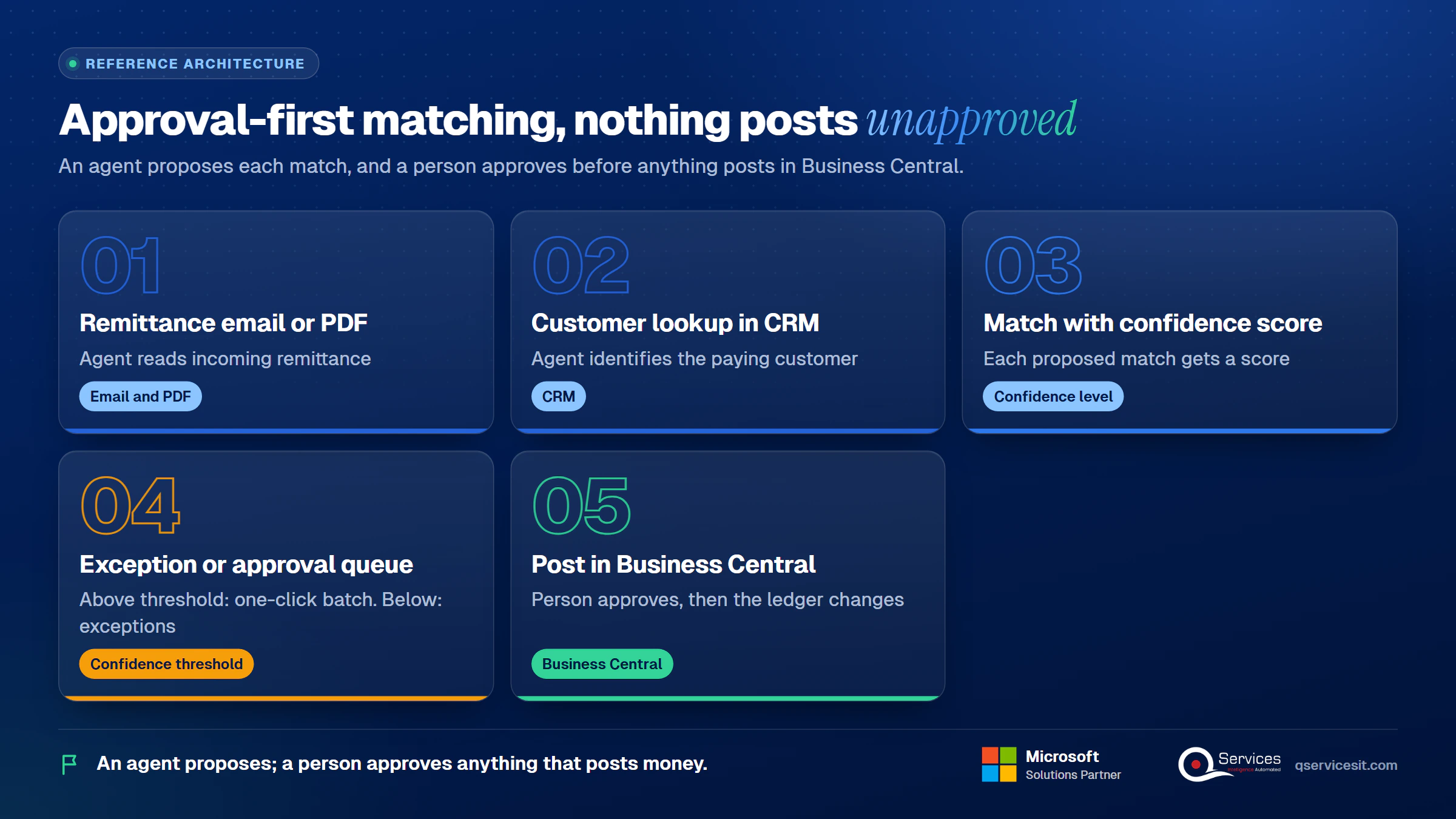
An agent helps most with Capture, Identify and Match. It reads remittance emails and PDFs, looks up the customer in the CRM, scores each proposed match with a confidence level, and queues the proposal. A person approves anything that posts money or changes the system. Above an agreed confidence threshold, a small and low-risk match can go to the approval queue as a one-click batch. Everything below it lands in an exception queue.
The agent only works as well as the remittance data it receives. If emails and PDFs arrive unreadable, matching will be poor. Our note on PDF text extraction giving wrong answers explains why.
| Measure (illustrative) |
Manual today |
With approval-first agent |
| Hours per week matching |
About 18 |
About 6 |
| Items reviewed per day, per person |
About 40 |
About 120 |
| Setup effort |
None |
Extra: 2 to 4 weeks tuning rules and remittance sources |
| New risk |
Human keying errors |
Wrong matches if remittance data is poor, so the approval queue stays |
These figures are illustrative, not results from a named client. The setup row is the honest cost: you’re trading daily effort for upfront tuning. For the wider picture see what works in AI for accounts receivable.
How does unapplied cash distort DSO and your cash forecast?
Unapplied cash doesn’t just clutter the ledger. It changes the numbers leadership reads every month, and it changes them in the wrong direction.
What happens to DSO when receipts sit unapplied?
Days sales outstanding (DSO) is accounts receivable divided by credit sales, multiplied by the days in the period. If unapplied receipts sit in a suspense account instead of against the customer, the invoices they paid stay open, so receivables are overstated and DSO looks worse than it is.
| Worked example (illustrative) |
Receipts left unapplied in suspense |
Receipts applied |
| Accounts receivable |
$1,200,000 |
$1,050,000 |
| Credit sales, last 90 days |
$2,700,000 |
$2,700,000 |
| DSO |
40 days |
35 days |
| Invoices shown as overdue |
Includes $150,000 already paid |
Only invoices really unpaid |
Five days of DSO from $150,000 of unmatched cash is enough to trigger a covenant question or a needless push on collections. Worse, collectors chase customers for invoices they already paid, which is the fastest way to annoy a good customer.
Why does it break the cash forecast?
Most collections forecasts are built from open invoices and their due dates. If a paid invoice still looks open, the forecast expects that cash again next month, so the same $150,000 is counted twice: once in the bank balance and once in expected collections. The forecast overstates liquidity until someone finds the gap.
What about working capital and month-end timing?
Unapplied cash also muddies working capital analysis, because receivables and the suspense balance both carry money that is really settled. Timing makes it worse at month end: a payment that lands on the last day of the month but is only identified on the first working day of the next one shows up as unapplied in the close. Three habits keep this clean:
- Cut-off rule: apply every receipt received by the last banking day before the books close, even if the remittance arrives a day late.
- Report both views: show DSO with unapplied cash netted against receivables, and the raw unapplied balance beside it, so nothing hides.
- Forecast from applied data: refresh the collections forecast only after the day’s cash application run, not before it.
Seeing old credits on your aging report?
Walk us through one aged credit balance on a call. We’ll trace it from deposit to ledger and show who should approve what.
When should unapplied cash be applied, refunded or written off?
Apply it first, refund it second, and release it only with documentation. That order protects both the customer and your audit trail.
How long can unapplied cash stay unapplied?
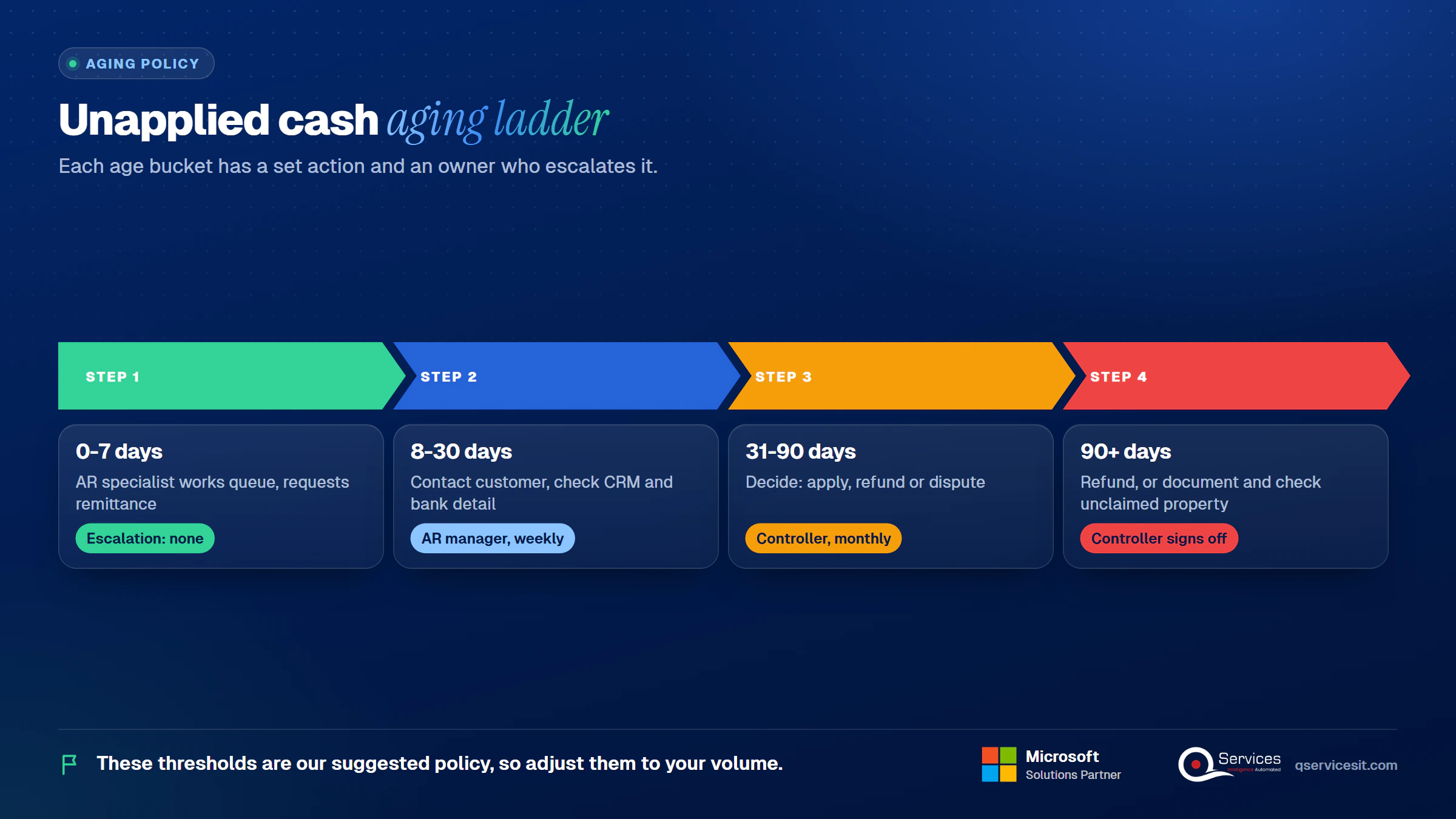
There’s no accounting standard that sets a number of days. The thresholds below are our suggested policy, so adjust them to your volume.
| Age bucket |
Action |
Escalation |
| 0-7 days |
AR specialist works the queue, requests remittance |
None |
| 8-30 days |
Contact the customer, check CRM and bank detail |
AR manager reviews weekly |
| 31-90 days |
Decide: apply, refund or dispute |
Controller reviews monthly |
| 90+ days |
Refund, or document and run an unclaimed property check |
Controller signs off |
What are the 7 steps to clear unapplied cash?
- Capture: list every unapplied receipt with date, amount, payer and bank reference.
- Identify: match the payer to a customer using bank detail, CRM and remittance.
- Request: ask the customer for remittance when none exists.
- Match: propose invoices, credit memos and deductions that sum to the amount.
- Approve: a second person approves the match, never the person who proposed it.
- Post: apply the cash and record any deduction or refund liability.
- Review: confirm the unapplied balance and aging buckets dropped.
Never apply to the oldest invoice just to empty the queue. It clears the wrong item and hides a dispute. The full process is in our cash application process steps.
Should you refund or write off unapplied cash?
Refund when the money clearly belongs to the customer and no invoice is coming. Don’t write off unapplied cash to bad debt or to other income. The funds belong to the payer, and unmatched cash isn’t a gain. A write-off needs documented evidence such as a clerical error with proof.
Old balances also carry unclaimed property risk. Dormancy periods vary by state, commonly in the range of three to five years, and customer credit balances are a recognised type. Check your state. See the overview of escheat for how priority between states is decided.
What should a month-end review cover?
- Total unapplied cash by customer and age bucket
- Credits on accounts with no open invoices, reclassed to liabilities
- Items older than 30 days with a named owner and next step
- Refunds in progress and their liability balance
- Reconciliation of the unapplied balance to the ledger
Our accounts receivable reconciliation routine fits this review.
Which KPIs show whether unapplied cash is under control?
| KPI |
Formula |
Example target |
| Unapplied % of receipts |
Unapplied balance at period end ÷ receipts in period |
Under 2% |
| Average age of items |
Sum of item ages ÷ item count |
Under 10 days |
| Auto-match rate |
Lines matched without keying ÷ total lines |
70% to start |
| Items older than 30 days |
Count of open items past 30 days |
Zero without an owner |
These are example targets, not benchmarks. We didn’t find independent benchmark data for any of them.
What does a 5-rule unapplied cash policy look like?
The AR manager works the queue daily. The Controller owns the policy, the month-end balance and the audit trail. A short policy might read:
- Owner: the AR manager owns the queue; the Controller owns the balance.
- SLA: every item is identified within 7 days and cleared within 30.
- No oldest-invoice shortcut: apply only to invoices the customer named or the match evidence supports.
- Write-off approval: the Controller approves, with documents, and never to bad debt or income.
- Unclaimed property: any credit past 90 days gets a state dormancy check.
What do auditors ask about old credit balances?
Auditors want to know why a balance is still there and what happened when it left. They focus on items cleared or reclassified with no documented resolution.
Key Insight A credit balance cleared without a record is a bigger audit risk than one that’s still open. Open balances show a process, but silent releases show a gap.
How do auditors review unapplied cash?
How auditors review unapplied cash is fairly consistent. Expect them to:
- Sort the sales ledger for credit balances and ask about each material one
- Ask whether credits are netted against other customers’ debits, and whether that’s immaterial
- Test a sample of cleared items for approval and support
- Question any write-off to income or bad debt
- Ask about unclaimed property for credits that have aged
What controls should protect unapplied cash?
- Segregation of duties: the person who posts a payment shouldn’t be the person who applies it or approves a refund.
- Audit trail: every application, unapplication and release is logged with user and date.
- Refund approval: a second person approves refunds before payment.
- Agent rule: any agent proposes; a person approves anything that posts money or changes a system.
Standards & References
How does QServices approach unapplied cash?
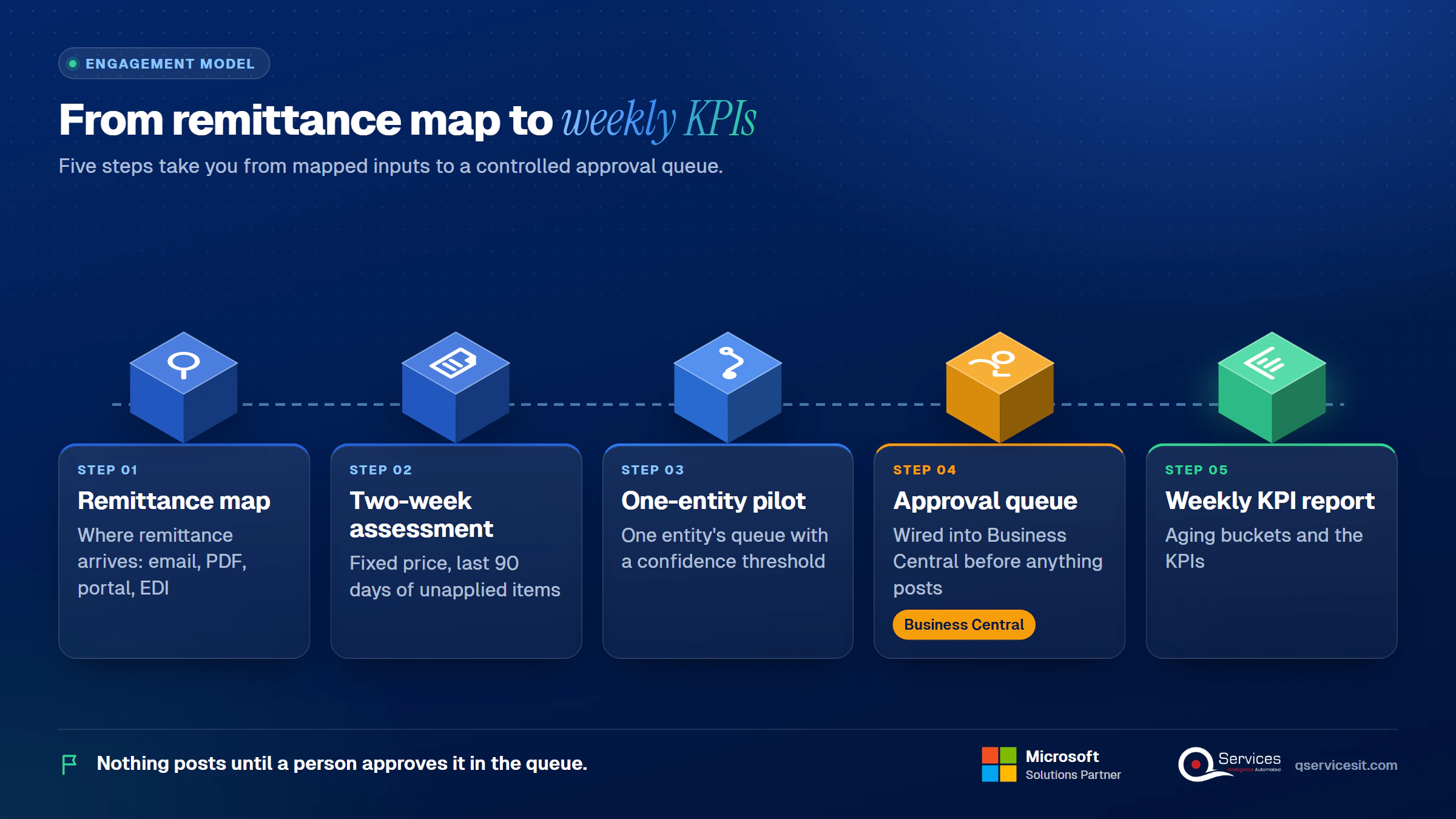
We start with Capture and Identify, because matching can’t be fixed until the inputs are readable. The agents run in your own Azure tenant, and nothing posts until a person approves it in the queue. The same team builds and runs it.
- A written map of where remittance arrives (email, PDF, portal, EDI).
- A two-week fixed-price assessment of your last 90 days of unapplied items.
- A pilot on one entity’s queue with a confidence threshold.
- An approval queue wired into Business Central before anything posts.
- A weekly report of aging buckets and the KPIs above.
Implementation Checklist
- Unapplied cash account or posting group agreed with the Controller
- Aging buckets (0-7, 8-30, 31-90, 90+) set in the policy
- Posting and applying done by different users
- Write-off to bad debt or income blocked without Controller approval
- Credits with no open invoices reclassed to liabilities at month-end
- Unclaimed property check scheduled for balances past 90 days
- Approval queue active for every agent-proposed match
- Remittance sources mapped for the top 20 customers
What should you do first to clear unapplied cash?
Now that you know what unapplied cash is, pilot one entity’s weekly queue for 30 days and measure unapplied % of receipts, average age, auto-match rate and items older than 30 days. and we’ll look at your queue with you.

Written by Rohit Dabra
Co-Founder and CTO, QServices IT Solutions Pvt Ltd
Rohit Dabra is the Co-Founder and Chief Technology Officer at QServices, a software development company focused on building practical digital solutions for businesses. At QServices, Rohit works closely with startups and growing businesses to design and develop web platforms, mobile applications, and scalable cloud systems. He is particularly interested in automation and artificial intelligence, building systems that automate routine tasks for teams and organizations.
Accounts receivableCash applicationERP integrationFinance automation
Talk to Our Experts
Frequently Asked Questions
Related Topics
Next step
Ready to stop carrying credits nobody owns?
Talk to our team about agents that propose matches inside your ERP while your people approve every posting. Every payment ends up in its place.




















 Trustpilot5.0★★★★★See reviewsGoodFirms5.0★★★★★45 verified reviews
 G25.0★★★★★See reviewsClutch5.0★★★★★Quality 5.0 · Schedule 4.8
 Google4.7★★★★★Mohali office
 Erik BrownBusiness owner and software engineerClient review
 Zoltan BodnarCFO, Yusen LogisticsGoodFirms
 Ranbeer MakinClientClient review
 Alex VanderElsClientClient review
 Philmore J.ClientClient review
 Michael WilliamsonPresident and CEO, United Way of Southeast LouisianaGoodFirms
 Steven LewisClientClient review
 Brian WallerPresident, Technology Association of IowaGoodFirms





