What is Epicor Prophet 21, in plain terms?
Epicor Prophet 21 (P21) is Epicor’s distribution-specific ERP for wholesale distributors, built on SQL Server and.NET and run in Epicor’s cloud on Azure or on your own servers. It fits distributors that live on multi-warehouse inventory, customer-specific pricing and fast counter and phone sales.
It is not built for heavy manufacturing or field service. Epicor sells Kinetic for those.
This guide is for the distribution CFO who owns the numbers and the IT manager who owns the system. Every date and figure is labelled with its source, and where we only have a partner rule of thumb, we say so.
Where does your P21 team still work by hand?
Walk through your Prophet 21 setup with our team and see where approval-first agents could take over repeat work while a person approves every posting.
Quick Answer Epicor Prophet 21 is a distribution ERP: one system for inventory, purchasing, order management, pricing, warehouse work and financials, built for wholesale distributors. It runs on SQL Server and.NET, either in Epicor’s cloud on Azure or on-premises. Manufacturers and field service firms are usually pointed to Epicor Kinetic instead.
What type of software is Prophet 21, and who is it not for?
Prophet 21 is enterprise resource planning software with a narrow focus. Epicor describes it as made by distributors, for distributors (a vendor claim). The product dates back to 1967, and Epicor took it on when Apax Partners combined Activant and Epicor in May 2011.
The practical meaning: the data model starts from the item, the warehouse and the customer price, not from a bill of materials. That shapes everything from the screens to the reports.
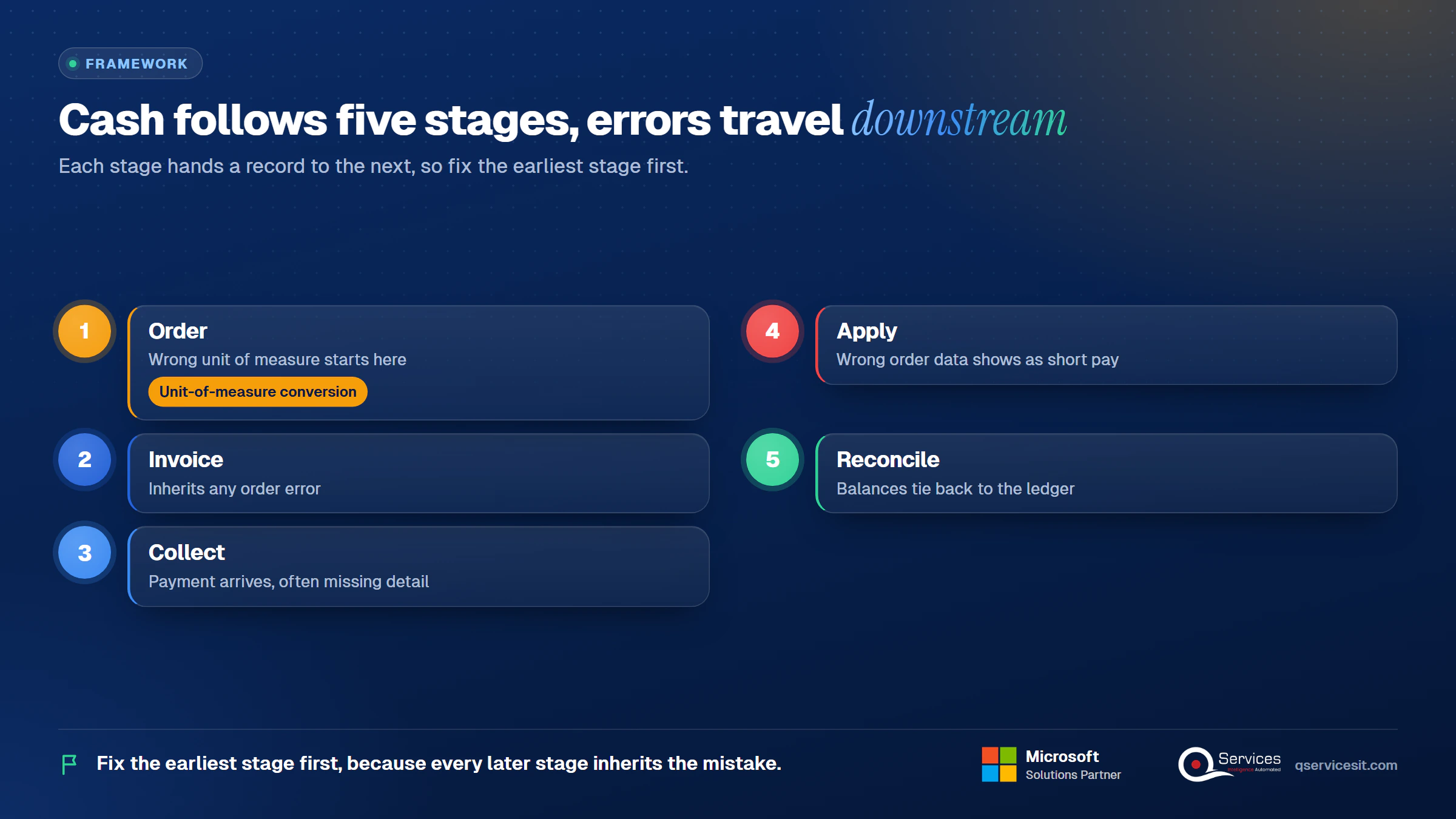
Our own lens for any ERP is a five-stage path that cash follows. We reuse it throughout this post.
The QServices Framework Order-to-Cash Control = Order → Invoice → Collect → Apply → Reconcile
Each stage hands a record to the next, so an error at Order (a wrong unit of measure) shows up as a short pay at Apply. Fix the earliest stage first, because every later stage inherits the mistake.
Is Prophet 21 an ERP system?
Yes. Capterra lists its core features as inventory management, order management, purchasing, accounting and warehouse management. Epicor adds demand forecasting, wireless warehouse tasks, kitting, assembly, vendor-managed inventory, matrix and contract pricing, and rebates.
One third-party review calls the kitting and assembly light, not full manufacturing. We agree with that reading.
Where does Epicor Kinetic fit instead?
Kinetic is Epicor’s manufacturing ERP. If you build products from routings and bills of materials, or dispatch technicians, Kinetic is the closer match.
If you buy, store, price and ship other people’s products, P21 is. A distributor that also runs light assembly can stay on P21. A distributor with a real shop floor should price both.
Who uses Epicor Prophet 21 for distribution, and why do they pick it?
P21 is aimed at wholesale and industrial distributors. Epicor markets it to electrical, plumbing, industrial, fastener, fluid power, HVAC, janitorial, medical supply, petroleum and tile distributors.
Named customers on Epicor’s own pages include P&R Electrical, Advantage Industrial Automation, ERB Company, DXP and Jergens Industrial Supply (as reported by TechTarget). Treat those as vendor-selected references. An Epicor figure of 1,200 industrial distribution customers dates from 2017, so we do not use it.
Why do distributors pick P21 over a general ERP?
Three reasons come up again and again:
- Pricing depth: matrix pricing, contract pricing and rebates are native, not add-ons.
- Warehouse and counter fit: multi-warehouse stock, wireless picking and counter sales share one item record.
- Peer references: buyers can call another distributor in their own trade.
What do reviewers say about it?
G2 shows roughly 4.0 to 4.1 out of 5 across about 180 to 200 reviews, and the counts differ between pages. Reviewers praise inventory and distribution fit.
Some TrustRadius and Capterra comments call it dated, with many screens and heavy custom work at implementation. G2 reviewers rate NetSuite higher on satisfaction. These are small samples, so use them to shape your reference calls, not your decision.
Which Prophet 21 modules matter to a CFO or IT manager?
The Prophet 21 modules are best read as answers to questions each owner asks. This table maps module to problem.
| Module |
What it does |
CFO impact |
IT impact |
| Inventory and multi-warehouse |
Stock by location, transfers, unit-of-measure conversion |
Inventory balance and turns |
Item master quality drives everything |
| Purchasing |
POs, vendor terms, demand forecasting |
Cost of goods and cash timing |
EDI and vendor feeds |
| Order management |
Quotes, orders, contract and customer pricing |
Margin leakage |
Pricing tables to maintain |
| Counter sales and WMS |
Counter tickets, wireless picking, kitting |
Fewer mis-picks and credits |
Handheld devices, labels |
| eCommerce and CRM |
Web orders, customer records |
Order cost per line |
Integration with storefronts |
| Financials and AR |
GL, AP, AR, invoice tracking and alerts |
Close speed and DSO |
Bank and remittance feeds |
| Grow BI and Automation Studio |
Reporting and workflow automation |
Visibility |
Report and workflow ownership |
What do the Prophet 21 order management and inventory modules cover?
The prophet 21 order management and inventory modules are the centre of gravity. Reviewers describe inventory linking to purchasing and purchasing linking to accounting, so a receipt updates cost and payables in one chain.
For a distributor selling one item in eaches, cases and pallets, unit-of-measure conversion is the detail that decides whether the first invoice is right.
How does P21 connect to other systems?
DCKAP’s guide names four P21 API families: v2 REST, Entity, Interactive, and Data Services (OData). Epicor also offers DynaChange and an SDK for custom logic, and EDI covers trading partners.
If you are weighing connection options, our guide to ERP integration patterns explains when each pattern fits. As an IT manager, pick the API family per use case: REST for new work, OData for reporting, Interactive when you need the screen’s business rules.
Cloud or on-premises: how do Prophet 21 cloud vs on-premises options compare?
On-premises Prophet 21 versus cloud is no longer an even choice. In January 2026 Epicor said all new capabilities for Kinetic, Prophet 21 and BisTrack will be built only for Epicor Cloud (see Epicor’s Innovation Pathway).
|
Cloud (Azure) |
On-premises |
| New features |
Yes, all of them |
Final feature release planned 2028.1 |
| Prism AI |
Available |
Mostly unavailable |
| Your IT effort |
Lower on infrastructure |
You patch servers and SQL Server |
| Control |
Vendor-managed upgrades |
You time upgrades yourself |
| Cost shape |
Subscription |
Existing licences plus hardware |
The honest downside of cloud: you lose control over when upgrades land, and customizations built with the SDK need testing against each release.
What are the on-premises support dates?
Per Epicor’s schedule as relayed in search summaries, the final on-premises feature release is 2028.1, tentatively May 2028. Active Support runs through 30 June 2029, and Sustaining Support starts 1 July 2029.
The 2028.1 date comes from third-party reports, so confirm it with Epicor before you plan around it. Sustaining Support is limited to phone support, the latest release without new modules, and a knowledge base. Our post on Prophet 21 accounts receivable and the 2029 dates covers what that means for finance.
Standards & References
What does Epicor's AI cover on P21?
What Epicor AI covers in Prophet 21 depends on where you run it. Prism is Epicor’s vertical AI agent layer, launched in January 2025. Futurum Group says Prism is reserved for SaaS users, and SoftwareReviews says most capabilities need Kinetic Cloud or Prophet 21 Cloud.
What is new from Epicor Prism AI agents in 2026?
At Insights 2026 in May, Epicor introduced the Agent Foundry, a guided workspace for building agents. It also announced the Prophet 21 Prism Business Rules Agent, which lets users write or change business rules in plain language. The MRP Log Agent and Freight Spend Agent were announced too, with 30-plus more said to be in development (all vendor claims).
So Epicor Prism AI agents cover rules, planning and freight. None of the Epicor agents we found covers collections or cash application directly. Epicor Cash Collect, a separate cloud product, is the nearest, and we could not confirm its licensing. Verify that with Epicor.
Does Epicor AI work with on-premises P21?
Mostly no. Prism agents are cloud-only, so on-prem P21 gets no new vendor AI. One report says external tools can connect to ERP data through model context protocol support, but we could not tell whether that covers on-premises.
An agent layer in your own Azure tenant can still work against an on-prem P21 through its APIs. A person approves anything that posts money or changes the system.
Key Insight If you stay on-premises, your vendor AI roadmap is zero new capabilities after the final feature release. Any AI you want has to sit beside P21, not inside it.
Where do P21 teams still work by hand?
Even a well-run P21 shop has clerks keying and matching. The brief version: orders arrive as emails and PDFs, exceptions need a human eye, and customer payments arrive with missing detail.
What manual work remains in Prophet 21 accounts receivable?
The manual work in Prophet 21 accounts receivable centres on cash application. We found no official Epicor documentation of P21’s native cash receipt steps, so verify the exact screens in your version. General sources describe the manual process as matching bank deposits and remittances to invoices, with edge cases like one payment covering several invoices, partial payments and deductions.
That edge-case work is where days go. Our cash application process steps post shows where it breaks, and unapplied cash is the symptom on the balance sheet.
Real-World Scenario A typical case we see: a distribution controller receives a $48,200 payment that covers six invoices and carries a $1,150 deduction with no reason code. The naive approach parks it as unapplied cash, and it sits until month-end. At the Apply stage, an agent proposes the six matches and a deduction code, and the controller approves the posting. Nothing hits the ledger without that click.
How does an agent handle an order exception from a customer email?
Here is the pattern, from inbound PO email to a P21 sales order:
- A customer emails a PO at 7:40 a.m. The agent reads it and finds the customer.
- It matches line items to the item master. One line says a case where P21 stocks eaches, so it converts the unit of measure.
- It compares price to the contract price and finds a 3.2% variance.
- It drafts the sales order in a queue instead of posting it.
- A rule says orders over $25,000 or price variance over 2% need approval, so a sales manager reviews it.
- On approval, the order posts, and the audit trail logs who approved what and when.
The controls are the point: thresholds, a queue, a named approver and a log. That is what we mean by approval-first agents for Prophet 21.
Is your on-premises P21 left out of vendor AI?
Epicor’s Prism agents run in the cloud only. Talk through what an agent working inside your on-premises P21 could do, with your team approving each action.
What does Prophet 21 cost, and what does a 3-year TCO look like?
Epicor does not publish list prices, so every number here is a published partner rule of thumb or our own assumption.
What are the published cost bands?
| Company size |
Upfront band |
Source |
| 8 to 20 users |
$40k to $100k |
Conveyance365 partner rule of thumb |
| 20 to 50 users |
$100k to $250k |
Conveyance365 partner rule of thumb |
| Over 50 users |
Over $250k |
Conveyance365 partner rule of thumb |
| Ongoing |
About $200 to $250 per user per month |
Conveyance365 partner rule of thumb |
These come from Conveyance365’s P21 guide, a partner’s rule of thumb and not Epicor list prices. Treat them as a starting point for quotes.
What does a worked 3-year TCO look like?
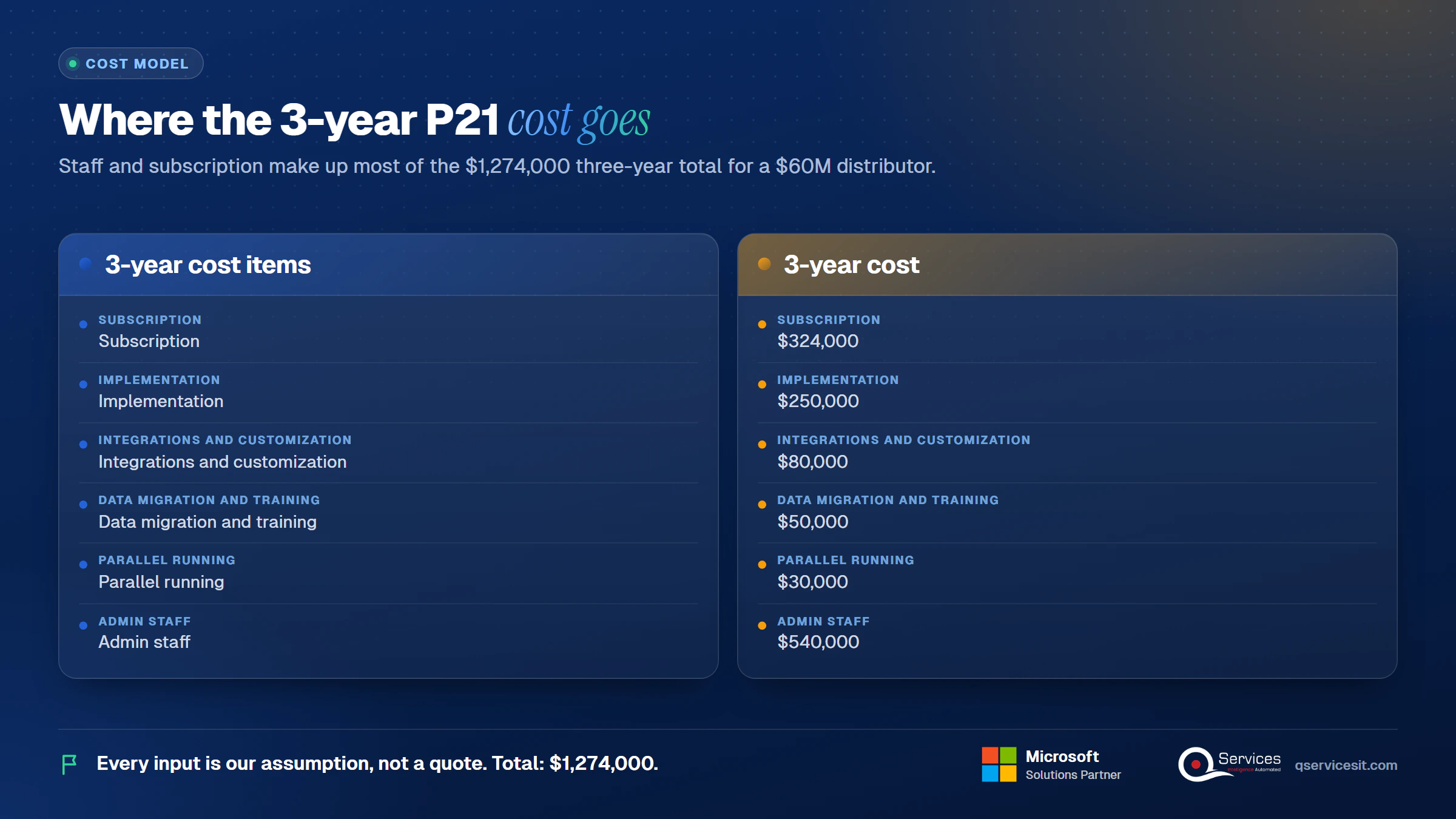
Take a $60M distributor with 40 users and 3 warehouses on cloud. Every input below is our assumption, not a quote.
| Item |
Working |
3-year cost |
| Subscription |
40 users × $225 × 12 × 3 |
$324,000 |
| Implementation |
Assumed, within the 20-50 user band |
$250,000 |
| Integrations and customization |
Assumed |
$80,000 |
| Data migration and training |
Assumed |
$50,000 |
| Parallel running |
Assumed |
$30,000 |
| Admin staff |
2 admins × $90,000 × 3 |
$540,000 |
| Total |
|
$1,274,000 |
Now the benefit side, again assumptions:
- Inventory: about $9M of stock (5 turns on $45M cost of goods). A 15% reduction releases $1.35M of cash. At a 20% carrying cost, that is $270,000 a year.
- Order entry: 120 PO emails a day at 4 minutes each is 8 hours. An agent draft plus 1 minute of review cuts it to 2 hours. 6 hours × 250 days × $35 loaded rate is $52,500 a year.
Total benefit is $322,500 a year, or $26,875 a month. One-time costs are $410,000 (implementation, integrations, migration, parallel running), so payback is about 15 months. This assumes run costs replace your current system’s costs. If they do not, payback is longer.
What hidden costs catch teams out?
Customization, integrations, data migration, running two systems in parallel and training. Budget for them separately. They are the line items that move a quote the most.
How long does a Prophet 21 implementation take?
Published partner ranges run about 3 to 4 months for smaller sites and 6 to 12 months for larger ones. Epicor also promises 90-day cloud go-lives (a vendor claim). Your pricing complexity decides where you land.
A realistic sequence:
- Discovery (2 to 4 weeks): process maps, pricing rules, integrations list.
- Data cleanup and migration (4 to 8 weeks): item master, units of measure, customer price books, open POs and open AR.
- Pricing and unit-of-measure setup (3 to 6 weeks): matrices, contracts, rebates.
- Integration (4 to 8 weeks): EDI, eCommerce, bank feeds, APIs.
- Training and UAT (3 to 4 weeks): real orders, real invoices.
- Cutover (1 to 2 weeks): freeze, final load, hypercare.
These durations are our planning ranges, not Epicor’s. Steps overlap on most projects.
Which migration pitfalls hit distributors most?
- Item master: duplicates and inconsistent descriptions multiply across warehouses.
- Units of measure: a wrong conversion factor misprices every line.
- Customer price books: stale contract prices carry over unchallenged.
- Open POs: receipts against old POs fail if vendors or items changed.
- Open AR: balances must tie to the aged trial balance by customer. Our ERP data migration checklist covers it.
Who owns what after go-live?
Partner and reviewer comments point to roughly 1 to 3 admins after go-live. The CFO owns pricing policy, credit rules, close and approval thresholds. IT owns user access, interfaces, upgrades and the customization backlog. Write that split down before cutover, not after.
Prophet 21 or Business Central: which fits a distributor?
Microsoft Dynamics 365 Business Central and Finance and Supply Chain are the alternatives no competing guide covers. Business Central Copilot and agents run only on Business Central online, so cloud is a condition there too.
How does P21 compare with Business Central?
|
Prophet 21 |
Business Central |
| Distribution depth |
Stronger, built for it |
Good, needs more setup |
| Pricing matrices and rebates |
Native |
Available, less distributor-specific |
| WMS |
Strong, with a redesigned WMS |
Adequate, often extended |
| AI and agents |
Prism, cloud only |
Copilot and agents, online only |
| Microsoft integration |
Teams, Power BI, Excel, Power Automate |
Native across Microsoft 365 |
| Cost model |
Higher entry cost |
Lower entry cost |
| Partner reach |
Epicor partners |
Large Microsoft partner network |
The trade-off: P21’s depth costs more and takes longer to configure. Business Central is quicker to start, but a complex price book will need more work.
Which should you choose?
Choose P21 if:
- Contract and matrix pricing drives your margin
- You run multiple warehouses with wireless picking
- Rebates and vendor-managed inventory are daily work
- You want distributor peers as references
Choose Business Central if:
- Your team lives in Microsoft 365 and Power Platform
- Entry cost matters more than depth
- You want Copilot and agents inside the ERP
- You need a wide choice of partners
We cover the broader decision in ERP upgrade or replace.
Is P21 right for us?
Tick these. Seven or more yes answers suggest a fit.
- You distribute products, you do not manufacture them
- You hold stock in two or more locations
- Customer-specific pricing covers most revenue
- You sell the same item in several units of measure
- You run counter sales
- You handle rebates or vendor-managed inventory
- You can fund 1 to 3 admins
- You accept a cloud path for new features
What should you ask before you buy or upgrade?
Ask these before signing, and write down the answers.
- Which release carries the features I need, and is it cloud-only?
- What exactly is in the quote, and what are the exclusions?
- Which customizations use DynaChange or the SDK, and who maintains them?
- Which API family will each integration use?
- Is Epicor Cash Collect licensed separately, and at what price?
- Can I see a reference distributor in my trade?
- What is the upgrade cadence on cloud, and how much testing does it need?
- Who approves postings that agents propose?
How does QServices approach Prophet 21 and agents?
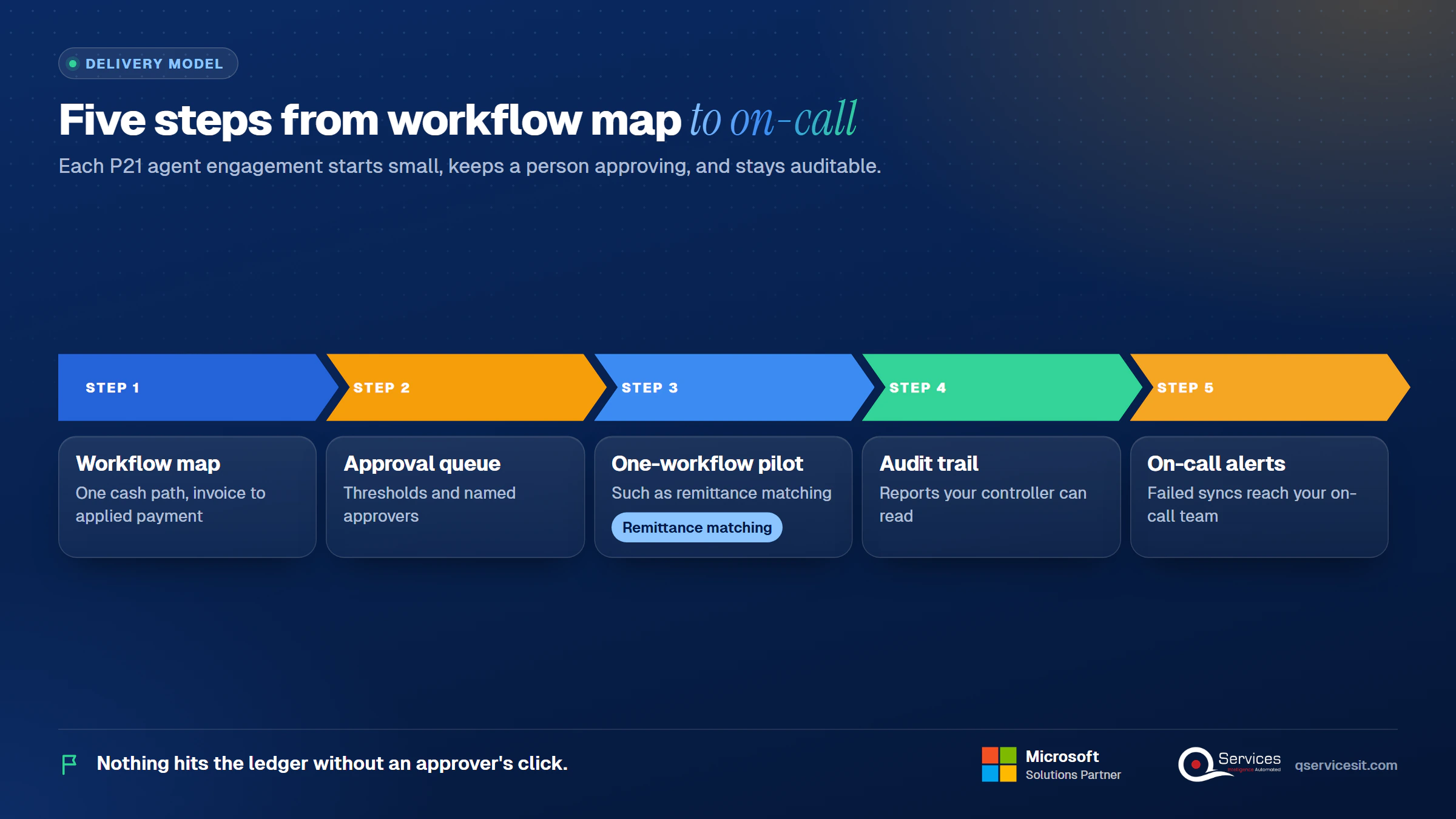
We start at the Collect and Apply stages of Order-to-Cash Control, because that is where a person approves every posting and the risk is easiest to contain. The agents run in your own Azure tenant, and the same team builds and runs them. These are the steps we run:
- A workflow map of one cash path, from invoice to applied payment.
- An approval-queue design with thresholds and named approvers.
- A pilot on one workflow, such as remittance matching.
- Audit-trail reports your controller can read without us.
- Alerts wired to your on-call team for failed syncs.
Implementation Checklist
- One workflow chosen for the pilot, with an owner named
- Approval thresholds written down in currency and percentage
- Every agent action visible in an audit trail
- Agent access limited to the APIs it needs
- Item master and units of measure cleaned
- Open AR tied to the aged trial balance
- Failed-sync alerts reaching a named person
- A rollback plan if the pilot misses its targets
What should you do next with Prophet 21?
Pick one workflow, such as cash application, and pilot it for 30 days with an approval queue. Measure time to apply, unapplied cash at month-end, share of payments matched without touching, and approver turnaround. and we will review your P21 setup with you.

Written by Rohit Dabra
Co-Founder and CTO, QServices IT Solutions Pvt Ltd
Rohit Dabra is the Co-Founder and Chief Technology Officer at QServices, a software development company focused on building practical digital solutions for businesses. At QServices, Rohit works closely with startups and growing businesses to design and develop web platforms, mobile applications, and scalable cloud systems. He is particularly interested in automation and artificial intelligence, building systems that automate routine tasks for teams and organizations.
ERP integrationAccounts receivableFinance automationDistribution ERP
Talk to Our Experts
Frequently Asked Questions
Related Topics
Next step
Ready to see what P21 could hand off?
Bring your collections and cash application steps. We’ll map which ones an agent can prepare and which stay with your team for approval.














 Trustpilot5.0★★★★★See reviewsGoodFirms5.0★★★★★45 verified reviews
 G25.0★★★★★See reviewsClutch5.0★★★★★Quality 5.0 · Schedule 4.8
 Google4.7★★★★★Mohali office
 Erik BrownBusiness owner and software engineerClient review
 Zoltan BodnarCFO, Yusen LogisticsGoodFirms
 Ranbeer MakinClientClient review
 Alex VanderElsClientClient review
 Philmore J.ClientClient review
 Michael WilliamsonPresident and CEO, United Way of Southeast LouisianaGoodFirms
 Steven LewisClientClient review
 Brian WallerPresident, Technology Association of IowaGoodFirms