Introduction
Choosing between Dynamics 365 vs Salesforce is rarely about which platform has the longer feature list. For businesses already running Microsoft 365, Azure, and Teams, a dynamics 365 crm implementation often wins on integration, total cost, and how quickly your team actually adopts it. Salesforce is a strong platform, but bolting it onto a Microsoft-first stack adds connectors, middleware, and licensing you may not need. This guide compares both CRMs honestly for healthcare, logistics, SaaS, and financial services teams, breaks down real costs and timelines, and helps you decide which platform fits your environment, your compliance needs, and your budget.
Key Insight Choosing between Dynamics 365 vs Salesforce is rarely about which platform has the longer feature list.
Eager to discuss about your project?
Share your project idea with us. Together, we’ll transform your vision into an exceptional digital product!
Book an Appointment now
Why Dynamics 365 CRM Implementation Fits Microsoft-First Businesses
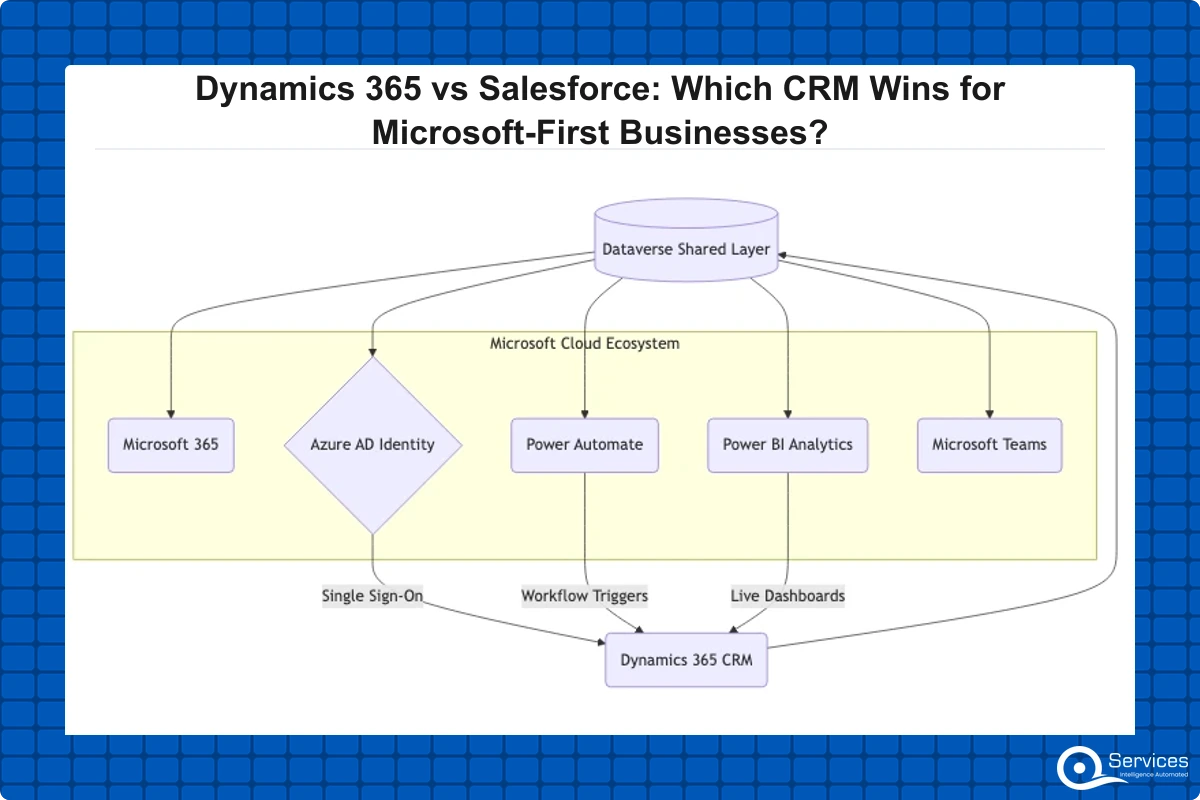
If your organization already lives in Outlook, Excel, Teams, and Azure Active Directory, a dynamics 365 crm implementation removes friction that Salesforce simply cannot match. Records open inside Teams, reports flow straight into Power BI, and your identity provider is already configured. There is no separate single sign-on project, no third-party sync tool keeping contacts aligned.
We have seen Microsoft-first teams cut their onboarding time roughly in half when the CRM shares the same login and the same Office interface employees use daily. Adoption is the single biggest predictor of CRM ROI, and familiarity drives adoption.
Native integration with the Microsoft ecosystem
Dynamics 365 sits on the same data layer (Dataverse) as the Power Platform. That means Power Apps, Power Automate, and Power BI talk to your CRM without custom APIs. If you want to understand how that automation layer works in practice, our breakdown of 10 real Power Automate workflow examples shows the kind of process automation you get almost for free.
Lower total cost for existing Microsoft licensees
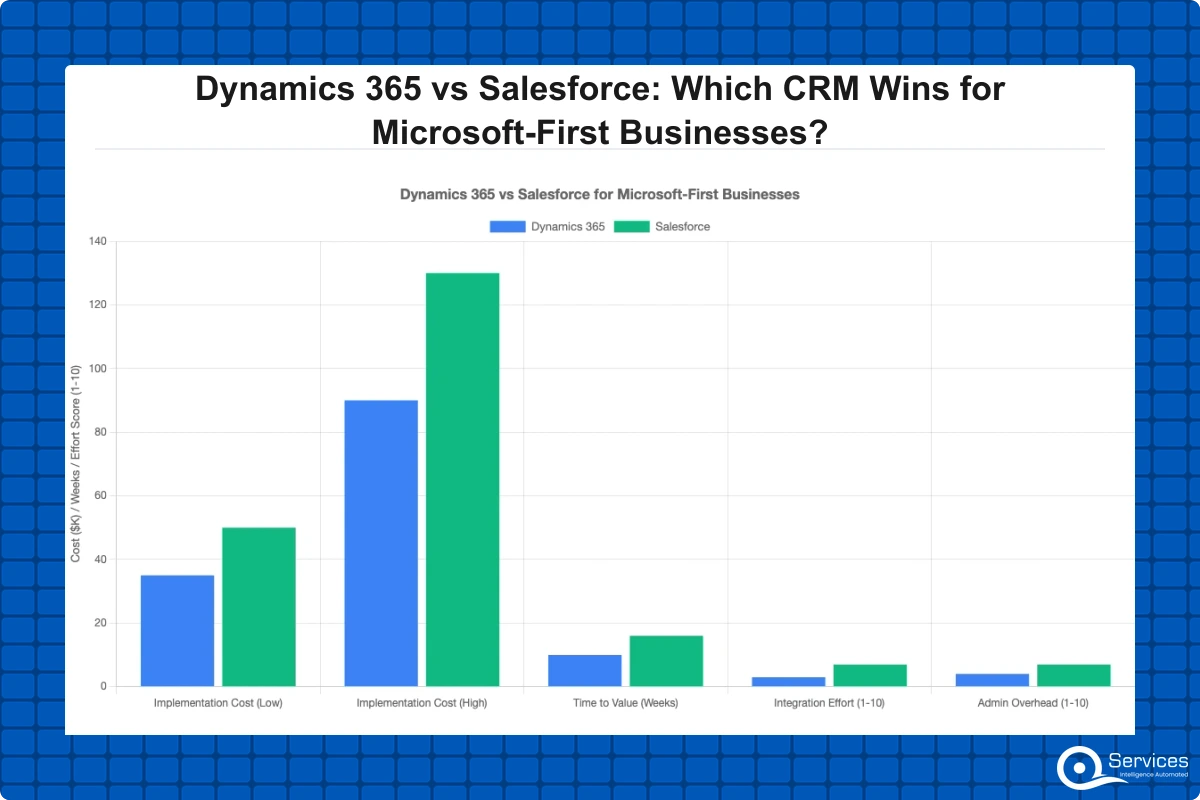
When you already pay for Microsoft 365, the incremental crm implementation cost of adding Dynamics 365 is often lower than standing up Salesforce from scratch. You reuse identity, security, storage, and reporting tools you already own.
Compliance alignment for regulated industries
Azure carries certifications that healthcare and banking teams need, including HIPAA, SOC 2, and FedRAMP. Microsoft documents its compliance coverage in detail through the Microsoft Trust Center, which simplifies vendor due diligence for regulated buyers.
Dynamics 365 vs Salesforce: A Feature and Cost Comparison
The honest answer to dynamics 365 vs salesforce is that both are mature, capable CRMs. The decision comes down to your existing stack, your industry, and how much you value a unified data model over a larger third-party app marketplace.
How do the two platforms compare on core capabilities?
Salesforce leads in raw ecosystem size and its AppExchange marketplace. Dynamics 365 leads in native Microsoft integration, built-in ERP options, and flexible licensing for mid-market buyers. Here is a side-by-side view.
| Factor |
Dynamics 365 |
Salesforce |
| Native Microsoft integration |
Built in |
Requires connectors |
| Reporting |
Power BI native |
Tableau (add-on) |
| ERP modules |
Business Central, F&O included |
Third-party or none |
| App marketplace |
Smaller |
Larger (AppExchange) |
| Best fit |
Microsoft-first orgs |
Salesforce-native orgs |
For a deeper, vendor-neutral take, our honest Dynamics 365 vs Salesforce comparison for 2026 walks through the trade-offs without the sales pitch.
What does crm implementation cost look like for each?
The crm implementation cost depends on user count, modules, and dynamics 365 customization depth. In our client engagements, mid-size projects typically require services investment scaled to those factors, plus per-user licensing. Salesforce projects often run higher once you add the connectors and integration work a Microsoft-first business needs.
Key Insight The crm implementation cost depends on user count, modules, and dynamics 365 customization depth.
Reporting and analytics differences
Dynamics 365 ships Power BI integration natively, so dashboards pull live CRM data with no extra pipeline. If you are weighing analytics tools alongside your CRM decision, our guide on Power BI vs Tableau vs Looker clarifies where each fits.
How Long Does a Dynamics 365 Implementation Take?
A dynamics 365 crm implementation typically takes 3 to 18 months depending on modules, user count, and customization complexity. A focused Sales and Customer Service rollout for a single team can go live in 8 to 12 weeks. A multi-module program spanning CRM and ERP across departments runs closer to a year.
Typical phases and timeline drivers
Most projects follow six phases: discovery, design, configuration, data migration, testing, and go-live. Data quality is the most common timeline driver. Dirty or fragmented source data extends migration far more often than the configuration work itself.
- Discovery and requirements (2-4 weeks)
- Solution design and dynamics 365 customization scoping (2-4 weeks)
- Configuration and build (4-12 weeks)
- Data migration and dynamics 365 migration services (2-8 weeks)
- User acceptance testing (2-4 weeks)
- Go-live and hypercare (2-4 weeks)
Our 6-phase step-by-step Dynamics 365 CRM implementation guide covers each stage in practical detail.
How to reduce false starts and rework
Most rework comes from skipping the design phase. Lock down your process maps, field requirements, and integration points before anyone configures a single form. Knowing when to configure versus build custom code matters too, which our customization vs configuration decision guide breaks down clearly.
What Modules Does Dynamics 365 Include?
Dynamics 365 is a family of business applications, not a single product. You license only the modules you need, which is part of why the platform suits mid-market budgets.
CRM-focused modules
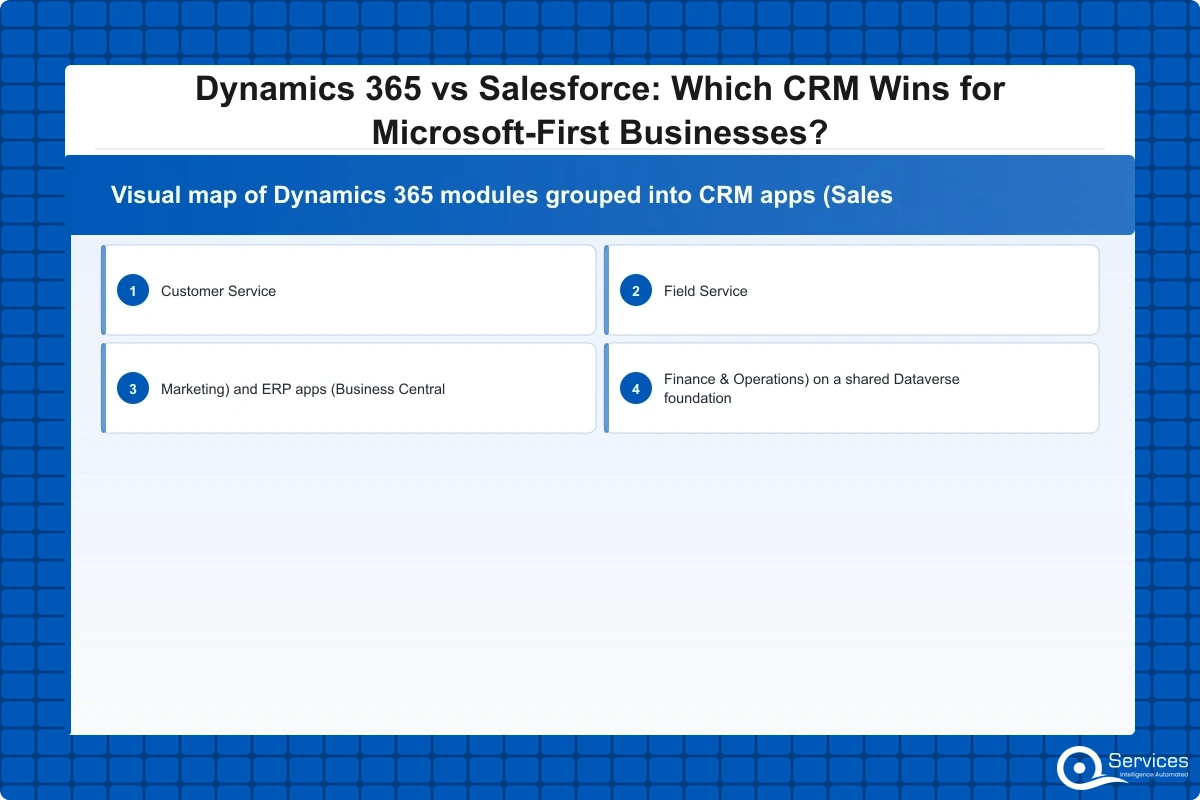
The core CRM applications cover Sales, Customer Service, Field Service, and Marketing (Customer Insights). These map directly to what most teams think of as a CRM, and they share the same Dataverse records so a contact created in Sales is instantly visible in Customer Service.
ERP modules: Business Central vs Finance & Operations
Dynamics 365 Business Central is designed for SMBs with roughly 10 to 300 users, bundling finance, inventory, and operations in one application. D365 Finance and Operations targets enterprises with 300+ users and complex, multi-entity requirements. Choosing the wrong tier is a costly mistake, so our D365 Finance and Operations modules and ROI guide is worth reading before you commit. A qualified dynamics 365 business central partner can help SMBs avoid over-buying enterprise tooling they will never use.
Power Platform extensibility
Because every module runs on Dataverse, you can extend any of them with low-code Power Apps and automate processes with Power Automate. This is where dynamics 365 integration services pay off, connecting CRM data to legacy systems, payment gateways, or industry tools without rip-and-replace projects.
How to Choose a Dynamics 365 Implementation Partner
The platform rarely fails. Partners and process do. Choosing the right dynamics 365 implementation partner is the highest-leverage decision in your entire project.
Key Insight Choosing the right dynamics 365 implementation partner is the highest-leverage decision in your entire project.
Credentials and certifications to verify
Confirm the partner holds Microsoft Solutions Partner designations and has named, certified consultants, not just a logo on a slide. Ask for delivered project counts in your industry. As a benchmark, QServices is a Microsoft Certified Solutions Partner for Dynamics 365 with 500+ projects delivered since 2014.
Industry experience that matters
A partner who has shipped HIPAA-compliant healthcare CRMs or OCC/FDIC-aligned banking systems will move faster and avoid compliance traps. Healthcare projects fail on compliance far more often than on code, a pattern we documented in why healthcare IT projects fail at compliance, not code.
A practical evaluation checklist
Use a structured scorecard rather than gut feel when comparing dynamics 365 consulting services. Our 10-point checklist to evaluate a Dynamics 365 implementation partner gives you the exact criteria, from data migration approach to post-go-live support terms. Independent research backs the stakes here: Gartner consistently reports that CRM project success correlates more with adoption and process design than with the software brand chosen.
Migrating from Salesforce to Dynamics 365
For Microsoft-first businesses already on Salesforce, migration is a common path once contract renewal approaches. Done well, dynamics 365 migration services preserve your data, history, and automations while cutting recurring connector costs.
Planning the data migration
Start with a data audit. De-duplicate, standardize fields, and decide what history is worth bringing over. Migrating ten years of stale leads inflates cost and slows performance. Map Salesforce objects to Dataverse tables before extraction, not after.
Rebuilding automations and integrations
Salesforce flows and Apex triggers do not transfer directly. Plan to rebuild logic in Power Automate and Dataverse, which often simplifies overcomplicated legacy automation along the way. Strong dynamics 365 integration services keep your phone system, ERP, and marketing tools connected through the transition.
Which CRM Wins for Microsoft-First Businesses?
For a Microsoft-first organization, a dynamics 365 crm implementation usually wins on integration depth, total cost of ownership, and adoption speed. Salesforce remains the better choice for teams already deeply invested in its ecosystem or reliant on niche AppExchange apps with no Microsoft equivalent.
When Dynamics 365 is the clear choice
Choose Dynamics 365 if you run Microsoft 365 and Azure, want native Power BI reporting, need built-in ERP through Business Central, or operate in a regulated industry that values Azure compliance. Dynamics 365 for small business through Business Central is especially compelling for SMBs that want CRM and finance in one platform.
When Salesforce still makes sense
Stick with Salesforce if your team is already certified on it, your critical apps live only on AppExchange, or you have no meaningful Microsoft footprint to leverage. Switching purely for parity features rarely justifies the disruption.
Conclusion
For businesses standardized on Microsoft, a dynamics 365 crm implementation is the pragmatic winner: it reuses your identity, reporting, and collaboration tools, lowers your effective crm implementation cost, and drives faster adoption because the interface is already familiar. Salesforce is excellent, but for a Microsoft-first business the integration tax and added licensing usually tip the decision toward Dynamics 365. The platform choice matters less than execution, so invest in a certified dynamics 365 implementation partner, scope your dynamics 365 customization carefully, and treat data migration as the long pole in your timeline. If you are ready to compare options for your specific environment, talk to our team about a scoped assessment and a realistic implementation roadmap.

Written by Rohit Dabra
Co-Founder and CTO, QServices IT Solutions Pvt Ltd
Rohit Dabra is the Co-Founder and Chief Technology Officer at QServices, a software development company focused on building practical digital solutions for businesses. At QServices, Rohit works closely with startups and growing businesses to design and develop web platforms, mobile applications, and scalable cloud systems. He is particularly interested in automation and artificial intelligence, building systems that automate routine tasks for teams and organizations.
Talk to Our Experts
Frequently Asked Questions
Related Topics
Eager to discuss about your project?
Share your project idea with us. Together, we’ll transform your vision into an exceptional digital product!
Book an Appointment now








 Trustpilot5.0★★★★★See reviewsGoodFirms5.0★★★★★45 verified reviews
 G25.0★★★★★See reviewsClutch5.0★★★★★Quality 5.0 · Schedule 4.8
 Google4.7★★★★★Mohali office
 Erik BrownBusiness owner and software engineerClient review
 Zoltan BodnarCFO, Yusen LogisticsGoodFirms
 Ranbeer MakinClientClient review
 Alex VanderElsClientClient review
 Philmore J.ClientClient review
 Michael WilliamsonPresident and CEO, United Way of Southeast LouisianaGoodFirms
 Steven LewisClientClient review
 Brian WallerPresident, Technology Association of IowaGoodFirms





