What does an account reconciliation template need to do?
This account reconciliation template ties any balance sheet account to its supporting detail, lists and ages the reconciling items, and turns green when every cent is explained. It's a free Excel file with a filled-in example. Enter your work email and it lands in your inbox.
One Excel workbook with a reconciliation sheet, an aged reconciling items log, a 15-account index, a worked example and a short how-to. Enter your work email and it arrives in your inbox.
Excel workbook · 4 sheets · works in Excel and Google Sheets
Not there in a few minutes? Check spam, or .
An account reconciliation proves that a balance sheet balance is right. You compare the general ledger (GL) balance to the supporting detail, then explain every difference.
The formula is simple: balance per GL minus balance per supporting detail equals the difference to explain.
Supporting detail depends on the account. For cash it's the bank statement. For receivables it's the customer aging. For accrued expenses it's the accruals schedule.
A reconciliation is finished when the explained items add up to the difference and the unexplained amount is 0.00. Close enough isn't finished.
Distributors feel this most. Freight accruals, received-not-invoiced goods and rebate accruals all sit in liability accounts that drift quickly. Our month-end close checklist shows where reconciliation fits in the close, and the month-end close automation page covers the wider process.
Here's exactly what the workbook contains, sheet by sheet. Nothing more is claimed.
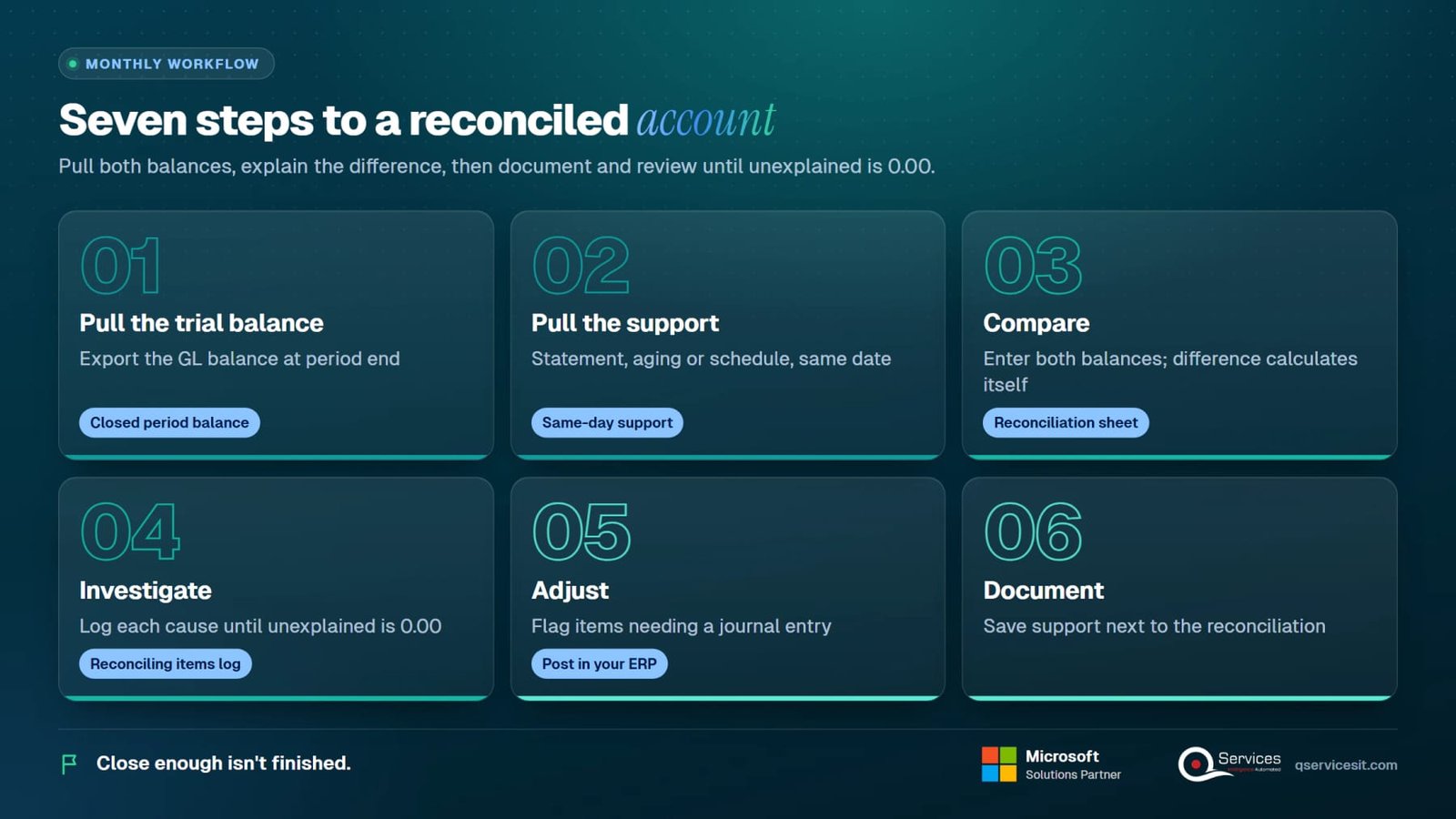
Seven steps, in this order. Do them every period and the close gets calmer.
Export the GL balance for the account as of period end. Use the closed period, not today's balance.
Get the bank statement, aging report or schedule dated to the same day. Mismatched dates create fake differences.
Enter both balances on the reconciliation sheet. The difference calculates itself.
Log each cause in the reconciling items log: type, amount, owner and clear-by date. Keep going until the unexplained difference is 0.00.
Flag items that need a journal entry. Post it in your ERP and note the reference.
Save the support next to the reconciliation. Someone should be able to rebuild it a year later.
A second person checks it, then you update its status in the index.

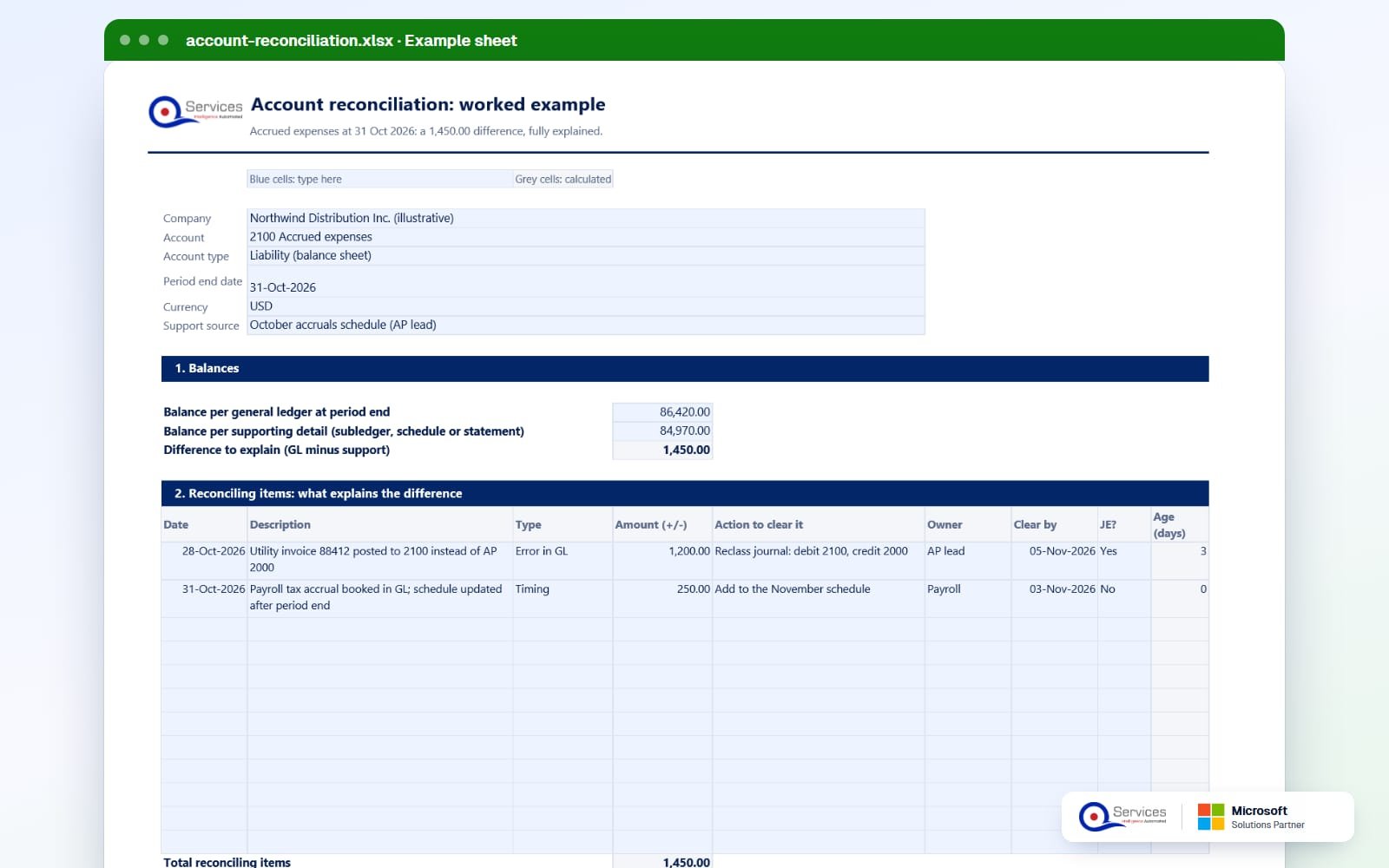
Northwind Distribution Inc. (illustrative), account 2100 Accrued expenses, a liability. Period end 31 Oct 2026. Supporting source: the October accruals schedule. This is the filled-in example in the template.
| Line | What it is | Amount |
|---|---|---|
| Balance per general ledger | Account 2100 at 31 Oct 2026 | 86,420.00 |
| Balance per supporting detail | October accruals schedule | 84,970.00 |
| Difference to explain | GL minus schedule | 1,450.00 |
| Item 1: Error in GL | 28 Oct 2026, utility invoice 88412 posted to 2100 instead of accounts payable 2000. Action: reclass journal, debit 2100, credit 2000. Owner AP lead, clear by 5 Nov. Journal entry: Yes | 1,200.00 |
| Item 2: Timing | 31 Oct 2026, payroll tax accrual booked in the GL but the schedule was updated after period end. Action: add to the November schedule. Owner Payroll, clear by 3 Nov. Journal entry: No | 250.00 |
| Total reconciling items | 1,200.00 plus 250.00 | 1,450.00 |
| Unexplained difference | 1,450.00 less 1,450.00 | 0.00: reconciled |
Prepared by A. Patel on 4 Nov, reviewed by J. Moreno on 5 Nov. Only item 1 needs a journal entry. Item 2 clears itself when the schedule catches up.
The same logic works on any account. These three examples are for teaching, so the numbers are illustrative and aren't in the template file.
Cash. Bank statement 50,150.00. Add a deposit in transit of 3,200.00. Subtract outstanding checks of 1,450.00. Adjusted bank: 51,900.00. The book balance is 52,400.00, less a bank fee of 40.00 and a returned customer check of 460.00. Adjusted book: 51,900.00. Journal entry: debit bank charges 40.00, debit accounts receivable 460.00, credit cash 500.00.
Accounts receivable. GL control account 418,300.00. Customer aging 419,100.00. The 800.00 gap is a customer deposit credited straight to the control account with no customer. Journal entry: debit 1200 Accounts receivable 800.00, credit 2300 Customer deposits 800.00. Our accounts receivable reconciliation guide goes deeper.
Prepaid. GL 24,000.00. Amortization schedule 22,000.00. October insurance amortization wasn't booked. Journal entry: debit insurance expense 2,000.00, credit prepaid expenses 2,000.00.
A reconciliation nobody checks is only a spreadsheet. Set these rules once and write them into your close policy.
Get the GL balance from the ERP and the support from its subledger or bank tool. Menu names vary by version and localization, so check yours.
| What you need | Business Central | Dynamics GP | NetSuite |
|---|---|---|---|
| GL balance at period end | G/L Entries or the trial balance report, dated to period end | Trial balance from the financial reports, dated to period end | Trial Balance report for the period |
| Bank support | Bank Acc. Reconciliation page: Statement Ending Balance, outstanding checks and transactions on the Test Report | Reconcile Bank Statements window, checkbook ID and statement ending balance | Reconcile Account Statement, after matching bank data |
| Receivables and payables support | Reconcile Cust. and Vend. Accs. report compares G/L net change to customer and vendor ledgers | Reconcile to GL routine (check the exact menu in your version) | A/R and A/P aging reports compared to the control accounts |
| Template column to fill | GL balance and supporting balance | GL balance and supporting balance | GL balance and supporting balance |
In Business Central, you can't post a bank reconciliation that still has differences on statement lines. Microsoft documents this on the Reconcile bank accounts page.
Most breaks come from a short list of causes. Check these before you dig into transactions.
| Cause | What it looks like | Fix |
|---|---|---|
| Cutoff mismatch | Support is dated a day before or after period end | Re-pull both sides at the same date |
| Direct posting | Entries hit the GL control account but not the subledger | Reclass the entry through the proper account |
| Timing item | Real transaction, recorded a few days apart | Log it, set a clear-by date, confirm it clears |
| Wrong account | An invoice sits in a different liability account | Reclass journal, like invoice 88412 in the example |
| Stale reconciling item | Same amount sits on the log for months | Age it, escalate it, then clear or write off with approval |
| Missing bank item | Fees or interest on the statement, nothing in the books | Post the journal, then match it |
The agent does the pulling, comparing and drafting. A person approves every action before anything posts.
The agent reads the GL balance and the supporting detail from your ERP at period end.
It finds differences and proposes the likely cause for each one, such as a misposted invoice or a timing item.
For items that need a journal, it prepares the debit and credit and attaches the support.
The preparer reviews the draft. Nothing posts until a person approves it.
We connect the agent to your ERP, set your thresholds and approval rules, and test it on a closed period first.
Yes. Enter your work email in the download form and the Excel file arrives in your inbox.
Any balance sheet account that has supporting detail: cash, receivables, payables, prepaid, accruals, fixed assets and more. The index lists 15 common ones with owner, frequency, risk and status.
It depends on risk. Cash and clearing accounts are often reconciled monthly or more often. Lower-risk accounts may follow a quarterly schedule. Set the frequency per account in the index and keep to it.
A timing item is correct but recorded in different periods, like the 250.00 payroll tax accrual in the example. An error is wrong in the GL and needs a journal entry, like the 1,200.00 utility invoice posted to 2100.
No. It documents and proves the reconciliation. Business Central, Dynamics GP and NetSuite have their own bank and subledger tools, and the template sits next to them as the review record.
We build approval-first AI agents that work inside your ERP and draft reconciliations for your team to approve. Book 30 minutes and we'll look at one account together.
Facts on this page checked on 19 November 2026.

Founder and CEO

Chief Sales Officer
Thanks, we’ve got your details. A named member of our team will reply within one business day.
Talk to a QServices solutions architect about your ERP. You'll leave with two or three automation ideas you can act on, even if you never work with us.