Year end close checklist (free Excel template, 40 tasks)

What's a year end close checklist and which one can you use today?

This year end close checklist is a free Excel template with 40 tasks, owners and business-day due dates. It shows what's done, open and overdue, so nothing slips between your auditors and the ERP lock. A filled-in example and a short how-to come with it.

Free download

What's in the template?

Enter your work email in the form and the Excel workbook arrives in your inbox, with 40 year-end tasks, a status for each, a progress summary and a worked example.

Excel workbook · 40 tasks · works in Excel and Google Sheets
  • 40 year-end tasks: planning, physical count, cut-off, accruals, tax provision, 1099s, audit and closing the year
  • Due dates in business days around your fiscal year end (four weeks before to five weeks after)
  • Status dropdown per task; done rows turn green, overdue rows turn red
  • A summary of done, open and overdue tasks with % complete
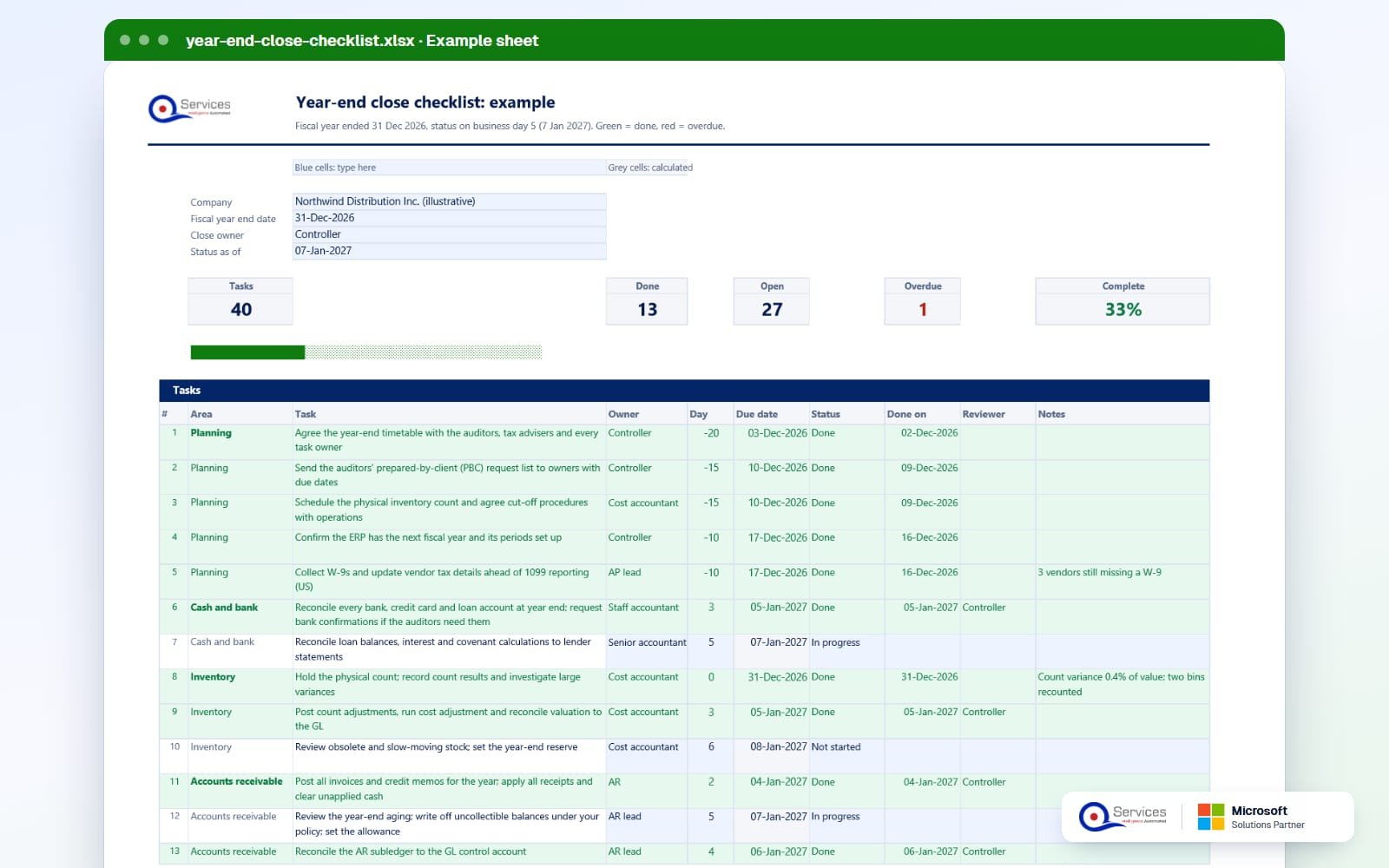
  • A worked example: fiscal year ended 31 Dec 2026, on business day 5, 33% complete with one overdue accrual
Year-end close checklist (Excel): the filled-in example sheet
Free template

Get it in your inbox.

Work email only. We send this one email with the file, and an occasional note you can unsubscribe from. See our privacy policy.

How to fill it in

How do you fill in the year end close checklist?

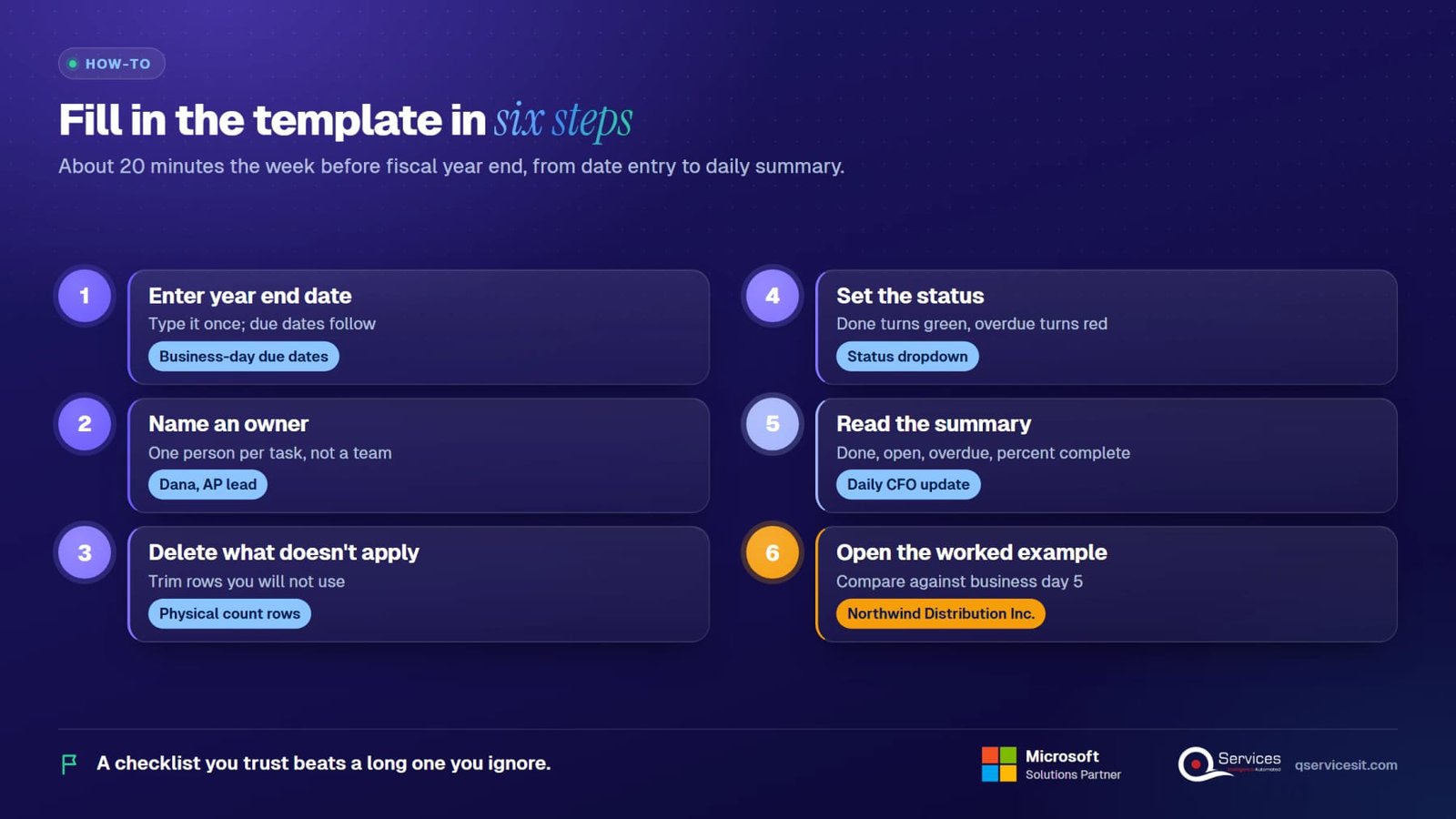
Six steps, about 20 minutes. Do them the week before fiscal year end, not the week after.

1Step 1

Enter your fiscal year end date

Type the date once. Every due date in the workbook is counted in business days from it, weekends excluded, from four weeks before year end to five weeks after. The template counts weekends only, so add your own holiday adjustments by hand.

2Step 2

Name an owner for each task

Every one of the 40 tasks needs one person, not a team. 'AP' is not an owner. 'Dana, AP lead' is. Unowned tasks are the ones that go overdue.

3Step 3

Delete what doesn't apply

No inventory? Remove the physical count and cut-off rows. No foreign currency? Drop the revaluation row. A checklist you trust beats a long one you ignore.

4Step 4

Set the status as work moves

Each task has a status dropdown. Done rows turn green. Rows past their due date and not done turn red. Update status daily during the close, in the same ten minutes as your stand-up.

5Step 5

Read the summary every morning

The summary counts done, open and overdue tasks and gives a percent complete. Send that one line to your CFO. It replaces the 'where are we?' emails.

6Step 6

Open the worked example first if you're unsure

The example workbook is filled in for a fictional company at business day 5. Compare your own sheet with it to see what a healthy close looks like at the same point.

How to fill in the year end close checklist: Enter your fiscal year end date, Name an owner for each task, Delete what doesn't apply, Set the status as work moves, Read the summary every morning, Open the worked example first if you're unsure
The steps at a glance.
The sequence

Which tasks does a year end close checklist need to cover?

A year end close is a dated, owned sequence of cut-off, reconciliation, adjustment, review and lock steps. These are the groups in the template, in the order they run.

0 of 23 settled
Plan and cut off (day -30 to day 0)
Count and cut-off (day 0 to day 3)
Reconcile subledgers and bank (day 1 to day 5)
Accruals, prepaids and assets (day 3 to day 10)
Tax, 1099s and audit (day 10 to day 25)
Close the year in the ERP (day 20 to day 25)
Worked example

What does the filled-in example look like at business day 5?

The template ships with an example for Northwind Distribution Inc. (illustrative). Fiscal year ended Thursday 31 Dec 2026. The status below is as of 7 Jan 2027, business day 5 as the template counts it (weekends only; 1 Jan is not excluded).

Line in the exampleWhat it shows
Overall status40 tasks: 13 done, 27 open, 1 overdue. 33% complete.
Planning (done)Timetable with auditors on day -20. PBC list and count scheduling on day -15. Next-year periods and W-9s on day -10, with 3 vendors still missing a W-9.
Physical count (done)Counted on 31 Dec. Variance was 0.4% of value, and two bins were recounted.
Bank, count adjustments, AR (done)Bank reconciliations finished, count adjustments posted and AR posting complete.
Fixed assets and payroll (done)Asset additions and depreciation posted, payroll accruals booked.
Overdue (red)Accrue goods received not invoiced and reconcile AP, due business day 4. Two receipts are disputed with the vendor and credit notes are still awaited.
Tax provisionDue day 12.
Audit adjustments and statementsDue day 15.
Board reviewDue day 18.
ERP year-end closeDue day 20.
Representation letter and archiveDue day 25.

Everything above is in the workbook itself. Replace the example dates and owners with yours and the colors and percentages update.

Journal entries

What do the year-end adjusting entries actually look like?

Here are six entries a controller will recognise. The amounts are illustrative and are not in the template, which tracks tasks rather than postings. They show why each task exists.

Bank fees. Bank balance per statement is 425,900. Add deposits in transit of 2,650, deduct outstanding checks of 16,200 and you get 412,350. The ledger shows 412,500 because 150 of fees were never booked. Debit Bank charges 150, credit Cash 150. Cash goes from 412,500 to 412,350 and ties.

Accrued expense. The December utility bill of 6,200 arrives in January. Debit Utilities expense 6,200, credit Accrued expenses 6,200. Expenses rise and liabilities rise by the same amount.

Prepaid release. A 24,000 annual insurance policy was paid on 1 July. Six months are used. Debit Insurance expense 12,000, credit Prepaid insurance 12,000. The prepaid balance falls to 12,000.

Depreciation. A delivery truck costs 90,000 over 5 years with no salvage value, so straight-line depreciation is 18,000 a year. Debit Depreciation expense 18,000, credit Accumulated depreciation 18,000.

Bad debt allowance. Receivables are 1,200,000. Management sets the allowance at 1.5%, which is 18,000, against an existing 9,000. Debit Bad debt expense 9,000, credit Allowance for doubtful accounts 9,000. The percentage is a judgment, so keep the support with the entry.

FX revaluation. A EUR 50,000 payable was booked at 1.0800, which is 54,000. At year end the rate is 1.1000, so it's 55,000. Debit Unrealized FX loss 1,000, credit Accounts payable 1,000.

Net effect. Pre-tax income falls by 46,350 (150 + 6,200 + 12,000 + 18,000 + 9,000 + 1,000). The trial balance still balances, because each entry has equal debits and credits. If it doesn't, you have a one-sided entry.

In your ERP

How do you close the year in Business Central, Dynamics GP and NetSuite?

Names and menus change by version, so confirm against the vendor pages in the sources below before you run anything that can't be reversed.

ERPHow the year closes
Dynamics 365 Business CentralPost your adjustments first. On the Accounting Periods page, use Close Year; Microsoft's documentation states that a closed fiscal year can't be reopened. Then run the Close Income Statement batch job, which creates entries that cancel the balances of income statement accounts. You post that journal yourself, and the result moves to the balance sheet and retained earnings. Control who can post into old dates with Allow Posting From and Allow Posting To in General Ledger Setup (and user setup).
Dynamics GPClose the subledgers first: Inventory, Receivables, Payables and Fixed Assets each have their own year-end procedure. Set up the next fiscal year in Fiscal Periods Setup. Then run Tools, Routines, Financial, Year-End Closing and name the retained earnings account. Microsoft's guidance is to back up first, because the routine changes balances.
NetSuiteGo to Setup, Accounting, Manage Accounting Periods and open the period close checklist. Work the tasks in order, lock AR, AP and payroll, then use Lock All. Closing the last period of the year moves the year's result to retained earnings. In OneWorld, locks can be set per subsidiary. Edit or Full permission on Manage Accounting Periods is required.
Dynamics NAVThe flow matches Business Central: close the accounting periods, then run the Close Income Statement batch job and post the journal. Older versions differ in screen names.

None of these steps replaces a review. Each one should come after a named person has signed off the reconciliations.

Review and sign-off

Who should prepare, review and approve each year-end task?

Use three roles per task: a preparer who does the work, a reviewer who checks it, and an approver who accepts the result. The preparer never reviews their own work.

A workable split: staff accountants prepare reconciliations. The controller reviews them and approves the accruals, tax provision and audit adjustments. The CFO approves the final statements and signs the representation letter.

Set a materiality threshold for explaining differences, and write it down. For example, explain any reconciling difference above 500 or 1% of the balance, whichever is lower. That number is a company policy, not an external standard. Pick yours with your auditors.

Here's a simple before and after timeline. Before: Day -30 you agree dates with auditors, day -20 you send the timetable, day -15 you schedule the count, day -10 you set up next-year periods and chase W-9s. After: Day 0 the count runs, day 5 reconciliations are tied, day 12 the tax provision is due, day 15 audit adjustments and statements, day 18 board review, day 20 ERP year-end close, day 25 representation letter and archive.

A close that runs on a dated plan finishes in weeks, not months. If you'd like a benchmark for your own days to close, APQC publishes financial close measures for peers; use those rather than a rule of thumb. For the monthly version of this process, see our month end close process checklist and the month-end close automation page.

Common mistakes

Which year-end close mistakes cost the most time?

Most of these show up as red rows on day 4 or 5.

0 of 9 settled
Timing mistakes
Reconciliation mistakes
Control mistakes
With an AI agent

How does an approval-first AI agent help with the year-end close?

The agent works inside your ERP, does the matching and drafting, and a person approves every action. It doesn't post, lock or close anything by itself.

  1. 1
    Agent

    Watch the checklist and the ledger

    The agent reads task status and due dates, then flags a row that's heading for overdue before it turns red.

  2. 2
    Agent

    Draft the reconciliations

    It matches subledger to ledger and lists unexplained differences with the transactions behind them, so the preparer starts at the exceptions.

  3. 3
    Agent

    Propose accrual and prepaid entries

    It drafts journal entries from receipts, invoices and schedules and attaches the support. Nothing is posted yet.

  4. 4
    Your team

    Approve, edit or reject

    The reviewer opens each draft, changes it if needed and approves it. The approval is logged with name and time.

  5. 5
    Your team

    Lock and close the year

    The controller runs the lock and the year-end routine in the ERP. The agent never runs these.

  6. 6
    Our team

    Set it up around your ERP

    We build and tune the agent for your Business Central, GP or NetSuite setup. See human-in-the-loop agents and ERP integration.

FAQ

What do people ask about the year end close?

What is a year end close checklist?

It's a dated, owned list of the steps that take your books from the last day of the fiscal year to a locked year: cut-off, reconciliations, adjustments, review and sign-off. The template here has 40 of them.

How is the year-end close different from the month-end close?

The monthly close is a routine you repeat. The year-end close adds the physical count, 1099s, tax provision, audit work and the ERP year-end routine that moves income statement balances to retained earnings.

How many days should a year-end close take?

It depends on your size, ERP and audit. The template plans it from four weeks before year end to five weeks after, with the ERP close on business day 20 in the example. Compare your own days with APQC's published financial close benchmarks.

Can I reopen a fiscal year after closing it?

In Business Central, no: Microsoft's documentation says a closed fiscal year can't be opened again. That's why the review and sign-off come first. Other ERPs differ, so check yours.

Does the template work with my ERP?

It's an Excel workbook and doesn't connect to anything. The tasks apply to Business Central, Dynamics GP, NAV, Epicor, SYSPRO, NetSuite and Sage, and you map each task to your own screens.

How do I get the template?

Enter your work email in the form on this page. The workbook arrives in your inbox.

Want help with the real close?

Close the year with fewer red rows

If your close runs through Business Central, GP, NAV, Epicor, SYSPRO, NetSuite or Sage, we'll walk through your ERP year-end steps and show where an approval-first agent saves time. Thirty minutes, no slides.

Book Appointment
Sahil kataria (1)
Sahil Kataria

Founder and CEO

amit Kumar
Amit Kumar

Chief Sales Officer

Talk To Sales

USA

+1 270-550-1166

flag

+1 270-550-1166

Phil J.
Phil J.Head of Engineering & Technology​
QServices Inc. undertakes every project with a high degree of professionalism. Their communication style is unmatched and they are always available to resolve issues or just discuss the project.​
Assured

Thank You

Thanks, we’ve got your details. A named member of our team will reply within one business day.