What is an on account payment, and why does it matter?
An on account payment is money received from a customer (or paid to a vendor) that isn't yet matched to a specific invoice, so it sits as an unapplied credit on the account. Until someone applies it, your aging report overstates what's owed and collectors chase people who already paid. This page covers the journal entries, a worked example, and the exact steps in Business Central, Dynamics GP and NetSuite.
An on account payment is a receipt or disbursement recorded against a customer or vendor account without being applied to a particular invoice. The cash is real and the bank balance is correct, but the invoice stays open until the payment is allocated. Under US GAAP, an amount received before the related performance is delivered is a contract liability, not revenue, per FASB ASC 606.
per FASB ASC 606 and IFRS 15
The cash lands first. The matching comes later.
A customer wires money, mails a check, or pays through a portal. The bank line is clear. What's missing is the link between that cash and a specific invoice.
So the payment is posted to the customer's account as a credit. The open invoices stay open. The customer balance is correct in total, but the aging report shows the debits and the credit separately.
That gap is the whole problem. Until an accountant applies the credit, the aging bucket for the old invoice still shows money as owed.
The same thing happens on the vendor side. If you pay a supplier before the bill arrives, or pay a round amount without picking bills, the payment sits as a debit balance on the vendor account until it's applied.
Three situations create most on account payments:
→ The remittance is missing or unreadable, so nobody knows which invoices the customer meant.
→ The customer pays a round amount or a lump sum covering several invoices.
→ The customer pays before an invoice exists, such as a retainer or a progress payment.
Most of the time it's a data problem, not a cash problem. The money is there. The reference isn't.

These terms get mixed up in ERP screens and in conversation. The accounting differs, so the labels matter.
| Term | What it is | Where it sits |
|---|---|---|
| Payment on account | Cash received or paid, not yet matched to an invoice | Unapplied credit on the customer (or debit on the vendor) account |
| Deposit | Cash taken before delivery, tied to a specific order or contract | Contract liability or customer deposit until the work is delivered |
| Prepayment | Cash paid in advance for a future bill or service | Prepaid asset on the payer's books, liability on the seller's |
| Customer credit | A credit memo or an overpayment balance owed back to the customer | Credit on the customer account, usable against future invoices or refundable |
| Partial payment | Cash applied to an invoice that covers only part of it | Invoice stays open for the remaining balance |
| HMRC payments on account | UK Self Assessment advance tax payments, usually due 31 January and 31 July | A tax instalment, unrelated to invoice matching |
The UK tax meaning is a different concept entirely. HMRC describes payments on account as advance payments towards your next tax bill, each normally half of the previous year's bill, per GOV.UK.
Illustrative numbers. A customer has three open invoices and sends one wire for $8,000 with no remittance advice.
| Aging bucket | Before applying | After applying |
|---|---|---|
| Current to 30 days (INV-1067, $2,050) | $2,050 | $2,050 |
| 31 to 60 days (INV-1052, $3,150) | $3,150 | $0 |
| 61 to 90 days (INV-1041, $4,800) | $4,800 | $0 |
| Gross invoices open | $10,000 | $2,050 |
| Unapplied credit on account | ($8,000) | ($50) |
| Net customer balance | $2,000 | $2,000 |
The net balance never changed. The aging did. Before application, $4,800 looks 61 to 90 days overdue and a dunning letter goes out. After applying $4,800 to INV-1041 and $3,150 to INV-1052, $50 stays on account and only INV-1067 is open.
Account names vary by chart of accounts. The pattern is the same everywhere. All amounts below follow the $8,000 example.
| Case | Debit | Credit |
|---|---|---|
| 1. Receipt, unapplied | Bank $8,000 | Unapplied cash or customer credit $8,000 |
| 2. Application to invoices | Unapplied cash $7,950 | Accounts receivable $7,950 |
| 3. Overpayment (customer pays $8,500 against $8,000 owed) | Bank $8,500 | A/R $8,000 and customer credit liability $500, never revenue |
| 4. Refund of the $500 | Customer credit liability $500 | Bank $500 |
| 5. Vendor side, payment before bill | Vendor prepayment or debit balance $3,000 | Bank $3,000 |
| 6. Vendor bill arrives and is applied | Expense or inventory $3,000 | Accounts payable $3,000, then Dr A/P and Cr vendor prepayment $3,000 |
The key rule: an overpayment is a liability to the customer, not income. Under ASC 606 and IFRS 15, cash received without a performance obligation met is recorded as a contract liability or a refund liability.
Menu names shift between versions, so check them against Microsoft Learn and Oracle documentation for your release.
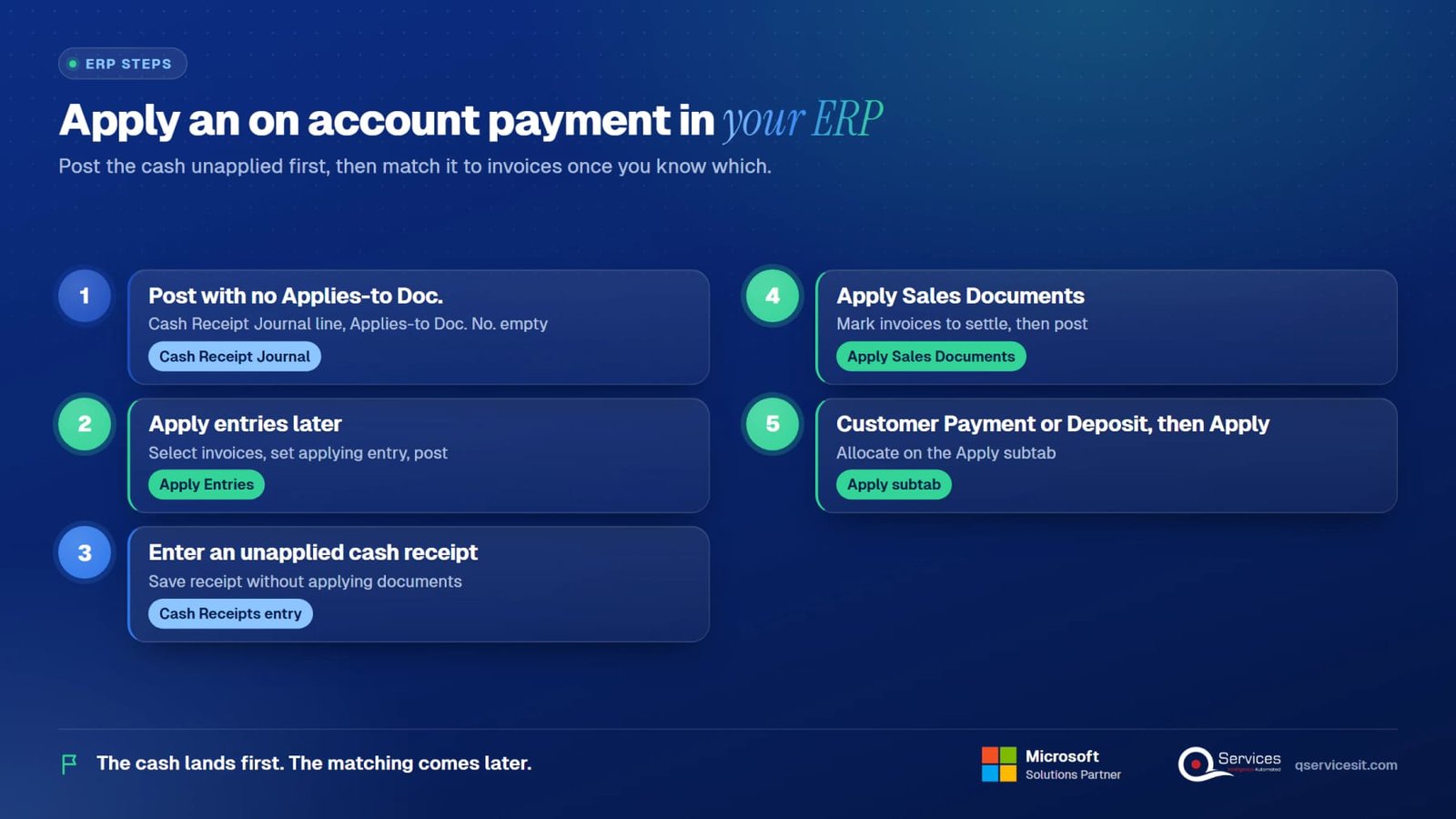
Open the Cash Receipt Journal (or a Payment Journal for vendors). Create a line with Document Type set to Payment, pick the customer account, enter the amount, and leave Applies-to Doc. No. empty. Post. The entry lands on the customer ledger as an open credit.
Open the customer ledger entry for the payment and choose Apply Entries. Select the invoices to settle, set the applying entry, and post the application. Business Central closes the matched entries and updates the aging. See Microsoft Learn on applying payments. Our Business Central page covers the surrounding setup.
In Receivables Management, open Cash Receipts entry, choose the customer, enter the check or wire amount, and save it without applying documents. The unapplied amount remains on the customer record. Details sit in Microsoft Learn for Dynamics GP.
Open Apply Sales Documents, pick the customer and the unapplied payment, mark the invoices to settle, and post. GP updates the open invoice balances. See our Dynamics GP page for migration and support context.
Enter a Customer Payment and leave part or all of the amount unapplied, or use a Customer Deposit when the cash is tied to an order. Open the transaction's Apply subtab to allocate it against invoices when you know which ones. Oracle documents both flows on the NetSuite help center.

Unapplied cash is rarely a one-off. It builds up in clusters.
Remittances arrive as PDFs, portal screenshots, bank notes or EDI files. When someone has to key the match by hand, the hard ones wait. See our guide to remittance advice and to EDI 820 payment remittance.
The costs show up in six places:
→ Stale aging: reports overstate past-due balances until the credit is applied.
→ Distorted DSO: gross receivables stay high while cash is already in the bank.
→ Dunning errors: collectors email customers who already paid.
→ Cash application errors: a rushed match lands on the wrong invoice.
→ Audit cut-off: unapplied cash at period end can sit in the wrong account.
→ Misclassification: overpayments booked as revenue instead of a liability.
Take a distributor with $40,000 per day in receipts. If 6% sits unapplied for ten days, that's $24,000 on average in credits floating against open invoices, plus hours of collector time spent on accounts that don't owe anything. The figures here are illustrative, but the pattern is real.
Our post on clearing unapplied cash walks through the backlog cleanup, and the cash application process explains the matching steps.
Targets below are starting points to adapt, not benchmarks from a standard.
The agent does the reading and matching work inside your ERP. A person approves every posting.
The agent pulls the PDF, email or EDI 820 file and extracts invoice numbers, amounts and discount or short-pay notes.
It matches the payment to open invoices in Business Central, GP, NAV, Epicor, SYSPRO, NetSuite or Sage, and shows its reasoning and confidence.
An AR specialist reviews the proposed application, edits anything wrong, and approves. Nothing posts without that click.
The agent applies the entries and writes an audit trail. Unclear items go to an exception queue with the reason attached.
We review exceptions with your team and adjust matching rules, so the same gap doesn't repeat.
An on account payment is cash received or paid that isn't tied to a specific invoice yet. It's recorded as an unapplied credit on the customer account (or a debit on the vendor account) until someone allocates it to open items. The money is real; the matching is pending.
No. Cash received on account is first a liability or an unapplied credit. Revenue is recognized when the performance obligation is met, per ASC 606. Applying the payment to an invoice clears receivables, and an overpayment stays a liability until you refund it or use it.
Debit the bank account and credit unapplied cash or the customer credit. When you apply it, debit unapplied cash and credit accounts receivable for the invoices settled. In Business Central, post a payment journal line with no Applies-to Doc. No., then use Apply Entries.
A deposit is tied to a specific order or contract and is held as a liability until delivery. A payment on account is simply unmatched cash on the account. A deposit has a purpose from day one; an unapplied payment is waiting for one.
Aim for one business day on average. Anything older than 30 days needs escalation, and anything at period end should be reconciled to the sub-ledger. The right target depends on volume and remittance quality, so measure your own baseline first.
Yes. If credits aren't applied, gross receivables stay high while cash is already in the bank, so DSO looks worse than it is. Applying the payment lowers open invoices and corrects aging. Net customer balance doesn't change, but the reported metrics do.
They're a UK tax concept: advance payments towards your next Self Assessment bill, normally made on 31 January and 31 July. They share a name with the accounting term but have no link to matching cash to invoices in an ERP.
We build approval-first AI agents that match payments to invoices inside your ERP, with a person signing off every posting. See how it would work on your remittances and your aging report.
Facts on this page checked on 17 November 2026.

Founder and CEO

Chief Sales Officer
Thanks, we’ve got your details. A named member of our team will reply within one business day.
Talk to a QServices solutions architect about your ERP. You'll leave with two or three automation ideas you can act on, even if you never work with us.