Unapplied cash bill payment expense: definition, causes and how to fix it

What is unapplied cash bill payment expense?

Unapplied cash bill payment expense is a system-generated, cash-basis-only QuickBooks Online account. It holds vendor payments not yet matched to a bill, or dated before the bill. It isn't a real expense category, and you can't post to it. If it shows up on your profit and loss, a payment is sitting without a bill behind it.

DefinitionUnapplied cash bill payment expensenoun · accounts payable
Also calledunapplied bill paymentunapplied vendor paymentunapplied cash payment expense

A system-generated account in QuickBooks Online that appears on the cash-basis profit and loss. It collects vendor bill payments that aren't linked to a bill, or that are dated earlier than the bill they pay. Once the payment is applied to a bill, the amount moves to the bill's real expense category. It doesn't exist as a category you can choose, and it never shows on accrual-basis reports.

per Intuit's help article
Unapplied cash bill payment expense: illustration of how it works in a finance team
Unapplied cash bill payment expense, illustrated.
Why it appears

Why does unapplied cash bill payment expense show up on your P&L?

Three things cause it. Each one leaves a vendor payment without a clean link to a bill.

Payment entered before the bill. Someone records the payment first and keys the bill later. For a while, the payment has nothing to attach to.

Payment dated before the bill date. The payment exists and so does the bill, but the payment date comes first. The software treats the payment as unapplied for that period.

Payment never applied. A payment was created as a standalone bill payment or check, and nobody matched it to the open bill. It sits there, month after month.

The account shows only on a cash-basis P&L. Cash-basis reports count an expense when money leaves the bank, so the system needs somewhere to put a payment that has no bill category yet. That's this account.

Accrual-basis reports count the expense on the bill date. The payment is just a settlement of accounts payable, so there's nothing to park, and the line disappears.

Think of it as a flag. The books say "money left, but I can't tell you what it was for." That's an expense with no category, and your reports are wrong until you fix it.

Worked example

What does a $4,800 unapplied vendor payment look like in March?

Illustrative numbers. Your team pays a vendor $4,800 on 3 March. The vendor's bill is dated 20 March and was entered on 22 March.

MomentCash-basis P&LAccrual-basis P&L
3 March: payment recorded, no bill$4,800 on the line Unapplied Cash Bill Payment ExpenseNothing yet. No bill, so no expense
20 March: bill dated, entered 22 March, still not linkedStill $4,800 on the unapplied line, and the bill also counts as open AP$4,800 expense in the bill's category, $4,800 in AP
After matching the payment to the bill (Pay Bills)$4,800 moves to the bill's category, say Subcontractors, dated 3 MarchSame $4,800 expense, AP cleared on 3 March
If someone posts a journal entry instead of linkingExpense counted twice: $4,800 on the journal and $4,800 on the billSame double count, plus AP left open

The double count is the real risk. A journal entry hides the unapplied line but leaves the bill open, so the same cost shows up twice.

Journal entries

What are the debit and credit entries for a payment made before the bill?

When you pay before a bill exists, the honest entry is a prepayment. Payment before bill: Dr Prepaid expense (or Vendor prepayment) $4,800, Cr Bank $4,800.

Once the bill arrives, book it the normal way. Bill entered: Dr Expense $4,800, Cr Accounts payable $4,800.

Then settle the payable and clear the prepayment. Payment applied: Dr Accounts payable $4,800, Cr Bank $4,800 (or Cr Prepaid expense $4,800 if you booked the prepayment first).

The point is that every payment ends up against a payable. When it does, no unapplied balance is left.

One more trap. If the payment date is 3 March and the bill date is 20 March, the accrual books recognise the expense on 20 March. The cash books recognise it on 3 March. Both are right for their basis, which is why only one of them shows an unapplied line.

The fix

How do you fix unapplied cash bill payment expense, step by step?

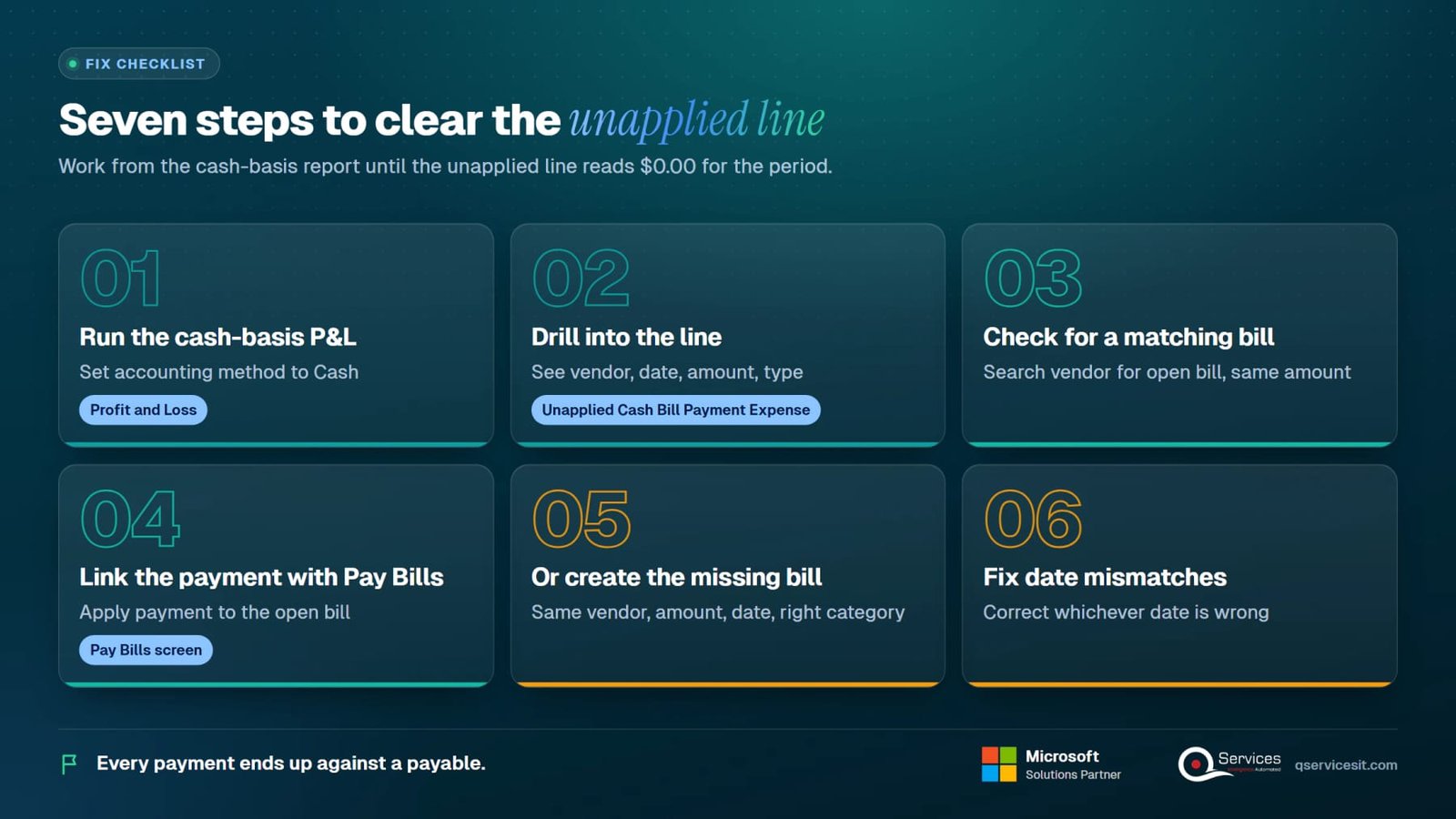
Work from the report, not from memory. Seven steps, in order.

1Step 1

Run the cash-basis P&L

Open Profit and Loss and set the accounting method to Cash. Set the period to the month with the problem.

2Step 2

Drill into the line

Click Unapplied Cash Bill Payment Expense. You'll see each payment: vendor, date, amount, and the transaction type.

3Step 3

Check for a matching bill

Search the vendor for an open bill with the same amount. If one exists, the payment just needs linking.

4Step 4

Link the payment with Pay Bills

Open the payment and use the Pay Bills screen to apply it to the open bill. Confirm the payment date and the bill date make sense together.

5Step 5

Or create the missing bill

If no bill exists, create one with the same vendor, amount and date, using the right expense category. Then apply the payment to it.

6Step 6

Fix date mismatches

If the payment is dated before the bill, correct whichever date is wrong. A payment can't honestly predate the invoice it settles unless it's a deliberate prepayment.

7Step 7

Re-run and confirm

Run the cash-basis P&L again. The unapplied line should read $0.00 for the period, and the expense should sit in its real category.

Unapplied cash bill payment expense process: Run the cash-basis P&L, Drill into the line, Check for a matching bill, Link the payment with Pay Bills, Or create the missing bill, Fix date mismatches, Re-run and confirm
The 7 steps of unapplied cash bill payment expense at a glance.
Cause and cure

Which cause produces which symptom, and what fixes it?

Match the symptom to the cause before touching anything.

CauseSymptomFix
Payment entered before the billUnapplied line on the cash P&L, no bill yetCreate the bill, then apply the payment
Payment dated before the bill datePayment and bill both exist but sit apartCorrect the date, or apply the payment to the bill
Payment never appliedUnapplied amount carried month after monthOpen the payment and link it with Pay Bills
Journal entry used instead of a billUnapplied line gone, but the bill still open and expense doubledReverse the journal, apply the payment to the bill
Wrong vendor on the paymentPayment can't find its billEdit the vendor, then apply

If a number won't match anything, check for a split payment: one cheque paying two bills often leaves a remainder unapplied.

Other systems

How do Business Central, Dynamics GP and NetSuite handle the same situation?

They handle it, but with different mechanics. None of them has an account called Unapplied Cash Bill Payment Expense. That's a QuickBooks Online construct, and the ERPs aren't the same thing.

SystemWhat exists insteadHow you clear it
QuickBooks OnlineSystem-generated account on the cash-basis P&L onlyLink the payment to a bill with Pay Bills, or create the bill
Dynamics 365 Business CentralUnapplied vendor payments: an open payment entry on the vendor ledgerUse Apply Entries on the vendor ledger entries to match payment to invoice
Dynamics GPUnapplied payments in Payables ManagementApply the payment to the open document in Payables
NetSuiteBill payment application, plus vendor prepaymentsApply the prepayment or bill payment to the bill

In the ERPs the unapplied item is a ledger entry you can see and apply. It isn't a P&L line that moves when you fix it.

Business Central

How does Business Central handle an unapplied vendor payment?

In Dynamics 365 Business Central, a payment posted to a vendor without an invoice stays an open entry on the vendor ledger. It reduces what you owe on paper but isn't tied to a document.

When the invoice posts, you use Apply Entries on the vendor ledger entries to match the payment to it. The open balance closes on both sides. Microsoft Learn documents the apply process.

Dynamics GP works the same way in spirit. Payables Management holds the unapplied payment until you apply it to a document.

Here's where it stops. Neither ERP tells you why a payment went in without a bill. A person has to chase the invoice, and that's the slow part.

A distribution team, for example, might pay a freight carrier on a phone confirmation, and the carrier invoice arrives nine days later. The payment sits open across a month end. Same pattern as the QuickBooks example, different screen.

Prevention

How do you stop unapplied vendor payments from building up?

A few habits at entry and one routine at month end. Most of this is about sequence.

0 of 10 settled
Prevention checklist
Month-end review
With an AI agent

How does an approval-first AI agent help with unapplied vendor payments?

An agent can do the matching legwork. A person approves every action, so nothing posts without a decision.

  1. 1
    Agent

    Find the unapplied items

    The agent reads the vendor ledger in your ERP and lists every payment without a linked bill, with age and vendor.

  2. 2
    Agent

    Propose the match

    It compares vendor, amount and dates against open bills and suggests the likely match, with its reasoning.

  3. 3
    Your team

    Approve or reject

    A controller or AP manager reviews each suggested match and approves, edits or rejects it.

  4. 4
    Agent

    Post and log

    Approved matches are applied in the system, and each action is logged for audit.

  5. 5
    Our team

    Set the rules

    We configure the matching rules, thresholds and approvals with your team during Process Assessment and build with AI Agent Development.

FAQ

What do people ask about unapplied cash bill payment expense?

Can I delete unapplied cash bill payment expense?

No. It's a system-generated account, so you can't delete it or post to it directly. The balance goes away when you apply each payment to a bill or correct the dates.

Why does it disappear on an accrual-basis report?

Accrual reports count the expense on the bill date, and the payment only settles accounts payable. With no expense to park, the line doesn't appear. It's a cash-basis artifact.

Does it affect my taxes?

It can, if you file on the cash method. An uncategorised expense can land in the wrong line or the wrong period. IRS Publication 538 explains accounting methods. Confirm specifics with your tax advisor.

Is it double counting my expenses?

Not on its own. It becomes double counting if you also create a bill or a journal entry for the same cost without linking the payment. Apply the payment to the bill instead.

Can I use a journal entry to clear it?

You can, but you shouldn't. A journal hides the line and leaves the bill open, so the same cost counts twice. Link the payment to the bill, or create the bill.

Is it the same as an unapplied payment in Business Central or GP?

No. Those are open vendor ledger entries you apply to invoices. The QuickBooks account is a P&L display line. The idea matches, the object doesn't.

Cash application

Clear unapplied payments before the close

Tell us which ERP you run and where unapplied items pile up. We'll show you how an approval-first agent handles the matching, and where your team still decides. See also unapplied cash and how to clear the backlog and the cash application process, or visit cash application. #CashApplication #AccountsPayable #MonthEndClose #BusinessCentral

Book Appointment
Sahil kataria (1)
Sahil Kataria

Founder and CEO

amit Kumar
Amit Kumar

Chief Sales Officer

Talk To Sales

USA

+1 270-550-1166

flag

+1 270-550-1166

Phil J.
Phil J.Head of Engineering & Technology​
QServices Inc. undertakes every project with a high degree of professionalism. Their communication style is unmatched and they are always available to resolve issues or just discuss the project.​
Assured

Thank You

Thanks, we’ve got your details. A named member of our team will reply within one business day.