What is the financial close process?
The financial close process is the recurring routine of recording final transactions, reconciling accounts, posting adjusting entries, reviewing the numbers and locking the period so financial statements can be issued. Most teams run it monthly, and every day it drags on delays the numbers leadership needs. Below you get the checklist, the calendar, journal entries with real figures, and the setup in Business Central, Dynamics GP and NetSuite.
The financial close process is the set of tasks a finance team completes at the end of each period to produce accurate financial statements. It runs from subledger cut-off through reconciliations, accruals, adjusting entries and review, and it ends when the period is locked against further posting. The outputs are an adjusted trial balance and the income statement, balance sheet and cash flow statement built from it.
Standards that govern what the statements must show are set out in the FASB Accounting Standards Codification.
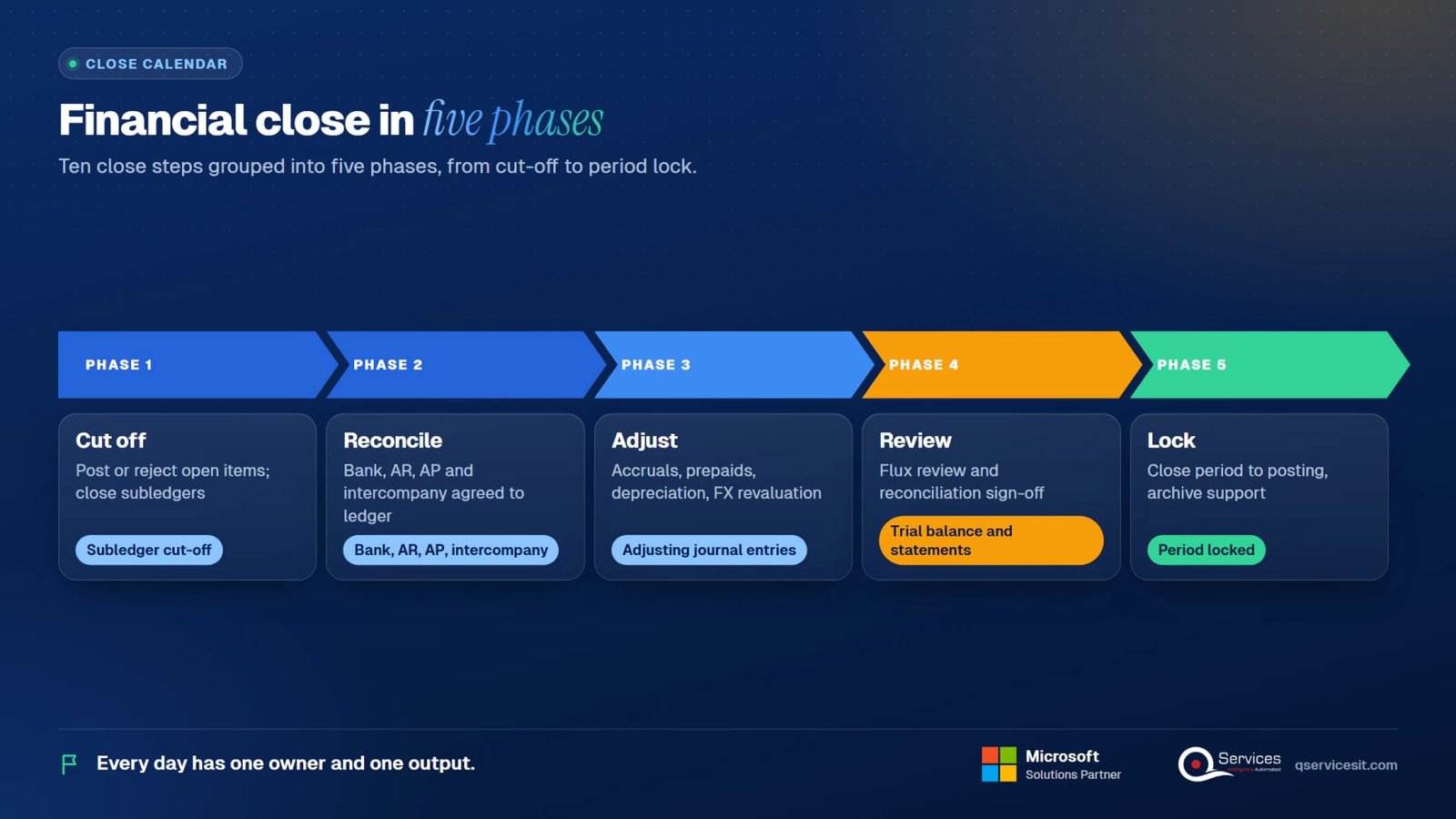
Quick facts first. Cadence: monthly, quarterly and yearly. Typical duration: several working days, with the goal set by each company. Owner: the controller, with AR, AP, payroll and treasury feeding in. Outputs: an adjusted trial balance and the financial statements. Here is the ten-step sequence most teams follow.
Post or reject every open invoice, receipt, payment and shipment dated inside the period. Then close AR, AP and inventory to new postings for that date range, so the general ledger totals stop moving underneath you.
Match each bank account to the ledger line by line. Clear outstanding checks and deposits in transit, and book unrecorded fees or interest the bank has already charged.
The subledger total must equal the control account. Any difference is an unposted entry, a wrong date or a manual journal that bypassed the subledger. Find it before moving on.
Each entity's receivable from a sister company must equal the other's payable. Settle the differences, then eliminate the balances on consolidation.
Record expenses incurred but not yet invoiced, and revenue earned but not yet billed. Reverse them on day one of the next period so the real invoice does not double count.
Move the monthly share of prepaid insurance, software and rent into expense. Do the same for deferred revenue moving into income.
Calculate depreciation for every active fixed asset and post it to the ledger. Check new additions and disposals first, because they change the charge.
Restate open foreign-currency receivables, payables and bank balances at the period-end rate. Post the unrealised gain or loss.
Compare each line to last month and to budget. Investigate any swing you cannot explain in one sentence, and get preparer and reviewer sign-off on every reconciliation.
Close the period to posting, archive the support, and report the close metrics. Later corrections go into the open period unless a controller reopens it with a recorded reason.

WD means working day after period end. This calendar is illustrative: a controller can compress or stretch it. What matters is that every day has one owner and one output.
| Day | Owner | Output |
|---|---|---|
| WD1 | AP and AR leads | Subledgers cut off. Accrual reversals posted. Open invoice and receipt lists cleared. |
| WD2 | Treasury or staff accountant | Bank accounts reconciled. Cash position agreed to the ledger. |
| WD3 | AR and AP managers | AR and AP subledgers agreed to the control accounts. Differences listed with owners. |
| WD4 | Staff accountant | Payroll, accruals and prepaid amortisation journals posted with support attached. |
| WD5 | Fixed asset accountant | Depreciation run posted. Additions and disposals checked. |
| WD6 | Group accountant | Intercompany balances agreed. FX revaluation posted. Eliminations booked. |
| WD7 | Controller | Preliminary trial balance and flux review (variance against last month and budget). Questions sent to owners. |
| WD8 | Controller and CFO | Adjustments agreed. Reconciliations signed. Period locked. Statements released. |
Many teams talk about an eight-day close, but the number is a target you set, not a standard. Compare against your own history first, then against the sources in the KPI section.
All figures below are illustrative. Each row is one entry a controller would see on the close checklist, with its effect on the books.
| Entry | Debit / Credit | Effect |
|---|---|---|
| Accrued expense: consultants worked in the month, invoice not yet received | Dr Consulting expense 12,000. Cr Accrued expenses 12,000. | Expenses rise by 12,000 in the right month. Reverse on WD1 of next month, then post the real invoice. |
| Prepaid amortisation: annual insurance paid up front, 60,000 for 12 months | Dr Insurance expense 5,000. Cr Prepaid expenses 5,000. | 60,000 divided by 12 is 5,000 a month. Prepaid falls from 60,000 to 55,000. |
| Depreciation: equipment costing 240,000, five years, straight line, no salvage | Dr Depreciation expense 4,000. Cr Accumulated depreciation 4,000. | 240,000 divided by 60 months is 4,000 a month. Net book value falls by 4,000. |
| FX revaluation: EUR 50,000 receivable booked at 1.08, period-end rate 1.10 | Dr Accounts receivable 1,000. Cr Unrealised FX gain 1,000. | 54,000 becomes 55,000 in USD. The gain is unrealised until the customer pays. |
Trial balance, illustrative. Before adjustments: debits 990,000 (cash 180,000, AR 210,000, prepaid 60,000, fixed assets 240,000, operating expenses 300,000) and credits 990,000 (accumulated depreciation 80,000, AP 95,000, equity 215,000, revenue 600,000). After the four entries: AR 211,000, prepaid 55,000, operating expenses 321,000, accumulated depreciation 84,000, accrued expenses 12,000 and FX gain 1,000. Debits and credits both total 1,007,000. Profit before the entries was 300,000. After them it is 600,000 less 321,000 plus 1,000, which is 280,000.

The core routine repeats every period. Quarter-end and year-end add reporting, review and disclosure work on top. One point trips people up: the closing entries that reset temporary accounts are a separate step from the close process itself.
| Cadence | What is added | Typical extra work |
|---|---|---|
| Month-end | The ten steps above | Internal management reporting, flux review, accrual reversals, lock the month. |
| Quarter-end | Month-end plus external reporting | Review by management and, for listed companies, the auditor. Tax provision estimate, disclosure drafting, intercompany and consolidation checks. |
| Year-end | Quarter-end plus annual audit support | Inventory count or valuation, fixed asset and impairment review, full balance sheet substantiation, audit schedules, tax return data. |
| Closing entries (year-end only) | Mechanical postings, not review | Revenue and expense accounts are zeroed out and the net result moves to retained earnings. ERP systems do this with a batch job (see the ERP table). |
Do not confuse the two ideas. The financial close is the review-and-adjust routine that makes the numbers right. Closing entries only reset temporary accounts for the new year, and they take minutes. Companies that skip the first because the second ran cleanly end up with wrong statements and an empty income statement.
Feature names below come from each vendor's documentation. Menu paths and options differ by version, so check your release notes before you change a setup.
| Task | Business Central | Dynamics GP | NetSuite |
|---|---|---|---|
| Posting dates and periods | Accounting Periods, plus Allowed Posting From and To in General Ledger Setup or per user | Fiscal Periods Setup, with period status by series and by module | Accounting Periods, with lock options for AR, AP, all transactions and non-GL changes |
| Accrual reversal | General Journal with a recurring reversing method, or a journal reversal on posted entries | General Transaction Entry with a reversing date on the transaction | Journal entry with a reversal date, or an auto-reversing journal |
| Recurring journals | Recurring General Journals with frequency and allocation | Recurring batches in Financial transaction entry | Recurring journal entries, plus amortisation schedules for prepaids and deferrals |
| Bank reconciliation | Bank Account Reconciliation with automatic matching and statement import | Bank Reconciliation window, matched to the checkbook | Account reconciliation, with statement import and matching rules |
| Depreciation | Calculate Depreciation batch job in the fixed asset journal | Fixed Assets module, depreciation run | Fixed Assets Management, with a scheduled depreciation process |
| Consolidation | Business Unit setup and the Consolidation process, or the consolidation extension | Multi-entity setup and reporting through Management Reporter or an add-on | OneWorld subsidiaries, with built-in consolidation and eliminations |
| Period lock and year-end | Close Income Statement batch job at year-end, and posting limits for the period | Year-end closing routine for the General Ledger | Period close checklist, then close the period. Year-end closes income to retained earnings automatically |
Start with the vendor's own pages: Business Central documentation, Dynamics GP documentation and the NetSuite help center. See also our guides for Business Central and NAV and Dynamics GP.
Four numbers cover most of what a CFO needs to ask. Benchmark ranges are quoted only where a published source exists. Everything else is something you set against your own trend.
| KPI | How to count it | Benchmark and use |
|---|---|---|
| Days to close | Working days from period end until the period is locked | Several surveys publish medians, and the numbers vary by company size and year, so cite a current report before you quote one. Set your own target and track it monthly. |
| Share of accounts reconciled on time | Reconciled and signed by the deadline, divided by total accounts that need reconciling | No reliable public benchmark. Aim for 100 percent on cash, AR, AP and intercompany, then widen the list. |
| Manual journal count | Journals keyed by hand, not generated by a subledger or schedule | No public benchmark. Falling numbers show more automation and fewer error points. Segregate and approve the rest. |
| Post-close adjustments | Entries posted to a period after it was locked, or in the next period but dated back | Aim for zero. Any figure above zero points to a step that signed off too early. |
For published close-time benchmarks, see the Hackett Group's finance research at thehackettgroup.com. Quote its year and sample when you use any figure.
Auditors test controls, not good intentions. Public companies in the United States work to the rules of the SEC on internal control over financial reporting and the PCAOB's AS 2201. Many private companies borrow the same discipline, usually structured on the COSO Internal Control framework.
An agent that works inside Business Central, Dynamics GP or NetSuite does the preparation and chasing, not the judgement. A person approves every action before anything posts. Our month-end close automation pages cover the build, and the broader finance agents page covers adjacent work.
The agent reads open items, unreconciled accounts and missing journals each day. It tells the owner which task is late before WD8 arrives.
It prepares accruals, prepaid amortisation and depreciation as journal drafts, with the schedule and source document attached.
It proposes bank and subledger matches and lists the leftover items with a likely cause, so the accountant reviews the exceptions only.
A controller sees the draft, the support and the effect on the trial balance. Nothing posts until a named person approves it, and the approval is logged.
We map your close steps, approval limits and segregation rules first, then connect the agent through ERP integration. Start with a process assessment if the close needs mapping first.
It means the period is final. Every reconciliation is signed, the adjusting entries are posted, the ledger is locked and the statements are ready to be issued. After that point, changes go through a controlled reopen or into the next period with a note.
There is no single right answer, because transaction volume, entity count, systems and reporting duties differ. Measure your own days to close for six months, then set a target a few days below it. Published surveys exist, but check the year and sample before you compare.
The close is the whole review-and-adjust routine. Closing entries are one mechanical piece of it, posted at year-end, that zero out revenue and expense accounts and move the result to retained earnings. In most ERP systems that is a batch job.
Move work out of the critical days. Post recurring journals from schedules, reconcile bank and subledgers daily or weekly, set cut-off times for AP and AR, and automate matching. Fix the cause of every post-close adjustment, because each one is a step that signed off too early.
A soft close is a quick, lower-effort close, often for internal reporting. It uses estimates, skips some reconciliations and leaves the period open for corrections. A hard close is the full process with every reconciliation signed and the period locked.
The controller owns the calendar and the sign-off, and each task has a named owner. The CFO approves the final statements. Treasury, AR, AP and payroll supply inputs on set days, and a miss goes to the controller the same day.
Book a 30-minute call and we will look at your close calendar, your ERP and where an approval-first agent would take over the repetitive steps.
Facts on this page checked on 17 November 2026.

Founder and CEO

Chief Sales Officer
Thanks, we’ve got your details. A named member of our team will reply within one business day.
Talk to a QServices solutions architect about your ERP. You'll leave with two or three automation ideas you can act on, even if you never work with us.