When discussions turn to hybrid and native app performance, Ionic is often the framework that gets questioned. Among cross-platform options such as React Native, Flutter, and Xamarin, the Ionic UI framework is known for helping teams get a mobile app to market faster. However, this speed is often viewed as a compromise on performance.Across communities such as GitHub and Reddit, both developers and decision-makers raise concerns about Ionic performance in real applications. One widely shared Medium article even stated there were “no regrets in leaving Ionic,” which adds even more power to the doubts across organizations. These conversations often mix broad frustration with limited examples. In reality, Ionic app performance issues are frequently misunderstood and do not always reflect real-world problems.With this article, we aim to debunk Ionic performance myths and uncover the realities that matter in strategic technology decisions.
Why Ionic Performance is Heavily Criticized
Before discussing Ionic app speed and performance, it is important to understand what Ionic is built for. Ionic is an open-source UI framework built to support cross-platform apps that are simple, fast to build, and quick to launch.Many large organizations, including NASA and McDonald’s, have used Ionic to deliver mobile applications.Ionic is not designed for animation-heavy or graphics-intensive mobile applications, unlike frameworks such as Google’s Flutter or Microsoft’s Xamarin, which place stronger emphasis on rendering performance. Its focus stays on business apps, content-driven platforms, and products where speed of delivery matters more than visual complexity.Most criticism around Ionic app performance begins when it is compared directly with native apps or frameworks built for high-performance visuals. These comparisons ignore the purpose Ionic serves. When expectations do not align with design goals, performance concerns surface at both developer and leadership levels.
Ionic Performance Myths vs. Ionic Performance Reality
Several Ionic performance misconceptions arise when cross-platform frameworks are judged without considering use cases, design intent, and real production outcomes. Below are some of the most common Ionic performance myths, along with the realities:
Myth #1: Ionic apps are slow
Reality: Ionic delivers apps that respond well for most business and content-focused platforms. Speed depends on the app’s structure, not the framework. Many large organizations run Ionic apps smoothly without noticeable delays for users.
Myth #2: Big companies don’t use Ionic
Reality: Companies such as Amtrak, GE Healthcare, and Untappd have used Ionic in production. These organizations rely on Ionic to quickly deliver apps that work across platforms, proving it can meet enterprise standards.
Myth #3: Ionic apps don’t feel like real mobile apps
Reality: Ionic supports native-style navigation and interactions. Users often cannot tell the difference between a well-designed Ionic app and a native app, making it suitable for customer-facing experiences without compromising familiarity.
Myth #4: Ionic is only for small projects
Reality: Many organizations use Ionic for internal platforms, portals, and tools that support thousands of users. Its structure allows teams to maintain large applications over time without added complexity.
Myth #5: Ionic cannot scale
Reality: Scaling depends on the backend and architecture choices. Ionic integrates with modern APIs and cloud services, letting apps grow to handle more users and features without creating performance problems.
Let's Discuss Your Project
Get free Consultation and let us know your project idea to turn into an amazing digital product.
Opinions from forums, blogs, and isolated experiences often exaggerate claims about slow Ionic apps. However, some of these myths overshadow real performance challenges. These include:
Slow Page Loads from Improper Lazy Loading
Many applications experience delays because Ionic lazy loading performance impact is not fully considered. Pages or modules that load unnecessary components upfront can make navigation feel sluggish. Optimizing module structure ensures only the required parts of the app load, reducing delays.
Rendering Delays in Large or Complex Pages
Apps that display many elements simultaneously or use nested components often see slower rendering. Heavy DOM structures can strain the app’s responsiveness. Techniques like virtual scrolling and simplifying page layouts can significantly improve Ionic framework performance in these cases.
Benchmarking Misunderstandings
Teams often rely on synthetic tests for Ionic app benchmarking. Comparing Ionic apps with native apps in artificial scenarios can exaggerate slowness. Real-world benchmarks, reflecting typical user navigation and actual data, show Ionic apps perform smoothly in practical use.
Excessive Third-Party Plugins
Adding multiple plugins increases load and execution time. Some plugins are not fully optimized, which impacts app responsiveness. Careful auditing of dependencies helps maintain real-world performance without unnecessary delays.
Backend and Data Handling
Slow API responses, large data queries, or unoptimized network calls can make an Ionic app feel sluggish. While not a framework flaw, these issues directly affect Ionic app performance in production environments.
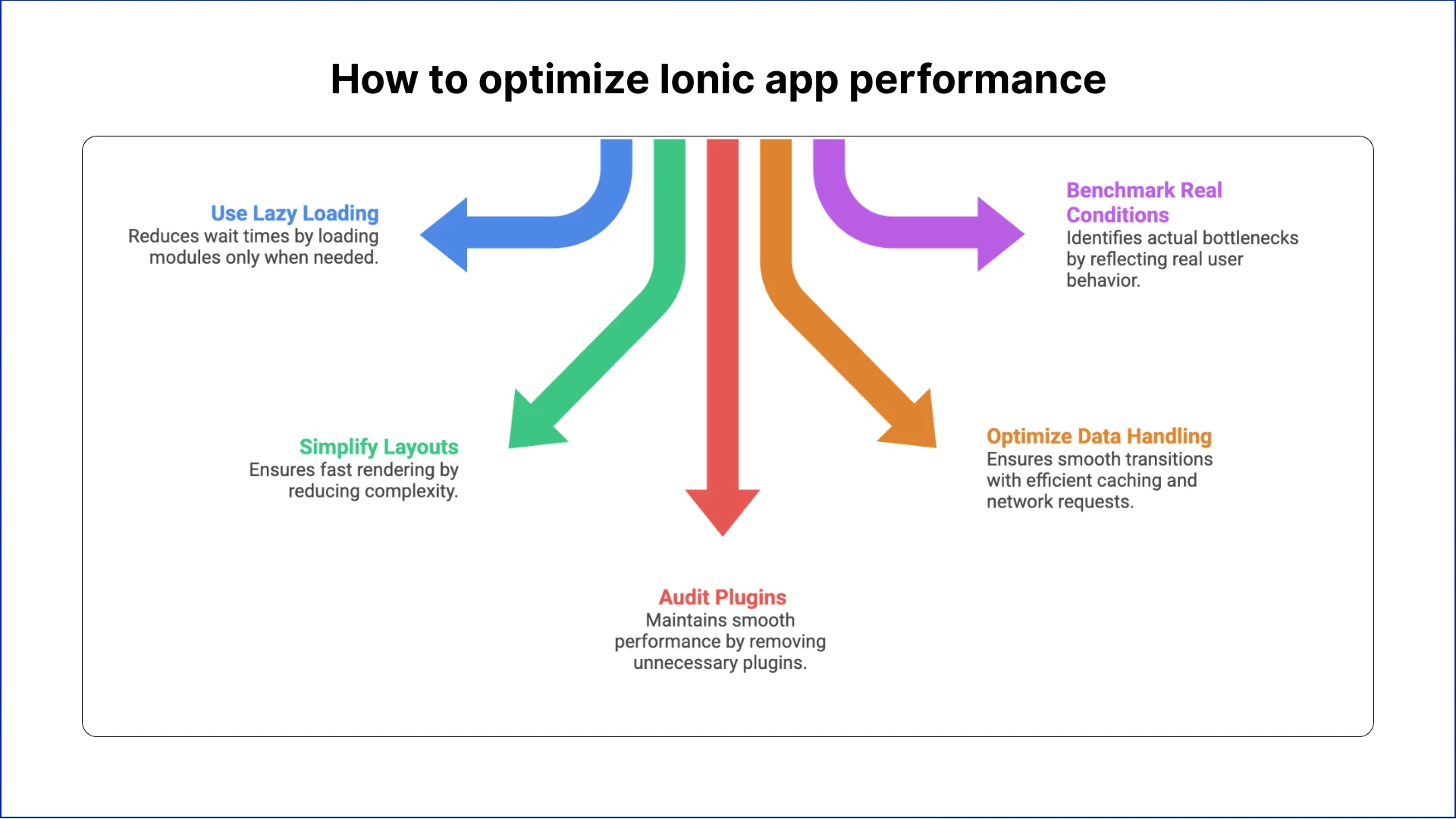
How to optimize Ionic app performance
“Why is my Ionic app slow?”
This is a question that often comes up when evaluating Ionic performance optimization. Many issues arise from design decisions or app structure rather than the framework itself. Applying best practices ensures responsive, smooth, and reliable experiences for real users.
Here are Ionic app performance best practices for 2026:
1. Use Lazy Loading Strategically
Improper lazy loading can make navigation feel delayed, especially in apps with many modules. By structuring pages and modules to load only when needed, teams can reduce wait times and improve perceived performance without changing the underlying Ionic framework.
2. Simplify Page Layouts
Pages with many elements or deeply nested components can slow down rendering. Reducing complexity, optimizing templates, and using techniques like virtual scrolling ensures that even content-heavy pages remain fast and responsive for users in real-world scenarios.
3. Audit Third-Party Plugins
Every additional plugin adds execution overhead. Excess or poorly optimized plugins can create bottlenecks, increasing app load time. Reviewing and removing unnecessary plugins helps maintain smooth performance and ensures that critical features run efficiently across devices.
4. Optimize Data Handling and Backend Calls
Slow APIs or large data requests can make the app feel sluggish. Efficient caching, structured network requests, and optimized backend interactions are crucial for ensuring smooth transitions, consistent response times, and reliable app performance at scale.
5. Benchmark Under Real Conditions
Testing only in artificial environments can be misleading. Ionic app benchmarking should reflect real user behaviour, including navigation, data load, and device constraints, to identify actual bottlenecks and confirm improvements in everyday usage.
Eager to discuss about your project ?
Share your project idea with us. Together, we’ll transform your vision into an exceptional digital product!
Ionic’s performance is often judged through the lens of early hybrid frameworks, where WebView limitations and inefficient JavaScript bridges created noticeable lag. While these issues shaped lasting perceptions, modern Ionic apps run on significantly improved WebView engines and benefit from optimized rendering pipelines.
Many concerns about app speed come from implementation choices rather than flaws in the framework itself. Organizations continue to deploy Ionic at scale because it supports faster development, cross-platform consistency, and lower maintenance overhead compared with managing separate native codebases.
Understanding this distinction is essential for strategic technology decisions. For teams building business tools, content platforms, or customer portals, Ionic delivers reliable performance that meets user expectations. It allows organizations to focus on solving the right problems efficiently without unnecessary complexity or cost.
Ionic uses WebView technology while React Native and Flutter compile closer to native code. Performance gaps narrow significantly with proper optimization, making Ionic competitive for business applications and content-driven platforms.
Which apps should avoid using Ionic framework?
Gaming apps, AR/VR experiences, and graphics-intensive applications requiring complex animations perform better with native development. Ionic excels in enterprise tools, dashboards, and content platforms where development speed matters more.
How does WebView affect Ionic app speed?
Modern WebView engines like WKWebView and Chromium deliver near-native performance for standard interactions. Performance issues typically stem from inefficient JavaScript execution, excessive DOM manipulation, or unoptimized rendering, not WebView itself.
Can Ionic handle apps with thousands of users?
Yes, scalability depends on backend architecture and API design rather than frontend framework choice. Ionic integrates seamlessly with cloud services, GraphQL, and REST APIs to support enterprise-scale user bases efficiently.
Why does my Ionic app feel sluggish?
Common culprits include bloated bundle sizes, synchronous operations blocking the main thread, unoptimized images, and excessive change detection cycles. Profile with Chrome DevTools to identify actual bottlenecks rather than assumptions.
Does Ionic support native device features properly?
Capacitor and Cordova provide JavaScript bridges to native APIs for camera, geolocation, push notifications, and biometrics. Performance overhead is minimal for standard features but increases with high-frequency sensor data processing.
How do I reduce Ionic app startup time?
Enable production builds with ahead-of-time compilation, implement code splitting across routes, defer non-critical module imports, and optimize asset loading. Tree shaking removes unused code, significantly reducing initial bundle size.
What's the difference between Ionic Angular and Ionic React performance?
Both frameworks offer similar performance when properly optimized. React’s virtual DOM provides efficient updates, while Angular’s change detection requires zone optimization. Choose based on team expertise rather than performance assumptions.
Can progressive web apps replace Ionic mobile apps?
PWAs offer instant updates and no app store distribution but lack full native feature access and offline capabilities. Ionic supports both approaches, letting teams deploy as PWA or native app from single codebase.
How does virtual scrolling improve Ionic performance?
Virtual scrolling renders only visible list items instead of entire datasets. This dramatically reduces DOM nodes, memory consumption, and rendering time for feeds, catalogues, and data tables exceeding 100 items.
Business intelligence consulting services should give a mid-market company a governed way to make decisions. Attractive dashboards are only the visible part. The useful outcome is a system in which source data, metric definitions, access, releases, ownership, and support still work after the consultants leave.
In a Microsoft Solutions Partner vs Microsoft Partner comparison, the difference is validation. A company can participate in the Microsoft AI Cloud Partner Program without holding a customer-facing Solutions Partner designation. A designated Solutions Partner has met Microsoft’s current threshold in a specific solution pathway: at least 70 out of 100 partner capability points, with more than zero points in every required metric, based on performance, skilling, and customer success data recorded in Partner Center.
How do you build a legacy application modernization strategy for Azure? A legacy application modernization strategy assigns the right treatment to each workload, then sequences the work around business value, technical evidence, and operational risk. For Azure, that means choosing among retire, retain, rehost, replatform,
QServices Inc. undertakes every project with a high degree of professionalism. Their communication style is unmatched and they are always available to resolve issues or just discuss the project.
Turn the Microsoft Licenses
You Already Own Into an AI Workplace
Join our live webinar on Sept 24 and see five ways to automate meetings, approvals, and