The slowdown appears later, usually after the app reaches production and starts handling real user traffic.
Organizations often struggle with the gap between what they tested and what users experience. The app still works, but interactions feel heavier. Clicks lag. Scrolling is no longer smooth.
“It’s not broken, it just feels slow.”
That statement comes up often in mature Angular applications.
A major contributor is change detection doing more work than expected. As components grow and templates become more dynamic, Angular evaluates far more bindings per interaction. This pattern sits behind many recurring angular performance issues in large single-page applications.
Bundle growth adds another layer of pressure. Mobile devices struggle first, but the impact eventually reaches all users.
Memory issues tend to follow. Memory usage increases gradually, without alerts or crashes, until performance starts to suffer.
These problems are rarely dramatic in isolation. Together, they compound. That is what makes angular performance difficult to manage at scale.
Before applying angular performance optimization, it is critical to recognize these patterns.
How to Improve Angular App Performance Without Rewriting Everything
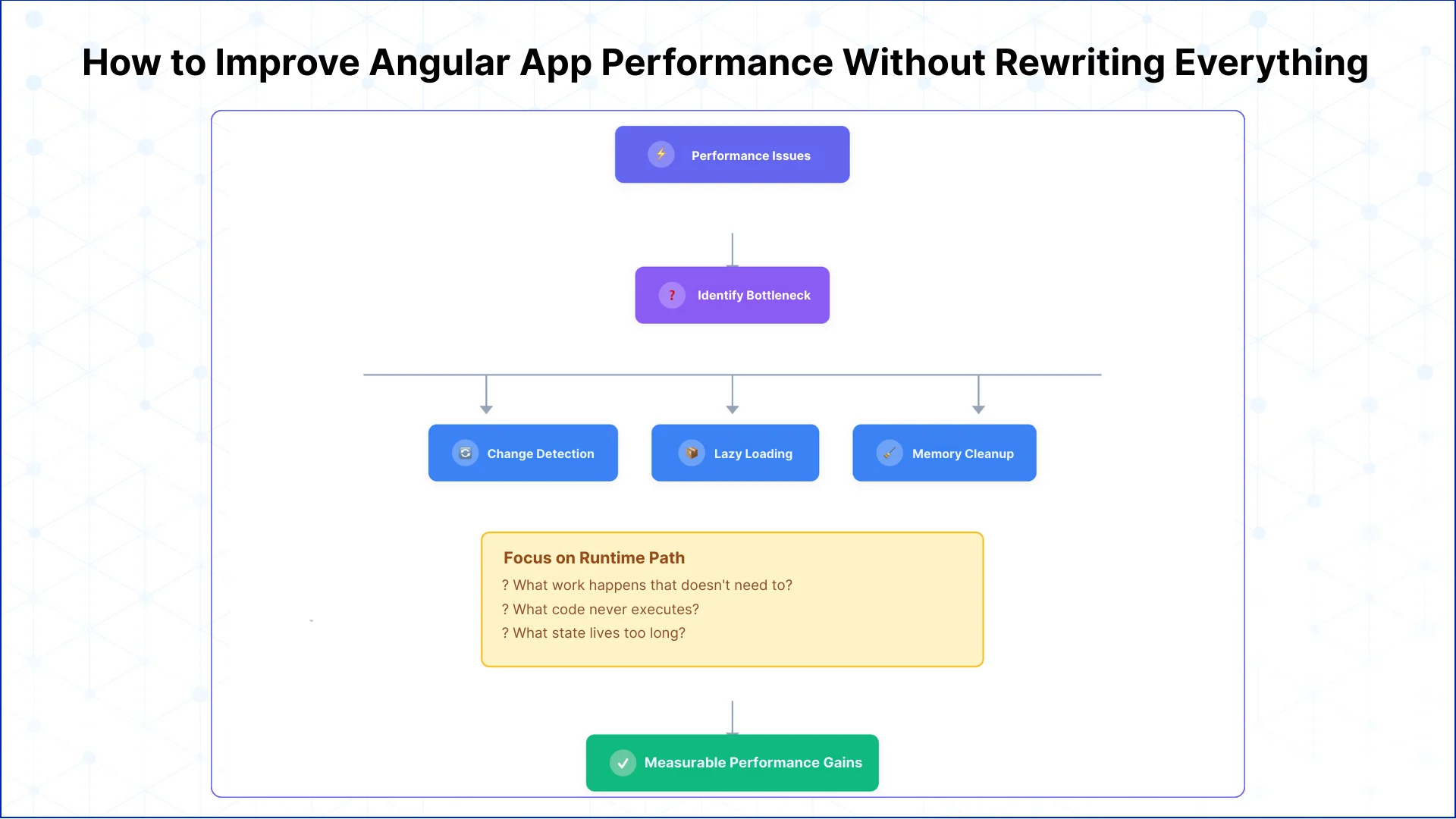
Performance work in Angular does not start with a rewrite. Most slowdowns in production come from a small number of repeated patterns.
Reduce Unnecessary Change Detection Work
Angular apps slow down when the framework does more checking than the UI needs. This is one of the most effective ways to improve angular performance without refactoring features or data flows.
Control What Loads and When
Large bundles delay first interaction and make the app feel heavy. Splitting the application into smaller, lazy-loaded chunks improves angular app performance, especially on slower networks and mobile devices.
Clean Up Long-Lived State and Memory
Memory issues rarely crash Angular apps. They slow them down over time. Addressing these leaks is one of the most reliable angular slow performance fix strategies.
Focus Optimization on the Runtime Path
Effective angular optimization starts by questioning what actually runs during user interactions.
What work happens on every click that does not need to What code ships to users but never executes What state stays alive longer than the UI requires
When optimization targets the runtime path instead of theoretical issues, performance improvements become measurable and repeatable.
Common Angular Performance Issues Seen in Production Apps
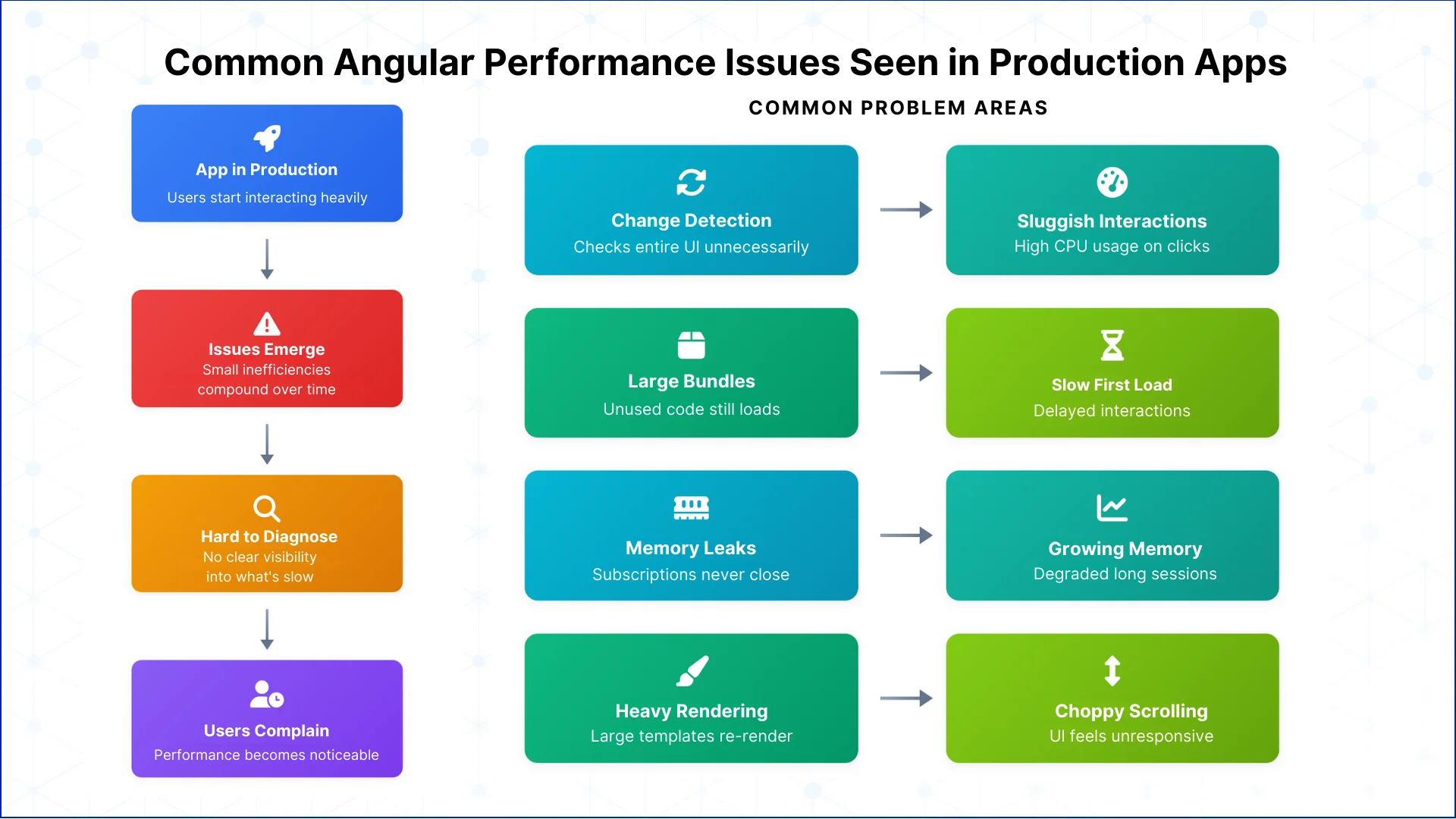
Angular performance problems usually appear only after an application is used heavily. In production, small inefficiencies add up. Over time, they turn into visible slowdowns that affect everyday use.
Change Detection Doing Too Much Work
One of the most frequent angular performance issues is change detection running more often than necessary. A simple click can cause Angular to re-check large parts of the UI. As the app grows, this extra work becomes expensive.
The result is slower interactions and higher CPU usage. This is often the main reason an app feels sluggish even when the data itself is small.
Large Bundles and Slow Loading
As features are added, bundle sizes grow. Code that is rarely used still gets downloaded and parsed. This delays the first interaction and makes route changes feel heavy.
This is a common angular slow performance problem, especially on mobile devices or slower networks. Users notice it before they see any UI.
Memory That Never Gets Released
Memory issues are subtle but damaging. Subscriptions stay active longer than they should. Components leave data behind after they are destroyed. Over time, memory usage increases and the browser struggles to keep up.
The app does not crash. Instead, angular app performance slowly declines during long sessions.
Too Much Rendering in the Browser
Large templates, long lists, and frequent updates can overwhelm the browser. Even small data changes can cause large parts of the UI to re-render.
This often shows up as choppy scrolling or delayed updates. The framework is doing its job, but the workload is too high.
Limited Visibility Into What’s Slowing Things Down
Many performance problems persist because they are hard to see. Logs and error tracking do not show rendering cost or interaction delays. Without clear visibility, angular performance issues remain until users complain.
Understanding these common patterns helps explain why Angular apps slow down over time. Once they are clear, performance work becomes focused and effective instead of reactive.
Let's Discuss Your Project
Get free Consultation and let us know your project idea to turn into an amazing digital product.
Angular Performance Optimization Techniques That Actually Move the Needle
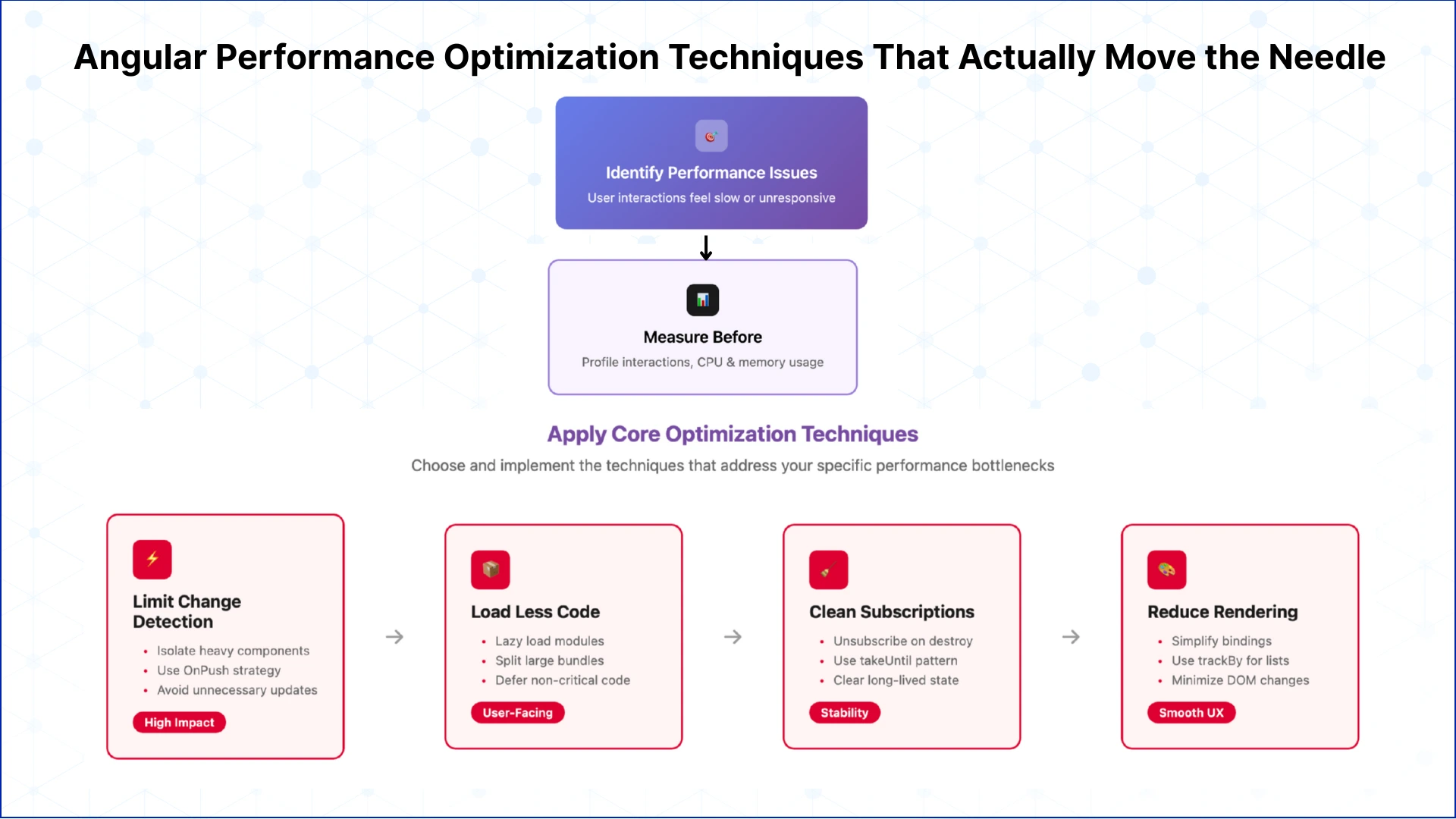
Not every optimization matters. In Angular, a small set of changes usually delivers most of the gains. The goal is not to tune everything, but to reduce the work the app does during real user interactions.
Limit Change Detection Scope
Reducing how much of the UI Angular checks on each interaction is one of the fastest ways to improve responsiveness. Isolating heavy components and avoiding unnecessary updates keeps the browser from doing extra work.
This single step often produces visible angular performance improvements without changing how features behave.
Load Less Code Up Front
Large initial bundles slow down first interaction. Breaking features into smaller, lazy-loaded modules helps users reach usable screens faster. Code that is not needed immediately should not block the app.
This is a practical angular app speed optimization approach that users notice right away.
Clean Up Subscriptions and State
Unreleased subscriptions and long-lived state quietly degrade performance. Ensuring cleanup when components are destroyed reduces memory pressure and keeps long sessions smooth.
This is one of the most reliable angular performance tuning techniques for apps used throughout the day.
Reduce Rendering Cost
Templates that do too much work slow the UI. Simplifying bindings, limiting updates in large lists, and avoiding unnecessary DOM changes lowers the rendering load.
Even small reductions here can lead to smoother scrolling and faster interactions.
Measure Before and After
Optimization without measurement leads to guesswork. Profiling interactions and watching CPU and memory usage shows which changes matter and which do not.
Effective angular performance optimization techniques are guided by evidence, not assumptions.
Angular Change Detection: The Primary Source of Performance Degradation
Organizations often struggle with angular performance issues only after their applications reach real production scale. Early-stage builds appear responsive, but as component counts rise and data flows become more complex, latency begins to surface across the UI.
In most mature Angular applications, performance degradation is not caused by the network or the backend. It originates in uncontrolled change detection.
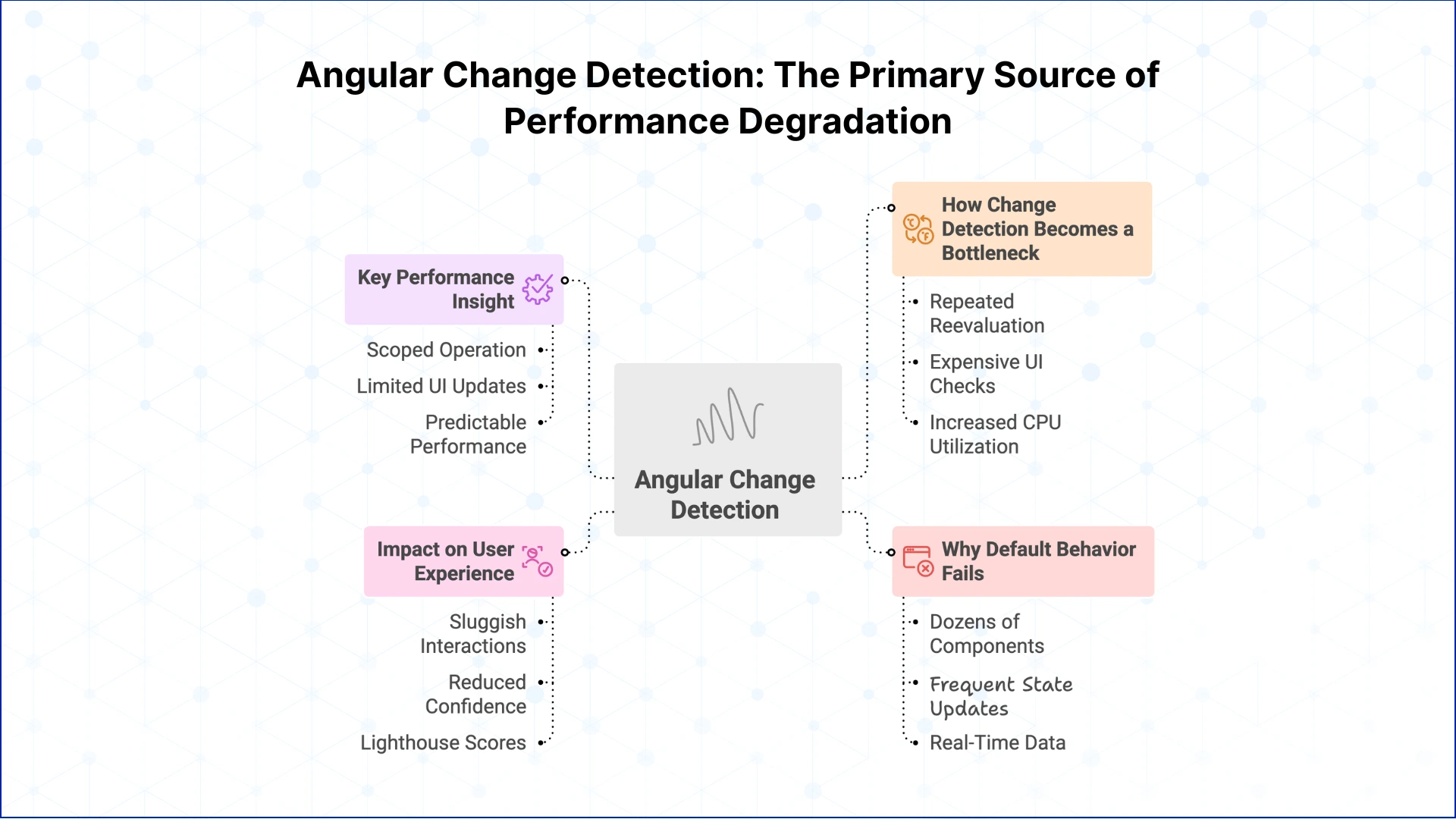
How Change Detection Becomes a Bottleneck at Scale
Angular’s default change detection strategy assumes that any event may impact the entire component tree. This design favors correctness over efficiency.
As applications grow, this results in:
Repeated reevaluation of components that have not changed
Expensive UI checks triggered by minor user interactions
Increased CPU utilization during routine workflows
These symptoms are commonly misdiagnosed as rendering or API issues, when in reality they reflect inefficient UI reprocessing. This is a frequent root cause behind angular slow performance in enterprise and data-heavy applications.
Why Default Behavior Fails in Complex Angular Apps
The default change detection model works well for small and moderately sized applications. It becomes problematic when:
Screens contain dozens or hundreds of components
Shared services trigger frequent state updates
Real-time data or polling is introduced
At this stage, teams trying to improve angular performance often add optimizations in the wrong places, overlooking the fact that most of the UI does not need to be checked on every event.
The Impact on User Experience and Delivery Velocity
Unchecked change detection affects more than just technical metrics.
From a delivery standpoint, performance regressions become harder to predict and more expensive to fix. This is why effective angular performance optimization must start with controlling how and when change detection runs.
The Key Performance Insight
Angular performance improves significantly when teams treat change detection as a scoped operation rather than a global one.
Limiting UI updates to components that actually depend on changing data is one of the most reliable ways to stabilize angular app performance in production.
Next, we examine concrete strategies teams use to apply this principle and regain predictable performance behavior.
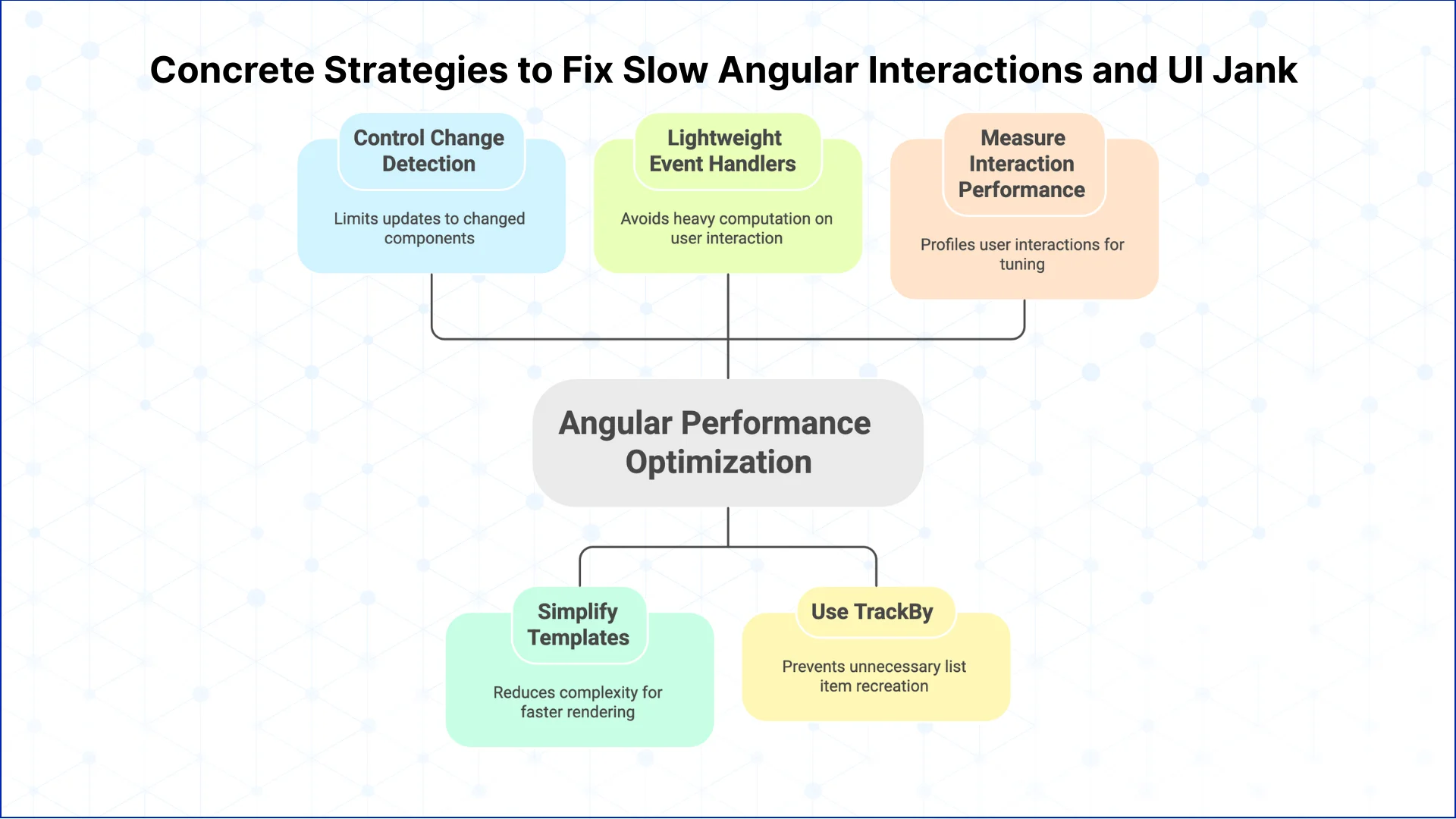
Concrete Strategies to Fix Slow Angular Interactions and UI Jank
Many Angular apps load quickly but still feel slow during use. Clicks lag, scrolling stutters, and forms hesitate before responding. This usually happens because too much work runs on every user interaction.
Control Change Detection
Angular’s default change detection can re-evaluate large parts of the app on every event. In real-world apps, this leads to noticeable UI lag.
Using OnPush where possible limits updates to components that actually changed. This is one of the most effective angular performance optimization techniques for improving interaction speed.
Simplify Templates and the DOM
Large, complex templates slow rendering. Deep nesting, heavy loops, and oversized tables increase DOM cost.
Smaller, focused components are a practical angular app optimization best practice, especially for dashboards and data-heavy views.
Keep Event Handlers Lightweight
User interactions should not trigger heavy computation. Expensive logic inside click or input handlers directly impacts perceived speed.
If users feel lag, this is often the root cause of angular performance issues.
Use TrackBy for Stable Lists
Without trackBy, Angular recreates list items unnecessarily. This causes extra re-renders and visual jitter.
TrackBy is a simple angular optimization that delivers immediate gains in list-heavy interfaces.
Measure Interaction Performance
Fast load times do not guarantee a fast app. Profile clicks, scrolling, and typing using DevTools and Angular profiling.
Real angular performance tuning focuses on smooth interactions, not just bundle size.
Eager to discuss about your project ?
Share your project idea with us. Together, we’ll transform your vision into an exceptional digital product!
Reducing Bundle Size and Improving Initial Load Performance
Many Angular performance problems surface before users even interact with the app. The UI appears late, clicks feel unresponsive, or the browser stalls during startup. It is caused by shipping too much code too early.As Angular applications mature, features accumulate. Routes used by a small subset of users end up bundled with core flows. Dependencies remain long after features are retired. The browser pays this cost on every cold load, especially on mobile devices and average networks.
Bundle Size as a Delivery Risk
Large bundles increase more than download time. They increase parse time, execution cost, and memory pressure during bootstrap. Even when the UI renders, the app may not be ready to respond.This is a common source of angular performance issues that do not appear in development or synthetic tests.
Load Code Based on User Intent
Improving startup performance is not about making builds smaller in theory. It is about delaying work until the user actually needs it.Lazy loading core flows separately from secondary features reduces time to first interaction. This is one of the most effective angular app speed optimization techniques because it improves perceived performance without changing business logic.
Remove Code That Adds No Runtime Value
Unused modules and legacy dependencies silently inflate bundles. Tree shaking only works when module boundaries are clear and references are intentional.Consistent cleanup is a core part of angular bundle size optimization in long-lived codebases.
Optimize for Interactivity, Not Appearance
A fast-looking app that cannot respond to input is still slow.Angular performance tuning at startup should prioritize when the app becomes usable, not just when something appears on screen.Teams that treat startup as a user experience problem, not a build artifact, deliver more reliable performance at scale.
Conclusion
Angular performance problems are rarely caused by a single mistake. They emerge from cumulative decisions around change detection, rendering scope, bundle growth, and state lifecycle management.This guide covered how Angular performance issues actually manifest in production and which Angular performance optimization techniques consistently improve real user interactions without relying on rewrites or theoretical fixes. The focus was on controlling runtime work, reducing unnecessary checks, and aligning optimization efforts with how Angular executes in practice.For engineering teams, the takeaway is simple. Angular performance tuning is an architectural discipline. Teams that treat performance as part of system design, not post release cleanup, ship applications that remain responsive as complexity increases.Performance does not degrade suddenly. It erodes. Teams that understand where Angular spends its time are the ones that prevent it.
What causes Angular applications to slow down over time?
Angular apps usually slow down as components increase, templates grow complex, and change detection runs more often than necessary. Larger bundles and unreleased memory add steady pressure in long-running sessions.
How can Angular performance be improved without rewriting the app?
Most performance gains come from reducing runtime work. Limiting change detection, lazy loading features, trimming unused code, and cleaning up subscriptions often deliver measurable improvements without architectural changes.
Why does change detection impact Angular performance so heavily?
Angular’s default strategy checks many components on every user interaction. As the UI grows, this repeated evaluation becomes CPU-intensive and is a common source of sluggish behavior.
When should OnPush change detection be used?
OnPush works best for components with predictable inputs and controlled data flow. It reduces unnecessary UI checks and improves responsiveness in dashboards, tables, and high-frequency views.
How can real Angular performance bottlenecks be identified?
Profiling real user interactions is key. Tools like Chrome DevTools and Angular DevTools reveal which components re-render, where CPU spikes occur, and how memory grows over time.
Which Angular performance optimizations deliver the most impact?
The biggest gains usually come from controlling change detection scope, reducing initial bundle size, simplifying templates, and avoiding unnecessary DOM updates.
How does bundle size affect Angular app performance?
Large bundles delay first interaction by increasing download, parse, and execution time. This impact is most visible on mobile devices and slower networks.
What performance issues are common in enterprise Angular applications?
Enterprise apps often suffer from excessive change detection, large shared bundles, long-lived state, and templates that re-render more than needed.
How can slow UI interactions in Angular be fixed?
Focus on reducing work per interaction. Optimize event handlers, use trackBy in lists, limit rendering scope, and avoid triggering global updates for local changes.
Which tools help with Angular performance tuning?
Angular DevTools, Chrome DevTools performance profiling, Lighthouse, and memory snapshots provide the visibility needed to optimize with confidence.
Business intelligence consulting services should give a mid-market company a governed way to make decisions. Attractive dashboards are only the visible part. The useful outcome is a system in which source data, metric definitions, access, releases, ownership, and support still work after the consultants leave.
In a Microsoft Solutions Partner vs Microsoft Partner comparison, the difference is validation. A company can participate in the Microsoft AI Cloud Partner Program without holding a customer-facing Solutions Partner designation. A designated Solutions Partner has met Microsoft’s current threshold in a specific solution pathway: at least 70 out of 100 partner capability points, with more than zero points in every required metric, based on performance, skilling, and customer success data recorded in Partner Center.
How do you build a legacy application modernization strategy for Azure? A legacy application modernization strategy assigns the right treatment to each workload, then sequences the work around business value, technical evidence, and operational risk. For Azure, that means choosing among retire, retain, rehost, replatform,
QServices Inc. undertakes every project with a high degree of professionalism. Their communication style is unmatched and they are always available to resolve issues or just discuss the project.
Turn the Microsoft Licenses
You Already Own Into an AI Workplace
Join our live webinar on Sept 24 and see five ways to automate meetings, approvals, and