


Azure Integration Services Explained: Logic Apps, Service Bus, API Management, and Event Grid Rohit Dabra | July 10, 2026 Table
Architecture map, prioritized backlog, 15/20/45 plan, and risk register — ready for your board.
One workflow shipped end-to-end with audit trail, monitoring, and full handover to your team.
Stabilize a stalled project, identify root causes, reset delivery, and build a credible launch path.
Monitoring baseline, incident cadence targets, and ongoing reliability improvements for your integrations.
Answer 3 quick questions and we'll recommend the right starting point for your project.
Choose your path →Turn scattered data into dashboards your team actually uses. Weekly reporting, KPI tracking, data governance.
Cloud-native apps, APIs, and infrastructure on Azure. Built for scale, maintained for reliability.
Automate manual processes and build internal tools without the overhead of custom code. Power Apps, Power Automate, Power BI.
Sales pipelines, customer data, and service workflows in one place. Configured for how your team actually works.
Custom .NET/Azure applications built for workflows that off-the-shelf tools can't handle. Your logic, your rules.
Every engagement starts with a clear plan. In 10 days you get:
Patient data systems, compliance reporting, and workflow automation for regulated environments.
Real-time tracking, route optimization, and inventory visibility across your distribution network.
Scale your product infrastructure, integrate third-party tools, and ship features faster with reliable ops.
Secure transaction processing, regulatory reporting, and customer-facing portals for financial services.
Get a clear plan in 10 days. No guesswork, no long proposals.
See case studies →Download our free checklist covering the 10 steps to a successful delivery blueprint.
Download free →15-minute call with a solutions architect. No sales pitch — just clarity on your project.
Book a call →
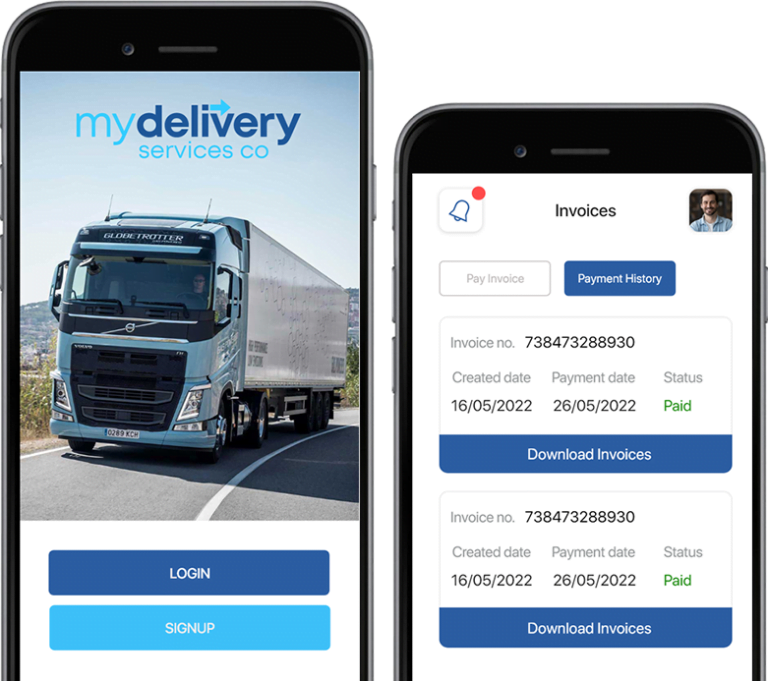
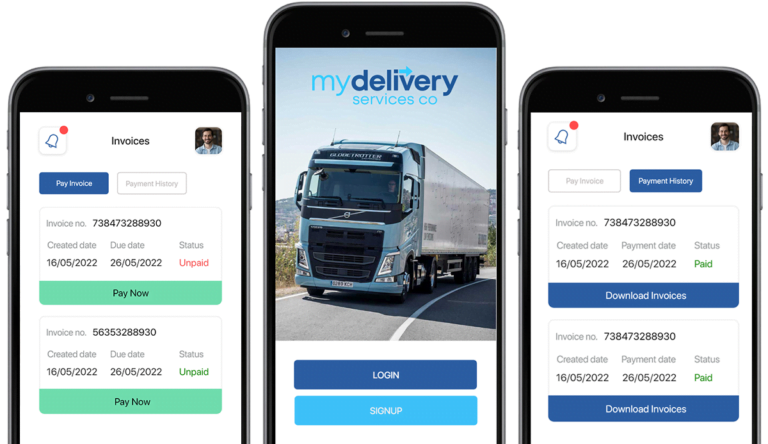
My Delivery is an app for managing deliveries connected to E-logi services for creating and maintaining delivery orders. In this project, we can create orders through our app and then manage other services on the elogi dashboard, where we can assign orders to registered drivers.
Features provide a wonderful first impression; thus, selecting usable features that can project powerful images in front of users is important. But, as is common knowledge, first impressions last longer, and features continue to work as intended.
It’s important to have both sophisticated and less skilled features if you want to obtain a lot of traffic, visits, and conversions. For example, it was difficult for QServices to figure out how to make a landing page for property maintenance stand out. However, any scenario can be handled by our skilled staff for the client’s benefit. With our industry experience, we have provided results-driven features in exchange.
Here, take a look at all the features:
For a secure login, there is two-factor authentication.
The administrator manages the customers.
The customer can establish an order for the Delivery of his items.
The customer can check the progress of their orders and retrieve a list of all their recent and past orders.
Orders come with proof of Delivery.
The customer has access to all of the orders’ invoices.
Through the app, the customer can reset his account password.
We offer an elogi-enabled delivery management app. In addition, Elogi Services and Zoho are used to develop application programming interfaces and invoices, respectively.
We use React-native for Hybrid Applications. We chose Dotnet for the backend services and ReactJS for the front end. For high-quality cloud services, we have chosen Vultur cloud.
We provided solutions such as order creation, tracking, proofing, invoices, and history.
Without overcoming some obstacles, nothing spectacular is accomplished.
When creating the My Delivery app, we did run across some difficulties. We found that integrating with outside services like elogi and Zoho was the most challenging task. We had read through all of the elogi dashboard documentation to maintain and execute functionalities to discover a solution. There were times when certain functions would stop working, and to fix them, we had to email elogi and Zoho with our complaints.
Where there is a problem, there is a solution. With this case study, we want to highlight the solution we found for all the technical glitches in the app.
The first thing we looked into was Research and Development section. Now, this is not enough. We need a strong team. Hence we built a team with a proper communication channel. And Voila! With good support from our team and third-party services, we got all the needed solutions. With this, we implemented our app bug-free with a great user experience.

Azure Integration Services Explained: Logic Apps, Service Bus, API Management, and Event Grid Rohit Dabra | July 10, 2026 Table

Power BI Embedded is Microsoft’s developer-focused API for embedding interactive analytics directly inside third-party apps, customer portals, and SaaS products. If you are building software and want customers to see live dashboards without logging into the Power BI service, this is where that journey starts. The question is not whether you can embed Power BI reports, you almost certainly can. The real question is whether it makes financial and architectural sense for your specific situation. This guide covers the when, the how, and the cost math that most tutorials skip.

Power apps portals sit at an interesting crossroads for IT leaders: they’re fast, deeply integrated with the Microsoft stack, and manageable without a dedicated development team. But they’re also constrained in ways that matter when your business needs a portal that handles complex UI logic, third-party integrations outside the Microsoft ecosystem, or pixel-perfect UX design.
This guide gives you a straight comparison so you can make the right call without spending three months in discovery. We’ll cover what each option actually delivers, where each breaks down, and the governance questions that need answers before you commit either way.
If you’re evaluating your Microsoft stack more broadly, our breakdown of Power Platform vs Custom .NET Development provides useful parallel context.
Yes, all your documents will be stored on a server with an external internet connection. No information will be saved on your garage system, so if your system is damaged accidentally, all your data will be restored within a few seconds.
Of course! GMS is completely cloud-based and only needs an internet connection to bring up your garage or automobile system at home.

Founder and CEO

Chief Sales Officer