In banking operations, reducing errors and accelerating settlements is a top priority. However, many banks still fail to achieve this.
Processing payments involves multiple steps, such as verifying account details, checking records, and ensuring timely execution. In the current financial environment, manual approaches slow down these processes and increase the risk of errors.
Payment processing automation is becoming a strong replacement for manual workflows, as it addresses these challenges with intelligent, system-driven operations.
As automation adoption grows across banking, this area is becoming critical to meeting the demands of scalability, rising customer expectations, and strict compliance requirements.
What is Payment Processing Automation?
Payment process automation refers to using a software system to automatically manage, execute (sending or receiving), and track financial transactions. Unlike traditional processes that take days to complete, an automated solution verifies, initiates, and records transactions within minutes.
These automated systems integrate with ERP platforms or bank APIs to retrieve data and trigger actions. They support scheduling of payments, invoice validation, approval routing, and real-time ledger updates.
Financial institutions implement payment automation to handle high transaction volumes with accuracy and under compliance standards.
How Automation Reduces Payment Processing Errors
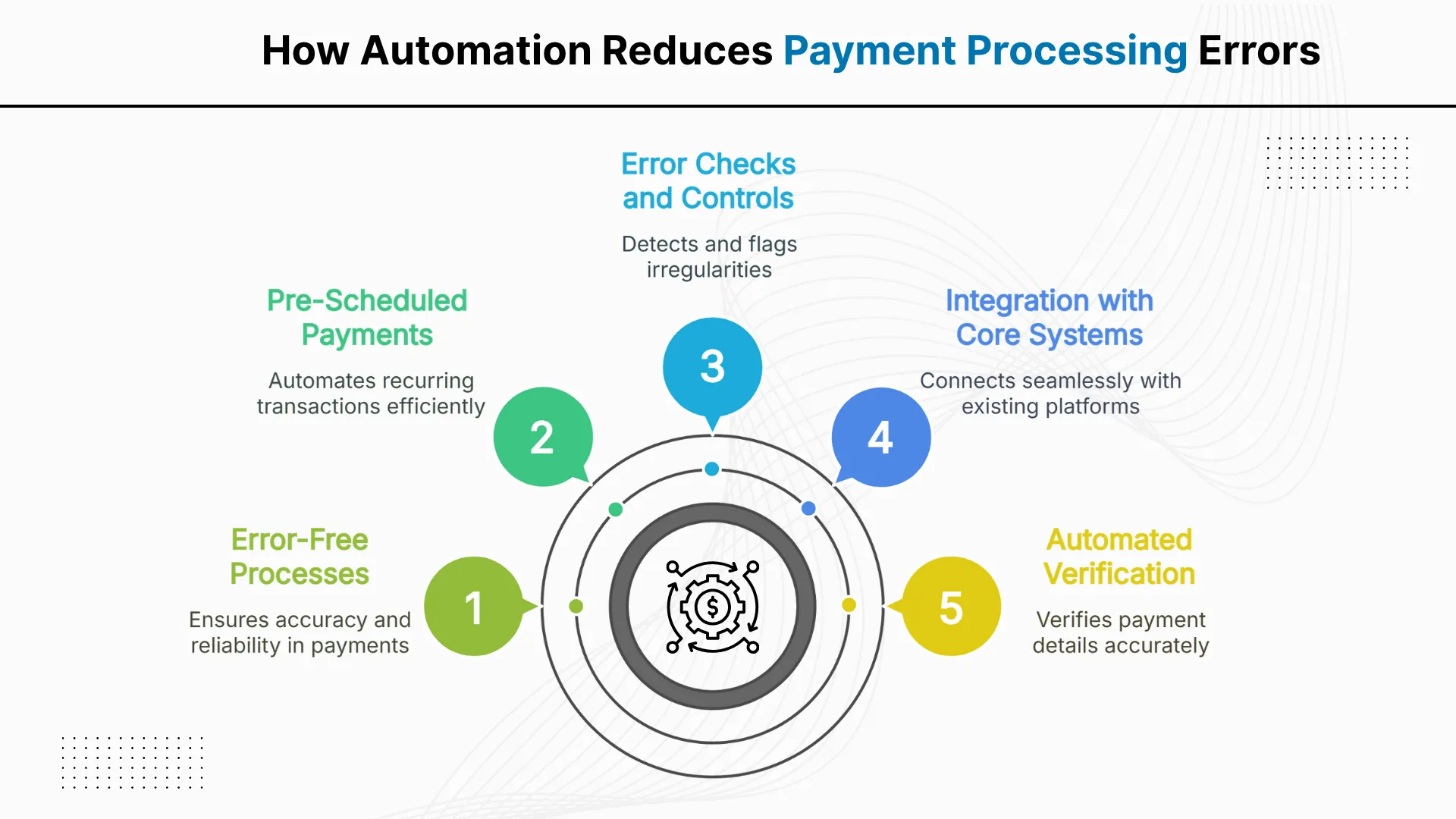
In banks, payment errors often occur due to manual entry or filling incorrect details. Automated payment processing systems reduce these risks by adding accuracy, speed, and built-in control mechanisms. Here are several ways automation ensures error-free processes:
1. Automated Verification of Payment Information- Automated systems cross verify account numbers, payment amounts, and beneficiary details before processing any transaction.
2. Integration with Core Systems- Automated systems connect directly to ERP platforms and bank APIs to remove the need for manual data transfer.
3. Built-in Error Checks and Controls- Automation solutions apply validation rules to detect duplicates, missing fields, and anomalies. The system flags irregularities before approval.
4. Pre-Scheduled and Recurring Payments- Payment automation enables institutions to set up recurring transactions such as payroll or vendor disbursements. The system executes these payments on time without manual intervention.
Let's Discuss Your Project
Get free Consultation and let us know your project idea to turn into an amazing digital product.
Benefits of Payment Processing Automation for Faster Settlements
Automating payment processes not only reduces financial errors, but it also accelerates settlements. With real-time validation, smart workflows, and integrated systems, it offers several benefits to financial institutions, including:
Timely Payment Settlements
Automated systems process payments at fixed intervals or in real time using scheduled triggers. This prevents delays, reduces reliance on staff availability, and ensures consistent settlement cycles.
Real-Time Approvals
Workflow automation routes payment requests directly to designated approvers. This eliminates manual routing, speeds up decision-making, and maintains policy compliance.
Quick Reconciliation and Reporting
Payment automation syncs transactional data with core financial systems. This enables instant reconciliation and supports real-time reporting without waiting for manual input.
Improved Cash Flow Visibility
The system updates payment status and ledger entries as transactions occur. Finance teams use this real-time data to monitor liquidity and manage working capital accurately.
Enhanced Vendor Satisfaction
Automated payments reach vendors on time, aligned with agreed terms. Timely settlements reduce follow-ups, avoid penalties, and improve vendor relationships.
Real World Examples of Automated Payment Solutions
Automation in payments is no more an exception; several businesses have already transformed their processes through automation. Below are two real-world platforms that demonstrate how payment automation solutions transform settlements:
BluePay: Payment Processing Automation
BluePay, a U.S.-based payment processor, automates credit card, ACH, and mobile transactions. It uses features such as tokenization, fraud detection, and recurring billing to ensure secure and consistent payment flows.
Businesses implement BluePay to minimize manual reconciliation, reduce fraud risk, and accelerate settlement cycles.
Prism: Automated Bill Payment for Consumers
Prism bills pay is one of the best tools for automating bill payment settlements. It automates bill payments across more than 11,000 service providers. The platform has processed over $1 billion in payments by offering real-time tracking, payment reminders, and same-day execution.
It helps users avoid missed payments and simplifies monthly bill management through automation.
How to Set Up Payment Processing with Automated Onboarding
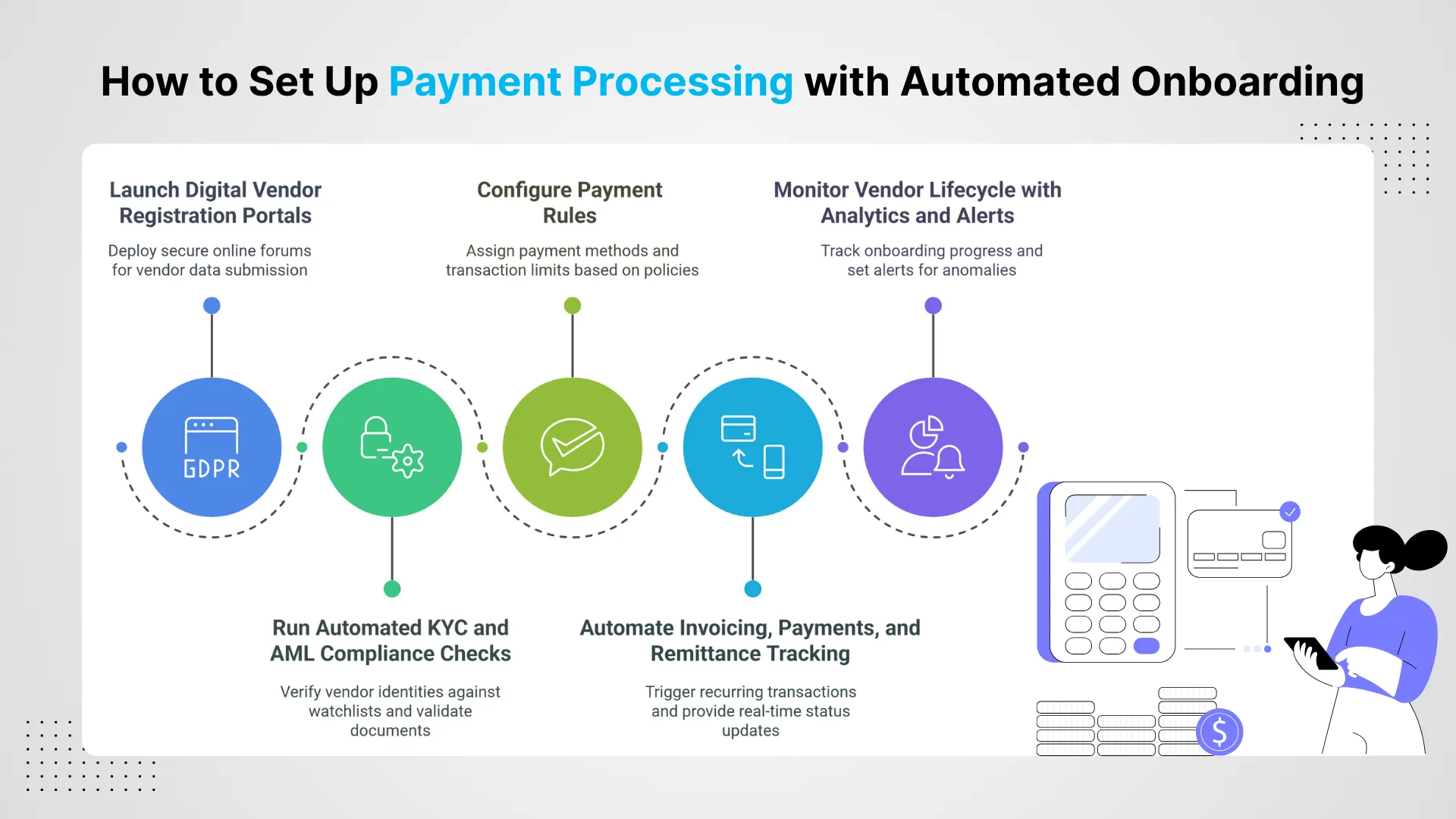
Automating vendor onboarding optimizes payment processing by removing manual data collection and validation. Instead of handling forms and spreadsheets, automated payment systems securely capture and verify vendor information through digital workflows. Below are the key steps to implement vendor payment automation:
Step 1: Launch Digital Vendor Registration Portals
Deploy secure online forums where vendors submit tax information, contact details, and banking credentials. The system captures this data in structured formats for direct use.
Step 2: Run Automated KYC and AML Compliance Checks
Verify vendor identities against government watchlists and perform real-time validation of submitted documents. The system flags mismatches or compliance issues automatically.
Step 3: Configure Payment Rules
Assign payment methods, currencies, transaction limits, and approval flows to each vendor based on predefined business policies. Automation ensures these rules are consistently applied.
Step 4: Automate Invoicing, Payments, and Remittance Tracking
Trigger recurring or scheduled transaction automation for approved vendors. The system handles invoice matching, payment execution, and real-time status updates without manual intervention.
Step 5: Monitor Vendor Lifecycle with Analytics and Alerts
Use integrated dashboards to track onboarding progress, compliance checks, and payment exceptions. Set alerts to flag anomalies or changes in vendor risk profiles.
Eager to discuss about your project ?
Share your project idea with us. Together, we’ll transform your vision into an exceptional digital product!
Automated payment processing is a way to transform how financial institutions manage vendor payments. By streamlining payment settlements with automation technology, banks reduce manual dependencies, enforce consistency, and transact quickly.
These systems not only improve speed but also contribute to improving accuracy, minimizing risks of duplication, delays, and data errors.
For growing financial institutions, the goal is not just to accelerate payment settlements with automated systems, but to adopt smarter, scalable ways of managing financial operations.
Payment automation uses software systems to automatically manage, execute, and track financial transactions without manual intervention, reducing errors and processing times significantly.
How does automated payment processing reduce errors?
Automated systems eliminate manual data entry mistakes by cross-verifying account numbers, payment amounts, and beneficiary details before processing any transaction through built-in validation rules.
What are the main benefits of payment automation for businesses?
Key benefits include faster settlement times, reduced processing costs, improved accuracy, enhanced cash flow visibility, better vendor relationships, and compliance with regulatory requirements automatically.
Can payment automation integrate with existing ERP systems?
Yes, most modern payment automation solutions offer API integrations with popular ERP platforms like SAP, Oracle, QuickBooks, and NetSuite for seamless data synchronization.
Is payment automation secure for handling sensitive financial data?
Payment automation systems use bank-level encryption, tokenization, multi-factor authentication, and comply with PCI DSS standards to ensure maximum security for all financial transactions.
What happens if automated payment processing fails or errors occur?
Modern systems include fail-safes, error alerts, automatic retry mechanisms, and manual override options to handle exceptions while maintaining detailed audit trails for troubleshooting.
How does payment automation handle compliance and regulatory requirements?
Automated systems maintain compliance through built-in regulatory controls, automated reporting, audit trails, anti-money laundering checks, and real-time monitoring of suspicious transaction patterns.
Can payment automation systems handle approval workflows and controls?
Yes, systems support customizable approval hierarchies, spending limits, multi-level authorizations, and automatic routing based on transaction amounts, vendor types, and company policies established.
What reporting and analytics capabilities do payment automation systems provide?
Comprehensive dashboards show transaction volumes, processing times, error rates, cost savings, vendor performance metrics, cash flow forecasts, and customizable reports for stakeholders.
How does payment automation affect relationships with banks and vendors?
Automation improves bank relationships through consistent transaction volumes and reduces vendor inquiries by ensuring timely, accurate payments with transparent tracking and communication.
How should you govern Power Platform without slowing delivery? Power Platform governance best practices give makers room to experiment without allowing an informal app or flow to drift into unsupported production use. The dividing line is promotion: once a solution is shared, handles sensitive data,
Introduction Custom power apps development is how Microsoft-stack organizations finally close the gap between what IT can build and what the business actually needs. If your team still routes approvals through email chains, tracks inventory in spreadsheets, or waits six months for developer time on
Introduction Power Automate vs Logic Apps is one of the most common architectural decisions Microsoft shops face in 2026, and the stakes are higher than they look. Both tools automate workflows inside the Microsoft stack, both connect to hundreds of services, and both claim to
“Quality assurance is often overlooked, but these guys take that very seriously. … their team of experienced, dedicated developers and highly skilled engineers quickly dissected and decomposed every problem and presented solutions and options that directly met my needs”
Erik BrownBusiness owner and software engineerClient review
★★★★★
“The supplier delivered the application on time and was responsive to our needs. He was also flexible, which allowed us to make changes on the fly.”
“I have had an excellent experience working with QServices. We have a highly collaborative relationship and I value them not just as contractors but as partners.”
Alex VanderElsClientClient review
★★★★★
“Sahil undertakes every project with a high degree of professionalism. His communication style is unmatched and he is always available to resolve issues or just discuss the project.”
Philmore J.ClientClient review
★★★★★
“Responsive, patient and professional. Consistent weekly attention to our project, and new ideas we hadn't asked for.”
Michael WilliamsonPresident and CEO, United Way of Southeast LouisianaGoodFirms
★★★★★
“I have been working with them on a project for a year now … They have been able to solve problems that come up with bugs or development and able to communicate well with me.”
Steven LewisClientClient review
★★★★★
“We had been working on the app for two years. QServices built it in two months.”
Brian WallerPresident, Technology Association of IowaGoodFirms
★★★★★
“All projects were delivered on time and were fully completed upon delivery.”
RBRaine Marie BuenvendiaSr. Support Specialist, Arc.DevClutch
★★★★★
“They had excellent quality. The hypercare they provided after the project went live is exceptional.”
KKKrish KishorePresident, Zero Hour ConsultantsClutch
QServices Inc. undertakes every project with a high degree of professionalism. Their communication style is unmatched and they are always available to resolve issues or just discuss the project.
Thank You
Your details has been submitted successfully. We will Contact you soon!


 In banks, payment errors often occur due to manual entry or filling incorrect details. Automated payment processing systems reduce these risks by adding accuracy, speed, and built-in control mechanisms. Here are several ways automation ensures error-free processes:










 Trustpilot
 G2
 Google