Many enterprise teams treat identity and access as if they are the same thing. They aren’t. Identity confirms who a user is. Access defines what that user is allowed to do. Assuming that an authenticated identity automatically deserves access is one of the most common—and costly organizational security mistakes.
Flexible work environments, remote access, and after-hours system use have made this problem worse. Even with identity and access management (IAM) programs in place, enterprises often grant too much access that later result into financial losses.
Gartner has repeatedly highlighted that breaches frequently occur not because identities are missing, but because access is poorly governed.
This blog discusses the major gaps in an organization’s IAM security and how correcting identity vs access management misunderstanding strengthens enterprise security.
Identity Management vs Access Management – The Core Difference
In most organizations, identity and access are often treated as the same thing, but they answer two very different questions. Teams often assume that once someone is verified, they can be trusted with everything related to their role. Which is not true.
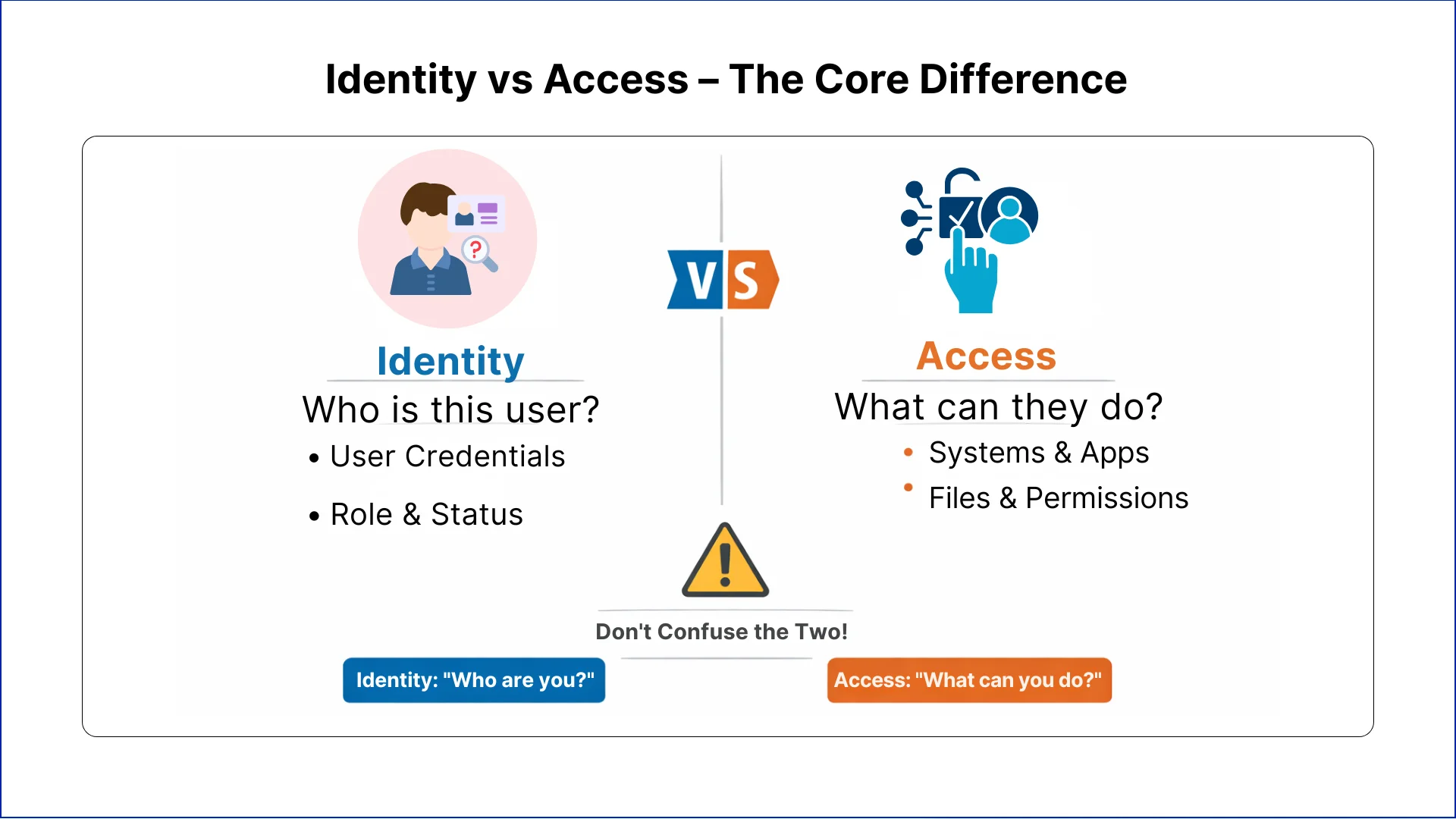
Identity answers the question: Who is this user? It confirms a person’s credentials, role, and status within the organization.
Access answers the question: What is this person allowed to do? It defines which systems, files, and functions the person can use.
Identity management security focuses on making sure the right people are correctly identified. Access management ensures they only do what they need to do. Confusing these two leads to errors that are often invisible until something goes wrong.
Let's Discuss Your Project
Get free Consultation and let us know your project idea to turn into an amazing digital product.
Six Major Blunders Enterprises Make with IAM Security
Even organizations with strong IAM programs often make simple mistakes. These mistakes are usually about processes, not technology.
Mistake 1: Giving Extra Access
To speed up onboarding or reduce internal requests, many teams grant broader access than necessary. The thinking is practical. It avoids delays and future approvals.
Over time, this practice creates users who can:
View systems they never use
Access data outside their responsibilities
Perform actions they were never meant to perform
IAM security suffers when access is given for convenience rather than actual need. What starts as a time-saving step becomes a long-term problem.
Mistake 2: Not Removing Access When Roles Change
Employees move between teams, get promoted, or take temporary assignments. Many enterprises add new access but forget to remove old permissions.
This leads to:
Users holding access to multiple departments
Old systems still available to employees who no longer need them
Higher risk if accounts are misused or accessed by attackers
Identity may remain correct, but access no longer reflects what the person should be able to do. This mismatch is one of the most persistent IAM mistakes enterprises make.
Mistake 3: Contractors Treated Like Employees
Temporary workers and contractors often receive the same access as permanent staff. When contracts end, accounts may remain active.
This allows:
Former contractors to continue accessing systems
Sensitive data to be exposed outside the organization
Compliance gaps that auditors notice
Treating temporary staff like permanent employees is one of the easiest ways IAM security fails.
Mistake 4: Trusting Roles Instead of Checking Access
Some teams assume that if a person has a senior position or long tenure, they can be trusted with broad access. This is common but risky.
The result is:
Users having permissions they do not need
Role changes not reflected in access
Accumulation of unnecessary permissions over time
Access should be based on actual responsibilities, not assumed from a job title.
Mistake 5: Access is Removed Late After Employee Exit
When employees leave, removing access is often delayed. Accounts may remain active for days or weeks because of slow processes.
This exposes the organization to:
Former employees accessing email or systems
Sensitive information being at risk
Audit and compliance issues
IAM compliance expects access to be removed immediately when someone leaves.
Mistake 6: IAM Seen as an IT-Only Responsibility
IAM is often owned only by IT. Business teams, HR, and security teams are frequently not involved.
This creates problems like:
Access decisions made without business context
Slow response to changes
Lack of accountability during audits
IAM works best when multiple teams share responsibility. Identity and access management is not only technical; it is operational.
How These Mistakes Affect Security and Compliance
When identity or access management are managed incorrectly, the consequences may not be immediately visible, but they build up over time.
Security Impact
Users retain permissions they don’t need, increasing internal risk
Old accounts remain active, giving attackers more targets
Breaches happen not because identities are missing, but because access is uncontrolled
Compliance Impact
Regulated industries require clear access control
Delays in revoking access or improper assignment trigger audit findings
Poor IAM security leads to remediation work, fines, or reputational risk
Treating identity and access as the same makes both security and compliance harder to manage.
Eager to discuss about your project ?
Share your project idea with us. Together, we’ll transform your vision into an exceptional digital product!
The Key to Effective IAM Security for Enterprise Teams
Effective IAM security comes from actively managing identity and access in a way that reflects actual work responsibilities. It is not about installing tools; it is about aligning access with real business needs.
1. Align Access with Real Responsibilities
Each user’s access should match their role. Employees should only have permissions for the systems and data they need. Granting extra access for convenience or future needs increases risk and creates hidden security problems. Access should change as responsibilities change, ensuring identity and access are always aligned.
2. Review Access Regularly
Access must be reviewed at regular intervals. These reviews ensure that permissions still match work responsibilities. Managers, system owners, and security teams should verify that access is appropriate and remove anything unnecessary. Regular reviews prevent access from accumulating over time, keeping IAM security effective.
3. Remove Access Immediately When Not Needed
When employees leave, change roles, or finish temporary assignments, access should be revoked right away. Delayed removal leaves systems exposed and increases the risk of unauthorized activity. Immediate removal simplifies compliance and keeps enterprise systems secure.
4. Handle Privileged Access Separately
High-level permissions require special attention. Administrative accounts should be granted only, when necessary, monitored regularly, and reviewed separately from standard accounts. Treating privileged access the same as regular access increases exposure and complicates audits.
5. Make IAM a Shared Responsibility
IAM security should involve IT, business leaders, HR, and security teams. Shared responsibility ensures that access decisions consider business context, role changes are captured correctly, and accountability is clear. Collaboration improves speed, accuracy, and compliance.
6. Support Zero Trust Practices
Zero trust assumes no one should have access by default. IAM security should check and approve access continuously, monitor changes, and prevent unnecessary permissions. Correctly managed IAM supports zero trust without slowing operations, giving organizations control over who can do what.
Conclusion
In regulated environments, simply knowing who someone is does not guarantee security. Identity management without proper access controls leaves organizations exposed to risks such as over-privileged accounts, insider threats, and compliance failures.
Teams must focus on both identity and access management, ensuring that users have the right permissions for their roles at all times.
When identity and access management is handled correctly, employees see only what they need, sensitive systems remain secure, and compliance requirements are consistently met. IAM security becomes a strength, not a risk, giving teams confidence that their organization is safe.
IAM is a security framework that verifies user identities and controls their system permissions. It ensures the right people access appropriate resources at the right time, protecting sensitive data through authentication and authorization controls.
Is identity management the same as access management?
No, they serve distinct functions. Identity management confirms who users are through authentication, while access management determines what they can do through authorization. Both components work together within IAM security frameworks.
What's the core difference between identity and access management?
Identity management validates user credentials and maintains user profiles. Access management enforces permissions based on roles and responsibilities. Identity answers “who are you” while access controls “what can you do.”
How do identity and access management work together?
Identity management authenticates users first, then access management applies authorization rules. This sequential process ensures verified identities receive appropriate permissions, creating layered security that prevents unauthorized actions even from authenticated users.
Do you need identity management without access management?
No, authentication alone creates security gaps. Verified identities without controlled permissions lead to over-privileged accounts and compliance failures. Effective IAM requires both components to enforce least privilege and protect enterprise resources.
What happens when former employees retain system access?
Delayed access revocation creates security vulnerabilities and compliance violations. Former employees can leak sensitive data, access confidential systems, or compromise accounts. Immediate deprovisioning upon termination prevents unauthorized access and audit findings.
How does privileged access management differ from IAM?
PAM specifically controls high-level administrative permissions requiring extra security measures like session recording and just-in-time access. IAM governs standard user permissions across the organization, while PAM adds specialized controls for elevated privileges.
Why do contractors need different access controls?
Contractors have temporary relationships requiring time-bound permissions and stricter monitoring. Unlike employees, their access should automatically expire with contract end dates, preventing persistent accounts that create compliance gaps and security risks.
What role does IAM play in zero trust security?
IAM enforces continuous verification and least privilege access central to zero trust architecture. It validates every access request regardless of network location, monitors behaviour patterns, and revokes permissions dynamically based on risk signals.
How often should organizations review user access?
Quarterly reviews catch permission creep before it becomes problematic. High-risk accounts need monthly audits, while privileged access requires continuous monitoring. Regular reviews ensure permissions align with current responsibilities and prevent unauthorized access accumulation.
Business intelligence consulting services should give a mid-market company a governed way to make decisions. Attractive dashboards are only the visible part. The useful outcome is a system in which source data, metric definitions, access, releases, ownership, and support still work after the consultants leave.
In a Microsoft Solutions Partner vs Microsoft Partner comparison, the difference is validation. A company can participate in the Microsoft AI Cloud Partner Program without holding a customer-facing Solutions Partner designation. A designated Solutions Partner has met Microsoft’s current threshold in a specific solution pathway: at least 70 out of 100 partner capability points, with more than zero points in every required metric, based on performance, skilling, and customer success data recorded in Partner Center.
How do you build a legacy application modernization strategy for Azure? A legacy application modernization strategy assigns the right treatment to each workload, then sequences the work around business value, technical evidence, and operational risk. For Azure, that means choosing among retire, retain, rehost, replatform,
QServices Inc. undertakes every project with a high degree of professionalism. Their communication style is unmatched and they are always available to resolve issues or just discuss the project.
Turn the Microsoft Licenses
You Already Own Into an AI Workplace
Join our live webinar on Sept 24 and see five ways to automate meetings, approvals, and