Why do enterprises still choose Azure IaaS when platform and serverless services are everywhere?
The reason is simple: control and flexibility still matter. As organizations adopt Azure cloud services, many begin their journey with Azure Infrastructure as a Service to modernize infrastructure without losing visibility or operational ownership. For beginners, Azure cloud computing through IaaS offers a familiar path to move workloads into the cloud while avoiding major architectural changes.
A common industry saying goes, “The cloud does not remove complexity, it moves it.” With Azure IaaS, teams gain the ability to deploy Azure virtual machines, configure networks, and manage storage in a way that closely mirrors on-premise environments. This makes Microsoft Azure IaaS especially attractive for legacy applications, regulated workloads, and hybrid cloud strategies.
Market trends reinforce this approach. Most enterprises still adopt cloud infrastructure using IaaS before transitioning to higher-level services, proving that Azure infrastructure as a service remains a practical starting point rather than an outdated model. Understanding what is Azure IaaS and how it fits into modern Azure cloud infrastructure is essential for beginners who want to build scalable and secure environments.
This guide explains What is Infrastructure as a Service in Azure, how Azure IaaS works, and the key decisions beginners must get right when designing Azure cloud infrastructure for beginners.
Azure IaaS Overview and Architecture
How does Azure actually organize infrastructure once a virtual machine is deployed?
In Azure infrastructure as a service, infrastructure is not created in isolation. Every workload runs inside a controlled environment that combines compute, storage, and networking as a single operating model. This design is why Azure cloud services scale reliably even when workloads grow or change unexpectedly.
A common cloud saying captures this well: “Infrastructure fails silently when architecture is an afterthought.” In Azure IaaS architecture is the first operational decision, not a later optimization.
Core Operational Layers in Azure IaaS
Compute Operations with Azure Virtual Machines
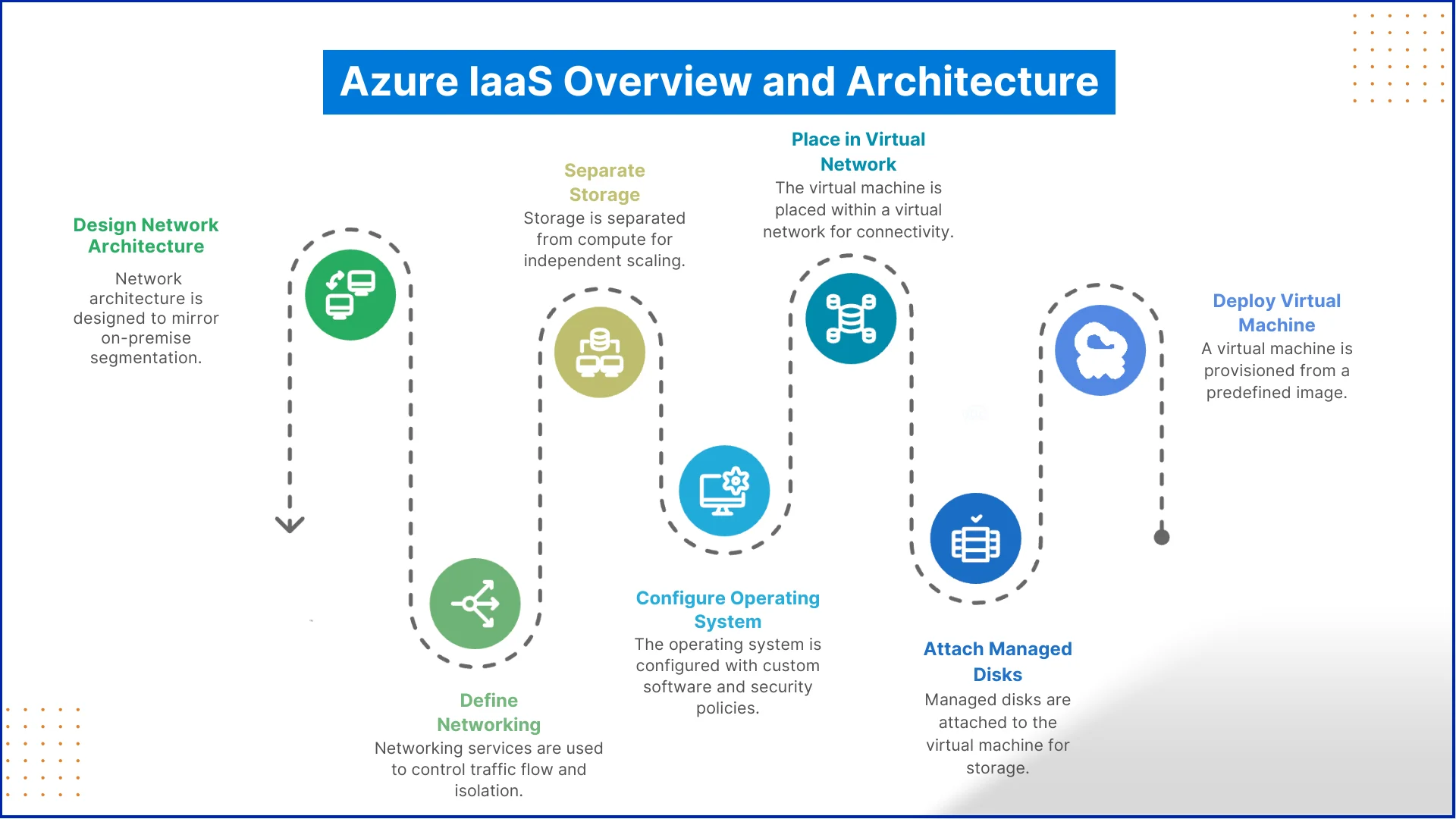
At the compute level, Azure compute services deliver processing power through Azure virtual machines. These VMs are provisioned from predefined images, attached to managed disks, and placed inside a virtual network by default. This setup allows teams to control operating systems, install custom software, and apply security policies at the OS level, which is why Microsoft Azure IaaS is widely used for legacy applications and custom enterprise systems.
For example, organizations migrating on-premise ERP systems often start by deploying identical VM configurations in Azure to maintain application stability while gaining cloud scalability.
Storage Operations in Azure IaaS
Storage in Azure IaaS services is deliberately separated from compute. Azure storage services provide managed disks for performance-sensitive workloads and scalable storage accounts for backups, logs, and application data. This separation allows operations teams to scale storage capacity or performance independently, without redeploying virtual machines.
A practical example is a transactional application that requires high disk performance during business hours but only needs low-cost storage for nightly backups. Azure enables this balance without architectural complexity.
Networking Operations in Azure Cloud Infrastructure
Azure networking services define how workloads communicate internally and externally. Virtual networks, subnets, and security rules control traffic flow and isolation. In real environments, networking decisions often determine whether infrastructure is secure or exposed.
Enterprises using Azure infrastructure as a service typically design networks that mirror on-premise segmentation, ensuring smooth hybrid connectivity and predictable access control. This approach reduces risk during migration and simplifies operational management.
Understanding this operational model answers the practical question of how Azure IaaS works. For beginners exploring what is Azure IaaS, this level of insight is enough to design stable environments while avoiding overengineering early deployments. It also sets the foundation for evaluating the full Azure IaaS services list with confidence
Let's Discuss Your Project
Get free Consultation and let us know your project idea to turn into an amazing digital product.
Which services truly form the backbone of infrastructure in Azure IaaS environments?
In practical deployments, Azure IaaS services are built on a focused set of foundational capabilities rather than an overwhelming list of tools. These services manage compute, storage, and networking and together enable resilient, scalable Azure cloud infrastructure. Understanding these core components is far more valuable than knowing every available Azure cloud services offering.
Azure Compute Services
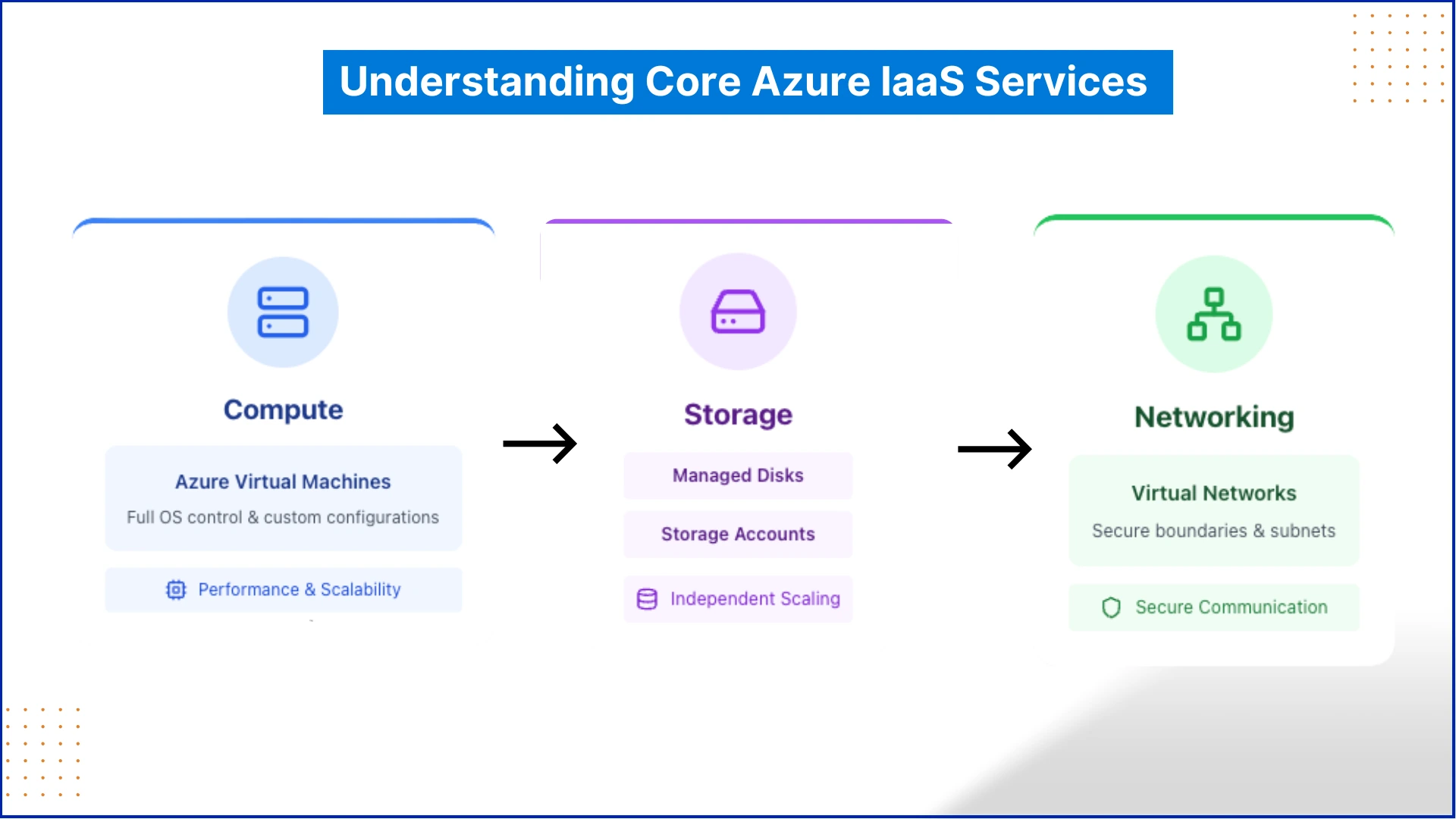
Azure Virtual Machines are the main building block of Azure IaaS, functioning as servers in the cloud. These virtual machines provide organizations with complete control over operating systems, configurations, and installed applications. This level of control is a key reason Microsoft Azure IaaS remains the preferred choice for custom-built applications and legacy enterprise workloads.
From an operational standpoint, compute decisions directly affect performance, scalability, and cost. Selecting the right VM size and configuration early helps manage Azure Virtual Machine pricing while ensuring workloads remain stable as demand grows.
Azure Storage Services
Azure storage services underpin both infrastructure and application data needs. Managed disks support operating systems and active workloads, while storage accounts are used for backups, logs, and unstructured data. This separation allows storage capacity and performance to scale independently, which is a core advantage of Azure cloud infrastructure.
For instance, high-performance disks can support production workloads, while cost-efficient storage tiers handle archival and backup data without impacting performance.
Azure Networking Services
Azure networking services define how resources communicate securely across the cloud. Virtual networks, subnets, and access controls establish secure boundaries for workloads operating under Azure Infrastructure as a Service.
Together, these components represent the most commonly used Azure IaaS services list. Understanding how compute, storage, and networking function as a unified system helps beginners grasp how Azure IaaS works and design reliable Azure cloud infrastructure for beginners.
How Azure IaaS Works in Real Scenarios
Once infrastructure is deployed, Azure IaaS shifts from a setup exercise to an operational platform. Virtual machines run workloads, storage supports data growth, and networks control access and connectivity. This is where Azure cloud services begin delivering value through consistency, scalability, and control within Azure cloud computing.
Running Existing Business Applications on Azure IaaS
A common real-world use of Azure IaaS is hosting existing business applications without redesigning them. Organizations deploy Azure Virtual Machines that replicate on-premise servers, allowing applications to run as expected while benefiting from cloud availability.
For example, internal finance systems or line-of-business applications are often moved to Azure in this way. This pattern represents one of the most practical Azure IaaS examples, especially during early cloud adoption.
Creating Flexible Environments for Development Teams
Azure cloud infrastructure is frequently used to support development and testing workflows. Teams provision infrastructure when required and release it once testing is complete. This operational flexibility is a core reason Azure IaaS services are preferred for non-production workloads.
By controlling usage time and capacity, organizations gain better visibility into Azure Virtual Machine pricing and reduce unnecessary spending.
Maintaining Control in Hybrid and Regulated Environments
In scenarios where compliance and governance matter, Microsoft Azure IaaS enables organizations to retain control while extending infrastructure to the cloud. Workloads can remain isolated, access tightly managed, and connectivity maintained with on-premise systems.
This approach is common in sectors such as finance and healthcare, where Azure Infrastructure as a Service supports modernization without compromising regulatory requirements.
Eager to discuss about your project ?
Share your project idea with us. Together, we’ll transform your vision into an exceptional digital product!
When starting with Azure, beginners often come across three primary cloud models: Infrastructure as a Service, Platform as a Service, and Software as a Service. Understanding these models provides context for how Azure delivers services and where Azure IaaS fits within the cloud ecosystem. Each model operates at a different layer, from full infrastructure control to fully managed applications, and together they form the foundation of Azure cloud computing.
Azure IaaS
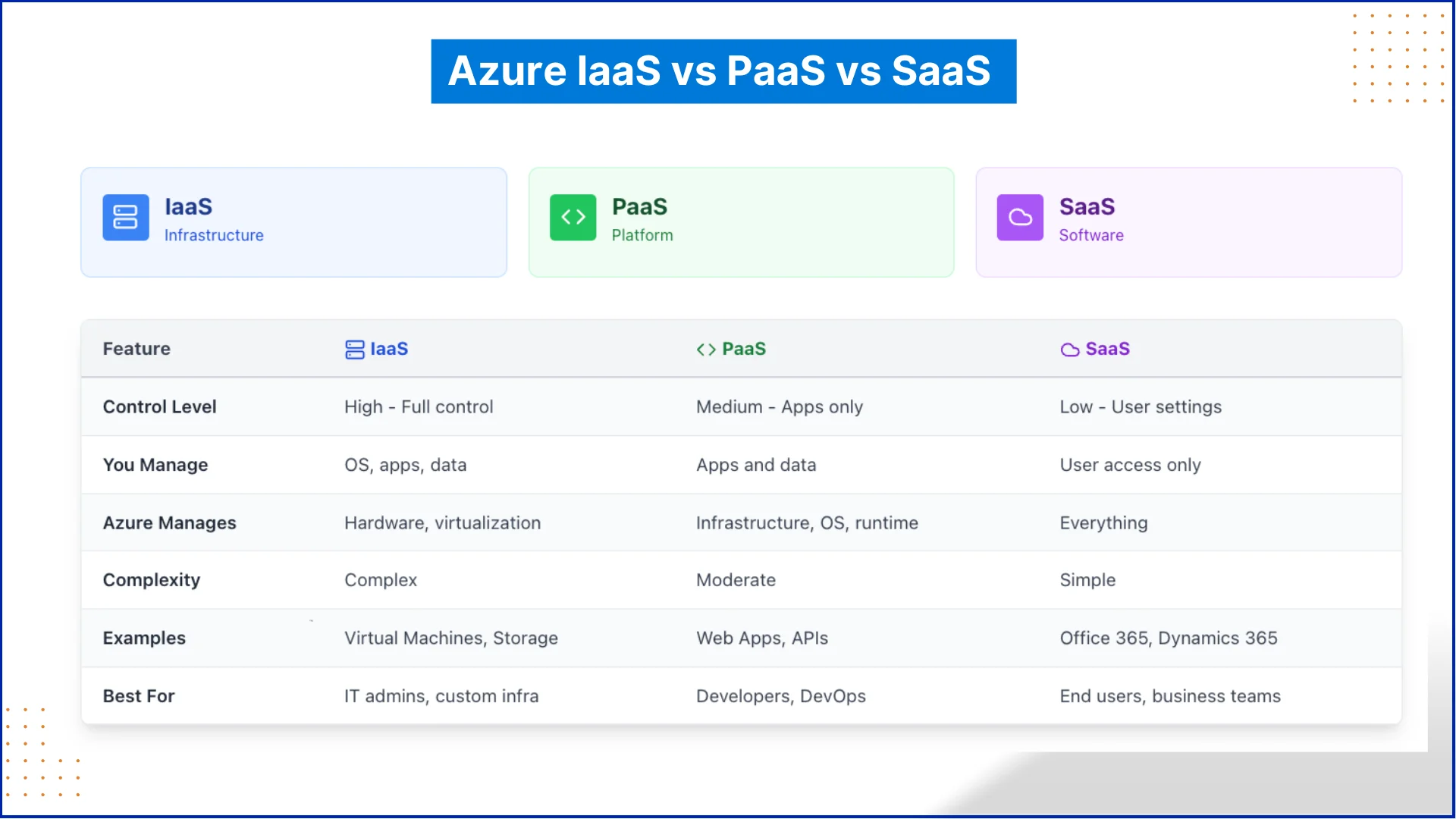
Azure IaaS offers virtualized computing resources such as Azure Virtual Machines, storage accounts, and networking components on demand. Users are responsible for managing operating systems, installed software, and application configurations, while Azure handles the underlying hardware, data centers, and physical security. This model allows beginners to deploy workloads in the cloud with a structure similar to on-premise environments, making it ideal for learning the fundamentals of cloud operations.
Azure PaaS
Azure PaaS provides a managed environment for developing, testing, and deploying applications. The platform handles infrastructure, runtime, middleware, and operating system updates, while users focus on building and managing their applications. PaaS abstracts many of the operational complexities of IaaS, allowing developers to work directly on code and application logic without worrying about server management. This layer sits above Azure IaaS in the cloud stack.
Azure SaaS
Azure SaaS delivers fully managed applications over the cloud that users can access directly through a web interface or API. In this model, Azure manages the infrastructure, platform, and the application itself. Users only interact with the software, without handling updates, patching, or scaling. SaaS represents the highest level of abstraction in the cloud, providing ready-to-use solutions such as productivity tools, collaboration platforms, and enterprise applications.
How the Models Work Together
Azure IaaS, PaaS, and SaaS complement each other. IaaS provides the foundational infrastructure for virtual machines, storage, and networking. PaaS builds on that foundation to deliver managed development environments. SaaS sits on top, offering complete software solutions that require no infrastructure management. Understanding Azure IaaS vs PaaS vs SaaS gives beginners a clear picture of the cloud stack, helping them navigate Azure services effectively and see where their workloads fit.
Conclusion
Starting with Azure IaaS gives beginners a hands-on way to understand cloud infrastructure. Users can deploy real workloads using virtual machines, storage, and networking. This experience helps them see how enterprise-grade cloud services operate in practice. Learning Azure IaaS also makes it easier to understand related services like PaaS and SaaS. From small projects to larger migrations, Azure IaaS provides flexibility and control. It also ensures scalability, allowing organizations to modernize applications and run workloads efficiently in the cloud.
Azure IaaS (Infrastructure as a Service) is a cloud computing model that provides virtualized infrastructure such as Azure Virtual Machines, storage, and networking. Users manage operating systems and applications, while Microsoft handles the underlying hardware.
How does Azure IaaS work?
Azure IaaS works by delivering compute, storage, and networking resources on demand. Users can deploy virtual machines, attach storage, and configure networks without managing physical servers.
What are the main services included in Azure IaaS?
The core services include Azure Virtual Machines for compute, Azure Storage Services for data storage, and Azure Networking Services for secure connectivity.
What is the difference between Azure IaaS, PaaS, and SaaS?
Azure IaaS provides infrastructure, PaaS offers managed platforms for application development, and SaaS delivers fully managed software. Each model operates at a different level of cloud abstraction.
Can beginners use Azure IaaS effectively?
Yes, beginners can start with Azure IaaS by deploying virtual machines and storage services. Hands-on practice helps users understand scaling, networking, and cloud workload management.
What are some common use cases of Azure IaaS?
Common use cases include migrating legacy applications to the cloud, creating development and testing environments, running hybrid workloads, and hosting enterprise applications.
When PDF text extraction drops the spaces between words, AI agents can’t find facts that are right there. How we found it in Azure AI Foundry and fixed it.
Pint AE explained for UAE finance teams with one sample invoice: see which fields come from your ERP, which go missing, and how to test before go-live.
Days sales outstanding explained for CFOs: the formula, worked examples, named industry benchmarks, and why seasonal sales distort DSO. See what moves it.
QServices Inc. undertakes every project with a high degree of professionalism. Their communication style is unmatched and they are always available to resolve issues or just discuss the project.
Turn the Microsoft Licenses
You Already Own Into an AI Workplace
Join our live webinar on Sept 24 and see five ways to automate meetings, approvals, and