Blazor vs React is one of the most actively debated front-end decisions on .NET projects right now, and if you're planning an enterprise build or a modernization initiative, you've probably heard strong opinions on both sides.
Here's the honest answer: neither framework is universally better. The right choice depends on your team's existing skills, your deployment environment, your performance requirements, and how much of the Microsoft stack you're already committed to. This post walks through each scenario clearly so you can make a call based on technical fit rather than framework loyalty.
In This Article, You'll Learn
What Is Blazor? A Quick Orientation for Enterprise Teams
Blazor vs React: Where the Architecture Splits
When Blazor Wins for .NET Enterprise Applications
When React Is the Right Choice for Enterprise Apps
.NET Application Modernization: Where Blazor Fits In
Eager to discuss about your project?
Share your project idea with us. Together, we’ll transform your vision into an exceptional digital product!
What Is Blazor? A Quick Orientation for Enterprise Teams
Blazor is Microsoft's framework for building interactive web UIs using C# instead of JavaScript. It ships in two primary modes that work very differently under the hood, and mixing them up is one of the most common sources of confusion in early project planning.
Blazor Server vs Blazor WebAssembly
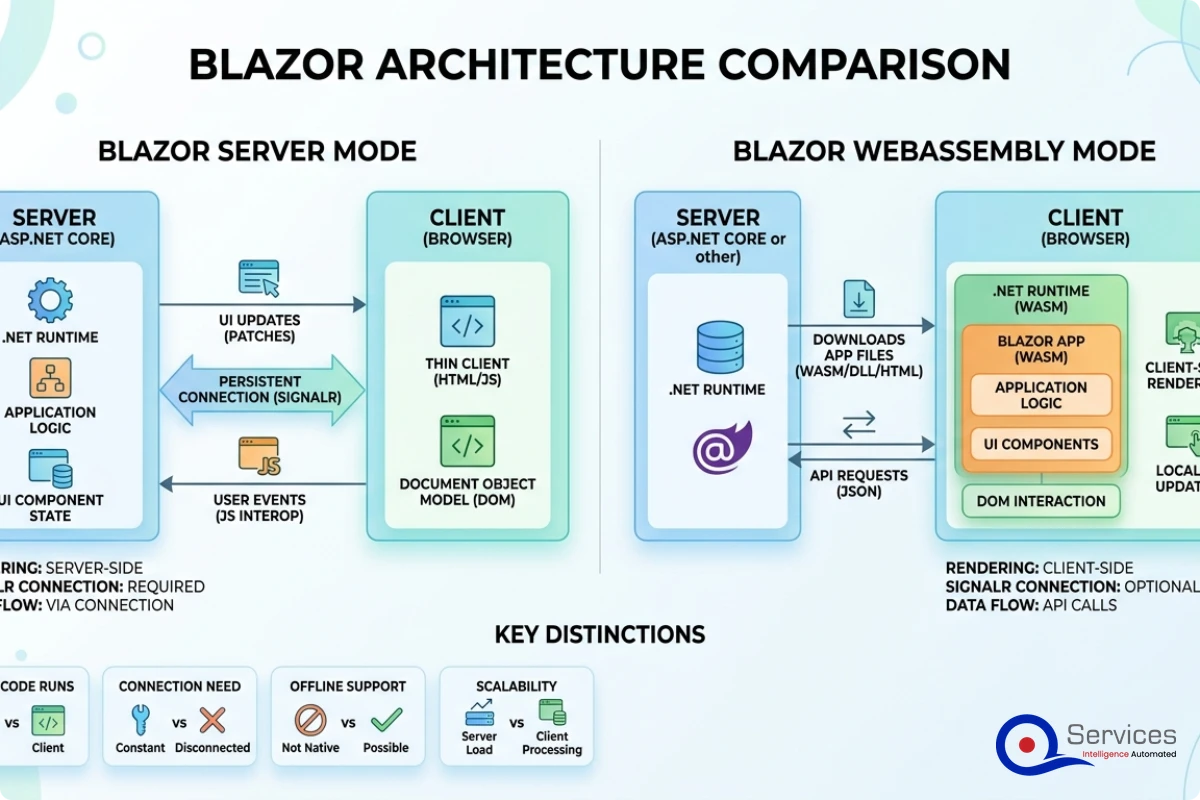
Blazor Server runs your C# component code on the server. Every user interaction triggers a real-time update over a SignalR connection, and only the DOM diff gets sent to the browser. This means fast initial load times, no WASM download, and full access to server-side resources. The catch is latency: every click requires a round-trip to the server.
Blazor WebAssembly (WASM) downloads your compiled .NET runtime and application code to the browser and runs it locally via WebAssembly. After the initial load, which can be several megabytes, the app runs entirely client-side with no server dependency for UI interactions. First-load performance is slower than a standard JavaScript SPA, though Ahead-of-Time (AOT) compilation in .NET 8 and .NET 9 has improved runtime performance considerably.
There's also Blazor Web App, the unified rendering model introduced in .NET 8, which lets you mix rendering modes per component. This is where Microsoft's roadmap is heading, and it's worth understanding before you commit to an architecture.
What .NET Developers Get Out of the Box
The appeal for enterprise teams running on the Microsoft stack is straightforward. Blazor lets C# developers write front-end code without switching to TypeScript or learning a different component model. Your asp.net development services team gets:
Shared models between client and server (no separate DTOs to maintain in two places)
Full access to the NuGet package ecosystem
Native integration with ASP.NET Core middleware, authentication, and authorization
Single-language debugging across the full stack in Visual Studio
For organizations where .NET development is the primary skill set, that's not a minor convenience. It's a meaningful reduction in context-switching overhead and a smaller surface area for bugs introduced at the front-end/back-end boundary.
Blazor vs React: Where the Architecture Splits
React is a JavaScript library for building component-based UIs. It's been the dominant choice for enterprise front-end development since roughly 2016, and it has a large ecosystem built around it.
The core architectural difference is where logic executes and in what language. React runs JavaScript in the browser. Blazor Server runs C# on the server. Blazor WASM runs C# compiled to WebAssembly in the browser. Neither is strictly better; they're different bets on where your team's expertise lives and where your infrastructure constraints allow.
Component Model and State Management
Both frameworks use a component model with parameters flowing down and events flowing up. The patterns are similar enough that a React developer can read Blazor components quickly, and vice versa.
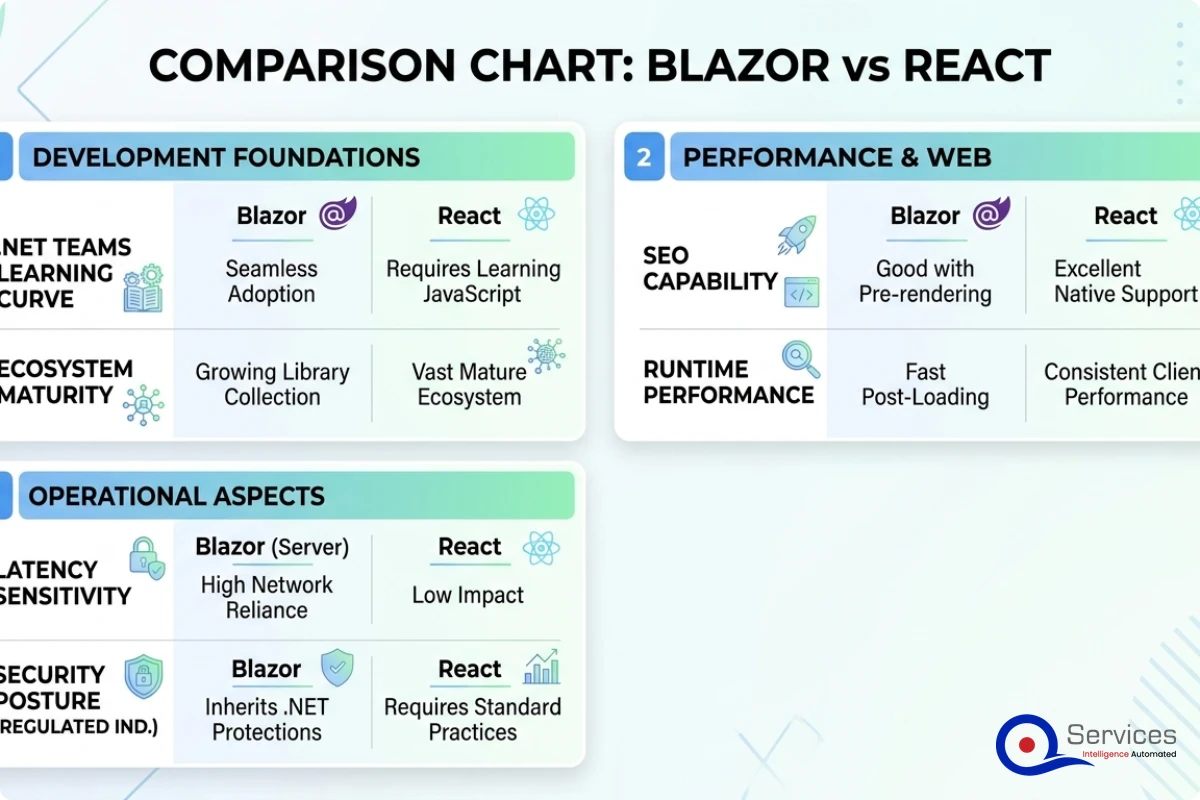
Where they diverge is state management at scale. React's ecosystem offers mature, battle-tested options: Redux, Zustand, Jotai, React Query for server state. Blazor has built-in Cascading Parameters and dependency-injected services, plus community libraries like Fluxor for Flux-style patterns. The React ecosystem is simply larger for complex state scenarios.
That said, most enterprise internal applications don't need sophisticated global state management. Form-heavy workflow tools and admin portals work fine with Blazor's simpler model, and they're often faster to build with it.
Performance Benchmarks Worth Knowing
Blazer Server's latency is one performance constraint you can't engineer around at the application layer. If your users are geographically distributed or on unstable networks, every interaction requiring a server round-trip will feel sluggish at 200ms or more. We've seen Blazor Server applications become noticeably slow for remote workers in high-latency regions. That's not a hypothetical.
Blazer WASM's first-load time is the other constraint. The initial payload can be 5-15MB depending on your dependencies. For internal applications on fast corporate networks, this is manageable. For public-facing apps where users arrive via organic search, it's a real problem.
React applications, bundled and served via CDN, have neither constraint.
When Blazor Wins for .NET Enterprise Applications
There are specific scenarios where Blazor is the objectively better choice, and identifying them saves teams from decisions based on trend-chasing rather than technical fit.
Internal Business Applications and Admin Portals
Blazor is strong when the application is internal, network latency is acceptable, and your organization runs as a dotnet development company or has a .NET-heavy engineering team. Admin dashboards, internal workflow tools, case management systems, and ERP extensions are Blazor's natural home.
The sealed-network argument matters here. Enterprise internal apps often run on corporate LANs or VPNs where round-trip latency is under 20ms. Blazor Server's latency constraint essentially disappears in those conditions.
If you're extending existing ASP.NET Core applications or building portals alongside existing .NET APIs, the integration story is smoother with Blazor. Your asp.net development services team doesn't need a context switch. The authentication middleware, Entity Framework models, and service layer are reused directly in the Blazor components, rather than being reconstructed as a separate API consumed by a JavaScript front-end.
Teams Already Deep in the .NET Ecosystem
The skill argument is real and consistently underweighted in architecture discussions. If your development team consists primarily of C# developers who have used React only occasionally, building a large React front-end means either a significant training investment or bringing in front-end specialists at additional cost.
Blazer development services delivered by an experienced .NET team will ship faster and with fewer bugs than React applications built by C# developers learning TypeScript on the job. The converse is equally true: experienced React developers forced onto Blazor will be slower and more frustrated.
The right technical answer is the one that matches your actual team, not an idealized team.
In healthcare and banking, where server-side security controls matter more than UI flexibility, Blazor Server has structural advantages. Sensitive data never needs to travel to the client. Authentication and authorization live entirely server-side. There's no client-side JavaScript dependency injection vulnerability surface.
When React Is the Right Choice for Enterprise Apps
React has genuine advantages that Blazor can't replicate without significant workarounds.
Public-Facing Applications with SEO Requirements
React with Next.js is better suited for public-facing applications where SEO matters. Blazor WASM doesn't produce pre-rendered HTML that search crawlers can efficiently index. Blazor Server does render server-side HTML, but the meta tag management, SSR configuration, and CDN edge rendering story is more mature in the Next.js ecosystem.
For a customer portal with public content, a SaaS marketing website, or any application where organic search drives the business model, React with Next.js is the practical choice. The SEO tooling ecosystem alone is a meaningful differentiator.
Large Multi-Disciplinary Teams
In enterprise application development at scale, you often have dedicated front-end designers, UX engineers, and back-end developers working on the same product. The React developer market is significantly larger than the Blazor developer market, which matters when you're hiring.
React's ecosystem of UI component libraries (Material UI, Ant Design, Chakra UI, Radix) is also more mature for design-systems integration. If your design team produces Figma components that need to become production UI, there are more React tooling options bridging that gap efficiently.
.NET Application Modernization: Where Blazor Fits In
The front-end framework question frequently surfaces in the context of legacy modernization rather than greenfield development. If you're running .NET Framework 4.x applications and planning a move to .NET 8 or .NET 9, Blazor often becomes part of the conversation.
The Strangler Fig Approach to .NET Framework Migration
Legacy .NET Framework modernization uses the strangler fig pattern to incrementally replace components without a full rewrite. Rather than a big-bang migration that freezes product development for 18 months, you identify discrete modules, rewrite them on the modern stack, and route traffic to the new version while the legacy system continues handling everything else.
In practice, this looks like extracting a specific workflow (say, order entry) into a new Blazor module served from a .NET 8 API, while your legacy ASP.NET Web Forms application still handles accounts and reporting. Over 12-18 months, you replace the old system piece by piece. Legacy app modernization handled this way typically delivers usable improvements to end users within the first 60-90 days, which is a meaningful difference for stakeholder buy-in.
This approach pairs naturally with .net microservices consulting engagements where the goal is to decouple a monolith rather than replace it wholesale. Azure API Management plays a useful routing role here, providing a single entry point while traffic progressively shifts between old and new services.
Should You Rewrite or Modernize?
The answer is almost always "modernize incrementally, unless the existing code is genuinely unsalvageable."
In our client engagements, a full rewrite of a mature enterprise application often takes considerably longer than initial estimates and introduces regressions in edge cases the old system handled implicitly. The root causes of missed digital transformation deadlines aren't usually in technology selection. They're in scope expansion, organizational change management, and underestimating existing system complexity.
Incremental .net application modernization delivers business value continuously, which matters more to stakeholders than a complete rewrite delivered all at once in two years.
.NET 9 Migration Considerations
.NET 9 migration from .NET Framework isn't always straightforward. The things that break most often:
Web Forms and ASMX services: No equivalent in .NET Core; these require rewrites or REST API wrappers
Custom HttpModules and HttpHandlers: Replace with ASP.NET Core middleware
WCF service references: Replace with CoreWCF or REST/gRPC APIs
Threading patterns: Code relying on older synchronization context behaviors may behave differently in the new runtime
Each of these is solvable, but they require explicit planning. Teams that underestimate this surface area are the ones that hit .net 9 migration cost overruns at the worst possible time: mid-project when the legacy system is partially decommissioned.
How to Evaluate Front-End Choices During a .NET Modernization
Before committing to either framework, a structured evaluation process prevents expensive rework. We surface these constraints during the scoping phase, using the approach described in our 5-Day Blueprint Sprint, before architecture decisions are locked in.
The Decision Checklist
Work through these questions honestly before choosing:
Team skills:
What percentage of your developers are comfortable with TypeScript and the React ecosystem?
How many hours per week can you realistically dedicate to front-end skill development during the project?
Deployment environment:
Is this an internal application on a corporate LAN, or public-facing to general internet users?
What is the expected round-trip latency between your servers and 90% of your users?
SEO requirements:
Does organic search matter to this application's success?
Will content be indexed by search crawlers?
Long-term maintainability:
Who will own this application after initial delivery, and what is their technical background?
Is this a role you'll hire for, and which skill set is more available in your market?
Integration surface:
How tightly does this UI need to integrate with existing .NET services?
Are you building green-field or extending an existing ASP.NET application?
If four or more answers point clearly toward React, go React. If four or more point toward Blazor, go Blazor. If it's split, team skills is the tiebreaker. That's the practical heuristic, not the theoretically optimal one.
The Real Costs of Enterprise Application Development
Cost is where teams often carry unrealistic expectations, regardless of framework. Working with a custom software development company on either a Blazor or React project carries similar base cost drivers, but there are framework-specific factors worth understanding before you budget.
According to Microsoft's official Blazor documentation, deployment and operational complexity varies significantly between Blazor Server (which requires persistent connections and potential backplane infrastructure at scale) and Blazor WASM (which can be deployed as static files on any CDN). That operational difference translates directly to infrastructure cost as usage grows.
What Drives Cost in a Blazor Project
Senior .NET developer rates tend to be higher than mid-level JavaScript developer rates in most markets, though productivity gains on .NET-native teams often offset this
Blazor's component library ecosystem is less mature, so teams may need to build custom components that are available off-the-shelf in React
Blazor Server at scale requires sticky sessions or a distributed backplane (Redis or Azure SignalR Service), adding operational overhead and hosting cost
Counter-factor: Faster time-to-first-feature for .NET teams because there's no language context switch between front-end and back-end work
For enterprise application development projects where the client team is .NET-native, Blazor development services engagements typically run 15-25% faster for internal tools specifically because the same developers own the full stack.
Key Insight For enterprise application development projects where the client team is .NET-native, Blazor development services engagements typically run 15-25% faster for internal tools specifically because the same developers own the full stack.
What Drives Cost in a React Project
Larger talent pool means more competitive developer rates, particularly for mid-level work
Mature component ecosystem reduces custom UI development time for common patterns
Additional TypeScript overhead for .NET-only teams unfamiliar with the JavaScript build toolchain
Separate front-end and back-end codebases require more coordination and can produce API contract mismatches that are expensive to debug late in delivery
In our experience, the framework choice rarely accounts for more than 15-20% of total project cost variance. Team fit, scope clarity, and delivery governance explain the rest. If you're evaluating CI/CD tooling alongside your framework decision, that often has more practical impact on delivery speed than the front-end framework itself. Our breakdown of Azure DevOps vs GitHub Actions covers that trade-off in detail.
Key Insight In our experience, the framework choice rarely accounts for more than 15-20% of total project cost variance.
Key Takeaways
Blazor is Microsoft's framework for building interactive web UIs using C# instead of JavaScript.
React is a JavaScript library for building component-based UIs.
There are specific scenarios where Blazor is the objectively better choice, and identifying them saves teams from decisions based on trend-chasing rather than technical fit.
React has genuine advantages that Blazor can't replicate without significant workarounds.
The front-end framework question frequently surfaces in the context of legacy modernization rather than greenfield development.
Conclusion
The blazor vs react decision doesn't have a universal winner. Blazor earns its place in .NET-heavy organizations building internal tools, regulated-industry applications, and extensions to existing ASP.NET systems. React earns its place when SEO matters, when teams are JavaScript-fluent, or when the application needs a broad ecosystem of mature UI components.
For most enterprise teams on the Microsoft stack, the split is practical: Blazor for internal applications, React with Next.js for public-facing products. Legacy app modernization almost always benefits from the strangler fig approach regardless of which front-end you choose, since back-end architecture decisions matter more than the UI layer in those projects.
QServices specializes in .NET modernization with Human-in-the-Loop governance for enterprise applications. Whether you need a dotnet development company for a new Blazor internal platform or .net microservices consulting to incrementally decouple a .NET Framework monolith, we structure delivery with transparent checkpoints at every stage. Reach out to scope your project and we'll give you a straight assessment of which path makes sense for your specific context.
Co-Founder and CTO, QServices IT Solutions Pvt Ltd
Rohit Dabra is the Co-Founder and Chief Technology Officer at QServices, a software development company focused on building practical digital solutions for businesses. At QServices, Rohit works closely with startups and growing businesses to design and develop web platforms, mobile applications, and scalable cloud systems. He is particularly interested in automation and artificial intelligence, building systems that automate routine tasks for teams and organizations.
Neither is universally better. Blazor is the stronger choice for .NET-native teams building internal business applications, admin portals, or extending existing ASP.NET systems, especially in regulated industries like healthcare and banking. React is better suited for public-facing applications where SEO matters, larger multi-disciplinary teams, and projects that need a mature component library ecosystem. Team skills and deployment environment are the two most important tiebreakers.
Blazor is Microsoft’s framework for building web UIs in C# instead of JavaScript. It ships as Blazor Server (renders on server via SignalR, fast initial load, latency-sensitive) and Blazor WebAssembly (runs C# in the browser via WebAssembly, no server dependency after load). You should use it if your team is .NET-native, your application is internal or runs on a low-latency network, and you want to share code between front-end and back-end without a context switch to TypeScript.
In most cases, modernize incrementally rather than rewrite. A full rewrite typically takes 2-3x longer than estimated and introduces regressions in edge cases the original system handled implicitly. The strangler fig pattern, where you replace discrete modules one at a time while the legacy system keeps running, delivers usable improvements within 60-90 days and reduces organizational risk. A rewrite only makes sense if the existing codebase is structurally unsalvageable or contains no reusable business logic.
The strangler fig pattern is an incremental migration strategy where you replace individual components of a legacy system one at a time, routing traffic to the new version while the old system handles everything else. Over time, the new system grows and the old one shrinks until it can be decommissioned entirely. For .NET Framework applications, this typically means extracting specific workflows into .NET 8 or .NET 9 modules with modern APIs, while the legacy ASP.NET Web Forms or MVC application continues running in parallel.
Start by auditing your existing application for components that have no direct .NET Core equivalent: Web Forms, ASMX services, WCF references, and custom HttpModules. These require rewrites or wrappers rather than straight migration. For the remaining application code, use the .NET Upgrade Assistant to identify breaking changes and API surface gaps. Apply the strangler fig pattern to migrate module by module rather than attempting a big-bang migration. Budget explicitly for threading model changes and synchronization context differences, which are a common source of late-stage surprises.
Enterprise application development costs vary widely based on scope, team composition, and framework choice. Blazor projects with .NET-native teams tend to run 15-25% faster for internal tools because there is no front-end/back-end skill split. React projects benefit from a larger talent pool and mature component libraries for public-facing work. Across both, the framework rarely accounts for more than 15-20% of total cost variance. Team fit, scope clarity, and delivery governance have a larger impact on final cost than the technology stack.
For most mid-market organizations on .NET, start with a well-structured modular monolith and extract services only when you have a clear scaling or team-ownership reason to do so. Microservices add real operational complexity: distributed tracing, network latency between services, independent deployment pipelines, and service discovery. The strangler fig approach to legacy modernization often produces a practical hybrid: a monolith with some extracted services where scale or team boundaries justified the split. .NET microservices consulting engagements typically begin with an architecture audit to determine which boundaries are worth drawing before writing any new services.
When PDF text extraction drops the spaces between words, AI agents can’t find facts that are right there. How we found it in Azure AI Foundry and fixed it.
Pint AE explained for UAE finance teams with one sample invoice: see which fields come from your ERP, which go missing, and how to test before go-live.
Days sales outstanding explained for CFOs: the formula, worked examples, named industry benchmarks, and why seasonal sales distort DSO. See what moves it.
Follow one payment through the cash application process, step by step, and see the exact moment it stalls so your AR team can clear unapplied cash faster.
When PDF text extraction drops the spaces between words, AI agents can’t find facts that are right there. How we found it in Azure AI Foundry and fixed it.
Pint AE explained for UAE finance teams with one sample invoice: see which fields come from your ERP, which go missing, and how to test before go-live.
Days sales outstanding explained for CFOs: the formula, worked examples, named industry benchmarks, and why seasonal sales distort DSO. See what moves it.
Follow one payment through the cash application process, step by step, and see the exact moment it stalls so your AR team can clear unapplied cash faster.
QServices Inc. undertakes every project with a high degree of professionalism. Their communication style is unmatched and they are always available to resolve issues or just discuss the project.
Turn the Microsoft Licenses
You Already Own Into an AI Workplace
Join our live webinar on Sept 24 and see five ways to automate meetings, approvals, and