The debate over azure devops vs github actions has moved from developer forums to executive briefings at mid-size enterprises. If you're running Microsoft workloads and need to make a CI/CD platform decision, both tools can technically do the job. Choosing the wrong one, though, creates compliance gaps, cost overruns, and pipeline rewrites at the worst possible time. This post compares both platforms on what matters for regulated industries: security controls, Microsoft ecosystem integration, cost at scale, and operational fit. We've seen this choice play out across healthcare, banking, and logistics clients, and the right answer is almost never the one that wins on a feature checklist alone.
In This Article, You'll Learn
What Is Azure DevOps vs GitHub Actions? Understanding the Basics
Feature-by-Feature Comparison: Azure DevOps vs GitHub Actions
How Does Security and Compliance Stack Up?
GitHub Actions vs Azure DevOps: Cost and Licensing Reality
What Is the Right Choice for Your Azure Migration Strategy?
Eager to discuss about your project?
Share your project idea with us. Together, we’ll transform your vision into an exceptional digital product!
What Is Azure DevOps vs GitHub Actions? Understanding the Basics
Azure DevOps vs GitHub Actions represents two genuinely different philosophies about what a CI/CD platform should do.
Azure DevOps is a full DevOps platform with five integrated services: Azure Repos (source control), Azure Pipelines (CI/CD), Azure Boards (work tracking), Azure Test Plans, and Azure Artifacts. It was built for enterprise software delivery and, as documented by Microsoft, supports both cloud-hosted and on-premise deployments through Azure DevOps Server.
GitHub Actions is a workflow automation engine embedded in GitHub. It triggers on repository events (push, pull request, schedule) and runs YAML-defined jobs using community-built or custom actions. Per GitHub's official documentation, it was designed around developer-centric automation, with a marketplace of over 20,000 actions at its core.
How Does Azure DevOps Work as a Full DevOps Platform?
Azure DevOps gives teams a single control plane for planning, building, testing, and releasing software. If your organization already uses Microsoft tools (Teams, Visual Studio, Azure), the integration feels native from day one. Azure Boards connects to sprint backlogs, and Azure Pipelines deploys to Azure App Service, AKS, or any cloud provider through service connections.
The practical catch: all five services have their own learning curve. Teams that only need CI/CD sometimes end up paying for features they never configure, and the Azure Boards setup alone can take a week to align with existing project management processes.
What Makes GitHub Actions Different from Azure Pipelines?
GitHub Actions triggers on any GitHub repository event and runs jobs in containers, either cloud-hosted or self-hosted. Its strengths are simplicity for standard workflows and the depth of its action marketplace. For teams already using GitHub as their source control, there is no context switch.
The tradeoff: environment-level approval gates in GitHub Actions require "Environment protection rules," which work but feel less native than Azure Pipelines' built-in deployment approvals and stage gates. This matters more than it sounds in regulated environments.
Feature-by-Feature Comparison: Azure DevOps vs GitHub Actions
Feature
Azure DevOps
GitHub Actions
CI/CD engine
Azure Pipelines (YAML + classic editor)
Workflow YAML files
Source control
Azure Repos (Git + TFVC)
GitHub (Git only)
Work tracking
Azure Boards
GitHub Issues + Projects
Artifact management
Azure Artifacts
GitHub Packages
Self-hosted runners
Yes (Azure Pipelines agents)
Yes (GitHub Actions runners)
Microsoft Azure integration
Native, first-party
Supported via Azure Login action
Free compute minutes/month
1,800 (Microsoft-hosted)
2,000 (private repos, free plan)
Enterprise SSO
Azure Active Directory / Entra ID
SAML SSO (Enterprise Cloud only)
Compliance certifications
ISO 27001, SOC 2, HIPAA, FedRAMP
SOC 1/2, ISO 27001, HIPAA
Pipeline Configuration and YAML Support
Both platforms use YAML. Azure Pipelines YAML has more built-in constructs for complex enterprise workflows: template inheritance, stage-level approval gates, multi-environment deployment strategies (canary, blue-green, rolling), and environment protection policies that block deployments without explicit sign-off.
For teams that require human approval checkpoints at every deployment stage, a requirement we cover in detail in HITL Governance for Banking: OCC/FDIC Compliance Built into Delivery, Azure Pipelines treats deployment approvals as first-class pipeline features. In GitHub Actions, you configure these through Environment protection rules, which achieve the same outcome but add configuration work that accumulates across dozens of pipelines.
Integration With Microsoft Azure and the Broader Ecosystem
Azure DevOps integrates with Azure natively. Service connections to Azure subscriptions, managed identity authentication, and Azure Key Vault secret references are all first-party pipeline features. For teams doing azure app modernization work, deploying microservices to AKS or migrating applications to Azure App Service, this native plumbing removes entire categories of configuration complexity.
GitHub Actions works with Azure through the azure/login action and Microsoft-maintained action packages. It's capable, but you're assembling community-maintained pieces rather than using an integrated platform. This distinction grows in importance when you're managing dozens of pipelines across multiple Azure subscriptions under different governance policies.
Marketplace and Extensions
GitHub Actions has the larger marketplace by a significant margin. With 20,000+ community actions, standard tasks (Docker builds, Terraform, Kubernetes deployments, Slack notifications) all have ready-made solutions. Azure DevOps Marketplace is smaller but includes more enterprise-focused extensions: SAP integration, mainframe tooling, and advanced compliance scanners that most open-source action authors don't build.
How Does Security and Compliance Stack Up?
For healthcare, banking, and financial services organizations, security controls are often the real decision driver in the azure devops vs github actions evaluation.
Azure DevOps Security Controls for Regulated Industries
Azure DevOps operates within Microsoft's Azure trust boundary. Azure Active Directory (now Entra ID) integration means you manage CI/CD access through the same identity system controlling your entire Azure environment. RBAC is granular at the pipeline, repository, environment, and artifact feed level.
During azure security assessment engagements, we consistently find Azure DevOps environments easier to audit than alternative platforms. Pipeline activity, approvals, and artifact publications all log to Azure Monitor and can feed directly into Microsoft Sentinel for SIEM correlation. For teams building HIPAA-compliant delivery pipelines, a unified audit stream across CI/CD and production is a real compliance advantage. Our HIPAA-Compliant Cloud Architecture on Azure: The Full Checklist covers how to structure this end-to-end.
How GitHub Actions Handles Access and Secret Management
GitHub Actions uses GitHub Secrets for credential storage, scoped at the repository, environment, or organization level. GitHub Enterprise Cloud supports SAML SSO, IP allow lists, and audit log streaming to third-party SIEM platforms.
The honest limitation: GitHub audit logs don't flow natively into Azure Monitor or Microsoft Sentinel the way Azure DevOps logs do. If your security operations team requires a single audit stream across your entire Azure estate and your CI/CD pipeline, GitHub Actions requires custom log forwarding setup to achieve that. It's solvable, but it's extra work that Azure DevOps eliminates.
GitHub Actions vs Azure DevOps: Cost and Licensing Reality
Cost comparisons that focus only on per-user pricing miss the larger variable: compute costs from pipeline runs.
Azure DevOps charges $6/user/month for the Basic plan (first 5 users free), as of 2026. Azure Pipelines includes one free Microsoft-hosted parallel job, with additional parallel jobs at $40/month each. GitHub Teams costs $3.67/user/month on annual billing. GitHub Enterprise Cloud starts at $19/user/month and adds secret scanning, code scanning, and dependency review. GitHub Actions compute is $0.008 per minute for Linux runners on private repos beyond the free tier of 2,000 minutes.
Key Insight Azure DevOps charges $6/user/month for the Basic plan (first 5 users free), as of 2026.
For most enterprise teams, compute costs exceed licensing costs once pipelines run regularly. An azure cost optimization consulting engagement we ran for a 120-person logistics team revealed their GitHub Actions runner costs were 3x their initial estimate. Nobody had set concurrency limits or reviewed which workflows triggered on every push event. For the patterns we see repeatedly in these situations, our post on 5 Azure Cost Mistakes We See in Every Audit covers the parallel dynamics in pipeline spending.
Azure DevOps Pricing: What Enterprise Teams Actually Pay
Organizations with Microsoft Enterprise Agreements often see Azure DevOps licensing discounted or bundled into broader Microsoft agreements. Visual Studio Enterprise subscribers already include Azure DevOps Basic and Test Plans access. If your developers hold Visual Studio subscriptions, which is common in .NET shops, a significant portion of Azure DevOps licensing may already be covered under agreements you're paying for anyway.
GitHub Actions Free Tier vs Paid Plans
GitHub Actions' free tier is genuinely useful for small teams and open-source projects. The challenge for enterprise is that GitHub Advanced Security, which adds secret scanning, code scanning, and dependency review, adds cost on top of Enterprise Cloud. For regulated industries, those features are effectively mandatory, and in our client engagements the all-in cost per user typically lands well above the base Enterprise Cloud price.
What Is the Right Choice for Your Azure Migration Strategy?
Choosing between azure devops vs github actions is more straightforward when you treat it as an architectural decision rather than a features debate. The CI/CD tool should follow your platform strategy, not define it.
When to Lift and Shift to Azure with Azure DevOps
If your team is executing a lift and shift to azure, moving existing applications to Azure Virtual Machines or App Service with minimal code changes, Azure DevOps is the natural choice. Built-in pipeline templates for Azure targets mean you're configuring rather than building from scratch. When you later want to progress from lift-and-shift into azure app modernization, refactoring to containers or serverless, the same pipeline extends rather than requiring a rewrite.
Teams planning to migrate on premise to azure through a phased program also benefit from Azure DevOps Server, which can run pipelines against on-premise environments during migration. This is precisely the hybrid cloud azure setup most mid-size enterprises operate in during a 12-to-18-month migration program. The Microsoft Cloud Adoption Framework structures this migration into five phases: Strategy, Plan, Ready, Adopt, and Govern, and Azure DevOps maps cleanly to each phase.
Hybrid Cloud Azure Setup and Pipeline Flexibility
In hybrid environments, Azure DevOps handles multi-target deployments more cleanly. Azure Pipelines agents can be placed on-premise, in Azure, or in other clouds, all managed from one control plane with consistent RBAC and logging.
For teams building toward an azure landing zone implementation, the pipeline design should be part of the landing zone deliverable, not an afterthought. As we explain in Azure Landing Zones Explained for Mid-Size Companies, a landing zone pre-provisions governance, networking, and identity controls. Pipelines designed to deploy into that structure from day one inherit compliant defaults automatically, rather than requiring security retrofitting later.
Working with an azure migration partner who treats landing zone design and pipeline architecture as a single engagement is a practical way to avoid the governance gaps that appear when these two concerns are handled separately.
Azure DevOps Consulting Services for Regulated Teams
Selecting a platform solves one problem. Building pipelines that handle secrets correctly, enforce approval gates, connect to your monitoring stack, and satisfy your compliance team is a separate, harder problem.
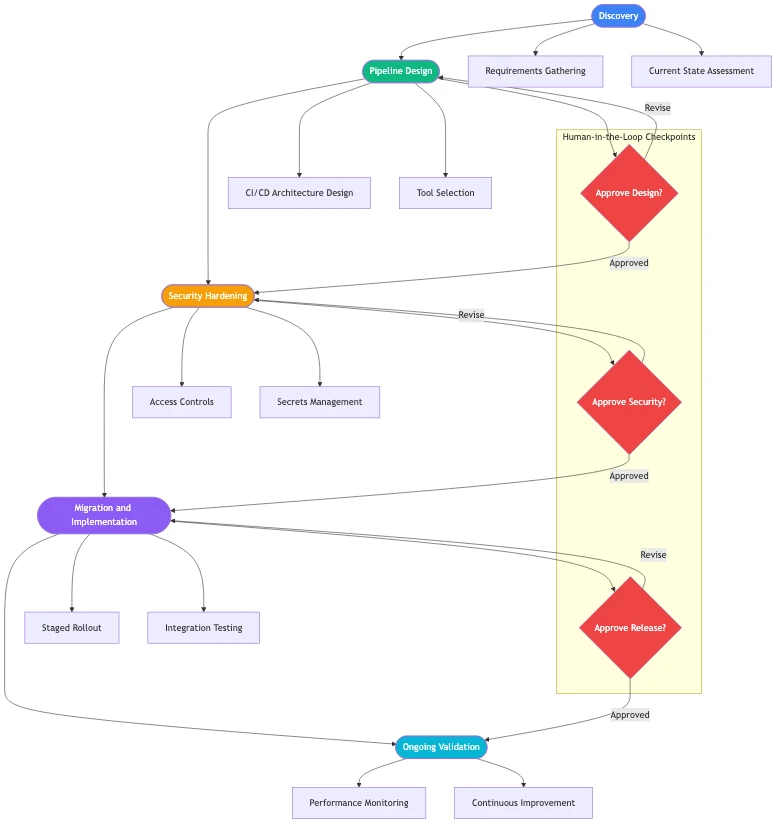
QServices is a Microsoft Certified Solutions Partner specializing in Azure, with 500+ completed Azure and Microsoft platform projects since 2014. Our azure devops consulting services engagements follow five consistent phases:
Security hardening: Configure RBAC with least-privilege service principals, Azure Key Vault integration, and secret rotation policies
Migration: Move pipelines from Jenkins, CircleCI, GitLab CI, or GitHub Actions to Azure DevOps, or structure new pipelines for greenfield projects
Validation: Apply Human-in-the-Loop governance checks to confirm every production deployment requires explicit human approval before executing
Human-in-the-Loop governance ensures human approval at every deployment stage. For banking and healthcare teams, automated production deployments without approval gates create regulatory exposure that compliance teams catch at the worst moment: during an audit.
What a Microsoft Azure Consulting Company Does Differently
A microsoft azure consulting company with Microsoft certifications connects your CI/CD configuration to your overall Azure governance posture. That means aligning pipeline service connections to your azure infrastructure assessment findings, applying azure architecture review recommendations to how pipelines access Azure resources, and structuring secrets management around your existing Key Vault hierarchy.
A secondary azure security assessment specifically focused on CI/CD configuration often surfaces risks that general cloud security reviews miss: service principals with excessive subscription-level permissions, build agents with direct internet access, and artifact feeds without immutability policies. Generic DevOps consultants configure pipelines in isolation and these issues persist for years.
Azure Landing Zone Implementation and Pipeline Design
The best time to standardize CI/CD tooling is during an azure landing zone implementation. The landing zone defines your subscription structure, networking topology, identity model, and governance policies. Pipelines designed to deploy into that structure inherit compliant defaults rather than requiring retrofit.
If you're working with an azure migration partner setting up your landing zone, request pipeline templates as part of the engagement scope. Retrofitting pipeline governance onto an already-deployed environment takes significantly longer than building it in from day one, and it creates a window where non-compliant deployments can occur.
Why an Azure Architecture Review Improves CI/CD Outcomes
Before committing to either platform long-term, an azure architecture review often surfaces constraints that affect the pipeline decision directly: subscription-level Azure Policy that blocks certain deployment patterns, Entra ID configurations that affect how service principals authenticate, or network topologies that require private endpoints for runner connectivity.
An azure infrastructure assessment done before pipeline migration prevents the scenario where pipelines work in staging but fail in production because of policies or network rules that only apply in production subscriptions. We've seen teams spend weeks debugging GitHub Actions failures that traced back to a single Azure Policy blocking deployments to specific regions.
For teams evaluating an azure managed services provider to manage CI/CD operations post-setup, the architecture review deliverable gives your provider the baseline documentation they need to support the environment reliably. If you're unsure what to ask potential partners during the selection process, our guide on How to Evaluate a Microsoft Azure Consulting Partner covers exactly that.
Key Takeaways
Azure DevOps vs GitHub Actions represents two genuinely different philosophies about what a CI/CD platform should do.
For healthcare, banking, and financial services organizations, security controls are often the real decision driver in the azure devops vs github actions evaluation.
Cost comparisons that focus only on per-user pricing miss the larger variable: compute costs from pipeline runs.
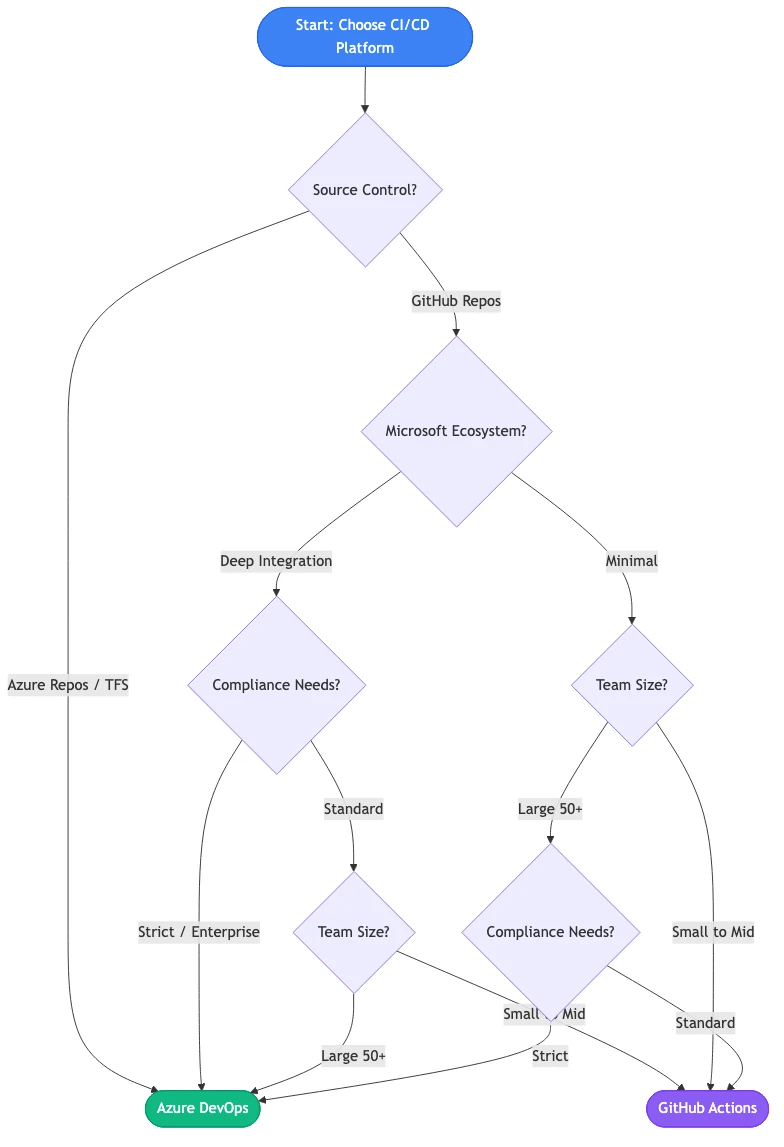
Choosing between azure devops vs github actions is more straightforward when you treat it as an architectural decision rather than a features debate.
Selecting a platform solves one problem.
Conclusion
The azure devops vs github actions decision carries real compliance, cost, and operational consequences. For most enterprises running Microsoft workloads, particularly in healthcare, banking, or logistics with regulated deployments, Azure DevOps delivers tighter native integration with the Azure security stack, more mature enterprise governance controls, and cleaner audit trails that simplify compliance reporting. GitHub Actions is excellent for developer-centric teams that prioritize marketplace flexibility and already use GitHub for source control.
The practical framing: if GitHub is your source control platform and Azure is secondary, GitHub Actions works well. If Azure is your primary cloud, if you're engaged in azure cloud migration services work, or if your compliance team requires a unified audit trail, Azure DevOps is worth the switch. Our azure consulting services team runs these assessments regularly. If you want an objective review of your current setup and a recommendation tied to your actual environment, that conversation is worth having before you build six months of pipelines on the wrong foundation.
Co-Founder and CTO, QServices IT Solutions Pvt Ltd
Rohit Dabra is the Co-Founder and Chief Technology Officer at QServices, a software development company focused on building practical digital solutions for businesses. At QServices, Rohit works closely with startups and growing businesses to design and develop web platforms, mobile applications, and scalable cloud systems. He is particularly interested in automation and artificial intelligence, building systems that automate routine tasks for teams and organizations.
Azure cloud migration for a mid-size company typically costs between $50,000 and $500,000 depending on the number of workloads, migration complexity, and target architecture. Lift-and-shift migrations are generally less expensive than full modernization projects. Most budgets also need to account for ongoing azure managed services provider support, security operations, and cost optimization work after go-live. An azure infrastructure assessment before the migration is the most reliable way to get an accurate estimate for your specific environment.
The best approach to migrate on premise to azure follows the Microsoft Cloud Adoption Framework’s five phases: Strategy, Plan, Ready, Adopt, and Govern. For most mid-size enterprises, this means starting with an azure landing zone implementation to establish governance and networking, then migrating workloads in prioritized waves from least-critical to most-critical. A phased approach reduces risk and lets teams build Azure operational maturity before moving regulated workloads like patient data or financial records.
A typical Azure migration for a mid-size company takes 6 to 18 months from initial assessment to production cutover. Simple lift-and-shift migrations of non-critical workloads can complete in 2 to 3 months. Full modernization or migrations involving regulated industries such as healthcare or banking typically take 12 to 18 months due to compliance validation requirements, data migration complexity, and the staff training needed to operate the new environment confidently.
An Azure landing zone is a pre-configured Azure environment that establishes governance, networking, identity, and security controls before workloads are deployed. It acts as the foundation for cloud adoption, ensuring every workload deployed into Azure automatically inherits consistent policies, access controls, and cost management structure. Most azure consulting services engagements begin with a landing zone design before migrating or building workloads, because retrofitting governance onto existing cloud environments is significantly harder than building it in from the start.
Azure and AWS pricing are competitive, and the answer depends on your existing licensing and workload profile. Organizations with existing Microsoft licensing for Windows Server, SQL Server, or Office 365 often see significant savings on Azure through Azure Hybrid Benefit, which can reduce VM and SQL database costs by up to 85%. However, total cost depends on workload type, reserved instance strategy, and operational complexity. An azure cost optimization consulting engagement that includes cost modeling for your specific workloads is the accurate way to compare platforms rather than relying on list price comparisons.
An azure managed services provider takes responsibility for ongoing Azure operations after initial implementation: monitoring infrastructure health, managing security patching, optimizing costs, handling incidents, and implementing governance improvements over time. A qualified microsoft azure consulting company provides both the implementation expertise to build the environment correctly and the operational support model to keep it secure, cost-efficient, and aligned with compliance requirements as your organization grows and regulations change.
Look for Microsoft Solutions Partner certification for Azure, demonstrated experience in your industry (healthcare, banking, logistics), and a defined governance process for how they handle approvals, audit trails, and post-deployment support. Ask specifically about their approach to azure security assessment during projects, how they structure an azure architecture review, and what their support model looks like after go-live. Price matters, but the cost of choosing a partner without deep Azure expertise is usually higher than any fee difference.
When PDF text extraction drops the spaces between words, AI agents can’t find facts that are right there. How we found it in Azure AI Foundry and fixed it.
Pint AE explained for UAE finance teams with one sample invoice: see which fields come from your ERP, which go missing, and how to test before go-live.
Days sales outstanding explained for CFOs: the formula, worked examples, named industry benchmarks, and why seasonal sales distort DSO. See what moves it.
Follow one payment through the cash application process, step by step, and see the exact moment it stalls so your AR team can clear unapplied cash faster.
When PDF text extraction drops the spaces between words, AI agents can’t find facts that are right there. How we found it in Azure AI Foundry and fixed it.
Pint AE explained for UAE finance teams with one sample invoice: see which fields come from your ERP, which go missing, and how to test before go-live.
Days sales outstanding explained for CFOs: the formula, worked examples, named industry benchmarks, and why seasonal sales distort DSO. See what moves it.
Follow one payment through the cash application process, step by step, and see the exact moment it stalls so your AR team can clear unapplied cash faster.
QServices Inc. undertakes every project with a high degree of professionalism. Their communication style is unmatched and they are always available to resolve issues or just discuss the project.
Turn the Microsoft Licenses
You Already Own Into an AI Workplace
Join our live webinar on Sept 24 and see five ways to automate meetings, approvals, and