How should you govern Power Platform without slowing delivery?
Power Platform governance best practices give makers room to experiment without allowing an informal app or flow to drift into unsupported production use. The dividing line is promotion: once a solution is shared, handles sensitive data, or runs an important process, it needs a named owner, an appropriate environment, reviewed connections, a controlled release path, and evidence that someone accepted the risk.
Direct Answer
A Power Platform governance framework should make the governed path faster than the uncontrolled path. The right model defines environment strategy, data-loss-prevention rules, identity and sharing controls, ALM pipelines, monitoring, risk triage, and human approval gates for apps and automations that affect sensitive data or business operations.
Key Takeaways
Separate maker productivity from production-grade operational risk.
Design environments and DLP policies before sprawl becomes expensive.
Use human approval gates for sensitive data, privileged access, and consequential workflows.
Support makers with reusable patterns, pipelines, and Center of Excellence guidance.
Measure governance by adoption, risk reduction, support load, and business continuity.
The approved path has to be easier than the unofficial one. Ban low-code work across the tenant and people will fall back to spreadsheets, consumer automation tools, or unreviewed code. Leave creation entirely open and the tenant fills with orphaned apps, flows tied to former employees, risky connector combinations, and processes no support team understands. Good governance sits between those two failures.
This guide translates Microsoft platform controls into decisions a CIO, Power Platform administrator, security lead, or Center of Excellence team can use. It covers environments, data policies, identity, deployment, ownership, and monitoring, then shows where five human approvals belong. Low-risk work moves quickly; sensitive or business-critical work carries more evidence and scrutiny.
In this article, you'll learn
Why Power Platform sprawl happens and which signals deserve immediate attention
How to design environment groups, development routes, data policies, and tenant isolation
How a five-gate human approval model keeps low-code delivery fast without making it opaque
How to move solutions from personal experiments to supported production workloads
What the modern Power Platform Center of Excellence should own and measure
How to implement the framework in 30, 60, and 90 days
Why is Power Platform sprawl an operating-model problem?
Power Platform reduces the technical barrier to creating apps, automations, reports, pages, and agents. That is its value. It also means the team that first sees a process problem can build a response before a conventional project reaches the development queue. The governance challenge begins when a useful experiment quietly becomes operational infrastructure.
An app can move from one maker to a department without anyone recording a service owner, recovery expectation, data classification, support route, or replacement plan. A cloud flow can automate a financial or customer-facing process while authenticating through the original maker’s connection. A connector that was reasonable for personal productivity can become inappropriate once regulated, confidential, or customer data enters the process. None of these outcomes requires malicious intent. They follow from unclear promotion rules.
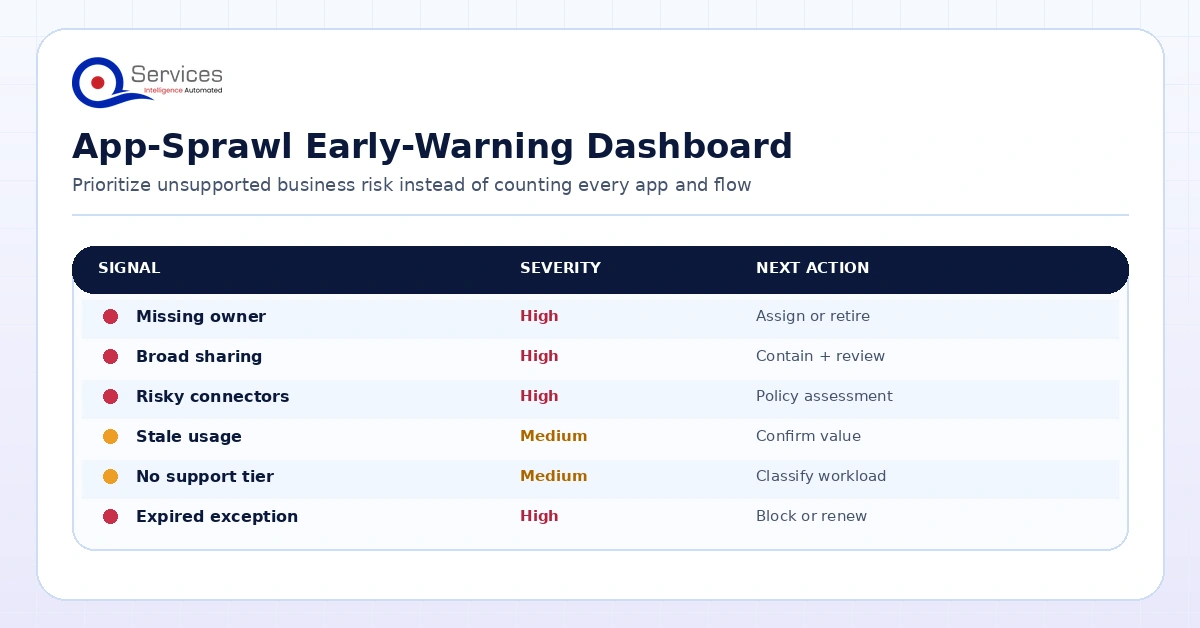
Shadow IT in Power Platform is therefore not simply “too many apps.” The warning signs are assets whose business importance exceeds their controls. A large inventory can be healthy when ownership, environments, data boundaries, deployment, and support are deliberate. A small inventory can be dangerous when one untested flow controls a high-impact process. Count assets, but govern them by consequence.
Common sprawl signals
Shared apps or flows remain in the default environment.
Production processes depend on personal connections or one maker’s account.
No current owner can explain an asset’s purpose, users, data, or dependencies.
Changes are made directly in production with no review or rollback route.
Custom or HTTP connectors appear without security and endpoint review.
Multiple teams rebuild the same capability because inventory is not discoverable.
High-use assets lack test evidence, runbooks, incident routing, or continuity ownership.
Former employees remain recorded as sole owners of important solutions.
The answer is not a quarterly cleanup alone. Cleanup treats symptoms after risk and support debt have accumulated. Prevention requires a paved road: a clear place to experiment, a visible threshold for promotion, reusable components, automated inventory, and proportional human approval. Teams should know where to build, what they may connect, when review starts, and who accepts production accountability.
A useful sprawl dashboard prioritizes unsupported business risk, not the raw number of apps and flows.
How should Power Platform governance balance control and delivery?
A governance charter should be short enough for leaders and makers to use. Start with the outcomes you need rather than listing every setting in the admin center. The charter should say what data needs protection, who owns a production service, how a solution reaches production, what continuity it requires, and which decisions need an audit record.
Convert each outcome into an enforceable control and an accountable role. “Protect confidential data” becomes a data classification model, connector policy, access review, and named security owner. “Avoid orphaned apps” becomes owner and backup-owner requirements plus an inactivity and departure process. “Improve quality” becomes solution-aware development, test evidence, pipeline checks, and release approval for higher-risk assets.
Governance also needs a declared scope. Power Apps and Power Automate are obvious, but the tenant model may also cover Power Pages, Copilot Studio agents, Dataverse, custom connectors, gateways, solutions, pipeline hosts, and Power BI dependencies. A policy that ignores agents or external-facing pages creates predictable gaps as adoption shifts.
Use risk tiers instead of one approval path
Not every asset deserves an architecture board. A personal reminder flow with no sensitive data should not wait behind a customer portal. Define tiers using objective factors: audience size, external access, data classification, write access, business criticality, premium or custom connectors, automation privileges, financial impact, and recovery needs.
Tier
Typical use
Minimum controls
Promotion route
Personal
Individual productivity with approved data and connectors
Personal development environment, standard policy, maker ownership
No production promotion unless scope changes
Team
Shared departmental app or automation
Business owner, backup owner, data review, basic test and support record
Lightweight gates and managed test/production
Business-critical
Operational process with material interruption impact
Guest, customer, partner, or regulated-data workload
Highest identity, data, network, legal, testing, monitoring, and incident controls
All gates with specialist sign-off
Set the classification when work starts and reassess it when audience, connectors, data, or process importance changes. A personal app that becomes popular is not grandfathered into weak controls. Its success triggers promotion.
How do you build a Power Platform environment strategy before writing more policies?
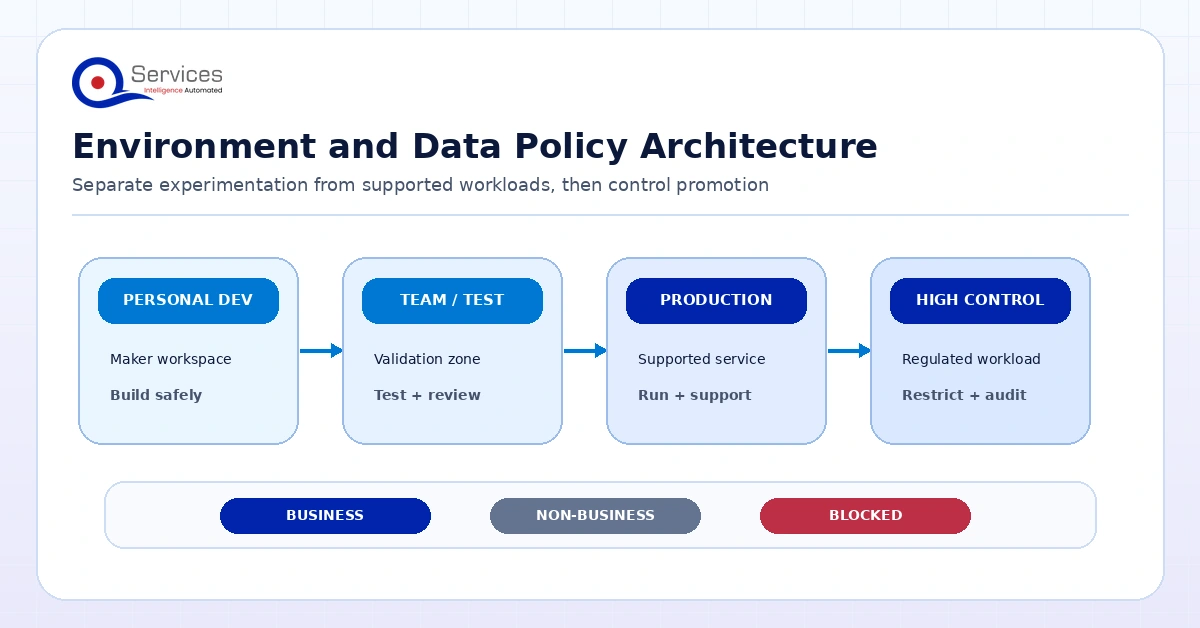
Environment architecture turns governance intent into boundaries. Microsoft’s current environment strategy guidance says the default environment is not intended for long-term or permanent work beyond Microsoft 365 personal-productivity scenarios. The recommended direction routes makers into personal Developer Environments, governs them through environment groups, and promotes shareable solutions through CI/CD into production. Production environments host permanent workloads; Sandbox environments support testing and application lifecycle management.
Key Insight Microsoft’s current environment strategy guidance says the default environment is not intended for long-term or permanent work beyond Microsoft 365 personal-productivity scenarios.
This separation solves several problems at once. Personal development remains available without implying that every experiment has production support. Test work can be reset or changed without putting live users at risk. Production access can be narrower, direct changes can be constrained, and releases can leave a record. The architecture makes lifecycle state visible.
A practical environment pattern
Use Personal Developer Environments for experiments and individual productivity, with baseline connector and sharing rules.
Create department development environments only when a team needs shared build access.
Use Test or Sandbox environments for integration tests, user acceptance, release checks, and training where needed.
Reserve Production environments for permanent supported workloads. Limit maker privileges, monitor operations, and deploy through a controlled route.
Isolate external, regulated, sensitive, or highly critical solutions in dedicated high-control environments when the risk warrants it.
Avoid creating environments solely from organizational charts. A new environment carries administration, policy, capacity, identity, monitoring, and lifecycle work. Create one because a boundary is required: data residency, security group, business continuity, billing, administration, connector posture, business criticality, or ALM. Document the reason so future admins understand whether the boundary still matters.
Use Managed Environments as the enterprise baseline
Microsoft defines Managed Environments as a premium capability suite that can be enabled on any environment type, rather than a separate environment type. The available governance and insight capabilities include environment groups, sharing limits, usage insights, data policies, pipelines, solution checker, IP firewall, IP cookie binding, Customer Lockbox, extended backup, Application Insights export, environment routing, app-level Conditional Access, and data masking.
That breadth makes Managed Environments a sensible baseline for governed shared and production use, but licensing must be validated during design. Microsoft states that entitlement depends on qualifying standalone Power Apps, Power Automate, Copilot Studio, Power Pages, or Dynamics 365 licenses. The Developer Plan does not entitle a user to run assets in a Managed Environment. Treat licensing as an architecture constraint, not a detail to discover after promotion.
Key Insight Microsoft states that entitlement depends on qualifying standalone Power Apps, Power Automate, Copilot Studio, Power Pages, or Dynamics 365 licenses.
Apply rules at scale with environment groups
Environment groups let tenant administrators publish rules across Managed Environments and prevent local environment administrators from overriding the corresponding settings. This is useful when dozens of environments need a common sharing, retention, AI, or maker posture.
Design the grouping model carefully. Microsoft documents that only Managed Environments can join, each environment can belong to one group, groups cannot overlap or nest, and per-environment exceptions are not currently supported. If an environment leaves a group, it retains the last applied settings, but those settings become editable. Group environments by a policy posture you can enforce consistently, such as personal development, standard internal production, or high-control workloads. Do not create an “all environments” group and then depend on exceptions the platform does not provide.
Environment boundaries, policy groups, and promotion paths should reflect workload risk and lifecycle.
How do you apply 5 Power Platform governance best practices for data and connectors?
Data policies are a central control, but they are often misunderstood as a complete security model. They govern which connectors can be used or combined in an environment. They do not replace source-system authorization, Microsoft Entra controls, Dataverse roles, application sharing, network controls, endpoint security, or monitoring.
Microsoft’s data policy documentation distinguishes tenant-level and environment-level policies. A tenant policy can include or exclude specific environments; an environment-level policy applies to one environment. Policies classify connectors as Business, Non-Business, or Blocked. The critical design question is not whether a connector is “good.” It is whether data may move through that connector, in that environment, for that risk class.
Design policy from data flows
Inventory real business scenarios before grouping connectors. Record the source, destination, data classification, identity used, action performed, audience, and logging needs. Then approve connector combinations that support those scenarios. A policy copied from another tenant may either break legitimate work or permit transfers that violate your own obligations.
Keep business data connectors together only where their combination is acceptable. Separate general consumer or personal-productivity services into the Non-Business group when business data should not move to them. Block connectors that have no approved case or unacceptable control characteristics. Review new connector requests through a documented exception process with an owner and expiry date.
Microsoft warns that blocking or regrouping connectors can affect authoring and the runtime behavior of existing apps and flows. Before changing a broad policy, analyze impact, identify affected assets and owners, test the intended change, communicate the rollout, and prepare remediation. A security improvement that silently disables payroll, intake, or customer-service automation becomes an operational incident.
Use deny by default where coverage fits
Advanced Connector Policies use a strict allowlist: certified connectors are blocked unless explicitly allowed. This is stronger than maintaining a growing blocklist and can fit high-control environments. The current limitation matters, however: Microsoft states that advanced policies cover certified connectors only; custom connectors and HTTP connectors are not yet supported. Classic policies remain necessary for those categories, and some core connectors cannot be marked Blocked under classic policies.
For this reason, create an explicit custom-connector process. Require an owner, endpoint, authentication method, permitted operations, data classification, dependency record, security review, and retirement route. Review HTTP use with the same care. The connector label alone does not reveal the risk of the service behind it.
Add tenant isolation for cross-tenant traffic
With Power Platform tenant isolation off, which Microsoft documents as the default, users can create cross-tenant connections when they possess valid Microsoft Entra credentials. Turning isolation on blocks inbound and outbound cross-tenant connector connections unless a directional allow-list exception exists. See Microsoft’s cross-tenant restriction guidance.
Use tenant isolation when cross-tenant connector traffic is not a deliberate requirement, then approve specific business-to-business paths. Understand the boundary: this is a Power Platform connector control, not an Entra-wide restriction, and it applies only to connectors using Entra authentication. Microsoft also documents an enforcement gap for the Azure DevOps connector and recommends restricting that connector through data policies when insider risk is a concern. Policy reassessment for active apps and flows takes about an hour, so test and communicate changes rather than expecting an instantaneous tenant-wide state.
How should you control identity, sharing, and privileged access?
Every production solution needs a deliberate identity model. Ask who can enter the environment, who can use the app, who can edit it, what identity each connection runs under, what data that identity can reach, and what happens when an employee leaves. Sharing an app does not make its downstream permissions safe, and a restrictive data policy does not reduce an overprivileged service account.
Microsoft’s identity and access management guidance recommends combining environment security groups, Managed Environment sharing controls, IP firewall, and IP cookie binding where applicable. Environment security groups limit access to licensed users in the appropriate group. Sharing limits constrain canvas app, cloud flow, and agent distribution. IP firewall and IP cookie binding protect Dataverse access in Managed Environments. New Dataverse-backed environments prohibit guest access to Dataverse data by default.
Apply least privilege to makers, administrators, users, service principals, connections, and gateways. Separate build permissions from production operations. Use service identities where an organizational process must survive staff changes, but do not turn a service account into an unmonitored universal credential. Give each identity only the access its automation needs, store ownership centrally, and rotate or revoke credentials through a controlled process.
Make privileged administration temporary
Microsoft no longer automatically assigns the Dataverse System Administrator role to Global, Power Platform, or Dynamics 365 service admins. For data-level work, eligible administrators can self-elevate in the target environment. Microsoft’s privileged-role guidance says elevation is logged to Microsoft Purview. When Microsoft Entra Privileged Identity Management supplied the just-in-time tenant role, the Dataverse System Administrator assignment is removed when that assignment expires.
Key Insight Microsoft no longer automatically assigns the Dataverse System Administrator role to Global, Power Platform, or Dynamics 365 service admins.
Use this as the pattern for exceptional administration: eligible access, a reason, short duration, logging, and review. Note the documented caveats: role assignment through groups is unsupported for this elevation flow, the person who needs access must invoke it, and direct Dataverse access requires an appropriate license. Keep standing production privileges small and test emergency access procedures before an incident.
How do you apply 5 gates in a human-in-the-loop Power Platform governance framework?
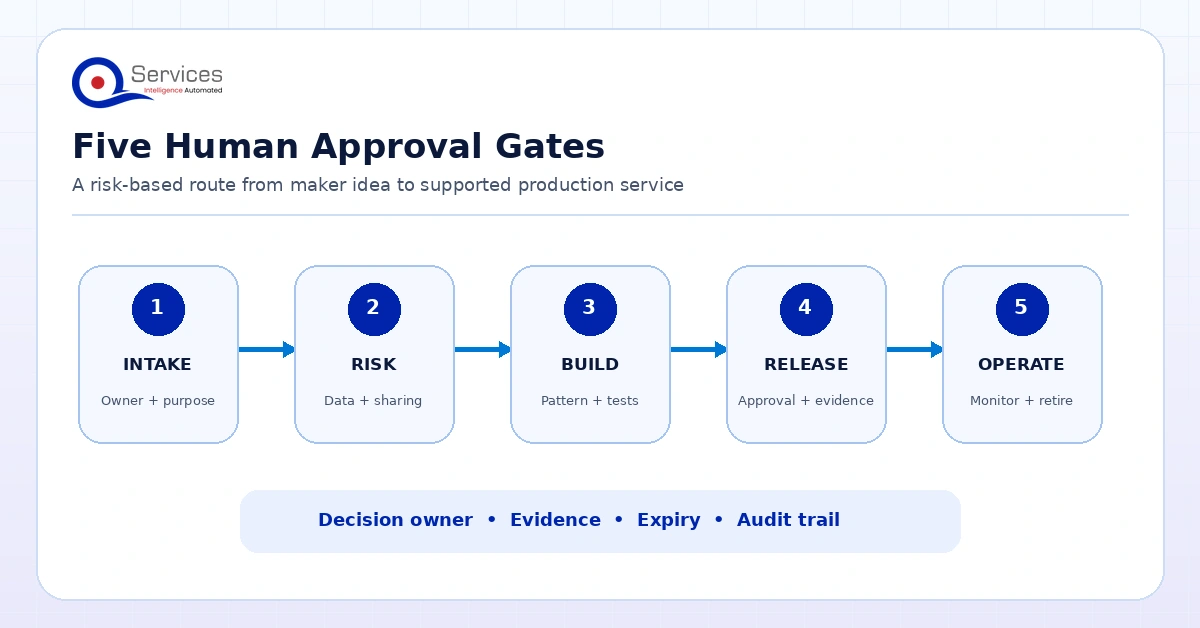
Tools enforce boundaries; people accept business risk. A human-in-the-loop model inserts named decisions where context matters and preserves evidence without forcing every low-risk experiment through a committee. The five gates below map a solution from idea to ongoing service. Risk tier determines the depth, required approvers, and evidence.
Five gates create an auditable route from maker idea to supported production service.
Gate 1: Purpose, owner, and risk intake
The maker or sponsor states the problem, intended users, expected lifespan, data sources, actions, business impact, and proposed owner. The intake classifies the solution as personal, team, business-critical, or external/regulated. It checks whether an approved solution already exists and whether Power Platform is the right delivery option.
The output is a decision record: proceed in personal development, route to a team build, escalate for architecture discovery, reuse an existing asset, or choose another platform. This gate prevents duplicate apps and makes promotion criteria visible before development becomes expensive.
Gate 2: Data, identity, and connector approval
The reviewer examines data classification, connector combinations, credentials, permissions, cross-tenant paths, guest access, external endpoints, gateway use, and audit needs. Standard low-risk combinations can be preapproved. Custom connectors, HTTP actions, write access to sensitive systems, and external sharing receive deeper review.
The output records permitted data flows, policy placement, required security controls, exceptions, owners, and exception expiry. If a necessary connector conflicts with the environment policy, the answer is usually a better-targeted environment or approved integration pattern, not weakening the tenant baseline for everyone.
Gate 3: Architecture, quality, and support readiness
Before a shared solution reaches production, review solution structure, dependency mapping, environment variables, connection references, error handling, concurrency, performance assumptions, accessibility, testing, source control, and support design. Business-critical workloads also need monitoring, recovery objectives, incident routing, data retention, and a tested continuity approach.
This gate should produce an Architecture Decision Record for material choices: why Power Platform was selected, which environment and data stores are used, where custom code begins, how authentication works, and what scaling or licensing thresholds would force redesign. The record protects the organization from decisions living only in a vendor’s or employee’s memory.
Gate 4: Release and business acceptance
A release approver verifies that the promoted artifact passed test, the business owner accepted the process, security conditions are met, support documentation exists, and rollback or recovery is understood. The deployment should use the artifact tested in the prior stage rather than a freshly exported substitute.
Approval evidence includes version, test result, approvers, deployment target, release notes, known limitations, and support contact. Reject direct production editing for governed workloads except under a documented emergency route followed by reconciliation into the managed solution.
Gate 5: Operational review, renewal, and retirement
Production approval is not permanent permission to ignore an asset. Review business-criticality, owner status, usage, errors, sharing, connections, policy compliance, support history, licensing, and data obligations on a defined cadence. Revalidate after major changes. Trigger review when ownership changes, usage spikes, sensitive data is added, a connector changes, an exception expires, or the app becomes externally accessible.
The outcome is continue, remediate, reclassify, replace, archive, or retire. Retirement must remove sharing, disable flows, preserve required records, handle data, release capacity, revoke credentials, and update the inventory. This final gate stops the tenant from becoming a permanent museum of past experiments.
Gate
Decision owner
Core evidence
Decision
1. Intake
Business sponsor or CoE triage
Purpose, users, owner, data, risk tier
Build, reuse, redirect, or stop
2. Data and identity
Security/data owner
Flows, connectors, access, exceptions
Approve controls or redesign
3. Architecture and readiness
Platform/solution owner
ADR, tests, dependencies, support plan
Ready for acceptance or remediate
4. Release
Business and release owners
Accepted artifact, test evidence, rollback
Deploy or hold
5. Operations
Service owner
Usage, health, ownership, compliance
Renew, improve, or retire
QServices IT applies this kind of accountable review to software delivery through its human-in-the-loop governance principles. For Power Platform, the important adaptation is proportionality: automate baseline checks and reserve human attention for exceptions, business impact, sensitive data, architecture, and risk acceptance.
Need a governable route from maker idea to production?
Map your environments, data controls, ownership, and approval gates into a practical Power Platform blueprint.
Use solutions and pipelines for application lifecycle management
Governed production delivery requires more than copying an app between environments. Build shared workloads inside solutions so components, connection references, environment variables, dependencies, and versions can move as a managed unit. Keep environment-specific values outside hard-coded logic. Store source artifacts and decision records where the organization can access them.
Power Platform pipelines let administrators govern development, test, and production delivery centrally. Microsoft documents approval-based delegated deployment, preserved deployment customizations and audit logs, target prevalidation, and sequential stages that move the same exported solution artifact forward. That sequence matters: a maker cannot legitimately bypass quality assurance by exporting a different package for production.
Pipelines deploy solutions and configuration, not Dataverse table data. Plan reference data, configuration migration, and data transformation separately. Microsoft also states that pipeline environments other than Developer environments and the pipeline host must be Managed Environments and require premium-use licenses. Pipelines cannot deploy across tenants. Starting in February 2026, Microsoft began enabling Managed Environments for non-managed pipeline targets. Validate the current state and licensing in your tenant before making the pipeline part of a release commitment.
Redesign the Power Platform Center of Excellence for 2026
A Center of Excellence is a working group with decision rights, not a dashboard installation. Someone still has to set tenant controls, review risky designs, support makers, assign ownership, and explain unresolved exposure to leadership. If the group only reports app counts, it is observing the estate rather than governing it.
The tooling basis has changed. Microsoft states that the CoE Starter Kit is no longer receiving ongoing feature investments or updates; issues are no longer reviewed or addressed. The kit remains available for existing and new deployments, and security vulnerabilities should still be reported to Microsoft Security Response Center, but Microsoft directs organizations to the Power Platform admin center as the central governance, monitoring, and insights experience.
Build future-state inventory and monitoring around native admin-center capabilities. Microsoft maps former CoE scenarios to Inventory for tenant-wide apps, flows, and agents; Usage for adoption, top resources, and owners; Monitor for the operational health of heavily used resources; and Actions for governance risks, best-practice enforcement, and remediation. CLI, REST APIs, the inventory API, and the Power Platform for Admins V2 connector can support automation.
What the CoE should own
The governance charter, risk tiers, exception process, and decision rights
Environment strategy, Managed Environment standards, and group rules
Tenant and environment data policies plus custom-connector review
Maker onboarding, patterns, office hours, reusable components, and training
Inventory, ownership campaigns, orphan remediation, and retirement
Solution, pipeline, testing, release, and support standards
Operational dashboards and executive reporting focused on risk and value
Federate responsibility. A central team can set policy and operate tenant controls, but business units know process impact and should own their production services. Security owns risk decisions, data owners approve appropriate use, platform administrators operate controls, makers maintain technical assets, and business sponsors accept operational outcomes. A RACI is more useful than a generic statement that “the CoE owns governance.”
Inventory is the foundation of control. At minimum, track asset type, environment, owner, backup owner, business sponsor, users, last activity, connectors, data classification, solution membership, deployment route, risk tier, support contact, review date, and retirement status. For critical assets, add dependencies, service identity, recovery expectations, monitoring, version, and decision records.
Do not wait for the inventory to be perfect before acting. Begin with production environments, external sharing, sensitive connectors, custom connectors, HTTP, high-use apps and flows, assets with no owner, and processes known to matter. Use native Inventory, Usage, Monitor, and Actions experiences as the main operational source, then automate enrichment or workflow where a real gap exists.
Use actionable governance metrics
Metric
Question answered
Likely action
Production assets without primary and backup owners
Can the service survive staff change?
Assign ownership or retire
Critical assets outside solutions or pipelines
Can releases be tested and traced?
Move into managed ALM
Policy exceptions past expiry
Is temporary risk becoming permanent?
Renew with evidence or remove
Inactive shared assets
Is support debt accumulating?
Confirm need, archive, or retire
Unapproved custom/HTTP connector use
Are unknown endpoints moving data?
Review, isolate, replace, or block
Repeated runtime failures in important flows
Is a business process unreliable?
Investigate, redesign, or add support
Direct production edits
Is release control being bypassed?
Restrict access and reconcile changes
Raw adoption counts belong beside risk and operational measures. Makers trained, active assets, and monthly users can indicate value, but they do not show whether the tenant is governable. Pair adoption with owner coverage, policy compliance, supported-production percentage, release success, unresolved incidents, stale assets, and time to approve standard requests.
Set remediation service levels by risk. An ownerless personal experiment can enter a periodic cleanup queue. An ownerless production flow that writes to a financial system needs immediate attention. Automate notices and standard actions, but keep human approval before destructive retirement when business impact is uncertain.
Make the governed path the fast path
Governance fails when approved work takes longer than covert work and provides no useful support. Makers need concise standards, searchable examples, starter solutions, preapproved connectors, reusable components, office hours, and predictable review times. Publish the promotion checklist before teams build.
Create service levels for common requests. A standard team app using approved business connectors may receive a short review. A custom connector or external portal needs specialist attention. Tell makers what evidence speeds approval: an owner, data-flow diagram, test record, connection model, support route, and solution package. This changes governance from a surprise inspection into a delivery method.
Offer an escalation route when low-code is the wrong fit. Power Platform may be unsuitable when requirements demand a different user experience, extreme scale, specialized performance, unsupported integration, complex offline behavior, or a licensing profile that does not work. A responsible Power Platform development decision includes the boundary between configuration, low-code, Azure services, and custom software.
A 30-60-90 day implementation roadmap
Days 1–30: Establish visibility and stop new unmanaged risk
Confirm executive sponsorship and decision owners. Inventory environments, apps, flows, agents, pages, connectors, owners, sharing, and usage through the admin center. Identify urgent cases: external access, sensitive data, custom or HTTP connectors, ownerless production assets, failing critical flows, and privileged connections. Do not begin with mass deletion.
Publish an interim charter, risk tiers, approved development route, and emergency contact. Define what may remain personal and what must be promoted. Establish baseline tenant data policy and a request path. Decide whether tenant isolation should be enabled, then assess legitimate cross-tenant dependencies before rollout. Begin routing makers toward personal Developer Environments rather than permanent use of the default environment.
Days 31–60: Build the governed production route
Design environment groups and their policy postures. Enable Managed Environments for the selected shared and production estate after validating licensing. Create development, test, and production patterns; security groups; sharing limits; ownership requirements; and custom-connector review. Define the five gates and publish the evidence templates.
Choose representative solutions for a pilot. Move them into solutions, remove hard-coded configuration, establish test evidence, and configure a pipeline. Record business owner, technical owner, backup owner, support contact, data classification, dependencies, and recovery needs. Train a small maker and reviewer cohort on the new path.
Days 61–90: Scale, measure, and remediate
Roll environment group rules and data policies out in controlled waves. Use impact analysis and communication before connector changes. Expand pipeline use for governed workloads. Launch owner confirmation, stale-asset review, and exception-expiry workflows. Create dashboards that combine adoption with ownership, policy, lifecycle, and operational health.
Review pilot friction. If standard solutions wait too long, delegate approval or automate checks. If makers repeatedly request the same exception, create a safe reusable pattern. If production edits persist, tighten permissions and improve emergency change handling. Present leaders with decisions and remediation status, not a decorative asset count.
Takeaway: govern promotion, not curiosity
A workable Power Platform governance framework does not send every early idea to a review board. Makers need a safe place to test whether an idea is useful. The controls tighten when that experiment becomes shared, touches sensitive data, or starts running a process the business depends on. At that point, environment placement, identity, release history, ownership, and approval evidence are no longer optional.
Start with assets whose business importance already exceeds their controls. An ownerless production flow that writes to finance deserves attention before a hundred inactive personal experiments. Fix sensitive connections, external exposure, failing critical flows, and direct production changes first. Then give makers a documented route through personal development, risk classification, promotion, deployment, and ongoing review so the same problems do not return.
If your tenant already has useful apps but no coherent route from maker experiment to supported production, Book a Blueprint Call to map a practical governance framework around your environments, data, delivery process, and business risk.
Eager to discuss about your project?
Share your project idea with us. Together, we’ll transform your vision into an exceptional digital product!
Co-Founder and CTO, QServices IT Solutions Pvt Ltd
Rohit Dabra is the Co-Founder and Chief Technology Officer at QServices, a software development company focused on building practical digital solutions for businesses. At QServices, Rohit works closely with startups and growing businesses to design and develop web platforms, mobile applications, and scalable cloud systems. He is particularly interested in automation and artificial intelligence, building systems that automate routine tasks for teams and organizations.
Start with tenant inventory, risk tiers, personal Developer Environments, deliberate test and production environments, Managed Environments for governed workloads, layered data policies, clear ownership, solution-based ALM, controlled pipelines, monitoring, and periodic retirement. Use named human approvals for data, architecture, production release, and risk exceptions instead of relying on admin settings alone.
Make the sanctioned route faster and clearer than the unofficial one. Give makers a safe personal development space, preapproved connectors and patterns, training, office hours, a published promotion checklist, and predictable reviews. Escalate only when sharing, data sensitivity, connector risk, external access, or business criticality crosses a defined threshold.
Not automatically. Managed Environments provide a broad premium governance capability suite and are a strong baseline for shared and production estates. Licensing and workload purpose still matter. Validate user entitlement, environment role, risk, and cost, then apply the capability where it supports the operating model.
Microsoft says the CoE Starter Kit remains available but is no longer receiving ongoing feature investments or updates, and issues are no longer reviewed or addressed. Microsoft directs organizations to Power Platform admin center experiences for central governance, inventory, usage, monitoring, and actions. Treat the kit as a legacy reference or existing dependency, not the strategic center of a new governance design.
Classic data policies place connectors into Business, Non-Business, and Blocked groups. Advanced Connector Policies use an allowlist posture in which certified connectors are blocked unless explicitly allowed. Advanced policies currently do not cover custom connectors or HTTP connectors, so classic policies and a separate review process remain necessary.
Use a cadence based on risk and add event-driven reviews. Business-critical, external, or regulated solutions need more frequent checks than low-impact team tools. Reassess whenever ownership, audience, data, connectors, privileges, business importance, or architecture changes, and when an exception approaches expiry.
QServices Inc. undertakes every project with a high degree of professionalism. Their communication style is unmatched and they are always available to resolve issues or just discuss the project.
Turn the Microsoft Licenses
You Already Own Into an AI Workplace
Join our live webinar on Sept 24 and see five ways to automate meetings, approvals, and