How do you build a legacy application modernization strategy for Azure?
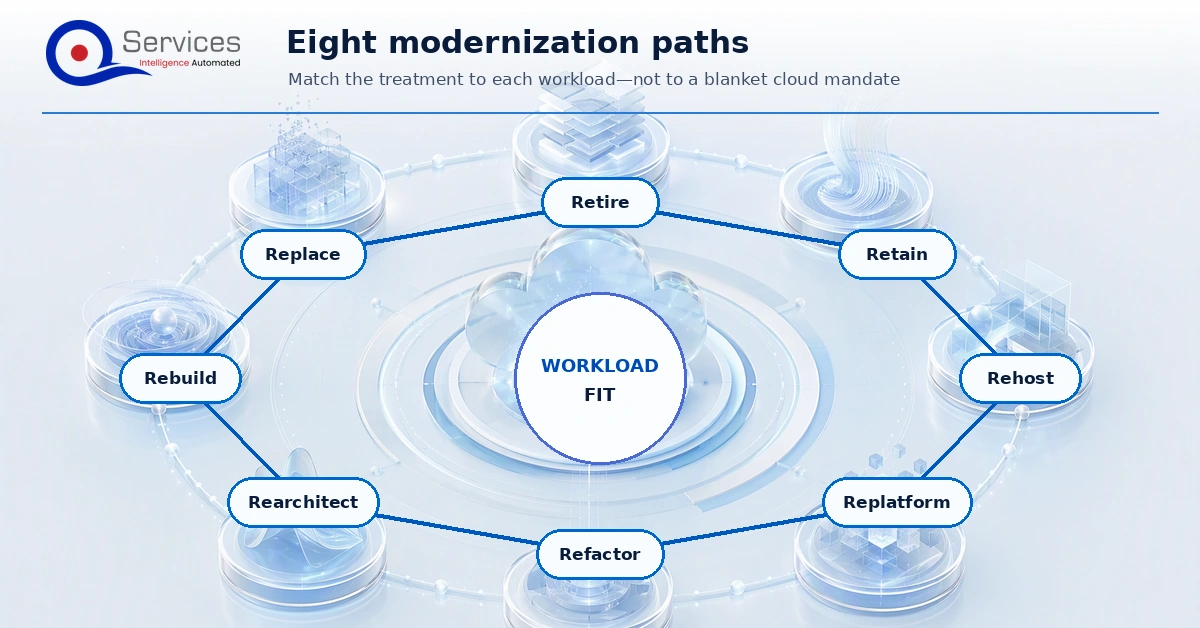
A legacy application modernization strategy assigns the right treatment to each workload, then sequences the work around business value, technical evidence, and operational risk. For Azure, that means choosing among retire, retain, rehost, replatform, refactor, rearchitect, rebuild, and replace instead of treating cloud migration as a blanket mandate.
Direct Answer
A legacy application modernization strategy for Azure should classify each workload by business value, technical risk, dependency complexity, data sensitivity, and modernization path. The best plan does not force every system into the same cloud pattern; it chooses rehost, replatform, refactor, rearchitect, rebuild, or retire based on evidence.
Key Takeaways
Start with a portfolio assessment before choosing Azure services.
Use modernization paths only after dependencies and business criticality are clear.
Design the target Azure architecture around workload requirements.
Build a phased roadmap with cost, testing, rollback, and governance gates.
Measure modernization by reliability, cost, delivery speed, security, and business outcomes.
Start with the portfolio decision, not a preferred Azure service. Each workload choice needs an owner, baseline, dependency map, target architecture, cost model, test evidence, cutover method, and measurable outcome.
In This Article, You'll Learn
How to turn a cloud mandate into a workload-by-workload portfolio plan
How Microsoft's eight treatments relate to the familiar 6 Rs of modernization
When to rehost, replatform, refactor, rearchitect, rebuild, retain, retire, or replace
What evidence is required before selecting Azure compute, data, and landing-zone designs
How to build the business case, roadmap, test plan, cutover controls, and executive metrics
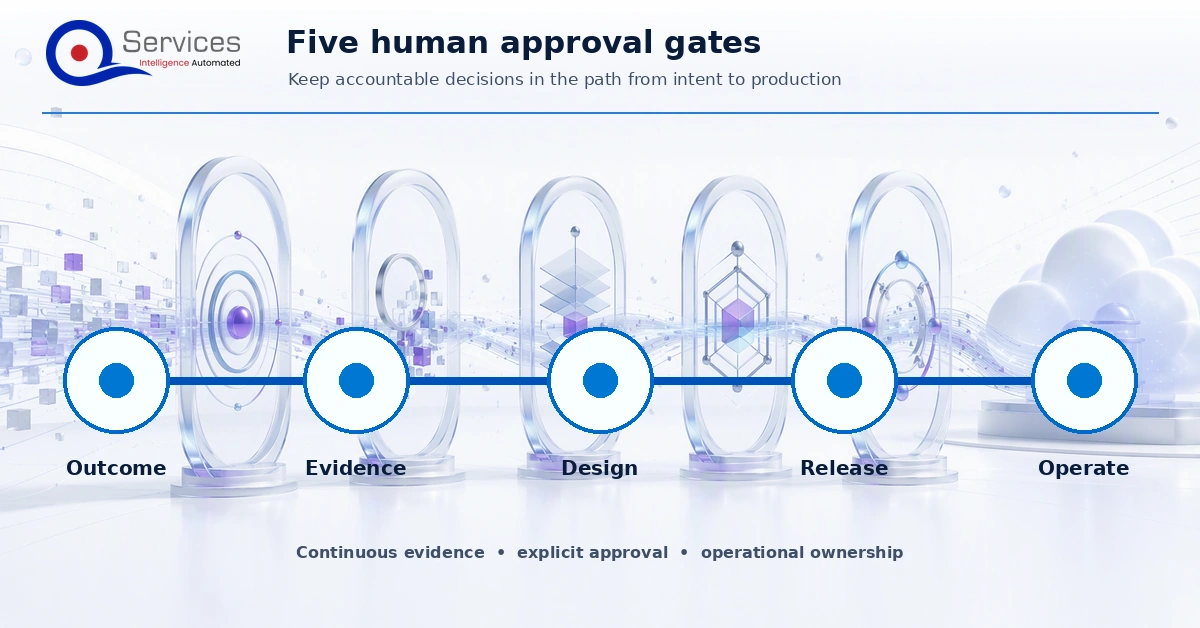
How QServices uses five human approval gates to control modernization scope and risk
How do you build a legacy application modernization strategy instead of a cloud mandate?
“Move everything to Azure” names a destination, but it does not tell a CIO what to fund. It leaves open which applications should move, which should change, which should stay temporarily, and which should disappear. Sequencing, dependencies, service levels, data residency, licensing, and the cost of running old and new environments in parallel are still unresolved.
A useful portfolio strategy starts with business capabilities. Ask which revenue process, customer journey, plant operation, clinical workflow, financial close, or internal service each application supports. Then record the cost of interruption, the change pressure, the useful life of the capability, and the consequence of leaving the system as it is. An old application can be stable and economically rational to retain. A newer application can be the greater risk if it blocks acquisitions, creates manual reconciliations, or cannot meet recovery requirements.
Set explicit portfolio objectives before scoring workloads. Examples include exiting a data center lease by a fixed date, reducing recovery exposure for a critical service, shortening release lead time, enabling an acquisition integration, retiring unsupported components, or making operating cost attributable by product. Each objective needs a baseline and a target. “Become cloud native” is too vague to approve investment or verify results.
The portfolio plan should show waves, not a ranked list alone. Dependencies can make a lower-priority system an earlier prerequisite. Identity, shared databases, file transfer, batch scheduling, network appliances, enterprise reporting, and downstream exports often connect applications that appear separate in a CMDB. Plan shared foundations and dependency-breaking work before committing each wave.
Before funding work to modernize applications on Azure, require a business result that the workload cannot produce acceptably today. If the result is unclear, pause the build decision and improve the evidence.
What are the 6 Rs of modernization and Microsoft’s 8 treatment paths?
Many teams know the “6 Rs of modernization,” but the exact six differ across frameworks. Some combine refactor and rearchitect. Some use repurchase where another uses replace. Rebuild may appear as its own choice or be folded into rearchitect. That makes an unlabeled “R” dangerous in steering documents, contracts, and estimates.
Microsoft’s Cloud Adoption Framework currently lists eight treatments: retire, retain, rehost, replatform, refactor, rearchitect, rebuild, and replace. Use those eight terms in this article’s decision model. If your program must report a six-R model, publish a one-page mapping that states which categories were combined. Do not assume executives, architects, and delivery vendors attach the same scope to “refactor.”
Use eight explicit treatments to avoid hiding materially different scopes inside a vague six-R label.
Rehost: move with minimal application change
Rehosting moves an existing workload to Azure infrastructure with limited change to its architecture. It can help meet a data center exit deadline, improve infrastructure provisioning, or place the application near other Azure-hosted dependencies. It is often the fastest route when the business cannot absorb broad code change in the current wave.
The trade-off is direct: rehost does not fix technical debt. A brittle deployment, oversized server, single-instance design, obsolete framework, manual patch process, or tightly coupled database remains a problem after relocation. The operating model must account for guest operating systems, backup, monitoring, vulnerability management, recovery, and rightsizing. A rehost is successful only if the intended business constraint was location or infrastructure, not when modernization benefits were assumed but never designed.
Replatform: change the platform without redesigning the whole application
Replatforming makes bounded platform changes while preserving most application behavior and architecture. Examples can include moving a web tier to a managed hosting service, adopting a managed database target, externalizing configuration, or replacing an infrastructure component with an Azure-managed capability. The precise change depends on compatibility and operational requirements.
This treatment fits when the platform layer is the main source of toil or risk and the application’s business logic remains useful. It can reduce maintenance responsibility and improve deployment operations without accepting the scope of a broad code redesign. Compatibility testing is central. Runtime versions, file-system assumptions, scheduled tasks, local state, network dependencies, authentication, drivers, and database features can turn a nominal replatform into a refactor.
Refactor: change code to remove a measured constraint
Refactoring changes implementation while preserving the application’s intended business behavior. It should target known constraints: deployment fragility, session coupling, hard-coded configuration, poor observability, a blocking framework version, or a component that cannot scale independently. The objective is not to rewrite whatever engineers dislike. It is to create a measurable improvement while containing regression risk.
Selective refactoring is a practical route to legacy modernization without full rewrite. Encapsulate the old core, place tests around high-value behavior, improve one seam, and release behind controlled routing. This approach preserves hard-earned business rules while reducing the part of the estate that must change at once.
Rearchitect: change system structure and operating characteristics
Rearchitecture changes major component relationships, deployment boundaries, data flows, or failure behavior. It may separate a modular monolith, isolate a scaling hotspot, replace synchronous coupling with durable messaging, or split a shared data model along business boundaries. Its justification should come from requirements that the current architecture cannot meet at acceptable cost or risk.
Architecture Decision Records should state the options considered, evidence, decision, trade-offs, and reversal conditions. That record protects the program from unexplained shifts and gives operations, security, finance, and delivery teams a shared basis for approval.
Rebuild: create a new implementation of the capability
Rebuild is appropriate when the capability remains differentiating but the existing implementation cannot reasonably reach the target state. The old system may lack testable boundaries, rely on unsupported technology, or contain structural constraints that make incremental change more expensive and risky than replacement code.
The danger is assuming a new build can rediscover years of behavior from requirements workshops. Legacy systems often contain undocumented exception handling, reconciliation rules, permissions, timing assumptions, and reports that users depend on. Mine production behavior, support tickets, data, code, operating procedures, and user observation. Decide which behavior is intentional, which is accidental, and which should be retired.
Retain, retire, and replace are active strategy choices
Retain means keeping a workload in its current environment for a defined reason and review period. Reasons may include an imminent vendor replacement, dependency on specialized hardware, low change demand, contractual limits, or an unfavorable migration business case. Record the risks accepted, controls required, review date, and exit trigger. Retain should never mean “we did not assess it.”
Retire removes an application and its ongoing obligations. Confirm actual usage, downstream feeds, records-retention duties, audit needs, legal holds, ownership, and archive access before shutdown. Savings appear only when infrastructure, licenses, support work, integrations, and monitoring are actually decommissioned. Turning off a virtual machine while keeping every surrounding cost is not retirement.
Replace moves the business capability to a commercial product, SaaS service, or another existing platform. It works when differentiated custom behavior is limited and the target product can satisfy process, data, integration, security, and regulatory requirements. Replacement usually shifts effort into process change, configuration, migration, integration, identity, vendor governance, and adoption. Treat it as a transformation, not a procurement shortcut.
How should you compare rehost, replatform, refactor, rearchitect, rebuild, and other paths?
Treatment
Primary reason
Change level
Main risk
Evidence required
Typical exit condition
Retire
Capability is unused, duplicated, or no longer valuable
Decommission
Hidden users, feeds, or retention duties
Usage, dependency, owner, archive, and compliance proof
Data retained as required and all costs removed
Retain
Moving now has weak value or a blocking constraint
Minimal
Indefinite deferral and unmanaged exposure
Risk acceptance, controls, review date, and trigger
Reassess, retire, replace, or modernize at trigger
Rehost
Location or infrastructure deadline dominates
Low application change
Technical debt and poor economics move unchanged
Compatibility, sizing, dependency, operations, and recovery tests
Stable Azure operation and dated next step if needed
Replatform
Managed platform benefits justify bounded change
Low to moderate
Hidden incompatibility expands scope
Runtime, feature, driver, performance, and operations proof
Target platform meets service and support requirements
Refactor
Specific code constraints block target outcomes
Moderate, selective code change
Regression and uncontrolled cleanup
Behavioral tests, code boundaries, metrics, and rollback path
Constraint removed with behavior and service levels verified
Rearchitect
System structure cannot meet required qualities
High structural change
Distributed complexity and immature operations
Quality attributes, boundary tests, failure tests, and ownership model
New structure works under realistic load and failure
Rebuild
Capability matters but current implementation is not viable
New implementation
Missing hidden business rules
Behavior inventory, data mapping, staged acceptance, transition plan
Required capabilities adopted and old system retired
Replace
A product can provide the capability economically
Product and process change
Fit gaps, vendor dependence, and adoption failure
Fit-gap analysis, TCO, integration, security, and migration proof
Target product operates and old obligations are closed
One application can receive multiple treatments, such as retaining a records component while rebuilding a portal and replatforming its database. Define boundaries teams can estimate, test, own, and release.
What evidence pack should you create before choosing an Azure modernization path?
Modernization decisions fail when they are based on interviews alone. Build an evidence pack for every candidate workload. It should be concise enough for a decision meeting and detailed enough for an architect, security reviewer, finance partner, and service owner to challenge the recommendation.
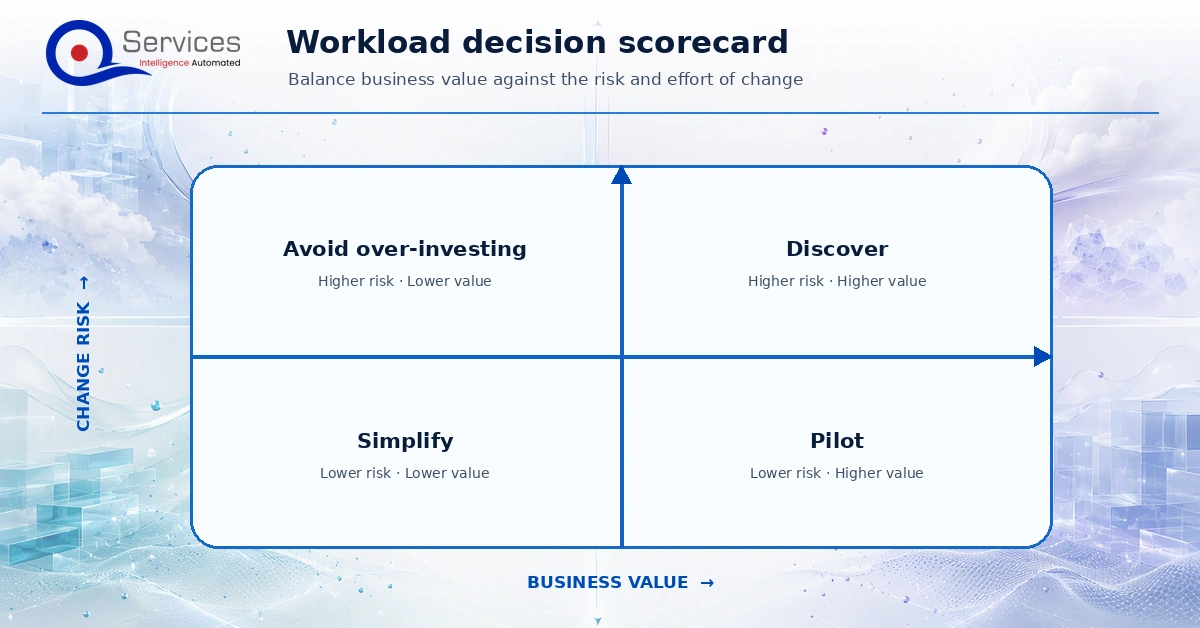
A workload scorecard should make evidence visible without turning weighted scores into an automatic architecture decision.
Business and service evidence
Business capability, executive sponsor, service owner, product owner, and user groups
Critical business periods, acceptable outage, recovery time, recovery point, and support hours
Transaction patterns, seasonality, growth assumptions, user locations, and latency needs
Known process pain, manual workarounds, change backlog, contractual duties, and end-of-life dates
Baseline outcomes such as release frequency, lead time, incident rate, recovery performance, and support effort
Talk to operators and users who handle exceptions, not only managers who know the intended process. Observe month-end, peak events, failed transactions, batch restarts, and manual reconciliation. Those moments reveal the behavior that a modernization plan must preserve or deliberately improve.
Application and dependency mapping
Inventory runtimes, frameworks, libraries, operating systems, web servers, schedulers, agents, certificates, secrets, file shares, local storage, queues, APIs, database drivers, report engines, and deployment tools. Record support status and ownership. Scan code and configuration where possible, then reconcile automated findings with operations knowledge.
Map inbound and outbound dependencies with protocol, direction, frequency, volume, authentication, timeout behavior, retry behavior, data classification, and owner. Include DNS, directory services, email relays, print, SFTP, partner connections, monitoring, backup, identity providers, shared databases, and business intelligence extracts. Passive traffic observation over a representative cycle can expose links missed in workshops.
Azure Migrate supports discovery, assessment, business-case analysis, dependency analysis, and migration scenarios. Microsoft describes assessment outputs that include strategy, readiness, rightsizing, resource cost, tooling, and other findings. Treat an assessment as point-in-time evidence. Configuration, utilization, prices, dependencies, and business priorities can change, so date the evidence and refresh it before an approval or cutover if the workload has materially changed.
Data mapping
Catalog databases, schemas, storage, files, queues, caches, reports, archives, and external data exchanges. For each, record ownership, classification, retention, residency, encryption, keys, volume, growth, quality issues, replication, consistency requirements, downtime tolerance, and reconciliation method. Identify where a shared database is acting as an undocumented integration layer.
Separate database engine compatibility from migration feasibility. Features, extensions, collation, jobs, linked servers, authentication, transaction semantics, query behavior, and operational tooling can alter the target choice. Microsoft provides a data-store decision tree, but the choice still depends on workload access patterns and quality attributes. A managed relational service, globally distributed database, analytical store, cache, or object store solves a different problem.
Plan validation before movement begins. Define row or object counts, checksums where appropriate, financial control totals, referential checks, sampling, duplicate handling, rejected-record ownership, and business sign-off. The Azure Database Migration Service FAQ is a useful product reference, but migration mode and support should be confirmed for the exact source, target, version, and current service capability during design.
Security, compliance, and operations evidence
Record identities, service accounts, privileged paths, authorization rules, certificates, secrets, encryption, key ownership, network flows, internet exposure, data classifications, audit requirements, threat scenarios, vulnerability findings, and regulatory obligations. Document who can approve each risk and what evidence the approver needs.
Use scores to structure judgment, not replace it
Rate business value, urgency, technical health, security exposure, dependency complexity, team readiness, and transition risk. Show raw evidence beside the score because identical totals can hide different constraints.
How do you design the Azure target around workload requirements?
Choose compute from operating requirements
Start with deployment unit, runtime control, scaling behavior, state, network needs, availability, compliance, team skills, and operational responsibility. Then consult Microsoft’s Azure compute decision tree. Virtual machines provide broad control but leave more operating responsibility with the team. Managed web and application platforms can reduce platform work when the application fits. Containers can package dependencies consistently, but an orchestrator adds operational concepts that must be justified. Functions fit event-driven and bounded execution patterns, subject to product behavior and workload requirements.
Choose databases from access patterns and transition needs
Database choice should follow data shape, query and transaction patterns, consistency, latency, scale, availability, retention, analytics, security, operational skills, and migration constraints. Do not convert a relational model to another database category solely to claim modernization. The cost of rewriting queries, transactions, reports, integrations, backup procedures, and operating knowledge may exceed any platform benefit.
When moving a tightly coupled application and database, decide whether to change both in one release or stage the work. A staged move reduces simultaneous variables but may introduce network latency, data-transfer cost, or temporary connectivity complexity. Test the actual call patterns. Chatty applications can behave poorly when the application and database are separated by a network path they did not previously cross.
Establish the landing zone before workload teams improvise
The Azure landing-zone guidance separates platform landing zones from application landing zones. Platform landing zones provide shared services and centralized capabilities. Application landing zones host workloads. This distinction supports delegated delivery while retaining common governance.
Define tenant and subscription structure, management groups, identity, privileged access, network topology, connectivity, DNS, policy, resource naming, tagging, logging, security monitoring, key management, backup, recovery, cost ownership, deployment pipelines, and exceptions. Decide who owns each platform capability and its service level. Application teams should know which controls are inherited, which they must implement, and how to request an exception.
Apply the Azure Well-Architected Framework pillars to workload decisions: reliability, security, cost optimization, operational excellence, and performance efficiency. The pillars create a review structure, not a claim that every design can maximize every property. Document trade-offs, such as paying for redundancy to meet recovery needs or accepting a simpler design because demand and impact are bounded.
Which modernization path fits each workload in your Azure portfolio?
Use a 5-day, $5K Blueprint Sprint to turn workload evidence into a governed scope, target architecture, roadmap, and fixed-price next step.
Key Insight Use a 5-day, $5K Blueprint Sprint to turn workload evidence into a governed scope, target architecture, roadmap, and fixed-price next step.
A modernization business case must compare credible alternatives over a defined period. Include the baseline cost of keeping the workload, not only the Azure estimate. Baseline categories can include infrastructure, facilities, licenses, support contracts, labor, backup, disaster recovery, security tooling, incident effort, delayed change, and the expected cost of known end-of-life actions. Separate cash cost from allocated cost and document assumptions.
For each treatment, model discovery, engineering, platform preparation, migration tooling, testing, data movement, parallel environments, licenses, training, process change, security review, cutover support, decommissioning, and ongoing operations. Include temporary coexistence. A lower steady-state estimate does not fund the transition itself.
Cloud resource estimates should reflect observed utilization and forecast demand, with explicit assumptions for region, availability, storage growth, data transfer, support, reservations or savings mechanisms, licensing benefits, backup, logging, security, and nonproduction environments. Azure Migrate can contribute rightsizing and resource-cost evidence, but its assessment remains point-in-time and cannot represent every business or transition cost.
Set ownership for post-migration cost. Tags and budget alerts help only when someone is accountable for action. Microsoft’s Cost Management budget guidance is explicit that budgets provide alerts and do not stop resources. If a hard control is required, design a separate, risk-aware policy or automation and confirm it will not terminate critical production service.
Value also needs evidence. Connect the investment to avoided end-of-support exposure, faster recovery, reduced deployment effort, shorter release lead time, retirement of licenses, lower incident load, improved throughput, or enabled business change. Avoid converting every benefit into a speculative dollar figure. Some risk reductions are better presented as exposure, control improvement, and executive risk acceptance.
Sequence a phased Azure modernization roadmap
A roadmap should reduce uncertainty before increasing commitment. Organize it into decision points with evidence, owners, and entry and exit criteria. Avoid a two-year plan that assumes architecture, priorities, and dependencies will remain fixed.
Phase 1: define outcomes and portfolio boundaries
Name executive objectives, deadlines, risk appetite, funding boundaries, and success measures.
Establish the application inventory and accountable owners.
Identify nonnegotiable business, security, regulatory, and contractual constraints.
Group workloads by business capability and likely dependency domain.
Create a triage list for immediate retirement, urgent remediation, and deeper assessment.
Phase 2: discover and assess
Collect workload evidence across business, application, dependency, data, security, operations, and cost domains.
Use tooling and interviews together, then reconcile discrepancies.
Produce treatment options, uncertainty, risk, target outcomes, and preliminary economics.
Select proof-of-concept questions that could change the decision.
Approve treatment and wave placement through a documented decision.
Phase 3: prepare the platform and delivery system
Establish platform and application landing zones, connectivity, identity, policy, logging, and cost ownership.
Define nonfunctional acceptance criteria and production-readiness controls.
Test the riskiest compatibility, performance, data, or integration assumptions early.
Phase 4: deliver by workload wave
Begin with a representative workload that is meaningful but recoverable. A trivial pilot proves little, while the most critical and interconnected system creates unnecessary exposure. Deliver vertical slices that can be demonstrated and measured. Keep dependency owners in the wave, rather than declaring their systems out of scope while relying on them for success.
For detailed infrastructure migration planning, the QServices guide to moving on-premises infrastructure to Azure with controlled downtime provides a related operational view. When modernization affects operational planning and data flows, review how enterprise systems support processes such as ERP in supply chain management. The application cannot be assessed apart from the business network it serves.
Phase 5: cut over, stabilize, and decommission
Use a hypercare period with named incident authority, monitoring, business validation, and defect triage. Transfer runbooks and ownership to the operating team. Then remove old infrastructure, accounts, network rules, licenses, backups, pipelines, monitoring, and vendor commitments according to retention and audit rules. Confirm costs disappeared. A modernization wave is not financially complete while the old estate remains quietly funded.
Test, cut over, and define rollback before production
Testing must demonstrate business behavior and operating qualities. Build a traceable set of functional, integration, data, security, performance, resilience, recovery, deployment, and operational acceptance tests. Use production-shaped data safely, representative volumes, realistic dependency behavior, and failure injection where appropriate. A green unit-test suite does not prove a batch closes on time or that operators can recover the service.
Define data acceptance in business terms. Reconcile opening and closing balances, order states, record counts, control totals, document links, timestamps, permissions, and rejected items. Assign an owner for every exception. Where synchronization continues during transition, measure lag and define how conflicts are resolved.
Rehearse the migration and time each step. The runbook should identify the command or action, owner, expected duration, evidence produced, stop condition, and escalation path. Set a go or no-go meeting with named decision rights. “Rollback if there are problems” is not enough. Define which symptoms, thresholds, and elapsed time trigger rollback, and the last safe decision point.
Microsoft explains that an Azure Migrate test migration creates a clone while the source remains operational. The test target needs an isolated virtual network so it does not interfere with production. Use the clone to validate boot, connectivity, application behavior, performance, security controls, monitoring, and operational procedures. Clean it up as directed after testing.
Product limits shape rollback. Azure Migrate cannot roll a server back to on-premises after final cutover. Therefore the program must own a separate fallback design where required, such as restoring or restarting the source within a controlled window, reversing traffic, or recovering from protected data. The exact pattern depends on write activity, synchronization, data authority, and the selected migration method. Test it rather than assuming it works.
For supported Azure App Service tiers, deployment slots are available in Standard, Premium, and Isolated plans. Slots can support validation and controlled swaps, and a swap can be reversed. That does not automatically reverse database changes, external messages, or irreversible business transactions. Coordinate application and data compatibility, use backward-compatible changes where possible, and define what a reverse swap would actually recover.
Use five human approval gates to control execution
The following five-gate method is a QServices delivery framework, not Microsoft product behavior. QServices uses human-in-the-loop approvals, fixed scope and fixed price per sprint, Architecture Decision Records with a full audit trail, and working software every Friday. The purpose is to expose decisions while they are still reversible.
QServices’ five gates put accountable human approval between evidence, architecture, build, cutover, and production acceptance.
Gate 1: evidence and objective approval
Business and technical owners approve the workload boundary, baseline, desired outcomes, constraints, dependencies, unknowns, and assessment evidence. Conflicting records are resolved or explicitly marked. No target architecture is approved on an unowned inventory.
Gate 2: treatment and architecture approval
Decision owners review treatment options, target compute and data choices, landing-zone dependencies, security design, cost range, transition method, and rejected alternatives. The approved Architecture Decision Records state trade-offs and reversal conditions. This gate prevents an exploratory idea from becoming an unexamined commitment.
Gate 3: sprint scope and acceptance approval
The team converts the next slice into fixed scope, fixed price, acceptance criteria, exclusions, test evidence, and change control. QServices’ 5-day, $5K Blueprint Sprint is the discovery mechanism used to produce that bounded plan. Later delivery proceeds sprint by sprint, so new findings can change a future scope without silently expanding the current one.
Key Insight QServices’ 5-day, $5K Blueprint Sprint is the discovery mechanism used to produce that bounded plan.
Gate 4: release and cutover approval
Owners review working software, test results, unresolved defects, security evidence, data reconciliation, operational readiness, cutover rehearsal, rollback conditions, communications, and support staffing. Weekly Friday demonstrations provide recurring evidence before the final release meeting rather than leaving sponsors with status summaries until the end.
Gate 5: production acceptance and retirement approval
Business and service owners confirm production behavior, metrics, support transfer, risk acceptance, and stabilization status. Retirement approval requires archive and retention evidence plus confirmation that old costs and access paths were removed. Every approval, exception, and Architecture Decision Record remains in the audit trail.
The gates do not remove change. They make change visible and assign a decision owner. If discovery invalidates a selected treatment, the correct response is to return to the relevant gate, update the evidence and decision, and re-scope. Hiding the change to preserve an original estimate creates a weaker system and an unreliable commercial record.
Avoid common modernization anti-patterns
One treatment for the whole estate: a factory can standardize evidence and controls, but it should not force every workload into rehost or rewrite.
Architecture before discovery: selecting containers, microservices, or a database category before measuring requirements turns tools into constraints.
Rehost presented as debt removal: relocation can solve a location deadline, but inherited code and operating weaknesses remain.
Rewrite from a requirements document alone: undocumented behavior, exceptions, reports, permissions, and reconciliations must be discovered from the operating system and its users.
Ignoring retained and retired paths: retaining without controls accumulates risk, while retiring without dependency and retention proof creates outages or compliance exposure.
Shared database left unexamined: moving applications separately while preserving hidden database coupling can create latency, release, and ownership failures.
Point-in-time assessment treated as permanent truth: refresh utilization, inventory, dependencies, prices, and readiness when decisions or cutovers occur later.
Cost model stops at compute: transition labor, parallel run, networking, backup, security, logging, support, licenses, and decommissioning affect the business case.
Budget alert treated as a spending brake: Azure budgets alert; they do not stop resources.
Rollback described but not rehearsed: final cutover and data writes can make reversal materially different from redirecting traffic.
Cloud operating model deferred: unclear ownership for identity, policy, observability, security, and cost creates production risk even when migration succeeds.
Project closes before decommissioning: parallel cost continues and obsolete access remains when retirement has no owner or evidence.
Measure portfolio, delivery, and workload outcomes
Executives need a small set of measures that connect investment to outcomes. Teams need diagnostic measures that reveal where to act. Establish baselines before the change and retain definitions, data owners, collection methods, and review cadence.
Portfolio measures
Workloads with an accountable owner, current evidence pack, approved treatment, and review date
Applications retired, retained with active risk acceptance, replaced, migrated, or modernized by wave
Data center, license, support, and infrastructure obligations actually removed
Investment and forecast by business capability and treatment, including transition and parallel-run cost
Risks, exceptions, and dependencies without an owner or dated resolution
Delivery measures
Lead time from approved scope to production, deployment frequency, change failure rate, and recovery time
Acceptance criteria passed, escaped defects, security findings, data exceptions, and rollback rehearsals completed
Scope changes by cause, approval, cost, and schedule effect
Decisions awaiting approval, Architecture Decision Records completed, and evidence age
Forecast accuracy and unfinished decommissioning actions
Workload outcome measures
Select measures tied to the reason for treatment. A reliability-led change might track availability, recovery performance, incident frequency, and restoration proof. A delivery-led refactor might track release lead time, deployment effort, and failed changes. A cost-led replatform might track unit cost, utilization, support hours, and variance from budget. A customer-facing rebuild might track completion, latency, error rate, adoption, and support contacts.
Avoid claiming success from migration count, Azure resource count, or percentage of servers moved. Those are activity measures. A workload can be moved and still be expensive, fragile, difficult to change, and poorly owned.
What the executive team should approve
A sound legacy application modernization strategy is a chain of accountable decisions. Start with portfolio outcomes, assemble a workload evidence pack, define the treatment taxonomy, compare real alternatives, design the Azure target from requirements, model transition and operating economics, and release through tested gates. Retain and retire deserve the same rigor as rehost, replatform, refactor, rearchitect, rebuild, and replace.
Keep Microsoft product behavior separate from delivery recommendations. Azure Migrate assessments provide useful point-in-time evidence. Landing zones establish platform and application foundations. Well-Architected pillars structure quality reviews. Test migration, deployment slots, and budgets each have specific capabilities and limits. Your governance model must connect those capabilities to human ownership, acceptance evidence, rollback decisions, and business outcomes.
QServices’ five-gate approach uses fixed-scope, fixed-price sprints, a full Architecture Decision Record trail, and working software every Friday to keep modernization decisions visible. Review examples of delivered work in the QServices portfolio, or Book a Blueprint Call to map a 5-day, $5K Blueprint Sprint for your Azure modernization portfolio.
Key Insight Review examples of delivered work in the QServices portfolio, or Book a Blueprint Call to map a 5-day, $5K Blueprint Sprint for your Azure modernization portfolio.
Eager to discuss about your project?
Share your project idea with us. Together, we’ll transform your vision into an exceptional digital product!
Co-Founder and CTO, QServices IT Solutions Pvt Ltd
Rohit Dabra is the Co-Founder and Chief Technology Officer at QServices, a software development company focused on building practical digital solutions for businesses. At QServices, Rohit works closely with startups and growing businesses to design and develop web platforms, mobile applications, and scalable cloud systems. He is particularly interested in automation and artificial intelligence, building systems that automate routine tasks for teams and organizations.
A legacy application modernization strategy is a portfolio-level plan that decides what to do with each existing workload, why that treatment creates business value, and how to execute it safely. It can assign retire, retain, rehost, replatform, refactor, rearchitect, rebuild, or replace based on evidence rather than applying one migration method to every application.
The 6 Rs usually refer to rehost, replatform, refactor or rearchitect, rebuild or repurchase, retain, and retire, but the labels vary by source and era. Microsoft currently presents eight treatments: retire, retain, rehost, replatform, refactor, rearchitect, rebuild, and replace. Define the taxonomy in your decision record before comparing plans or vendor estimates.
Replatform when a bounded infrastructure or runtime change can deliver the target benefit without materially redesigning the application. Refactor when code changes are needed to remove a specific constraint, such as fragile session state, platform coupling, or poor deployment automation. Choose from measured requirements and a proof of concept, not from a general preference for more cloud-native architecture.
Yes. Rehosting, replatforming, selective refactoring, API encapsulation, and incremental rearchitecture can modernize a legacy application without a full rewrite. The safest plan isolates seams, moves one bounded capability at a time, and keeps a tested fallback until the new path meets functional and operational acceptance criteria.
Reduce cutover risk with rehearsed migrations, production-like testing, reconciled data, isolated test networks, explicit go or no-go criteria, and a time-bounded rollback decision. Azure Migrate can create a test-migration clone while the source stays operational, but the clone needs an isolated virtual network, and Azure Migrate cannot roll a workload back to on-premises after final cutover.
When PDF text extraction drops the spaces between words, AI agents can’t find facts that are right there. How we found it in Azure AI Foundry and fixed it.
When PDF text extraction drops the spaces between words, AI agents can’t find facts that are right there. How we found it in Azure AI Foundry and fixed it.
Pint AE explained for UAE finance teams with one sample invoice: see which fields come from your ERP, which go missing, and how to test before go-live.
Globally Esteemed on Leading Rating Platforms
Earning Global Recognition: A Testament to Quality Work and Client Satisfaction. Our Business Thrives on Customer Partnership
QServices Inc. undertakes every project with a high degree of professionalism. Their communication style is unmatched and they are always available to resolve issues or just discuss the project.
Turn the Microsoft Licenses
You Already Own Into an AI Workplace
Join our live webinar on Sept 24 and see five ways to automate meetings, approvals, and