Power BI dashboard development is one of the highest-leverage investments a Microsoft-stack organization can make, but most projects stall for the same three reasons: unclear data ownership, no deployment process, and dashboards built for the developer rather than the end user. This guide covers the full development lifecycle, governance practices that separate a reliable analytics layer from a fragile one, and realistic pricing. If you're evaluating power bi consulting services or planning an internal build, the process questions matter as much as the technical specification.
In This Article, You'll Learn
What Is Power BI Dashboard Development?
The Power BI Dashboard Development Process: From Requirements to Deployment
Power BI Dashboard Best Practices
How Power Platform Governance Protects Your BI Investment
Power Apps Development Services: What to Build Alongside Power BI
Eager to discuss about your project?
Share your project idea with us. Together, we’ll transform your vision into an exceptional digital product!
Power BI dashboard development is the end-to-end process of connecting business data sources to a reporting layer that gives decision-makers accurate, timely visibility into the metrics that drive decisions. It goes well beyond building charts. It involves data modeling, semantic layer design, access control, deployment pipelines, and ongoing governance.
Power BI vs Tableau for Microsoft Environments
For companies already running Microsoft 365, Dynamics 365, or Azure SQL, Power BI is the practical default, not just because of licensing but because of native connector depth. According to Microsoft's Power BI documentation, it integrates directly with the broader Power Platform suite, meaning dashboards can trigger Power Automate flows, embed in Power Apps, and draw from a shared Dataverse data layer without additional middleware.
Tableau requires extra connectors for many of these integrations, and enterprise licensing costs are substantially higher. The honest answer: if your data mostly lives in Microsoft services, Power BI wins on integration depth and total cost. If your primary warehouse is Snowflake and your CRM is Salesforce, Tableau's connector story may justify the premium.
Key Components of a Power BI Dashboard
A production Power BI dashboard has several distinct layers:
Data sources: Azure SQL, Dataverse, SharePoint, REST APIs, or on-premises systems via gateway
Semantic model: Relationships, calculated columns, and DAX measures encoding business logic
Report layer: Visuals, slicers, bookmarks, and drill-throughs
Workspace and app: Deployment containers with role-based access
Row-level security: Access filters enforced at the model level, not the report level
Getting each layer right during power bi dashboard development is what separates a two-second dashboard from one that generates Monday morning support tickets.
The Power BI Dashboard Development Process: From Requirements to Deployment
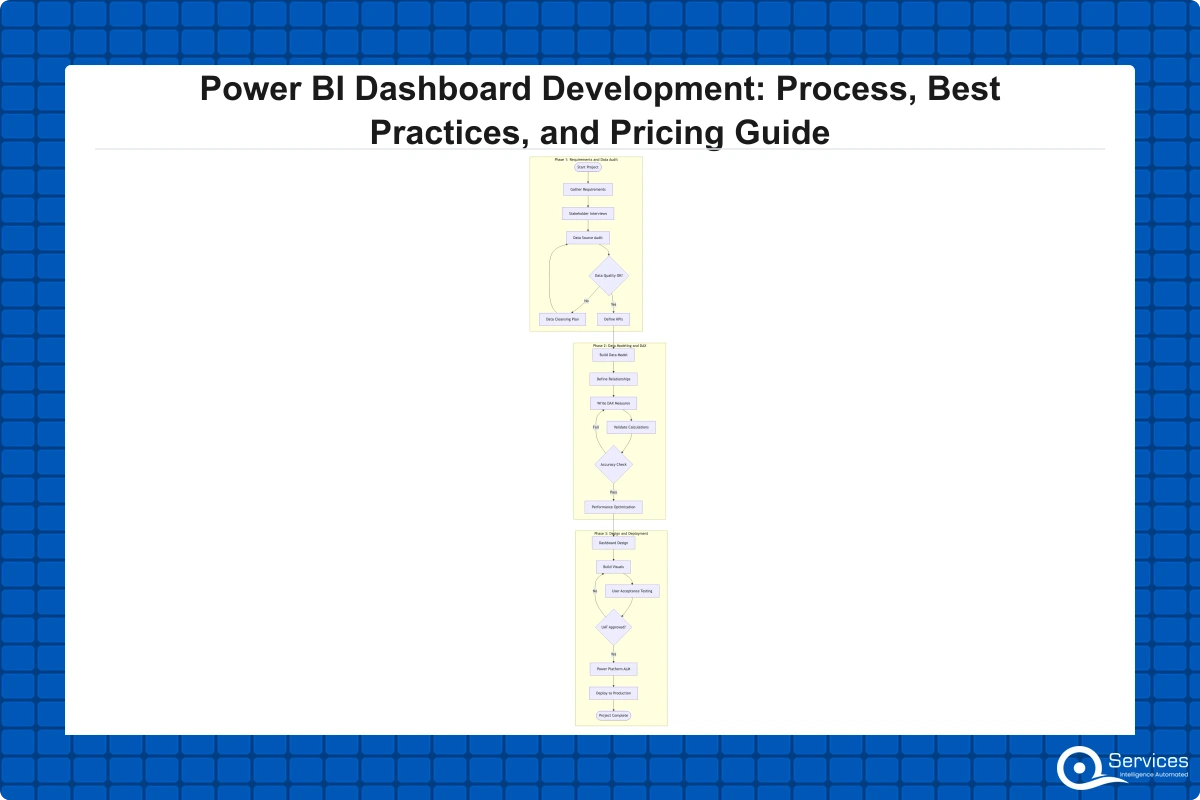
Step 1: Data Audit, Requirements, and Source Mapping
Most failed BI projects collapse here. Before any visual gets built, you need to know where data lives, who owns it, how often it updates, and what decisions it actually needs to support. Stakeholder interviews should focus on decisions being made, not reports being requested. A sales director asking for a pipeline dashboard really wants to know which deals are at risk this quarter.
Source mapping surfaces complexity. Organizations with mixed ERP systems, Dynamics 365 data in Dataverse, and operational data in Azure SQL often discover their three supposedly straightforward sources need a staging layer to resolve naming conflicts and timezone discrepancies. Power platform ALM practices, specifically separate development, test, and production environments, need to be established at this stage. Retrofitting environment governance post-launch costs more in rework than setting it up properly at the start.
Step 2: Data Modeling, DAX, and Semantic Layer Design
The semantic layer is where most of the real work happens. A clean star schema with proper relationships and reusable DAX measures is the difference between a dashboard that performs at ten million rows and one that times out at five hundred thousand.
DAX is not intuitive for developers coming from SQL, and this is where in-house teams accumulate the most technical debt. Year-over-year comparisons, rolling averages, and rank filters all require specific patterns that, when written incorrectly, return wrong results at certain filter combinations. Getting DAX right is where power bi consulting services pay for themselves most directly.
Step 3: Dashboard Design, Deployment, and Power Platform ALM
Dashboard design is where adoption is won or lost. Color contrast, information hierarchy, and mobile responsiveness are functional requirements. Technically correct dashboards fail adoption reviews when users can't find the filter they need or a tooltip clips on a 1080p screen.
Deployment through power platform ALM means using deployment pipelines in the Power BI service to promote content from development to test to production. This creates rollback capability and change history, which matters when a DAX update causes wrong numbers in a board report. Without this structure, power bi dashboard development becomes a pattern of publish-and-hope.
Power BI Dashboard Best Practices
Designing for Adoption, Not Just Accuracy
Accuracy is table stakes. Dashboards that change behavior do a few things differently. Each report page answers one business question. When users face fifteen charts on a single page, they typically export to Excel, and the dashboard investment never delivers its value.
Bookmarks for common filter states, metric definitions on a glossary page, and consistent navigation patterns reduce cognitive load for daily users. Citizen developer governance applies at the design stage too: when business users build reports on top of a certified semantic model, design guardrails such as approved visual types and publishing gates prevent unofficial dashboards from circulating in email attachments. The Power Platform Governance Framework: The 6 Pillars Every Enterprise Needs covers how these guardrails fit into a broader governance structure.
How to Integrate Power BI with Azure SQL and Dataverse
For Dynamics 365 deployments (see our Dynamics 365 licensing guide if you're still scoping plans), Power BI connects to Dataverse via a native connector supporting row-level security inherited from Dataverse security roles. The integration story is clean, but the data model design is rarely obvious. Dataverse uses GUID-based relationships that don't map directly to a star schema without a transformation layer.
Azure SQL gives more flexibility. DirectQuery works well for real-time operational metrics. Import mode performs better for historical aggregates and large datasets. Most production environments need both. Dataverse consulting engagements typically spend as much time on this architecture decision as on report design, because the wrong choice creates performance ceilings that are expensive to fix after go-live.
How Power Platform Governance Protects Your BI Investment
Power platform governance is the set of policies and structures that prevent your BI investment from turning into a data chaos problem over time. Without it, you accumulate undocumented semantic models, duplicate dashboards pulling from conflicting sources, and no clear owner when numbers disagree in front of senior leadership.
What Is a Power Platform Center of Excellence?
A Power Platform Center of Excellence (CoE) is the governance structure that coordinates how Power Platform tools including Power BI are built, deployed, and maintained across an organization. QServices implements Power Platform Center of Excellence using Microsoft's CoE starter kit as the baseline, customized for each client's environment strategy and risk profile.
Power Platform governance prevents shadow IT through DLP policies, environment strategies, and approval workflows. Data Loss Prevention policies define which connectors can share data. You might allow SharePoint and Dataverse connectors to interact freely while blocking any flow that connects a corporate source to a personal Gmail or consumer OneDrive.
Citizen developer programs need governance guardrails to prevent data silos and compliance gaps, because cleaning up an unmanaged Power Platform environment almost always costs more than governing it from the start. Our analysis of shadow IT in Power Platform environments covers the patterns that appear most often and how to address them without blocking legitimate self-service development.
Power Apps Development Services: What to Build Alongside Power BI
Power BI dashboards show what's happening. Power Apps let users act on what they see without leaving the Microsoft environment. Organizations running Dataverse or Dynamics 365 often find a purpose-built app reduces the friction between reading a data point and doing something about it.
Power Apps Canvas vs Model-Driven Apps: Which Should You Use?
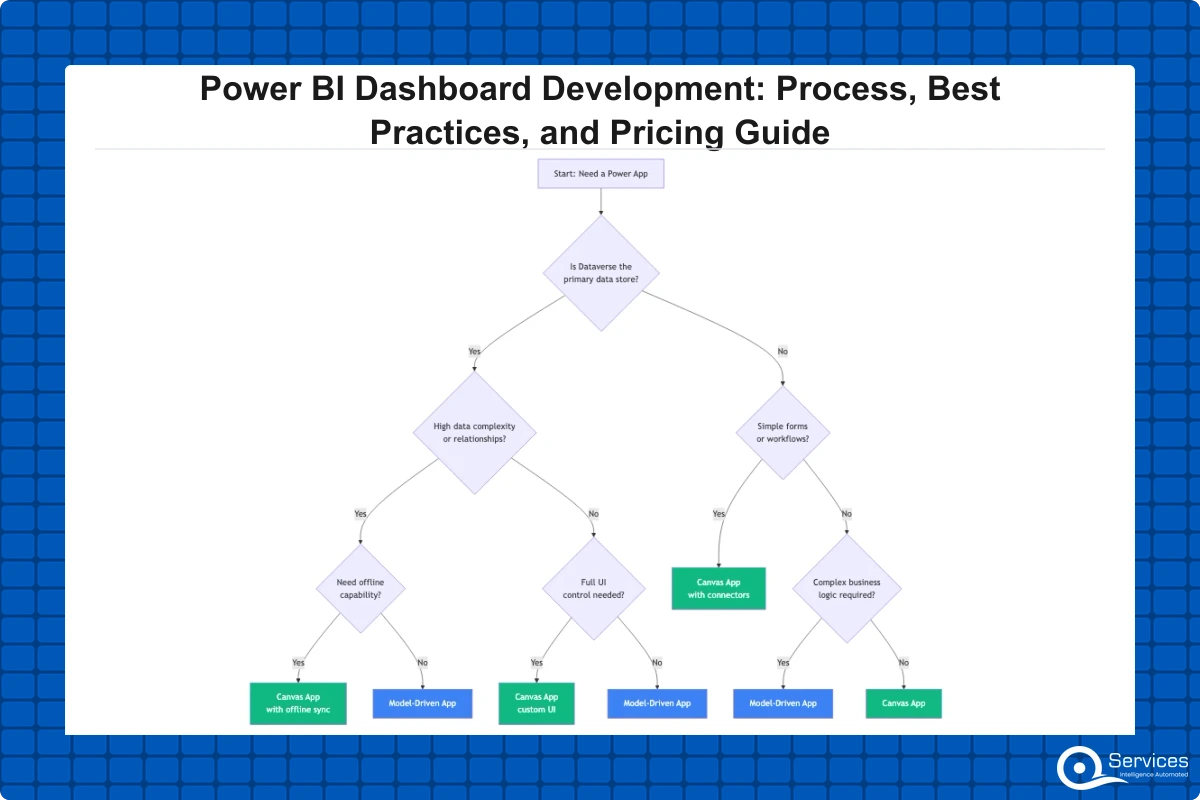
Power apps canvas vs model driven is the first real architectural decision in any custom power apps development engagement. It shapes build complexity, maintenance burden, and extensibility in ways that are hard to reverse mid-project.
Canvas apps give pixel-level UI control and connect to any Power Platform data source. They're faster to prototype, especially for mobile. The trade-off: they don't inherit Dataverse's built-in security model, and without design standards they become unmaintainable as they grow.
Model-driven apps generate their UI from your Dataverse data model. They work better for complex data entry with multiple related entities, business rules, and approval chains. Power automate consulting engagements involving multi-step approvals typically recommend model-driven apps as the interaction layer. For cost and use case detail, see Custom Power Apps Development: Use Cases, Costs, and What to Expect.
Custom Power Apps Development Use Cases
Custom power apps development scenarios that consistently deliver fast ROI include:
Leave and absence management with Power Automate approval routing (we delivered one in three working days)
Field inspection apps with offline capability and photo capture
Procurement request workflows with Dataverse as the backend and Power BI for spend visibility
Power pages development for external client portals: KYC forms, document submission, and onboarding checklists
Power pages development is the underused piece. It handles the external-facing layer while internal processing runs in model-driven apps and Dataverse, giving you a complete Microsoft-native solution without a separate web application.
Power Automate Consulting: Connecting Dashboards to Business Workflows
Power automate consulting sits at the intersection of BI and operations. A dashboard showing high invoice processing time is more useful when clicking a slow-processing vendor triggers an automated follow-up. That level of integration requires expertise in both the data model and process design, which is why power automate consulting and power bi dashboard development are frequently scoped together.
Threshold alerts: When a KPI in Dataverse crosses a defined limit, trigger a Teams notification to the responsible manager
Data approval gates: Route record updates through an approval step before they affect the production semantic model
Scheduled report distribution: Export Power BI reports as PDF and deliver to distribution lists on a set schedule
Data quality exception handling: Flag records violating quality rules and create resolution tasks in Planner or Dataverse
These flows make dashboards actionable by closing the loop between insight and response.
Dataverse Consulting and a Shared Data Layer
Dataverse consulting is about making Dataverse the authoritative source for both Power BI and Power Apps rather than each tool pulling from its own data copy. When the Power BI semantic model reads Dataverse tables and Power Apps write back to the same tables, the reporting layer reflects actual operational state without a separate ETL process.
The complication: Dataverse data modeling differs from SQL. Flat table structures that seem fine initially create performance problems in Power BI as volume grows. Getting the data architecture right before building is where dataverse consulting delivers its clearest return.
What Does Power BI Dashboard Development Cost?
Cost is the question most organizations ask first, and it's genuinely hard to answer without context. Power bi dashboard development costs depend on data source complexity, the number of integrated systems, governance requirements, and whether you're building one operational dashboard or a full enterprise reporting program. Premium connector licensing is often the hidden line item; see our cost decision guide for standard versus premium connector tradeoffs.
Key Pricing Factors for Power BI Consulting Services
Power bi consulting services are typically scoped on time-and-materials or fixed-price contracts. The factors that drive cost most significantly:
Source system complexity: A single Azure SQL database costs a fraction of five integrated systems with schema conflicts
Custom DAX development: Complex business logic in measures adds 20-40% to the modeling phase
Row-level security design: RLS in Dynamics 365 environments with layered security roles adds meaningful scope
Power Platform ALM setup: Environment pipelines and workspace governance are rarely optional at scale
Training and handover: Citizen developer training reduces long-term support cost but adds to initial scope
In our client engagements, a focused power bi consulting services project for a mid-market organization typically ranges from $8,000 to $15,000 for three to five report pages with one or two data sources. An enterprise program with certified semantic models, multiple workspaces, and CoE implementation typically runs $40,000 to $80,000 or more.
Key Insight In our client engagements, a focused power bi consulting services project for a mid-market organization typically ranges from $8,000 to $15,000 for three to five report pages with one or two data sources.
In-House vs. Hiring a Power Platform Development Company
The build-in-house decision comes down to one question: do you have someone who owns both data modeling and business logic, plus Power BI-specific DAX expertise? Most organizations have strong SQL developers or strong business analysts, rarely both skill sets plus Power BI depth in the same person.
Engaging a power platform development company for the initial build, with a structured handover to internal teams, is the pattern that works most consistently. It avoids the skill ramp-up delay while building internal capability rather than permanent external dependency.
Choosing a Power Platform Development Company
The Microsoft partner ecosystem is large and quality varies widely. A power platform development company that excels at canvas app development may not have the data modeling depth for enterprise-grade power bi dashboard development. Ask specifically about experience with your data sources, your industry's data volume, and your compliance requirements.
Questions to Ask Before You Sign a Statement of Work
Before engaging any partner for power bi dashboard development, ask:
Can you show a data model built for similar data volume or industry?
How do you handle power platform ALM across client projects? Publishing directly to production with no pipeline is a red flag.
What is your approach to citizen developer governance after handover?
Do you configure DLP policies and power platform governance, or only report development?
How do you handle semantic model certification and workspace access controls?
A credible partner answers questions two and four without hesitation. If governance is positioned as an optional add-on, expect technical debt that costs more to fix than it would have to prevent upfront.
Key Takeaways
Power BI dashboard development is the end-to-end process of connecting business data sources to a reporting layer that gives decision-makers accurate, timely visibility into the metrics that drive decisions.
Most failed BI projects collapse here.
Power platform governance is the set of policies and structures that prevent your BI investment from turning into a data chaos problem over time.
Power BI dashboards show what's happening.
Power automate consulting sits at the intersection of BI and operations.
Conclusion
Power BI dashboard development done well is not just a reporting project. It's the foundation for how your organization reads and acts on its own data. Getting the semantic layer right, building governance structures that survive staff turnover, and connecting dashboards to automated workflows through power automate consulting and Power Apps are what turn a one-time delivery into a long-term analytics capability.
If you're evaluating power bi consulting services or scoping an enterprise BI engagement, the governance and process questions matter as much as the technical specification. How will environments be managed? Who certifies semantic models? What happens when citizen developer governance breaks down?
QServices works with mid-market and enterprise Microsoft organizations on Power Platform development from initial scoping through to CoE establishment. Talk to our team about what a structured power bi dashboard development engagement looks like for your organization.
Co-Founder and CTO, QServices IT Solutions Pvt Ltd
Rohit Dabra is the Co-Founder and Chief Technology Officer at QServices, a software development company focused on building practical digital solutions for businesses. At QServices, Rohit works closely with startups and growing businesses to design and develop web platforms, mobile applications, and scalable cloud systems. He is particularly interested in automation and artificial intelligence, building systems that automate routine tasks for teams and organizations.
A Power BI report is a multi-page document connected to a semantic model where users apply filters and drill into data. A dashboard in the Power BI service is a single-page canvas that pins visuals from one or more reports for executive-level monitoring. During power bi dashboard development, the semantic model and report are built together, with the dashboard assembled separately as a high-level summary view.
A focused project covering three to five report pages with one or two data sources typically takes four to eight weeks from requirements to go-live. An enterprise analytics program with multiple certified semantic models, workspace governance, and Power Platform ALM setup can run twelve to twenty-four weeks depending on data complexity and the number of source systems being integrated.
Canvas apps work better for focused, mobile-friendly workflows where you need pixel-level UI control and a fast build timeline. Model-driven apps are better when your Power BI data also feeds complex data entry forms with business rules, approval chains, and multiple related Dataverse entities. Most mature Power Platform implementations use both types for different parts of the same workflow.
Power Platform governance prevents shadow IT through DLP policies that control which connectors can share data, environment strategies that restrict who can create production apps and flows, and approval workflows that gate publishing. A Power Platform Center of Excellence provides the organizational structure to enforce and sustain these controls as the number of citizen developers grows across the organization.
A Power Platform Center of Excellence (CoE) is the governance structure that coordinates how Power Platform tools including Power BI, Power Apps, and Power Automate are built and maintained across an organization. It manages four areas: environment governance, connector policy via DLP rules, maker support including training and escalation, and usage monitoring for compliance. QServices implements Power Platform Center of Excellence using Microsoft’s CoE starter kit as the baseline.
Import mode delivers better query performance because data loads into Power BI’s in-memory engine, making it best for historical analysis and large datasets. DirectQuery always queries the source and works better for real-time operational data. Most production power bi dashboard development engagements use a hybrid: import for trend analysis and DirectQuery for live operational metrics that need to reflect current state.
Power bi consulting services for a mid-market organization typically range from $8,000 to $15,000 for a focused project covering three to five report pages with one or two data sources. Enterprise analytics programs with certified semantic models, multiple workspaces, and CoE implementation typically run $40,000 to $80,000 or more. The biggest cost drivers are source system complexity, custom DAX development, row-level security design, and Power Platform ALM setup.
Business intelligence consulting services should give a mid-market company a governed way to make decisions. Attractive dashboards are only the visible part. The useful outcome is a system in which source data, metric definitions, access, releases, ownership, and support still work after the consultants leave.
In a Microsoft Solutions Partner vs Microsoft Partner comparison, the difference is validation. A company can participate in the Microsoft AI Cloud Partner Program without holding a customer-facing Solutions Partner designation. A designated Solutions Partner has met Microsoft’s current threshold in a specific solution pathway: at least 70 out of 100 partner capability points, with more than zero points in every required metric, based on performance, skilling, and customer success data recorded in Partner Center.
How do you build a legacy application modernization strategy for Azure? A legacy application modernization strategy assigns the right treatment to each workload, then sequences the work around business value, technical evidence, and operational risk. For Azure, that means choosing among retire, retain, rehost, replatform, refactor, rearchitect, rebuild, and replace instead of treating cloud migration as a blanket mandate. Direct Answer A legacy application modernization strategy for Azure should classify
Eager to discuss about your project?
Share your project idea with us. Together, we’ll transform your vision into an exceptional digital product!
Business intelligence consulting services should give a mid-market company a governed way to make decisions. Attractive dashboards are only the visible part. The useful outcome is a system in which source data, metric definitions, access, releases, ownership, and support still work after the consultants leave.
In a Microsoft Solutions Partner vs Microsoft Partner comparison, the difference is validation. A company can participate in the Microsoft AI Cloud Partner Program without holding a customer-facing Solutions Partner designation. A designated Solutions Partner has met Microsoft’s current threshold in a specific solution pathway: at least 70 out of 100 partner capability points, with more than zero points in every required metric, based on performance, skilling, and customer success data recorded in Partner Center.