Enterprise application development is one of the most consequential technical decisions a mid-market or enterprise organization will make. Unlike a simple website build or a SaaS subscription, building or modernizing a core business application carries multi-year implications for operational efficiency, regulatory compliance, and competitive positioning. This guide covers architecture patterns, technology stack decisions for the Microsoft .NET ecosystem, legacy modernization strategies, and realistic timelines. If you're deciding whether to build new, modernize an existing system, or migrate to .NET 9, you'll find concrete answers here, grounded in what actually works in production.
In This Article, You'll Learn
What Is Enterprise Application Development?
Architecture Patterns Every Enterprise Application Needs
Choosing the Right .NET Tech Stack for Enterprise Applications
How to Modernize Legacy Applications Without Starting Over
.NET Microservices: Should You Decompose Your Enterprise Application?
Eager to discuss about your project?
Share your project idea with us. Together, we’ll transform your vision into an exceptional digital product!
Enterprise application development is the process of designing, building, and deploying software systems that manage core business operations across departments, user roles, and regulatory domains. These systems handle complex multi-step workflows, integrate with multiple data sources, enforce compliance rules at the data layer, and serve hundreds or thousands of concurrent users without degrading performance.
The distinction matters because it changes the entire approach to architecture, testing, deployment, and governance.
Key Characteristics That Separate Enterprise Apps from Standard Software
Enterprise applications share several traits that make their development fundamentally different from typical commercial software:
Multi-tenancy and role-based access control designed at the schema level, not added as an afterthought
Integration density: connections to ERP, CRM, HRIS, payment gateways, and regulatory reporting systems
Auditability requirements: immutable logs for every state change, required by SOX, HIPAA, or PCI-DSS
High availability targets: 99.9% uptime or better, with disaster recovery strategies defined before go-live
Approval workflows: multi-stage sign-off processes that stay reliable even under load spikes
If your application needs to satisfy an external auditor and survive a traffic spike at the same time, you are in enterprise territory.
The Build vs. Buy vs. Modernize Decision
Most organizations facing an enterprise application project have three paths. Build a custom system when your workflow is genuinely unique and no off-the-shelf product covers it without heavy customization. Buy a commercial product (ERP, CRM, ITSM) when the workflow is standard and configuration beats custom code. Modernize your existing system when the business logic is sound but the underlying technology is blocking growth.
The honest answer is that many organizations underestimate how much customization a purchased product eventually requires. In regulated industries such as banking or healthcare, heavily customized SaaS products often cost more over five years than a well-scoped build. Working with an experienced custom software development company during the evaluation phase can prevent significant rework later.
Architecture Patterns Every Enterprise Application Needs
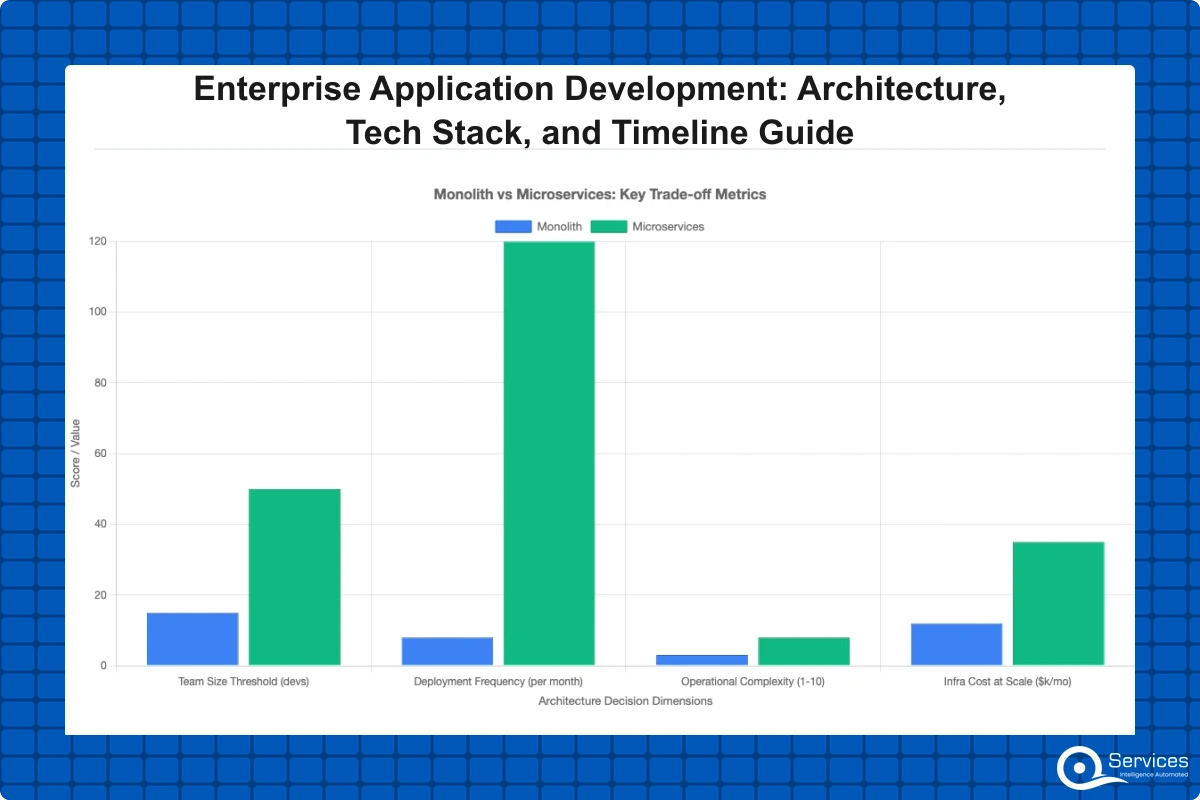
Architecture decisions made in the first sprint follow you for years. The two most common mistakes are choosing microservices too early, before domain boundaries are understood, and sticking with a monolith too long, until scaling problems force a painful decomposition under time pressure.
Layered Architecture vs. Microservices: Choosing a Starting Point
Most enterprise applications benefit from a layered (N-tier) architecture in early stages: a presentation layer, an API/service layer, a business logic layer, and a data access layer. This pattern is predictable, easier to staff, and faster to deliver initial value. ASP.NET Core handles it cleanly, and asp.net development services teams can onboard without a steep distributed systems learning curve.
Microservices make sense when specific bounded domains need independent scaling or deployment cycles. A payment processing service that deploys three times a day while the reporting module deploys monthly is a legitimate microservices candidate. Splitting a monolith into microservices for architectural fashion alone is one of the most expensive mistakes an enterprise team can make. Microsoft's .NET Application Architecture documentation provides detailed guidance on choosing between these patterns for real workloads.
API-First Design as a Foundation
API-first design means defining API contracts before writing any implementation code. Teams work in parallel against mock servers, frontend and backend stay loosely coupled from day one, and integration partners can validate against documented contracts before implementation completes. Our api development services engagements always start here because changing a contract after implementation costs roughly ten times what it costs to change it before. Every enterprise application should have an OpenAPI (Swagger) specification checked into version control alongside the code.
Choosing the Right .NET Tech Stack for Enterprise Applications
The .NET ecosystem has matured significantly over the past three years. .NET 9, released in November 2024, brings performance improvements that make it a compelling choice for greenfield enterprise applications. A qualified dotnet development company will help you navigate these choices based on your workload, team composition, and integration requirements rather than defaulting to whatever is most familiar.
ASP.NET Core for Backend Services
ASP.NET Core is the foundation of most modern .NET enterprise backends. It is cross-platform, high-performance, and has strong support for dependency injection, middleware pipelines, and OpenAPI documentation. For REST APIs, gRPC services, and server-side rendering, asp.net development services built on ASP.NET Core handle high throughput with relatively low memory consumption compared to older .NET Framework equivalents.
The correct deployment pattern for enterprise ASP.NET Core applications:
Minimal APIs for high-throughput endpoints with simple routing logic
Controller-based APIs for complex routes with middleware requirements
Background services via IHostedService for long-running processes
Strongly typed configuration via IOptions for environment-specific settings
Authentication via Azure Entra ID, combined with ASP.NET Core's built-in authorization policies, gives enterprise applications fine-grained role and claim-based access control without custom security middleware.
Blazor for Enterprise Web UI: When It Wins
Blazor Server renders UI on the server with SignalR; Blazor WebAssembly (WASM) runs C# directly in the browser via WebAssembly. For enterprise applications where the development team is entirely .NET-skilled and the app is internal-facing, blazor development services can cut development time by 30-40% compared to maintaining a separate React frontend. Shared models, shared validation logic, and a single language across the stack reduce context-switching overhead significantly.
Key Insight For enterprise applications where the development team is entirely .NET-skilled and the app is internal-facing, blazor development services can cut development time by 30-40% compared to maintaining a separate React frontend.
Blazer WASM has limitations worth knowing before you commit: initial load times are longer than React for large applications, and SEO is limited without server-side prerendering. For internal enterprise tools where neither limitation applies, Blazor is often the faster path to production. We have covered the trade-offs in depth in our Blazor vs React for Enterprise Apps comparison, including scenarios where each one clearly wins.
How to Modernize Legacy Applications Without Starting Over
Most enterprise application work in 2025 and 2026 is modernization, not greenfield development. Organizations running .NET Framework 4.5 through 4.8 face a real problem: those applications cannot run on Linux containers, cannot benefit from .NET 9 performance gains, and are increasingly difficult to hire .NET developers for. Legacy app modernization almost never requires a full rewrite. Our 5-phase .NET modernization roadmap covers the full process, but the core strategy comes down to three decisions.
The Strangler Fig Pattern for .NET Modernization
Legacy .NET Framework modernization uses the strangler fig pattern to incrementally replace components without a full rewrite. The pattern, originally described by Martin Fowler, works by routing new traffic to a .NET 8/9 service while the existing .NET Framework system continues handling established requests. Over time, traffic shifts to the new system and the legacy application is deprecated piece by piece.
The practical steps for strangler fig .net application modernization:
Stand up an API gateway or reverse proxy in front of the legacy system
Build new modules in .NET 8/9 as separate services
Route specific URL paths or user segments to the new services
Migrate data incrementally using dual-write patterns during the transition window
Decommission legacy modules after the new service has processed equivalent volume without issues
This approach takes longer than a full rewrite but carries dramatically less risk. A two-year rewrite project that fails at go-live costs more in every dimension than a three-year incremental migration that works.
How to Migrate from .NET Framework to .NET 8 or .NET 9
The .net 9 migration path from .NET Framework has three common patterns. The simplest is in-place upgrade: update project files, resolve breaking API changes, and retarget. This works for applications with minimal Windows-specific dependencies. For apps heavy with Windows Communication Foundation (WCF) or third-party libraries not yet ported to .NET, a side-by-side migration (running old and new in parallel with gradual traffic shifting) is safer.
Microsoft's .NET Upgrade Assistant automates much of the mechanical conversion work but will not resolve architectural problems. Plan for 20-30% manual remediation even with good tooling coverage. The tooling accelerates the mechanical parts; the architectural judgment still requires experienced .NET engineers.
Key Insight Plan for 20-30% manual remediation even with good tooling coverage.
When Modernization Requires a Full Rewrite
Some legacy applications are not candidates for incremental modernization. Signs you may need a full rewrite: no automated tests exist making every change high-risk, the original developer is unavailable and the codebase is completely undocumented, or the foundational technology has been sunset with no migration path (classic ASP, VB6, or Microsoft Access databases serving as application backends). In these cases, a disciplined rewrite with a parallel-run validation period is the correct approach rather than incremental modernization.
.NET Microservices: Should You Decompose Your Enterprise Application?
.net microservices consulting engagements consistently surface the same pattern: organizations adopting microservices because the architecture sounds modern rather than because their scaling or deployment requirements actually justify the operational overhead. The conversation should start with a clear business requirement, not an architectural preference.
When a Monolith Is the Right Answer
A well-structured monolith is the correct starting architecture when the engineering team has fewer than 15 members, when domain boundaries are not yet fully understood, or when deployment frequency across modules is roughly equal. A modular monolith with separate assemblies and schema-isolated modules provides clean internal structure without the operational complexity of managing multiple independently deployed services. Many successful enterprise applications run as modular monoliths for years before decomposition becomes necessary.
Decomposing a .NET Monolith: Where to Start
When decomposition becomes necessary, start with the bounded contexts that have the highest change rate or the clearest independent scaling requirements. In a healthcare application, the scheduling module may change weekly while the billing module changes monthly. Extract scheduling first. Use Azure Service Bus for async communication between extracted services and deploy to Azure Kubernetes Service for independent scaling per service. Avoid synchronous REST calls between microservices where possible; those patterns recreate distributed monolith problems and eliminate most of the benefits of decomposition.
Enterprise Application Development Timelines: What to Actually Expect
Enterprise application development projects that miss timelines almost always do so for the same three reasons: scope that grows during development, integration surprises from underdocumented third-party APIs, and compliance requirements discovered late in the project. Accurate timelines require honest assessment of what each phase actually involves before the first line of production code is written.
Discovery and Architecture Sprint (Weeks 1-6)
Every serious enterprise project needs a defined scoping phase before production code is written. We run a structured 5-day Blueprint Sprint to define technical architecture, integration requirements, compliance constraints, and a work-breakdown structure. Organizations that skip this phase spend the equivalent time resolving architectural disagreements during active development at far higher cost. A completed discovery phase produces four concrete deliverables: a data model, API contracts, an integration dependency map, and a risk register with mitigation plans.
Core Development and Launch (Months 2-10)
A typical mid-size enterprise application with 10-20 core modules and 5-8 external integrations takes 6-8 months of active development with a team of 4-8 engineers, assuming clear requirements and available stakeholders for weekly demos. Banking and healthcare applications typically add 2-4 months for compliance validation and security review. The final 6-8 weeks before go-live should focus on end-to-end integration testing, user acceptance testing with actual end users (not just QA engineers), performance testing under realistic concurrent load, and formal compliance validation. As a reference point, we rebuilt a logistics platform from 60% to 95% order visibility in 7 months with a six-person team.
Key Insight As a reference point, we rebuilt a logistics platform from 60% to 95% order visibility in 7 months with a six-person team.
How Much Does Enterprise Application Development Cost?
Cost estimates without context are misleading. Here is what actually drives the numbers when working with a custom software development company on enterprise projects, based on projects delivered across healthcare, logistics, banking, and SaaS.
Factors That Drive Cost Up or Down
The three biggest cost drivers in enterprise application development:
Integration complexity: In our engagements, each third-party integration typically adds a significant chunk of effort, varying with API quality, documentation completeness, and sandbox environment availability
Compliance scope: HIPAA Business Associate Agreement requirements, PCI-DSS audit logging, and SOX controls each add measurable effort at every layer of the stack, not just in final review
Team model: In our experience, onshore teams command a premium over nearshore, and nearshore over offshore. The right model depends on how much real-time collaboration your project requires and your organization's risk tolerance for communication overhead
In our client engagements, a mid-size enterprise application with 10-15 modules, 5 integrations, and a 12-month build timeline typically falls in the mid six figures. Applications with heavy real-time compliance requirements or complex legacy data migration can push well past that. These ranges assume a competent delivery team; underestimating by hiring the cheapest option usually results in a rewrite within three years.
Fixed Price vs. Time and Materials
Fixed price protects budget but can incentivize vendors to reduce scope or cut corners when they are running over budget. It works well when requirements are fully documented before signing and the vendor has delivered similar work before. Time and materials aligns vendor incentive with client outcome and works better for complex enterprise projects where requirements will evolve during delivery. A hybrid model, fixed price for discovery and architecture, time and materials for implementation, is often the most practical approach for first-time enterprise application development engagements where full requirements cannot be known upfront.
Key Takeaways
Enterprise application development is the process of designing, building, and deploying software systems that manage core business operations across departments, user roles, and regulatory domains.
Architecture decisions made in the first sprint follow you for years.
The .NET ecosystem has matured significantly over the past three years.
Most enterprise application work in 2025 and 2026 is modernization, not greenfield development.
.net microservices consulting engagements consistently surface the same pattern: organizations adopting microservices because the architecture sounds modern rather than because their scaling or deployment requirements actually justify the operational overhead.
Conclusion
Enterprise application development done well is not fast, and it is not cheap. But running a business on aging .NET Framework applications that cannot scale, or on a patchwork of SaaS tools that do not integrate, carries its own compound cost in productivity loss, compliance exposure, and competitive disadvantage. The architecture patterns, .NET technology choices, and modernization strategies in this guide are a starting framework. What matters beyond any specific technology decision is the discipline of the process: thorough discovery work before coding starts, honest scope management throughout delivery, and human checkpoints where engineers and stakeholders review real progress against real requirements.
QServices specializes in .NET modernization with Human-in-the-Loop governance for enterprise applications, with over 500 delivered projects across healthcare, logistics, banking, and SaaS. If you are evaluating a .NET development partner for your next enterprise build or modernization project, ask one question before signing: how do they handle scope changes when requirements shift two months into development? The answer tells you everything about how the project will actually go.
Co-Founder and CTO, QServices IT Solutions Pvt Ltd
Rohit Dabra is the Co-Founder and Chief Technology Officer at QServices, a software development company focused on building practical digital solutions for businesses. At QServices, Rohit works closely with startups and growing businesses to design and develop web platforms, mobile applications, and scalable cloud systems. He is particularly interested in automation and artificial intelligence, building systems that automate routine tasks for teams and organizations.
For most .NET Framework applications, modernization via the strangler fig pattern is the safer and more cost-effective option. A full rewrite only makes sense when the codebase has no automated tests, is completely undocumented, or relies on technology with no migration path such as VB6 or classic ASP. The strangler fig approach lets you incrementally replace components while the existing system continues operating, which dramatically reduces go-live risk compared to a big-bang rewrite.
The strangler fig pattern is an incremental modernization strategy where new functionality is built on a modern platform (.NET 8/9) while the legacy system continues handling existing requests. An API gateway routes traffic to old or new services based on the request path or user segment. Over time, the new system absorbs more traffic until the legacy system can be decommissioned safely. Legacy .NET Framework modernization uses the strangler fig pattern to incrementally replace components without a full rewrite, which is why it is the preferred approach for .NET Framework to .NET 9 migration in production environments.
A mid-size enterprise application with 10-20 modules and 5-8 external integrations typically takes 8-14 months from discovery to go-live. Discovery and architecture take 4-6 weeks, core development takes 6-8 months, and compliance validation plus user acceptance testing adds another 6-8 weeks. Applications in regulated industries like banking or healthcare typically add 2-4 months for compliance review. Projects that skip discovery almost always run over this estimate.
Blazor is a strong choice for internal enterprise applications where the development team is .NET-skilled and SEO is not a requirement. Blazor Server renders UI on the server with SignalR and suits complex real-time line-of-business applications. Blazor WASM runs C# directly in the browser via WebAssembly and suits offline-capable enterprise tools. React remains more practical for public-facing applications requiring strong SEO or where the team has deep JavaScript expertise. The 30-40% development time saving from sharing C# code across the stack makes Blazor compelling for internal enterprise portals.
A mid-size enterprise application with 10-15 modules, 5 integrations, and a 12-month build timeline typically costs $400,000-$900,000. Applications with heavy compliance requirements (HIPAA, PCI-DSS, SOX) or complex legacy data migration can exceed $1.5M. The three biggest cost drivers are integration complexity (40-120 hours per integration), compliance scope, and team model (onshore teams cost $150-300/hour versus $40-80/hour for offshore teams). These figures assume a competent delivery team; selecting solely on lowest cost typically results in a rewrite within three years.
The .NET Framework to .NET 9 migration has three common paths: in-place upgrade (update project files and resolve breaking changes, works for apps with few Windows-specific dependencies), side-by-side migration (run old and new in parallel and gradually shift traffic), and component extraction (move business logic to .NET Standard libraries first, then port the application shell). Microsoft’s .NET Upgrade Assistant automates much of the mechanical conversion, but plan for 20-30% manual remediation even with tooling support. Apps heavy with WCF or unported third-party libraries should use the side-by-side approach.
Start with a well-structured modular monolith if your engineering team has fewer than 15 members or domain boundaries are not yet fully understood. A modular monolith with separate assemblies and schema isolation per module provides clean structure without the operational complexity of distributed systems. Move to microservices when specific modules need independent deployment cycles or independent scaling, and when a single team clearly owns that bounded context. Avoid microservices for architectural prestige alone; the operational overhead is real and adds measurable cost to every subsequent deployment.
Business intelligence consulting services should give a mid-market company a governed way to make decisions. Attractive dashboards are only the visible part. The useful outcome is a system in which source data, metric definitions, access, releases, ownership, and support still work after the consultants leave.
In a Microsoft Solutions Partner vs Microsoft Partner comparison, the difference is validation. A company can participate in the Microsoft AI Cloud Partner Program without holding a customer-facing Solutions Partner designation. A designated Solutions Partner has met Microsoft’s current threshold in a specific solution pathway: at least 70 out of 100 partner capability points, with more than zero points in every required metric, based on performance, skilling, and customer success data recorded in Partner Center.
How do you build a legacy application modernization strategy for Azure? A legacy application modernization strategy assigns the right treatment to each workload, then sequences the work around business value, technical evidence, and operational risk. For Azure, that means choosing among retire, retain, rehost, replatform, refactor, rearchitect, rebuild, and replace instead of treating cloud migration as a blanket mandate. Direct Answer A legacy application modernization strategy for Azure should classify
Eager to discuss about your project?
Share your project idea with us. Together, we’ll transform your vision into an exceptional digital product!
Business intelligence consulting services should give a mid-market company a governed way to make decisions. Attractive dashboards are only the visible part. The useful outcome is a system in which source data, metric definitions, access, releases, ownership, and support still work after the consultants leave.
In a Microsoft Solutions Partner vs Microsoft Partner comparison, the difference is validation. A company can participate in the Microsoft AI Cloud Partner Program without holding a customer-facing Solutions Partner designation. A designated Solutions Partner has met Microsoft’s current threshold in a specific solution pathway: at least 70 out of 100 partner capability points, with more than zero points in every required metric, based on performance, skilling, and customer success data recorded in Partner Center.