.NET microservices consulting is one of the most requested engagements we run at QServices, and the reason is consistently the same: solid business logic trapped in a monolith built on .NET Framework, accumulating technical debt while every deployment requires coordinating multiple teams and a weeks-long test cycle. This guide covers the architecture patterns that work in real microservices projects, the migration approaches that reduce risk, and what a well-structured consulting engagement actually delivers.
Whether you're running a healthcare platform, a logistics application, or an enterprise SaaS product built on asp.net development services, the patterns here apply directly.
Key Insight Whether you're running a healthcare platform, a logistics application, or an enterprise SaaS product built on asp.net development services, the patterns here apply directly.
In This Article, You'll Learn
Why .NET Microservices Consulting Matters for Enterprise Teams
Core Architecture Patterns Every .NET Microservices Project Needs
How to Migrate from .NET Framework to .NET 8 or 9
The Strangler Fig Pattern: Modernizing Without the Big Rewrite
Blazor Development Services: Choosing the Right Frontend
Eager to discuss about your project?
Share your project idea with us. Together, we’ll transform your vision into an exceptional digital product!
Why .NET Microservices Consulting Matters for Enterprise Teams
Enterprise teams rarely start a microservices project because a consultant recommended it. They start one because something broke, a competitor started shipping features in days instead of months, or a regulatory requirement exposed how fragile the current architecture is. .NET microservices consulting brings in a team that has navigated this work dozens of times, which matters most in two areas: drawing service boundaries correctly the first time, and choosing a migration path that doesn't bet the business on a big bang rewrite.
When a Monolith Becomes a Liability
A monolith is genuinely a liability when independent teams are stepping on each other's code, when business domains have wildly different scaling requirements, or when deployment cycles have slowed to the point where the organization can't respond to market changes. For a healthcare logistics company we worked with, a billing domain and a patient records domain had to deploy together despite completely different release cadences. Separating them cut the billing team's release cycle from every six weeks to weekly.
The Real Cost of Delayed .NET Application Modernization
.NET application modernization deferred for two or more years compounds the cost significantly. Engineers who understand the legacy codebase retire or leave. Recruiting to a .NET Framework 4.x codebase gets harder every year. Security patches require testing against an increasingly fragile system. The hidden cost isn't the migration itself, it's the features never built because the architecture couldn't support them, and the incidents caused by changes in one domain cascading into another. Our .NET Application Modernization: A 5-Phase Roadmap from Legacy to Cloud-Native covers the phased approach in detail.
Key Insight The hidden cost isn't the migration itself, it's the features never built because the architecture couldn't support them, and the incidents caused by changes in one domain cascading into another.
Core Architecture Patterns Every .NET Microservices Project Needs
These patterns appear in every production .NET microservices system we've built as part of our asp.net development services work. They aren't optional extras: they're the structural decisions that separate systems that are easy to operate from ones that generate new operational problems as fast as they solve technical ones.
Event-Driven Architecture with Azure Service Bus
When services need to communicate without tight coupling, event-driven architecture is the right choice. In .NET, this means Azure Service Bus for enterprise workloads. A service publishes an event when something meaningful happens, and downstream services react without the publisher knowing who is listening. The discipline is in designing event contracts: a schema that is too narrow requires constant updates; one that is too wide leaks domain knowledge across service boundaries. For enterprise application development projects, we use versioned event contracts and treat schema changes as breaking changes.
CQRS and Event Sourcing for High-Volume .NET Apps
Command Query Responsibility Segregation separates read and write models, which matters when those workloads have different scaling requirements. Event Sourcing stores state as a sequence of events rather than a current snapshot, giving you a complete audit trail at no additional infrastructure cost. This is particularly valuable in banking and healthcare where audit requirements are strict. MediatR is the standard .NET library for CQRS implementation, paired with Entity Framework Core for the write side and a read-optimized projection layer for queries.
Domain-Driven Design and Service Boundaries
The most common mistake in microservices projects is drawing service boundaries around technology layers rather than business domains. Domain-Driven Design gives you the vocabulary to avoid this: bounded contexts define natural service boundaries based on how the business actually works. For a logistics platform, a bounded context analysis might reveal four domains: shipment tracking, inventory, carrier management, and billing. Each becomes a candidate for an independent service. Getting this wrong at the start costs significantly more to fix after the system is live.
How to Migrate from .NET Framework to .NET 8 or 9
.NET 9 migration is structured work, not a simple upgrade wizard. It requires assessing compatibility, updating dependencies, and in many cases refactoring code that relied on APIs that no longer exist in modern .NET. Teams that treat it as a weekend project end up with systems that partially run on the new runtime while key dependencies still target the old one.
Assessing Your Current .NET Framework Codebase
Before writing a line of migration code, you need to understand what you're working with. Microsoft's .NET Upgrade Assistant analyzes your solution and flags compatibility issues. The key things to assess are: third-party library compatibility, use of Windows-specific APIs, and any Web Forms or WCF usage. Web Forms has no direct equivalent in modern .NET. WCF services typically need to migrate to gRPC or REST APIs. These decisions shape the timeline more than anything else.
A Practical Migration Path to .NET 9
For any .NET 9 migration, this sequence reduces risk significantly:
Dependency audit: Every NuGet package checked for .NET 8/9 compatibility
Test coverage baseline: Migrations without tests validate nothing
Class library migration first: Shared libraries before application projects
Application project migration: Web, API, and worker projects in priority order
Integration testing: Validate behavior parity with the original system
Projects with clean layered architecture complete this process significantly faster than those where business logic has accumulated in controllers and code-behind files. Selecting the right dotnet development company for this work matters more than most teams realize before they start. The .NET Development Company: A Buyer's Guide to Choosing the Right Partner covers the evaluation criteria in detail.
Key Insight The .NET Development Company: A Buyer's Guide to Choosing the Right Partner covers the evaluation criteria in detail.
The Strangler Fig Pattern: Modernizing Without the Big Rewrite
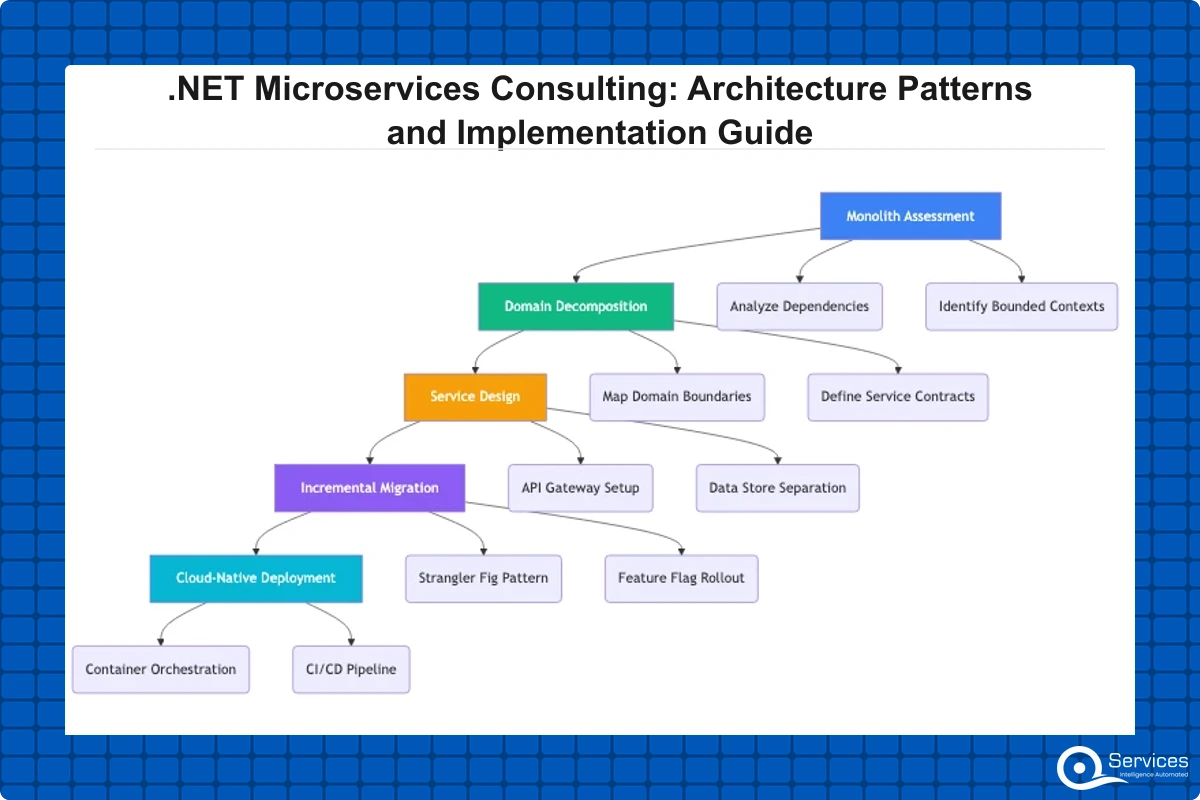
Legacy .NET Framework modernization uses the strangler fig pattern to incrementally replace components without a full rewrite. This is the approach we recommend for most enterprise modernization projects. The alternative, a full rewrite, fails at a rate that should give any engineering leader pause.
How the Strangler Fig Pattern Works in Practice
The strangler fig pattern places a facade layer in front of the legacy system. New features are built as separate services behind that facade. Over time, functionality migrates from the legacy system to new services, and the facade routes increasing traffic to the new stack. The legacy system is retired gradually as each component is replaced, not in a single high-stakes cutover. In .NET, the facade is typically an ASP.NET Core reverse proxy using YARP. Martin Fowler's description of the Strangler Fig Application pattern is the authoritative reference, and it maps directly to the way we structure .NET legacy app modernization engagements.
Should You Modernize or Rewrite? The Honest Answer
This question comes up in almost every legacy app modernization conversation. The honest answer: if the business logic is sound but the infrastructure is outdated, modernize incrementally. If the code is tangled to the point where engineers can't reason about it without executing it and watching what happens, a targeted rewrite of specific bounded contexts makes more sense. For teams in regulated industries, modernization is almost always preferable because it preserves audit trails and compliance documentation continuity.
Blazor Development Services: Choosing the Right Frontend
Blazor Server renders UI on the server with SignalR; Blazor WASM runs C# directly in the browser via WebAssembly. Both are production-ready in .NET 8 and 9. Choosing between them requires understanding your latency tolerance, offline requirements, and team composition.
Blazor Server vs Blazor WASM: Key Differences
Blazor Server keeps all application logic on the server. The browser receives HTML updates pushed over a SignalR connection, which means faster initial load times and direct server resource access. The tradeoff: every user interaction requires a server round trip, making it unsuitable for high-latency environments or offline scenarios. Blazor WASM ships the .NET runtime to the browser and runs C# client-side. This removes the SignalR dependency and enables offline use, but the initial payload is larger (typically 2-5 MB compressed). For enterprise application development in controlled network environments such as internal operations dashboards, Blazor Server is the better choice. For customer-facing applications with geographically distributed users, evaluate the payload size impact carefully.
When Blazor Wins Over React for Enterprise Apps
Blazor's core advantage for .NET teams is full-stack C# development without language context switching. A team writing C# all day doesn't have to switch to TypeScript to build the frontend, which enables genuine code sharing between client and server: shared validation logic, shared DTOs, shared business rules. Blazor development services make the most sense when the team is already invested in .NET and the application is primarily internal or data-intensive. React is the better choice when you need a broader developer talent market or a richer third-party UI component ecosystem. Our detailed comparison at Blazor vs React for Enterprise Apps: When Each One Wins covers this at the level of specific use cases.
How API Development Services Fit Into a Microservices Strategy
API development services are the connective tissue of any microservices architecture. In .NET, this means designing APIs that are consistent, versioned, observable, and aligned with how services actually communicate, not just functional at launch.
REST vs gRPC in .NET Microservices
REST is the right choice for external-facing APIs: familiar, toolable, and works over standard HTTP infrastructure without special client libraries. gRPC is the right choice for internal service-to-service communication where you need low latency and strong type contracts. Many well-structured .NET architectures use REST at the edge and gRPC internally. URL versioning (/v1/orders, /v2/orders) is the most explicit versioning approach and the one we recommend for public APIs where clients are outside your organization.
API Gateway Patterns for .NET Microservices
An API gateway handles cross-cutting concerns: authentication, rate limiting, routing, and logging. In the Azure ecosystem, Azure API Management is the managed option. YARP, available at microsoft.github.io/reverse-proxy, is the .NET-native open-source alternative for teams that need more control. The gateway should stay thin: when gateways accumulate business rules and conditional routing logic, the result is a distributed monolith where the gateway becomes a deployment bottleneck. For teams deploying on Azure, the CI/CD decisions that support modern api development services workflows are covered in our post on Azure DevOps vs GitHub Actions: Which CI/CD Pipeline Fits Your Team?
What to Expect from a .NET Microservices Consulting Engagement
A good .NET microservices consulting engagement has defined phases, clear deliverables, and exit criteria at each stage. It is not an open-ended retainer where activity is visible but outcomes are vague.
How to Select a Custom Software Development Company for .NET Work
When selecting a custom software development company for microservices work, the questions that matter are concrete:
Can they show completed projects? Architecture diagrams, deployment configs, and post-launch metrics, not just a case study summary
Do they use test-driven practices? Microservices without automated testing become unmanageable in production
How do they handle scope changes? Firms that agree to everything upfront tend to either deliver less or invoice more later
What is their observability approach? Distributed tracing, centralized logging, and service health dashboards should be part of the architecture from day one
For teams in regulated industries, verify that compliance requirements are embedded in the delivery process, not added after launch. Our post on Banking Software Development: What You Need to Know Before Starting is a useful reference for what this looks like in practice.
QServices' Approach: Human-in-the-Loop Governance
QServices specializes in .NET modernization with Human-in-the-Loop governance for enterprise applications. Every AI-assisted code generation step goes through a structured human review gate before reaching test or production environments. For clients in banking, healthcare, and logistics, this is the difference between a compliant delivery and a compliance incident. Our dotnet development company engagements start with a five-day blueprint sprint that produces a domain analysis, service decomposition map, technology decisions document, and phased effort estimate. This runs before any development work begins, so clients know exactly what they are paying for before committing to a full project.
Key Takeaways
Enterprise teams rarely start a microservices project because a consultant recommended it.
These patterns appear in every production .NET microservices system we've built as part of our asp.net development services work.
.NET 9 migration is structured work, not a simple upgrade wizard.
Legacy .NET Framework modernization uses the strangler fig pattern to incrementally replace components without a full rewrite.
Blazor Server renders UI on the server with SignalR; Blazor WASM runs C# directly in the browser via WebAssembly.
Conclusion
.NET microservices consulting pays off when it's done with structure: service boundaries drawn from domain analysis, a migration strategy built on incremental approaches like the strangler fig pattern, and a consulting partner with a track record on .NET application modernization and asp.net development services projects. The patterns in this guide (event-driven architecture, CQRS, Blazor for .NET-native frontends, thin API gateways) hold up in production across healthcare, logistics, banking, and SaaS. If your team is running a .NET Framework application and deployment friction has become a strategic problem, the right time to act is before the next major release cycle. Connect with our team to start with a blueprint sprint and get a clear picture of what modernization looks like for your specific system.
Co-Founder and CTO, QServices IT Solutions Pvt Ltd
Rohit Dabra is the Co-Founder and Chief Technology Officer at QServices, a software development company focused on building practical digital solutions for businesses. At QServices, Rohit works closely with startups and growing businesses to design and develop web platforms, mobile applications, and scalable cloud systems. He is particularly interested in automation and artificial intelligence, building systems that automate routine tasks for teams and organizations.
For most enterprise applications, modernizing incrementally with the strangler fig pattern is safer and more cost-effective than a full rewrite. A rewrite makes sense only when the business domain has fundamentally changed or the code is too entangled to migrate cleanly. Incremental modernization limits risk to one component at a time, preserves compliance documentation, and keeps the system operational throughout. If your team can still reason about the existing code, modernize it. If they cannot reason about a specific module without running it, rewrite that bounded context specifically rather than the whole system.
The strangler fig pattern is an incremental migration technique where a facade layer, typically an ASP.NET Core reverse proxy using YARP, sits in front of the legacy system and routes traffic. New features and migrated components are built as separate .NET services behind the facade. Over time, the facade routes increasing traffic to the new services while the legacy system handles fewer requests, until it can be decommissioned entirely. This avoids the high-stakes cutover of a big bang rewrite and limits risk at every stage to the component currently being migrated.
Your monolith is a good decomposition candidate when independent teams are forced to deploy together unnecessarily, when business domains have significantly different scaling or availability requirements, or when your release cycle has slowed because every change requires full system testing. If your teams can deploy independently and scaling is not a bottleneck, a well-structured modular monolith is often a better choice. .NET microservices consulting typically starts with an architecture assessment to answer exactly this question before recommending decomposition.
Blazor is better when your team writes C# and the application is primarily internal or data-intensive. It enables full-stack .NET development with shared code between client and server. React is better when you need a broader developer talent market, a richer UI component ecosystem, or when your frontend team is separate from the .NET team. Blazor Server works best in controlled network environments with low latency; Blazor WASM suits offline or globally distributed scenarios. Both are production-ready in .NET 8 and 9, so the decision is primarily about team composition and application type.
A .NET 9 migration involves four main phases: a compatibility audit of all NuGet dependencies and platform APIs, establishing a test coverage baseline to validate behavior before changes, migrating class libraries before application projects, and integration testing to verify parity with the original system. The biggest obstacles are typically legacy third-party libraries with no .NET 8/9 equivalent, Web Forms migration (which has no direct ASP.NET Core equivalent), and WCF services that need to be replaced with REST or gRPC APIs. Clean layered architecture reduces migration time significantly.
A scoping and architecture blueprint sprint runs five to ten business days and produces a decomposition map, technology decisions document, and phased effort estimate. The full modernization timeline depends on codebase size and complexity, but most enterprise .NET modernization projects run between six months and two years for a complete transition. The strangler fig approach delivers value incrementally throughout the project rather than requiring the full timeline before results are visible, which makes business cases easier to justify to stakeholders at each stage.
A monolith is right when the team is small, the domain is still evolving, or deployment independence between components is not a business priority. Microservices are right when independent teams need to deploy independently, when domains have fundamentally different scaling requirements, or when parts of the system need different technology choices. Most organizations benefit from starting with a well-structured modular monolith and decomposing only the specific domains that genuinely need independence, rather than adopting microservices across the board from the start.
Business intelligence consulting services should give a mid-market company a governed way to make decisions. Attractive dashboards are only the visible part. The useful outcome is a system in which source data, metric definitions, access, releases, ownership, and support still work after the consultants leave.
In a Microsoft Solutions Partner vs Microsoft Partner comparison, the difference is validation. A company can participate in the Microsoft AI Cloud Partner Program without holding a customer-facing Solutions Partner designation. A designated Solutions Partner has met Microsoft’s current threshold in a specific solution pathway: at least 70 out of 100 partner capability points, with more than zero points in every required metric, based on performance, skilling, and customer success data recorded in Partner Center.
How do you build a legacy application modernization strategy for Azure? A legacy application modernization strategy assigns the right treatment to each workload, then sequences the work around business value, technical evidence, and operational risk. For Azure, that means choosing among retire, retain, rehost, replatform, refactor, rearchitect, rebuild, and replace instead of treating cloud migration as a blanket mandate. Direct Answer A legacy application modernization strategy for Azure should classify
Eager to discuss about your project?
Share your project idea with us. Together, we’ll transform your vision into an exceptional digital product!
Business intelligence consulting services should give a mid-market company a governed way to make decisions. Attractive dashboards are only the visible part. The useful outcome is a system in which source data, metric definitions, access, releases, ownership, and support still work after the consultants leave.
In a Microsoft Solutions Partner vs Microsoft Partner comparison, the difference is validation. A company can participate in the Microsoft AI Cloud Partner Program without holding a customer-facing Solutions Partner designation. A designated Solutions Partner has met Microsoft’s current threshold in a specific solution pathway: at least 70 out of 100 partner capability points, with more than zero points in every required metric, based on performance, skilling, and customer success data recorded in Partner Center.