.NET 9 migration is one of the most consequential upgrade decisions Microsoft-stack teams face in 2026. Released in November 2024, .NET 9 delivers measurable performance gains, new runtime capabilities, and a set of breaking changes that need careful evaluation before you ship to production. Whether you're moving up from .NET 8, planning a .net application modernization project to escape .NET Framework 4.x, or deciding whether your enterprise application development roadmap should skip .NET 9 and wait for .NET 10 LTS, the answer depends on your support window requirements and deployment risk tolerance. This guide covers what .NET 9 actually delivers, what breaks, how the upgrade path looks for different starting points, and when it makes sense to bring in asp.net development services rather than attempting the migration in-house.
In This Article, You'll Learn
What's New in .NET 9: Key Features Worth Knowing
Breaking Changes in .NET 9 You Must Check Before Migrating
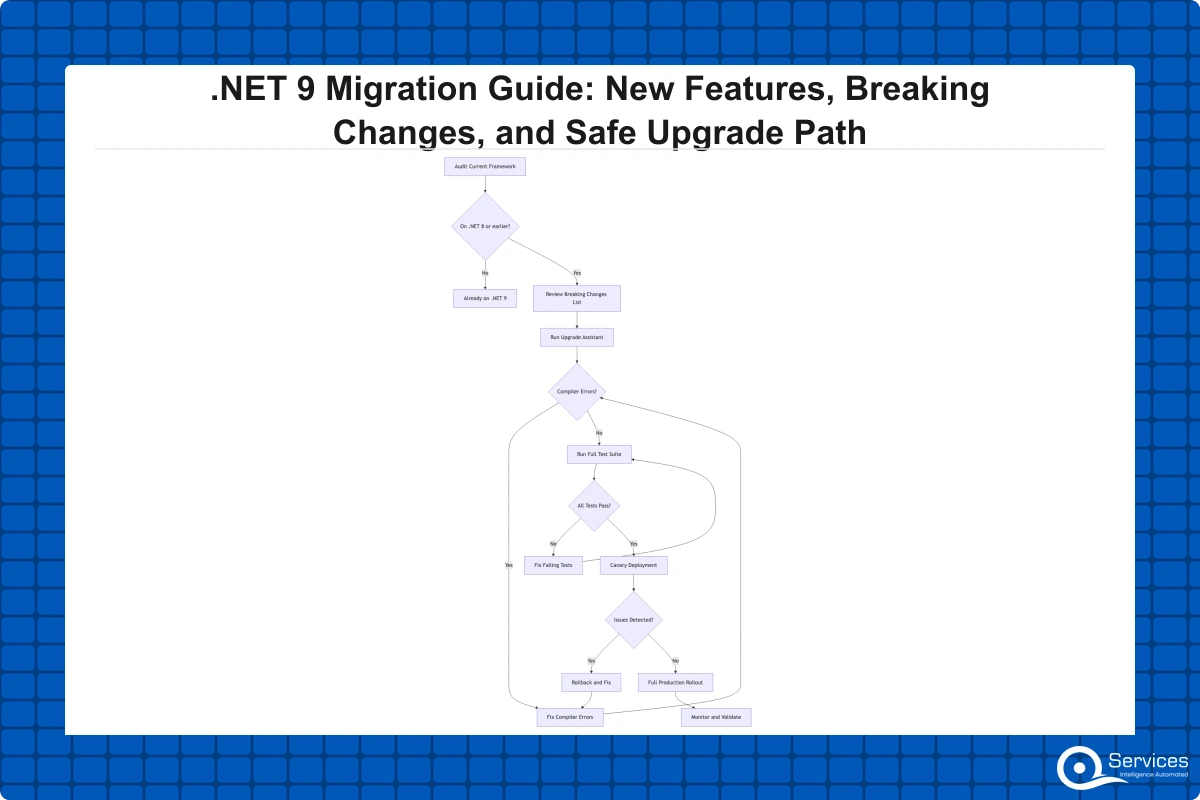
How to Plan Your .NET 9 Migration Step by Step
Migrating from .NET Framework: The Legacy App Modernization Challenge
Blazor Development Services and the .NET 9 Frontend Story
Eager to discuss about your project?
Share your project idea with us. Together, we’ll transform your vision into an exceptional digital product!
.NET 9 introduces meaningful improvements across the runtime, base class library, and toolchain. Not every change will affect your application, but knowing the highlights helps you justify the migration effort to stakeholders and prioritize your testing work.
Performance Improvements and JIT Enhancements
The JIT compiler in .NET 9 received significant updates to loop optimization, inlining decisions, and code generation for SIMD workloads. Microsoft's benchmarks show throughput improvements of 15-40% on certain workload categories, with JSON serialization via System.Text.Json and cryptographic operations showing the largest gains. For high-traffic ASP.NET Core APIs, this translates to real latency reductions without any code changes.
Key Insight Microsoft's benchmarks show throughput improvements of 15-40% on certain workload categories, with JSON serialization via System.Text.Json and cryptographic operations showing the largest gains.
The garbage collector also received improvements to allocation throughput and GC pause times on server workloads. If you're running workloads through a .net microservices consulting engagement with high-concurrency requirements, the GC improvements alone justify an upgrade evaluation.
New LINQ Methods and Collection Expressions
.NET 9 adds several long-requested LINQ methods: CountBy, AggregateBy, and Index. These reduce the need for custom extension methods and make aggregation code more readable. The collection expression syntax from C# 12 is extended to allow consistent [..] initialization for arrays, lists, and spans.
System.Text.Json gains schema export support in .NET 9, which matters for teams building OpenAPI-driven api development services who need to generate JSON schemas from C# types programmatically.
Native AOT and Trimming Improvements
Native AOT compilation matures considerably in .NET 9. More of the BCL is compatible with AOT publishing, the trimmer produces smaller binaries, and startup times for containerized services drop meaningfully. For teams running microservices in Kubernetes where pod startup time affects scale-out latency, Native AOT is now a practical option for real-world APIs rather than an experimental feature.
Breaking Changes in .NET 9 You Must Check Before Migrating
Microsoft maintains a comprehensive breaking changes list for .NET 9 that every team should read before starting work. The list is long, but most applications are affected by only a small subset. Here are the categories with the highest real-world impact.
ASP.NET Core Breaking Changes
The most impactful changes for asp.net development services work relate to middleware ordering and exception handling. The default exception handling middleware applies in a different order than in .NET 8, which can silently change error response behavior for applications that rely on specific HTTP status codes or response shapes. Test your error paths explicitly in staging if you use app.UseExceptionHandler() with custom handlers.
ProblemDetails middleware behavior changed in edge cases around status code mapping. APIs returning RFC 7807 problem details should verify their error responses against client contracts before deploying. HttpContext.Response.ContentType handling was also tightened, which can affect legacy middleware that sets content type headers without encoding information.
Runtime, BCL, and EF Core 9 Breaking Changes
BinaryFormatter is fully removed in .NET 9 after being disabled by default in .NET 8. Any remaining uses must be replaced with System.Text.Json, MessagePack, or a similar serializer. The System.Security.Cryptography namespace dropped support for DES, TripleDES, and RC2 algorithms that were already marked obsolete, producing build errors in strict configurations.
EF Core 9 changes how it generates SQL for certain LINQ queries, particularly GroupBy and complex joins. The new translation is more efficient but produces different SQL output, which can affect queries that depend on a specific execution plan for performance. Run integration tests against a copy of production data before deploying; in-memory test providers will not catch these differences.
How to Plan Your .NET 9 Migration Step by Step
A structured migration process reduces risk significantly. The teams we work with as a dotnet development company follow a consistent pattern regardless of application size or complexity.
Step 1: Audit Dependencies and Upgrade the Target Framework
Start by running dotnet --version across your build servers and deployment targets to confirm what each environment actually uses. Then run dotnet list package --outdated in each project to identify NuGet packages with .NET 9-compatible versions. Packages that haven't been updated in 18+ months are the most likely source of compatibility problems.
The .NET Upgrade Assistant can scan your solution and generate a prioritized change list. Once you've reviewed its output, change <TargetFramework> to net9.0 and treat the resulting compiler warnings as your migration checklist. Address obsolete API usage first, then analyzer violations, then nullable reference warnings.
Step 2: Test Comprehensively and Deploy to Canary Traffic
Run your full automated test suite immediately after the build succeeds. Automated tests catch behavioral changes that manual testing misses, particularly around EF Core query output and middleware ordering. If your test coverage is below 60%, add integration tests for your most critical workflows before migrating.
Key Insight If your test coverage is below 60%, add integration tests for your most critical workflows before migrating.
For enterprise application development projects with formal change management requirements, deploy the upgraded application to 5-10% of production traffic using Azure App Service deployment slots before full cutover. Even 24-48 hours of real traffic surfaces edge cases that staging environments don't cover, and this canary window provides an audit trail for compliance teams.
Key Insight For enterprise application development projects with formal change management requirements, deploy the upgraded application to 5-10% of production traffic using Azure App Service deployment slots before full cutover.
Migrating from .NET Framework: The Legacy App Modernization Challenge
Moving from .NET 8 to .NET 9 is a manageable engineering task. Moving from .NET Framework 4.x to .NET 9 is a different project entirely, and this is where most legacy app modernization engagements start.
The Strangler Fig Pattern for Gradual Migration
Legacy .NET Framework modernization uses the strangler fig pattern to incrementally replace components without a full rewrite. The approach routes new requests to modern .NET 9 endpoints while the legacy application continues running in parallel, then migrates functionality piece by piece until the old system can be decommissioned. We cover this approach in detail in our .NET Application Modernization: A 5-Phase Roadmap from Legacy to Cloud-Native.
The strangler fig pattern is particularly effective for large monoliths where a single big-bang rewrite carries too much business risk. By routing at the API gateway or reverse proxy level, teams can migrate one bounded context at a time without a coordinated deployment across multiple teams.
When to Modernize vs. When to Rewrite
The honest answer is that it depends on codebase health, not age. A .NET Framework 4.6 application with solid test coverage and clean domain logic can often be modernized to .NET 9 in weeks with the right asp.net development services support. A codebase with zero tests, heavy WebForms usage, and tight coupling to Windows-specific APIs may be better served by a targeted rewrite of the core domain, even if supporting modules are migrated incrementally.
The practical metric is the ratio of migration cost to ongoing maintenance cost. If the legacy app costs more to maintain each year than a 12-month modernization engagement would cost, the case for full modernization is easy to make.
How Long Does .NET Framework to .NET 9 Migration Take?
For a typical mid-market application with 50,000-200,000 lines of C# code, a .NET Framework to .NET 9 migration using the strangler fig approach takes 4-9 months. Applications with clean architecture and existing test coverage migrate faster. Applications with WebForms, WCF dependencies, or Windows-specific code take longer because those components require redesign decisions rather than porting. Complex enterprise systems with regulatory compliance requirements typically run 12-18 months end-to-end.
Blazor Development Services and the .NET 9 Frontend Story
Blazer is the most significant frontend development story in recent .NET releases, and teams planning a .net application modernization project need to understand what it offers before committing to a UI technology choice.
Blazor Server vs. Blazor WebAssembly: Architecture and Trade-offs
Blazer Server renders UI on the server using SignalR, sending DOM diffs to the browser over a persistent connection. Blazor WebAssembly runs C# directly in the browser via WebAssembly, with no server round-trips required for UI updates. .NET 9 matures the Blazor Web App unified hosting model, which lets teams choose per-component whether rendering happens on the server or client.
For enterprise intranet applications on reliable corporate networks, Blazor Server performs well and keeps your entire stack in C#. For public-facing applications where load times, SEO, or offline capability matter, Blazor WASM or the hybrid Blazor Web App model is the better fit. Your choice of blazor development services ultimately depends on your user base and network topology.
Blazor vs React for Enterprise Applications
The Blazor vs React question comes up in most enterprise frontend conversations. The direct answer: if your team is primarily C# developers and you want to eliminate context-switching between TypeScript and backend C#, Blazor is a legitimate choice for enterprise apps in 2026. If your team has strong TypeScript skills, an existing React component library, and needs the npm ecosystem, React still has the larger talent pool and richer third-party component coverage.
We covered the full trade-offs in Blazor vs React for Enterprise Apps: When Each One Wins. Many enterprise teams use Blazor for internal tooling and React for customer-facing portals within the same organization, which is a practical split rather than a forced choice.
How .NET 9 Improves Microservices and API Development
.NET 9 is a strong release for teams building distributed systems. The improvements to ASP.NET Core minimal APIs, .NET Aspire, and OpenTelemetry integration make it a compelling upgrade target for .net microservices consulting projects.
ASP.NET Core Minimal APIs and Native OpenAPI Support
Minimal APIs in .NET 9 gain native OpenAPI 3.1 document generation through the Microsoft.AspNetCore.OpenApi package, removing the dependency on Swashbuckle for many teams. Your API contracts stay synchronized with your route definitions without third-party tooling maintenance. Route groups now support middleware at the group level, simplifying per-feature authentication and rate limiting in large API surfaces. For teams delivering api development services with complex permission models, this reduces boilerplate noticeably.
.NET Aspire and Microservices Development Productivity
.NET Aspire, stabilized in .NET 9, orchestrates multi-service local development with automatic service discovery, configuration management, and an observability dashboard. It doesn't replace Kubernetes for production, but it cuts the friction of running 8-12 microservices locally from a half-day setup task to under an hour. Teams using Aspire report that it reduces new-developer onboarding time for complex distributed solutions from days to hours.
Should Enterprise Teams Upgrade to .NET 9 or Wait for .NET 10?
This is the question enterprise teams actually need answered, and it deserves a direct response rather than a hedge.
.NET 9 Is STS: Support Window and Compliance Implications
.NET 9 is a Standard-Term Support (STS) release supported until May 2026. It is not an LTS release. Microsoft's .NET support policy means .NET 9 stops receiving security patches partway through 2026.
For enterprise applications in regulated industries like healthcare, banking, or financial services, running unsupported software is a compliance risk. If your security policy requires supported software, plan your .NET 9 window carefully: begin the upgrade in Q4 2025 and have a .NET 10 LTS migration plan in place before May 2026. .NET 8 LTS is supported through November 2026, giving teams that prefer to skip .NET 9 a workable alternative path.
The Recommended Enterprise Upgrade Playbook
The practical approach for most enterprise application development programs: use .NET 9 in development and staging to surface issues early and build team familiarity, keep production on .NET 8 LTS through Q4 2026, then target production .NET 10 LTS deployment by early 2027. This gets you the learning benefits of .NET 9 without the compliance exposure of running STS software on production workloads.
For organizations unsure about the right upgrade sequence, working with a dotnet development company that understands both technical and compliance dimensions reduces execution risk. A custom software development company with enterprise .NET expertise can assess your codebase health, compliance requirements, and team capacity to give you a realistic migration timeline rather than generic advice. See our Enterprise Application Development: Architecture, Tech Stack, and Timeline Guide for how we approach these planning engagements.
Key Takeaways
.NET 9 introduces meaningful improvements across the runtime, base class library, and toolchain.
Microsoft maintains a comprehensive breaking changes list for .NET 9 that every team should read before starting work.
A structured migration process reduces risk significantly.
Moving from .NET 8 to .NET 9 is a manageable engineering task.
Blazer is the most significant frontend development story in recent .NET releases, and teams planning a .net application modernization project need to understand what it offers before committing to a UI technology choice.
Conclusion
.NET 9 migration offers real, measurable improvements: JIT performance gains that reduce API latency without code changes, a maturing Blazor ecosystem with the unified Web App hosting model, better Native AOT support for containerized workloads, and .NET Aspire tooling that meaningfully reduces microservices development friction. The case for upgrading is clear if you're on .NET 8 and can plan around the STS support window.
For teams still on .NET Framework, the strangler fig approach described in our .NET Application Modernization: A 5-Phase Roadmap remains the safest path for large legacy applications. A full rewrite is sometimes warranted, but only when incremental migration costs more than rebuilding due to structural degradation in the existing codebase.
If you're planning a .net 9 migration and want an informed second opinion, QServices provides .net application modernization and enterprise application development services with Human-in-the-Loop governance built into every engagement. Our dotnet development company buyer's guide covers the evaluation criteria that matter most when choosing a migration partner.
Co-Founder and CTO, QServices IT Solutions Pvt Ltd
Rohit Dabra is the Co-Founder and Chief Technology Officer at QServices, a software development company focused on building practical digital solutions for businesses. At QServices, Rohit works closely with startups and growing businesses to design and develop web platforms, mobile applications, and scalable cloud systems. He is particularly interested in automation and artificial intelligence, building systems that automate routine tasks for teams and organizations.
.NET 9 is a Standard-Term Support (STS) release with an 18-month window ending May 2026, not an LTS release. The safest approach for enterprise teams is to use .NET 9 in development and staging to build familiarity, keep production on .NET 8 LTS (supported through November 2026), and plan a .NET 10 LTS migration for early 2027. Teams without strict compliance requirements can run .NET 9 in production now but need a clear path to .NET 10 before the support window closes.
The highest-impact .NET 9 breaking changes for ASP.NET Core apps include: changes to middleware ordering that can alter error response behavior for custom exception handlers; ProblemDetails middleware changes in edge cases around status code mapping; and complete removal of BinaryFormatter. EF Core 9 also generates different SQL for GroupBy and complex join queries, which can affect performance on production workloads. Microsoft publishes the full list at learn.microsoft.com/dotnet/core/compatibility/9.0, and the .NET Upgrade Assistant will flag the issues specific to your codebase.
The strangler fig pattern is an incremental migration approach where new functionality is built on .NET 9 endpoints while the legacy .NET Framework application continues running in parallel. Traffic is routed to the modern system at the API gateway or reverse proxy level, and legacy features are migrated one bounded context at a time until the old system can be decommissioned. Legacy .NET Framework modernization uses this pattern to replace components without a full rewrite, which is why it is the recommended approach for most mid-market and enterprise applications with large, complex codebases.
For a mid-market application with 50,000 to 200,000 lines of C# code, a .NET Framework to .NET 9 migration using the strangler fig pattern typically takes 4-9 months. Applications with clean architecture and good test coverage migrate faster. Those with WebForms, WCF dependencies, or Windows-specific code take longer because those components require redesign, not just porting. Enterprise systems with multiple integration points and regulatory compliance requirements can run 12-18 months end-to-end. The key variable is codebase health, not application size.
Blazor is production-ready for enterprise applications in .NET 9, which matures the Blazor Web App unified hosting model. Blazor Server works well for enterprise intranet applications on reliable corporate networks, keeping your entire stack in C#. Blazor WebAssembly suits public-facing apps where load times and offline capability matter. The choice between Blazor and React comes down to your team’s existing skills: Blazor makes sense for C#-first teams, while React has a larger talent pool and richer third-party ecosystem for customer-facing applications. Many enterprise teams use Blazor for internal tooling and React for public portals.
.NET Aspire is an orchestration framework for local microservices development, stabilized in .NET 9. It provides automatic service discovery, configuration management, and an observability dashboard out of the box. Aspire does not replace Kubernetes for production but significantly reduces the friction of running 8-12 microservices locally during development and testing. Teams working on new .NET 9 microservices projects should evaluate Aspire as a development tool; it typically reduces onboarding time for new developers from days to hours and pairs well with OpenTelemetry for distributed tracing.
The safest approach for a .NET 9 migration is: run your full automated test suite immediately after updating the target framework and resolving compiler warnings; validate EF Core query behavior against a copy of production data rather than in-memory test providers; then deploy to 5-10% of production traffic using a canary deployment before full cutover. Azure App Service deployment slots make this straightforward. Even 24-48 hours of canary traffic surfaces edge cases that staging environments miss, particularly around concurrency patterns. For regulated industries, document this canary validation period for your compliance audit trail.
Business intelligence consulting services should give a mid-market company a governed way to make decisions. Attractive dashboards are only the visible part. The useful outcome is a system in which source data, metric definitions, access, releases, ownership, and support still work after the consultants leave.
In a Microsoft Solutions Partner vs Microsoft Partner comparison, the difference is validation. A company can participate in the Microsoft AI Cloud Partner Program without holding a customer-facing Solutions Partner designation. A designated Solutions Partner has met Microsoft’s current threshold in a specific solution pathway: at least 70 out of 100 partner capability points, with more than zero points in every required metric, based on performance, skilling, and customer success data recorded in Partner Center.
How do you build a legacy application modernization strategy for Azure? A legacy application modernization strategy assigns the right treatment to each workload, then sequences the work around business value, technical evidence, and operational risk. For Azure, that means choosing among retire, retain, rehost, replatform, refactor, rearchitect, rebuild, and replace instead of treating cloud migration as a blanket mandate. Direct Answer A legacy application modernization strategy for Azure should classify
Eager to discuss about your project?
Share your project idea with us. Together, we’ll transform your vision into an exceptional digital product!
Business intelligence consulting services should give a mid-market company a governed way to make decisions. Attractive dashboards are only the visible part. The useful outcome is a system in which source data, metric definitions, access, releases, ownership, and support still work after the consultants leave.
In a Microsoft Solutions Partner vs Microsoft Partner comparison, the difference is validation. A company can participate in the Microsoft AI Cloud Partner Program without holding a customer-facing Solutions Partner designation. A designated Solutions Partner has met Microsoft’s current threshold in a specific solution pathway: at least 70 out of 100 partner capability points, with more than zero points in every required metric, based on performance, skilling, and customer success data recorded in Partner Center.