PCI-DSS compliant development is not optional when you're building payment-connected applications on Azure. It's the baseline that every fintech software development team must clear before processing cardholder data, and the gap between "Azure is compliant" and "your app on Azure is compliant" is exactly where most teams get burned in QSA audits. Azure holds a strong position here: Microsoft maintains Attestations of Compliance for over 100 Azure services under PCI-DSS, which reduces shared infrastructure risk significantly. But your application code, database schemas, API design, and access control model all sit outside Microsoft's responsibility. This guide covers what PCI-DSS compliant development actually means in an Azure context, which services reduce your scope, how to structure your banking compliance software, and what to watch out for before your next audit.
In This Article, You'll Learn
What Is PCI-DSS Compliant Development on Azure?
Which Azure Services Are Approved for Banking Workloads?
How to Build PCI-DSS Compliant Apps: Core Architecture Decisions
KYC/AML Automation: Embedding Compliance in Your Core Banking System
PCI-DSS compliant development means building software that satisfies all 12 requirements of the Payment Card Industry Data Security Standard, specifically as they apply to systems that store, process, or transmit cardholder data, collectively known as your Cardholder Data Environment (CDE).
On Azure, this takes on a specific meaning: you're not starting from scratch on security controls. Microsoft's infrastructure meets PCI-DSS requirements at the physical and hypervisor layers. What you own is everything above that: your VMs, containers, application code, database encryption, access management, and logging configuration.
PCI DSS v4.0, which became mandatory in March 2025, adds requirements around customized implementation approaches and more prescriptive testing procedures. Teams building on Azure need to align their CI/CD pipelines, container registries, and deployment practices with v4.0 from the start, not at the end of a build cycle.
The 12 PCI-DSS Requirements and Their Azure Relevance
Not every requirement maps cleanly to a single Azure service, but understanding the groupings matters for planning:
Requirement 12 (security policies): Governance documentation, which Azure Policy can help enforce programmatically
Azure's Shared Responsibility Model for PCI Scope
The shared responsibility model is where teams make dangerous assumptions. Microsoft is responsible for the physical facility, the network hardware, and the hypervisor. You're responsible for the operating system, middleware, application code, and data. In a PaaS environment like Azure App Service or Azure SQL, Microsoft absorbs some OS-level responsibility, which is one reason PaaS deployments tend to shrink your audit scope compared to IaaS.
Which Azure Services Are Approved for Banking Workloads?
Azure for banking is not just a positioning claim. Microsoft publishes a regularly updated list of services in scope for PCI-DSS compliance, and as of 2025, that list covers over 100 services. "In scope" does not mean automatically compliant. It means the service has been audited and can be included in your PCI compliance boundary without inheriting unknown infrastructure risk.
The most commonly used services in banking compliance software built on Azure:
Compute and Storage Services in PCI Scope
Azure Virtual Machines with managed disks, encrypted by default
Azure Kubernetes Service (AKS) for containerized workloads, though this requires careful network policy configuration
Azure App Service, a PaaS option that reduces OS-layer responsibility
Azure SQL Database and Azure Database for PostgreSQL with Transparent Data Encryption enabled
Azure Blob Storage with private endpoints and customer-managed keys
One honest limitation: AKS requires additional configuration work to meet PCI requirements. Pod-to-pod communication policies, container image scanning, and secret management via Azure Key Vault all need explicit setup. Running on AKS does not make a workload compliant by default.
Azure Networking Controls for Cardholder Data Isolation
Isolating your CDE from other systems is one of the most important architectural decisions in PCI-DSS compliant development. Azure provides several controls for this:
Azure Virtual Network (VNet) with subnet segmentation
Azure Private Link and Private Endpoints to keep traffic off the public internet
Azure Firewall Premium with TLS inspection and intrusion detection
Azure DDoS Protection Standard for public-facing endpoints
Network Security Groups (NSGs) for granular inbound and outbound traffic rules
For teams doing azure for banking deployments, Azure Landing Zones provide a pre-built network topology that accounts for hub-spoke segmentation. See our guide on Azure Landing Zones for mid-size companies for how this fits into a broader governance model.
How to Build PCI-DSS Compliant Apps: Core Architecture Decisions
This is where fintech software development gets specific. The architectural choices you make in the first few weeks determine how painful your QSA audit will be six months later. Teams that treat compliance as a last-step documentation exercise rather than an engineering discipline tend to fail their first assessment.
Network Segmentation and the CDE on Azure
Your CDE should be a clearly bounded subset of your Azure environment. In practice:
Deploy CDE workloads in dedicated VNets or subnets with no direct internet access
Route all external traffic through Azure Firewall Premium or a WAF using Azure Application Gateway with WAF v2
Use Private Endpoints for every PaaS service inside the CDE, including SQL, Key Vault, and Storage
Maintain separate Azure subscriptions for CDE and non-CDE workloads if your team can manage the overhead
The subscription-per-environment approach is operationally heavier but provides the clearest audit trail. Teams that mix CDE and non-CDE workloads in the same subscription create scope-creep risk that QSAs do not overlook easily.
Encryption at Rest and in Transit for Banking Software
Banking compliance software must encrypt cardholder data at rest and in transit, without exception. On Azure:
Enable Transparent Data Encryption on all Azure SQL instances touching cardholder data
Store encryption keys in Azure Key Vault with Hardware Security Module backing for the highest key protection
Enforce TLS 1.2 or 1.3 minimum on all endpoints (Azure Policy can audit and enforce this across your subscription)
Use Azure Key Vault Managed HSM if your organization requires FIPS 140-2 Level 3 key protection
One thing teams consistently miss: key rotation. PCI-DSS requires cryptographic key rotation at least annually. Azure Key Vault supports automated rotation policies, and skipping this creates a manual process that will eventually get missed at the worst possible moment.
Access Control and Identity in Banking Compliance Software
For access control, Microsoft Entra ID is your foundation. PCI-DSS requires multi-factor authentication for all CDE access, and Entra Conditional Access Policies make this enforceable at the identity layer rather than the application layer. Specific controls to implement:
Privileged Identity Management (PIM) for just-in-time access to CDE resources
RBAC with least-privilege role assignments reviewed quarterly
Entra audit logs streamed to Azure Sentinel or a dedicated SIEM
Service accounts must use Managed Identities, not stored credentials
KYC/AML Automation: Embedding Compliance in Your Core Banking System
KYC/AML automation is where banking software development gets genuinely interesting from an engineering standpoint. The compliance requirement is clear: know your customer, monitor transactions for suspicious activity, file the required reports. The engineering challenge is doing this at scale without creating a bottleneck that kills your onboarding conversion rate or drowns your compliance team in false positives.
How to Automate KYC Checks Using Azure AI Services
Document verification: Azure AI Document Intelligence extracts and validates identity document data with high accuracy. Pair it with Azure AI Vision for liveness detection during selfie verification.
Sanctions screening: Azure Logic Apps or Durable Functions orchestrate calls to OFAC, UN, and EU sanctions lists, returning structured pass/fail results logged to Azure SQL with full audit trails.
Risk scoring: Azure Machine Learning models trained on historical customer data produce an onboarding risk score that automatically flags high-risk applications for human review.
The honest answer on automation limits: KYC automation works well for standard retail customers. For complex beneficial ownership structures like holding companies and trusts, you still need trained analysts. Build that human review queue into your workflow architecture from day one rather than retrofitting it later.
AML Transaction Monitoring: Real-Time Processing at Scale
AML monitoring requires near-real-time analysis of transaction patterns. The Azure stack for this typically includes:
Azure Event Hubs for high-throughput transaction stream ingestion
Azure Stream Analytics for real-time rule evaluation including velocity checks and geographic anomalies
Azure Synapse Analytics for batch pattern detection across historical transaction data
Azure AI anomaly detection for behavioral baseline deviations that static rules would miss
The regtech solutions angle here matters in practice: automated AML monitoring reduces false positives compared to purely rule-based systems. Lower false positives mean fewer analyst hours spent on legitimate transactions. Teams typically cut manual review workload by 40-60% by replacing static rule sets with ML-augmented monitoring pipelines.
Key Insight Teams typically cut manual review workload by 40-60% by replacing static rule sets with ML-augmented monitoring pipelines.
FinCEN's Bank Secrecy Act compliance guidance makes clear that AML programs must demonstrate effectiveness through measurable detection outcomes, not just document that processes exist.
Fraud Detection Software and Regtech Solutions on Azure
Fraud detection software built on Azure can operate at latencies that rule-based on-premises systems cannot match. Payment fraud decisions often need to happen in under 200 milliseconds, which is where Azure's managed ML infrastructure provides a measurable edge.
Building a Real-Time Fraud Detection Pipeline
The fraud detection pipeline for a typical fintech platform:
A transaction event arrives via API Gateway or Event Hub
Feature extraction runs in an Azure Function (transaction amount, merchant category, velocity metrics, device fingerprint)
ML model inference runs on an Azure Machine Learning Online Endpoint, with p99 latency under 50ms achievable for optimized models
The result returns to the calling system with a risk score and recommended action
High-risk transactions enter a review queue via Azure Service Bus, creating an auditable hold process
Beyond transaction monitoring, regtech solutions on Azure cover the full regulatory reporting cycle: SAR filing, CCAR stress testing data aggregation, and Basel III reporting. Azure Synapse with connected Power BI can pull together the data aggregations required for most routine regulatory filings, significantly reducing the quarterly compliance sprint that most teams dread.
Aligning your regtech tooling to the NIST Cybersecurity Framework functions (Identify, Protect, Detect, Respond, Recover) gives you a defensible documentation trail for regulators who ask how your controls interrelate. This matters more than most teams expect during an examination.
Financial Services Cloud Migration: What Actually Changes
Financial services cloud migration to Azure is a different project than a typical SaaS migration. The compliance surface area is larger, the data sensitivity is higher, and regulatory expectations for migration plans are more explicit. Understanding what the move actually involves before committing to a timeline is non-negotiable.
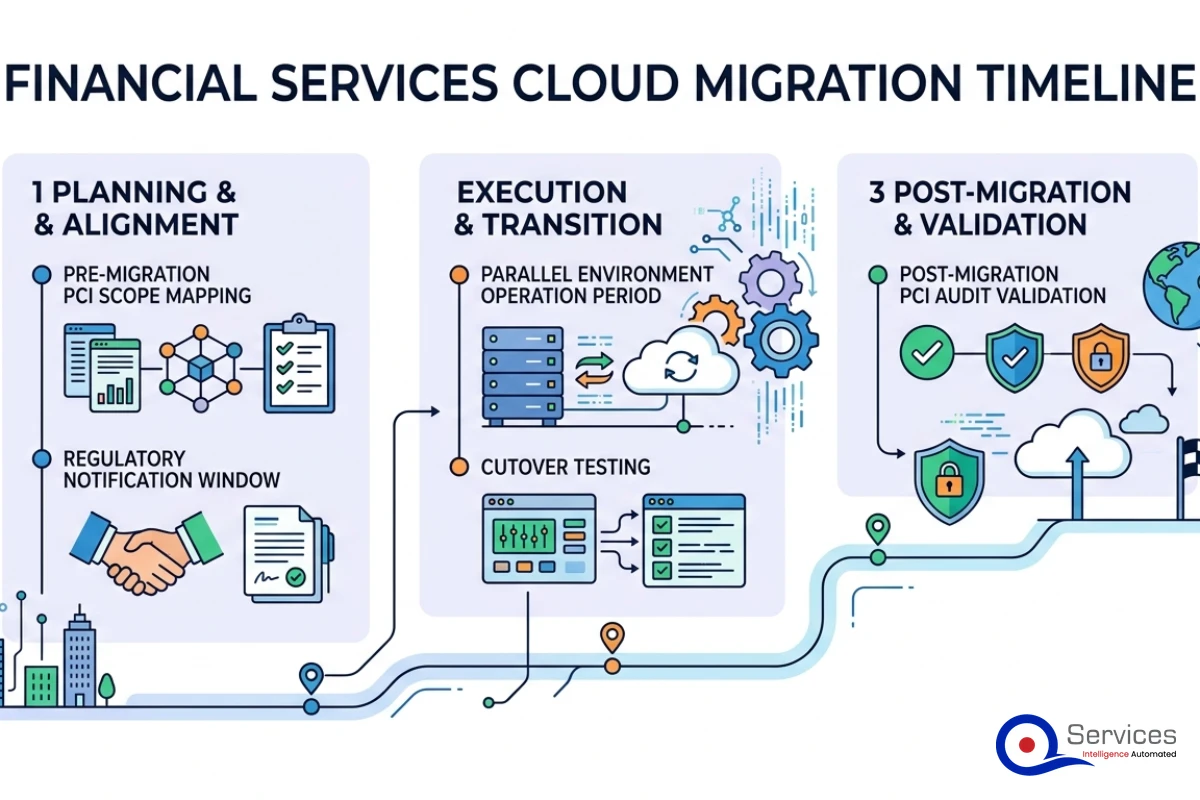
Assessing Your PCI Scope Before Migration
Before moving any workload, map your current CDE accurately:
Identify every system that stores, processes, or transmits cardholder data
Document all network flows in and out of those systems
Determine which connected systems fall into scope by association
Scope creep is the most common migration failure mode. Teams add systems to their Azure environment during migration without updating their CDE boundary documentation, and suddenly the audit scope is larger than the original on-premises environment. This is how migrations that start on time end up missing compliance milestones.
Banking Software Development Company Considerations During Migration
A banking software development company managing a financial migration needs to account for regulatory notification requirements from day one. In the US, banking regulators including the OCC, FDIC, and the Federal Reserve expect institutions to notify their primary regulator before migrating core systems to the cloud. This notification typically needs to happen 90 or more days before cutover, and it requires a documented risk assessment.
Migration also requires maintaining parallel environments during the transition, which carries cost implications most teams underestimate by 30-40%. Planning for that overlap budget early prevents the mid-project conversation where someone has to explain why the migration is running over on infrastructure costs.
Key Insight Migration also requires maintaining parallel environments during the transition, which carries cost implications most teams underestimate by 30-40%.
Open Banking API Development Within PCI-DSS Scope
Open banking API development sits at the intersection of two compliance regimes: PCI-DSS for payment data and open banking standards like PSD2 in Europe or the CFPB's emerging rulemaking in the US. Managing both without unnecessarily expanding your CDE scope requires deliberate API design decisions from the start.
API Gateway Design for PCI-DSS Compliance
Azure API Management is the natural choice for open banking API development on Azure. Key configurations for PCI compliance:
All APIs accessed via APIM, never directly to backend services
mTLS authentication for B2B API consumers
OAuth 2.0 with Microsoft Entra ID for consumer-facing open banking endpoints
Rate limiting and quota policies to prevent enumeration attacks
Request and response logging to Azure Monitor with PAN data masked before any log entry is written
Managing Third-Party Access Without Expanding Your CDE
One of the trickier aspects of open banking API development is third-party provider (TPP) access. When you grant a TPP access to your APIs, you need to evaluate whether they become part of your CDE or whether your API design keeps them outside it.
The practical approach: TPPs access a tokenized API layer that never returns raw PANs. They see tokenized card references, not actual card numbers. This keeps TPPs outside your CDE, which maintains a defined audit scope and limits your liability if a TPP is later compromised.
According to the PCI Security Standards Council's guidance on tokenization, replacing PANs with non-PAN tokens effectively removes those tokens from PCI scope, provided the tokenization system itself meets PCI controls.
Key Takeaways
PCI-DSS compliant development means building software that satisfies all 12 requirements of the Payment Card Industry Data Security Standard, specifically as they apply to systems that store, process, or transmit cardholder data, collectively known as your Cardholder Data Environment (CDE).
Azure for banking is not just a positioning claim.
This is where fintech software development gets specific.
KYC/AML automation is where banking software development gets genuinely interesting from an engineering standpoint.
Fraud detection software built on Azure can operate at latencies that rule-based on-premises systems cannot match.
Conclusion
PCI-DSS compliant development on Azure is a tractable problem when you approach it architecturally from the start. The combination of Azure's in-scope services, PaaS-level shared responsibility, and purpose-built security tools like Defender for Cloud and Microsoft Sentinel gives fintech software development teams a real advantage over building on commodity cloud infrastructure. The failures we consistently see are organizational: treating compliance as documentation work rather than engineering discipline, underestimating CDE scope before migration, skipping key rotation automation, or missing regulatory notification requirements.
If you're starting a new banking compliance software project on Azure, getting the CDE architecture right in the first sprint pays back across every subsequent audit. If you're mid-migration and realizing the scope is larger than planned, a structured assessment of your current PCI boundary is the right first step, not accelerating the timeline.
QServices works with banking and fintech clients on PCI-DSS compliant Azure architecture, KYC/AML automation, and financial services cloud migration. If you're planning a build or migration and want an architectural review before committing to an approach, reach out to discuss your specific environment.
Co-Founder and CTO, QServices IT Solutions Pvt Ltd
Rohit Dabra is the Co-Founder and Chief Technology Officer at QServices, a software development company focused on building practical digital solutions for businesses. At QServices, Rohit works closely with startups and growing businesses to design and develop web platforms, mobile applications, and scalable cloud systems. He is particularly interested in automation and artificial intelligence, building systems that automate routine tasks for teams and organizations.
PCI-DSS compliant cloud development means building applications that satisfy all 12 PCI-DSS requirements within a cloud environment. On Azure, this involves defining your Cardholder Data Environment (CDE), using Azure services that are in scope for PCI compliance (Microsoft maintains over 100 such services), and implementing application-layer controls including encryption, access management, logging, and network segmentation that fall outside Microsoft’s shared responsibility. Azure PaaS services reduce some OS-layer obligations, but your code, data, and configuration choices remain your responsibility.
KYC automation on Azure uses Azure AI Document Intelligence for identity document extraction, Azure AI Vision for liveness detection, and Azure Machine Learning for onboarding risk scoring. AML automation uses Azure Event Hubs for transaction stream ingestion, Azure Stream Analytics for real-time rule evaluation, and ML-based anomaly detection to reduce false positives by 40-60% compared to static rule sets. Both processes require auditable logging to Azure SQL and human review queues for edge cases that automation cannot resolve confidently.
Microsoft maintains over 100 Azure services in scope for PCI-DSS compliance. Commonly used services for banking include Azure Virtual Machines, Azure Kubernetes Service, Azure App Service, Azure SQL Database, Azure Blob Storage, Azure Key Vault, Azure Virtual Network, Azure Firewall Premium, Microsoft Entra ID, Microsoft Defender for Cloud, and Microsoft Sentinel. Being in scope means the service has been audited under PCI-DSS, but your specific configuration of that service must still meet all applicable PCI controls independently.
Start by mapping your current Cardholder Data Environment accurately before any migration work begins. In the US, notify your banking regulator (OCC, FDIC, or Federal Reserve) at least 90 days before migrating core systems, as regulatory notification with a documented risk assessment is typically required. Maintain parallel on-premises and Azure environments during the transition, update your PCI scope documentation to reflect the new CDE boundary on Azure, and have a Qualified Security Assessor review your migrated architecture before the next audit cycle.
An open banking API is a standardized interface that allows authorized third-party applications to access customer banking data or initiate payments with the customer’s explicit consent. Regulatory frameworks like PSD2 in Europe mandate that banks provide these interfaces. On Azure, open banking APIs are typically built using Azure API Management as the gateway layer, with OAuth 2.0 or mTLS authentication for third-party access, and tokenization to ensure raw cardholder data never leaves the bank’s PCI-controlled environment.
Banking software development costs vary significantly based on scope. A focused compliance feature like KYC automation or AML monitoring typically runs $150,000 to $500,000 for a mid-market implementation. A full core banking modernization on Azure including migration and compliance validation generally ranges from $500,000 to several million dollars, depending on data complexity, number of regulatory jurisdictions, and whether parallel environments must be maintained during migration. The biggest cost drivers are PCI compliance scope, integration depth with legacy systems, and parallel environment duration.
Azure-based AI fraud detection uses Event Hubs for transaction ingestion, Azure Functions for real-time feature extraction (amount, merchant category, velocity, device fingerprint), and Azure Machine Learning Online Endpoints for model inference with p99 latency under 50ms achievable. High-risk transactions are queued via Azure Service Bus for analyst review. The critical factor is training your ML model on labeled historical fraud data and retraining continuously as fraud patterns evolve. Most teams see meaningful detection improvement within 3-6 months compared to static rule-based systems.
When PDF text extraction drops the spaces between words, AI agents can’t find facts that are right there. How we found it in Azure AI Foundry and fixed it.
Pint AE explained for UAE finance teams with one sample invoice: see which fields come from your ERP, which go missing, and how to test before go-live.
Days sales outstanding explained for CFOs: the formula, worked examples, named industry benchmarks, and why seasonal sales distort DSO. See what moves it.
Follow one payment through the cash application process, step by step, and see the exact moment it stalls so your AR team can clear unapplied cash faster.
When PDF text extraction drops the spaces between words, AI agents can’t find facts that are right there. How we found it in Azure AI Foundry and fixed it.
Pint AE explained for UAE finance teams with one sample invoice: see which fields come from your ERP, which go missing, and how to test before go-live.
Days sales outstanding explained for CFOs: the formula, worked examples, named industry benchmarks, and why seasonal sales distort DSO. See what moves it.
Follow one payment through the cash application process, step by step, and see the exact moment it stalls so your AR team can clear unapplied cash faster.
QServices Inc. undertakes every project with a high degree of professionalism. Their communication style is unmatched and they are always available to resolve issues or just discuss the project.
Turn the Microsoft Licenses
You Already Own Into an AI Workplace
Join our live webinar on Sept 24 and see five ways to automate meetings, approvals, and