Azure cost optimization is where most enterprise Azure bills quietly bleed out, not through one dramatic mistake but through five recurring patterns we find in virtually every audit we run. After completing 500+ Azure and Microsoft platform projects since 2014, QServices has seen the same cost leaks across healthcare organizations, logistics companies, banks, and SaaS platforms. The details vary; the mistakes don't.
This post covers what we actually find during client audits, what each mistake costs in practice, and what a real fix looks like. If you recognize three or more of these, a formal assessment will likely surface significant savings.
In This Article, You'll Learn
Mistake #1: No Resource Tagging Strategy
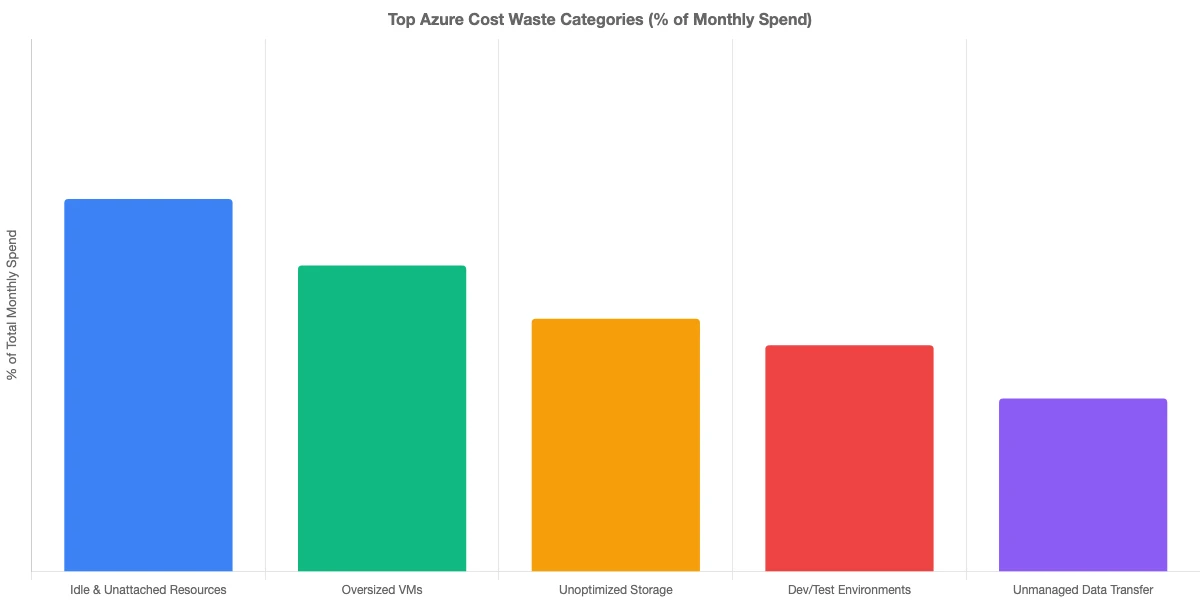
Mistake #2: Oversized VMs Are the Most Visible Azure Cost Optimization Problem
Mistake #3: Skipping Reserved Instances and Savings Plans
Mistake #4: Dev/Test Environments Without Azure Cost Optimization Controls
Mistake #5: No Azure Landing Zone Implementation
Eager to discuss about your project?
Share your project idea with us. Together, we’ll transform your vision into an exceptional digital product!
The first thing we check in any azure infrastructure assessment is tagging. Nine times out of ten, we find resources with no tags at all, or tags applied inconsistently by different teams at different times.
The practical problem: without tags, you cannot allocate costs to departments, projects, or environments. Your finance team sees one Azure bill. Nobody can identify which workload caused the spike in compute costs last quarter. Every investigation becomes a manual search through the portal, and manual searches rarely find everything.
According to Microsoft's Azure cost management best practices, consistent tagging is the foundational step for any cost governance program. Without it, every other optimization effort is guesswork.
How to Build a Tagging Policy That Sticks
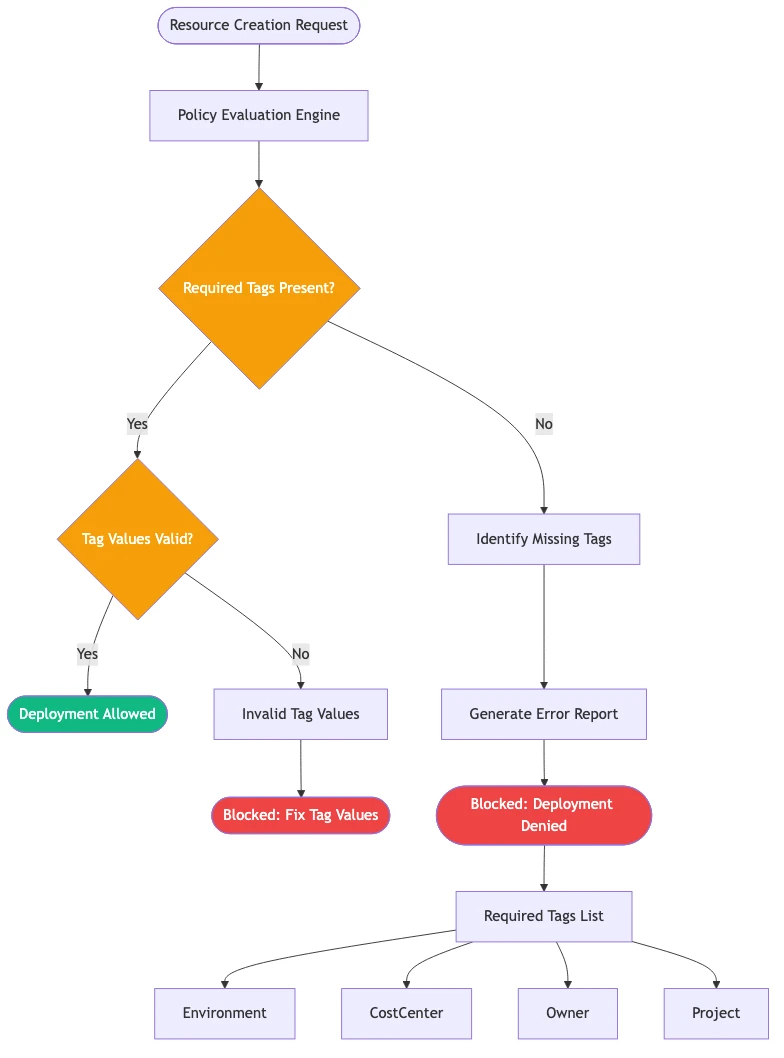
The fix is not just adding tags. It's enforcing them at the policy level using Azure Policy. We recommend a minimum tag set: environment, owner, project, cost-center, and managed-by. Azure Policy can block resource creation if required tags are missing, which is the only approach that actually holds at scale.
In one logistics platform engagement, similar to the rebuild we documented in our order visibility case study, a missing tagging policy meant the client had no idea a test environment from a completed project was running three D-series VMs continuously for seven months. That's real money with no associated business value.
Mistake #2: Oversized VMs Are the Most Visible Azure Cost Optimization Problem
Lift and Shift to Azure Creates Overprovisioning by Default
Lift and shift to azure is the fastest way to get off on-premises infrastructure. It's also the most expensive way to stay in the cloud if you stop there. When teams migrate workloads at 1:1 parity with on-premises server specs, they typically overprovision by 40-60% because on-premises servers are sized for peak load that rarely occurs.
Key Insight When teams migrate workloads at 1:1 parity with on-premises server specs, they typically overprovision by 40-60% because on-premises servers are sized for peak load that rarely occurs.
Azure cost optimization, done correctly, looks at utilization patterns across time, not just averages. A VM that peaks at 80% CPU during business hours but idles at 3% for 14 hours per day is a candidate for auto-scaling, not a smaller fixed VM size. Azure Advisor surfaces the most obvious cases: VMs running under 5% CPU for 14 or more days. But it misses the subtler overprovisioning that auto-scaling would fix better than downsizing.
If your team is running azure devops consulting services or CI/CD pipelines on dedicated build agents, those are often the worst offenders. Agents sitting idle between pipeline runs cost the same per hour as agents under full load.
Using Azure Advisor for Rightsizing Recommendations
Azure Advisor is free and built in. It's the first tool we open in any azure architecture review. The rightsizing recommendations typically surface 15-25% potential savings in compute costs for organizations that migrated without post-migration optimization.
Key Insight The rightsizing recommendations typically surface 15-25% potential savings in compute costs for organizations that migrated without post-migration optimization.
The honest caveat: Advisor recommendations are starting points, not final answers. Some high-memory VMs look idle from a CPU perspective but are genuinely memory-bound. Always validate against application performance metrics in Azure Monitor before downsizing. Skipping that step is how teams cause production incidents in the name of cost savings.
Mistake #3: Skipping Reserved Instances and Savings Plans
How Azure Reserved Instances Save Up to 72%
Pay-as-you-go pricing is convenient. It's also significantly more expensive than the alternatives for predictable workloads. Microsoft's Reserved VM Instances pricing page documents savings of up to 72% compared to pay-as-you-go rates on 3-year terms.
Most organizations that engage azure consulting services, particularly those using an azure managed services provider model, run a mix of predictable baseline workloads and variable spiky workloads. The baseline workloads are strong candidates for reservations. The variable ones are better served by Savings Plans, which offer flexibility as workload patterns shift.
The mistake is applying the same pricing model to everything: either all pay-as-you-go (expensive) or over-committing to reservations for workloads that vary significantly month to month.
When Savings Plans Make More Sense Than Reservations
Azure Savings Plans commit to a dollar amount of compute per hour rather than a specific VM type. This flexibility matters when your workload mix shifts, which it often does during azure app modernization projects or hybrid cloud azure setup phases when teams are still working out their steady-state architecture.
A working rule: reservations for workloads you are confident will run the same VM size in the same region for 1-3 years; Savings Plans for everything else that's predictable but could change. One pattern we see repeatedly in azure cost optimization consulting engagements: organizations that purchased reservations for VMs and then migrated those workloads to containers or Azure App Service. The reservations keep billing even after the VMs are deallocated. Reservation management is a quarterly task, not a one-time purchase.
Mistake #4: Dev/Test Environments Without Azure Cost Optimization Controls
The Hidden Cost of Always-On Dev Environments
This is where the real money hides. Development and test environments running 24/7 are often responsible for 30-40% of an organization's Azure bill, particularly in software companies where each developer has their own cloud environment.
Key Insight Development and test environments running 24/7 are often responsible for 30-40% of an organization's Azure bill, particularly in software companies where each developer has their own cloud environment.
The problem compounds quickly. Developers spin up environments for a sprint and don't tear them down. A feature branch environment from four months ago is still running a SQL instance, a Redis cache, and two App Service plans. Nobody owns it because there are no tags. Nobody shuts it down because nobody wants to be responsible for deleting something still in use. This is a governance problem before it's a cost problem.
In our experience, organizations with 20-50 active developers often run far more cloud resources than they actually need at any given time.
Auto-Shutdown Policies and Environment Lifecycle Rules
Azure Dev/Test subscriptions offer discounted pricing for non-production workloads. Combined with auto-shutdown policies on VMs and Azure Automation runbooks to tear down entire resource groups on a schedule, you can eliminate most idle environment cost without manual intervention.
The governance side is the critical piece. This is exactly the kind of work that sits at the intersection of azure infrastructure assessment and policy enforcement. Without someone accountable for environment hygiene, the shutdown scripts get applied once and drift as teams find workarounds.
The approach we use in our Human-in-the-Loop governance model for banking applies directly here: every environment creation request should go through explicit approval with a defined expiry date. Human-in-the-Loop governance ensures human approval at every deployment stage, which prevents environment sprawl before it accumulates rather than cleaning it up after the fact.
Mistake #5: No Azure Landing Zone Implementation
What Is an Azure Landing Zone?
An Azure landing zone is a pre-configured, policy-enforced environment structure that defines how subscriptions, networking, identity, and governance are organized before workloads move in. The analogy that holds: it's building the foundation and plumbing before constructing the house rather than retrofitting infrastructure after the walls are up.
Most organizations that migrate without proper azure landing zone implementation end up with what Microsoft calls the "big subscription" pattern: everything in one or two subscriptions with no environment separation, no governance guardrails, and no cost attribution structure. This pattern makes every other mistake on this list significantly harder to fix.
Azure Landing Zone Implementation and Long-Term Cost Control
The connection between landing zones and cost is direct, even if it's not immediately obvious. A well-structured landing zone with separate subscriptions for production, development, and staging means:
Budget alerts fire at the subscription level, giving early warning before a workload blows its allocation
Azure Policy applies governance at scale without team-by-team enforcement
Cost allocation to teams and projects is built into the subscription structure
Microsoft Defender for Cloud applies security policies per environment tier, which also catches misconfigurations that drive unexpected egress and data transfer costs
Organizations that skip the landing zone design as part of azure cloud migration services and go straight to workload migration typically return 12-18 months later to retrofit governance. That retrofit costs more than doing it right the first time, in both direct consulting cost and accumulated waste during the gap.
For teams deciding whether to migrate on premise to azure or to a competing cloud, this governance structure is one reason Azure often fits better for organizations already running Microsoft workloads. The tooling integrates more tightly, and the investment in governance translates across the Microsoft stack.
How Does an Azure Architecture Review Surface These Savings?
What We Look for in an Azure Infrastructure Assessment
An azure architecture review is a structured assessment, typically completed in one to two weeks, that maps your current Azure environment against Microsoft's Well-Architected Framework and your actual workload patterns. For cost specifically, a proper azure infrastructure assessment covers:
Resource inventory audit: Everything running, its size, and its actual utilization profile over time
Pricing model review: What's on pay-as-you-go vs. reserved vs. Savings Plans, and whether those choices match workload data
Governance gaps: Tagging, policies, RBAC, and environment lifecycle hygiene
Networking costs: Data egress, VPN gateway sizing, and ExpressRoute configurations
Storage tier analysis: Blobs in Hot tier that belong in Cool or Archive
An azure security assessment runs alongside the cost review. Cost and security are not separate workstreams. Misconfigured networking, such as storage accounts left publicly accessible, creates both security risk and hidden egress costs. Fixing the security issue fixes the cost leak at the same time.
QServices is a microsoft azure consulting company that has consistently found 20-35% potential savings in the first assessment for organizations that have not done a formal review before. That figure comes from real engagements, not projections.
How Azure Cost Optimization Consulting Pays for Itself
The honest answer on ROI: most organizations see consulting fees offset within 60-90 days of implementing the quick-win recommendations. Rightsizing, reserved instance purchases, and dev environment cleanup typically deliver savings faster than the governance improvements do.
The governance work (tagging policies, landing zone restructuring, environment lifecycle management) pays off over 12-24 months and compounds. Each new workload that deploys into a governed environment costs less to manage than one landing in an unmanaged environment.
As an azure migration partner, QServices structures engagements in phases: assess first, implement quick wins, establish governance, then migrate on premise to azure workloads into the governed structure. Doing it in that order means each migrated workload lands cleanly rather than adding to existing cost and governance debt.
What to Do Next: Getting an Azure Infrastructure Assessment
If any of the five mistakes in this post sound familiar, a formal azure infrastructure assessment is the fastest way to quantify the problem. The output is a prioritized finding list with estimated savings per item, so you can make an informed decision on implementation before committing to a full remediation engagement.
If you are also considering a larger migration, starting with an assessment clears the path. Azure cloud migration services work best when workloads land in a cost-governed environment rather than replicating existing problems in the cloud.
The first thing we check in any azure infrastructure assessment is tagging.
Lift and shift to azure is the fastest way to get off on-premises infrastructure.
Pay-as-you-go pricing is convenient.
This is where the real money hides.
An Azure landing zone is a pre-configured, policy-enforced environment structure that defines how subscriptions, networking, identity, and governance are organized before workloads move in.
Azure cost optimization is a continuous process, not a one-time project. The five mistakes covered here, missing tagging strategy, oversized VMs, wrong pricing models, ungoverned dev environments, and no landing zone foundation, compound over time. Each one makes the others harder to fix.
QServices is a Microsoft Certified Solutions Partner specializing in Azure, and these findings come from real audits across healthcare, logistics, banking, and SaaS organizations. The five phases of Azure migration are assess, plan, migrate, optimize, and govern, and most cost problems originate from skipping or rushing the assess and govern phases.
The good news: all five are fixable. Most organizations see meaningful savings within 90 days of starting a formal azure cost optimization consulting engagement. The fastest path is a structured assessment that tells you exactly where to focus first. If you want to understand where your environment stands, our azure consulting services team is a good starting point for that conversation.
Co-Founder and CTO, QServices IT Solutions Pvt Ltd
Rohit Dabra is the Co-Founder and Chief Technology Officer at QServices, a software development company focused on building practical digital solutions for businesses. At QServices, Rohit works closely with startups and growing businesses to design and develop web platforms, mobile applications, and scalable cloud systems. He is particularly interested in automation and artificial intelligence, building systems that automate routine tasks for teams and organizations.
Azure cloud migration costs vary widely depending on workload complexity, data volumes, and the level of re-architecture required. For mid-size companies, a lift-and-shift migration typically ranges from $30,000 to $150,000 in professional services fees, with ongoing Azure consumption costs determined by workload size and optimization level. Organizations that invest in a pre-migration assessment and proper landing zone design consistently see lower total cost of ownership over 24 months compared to those that migrate without governance preparation.
The best approach to migrate on premise to Azure follows a phased model: assess your current environment and identify dependencies, design a landing zone and governance framework, migrate low-risk workloads first to validate the process, then migrate business-critical workloads with a tested rollback plan. Attempting to migrate everything at once without a governance foundation is the most common cause of cost overruns and rework in Azure migration projects.
Azure migration timelines depend on the number and complexity of workloads being moved. A small environment with 10-20 servers can complete a lift-and-shift migration in 4-8 weeks. A mid-size enterprise with 50-200 workloads typically takes 3-9 months, including assessment, landing zone setup, and phased migration. Migrations involving significant re-architecture or azure app modernization as part of the process can run 12-18 months for large environments.
An Azure landing zone is a pre-configured, policy-enforced environment structure that establishes how subscriptions, networking, identity, and governance are organized before any workloads move in. It includes management group hierarchy, subscription design for environment separation, centralized networking, identity integration with Azure Active Directory, and Azure Policy guardrails. Azure landing zone implementation is considered a prerequisite for enterprise-scale deployments because it makes governance, cost management, and security controls scalable from day one.
Azure and AWS are comparable in compute and storage pricing at the list rate level, but Azure often delivers better total cost for organizations already running Microsoft workloads. Microsoft Azure Hybrid Benefit allows organizations to use existing Windows Server and SQL Server licenses in the cloud, which can reduce VM costs by 40-85% compared to pay-as-you-go rates. Enterprises with existing Microsoft EA agreements also receive Azure credits and discounts that are not available on competing platforms, making the effective cost comparison highly dependent on your existing Microsoft licensing position.
An azure managed services provider handles ongoing monitoring, optimization, patching, security management, and cost governance for your Azure environment so your internal team can focus on business applications rather than infrastructure operations. Managed services typically include 24/7 alerting, incident response, monthly cost optimization reviews, reserved instance management, policy enforcement, and access to certified architects for architecture guidance. QServices operates as a Microsoft Certified Solutions Partner providing managed services alongside project delivery.
The most impactful ways to reduce Azure costs are: implement a mandatory tagging policy and use Azure Cost Management for charge-back reporting; rightsize VMs using Azure Advisor recommendations validated against Azure Monitor utilization data; purchase Reserved Instances or Savings Plans for predictable workloads; apply auto-shutdown schedules and lifecycle policies to dev/test environments; and set up a properly structured Azure landing zone so governance scales with your environment. Organizations that address all five areas typically see 20-35% reductions in their monthly Azure bill within 90 days.
When PDF text extraction drops the spaces between words, AI agents can’t find facts that are right there. How we found it in Azure AI Foundry and fixed it.
Pint AE explained for UAE finance teams with one sample invoice: see which fields come from your ERP, which go missing, and how to test before go-live.
Days sales outstanding explained for CFOs: the formula, worked examples, named industry benchmarks, and why seasonal sales distort DSO. See what moves it.
Follow one payment through the cash application process, step by step, and see the exact moment it stalls so your AR team can clear unapplied cash faster.
When PDF text extraction drops the spaces between words, AI agents can’t find facts that are right there. How we found it in Azure AI Foundry and fixed it.
Pint AE explained for UAE finance teams with one sample invoice: see which fields come from your ERP, which go missing, and how to test before go-live.
Days sales outstanding explained for CFOs: the formula, worked examples, named industry benchmarks, and why seasonal sales distort DSO. See what moves it.
Follow one payment through the cash application process, step by step, and see the exact moment it stalls so your AR team can clear unapplied cash faster.
QServices Inc. undertakes every project with a high degree of professionalism. Their communication style is unmatched and they are always available to resolve issues or just discuss the project.
Turn the Microsoft Licenses
You Already Own Into an AI Workplace
Join our live webinar on Sept 24 and see five ways to automate meetings, approvals, and