.NET application modernization is the single most consequential technical decision most enterprise IT teams face right now. If your applications still run on .NET Framework 4.x, you are working with a platform that Microsoft stopped shipping new features for in 2019. Security patches continue, but the meaningful investment now lives entirely in .NET 8 and .NET 9: better performance, cloud-native container support, unified tooling, and a runtime that keeps pace with how modern software is deployed.
This checklist is for CTOs, architects, and project leads at mid-size and enterprise companies who know modernization is overdue but have not committed to a specific path. We cover the honest decision between modernizing and rewriting, the phase-by-phase steps that work in production environments, pattern selection for complex apps, frontend choices including Blazor and React, and the governance practices that keep these projects on track. If your business runs healthcare, banking, logistics, or SaaS systems on .NET Framework, this is your practical starting point.
In This Article, You'll Learn
Why .NET Application Modernization Can't Wait
Should You Modernize Your .NET Framework App or Rewrite It?
The Complete Migration Checklist: Phase by Phase
How to Choose the Right Modernization Pattern
Frontend Decisions: Blazor, React, and What Enterprises Actually Choose
Eager to discuss about your project?
Share your project idea with us. Together, we’ll transform your vision into an exceptional digital product!
The gap between .NET Framework and .NET 8/9 is not purely about new language features. It is about infrastructure. .NET Framework runs only on Windows. .NET 8 and .NET 9 run on Linux containers, which means Azure Kubernetes Service, lower compute costs, and CI/CD pipelines that match the rest of the industry. If your team is actively hiring mid-career developers, many of them have never shipped a production .NET Framework application. They know .NET 6 and above.
The Performance Gap Between .NET Framework and .NET 8/9
Microsoft benchmarks document .NET 8 handling HTTP workloads significantly faster than .NET Framework 4.8 under comparable conditions. For database-heavy enterprise applications, the improvements in Entity Framework Core 8, including compiled queries and improved batch operations, reduce round-trip latency in measurable ways. Teams migrating payroll engines, insurance claims processors, and order management systems consistently report a 30-50% reduction in peak CPU usage after moving to .NET 8. These are not lab numbers. They show up in production dashboards within weeks of cutover.
Key Insight Teams migrating payroll engines, insurance claims processors, and order management systems consistently report a 30-50% reduction in peak CPU usage after moving to .NET 8.
What Microsoft's .NET Framework Sunset Actually Means
Microsoft's official .NET lifecycle policy confirms that .NET Framework 4.8 is the final version and will only receive security and reliability fixes, with no new features. The risk is not that your app stops working tomorrow. The risk is that your dependency on Windows-only infrastructure grows while the rest of your organization moves toward cloud-native patterns, and your ability to recruit developers familiar with the stack shrinks every year.
Should You Modernize Your .NET Framework App or Rewrite It?
The honest answer is that it depends on the codebase, not the technology. Teams that choose a full rewrite typically underestimate the timeline by 40-60% and lose accumulated knowledge about edge cases that took years to surface. Teams that choose incremental modernization often underestimate the effort required to untangle shared state, WCF dependencies, and the Windows-only APIs that .NET Framework quietly permitted.
Key Insight Teams that choose a full rewrite typically underestimate the timeline by 40-60% and lose accumulated knowledge about edge cases that took years to surface.
The practical decision rule: if the core business logic is sound but the infrastructure is the constraint, modernize incrementally. If the business logic itself is undocumented, incorrect, or tightly coupled to a UI that no longer serves users, a targeted rewrite may be faster over a 24-month horizon.
When Incremental Modernization Makes Sense
Incremental modernization works best when the application has identifiable module boundaries, even if those modules are not formally separated. It also works when business logic lives in service classes rather than scattered across Global.asax or code-behind files, when the team has test coverage for at least the critical processing paths, and when the business can absorb 6-18 months of parallel-track development without requiring a hard cutover date.
A targeted rewrite makes sense when the application is small enough to reconstruct in 3-6 months (typically under 50,000 lines of net business logic), when the current system is actively losing revenue due to cascading bugs that cannot be fixed without breaking something else, or when no one on the current team can explain how more than 20% of the codebase works. This situation is more common in financial systems built in the early 2000s and extended by contractors over a decade than most organizations want to admit.
Key Insight A targeted rewrite makes sense when the application is small enough to reconstruct in 3-6 months (typically under 50,000 lines of net business logic), when the current system is actively losing revenue due to cascading bugs that cannot be fixed without breaking something else, or when no one on the current team can explain how more than 20% of the codebase works.
The Complete Migration Checklist: Phase by Phase
In our experience with .NET 9 migration and .NET 8 upgrades, the engagements that stay on schedule follow a consistent sequence. The ones that run over budget typically skip or compress the assessment phase, or they discover WCF dependencies mid-migration that should have been flagged in week one.
Phase 1: Assessment and Dependency Mapping
Before writing a single line of migrated code, complete these six steps:
Run the .NET Upgrade Assistant to generate an automated compatibility report for your entire solution
Check every NuGet package on NuGet.org for .NET 8/9 compatible versions and flag anything with no update in two or more years
Identify all Windows-only APIs: System.Web, HttpContext, COM interop, Windows Registry access, and Windows services
List all WCF service references, Windows Workflow Foundation usage, and Crystal Reports integration points
Estimate migration effort per module using T-shirt sizing before committing to any project timeline
Phase 2: Compatibility Testing and Target Framework Selection
Choose between .NET 8 (Long-Term Support, maintained until November 2026) and .NET 9 (Standard-Term Support, current release with newer runtime features). For most enterprise applications, .NET 8 is the safer choice because the ecosystem is well-established and you get a full three-year support window. Our .NET 9 Migration Guide: New Features, Breaking Changes, and Safe Upgrade Path covers the specific breaking changes if you are deciding between the two versions.
Microsoft's ASP.NET to ASP.NET Core migration documentation covers the breaking API changes from WebForms and Web API 2. Set up a compatibility test baseline before any migration work begins:
Unit tests covering all business-critical service classes
Integration tests for all database access patterns
Contract tests for any external API or partner system dependencies
Phase 3: Incremental Migration and Deployment
Migrate module by module, never all at once. The typical sequence that causes the fewest production incidents:
Shared utilities, constants, and domain models (fewest external dependencies)
Data access layer (migrate from EF 6 to EF Core, or modernize Dapper patterns)
Business service classes
API controllers or presentation layer last
Use feature flags to run old and new code paths in parallel during the transition. This lets you validate behavior on real production traffic for specific endpoints before committing to a full cutover. Never schedule a big-bang cutover for a system with more than a few hundred active users.
How to Choose the Right Modernization Pattern
.NET application modernization is not a single approach. The right pattern depends on how tightly coupled your current architecture is and how much business disruption the organization can absorb during the transition. Getting this decision wrong is the most expensive mistake teams make, because reversing a pattern choice mid-project is nearly impossible without extending the timeline significantly.
The Strangler Fig Pattern Explained
The strangler fig pattern is an incremental modernization approach where new functionality is built on the modern platform while the legacy system continues running, with traffic gradually routed to the new system until the legacy application can be decommissioned entirely. Legacy .NET Framework modernization uses the strangler fig pattern to incrementally replace components without a full rewrite or service interruption, making it the safest path for systems that cannot tolerate downtime.
For .NET migration, this means a reverse proxy (Azure API Management, NGINX, or YARP) routes some requests to the new .NET 8/9 service and others to the existing .NET Framework app. New features are built exclusively in the modern stack. Legacy endpoints are migrated one at a time, tested, and validated before the next endpoint moves. The old application is decommissioned module by module, not all at once.
This pattern is especially effective for asp.net development services scenarios where downtime is unacceptable and where the user base is large enough that a maintenance window cannot be negotiated with stakeholders.
Apps with reasonable structure but outdated APIs and patterns
Rearchitect
Split into services, redesigned data layer
Highest
Apps requiring .net microservices consulting for scalability demands
Most enterprise applications land in the refactor category. Pure lift-and-shift often misses the performance and cost gains that justify the migration effort. Full rearchitecture is expensive to justify unless scaling requirements or team ownership boundaries make microservices genuinely necessary.
Frontend Decisions: Blazor, React, and What Enterprises Actually Choose
Frontend modernization runs alongside backend migration, and this decision carries more weight than most architecture reviews acknowledge. Our detailed breakdown of Blazor vs React for Enterprise Apps: When Each One Wins covers this thoroughly. Here is the decision framework specifically for teams in the middle of a migration.
Blazor Server vs Blazor WASM: Which Fits Your App?
Blazor Server renders UI on the server with SignalR, keeping all C# business logic on the server and sending only UI updates to the browser. Blazor WebAssembly runs C# directly in the browser via WebAssembly, enabling offline use and reducing server-side load. For enterprise apps where you control the network (internal portals, healthcare dashboards, banking back-office tools), Blazor Server is usually the faster path. Blazor WASM makes more sense when the app needs offline capability or when server-side connection overhead becomes a concern at scale.
The practical advantage of blazor development services for .NET teams: your C# developers can build fully interactive UIs without learning a JavaScript framework. Teams with strong C# expertise and limited dedicated frontend resources typically cut UI development time by 25-35% compared to adopting React from scratch.
When React Still Wins Over Blazor
React is the better choice when the team has existing React expertise that would take six or more months to replicate in Blazor, when the app needs deep integration with JavaScript libraries that have no .NET equivalent, when public-facing pages require mature server-side rendering for SEO (Next.js is still ahead of Blazor for this), or when the target user base includes devices where WebAssembly bundle size creates meaningful load time differences.
Neither technology is universally better. The decision should follow the team's actual skill set and the application's distribution and performance requirements, not which framework is newer.
.NET Microservices and API Architecture After Migration
For larger systems, .NET 9 migration is also the natural moment to evaluate whether a monolith still fits the scaling requirements. Not every application should become microservices. Some monoliths are perfectly appropriate for the team size and traffic patterns involved. But some legacy .NET Framework apps are constrained by their monolithic structure in ways that only become obvious once the runtime constraint is removed.
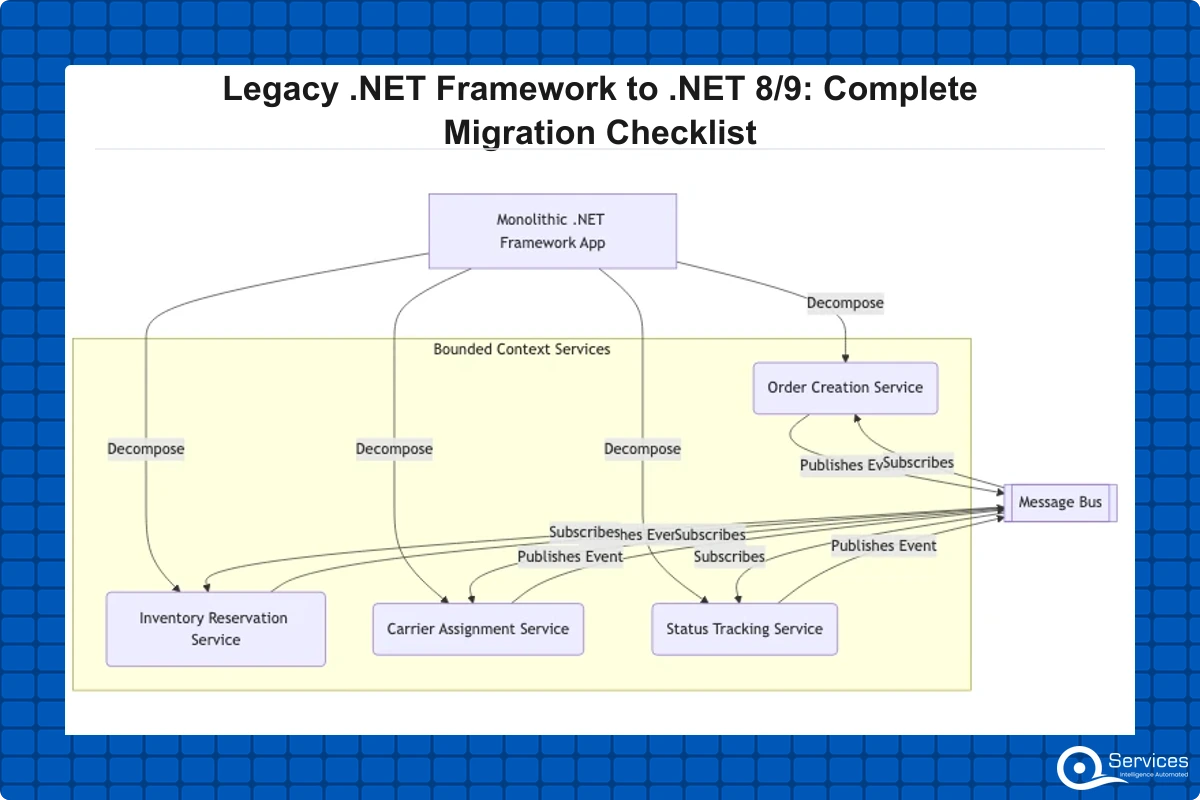
Decomposing a Monolith into .NET Microservices
Our .NET Microservices Consulting: Architecture Patterns and Implementation Guide covers decomposition strategy in depth. The short version: decompose by business domain using bounded contexts, not by technical layer. The most common mistake is creating a data service, a UI service, and a logic service, which replicates the monolith's coupling across a network boundary without gaining any of the independence that microservices are supposed to provide.
A logistics order management system, for example, typically decomposes into four bounded contexts:
Order creation and validation
Inventory reservation
Carrier assignment and routing
Status tracking and customer notification
Each domain has different scaling requirements and different failure modes. That is a real reason to split. Technical layer separation alone is not.
API-First Development After Migration
Once the backend moves to .NET 8/9, api development services patterns become practical that were not available on .NET Framework. Specifically: gRPC for internal service-to-service communication (not supported in .NET Framework), OpenAPI-first design with code generation for both client stubs and server contracts, Azure API Management as a single gateway for all external API traffic with built-in rate limiting and analytics, and SignalR for real-time push to browser and mobile clients without third-party WebSocket libraries.
This API surface also becomes the natural integration point for Dynamics 365 custom connectors and Power Platform low-code workflows, which enterprise teams in financial services and logistics increasingly build alongside custom applications as part of broader enterprise application development programs.
What Slows Down Legacy App Modernization Projects
Legacy app modernization projects run over time for predictable, well-documented reasons. None of them are surprising in hindsight. All of them are avoidable with the assessment work described in Phase 1, done thoroughly before the migration timeline is locked.
Third-Party Dependencies That Block Migration
The most common schedule blockers we see across .NET modernization engagements:
Windows Communication Foundation (WCF): No direct equivalent in .NET 8/9. Teams must choose between CoreWCF (a community-maintained port that covers most real-world scenarios), gRPC, or a REST redesign
Windows Workflow Foundation: No .NET 8/9 equivalent exists. Business process logic must be reimplemented, typically using Stateless or a dedicated workflow engine like Elsa Workflows
Crystal Reports: Requires a complete reporting layer replacement; SSRS, FastReport.NET, and Telerik Reporting are the most common paths
Legacy third-party UI controls: Telerik, DevExpress, and Infragistics all have .NET 8 compatible versions but require new license agreements and dedicated regression testing cycles
Mapping every dependency in Phase 1 prevents mid-migration surprises. Discovering a WCF service reference six weeks into a migration is a 4-8 week unplanned delay on a project that was already scoped without it.
Governance and Human-in-the-Loop Oversight
For regulated industries, banking, healthcare, and logistics, the migration itself must pass compliance review. Every code change to a system handling patient records, financial transactions, or safety-critical routing decisions needs documented testing, defined sign-off chains, and audit trails that can be presented to regulators on demand.
QServices specializes in .NET modernization with Human-in-the-Loop governance for enterprise applications, meaning every migration phase includes defined human review gates before code advances to the next environment. This governance model matters most for teams evaluating a custom software development company to lead the migration rather than handling it with internal resources already stretched across competing product priorities.
Key Takeaways
The gap between .NET Framework and .NET 8/9 is not purely about new language features.
The honest answer is that it depends on the codebase, not the technology.
In our experience with .NET 9 migration and .NET 8 upgrades, the engagements that stay on schedule follow a consistent sequence.
.NET application modernization is not a single approach.
Frontend modernization runs alongside backend migration, and this decision carries more weight than most architecture reviews acknowledge.
Conclusion
.NET application modernization does not have to be a multi-year slog or a high-risk big-bang cutover. The teams that complete it on schedule treat it as a sequence of small, testable increments: thorough assessment first, compatibility testing second, and module-by-module migration with feature flags and parallel deployment.
Start with the assessment checklist. Choose your migration pattern based on the codebase's actual structure. Make frontend decisions based on team skills and application requirements, not what sounds most modern. Handle the hard dependencies, WCF, Windows Workflow Foundation, and legacy reporting, early rather than discovering them mid-project. Build governance checkpoints into every phase, especially in regulated industries.
If you are evaluating what a full modernization engagement looks like from scoping through production deployment, our Enterprise Application Development: Architecture, Tech Stack, and Timeline Guide walks through what a well-run enterprise development engagement should include. QServices works with mid-market and enterprise teams in healthcare, banking, logistics, and SaaS on exactly this kind of .NET application modernization work. Reach out to start with a no-obligation assessment of your current .NET Framework application.
Co-Founder and CTO, QServices IT Solutions Pvt Ltd
Rohit Dabra is the Co-Founder and Chief Technology Officer at QServices, a software development company focused on building practical digital solutions for businesses. At QServices, Rohit works closely with startups and growing businesses to design and develop web platforms, mobile applications, and scalable cloud systems. He is particularly interested in automation and artificial intelligence, building systems that automate routine tasks for teams and organizations.
Modernize incrementally if the core business logic is sound but the infrastructure is the constraint. Choose a targeted rewrite if the codebase is under 50,000 lines of net business logic, has no meaningful test coverage, and no one on the team can explain how more than 20% of it works. Most mid-market applications fall into the modernize category. A rewrite looks faster at the start but typically takes 40-60% longer than teams estimate, because edge case knowledge accumulated over years cannot be reconstructed from code alone.
The strangler fig pattern is a technique where you build the new .NET 8/9 application alongside the running .NET Framework system, routing traffic incrementally to the new system as each module is migrated, until the legacy system can be decommissioned entirely. A reverse proxy like YARP or Azure API Management handles the routing. It avoids service downtime and lets you validate the new system against real production traffic before full cutover, making it the preferred approach for systems where a maintenance window cannot be negotiated.
For a typical mid-market enterprise application between 100,000 and 500,000 lines of code, plan 6-18 months for incremental modernization using the strangler fig pattern. A well-structured app with few Windows-only dependencies can complete a lift-and-shift in 2-4 months. Full rearchitecture to .NET microservices for a large monolith typically takes 18-24 months. The biggest time variable is third-party dependencies like WCF and Crystal Reports, which must be replaced rather than ported, and discovering them late in the project is the most common cause of overruns.
Use Blazor if your development team is primarily C# developers, the application is internal-facing rather than a public SEO page, and you want to avoid the overhead of a JavaScript build toolchain. Blazor Server is the most common starting point for .NET teams modernizing internal enterprise apps, reducing UI development time by 25-35% for teams already strong in C#. Use React if the team has existing React expertise, the app needs deep JavaScript library integration, or you need mature server-side rendering for public search-optimized pages.
For most enterprise teams, .NET 8 (Long-Term Support) is the safer target because it is maintained until November 2026 and the ecosystem is well-established. .NET 9 (Standard-Term Support) has improved AOT compilation and better container handling, but it requires upgrading to .NET 10 within 18 months of release. If your team can commit to keeping pace with the .NET release cadence and you want access to the latest runtime improvements, .NET 9 is worth evaluating. Otherwise, .NET 8 LTS is the more predictable choice for a regulated enterprise environment.
The major ones with no drop-in replacement are Windows Communication Foundation (WCF), which requires CoreWCF, gRPC, or a REST redesign; Windows Workflow Foundation, which must be reimplemented using Stateless or a dedicated workflow engine; WebForms, which must migrate to Blazor or ASP.NET Core MVC/Razor Pages; MSMQ, which should migrate to Azure Service Bus or RabbitMQ; and Crystal Reports, which requires replacement with SSRS, FastReport.NET, or Telerik Reporting. Identifying all of these in Phase 1 assessment is critical to producing an accurate migration timeline.
Cost depends on application size, dependency complexity, and the modernization approach chosen. A refactor-only engagement with no rearchitecture for a mid-market application typically runs between $150,000 and $500,000 over 6-12 months. Full rearchitecture to microservices for a large legacy monolith can exceed $1 million over 18-24 months. The right custom software development company will conduct a fixed-scope assessment before providing a migration estimate, because WCF dependencies, Crystal Reports replacement, and undocumented legacy logic are the variables that move cost the most.
Business intelligence consulting services should give a mid-market company a governed way to make decisions. Attractive dashboards are only the visible part. The useful outcome is a system in which source data, metric definitions, access, releases, ownership, and support still work after the consultants leave.
In a Microsoft Solutions Partner vs Microsoft Partner comparison, the difference is validation. A company can participate in the Microsoft AI Cloud Partner Program without holding a customer-facing Solutions Partner designation. A designated Solutions Partner has met Microsoft’s current threshold in a specific solution pathway: at least 70 out of 100 partner capability points, with more than zero points in every required metric, based on performance, skilling, and customer success data recorded in Partner Center.
How do you build a legacy application modernization strategy for Azure? A legacy application modernization strategy assigns the right treatment to each workload, then sequences the work around business value, technical evidence, and operational risk. For Azure, that means choosing among retire, retain, rehost, replatform, refactor, rearchitect, rebuild, and replace instead of treating cloud migration as a blanket mandate. Direct Answer A legacy application modernization strategy for Azure should classify
Eager to discuss about your project?
Share your project idea with us. Together, we’ll transform your vision into an exceptional digital product!
Business intelligence consulting services should give a mid-market company a governed way to make decisions. Attractive dashboards are only the visible part. The useful outcome is a system in which source data, metric definitions, access, releases, ownership, and support still work after the consultants leave.
In a Microsoft Solutions Partner vs Microsoft Partner comparison, the difference is validation. A company can participate in the Microsoft AI Cloud Partner Program without holding a customer-facing Solutions Partner designation. A designated Solutions Partner has met Microsoft’s current threshold in a specific solution pathway: at least 70 out of 100 partner capability points, with more than zero points in every required metric, based on performance, skilling, and customer success data recorded in Partner Center.