Microsoft Copilot Studio gives SMBs a way to build conversational AI agents without writing a single line of code, and that changes the calculus for small teams with limited engineering resources. But Azure OpenAI Service sits right alongside it, offering raw model access for teams that want more control. Which one should your business actually use?
This is not a theoretical question. If your team is evaluating AI automation in 2026, you are probably looking at two platforms that sound similar but work very differently. One is a point-and-click canvas with pre-built connectors to Microsoft 365, Teams, and Dynamics 365. The other is an API you call from code. The cost structure, skill requirements, and long-term flexibility differ enough that picking the wrong one can mean months of wasted effort.
This guide maps both platforms to real SMB scenarios so you can make the right call without rebuilding from scratch six months later.
What Microsoft Copilot Studio Actually Is
Microsoft Copilot Studio is a low-code platform for building AI-powered chatbots and autonomous agents. It sits inside the Power Platform family and is the evolution of Power Virtual Agents, with generative AI built in at every layer.
Here is what that means in practice. You open a canvas, describe the conversation flow you want, connect it to your data sources (SharePoint, Dataverse, external APIs), and publish. The agent handles natural language questions, routes to human agents when needed, and can trigger Power Automate flows to complete actions like creating a support ticket or updating a CRM record.
The platform uses a combination of rule-based topic trees and large language model (LLM) generative answers. You configure which parts of the conversation follow strict logic (good for compliance-sensitive processes) and which parts let the AI answer freely from a connected knowledge base. That flexibility is genuinely useful for regulated industries where some responses must be exact.
For most SMBs, the key appeal is how deeply it connects to the rest of the Microsoft stack. If your team already uses SharePoint, Teams, or Dynamics 365, Copilot Studio connects to all of them in a few clicks. There is no backend to manage, no vector database to provision, and no prompt engineering required to get a basic agent running. Our guide on Power Platform governance for SMBs explains how to keep that ecosystem from becoming technical debt as you scale.
According to Microsoft's official Copilot Studio documentation, the platform supports over 1,200 pre-built connectors through Power Platform, making it the broadest connectivity option in the Microsoft AI stack.
What Azure OpenAI Service Offers
Azure OpenAI Service is direct API access to OpenAI models (GPT-4o, o1, embeddings, DALL-E) hosted on Microsoft's Azure infrastructure. You bring your own code, you control the prompts, and you decide exactly how the model fits into your application.
This matters for two reasons. First, the models are more capable for complex, multi-step reasoning tasks. Second, you get enterprise-grade data residency, private network endpoints via Azure Virtual Network, and compliance certifications that the public OpenAI.com API does not offer.
The tradeoff is that Azure OpenAI is infrastructure, not an application. You are buying access to a model endpoint. Everything else (the conversation flow, the memory system, the retrieval pipeline, and the front-end) you build yourself or hire someone to build. Our post on autonomous AI agents on Azure OpenAI for SMBs covers what that full build looks like and where SMBs are getting real workflow value from it.
For SMBs without a developer on staff, that gap is significant. For SMBs with a .NET or Python developer who wants fine-grained control, Azure OpenAI is the right layer to build on.
Copilot Studio vs Azure OpenAI: Key Differences at a Glance
The honest answer is that these are not competing products in the same category. Copilot Studio is an application builder. Azure OpenAI is a model API. But they do overlap when an SMB is choosing one approach for their first AI agent, so the direct comparison is worth making.
Feature
Microsoft Copilot Studio
Azure OpenAI Service
Technical skill required
Low (no code needed)
High (developer required)
Time to first working agent
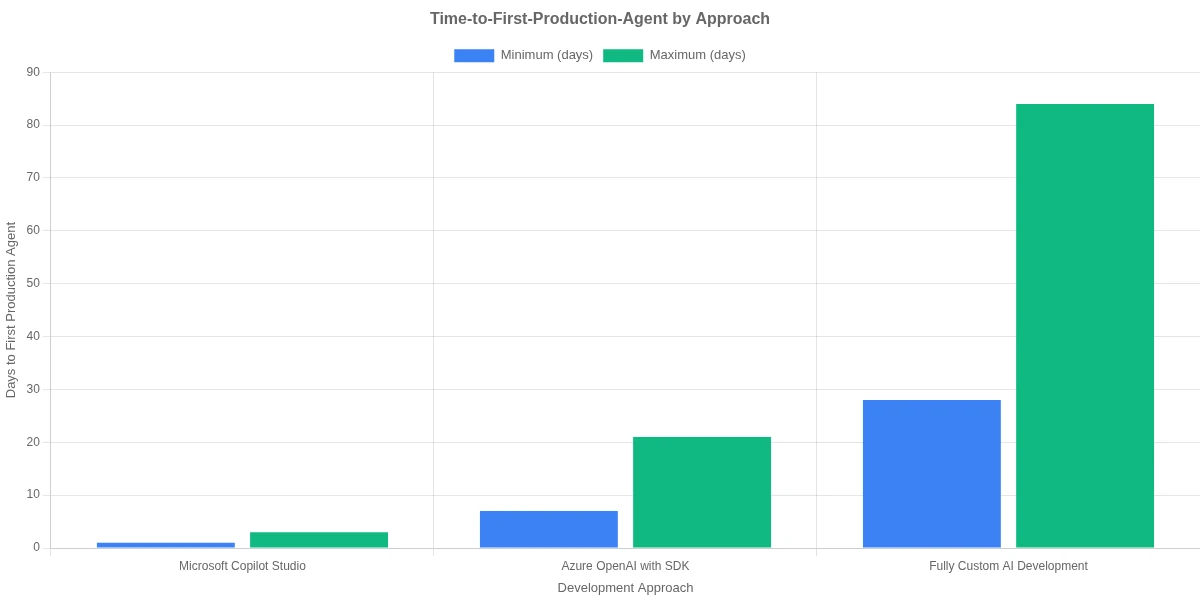
Hours to days
Days to weeks
Integration with M365 and Teams
Native, one-click
Manual, custom code
Customization ceiling
Medium
Very high
Pricing model
Per message or per user/month
Per token consumed
Data compliance controls
Strong (Power Platform governance)
Strong (Azure-native)
Best fit
Non-technical teams, M365-heavy SMBs
Dev teams, complex use cases
The table makes it look clean, but the tricky part is the customization ceiling. Copilot Studio works well until you need something outside its defaults, like a multi-step reasoning loop, a retrieval-augmented generation (RAG) pipeline with custom chunking logic, or fine-tuned model behavior. At that point, you are either working around platform limits or rebuilding on Azure OpenAI anyway.
That ceiling is not a dealbreaker for most SMBs. Most small business AI agents need to answer FAQs, look up records, create tickets, and hand off to humans. Copilot Studio handles all of that without a single line of code.
Eager to discuss about your project?
Share your project idea with us. Together, we’ll transform your vision into an exceptional digital product!
For most small businesses, Microsoft Copilot Studio is the right starting point. Here is why.
Speed to value is measurable. A basic customer-facing FAQ agent connected to a SharePoint knowledge base can go live in a day. Teams regularly report first-agent deployment in under 40 hours, including design, testing, and publishing to Teams or a website embed.
The M365 connectivity is genuinely useful. If your team lives in Teams, Outlook, and SharePoint, having an AI agent that pulls answers from your actual documents (not a generic model trained on the internet) is immediately practical. You do not need to move your data anywhere or set up embeddings manually. The agent grounds its answers in your content by default.
Governance fits SMB risk tolerance. Copilot Studio agents run inside your Microsoft tenant, so your IT admin controls what data the agent can access, who can publish agents, and what compliance policies apply. The Power Platform governance framework your team may already have in place applies directly.
Fintech and banking SMBs get compliance coverage. Copilot Studio inherits Azure's compliance certifications, including SOC 2, ISO 27001, and HIPAA eligibility. For SMBs in regulated industries, that matters from day one. Pair it with fraud detection automation on Azure and you have a compliance-aligned automation stack without building custom security controls.
The honest limitation: if your use case involves processing long unstructured documents with complex reasoning, generating creative content at scale, or building a fully custom agent architecture that other software calls as an API, Copilot Studio will feel constraining. The platform is opinionated by design, and that is both its strength and its ceiling.
When Azure OpenAI Service Makes More Sense
There are specific scenarios where Azure OpenAI is the better choice, even for smaller teams.
You need a custom RAG pipeline. Copilot Studio has basic knowledge base search, but if your documents are long, structurally diverse, or require metadata-based filtering, you need a proper RAG implementation. Azure OpenAI paired with Azure AI Search gives you full control over chunking strategy, embedding model selection, and retrieval logic. Our guide on enterprise RAG architecture for SMBs explains how to structure this without overbuilding.
Your use case is developer-facing or embedded in a product. If you are building an AI feature inside a customer-facing SaaS application, you are building an API integration, not a chatbot. Azure OpenAI is the right layer. Copilot Studio is not designed to be embedded in third-party products.
You want cost control at volume. Copilot Studio pricing is predictable but adds up quickly for high-volume scenarios. Azure OpenAI token pricing can be cheaper per interaction once you optimize prompts and implement response caching. For an SMB processing thousands of AI interactions per day, the per-unit cost difference is real.
The no-code vs low-code vs custom software decision ultimately traces back to your team's existing capabilities. If you have a developer who knows Azure, you have real options. If you do not, Copilot Studio is almost certainly the faster and lower-risk path.
Eager to discuss about your project?
Share your project idea with us. Together, we’ll transform your vision into an exceptional digital product!
Pricing: What SMBs Pay for Copilot Studio and Azure OpenAI
Neither platform is free at production scale, and the cost model is different enough that it affects which one makes sense for your usage pattern.
Microsoft Copilot Studio pricing in 2026:
Pay-as-you-go: $0.01 per message (one conversational turn counts as one message)
Capacity pack: $200/month for 25,000 messages (roughly $0.008 per message)
M365 Copilot add-on: Copilot Studio is included for organizations with licensed Microsoft 365 Copilot seats
For an SMB running a customer support bot that handles 5,000 conversations per month at an average of 4 turns each, that is 20,000 messages at $160-200/month depending on whether you use pay-as-you-go or the capacity pack. That is a predictable, budget-able number.
Azure OpenAI Service pricing:
Azure OpenAI charges per 1,000 tokens (roughly 750 words of combined input and output). GPT-4o costs approximately $0.005 per 1K input tokens and $0.015 per 1K output tokens as of early 2026. A typical 500-token customer support interaction costs under a cent for the model itself, but production infrastructure (Azure AI Search, App Service, storage, logging) adds $150-300/month to run a real application. Check the official Azure OpenAI pricing page for current rates before budgeting.
The bottom line: for low-to-medium volume, Copilot Studio is more cost-predictable and requires no infrastructure management. For high-volume deployments with developer resources, Azure OpenAI can be cheaper once you optimize. For a deeper look at how Microsoft licensing stacks affect your total cost, Power Platform licensing for SMBs in 2026 breaks down exactly what you pay across the full stack.
How to Build Your First AI Agent in Copilot Studio
If you have decided that Microsoft Copilot Studio fits your needs, here is a practical path to your first working agent. This assumes you have an M365 license and tenant admin access.
Go to copilotstudio.microsoft.com and sign in with your Microsoft 365 account. No separate account signup is required.
Create a new Copilot. Give it a name, select your language, and choose between a blank canvas or a pre-built template. Microsoft provides templates for customer service, HR help desk, and IT support.
Set up your knowledge source. Connect SharePoint sites, upload PDFs, or add a public website URL. Copilot Studio indexes the content and uses it to generate grounded answers. This single step is where most of the agent's day-to-day value comes from.
Build topics for controlled flows. Topics are conversation paths you define explicitly. Use them for sensitive paths like appointment booking, refund requests, or anything where strict output control matters. Let generative answers handle the long tail of open-ended FAQs.
Add Power Automate actions. If the agent needs to do something beyond answering questions (create a ticket, send an email, update a record), connect a Power Automate flow as an action. This is where the real automation value kicks in.
Test in the built-in test panel. Ask the kinds of questions real users will ask. Note where answers are wrong or unhelpful. Refine your knowledge sources and topic flows before publishing.
Publish to Teams or your website. Teams deployment takes roughly two minutes. Website deployment generates an embed code you paste into your site's HTML.
The honest gotcha: your first version will not be great. Plan for two to three rounds of refinement after initial user testing. Most teams spend as much time on post-launch tuning as they do on initial setup, and that is normal.
Conclusion
Microsoft Copilot Studio is the right starting point for most SMBs evaluating AI agents in 2026, particularly if your team is not technical, you already use Microsoft 365, and you need a working agent in weeks rather than months. The low-code builder, native M365 connectivity, and per-message pricing make it the most accessible path into production AI automation that Microsoft offers.
Azure OpenAI Service belongs in your stack when you have a developer, a use case that exceeds Copilot Studio's limits, or when you are building AI into a product rather than standing up a chatbot. It is not an alternative to Copilot Studio so much as the next layer down in the stack, closer to the model and further from the business user.
If you are still weighing which path fits your budget and team, our post on AI agents for SMBs: integrate without rebuilding walks through how to scope your first agent project without overcommitting. Or reach out to talk through your specific use case with our team.
Co-Founder and CTO, QServices IT Solutions Pvt Ltd
Rohit Dabra is the Co-Founder and Chief Technology Officer at QServices, a software development company focused on building practical digital solutions for businesses. At QServices, Rohit works closely with startups and growing businesses to design and develop web platforms, mobile applications, and scalable cloud systems. He is particularly interested in automation and artificial intelligence, building systems that automate routine tasks for teams and organizations.
Microsoft Copilot Studio is a low-code platform for building AI-powered chatbots and autonomous agents inside the Microsoft Power Platform. You build conversation flows on a visual canvas, connect your knowledge sources (SharePoint, PDFs, websites, Dataverse), and publish the agent to Teams or your website. The platform combines rule-based topic trees with generative AI answers, so you can control sensitive conversation paths while letting the AI handle open-ended questions from your knowledge base.
Microsoft Copilot Studio is an application builder where non-technical users create and deploy AI agents using a visual interface. Azure OpenAI Service is a model API that developers call from code to build custom AI applications. Copilot Studio is faster to deploy and integrates natively with Microsoft 365, while Azure OpenAI offers more customization, lower per-interaction costs at scale, and the ability to embed AI into third-party products.
Yes. Microsoft Copilot Studio is specifically designed for non-technical users. You can build a working FAQ agent connected to your SharePoint knowledge base in under a day without writing any code. The platform’s visual canvas, pre-built templates, and point-and-click Power Automate integration cover the majority of SMB use cases without requiring developer involvement.
As of 2026, Microsoft Copilot Studio offers pay-as-you-go pricing at $0.01 per message (one conversational turn), or a capacity pack of $200/month for 25,000 messages. Organizations with Microsoft 365 Copilot licenses get Copilot Studio included. A typical SMB customer support bot handling 5,000 conversations per month at 4 turns each costs roughly $160-200/month on the capacity pack.
For non-technical teams, Microsoft Copilot Studio is almost always the better choice. It requires no coding, deploys in hours rather than weeks, and connects directly to your existing Microsoft 365 data. Azure OpenAI Service requires a developer to build the surrounding application infrastructure, making it impractical for teams without technical staff.
Sign in at copilotstudio.microsoft.com with your Microsoft 365 account, create a new Copilot (from a template or blank canvas), connect a knowledge source like SharePoint or a PDF, build explicit topic flows for sensitive paths, add Power Automate actions for tasks the agent needs to complete, test in the built-in test panel, and publish to Microsoft Teams or your website. Most first agents go live within one to three days.
Microsoft Copilot Studio has a medium customization ceiling. It works well for FAQ agents, record lookups, ticket creation, and human handoffs, but is not designed for complex multi-step reasoning, custom RAG pipelines with advanced chunking logic, fine-tuned model behavior, or embedding AI features inside third-party SaaS products. If your use case requires any of these, Azure OpenAI Service gives you the control Copilot Studio cannot.
Business intelligence consulting services should give a mid-market company a governed way to make decisions. Attractive dashboards are only the visible part. The useful outcome is a system in which source data, metric definitions, access, releases, ownership, and support still work after the consultants leave.
In a Microsoft Solutions Partner vs Microsoft Partner comparison, the difference is validation. A company can participate in the Microsoft AI Cloud Partner Program without holding a customer-facing Solutions Partner designation. A designated Solutions Partner has met Microsoft’s current threshold in a specific solution pathway: at least 70 out of 100 partner capability points, with more than zero points in every required metric, based on performance, skilling, and customer success data recorded in Partner Center.
Business intelligence consulting services should give a mid-market company a governed way to make decisions. Attractive dashboards are only the visible part. The useful outcome is a system in which source data, metric definitions, access, releases, ownership, and support still work after the consultants leave.
In a Microsoft Solutions Partner vs Microsoft Partner comparison, the difference is validation. A company can participate in the Microsoft AI Cloud Partner Program without holding a customer-facing Solutions Partner designation. A designated Solutions Partner has met Microsoft’s current threshold in a specific solution pathway: at least 70 out of 100 partner capability points, with more than zero points in every required metric, based on performance, skilling, and customer success data recorded in Partner Center.