Dynamics 365 integration services are the connective tissue between your Microsoft CRM, ERP, and every other tool your business runs on. Most D365 implementations we review don't fall short because the platform is wrong. They fall short because the deployment left D365 as an island: powerful on its own, but disconnected from your warehousing system, HR platform, e-commerce layer, or data warehouse. The result is duplicate data entry, inconsistent reporting, and users who work around D365 rather than through it. This guide covers how integration architecture works in practice, what dynamics 365 crm implementation typically costs, how long it takes, and how to select a dynamics 365 implementation partner who understands connectivity from day one.
In This Article, You'll Learn
What Are Dynamics 365 Integration Services?
Core Integration Scenarios for Dynamics 365
How Does Dynamics 365 Integration Work Technically?
Dynamics 365 CRM Implementation Costs and Integration Timelines
How to Choose a Dynamics 365 Implementation Partner
Eager to discuss about your project?
Share your project idea with us. Together, we’ll transform your vision into an exceptional digital product!
Dynamics 365 integration services cover the technical and consulting work required to connect D365 modules to systems outside the Microsoft platform, and to other Microsoft services like Azure, Power Platform, and SharePoint. The goal is a single version of truth: customer records, financial data, and operational metrics that stay consistent whether you're looking at D365, your data warehouse, or a Power BI report.
According to Microsoft's Dynamics 365 integration documentation, the platform supports hundreds of out-of-the-box connectors. But most enterprise environments still require custom API work, middleware configuration, or Azure Service Bus routing to handle real-world data complexity.
Integration vs. Configuration: Why the Distinction Matters
Configuration means adjusting D365's built-in behavior: adding custom fields, defining workflows, setting security roles. Integration means making D365 exchange data with external systems. Confusing the two is one of the most common scoping mistakes we see. A dynamics 365 consulting services engagement should always assess both dimensions before producing a project estimate, because integration work is where cost and timeline overruns tend to hide.
Which Systems Typically Connect to D365
In practice, the most common integration points include:
ERP systems (SAP, Oracle, legacy NAV/GP): syncing financials, inventory, and procurement data
E-commerce platforms (Shopify, Magento): feeding orders, returns, and customer profiles into CRM or Business Central
HR and payroll systems (Workday, ADP): syncing employee records and org structure
Logistics and WMS platforms: tracking fulfillment status inside D365 Sales or Customer Service
Marketing automation tools (Marketo, HubSpot): bidirectional lead and campaign data flow
Business intelligence tools: pushing D365 data to Power BI or a cloud data warehouse
Core Integration Scenarios for Dynamics 365
The right integration pattern depends on what you're connecting and how frequently data needs to move. Here are the scenarios our team handles most often in dynamics 365 integration services engagements.
ERP-to-CRM Data Synchronization
When a business runs both D365 Sales and a separate ERP (or d365 finance and operations), the integration question is: which system owns which data, and in which direction does it flow? For most organizations, CRM owns the customer relationship record and the ERP owns the transaction record. The integration layer syncs account data, pricing, and order status bidirectionally, with conflict resolution rules for scenarios where both systems update a record simultaneously.
This is where dynamics 365 customization work often becomes substantial. Standard Dataverse connectors handle simple field mappings, but business rules and exception handling typically need custom logic built on top of the connector layer.
Power Platform as a Middle Layer
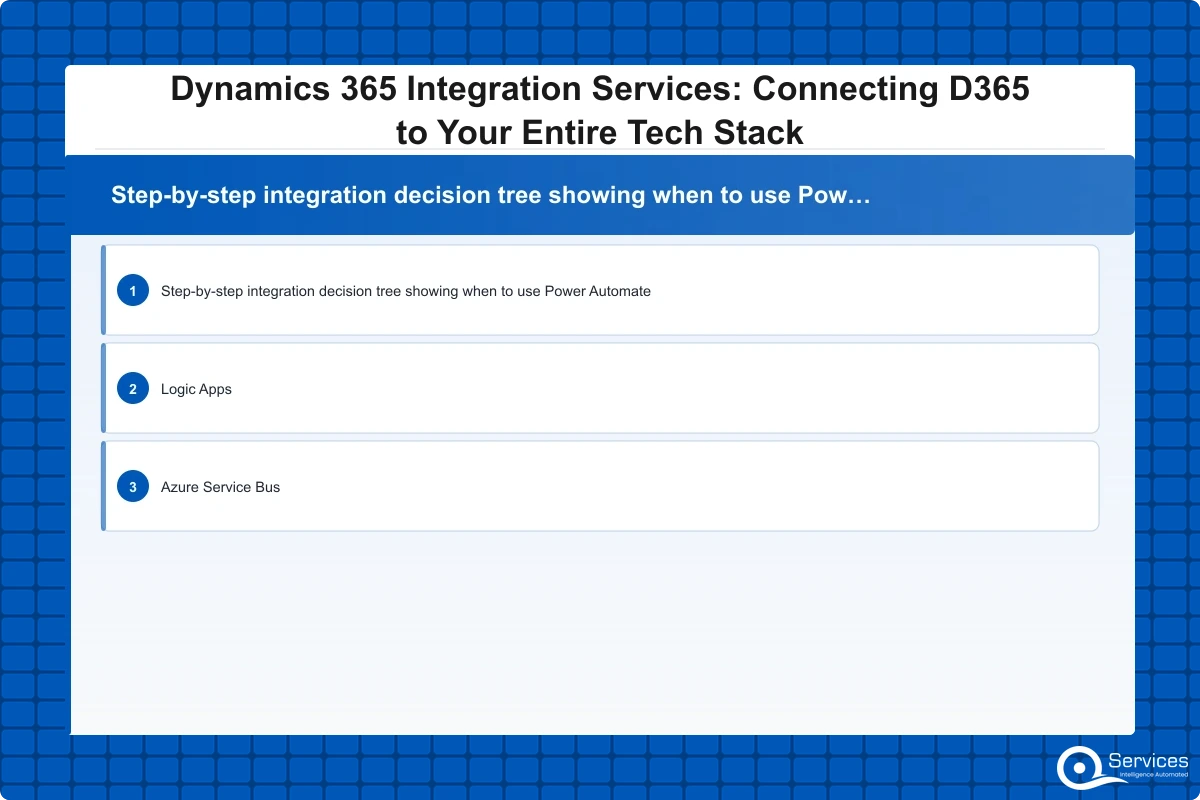
Many dynamics 365 integration services projects use Power Automate or Azure Logic Apps to orchestrate data flows between D365 and third-party tools. For lighter workflows, Power Automate handles the job well. For high-volume, transactional integrations, Azure Logic Apps or Azure Functions offer better retry logic, error handling, and scalability than Power Automate alone.
How Does Dynamics 365 Integration Work Technically?
The technical architecture behind dynamics 365 integration services has evolved significantly since Microsoft moved to Dataverse as the universal data layer across all D365 applications.
Dataverse as the Central Integration Hub
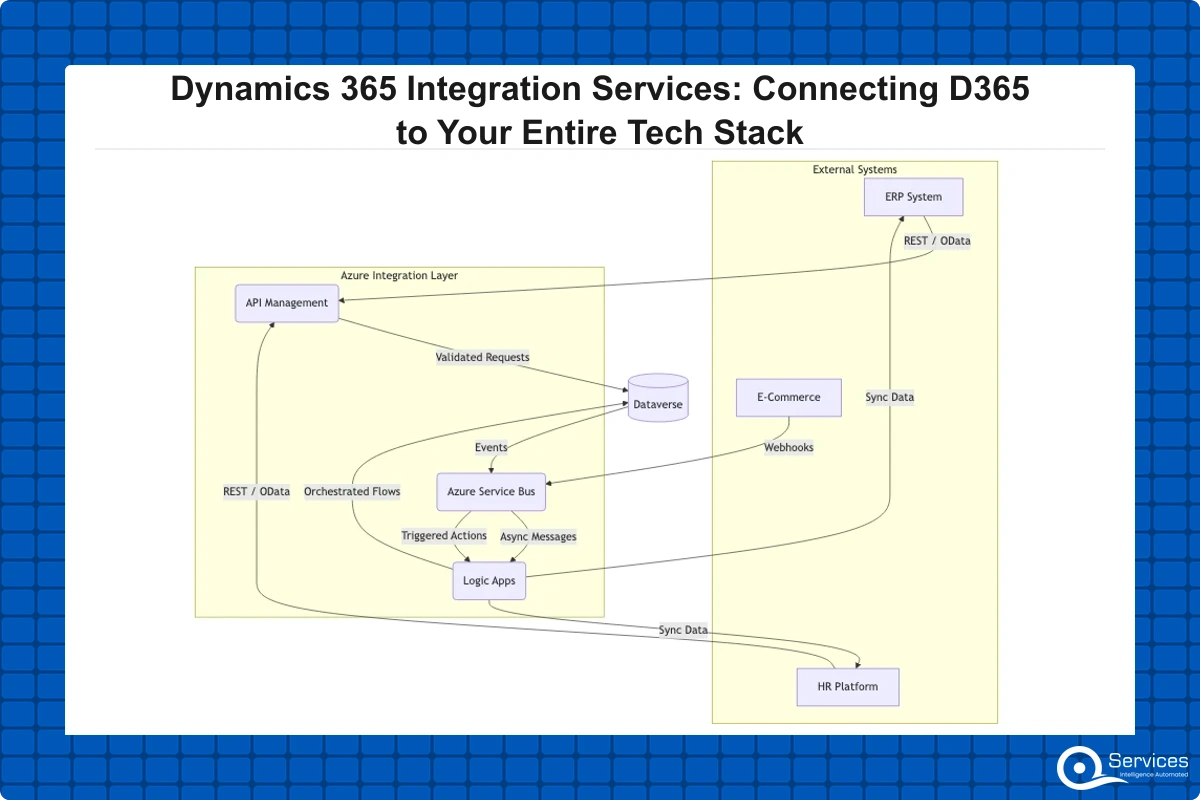
Microsoft Dataverse is the underlying data platform shared by all D365 modules. When you integrate an external system with D365, you're writing to and reading from Dataverse tables via OData APIs, webhooks, or Azure Service Bus. This architecture has a direct practical implication: if an integration writes unvalidated data into Dataverse, it corrupts every D365 module that reads those tables. Good dynamics 365 integration services work includes schema validation, duplicate detection rules, and rollback mechanisms that lower-budget implementations often skip entirely.
Azure Integration Services for Enterprise Scenarios
For large-scale or regulated deployments, Azure Integration Services provides the full enterprise integration stack: API Management, Logic Apps, Service Bus, and Event Grid. This is the architecture used in financial services, healthcare, and logistics environments where message ordering, guaranteed delivery, and audit trails are non-negotiable requirements.
QServices is a Microsoft Certified Solutions Partner for Dynamics 365 with 500+ projects delivered since 2014. In our experience, organizations that invest in Azure Integration Services as the backbone for D365 connectivity spend significantly less on remediation over a three-year horizon compared to those that chain together point-to-point integrations.
Dynamics 365 CRM Implementation Costs and Integration Timelines
Crm implementation cost is one of the first questions every project sponsor asks, and the honest answer is that integration complexity is usually the single biggest variable in the final budget number.
What Drives Integration Cost
In our client engagements, a basic D365 Sales deployment with no external integrations typically goes live in 6-8 weeks for under $30,000. Adding a single ERP integration usually adds 3-5 additional months and $40,000-$80,000 more, depending on data model complexity and the quality of the source system's APIs.
Key Insight In our client engagements, a basic D365 Sales deployment with no external integrations typically goes live in 6-8 weeks for under $30,000.
Key cost drivers in dynamics 365 integration services work:
Number of external systems: each new system adds scoping, mapping, and testing effort
Data quality in source systems: poor data quality in legacy systems can triple migration effort
Real-time vs. batch requirements: real-time synchronization is significantly more complex than nightly batch jobs
Custom business logic: exception handling, conflict resolution, and field-level transformation rules
Compliance requirements: GDPR, HIPAA, and PCI-DSS add audit logging, encryption, and access control layers
Timeline Ranges by Integration Scope
Dynamics 365 implementation typically takes 3-18 months depending on modules, users, and customization complexity. For a mid-market deployment with 2-3 integrations, 12 months is a realistic planning assumption.
How to Choose a Dynamics 365 Implementation Partner
Choosing the wrong dynamics 365 implementation partner is more expensive than choosing a more expensive one. Partner quality determines not just whether the integration works at launch, but whether it stays working as your business changes over time.
What Microsoft Certification Actually Tells You
Microsoft's Solutions Partner designations are a minimum bar, not a quality guarantee. Within the Dynamics 365 designation, look for specialization in the specific module you're deploying. A partner strong in Business Central may have limited depth in Customer Service or Field Service. More useful signals: ask for a list of integrations they've built, the industries they serve, and references from clients with similar integration scope. For detailed evaluation criteria, see Dynamics 365 Implementation Partner: 10-Point Checklist to Evaluate and Choose.
Red Flags That Signal Integration Risk
The most common red flag: a partner who scopes the D365 configuration work thoroughly but gives a vague estimate for integration. "That depends on the API" is not an acceptable answer at the proposal stage. A competent partner will assess the source system's API quality, data model, and authentication method before committing to a number.
Other warning signs include no dedicated integration architect on the proposal team, a plan that relies entirely on Power Automate for all integrations regardless of volume, and no mention of data governance, duplicate detection, or rollback procedures. For what good scope looks like across a full dynamics 365 consulting services engagement, see Dynamics 365 Consulting Services: Scope, Deliverables, and Typical Pricing.
D365 Finance and Operations vs Business Central: Integration Differences
D365 Business Central is designed for SMBs with 10-300 users; Finance and Operations targets enterprises with 300+ users. This distinction matters for integration planning because the two products have different API surfaces, data models, and middleware requirements.
Business Central for SMBs
Business Central works well for dynamics 365 for small business scenarios where integration needs are moderate: connecting to an e-commerce platform, syncing with a payroll system, or feeding data into Power BI. The BC API is REST-based and well-documented, and many integrations can be built through standard connectors in Power Automate or Logic Apps.
Working with a qualified dynamics 365 business central partner matters most when you're integrating BC with industry-specific vertical software, where custom extensions to the BC data model are often required alongside the integration work itself.
Finance and Operations for Enterprise
d365 finance and operations deployments typically require Azure Integration Services as the backbone. The data model is more complex, transaction volumes are higher, and compliance requirements in financial services and healthcare demand enterprise-grade middleware with full audit trails. From a project management perspective, Business Central integration projects tend to run 3-6 months; Finance and Operations integration projects rarely finish under 9 months, and 12-15 months is common for multi-system deployments.
Dynamics 365 vs Salesforce: Integration Ecosystem Comparison
For organizations deciding between platforms, dynamics 365 vs salesforce is often determined by the existing tech stack, not the CRM feature set alone. If your organization already runs Azure, Microsoft 365, Teams, and Power Platform, the integration effort required for D365 is dramatically lower than Salesforce. Connecting Salesforce to Azure services, Teams, or SharePoint requires third-party middleware that adds cost and a new failure point. With D365, those connections are native.
Salesforce has a broader AppExchange marketplace for industry-specific applications. But according to Gartner's CRM market analysis, Microsoft's advantage in the enterprise segment comes specifically from its integrated ecosystem: a single vendor for productivity, data platform, analytics, and CRM. That integration advantage is material when you're building a connected tech stack rather than deploying a standalone CRM tool. We cover the full feature and cost comparison in Dynamics 365 vs Salesforce: Which CRM Wins for Microsoft-First Businesses?
Dynamics 365 Migration Services and Connecting Your New Stack Safely
dynamics 365 migration services is where integration and migration overlap. When you move from Salesforce, a legacy Dynamics CRM version, or a custom-built system, you're not just moving data. You're rebuilding integrations, rewriting business logic, and retraining users at the same time.
Common Migration Scenarios
The scenarios our team handles most frequently:
Salesforce to D365: exporting objects via API, mapping to Dataverse schema, cleaning data, then rebuilding workflows and integrations in Power Platform or Azure
Legacy Dynamics (CRM 2011-2016) to Dynamics 365: architecture changes between versions mean some integrations need to be rebuilt rather than migrated
Standalone ERPs to D365 Finance or Business Central: consolidating on Microsoft ERP while preserving existing connections to external logistics, HR, or e-commerce systems
Managing Migration Risk
The highest risk in any dynamics 365 migration services engagement is data quality. Source systems accumulate years of duplicates, incomplete records, and structural inconsistencies. A migration that moves dirty data into D365 degrades every downstream integration from day one.
Our recommended approach: run data migration in parallel with integration build work, using a staging environment that mirrors production. This lets you validate integration behavior against real migrated data before go-live, not after the first production incident. For a detailed look at migration risk management, see Dynamics 365 Migration Services: Risks, Roadmap, and How to Move Safely.
Key Takeaways
Dynamics 365 integration services cover the technical and consulting work required to connect D365 modules to systems outside the Microsoft platform, and to other Microsoft services like Azure, Power Platform, and SharePoint.
The right integration pattern depends on what you're connecting and how frequently data needs to move.
The technical architecture behind dynamics 365 integration services has evolved significantly since Microsoft moved to Dataverse as the universal data layer across all D365 applications.
Crm implementation cost is one of the first questions every project sponsor asks, and the honest answer is that integration complexity is usually the single biggest variable in the final budget number.
Choosing the wrong dynamics 365 implementation partner is more expensive than choosing a more expensive one.
Conclusion
Dynamics 365 integration services determine whether your D365 investment delivers its promised ROI or sits underutilized while teams export CSVs and reconcile spreadsheets manually. The platform is capable. The integration layer is where most projects succeed or struggle.
Getting it right means choosing a dynamics 365 implementation partner with specific integration experience, not just configuration depth. It means planning for data quality remediation, real-time versus batch data flow decisions, and enterprise middleware requirements before the project starts. And it means understanding that dynamics 365 customization decisions made during implementation lock in the integration architecture for years to come.
QServices has delivered 500+ D365 integration and implementation projects since 2014 across healthcare, logistics, financial services, and manufacturing. If you're scoping a new implementation or trying to stabilize one that's already been delivered, contact our team to discuss your specific integration requirements.
Co-Founder and CTO, QServices IT Solutions Pvt Ltd
Rohit Dabra is the Co-Founder and Chief Technology Officer at QServices, a software development company focused on building practical digital solutions for businesses. At QServices, Rohit works closely with startups and growing businesses to design and develop web platforms, mobile applications, and scalable cloud systems. He is particularly interested in automation and artificial intelligence, building systems that automate routine tasks for teams and organizations.
Integration cost varies significantly based on complexity. A D365 Sales deployment with no external integrations typically runs $20,000-$50,000. Adding a single ERP integration increases the budget by $40,000-$80,000 and extends the timeline by 3-5 months. Full multi-system enterprise deployments involving D365 Finance and Operations can range from $150,000 to over $500,000. The main cost drivers are the number of external systems, data quality in source systems, real-time versus batch synchronization requirements, and compliance obligations like GDPR or HIPAA.
Dynamics 365 implementation typically takes 3-18 months depending on modules, users, and customization complexity. A simple D365 Sales deployment with no integrations can go live in 6-10 weeks. Adding one ERP integration pushes the timeline to 4-7 months. Full Finance and Operations deployments with multiple system integrations typically run 12-18 months. Mid-market companies planning a D365 deployment with 2-3 integrations should budget 12 months as a realistic baseline.
Configuration means adjusting D365’s built-in behavior: custom fields, workflows, security roles, and business rules within the platform. Integration means connecting D365 to external systems so data flows between them automatically. Configuration is scoped and priced separately from integration work, and confusing the two is a common cause of budget overruns. A proper Dynamics 365 consulting services engagement scopes both dimensions before producing an estimate.
Not every integration requires the full Azure Integration Services stack. Lighter workflows connecting D365 to SaaS tools like Mailchimp, DocuSign, or simple HR systems can often be handled through Power Automate connectors. However, high-volume transactional integrations, regulated environments requiring audit trails, and scenarios involving guaranteed message delivery or complex routing logic should use Azure Logic Apps, Service Bus, or API Management. The right architecture depends on volume, compliance requirements, and the reliability guarantees your business needs.
Yes, but migration and integration are separate workstreams that run in parallel. Existing Salesforce integrations cannot simply be transferred to D365 because the underlying data model and API structure are different. Each integration needs to be re-scoped, remapped to Dataverse schema, and rebuilt in Power Platform or Azure. Dynamics 365 migration services engagements that handle this correctly run the data migration alongside integration rebuild in a staging environment, validating behavior against real migrated data before go-live.
Business Central offers a well-documented REST API that supports integration with e-commerce platforms, payroll systems, project management tools, and Power BI. Many integrations can be built through standard Power Automate or Logic Apps connectors without custom development. For industry-specific vertical software or complex bidirectional data flows, a qualified Dynamics 365 Business Central partner can build custom AL extensions alongside the integration layer. D365 Business Central is designed for SMBs with 10-300 users, so the integration tooling is deliberately more accessible than Finance and Operations.
Pint AE explained for UAE finance teams with one sample invoice: see which fields come from your ERP, which go missing, and how to test before go-live.
Days sales outstanding explained for CFOs: the formula, worked examples, named industry benchmarks, and why seasonal sales distort DSO. See what moves it.
Pint AE explained for UAE finance teams with one sample invoice: see which fields come from your ERP, which go missing, and how to test before go-live.
Days sales outstanding explained for CFOs: the formula, worked examples, named industry benchmarks, and why seasonal sales distort DSO. See what moves it.
Follow one payment through the cash application process, step by step, and see the exact moment it stalls so your AR team can clear unapplied cash faster.
Globally Esteemed on Leading Rating Platforms
Earning Global Recognition: A Testament to Quality Work and Client Satisfaction. Our Business Thrives on Customer Partnership
QServices Inc. undertakes every project with a high degree of professionalism. Their communication style is unmatched and they are always available to resolve issues or just discuss the project.
Turn the Microsoft Licenses
You Already Own Into an AI Workplace
Join our live webinar on Sept 24 and see five ways to automate meetings, approvals, and