Choosing a dynamics 365 business central partner is one of those decisions that looks straightforward until you're two months into a bad one. Every vendor shows a polished demo, every proposal claims end-to-end expertise, and everyone has a five-star testimonial. Then you sign, and reality sets in: missed milestones, scope creep, and a support model that evaporates after go-live.
This guide cuts through that noise. Whether you're moving from QuickBooks, migrating from an aging ERP, or replacing a disconnected CRM stack with a Microsoft-native platform, the eight criteria below separate dynamics 365 implementation partners who've delivered this before from those still learning on your project. We cover certification, crm implementation cost transparency, dynamics 365 customization depth, integration capabilities, and a few things most buyers never think to ask before they sign.
In This Article, You'll Learn
Verified Microsoft Certification Level
Industry Experience That Matches Your Sector
What Does CRM Implementation Cost? Transparent Pricing Before You Sign
Dynamics 365 Business Central Customization Depth
Dynamics 365 Business Central Integration and Migration Services
Eager to discuss about your project?
Share your project idea with us. Together, we’ll transform your vision into an exceptional digital product!
A legitimate dynamics 365 implementation partner holds the Microsoft Solutions Partner for Business Applications designation. This replaced the older Gold and Silver competency labels in 2022. Earning it requires passing technical assessments, maintaining verified customer success scores, and hitting minimum active deployment counts. A partner without it hasn't demonstrated their capabilities to Microsoft, and you absorb that risk directly.
What Microsoft Partnership Tiers Mean for Your Project
Beyond the base designation, look for additional specializations such as "Finance" or "Low Code Application Development." These require separate audits and outcome reviews by Microsoft. They're not marketing claims: a partner either has them or doesn't. You can verify any partner's current status through the Microsoft Partner Network directory before your first meeting, which takes about 90 seconds.
Why Business Central Specialization Matters More Than General Azure Skills
Some partners are strong on Azure infrastructure but light on Business Central functional depth. The two skill sets are related but distinct. A partner focused primarily on cloud migrations won't have deep experience with Business Central financial close processes, inventory management configurations, or warehouse workflows that manufacturing and distribution clients depend on. Ask directly: how many Business Central go-lives has your team completed in the last 12 months? A credible answer is 10 or more. Fewer than five deserves follow-up questions.
Industry Experience That Matches Your Sector
Business Central handles financials, supply chain, and operations differently across industries. Healthcare organizations need tight audit trails and HIPAA-aware configurations. Logistics companies need warehouse management and real-time inventory visibility. Financial services firms need multi-entity consolidation and regulatory reporting. A partner without experience in your sector makes configuration decisions that a specialist would never make, and you find out at month-end close.
Sector-Specific Dynamics 365 CRM Implementation Examples to Ask For
Ask for case studies in your industry with actual outcome data. "We reduced month-end close from 8 days to 3 days for a 45-person distribution company" is useful. "We've helped businesses in your space" is not. A strong track record in dynamics 365 crm implementation shows in the specifics, not the summaries.
A generalist delivers a working system. The issue is efficiency. Industry specialists bring pre-built configuration templates and documented decision trees for common scenarios, which means faster answers and fewer discovery detours. For a 200-user deployment, that difference can add 4-6 weeks of billable discovery time. In our client engagements, that gap has translated into a meaningful amount of unplanned crm implementation cost before the build phase even begins.
What Does CRM Implementation Cost? Transparent Pricing Before You Sign
In our client engagements, CRM implementation cost for Dynamics 365 Business Central has ranged from around $15,000 for a simple 10-user deployment to $500,000+ for a multi-entity, heavily customized rollout. Those numbers are genuinely that far apart because the scope variables span that range. What matters is whether your partner can give you a realistic cost band early in the conversation, not after a 12-week paid discovery phase.
Key Insight In our client engagements, CRM implementation cost for Dynamics 365 Business Central has ranged from around $15,000 for a simple 10-user deployment to $500,000+ for a multi-entity, heavily customized rollout.
Typical Cost Ranges for Dynamics 365 Consulting Services
A credible partner estimates a rough cost band after a one-hour discovery call. If they insist on a paid assessment before giving any number, that's a process preference rather than an automatic red flag. But if they can't estimate the order of magnitude without weeks of requirements gathering, that's worth questioning. Our detailed breakdown in Dynamics 365 Consulting Services: Scope, Deliverables, and Typical Pricing covers what each engagement tier typically includes and what separates a smaller project from a much larger one.
Common cost drivers for any Business Central deployment:
Number of licensed users and modules selected
Degree of dynamics 365 customization versus out-of-box configuration
Number of third-party integrations required
Data migration volume and source data quality
Training scope and change management requirements
According to Gartner's ERP implementation research, approximately 55% of ERP projects exceed their original budget. The primary cause is requirements that weren't identified or scoped in the initial proposal, which is exactly the transparency problem a strong partner eliminates early.
Key Insight According to Gartner's ERP implementation research, approximately 55% of ERP projects exceed their original budget.
Hidden Costs Most Partners Skip in the First Proposal
Watch for: ongoing Microsoft licensing (the SaaS subscription continues indefinitely after go-live), hypercare support for the first 60-90 days post-launch, training that isn't included in the base scope, and integration maintenance as connected systems evolve their APIs. A transparent partner itemizes these in the first proposal. One who surfaces them only after signing has done this before, and you're not the first client to be surprised.
Dynamics 365 Business Central Customization Depth
Not every business requirement needs custom code. But when it does, you need a partner who writes it properly. The line between dynamics 365 customization through UI configuration and actual AL extension development matters more than most buyers understand before their first implementation.
Configuration vs. Code: When Each Approach Is Right
Business Central's configuration options cover roughly 80% of typical business requirements without any development work. Workflows, approval chains, financial dimensions, and report layouts all configure through the standard interface. Custom AL code is appropriate for complex integrations, UI extensions, and business logic that the platform's configuration layer genuinely can't handle.
Key Insight Business Central's configuration options cover roughly 80% of typical business requirements without any development work.
A partner who defaults to code for every requirement drives up costs and long-term maintenance overhead. One who refuses to write code at all limits what the system can do for you. The right position is configure where possible, code where necessary. Our guide on Dynamics 365 customization vs. configuration lays out the decision criteria with practical examples from real deployments.
How to Evaluate a Partner's Customization Portfolio
Ask to see AL extension examples and whether they follow Microsoft's AppSource validation standards. Ask who owns the custom code after go-live: does it stay with the partner, or do you receive the source? Ask what happens if you change partners in three years. A partner with sound practices hands over documented, clean code with no lock-in. A less disciplined one hands over undocumented modifications and a retention invoice.
Dynamics 365 Business Central Integration and Migration Services
Modern businesses don't run on one system. Business Central needs to connect with your CRM, e-commerce platform, payroll system, and sometimes your manufacturing or warehouse execution systems. Dynamics 365 integration services is a distinct skill from implementation, and partner quality varies considerably here.
Integration Services: APIs and Connectors to Evaluate
Business Central exposes a well-documented OData API for real-time integrations with external systems. Microsoft's Power Platform also provides hundreds of pre-built connectors that reduce custom development work considerably. A partner who builds custom APIs for every integration without first evaluating Power Platform connectors is spending your budget on work that's already been done.
For dynamics 365 integration services, ask these questions specifically: Do you use Power Automate for standard integrations or write custom code for everything? How do you handle retry logic and error logging when an integration fails at 2 AM? How do you document integration architecture so our internal team can maintain it?
Dynamics 365 Migration Services: Moving from Legacy ERP or Salesforce
Migration is where implementations most often exceed budget. Data quality issues, missing field mappings, and legacy system quirks compound quickly once you're in the middle of it. A partner with strong dynamics 365 migration services runs a data audit before scoping the migration, not after. They estimate effort based on actual record counts and real data quality findings, not rules of thumb like "migration takes 4 weeks."
If you're evaluating dynamics 365 vs salesforce or actively planning a migration from Salesforce, the structural differences between the two platforms need deliberate planning. Our comparison at Dynamics 365 vs Salesforce: Which CRM Wins for Microsoft-First Businesses? covers the data model differences that create migration complexity and the cases where each platform genuinely wins.
Post-Go-Live Support Structure
Go-live isn't the finish line. The first 90 days after launch are when most issues surface, and the first month-end close is when financial configuration gets genuinely tested under real conditions. A partner who shifts to a slow-response ticketing system the moment you go live has done you a disservice regardless of how smoothly the build phase went.
What Good Post-Go-Live Support Actually Looks Like
Get the support model in writing before signing: response time SLAs for critical issues, whether you have named contacts or an anonymous ticket queue, whether hypercare is included in the project cost or billed separately, and what happens to your implementation team after launch. The best partners keep the same consultants who built your system available for at least 60 days post-go-live. You don't want to explain your business context to a new person when your inventory sync breaks at quarter-end.
Dynamics 365 consulting services shouldn't end at launch. Microsoft releases two major platform updates per year, business needs evolve, and new modules get added as the company grows. A partner relationship that continues post-implementation is worth more than a one-time delivery engagement.
Honest Timeline and Project Governance
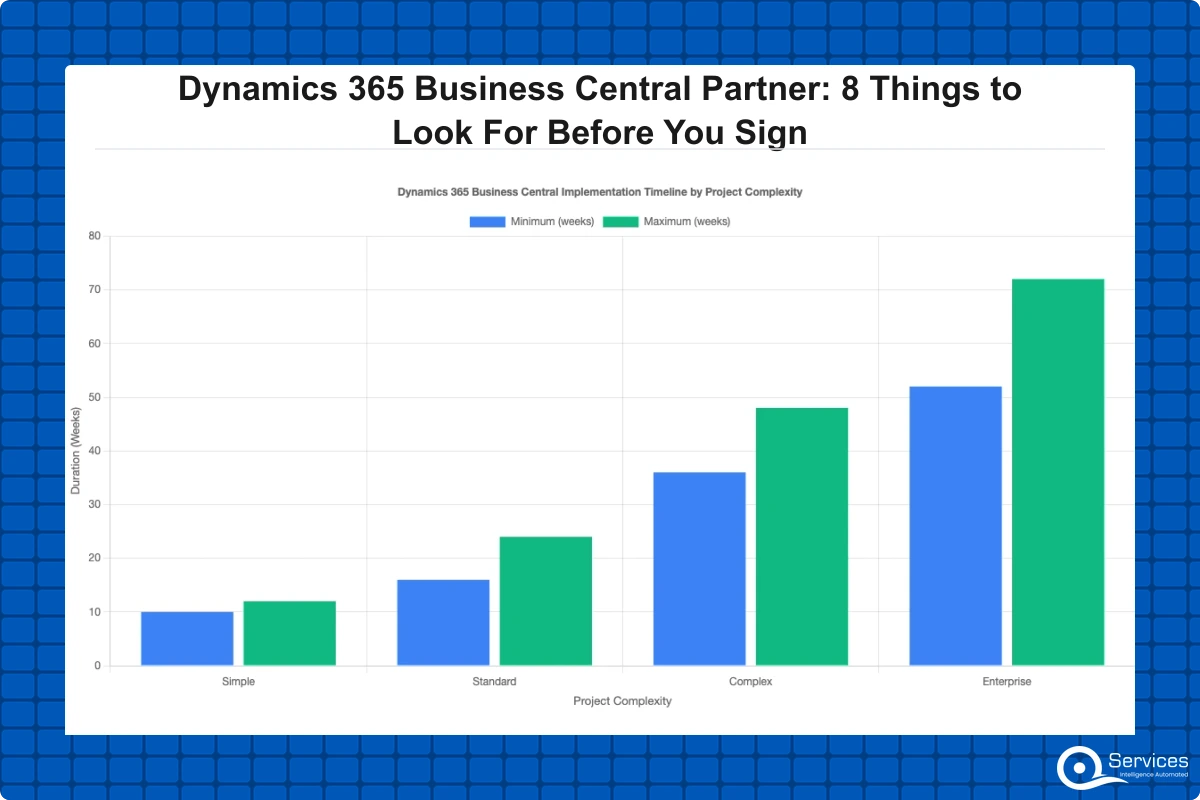
Dynamics 365 implementation typically takes 3-18 months depending on modules, users, and customization complexity. A 15-user Business Central deployment with minimal customization can go live in 10-12 weeks. A multi-site, multi-entity d365 finance and operations rollout with complex integrations can take 18 months. Both statements are true. The problem is when a partner quotes 12 weeks for a scope that realistically needs 9 months, and you discover the discrepancy after you've already signed.
Why the 3-18 Month Range Is Honest, Not Evasive
This range exists because the variables genuinely span that much. Adding Manufacturing or Warehouse Management to a base Financial implementation adds 6-12 weeks per module. User count drives training and change management timelines. Custom integrations typically add 2-6 weeks each. A partner who commits to a fixed 3-month timeline without scoping these variables first is either making an optimistic guess or setting up a scope dispute later.
Red Flags in a Partner's Project Governance Model
Watch for: fixed-price contracts with no change order process (every mid-project requirement becomes a billing dispute), no named project manager on your engagement, no structured steering committee cadence, and no defined escalation path when issues arise. Good governance doesn't add bureaucracy. It prevents the scope creep conversations that derail otherwise solid implementations.
Fit for Your Business Size and Complexity
D365 Business Central vs. Finance and Operations: Knowing the Difference
This is a common point of confusion worth resolving before you start talking to partners. D365 Business Central is designed for SMBs with 10-300 users; Finance & Operations targets enterprises with 300+ users. The distinction matters when choosing a partner because some firms specialize in one product, not both. A partner who primarily delivers Finance and Operations will apply enterprise-level complexity to a Business Central project and bill accordingly. The reverse is equally problematic.
Dynamics 365 for Small Business: What Partners Often Oversell
For companies under 50 users, dynamics 365 for small business deployments rarely need extensive custom development. Business Central Essentials and Premium tiers cover financials, basic inventory, job costing, and CRM integration without touching code. A good partner tells you what you can run out of the box and steers you away from unnecessary customization spend. If every partner in your shortlist is proposing significant custom development for a 20-user business, that's a signal worth paying attention to.
How to Run Your Final Dynamics 365 Business Central Partner Evaluation
At this point you've narrowed to two or three credible candidates. All pass the certification check, have relevant industry experience, and have given you reasonable cost estimates. How do you decide between them?
A Practical Scoring Framework for the Final Decision
Score each finalist on a 1-5 scale across these eight dimensions:
Microsoft certification and specialization depth
Verified industry references you can actually call
Cost transparency and realistic timeline estimate
Dynamics 365 customization approach: configuration-first or code-heavy
Integration and dynamics 365 migration services track record
Post-go-live support model and documented SLAs
Project governance and change order clarity
Communication quality: do their consultants explain things clearly to your non-technical team?
That last dimension sounds soft. It isn't. Implementations run for months. A technically strong partner who communicates poorly with your finance or operations team produces a system configured around consultant assumptions rather than how your business actually works. We've seen that pattern more than once.
Key Takeaways
A legitimate dynamics 365 implementation partner holds the Microsoft Solutions Partner for Business Applications designation.
Business Central handles financials, supply chain, and operations differently across industries.
In our client engagements, CRM implementation cost for Dynamics 365 Business Central has ranged from around $15,000 for a simple 10-user deployment to $500,000+ for a multi-entity, heavily customized rollout.
Not every business requirement needs custom code.
Modern businesses don't run on one system.
Conclusion
Choosing the right dynamics 365 business central partner determines whether your implementation becomes a competitive asset or a year of expensive cleanup. The eight criteria above reflect the practical difference between partners who've delivered this successfully and those still working things out on your project.
QServices is a Microsoft Certified Solutions Partner for Dynamics 365 with 500+ projects delivered since 2014, working with clients in healthcare, logistics, banking, financial services, and SaaS. We're direct about what your project will take, what crm implementation cost you should realistically expect, and what dynamics 365 consulting services you'll actually need after launch. If you're building your evaluation shortlist, reach out and we'll give you straight answers.
Co-Founder and CTO, QServices IT Solutions Pvt Ltd
Rohit Dabra is the Co-Founder and Chief Technology Officer at QServices, a software development company focused on building practical digital solutions for businesses. At QServices, Rohit works closely with startups and growing businesses to design and develop web platforms, mobile applications, and scalable cloud systems. He is particularly interested in automation and artificial intelligence, building systems that automate routine tasks for teams and organizations.
The baseline filter is Microsoft Solutions Partner for Business Applications certification. This designation requires verified deployment track records and customer success scores reviewed by Microsoft directly — it’s not a membership fee, it’s a demonstrated capability standard. After certification, industry-specific experience in your sector matters more than general ERP expertise because Business Central configuration decisions vary significantly by industry.
Dynamics 365 Business Central implementation costs range from $15,000 for a simple 10-user deployment to $500,000 or more for a multi-entity rollout with heavy customization. The main cost drivers are licensed user count, module scope, integration complexity, data migration volume, and training requirements. A credible partner provides a rough cost estimate band after a one-hour discovery call without requiring a paid assessment first.
Dynamics 365 implementation typically takes 3-18 months depending on modules, users, and customization complexity. A straightforward 15-user Business Central deployment with minimal customization can go live in 10-12 weeks. A multi-site Finance and Operations rollout with complex integrations and high user counts can take 12-18 months. Any partner quoting a fixed timeline without first scoping module count, integrations, and user training requirements is making an uninformed estimate.
Dynamics 365 Business Central is designed for small and mid-size businesses with 10-300 users, covering financial management, supply chain, inventory, project management, and basic CRM. Finance and Operations targets enterprises with 300+ users and more complex manufacturing, global operations, and advanced financial reporting requirements. Choosing the wrong product for your company size leads to either overpaying for unnecessary complexity or hitting capability limits as you grow.
Check the Microsoft Partner Network directory at partner.microsoft.com before your first meeting. Look specifically for the Microsoft Solutions Partner for Business Applications designation and any additional specializations such as Finance or Low Code Application Development. These require verified technical assessments and customer outcome scores reviewed by Microsoft — they cannot be self-claimed. The directory is publicly accessible and shows current certification status in real time.
Business Central’s configuration options cover roughly 80% of typical business requirements without any custom development. Workflows, approval processes, financial dimensions, and report layouts all configure through the standard interface. Custom AL code becomes necessary for complex third-party integrations, UI extensions, and business logic the configuration layer cannot handle. A strong partner defaults to configuration and uses custom code only when configuration genuinely cannot meet the requirement — not as a default billing approach.
Expect a hypercare period of 60-90 days post-go-live with elevated support from the consultants who built your system, covering critical issue resolution and first-cycle business processes like month-end close. After hypercare, a monthly retainer or incident-based model handles ongoing maintenance, platform updates, and new module additions. Because Microsoft releases two major Business Central updates per year, the partner relationship continues well past the go-live date for any business that wants to stay current.
Business intelligence consulting services should give a mid-market company a governed way to make decisions. Attractive dashboards are only the visible part. The useful outcome is a system in which source data, metric definitions, access, releases, ownership, and support still work after the consultants leave.
In a Microsoft Solutions Partner vs Microsoft Partner comparison, the difference is validation. A company can participate in the Microsoft AI Cloud Partner Program without holding a customer-facing Solutions Partner designation. A designated Solutions Partner has met Microsoft’s current threshold in a specific solution pathway: at least 70 out of 100 partner capability points, with more than zero points in every required metric, based on performance, skilling, and customer success data recorded in Partner Center.
How do you build a legacy application modernization strategy for Azure? A legacy application modernization strategy assigns the right treatment to each workload, then sequences the work around business value, technical evidence, and operational risk. For Azure, that means choosing among retire, retain, rehost, replatform, refactor, rearchitect, rebuild, and replace instead of treating cloud migration as a blanket mandate. Direct Answer A legacy application modernization strategy for Azure should classify
Eager to discuss about your project?
Share your project idea with us. Together, we’ll transform your vision into an exceptional digital product!
Business intelligence consulting services should give a mid-market company a governed way to make decisions. Attractive dashboards are only the visible part. The useful outcome is a system in which source data, metric definitions, access, releases, ownership, and support still work after the consultants leave.
In a Microsoft Solutions Partner vs Microsoft Partner comparison, the difference is validation. A company can participate in the Microsoft AI Cloud Partner Program without holding a customer-facing Solutions Partner designation. A designated Solutions Partner has met Microsoft’s current threshold in a specific solution pathway: at least 70 out of 100 partner capability points, with more than zero points in every required metric, based on performance, skilling, and customer success data recorded in Partner Center.