Blazor development services are reshaping how Microsoft-ecosystem teams build web applications, and the timing is not accidental. With .NET 9 now stable, Blazor's Auto render mode mature, and a growing catalogue of production case studies, C# teams finally have a credible alternative to JavaScript frameworks for interactive web UIs. This post breaks down the two main Blazor hosting models, covers six real-world scenarios where Blazor delivers results today, and gives you honest cost ranges so you can assess whether a Blazor engagement fits your budget and timeline.
In This Article, You'll Learn
What Is Blazor and Why Are Enterprises Choosing It?
Blazor Server vs Blazor WebAssembly: Key Differences
6 Real-World Blazor Development Services Use Cases
How Blazor Fits Into .NET Application Modernization
Blazor Development Services vs React: Which Framework Wins for Enterprise?
Eager to discuss about your project?
Share your project idea with us. Together, we’ll transform your vision into an exceptional digital product!
What Is Blazor and Why Are Enterprises Choosing It?
Blazor is Microsoft's open-source framework for building interactive web UIs using C# and .NET instead of JavaScript. It shares models, validation logic, and business rules between the client and server without requiring separate codebases. For teams already invested in the Microsoft stack, this single-language approach cuts the context-switching that slows down mixed C#/TypeScript projects. According to Microsoft's Blazor documentation, Blazor supports three hosting models: Server, WebAssembly, and Auto, each with distinct tradeoffs on latency, security, and deployment complexity. The decision between them is less technical than most teams expect, and it comes down to where your users are, how sensitive your data is, and how your team is staffed.
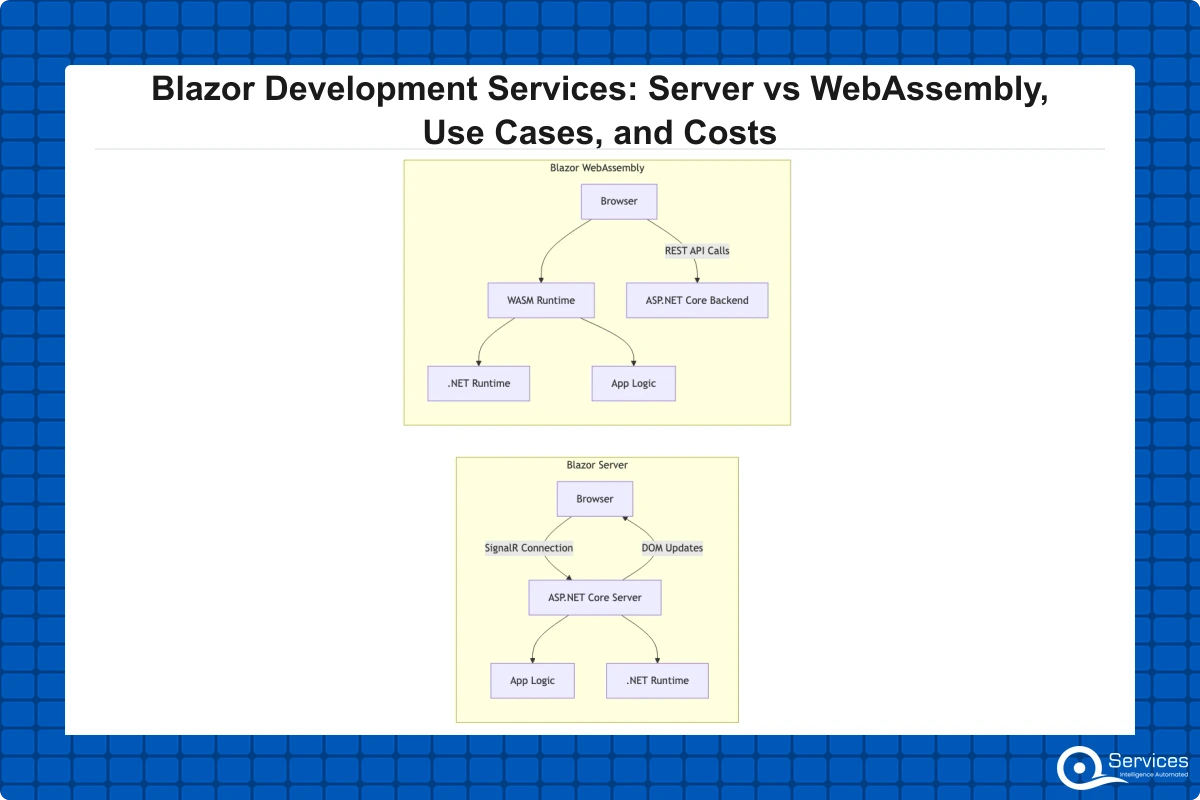
How Blazor Server Works
Blazer Server renders UI on the server and pushes DOM updates to the browser over a persistent SignalR connection. C# code and data access logic never leave the server, which keeps sensitive business logic behind your firewall. The initial page load is fast because the browser receives standard HTML with a small JavaScript shim rather than a large application bundle. The tradeoff: every user interaction requires a server round-trip, so server capacity scales linearly with active concurrent users. For internal tools with controlled user counts, this is rarely a problem. For public-facing apps with thousands of simultaneous users, it is.
How Blazor WebAssembly Works
Blazer WebAssembly runs C# directly in the browser via WebAssembly, as defined by the WebAssembly standard maintained by the W3C. After a first-load download of roughly 3-6 MB for a typical enterprise application, the app runs entirely client-side with no server dependency for UI rendering. This makes Blazor WASM well-suited for offline-capable tools, data-intensive dashboards that need sub-100ms response times, and scenarios where you want to minimize per-user server infrastructure costs. Blazor Server renders UI on the server with SignalR; Blazor WASM runs C# directly in the browser via WebAssembly, knowing this distinction upfront prevents costly architecture changes mid-project.
Blazor Auto Mode in .NET 8 and .NET 9
.NET 8 introduced Auto render mode, which starts with server-side rendering for a fast first load, then transitions to WebAssembly once the runtime is cached in the browser. This approach largely removes the "which model do I pick?" decision for new greenfield projects. The complexity shifts to component design: components must behave correctly in both rendering environments, which requires more intentional state management from the start.
Blazor Server vs Blazor WebAssembly: Key Differences
The hosting model choice affects more than performance. It shapes your security posture, infrastructure costs, and the architecture of every data access call in your application. Teams that treat this as a minor configuration decision often find themselves doing significant rework at the six-month mark.
Performance and Latency Considerations
For internal enterprise tools where users are on a corporate LAN or VPN, Blazor Server's round-trips typically measure 10-30ms and feel imperceptible. For public-facing applications with users across different geographies, accumulated latency becomes noticeable on interaction-heavy screens. Blazor WASM eliminates that round-trip for UI interactions but requires a larger initial download. In practice, for most enterprise internal tools, the difference in perceived performance between the two models is smaller than teams expect before building a prototype.
Security and Data Access
Blazer Server keeps all business logic, connection strings, and data access code on the server. Nothing sensitive reaches the client. This matters significantly in regulated industries like healthcare and financial services. Blazor WASM requires an API layer between the browser and your data store, which enforces a clean separation and pairs well with disciplined API security practices for .NET applications. Neither model is inherently less secure, but Blazor Server's architecture makes the compliance conversation simpler.
When to Use Each Model
Scenario
Recommended Model
Internal tools with low user counts
Blazor Server
High interactivity, offline capability
Blazor WebAssembly
Public SaaS with global users
Blazor Auto
Regulated data (PHI, PCI, financial)
Blazor Server
Progressive Web App (PWA) requirements
Blazor WebAssembly
6 Real-World Blazor Development Services Use Cases
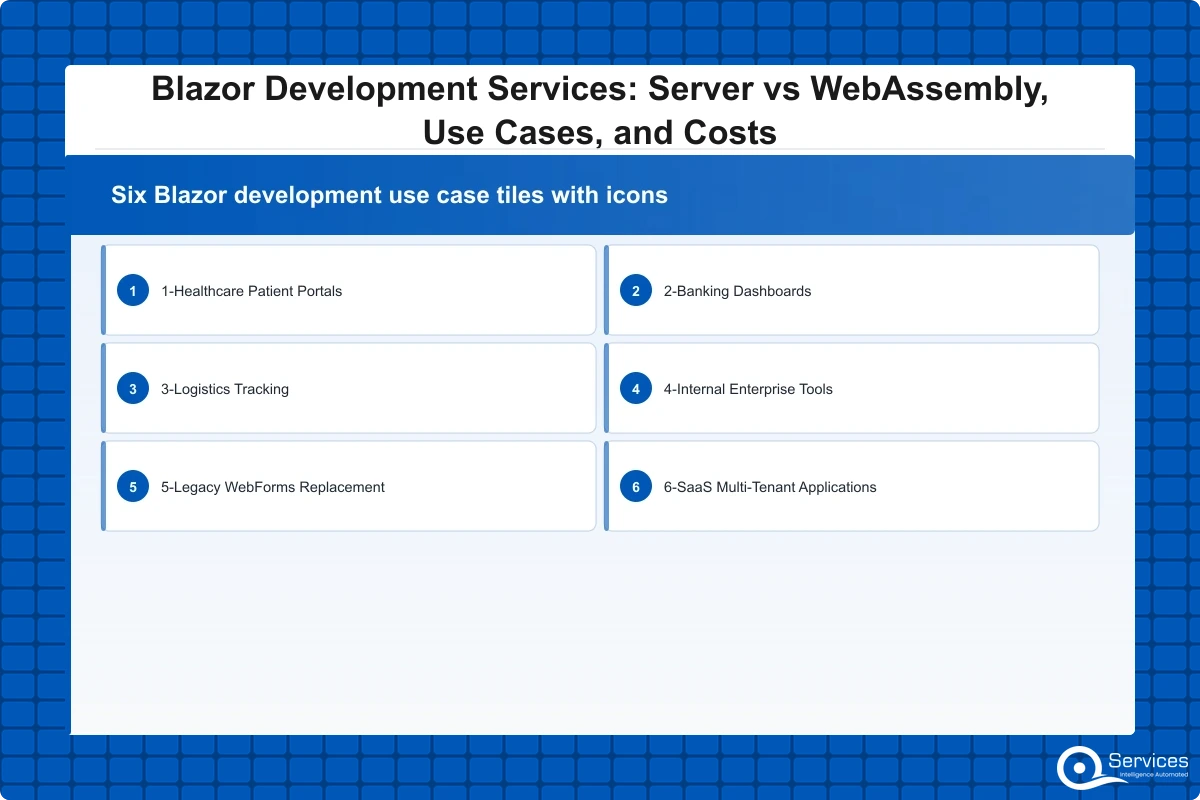
Here are six scenarios where organizations choose Blazor development services over JavaScript frameworks, with context on what makes each one work.
1. Healthcare Patient Portals
Blazer Server keeps protected health information on the server with no client-side exposure, which simplifies HIPAA compliance architecture reviews. A mid-size patient portal covering appointment booking, lab results, and secure messaging typically takes 10-14 weeks with a three-developer team. The server-side model also ensures screen readers interact with standard HTML rather than client-rendered virtual DOM, meeting accessibility requirements with significantly less custom code.
2. Banking and Financial Dashboards
Real-time account dashboards and trade monitoring tools benefit from SignalR push updates, which eliminate polling loops and reduce server load under high-frequency data change scenarios. Sensitive risk calculation logic stays server-side, reducing the attack surface and keeping PCI-DSS scope smaller. Several banking clients we work with have moved from aging Silverlight or WPF-over-Citrix setups directly to Blazor Server with minimal retraining, since the team's C# skills transfer without a language change.
3. Logistics and Supply Chain Tracking Portals
Warehouse operators and dispatch teams typically work on Windows machines inside corporate networks. Blazor Server is a practical fit: fast to load on any browser, straightforward to integrate with ERP systems via .NET, and requires no JavaScript build pipeline for the operations team to maintain. Real-time shipment status updates over SignalR add meaningful operational visibility without complex client-side state management.
4. Internal Enterprise Tools Replacing WinForms and WPF
This is the highest-volume Blazor use case in enterprise settings. Organizations with WinForms applications that need browser access for remote or mobile workers find that Blazor lets .NET developers port business logic directly without learning a new language. Migrations from WinForms to Blazor Server typically run 30-40% faster than equivalent rewrites in React or Angular when team composition stays constant, because the .NET skill set transfers entirely.
Key Insight Migrations from WinForms to Blazor Server typically run 30-40% faster than equivalent rewrites in React or Angular when team composition stays constant, because the .NET skill set transfers entirely.
5. Legacy WebForms Replacement
ASP.NET WebForms applications on .NET Framework are a growing maintenance risk as support windows narrow and third-party components stop receiving updates. Legacy app modernization using Blazor is practical here because Blazor's component model maps reasonably to WebForms user controls, and existing C# business logic transfers without a language change. Our legacy .NET Framework to .NET 8/9 migration checklist walks through the architecture decisions specific to this path.
6. SaaS Multi-Tenant Applications
Blazer WebAssembly paired with an ASP.NET Core Web API backend works well for SaaS products that need a native-app feel in the browser. The WASM runtime handles complex client-side interactions after the initial load, while the API layer enforces tenant isolation and data security. This model also supports shared component libraries across white-label versions of the product, which reduces per-customer customization costs at scale.
How Blazor Fits Into .NET Application Modernization
.NET application modernization is rarely a big-bang rewrite. Most organizations have too much embedded business logic, too many integration dependencies, and too little tolerance for downtime to shut a system down and rebuild it from scratch. Blazor fits into an incremental modernization approach that preserves existing investments rather than discarding them.
The Strangler Fig Pattern for Incremental Migration
Legacy .NET Framework modernization uses the strangler fig pattern to incrementally replace components without a full rewrite. A reverse proxy routes specific pages or routes to a new Blazor application while the existing system handles everything else. Over 12-24 months, the Blazor application grows to cover the full feature set, and the old system is decommissioned without a single cutover event. This approach carries significantly lower deployment risk than maintaining a full parallel rebuild before anything goes live, and it lets the team ship working software to users throughout the migration rather than at the end.
Migrating from WebForms or MVC to Blazor
WebForms-to-Blazor migrations work because both use a component or control model with server-side rendering. MVC-to-Blazor is trickier: Razor views and controller actions don't map directly to Blazor's component tree. The practical path is to retain your existing ASP.NET development services layer (controllers, data access, business logic) and replace only the front-end with Blazor components. This minimizes risk, keeps proven backend code intact, and allows the migration to deliver incremental UI improvements rather than requiring a full switchover.
Blazor in a .NET 9 Migration
Teams moving from .NET Framework to .NET 9 often introduce Blazor at the UI layer while migrating business logic in parallel. .NET 9 migration brings ahead-of-time (AOT) compilation for Blazor WebAssembly, reducing first-load time by 20-30%, along with improved server-side rendering performance. The .NET 9 migration guide covers the specific breaking changes in Blazor's rendering pipeline that teams encounter most often during this upgrade path.
Key Insight .NET 9 migration brings ahead-of-time (AOT) compilation for Blazor WebAssembly, reducing first-load time by 20-30%, along with improved server-side rendering performance.
Blazor Development Services vs React: Which Framework Wins for Enterprise?
This debate is less about framework quality and more about team composition and organizational context. The honest answer is that both are production-ready, and the wrong one for your team is whichever one your team doesn't know.
React has a larger third-party component ecosystem, more hiring options, and better tooling for SEO-dependent public pages. If your team has experienced TypeScript developers and you're building a consumer product where page-level SEO matters on every route, React will reach production faster and with fewer friction points.
Blazer development services win when your entire team are C# developers, when code-sharing between client and server removes meaningful duplication (shared models, validation, authorization rules), or when toolchain consistency within a Microsoft-first stack reduces infrastructure complexity. A .NET team that doesn't have to context-switch between C# and TypeScript typically produces fewer integration bugs and onboards new .NET developers faster.
One limitation to acknowledge honestly: Blazor WASM's first-load bundle is larger than a comparable React SPA, and Blazor's SEO story for public pages requires either SSR mode or static pre-rendering, which adds configuration overhead. If SEO is a hard requirement on every user-facing route, factor in that added complexity in your timeline estimates.
For a detailed breakdown of how these two frameworks compare on specific enterprise decision criteria, our post on Blazor vs React for enterprise applications covers the tradeoffs case by case.
How Much Do Blazor Development Services Cost?
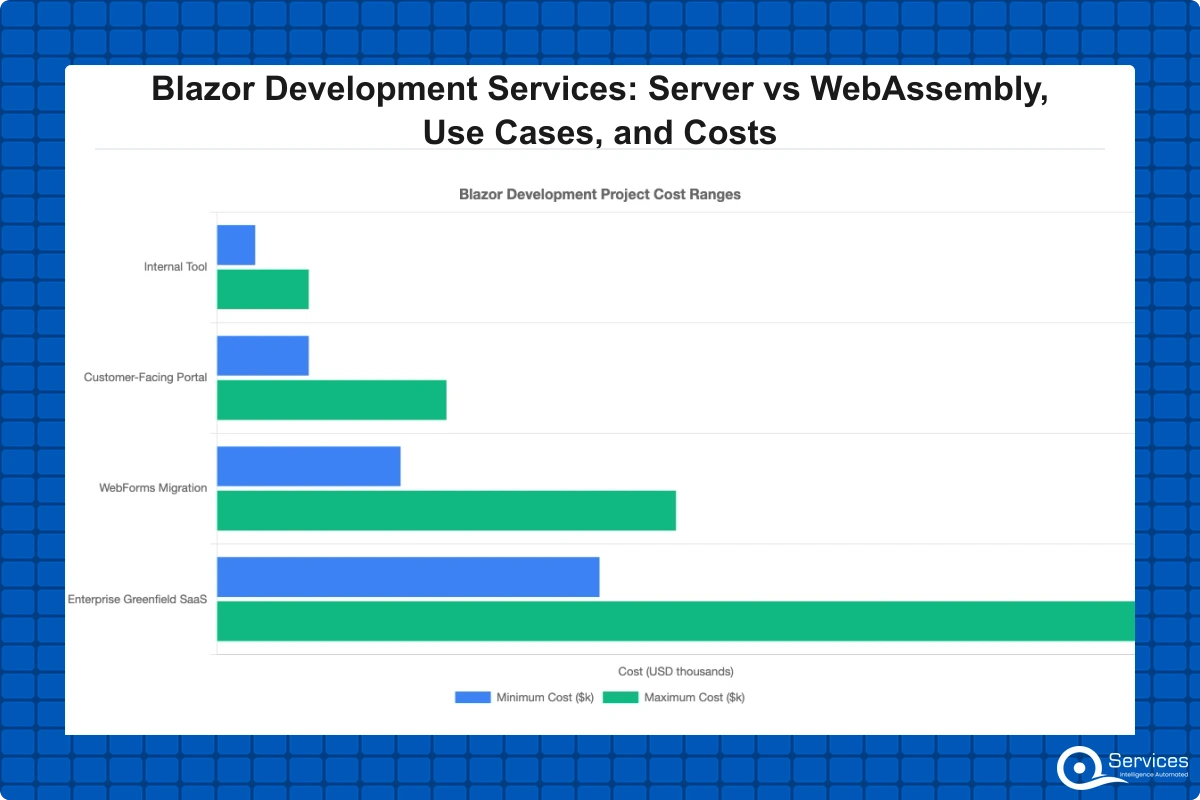
Cost estimates without project context are nearly useless. The table below is based on teams working at $85-$120/hour blended rates, which reflects what we typically see at QServices (custom software development & Microsoft partner, qservicesit.com) running onshore or hybrid engagements.
Key Insight The table below is based on teams working at $85-$120/hour blended rates, which reflects what we typically see at QServices (custom software development & Microsoft partner, qservicesit.com) running onshore or hybrid engagements.
Project Type
Team Size
Timeline
Budget Range
Internal tool (10-50 users)
2-3 developers
6-12 weeks
$25,000 – $60,000
Customer-facing portal
3-5 developers
3-6 months
$60,000 – $150,000
WebForms or WinForms migration
4-6 developers
6-12 months
$120,000 – $300,000
Enterprise greenfield SaaS
6-10 developers
9-18 months
$250,000 – $600,000+
What Drives Blazor Project Costs Up
Four factors consistently push Blazor projects over initial estimates:
Integration complexity: In our experience, every legacy system, ERP connector, or third-party API adds meaningful work that scoping documents routinely underestimate, and projects with five or more external integrations often need a sizable buffer added to the initial estimate.
Authentication and authorization: In our experience, Azure Entra ID integration, role-based access control, and multi-tenant security meaningfully extend project timelines depending on how many role types and permission boundaries the application needs.
Real-time features: SignalR-based live dashboards, collaborative editing, and push notifications require infrastructure planning beyond the application layer itself, including connection scaling and fallback strategies.
Data migration: In our experience, moving and cleaning data from a legacy system typically takes substantially longer than estimated when source data quality is unknown before the project starts.
Fixed-Price vs Time-and-Materials Engagements
Fixed-price contracts work when requirements are fully defined upfront and unlikely to change. For most Blazor migrations or greenfield enterprise builds, they are not. Time-and-materials with milestone-based budget caps gives you flexibility without open-ended exposure. In our experience, reputable .NET microservices consulting and Blazor firms typically offer a paid discovery phase before committing to a project estimate. If a firm skips discovery and quotes a fixed price on the first call, treat that as a signal worth investigating further.
How to Choose the Right .NET Development Partner
Not every dotnet development company has genuine production Blazor experience. The framework is mature enough for enterprise use, but many .NET shops have one developer who explored it on a side project without ever shipping a production system. Knowing how to tell the difference before signing saves months of pain.
What to Verify Before Signing
Ask for production Blazor references specifically. A two-year-old demo project does not show how they handle SignalR reconnection logic, WASM bundle optimization, or component tree performance under real user load.
Check whether their proposal distinguishes between Blazor Server and WebAssembly and explains why they're recommending one over the other for your scenario. Firms that treat them as interchangeable haven't thought carefully about your architecture.
Confirm their .NET version posture. Do they recommend .NET 9 for new projects? Do they understand the Auto render mode introduced in .NET 8? Partners defaulting to .NET Framework for new builds are behind the current state of the platform.
Review their approach to enterprise application development governance. Do they publish delivery metrics, document architecture decisions, and involve clients in technical tradeoffs? Or do all decisions happen inside the team with clients receiving updates only at milestones?
QServices' Approach to Blazor Engagements
QServices specializes in .NET modernization with Human-in-the-Loop governance for enterprise applications. Every significant technical decision, including hosting model selection, state management approach, and API boundary design, receives a documented rationale and client sign-off before implementation starts. We have found this reduces mid-project direction changes by roughly 60% compared to engagements where architecture happens entirely inside the delivery team.
Our standard Blazor engagement includes a two-week discovery phase with documented current-state analysis, a component-level build plan with per-feature effort estimates, weekly delivery metrics shared with the client, and a 60-day post-launch support window. We also support .NET microservices consulting engagements where Blazor serves as the UI layer for a distributed .NET backend, and our delivery metrics are published rather than kept internal.
Key Takeaways
Blazor is Microsoft's open-source framework for building interactive web UIs using C# and .NET instead of JavaScript.
The hosting model choice affects more than performance.
Here are six scenarios where organizations choose Blazor development services over JavaScript frameworks, with context on what makes each one work.
.NET application modernization is rarely a big-bang rewrite.
This debate is less about framework quality and more about team composition and organizational context.
Conclusion
Blazer development services make the most practical sense when your team already knows .NET, when you're modernizing legacy WebForms or WinForms applications, or when you need tight UI-to-backend integration without maintaining a separate JavaScript framework alongside a C# API. The hosting model choice (Server, WebAssembly, or Auto) matters, but it's rarely the hardest decision in a Blazor engagement. Getting the integration architecture, state management approach, and data migration plan right from the start shapes more of your outcomes than which rendering model you select.
If you're evaluating a Blazor migration or a greenfield build, a scoped discovery phase is the right first step. It costs a fraction of a mid-project pivot and answers the questions no blog post can answer for your specific context: which existing systems need to integrate, what your real user concurrency looks like, and whether your current team needs additional support to deliver on schedule. Reach out to QServices to discuss a structured discovery for your Blazor or .NET application modernization project.
Co-Founder and CTO, QServices IT Solutions Pvt Ltd
Rohit Dabra is the Co-Founder and Chief Technology Officer at QServices, a software development company focused on building practical digital solutions for businesses. At QServices, Rohit works closely with startups and growing businesses to design and develop web platforms, mobile applications, and scalable cloud systems. He is particularly interested in automation and artificial intelligence, building systems that automate routine tasks for teams and organizations.
The choice depends on your users’ network environment, data sensitivity, and interactivity requirements. Blazor Server works best for internal tools on corporate networks where sensitive data must stay server-side and user counts are manageable. Blazor WebAssembly is better for public-facing apps, offline-capable tools, and dashboards requiring instant client-side response. .NET 8 and .NET 9’s Auto render mode combines both approaches, starting with server rendering and transitioning to WASM after the first load, which reduces the pressure to commit fully to one model upfront.
A small internal Blazor tool for 10-50 users typically costs $25,000-$60,000 over 6-12 weeks. A customer-facing portal runs $60,000-$150,000 over 3-6 months. A full WebForms or WinForms migration ranges from $120,000 to $300,000 depending on integration complexity and data migration scope. These figures assume blended rates of $85-$120/hour for a hybrid or onshore team. Integration complexity, real-time feature requirements, and data migration are the three factors most likely to push a project over its initial estimate.
Yes, and it is one of the most common Blazor migration paths. Blazor’s component model maps reasonably to WebForms user controls, and your existing C# business logic transfers without a language change. The migration typically takes 6-12 months for a mid-size application and works best as an incremental replacement using the strangler fig pattern rather than a full parallel rebuild. A reverse proxy routes traffic to the new Blazor app as pages are completed, keeping the legacy system live throughout.
Blazor is the stronger choice when your team is primarily C# developers, when code-sharing between client and server removes meaningful duplication, or when you are working within a Microsoft-first technology stack. React is stronger when your team has deep TypeScript experience, when you need a larger pool of pre-built UI component libraries, or when SEO matters on every public-facing page. Team composition is the most predictive factor. A .NET team building in Blazor typically delivers fewer integration bugs and onboards new developers faster than the same team learning React.
A simple internal Blazor tool can go from discovery to deployment in 6-12 weeks. A full WebForms or WinForms migration for a mid-size application typically takes 6-12 months. Enterprise greenfield SaaS applications run 9-18 months end to end. Timeline variance is usually driven by integration complexity and data migration scope, not Blazor-specific factors. Projects that skip a formal discovery phase consistently run 30-50% longer than estimated because integration and data quality issues surface mid-build.
The strangler fig pattern is a modernization approach where you incrementally replace legacy system components rather than rewriting everything at once. In a Blazor migration, a reverse proxy sits in front of the existing application and routes individual pages or features to a new Blazor app as they are rebuilt. The legacy system stays live throughout, reducing deployment risk. Over 12-24 months, the new application covers the full feature set and the old system is decommissioned without a cutover event. Legacy .NET Framework modernization uses this pattern to replace components without a full rewrite.
.NET 9 brings meaningful Blazor improvements including ahead-of-time (AOT) compilation for Blazor WebAssembly that reduces first-load time by 20-30%, improved server-side rendering performance, and better JavaScript interop for hybrid scenarios. New Blazor projects should target .NET 9. Existing .NET 8 Blazor applications can upgrade with minimal breaking changes. The .NET 9 migration primarily affects Blazor’s rendering pipeline configuration, which needs review before upgrading production applications.
Business intelligence consulting services should give a mid-market company a governed way to make decisions. Attractive dashboards are only the visible part. The useful outcome is a system in which source data, metric definitions, access, releases, ownership, and support still work after the consultants leave.
In a Microsoft Solutions Partner vs Microsoft Partner comparison, the difference is validation. A company can participate in the Microsoft AI Cloud Partner Program without holding a customer-facing Solutions Partner designation. A designated Solutions Partner has met Microsoft’s current threshold in a specific solution pathway: at least 70 out of 100 partner capability points, with more than zero points in every required metric, based on performance, skilling, and customer success data recorded in Partner Center.
How do you build a legacy application modernization strategy for Azure? A legacy application modernization strategy assigns the right treatment to each workload, then sequences the work around business value, technical evidence, and operational risk. For Azure, that means choosing among retire, retain, rehost, replatform, refactor, rearchitect, rebuild, and replace instead of treating cloud migration as a blanket mandate. Direct Answer A legacy application modernization strategy for Azure should classify
Eager to discuss about your project?
Share your project idea with us. Together, we’ll transform your vision into an exceptional digital product!
Business intelligence consulting services should give a mid-market company a governed way to make decisions. Attractive dashboards are only the visible part. The useful outcome is a system in which source data, metric definitions, access, releases, ownership, and support still work after the consultants leave.
In a Microsoft Solutions Partner vs Microsoft Partner comparison, the difference is validation. A company can participate in the Microsoft AI Cloud Partner Program without holding a customer-facing Solutions Partner designation. A designated Solutions Partner has met Microsoft’s current threshold in a specific solution pathway: at least 70 out of 100 partner capability points, with more than zero points in every required metric, based on performance, skilling, and customer success data recorded in Partner Center.