Azure Pipelines YAML Explained: A Practical Guide for .NET Teams
Azure pipelines yaml is where most .NET teams either save hours every week or create a maintenance nightmare that nobody
Architecture map, prioritized backlog, 15/20/45 plan, and risk register — ready for your board.
One workflow shipped end-to-end with audit trail, monitoring, and full handover to your team.
Stabilize a stalled project, identify root causes, reset delivery, and build a credible launch path.
Monitoring baseline, incident cadence targets, and ongoing reliability improvements for your integrations.
Answer 3 quick questions and we'll recommend the right starting point for your project.
Choose your path →Turn scattered data into dashboards your team actually uses. Weekly reporting, KPI tracking, data governance.
Cloud-native apps, APIs, and infrastructure on Azure. Built for scale, maintained for reliability.
Automate manual processes and build internal tools without the overhead of custom code. Power Apps, Power Automate, Power BI.
Sales pipelines, customer data, and service workflows in one place. Configured for how your team actually works.
Custom .NET/Azure applications built for workflows that off-the-shelf tools can't handle. Your logic, your rules.
Every engagement starts with a clear plan. In 10 days you get:
Patient data systems, compliance reporting, and workflow automation for regulated environments.
Real-time tracking, route optimization, and inventory visibility across your distribution network.
Scale your product infrastructure, integrate third-party tools, and ship features faster with reliable ops.
Secure transaction processing, regulatory reporting, and customer-facing portals for financial services.
Get a clear plan in 10 days. No guesswork, no long proposals.
See case studies →Download our free checklist covering the 10 steps to a successful delivery blueprint.
Download free →15-minute call with a solutions architect. No sales pitch — just clarity on your project.
Book a call →Home » How We Built a Free Time Tracker That Lives Inside Azure DevOps Work Items
The azure devops time tracker problem hit us in the middle of a sprint review. We were sitting with a client, looking at velocity data that did not make sense, and the answer turned out to be simple: developers had been logging actual hours in a shared Excel file instead of inside Azure DevOps work items. Half the data was missing. The sprint metrics were guesswork.
We had seen this pattern before at QServices. Across dozens of delivery engagements in our azure devops consulting services practice, the same thing repeated: teams do their work in ADO, but log time somewhere else, or not at all. Work items show story points. They do not show the 12 hours a developer spent debugging a deployment issue that derailed the entire sprint.
That gap is what we built TimeTrack to close. It is a free Azure DevOps extension that logs developer hours directly inside ADO work items, with no additional tools required. This post covers the full build story: the problem we kept running into, the architecture we chose, the reason we made it free, and what it actually delivers for teams that need accurate velocity data without changing their workflow. You can install it today at https://timetrack.qservicesit.net.
Spreadsheet-based time tracking is a compromise most engineering teams accept because the alternatives either require changing tools or paying for a SaaS product. Neither is great when your team is already inside Azure DevOps all day.
The honest truth about time logging in software teams is that it almost never happens in real time. Developers log time at the end of the sprint, at end of week, or when a project manager asks for a report. By then, the data is reconstructed memory, not actual hours. That is not useful for velocity calculations, client billing, or any planning that depends on understanding where effort actually went.
The spreadsheet problem is fundamentally a data quality problem. When time data lives outside ADO, it is disconnected from the work items it describes. You cannot query it alongside task completion data. You cannot filter by developer, sprint, or epic without manual joins. You cannot surface it in ADO dashboards without building a separate integration that someone has to maintain.
We ran into this most painfully when clients asked for time-boxed delivery reports. "How many hours did the team spend on the authentication module in Q2?" is a simple question. When the answer requires cross-referencing two separate systems, it becomes a half-day exercise that nobody wants to do.
"Ghosted hours" is the term we use internally for time that was worked but never recorded. Across our microsoft azure consulting company engagements, ghosted hours typically represent 15-25% of actual developer time. They inflate perceived velocity (the work is counted as completed without recording the effort it cost), make sprint planning inaccurate, and create gaps in compliance documentation.
For teams in regulated industries like healthcare or financial services, untracked hours are not just inconvenient. They become a liability when auditors come asking for delivery records tied to specific tasks and dates.
An azure devops time tracker is a tool that lets team members log hours directly against ADO work items, making time data queryable, reportable, and linked to the tasks that generated it. It differs from general project time tracking software in one key way: the data lives inside ADO rather than in a separate application that requires its own login and reporting workflow.
TimeTrack is QServices' free implementation of this concept. It installs from the Visual Studio Marketplace in under five minutes and adds a time logging panel to every work item in your ADO project, with no configuration beyond the initial install.
Azure DevOps ships with two native time fields: Original Estimate and Remaining Work. Neither is sufficient for actual time tracking. Original Estimate is set once at task creation. Remaining Work is updated as work proceeds. Neither field gives you a log of actual hours worked per session, per developer, or per date.
Without actual time entries, you cannot answer the questions that matter most for planning and billing: who logged the most hours on this feature, how much time did we spend on bug fixes versus new development this sprint, and how does our actual effort compare to our estimates over time.
The paid Azure DevOps time tracking extensions in the marketplace are solid products, but they add a per-user monthly cost on top of existing ADO licensing. For teams of 20-50 developers, that compounds quickly. Some also store data in external servers, which creates data sovereignty concerns for enterprise clients and teams with strict azure security assessment requirements.
Our view: basic time logging against work items should not cost extra. It is a fundamental delivery metric, not a premium feature.
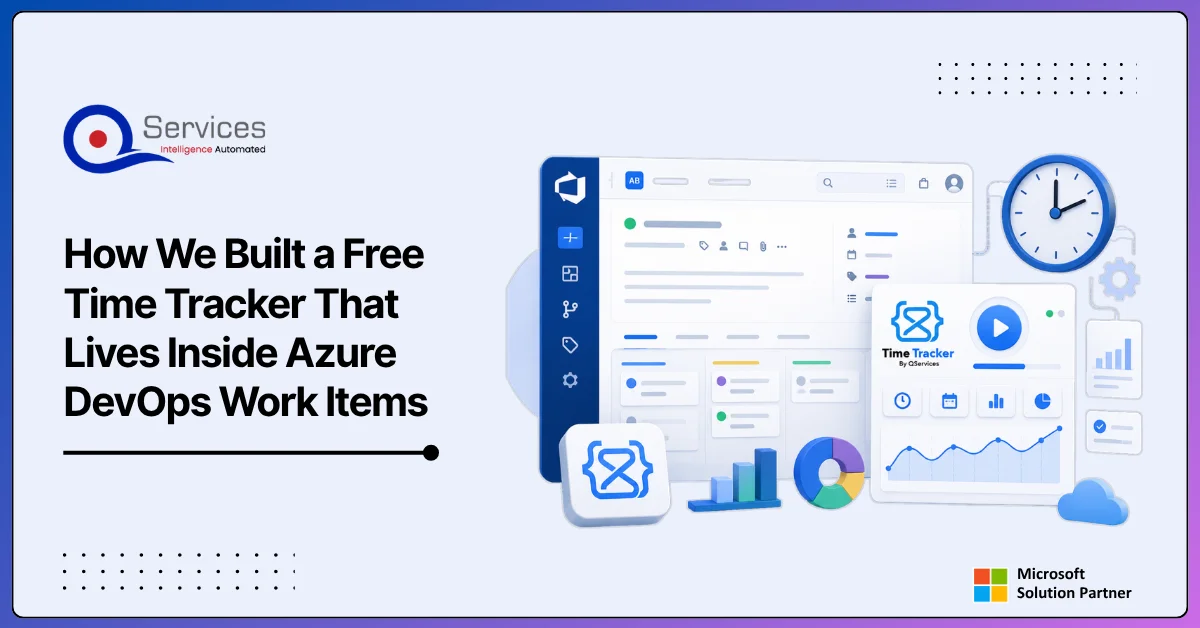
TimeTrack adds a time entry tab directly to the ADO work item form. When a developer opens a User Story, Task, or Bug, they see a panel for logging hours alongside the existing fields. There is no context switching and no additional login.

Installation is a one-time admin action. You install the extension for your ADO organization, grant it access to the projects you want active, and it appears automatically in all work items in those projects. There are no configuration scripts, no database setup, and no service endpoints to configure. This matters for teams that have had bad experiences with ADO extensions that require days of onboarding before they become usable.
The logging interface is intentionally minimal: date, hours, optional description. A developer opens their Task or User Story, clicks the TimeTrack tab, and creates a time entry. The entry is associated with the work item ID and the developer's ADO identity automatically, so there is no manual attribution required.
Multiple developers can log against the same work item independently. TimeTrack aggregates all entries so you can see both the total hours per work item and each contributor's individual time, all within the standard ADO work item view.
Beyond individual work items, TimeTrack surfaces aggregated time data at the sprint and epic level. A dashboard widget shows total logged hours for the current sprint broken down by work item type, developer, or date range.
This is the view that makes sprint retrospectives genuinely useful. You can see exactly where time went, not just which story points were marked done. For teams already using ADO alongside Power Automate workflows for process automation, this data feeds naturally into broader reporting pipelines without any additional integration work.
Eager to discuss about your project?
Share your project idea with us. Together, we’ll transform your vision into an exceptional digital product!
Book an Appointment nowTimeTrack is built as a standard Azure DevOps extension using the Azure DevOps Extension SDK. It runs entirely within the ADO context, which means no external servers, no separate databases, and no authentication to manage beyond ADO itself.
For enterprise teams with strict security requirements, this architecture answers the most common questions upfront: where does the data go, who can access it, and does anything leave the tenant.
The extension manifest defines two contribution points: a work item form group (the time logging panel visible on each work item) and a dashboard widget (the sprint summary view). Both use the standard ADO contribution model, which means they receive the ADO identity context automatically without custom authentication logic.
The work item form group uses the ms.vss-work-web.work-item-form contribution point, which renders inside the standard work item form alongside fields like Assigned To and Iteration Path. This placement is what makes the experience feel native rather than bolted on.
Time entries are stored in ADO's extension data service, a key-value store scoped to your collection and project. Each time entry is a JSON document keyed by work item ID, containing an array of entries with timestamp, user, hours, and optional description. No personally identifiable data leaves your ADO organization.
This follows the same data handling model as other approved enterprise ADO extensions, which is why it tends to clear security reviews quickly. For organizations building hybrid cloud azure setup policies or evaluating tools as part of an azure infrastructure assessment, this architecture is easier to approve than extensions that depend on external data stores.
The honest answer: we built it for ourselves first. The initial version of TimeTrack was an internal tool QServices developers used on client projects to solve a problem we kept running into. Once it was stable enough, making it free for the broader ADO community was the obvious decision.
There is also a practical benefit for QServices. Teams that use TimeTrack and later need help with broader work, whether as an azure migration partner for a cloud transition, an azure managed services provider for ongoing infrastructure operations, or a partner for azure app modernization work, tend to reach out to us because they have already seen how we think about tooling problems. The extension is credibility before the first conversation.
We do not capture your data or monetize your usage. TimeTrack runs entirely within your ADO organization. Our cost to maintain it is low, which makes free sustainable long-term. The marketplace listing shows exactly what permissions the extension requests before you install, so there is nothing hidden or unexpected.
A solid azure devops time tracker does more than tell you where hours went. It changes how you plan, estimate, and communicate about software delivery.
Story points estimate complexity. Hours measure effort. When you have both, velocity calculations become more reliable and sprint planning becomes less dependent on intuition. You can identify which types of work consistently take longer than estimated and which parts of the codebase are expensive to touch.
This connects directly to a problem we wrote about in depth: why Azure DevOps time estimates are often wrong. Without historical time data per work item type, estimation is mostly institutional memory. With it, you can build data-driven estimates that hold up across teams and quarters.
For organizations in regulated industries, time records tied to specific work items and developer identities provide meaningful audit trail data. Whether you need to show a client that a fixed-price engagement was delivered within scope, or demonstrate to an auditor that a specific security task was completed on a particular date, ADO-linked time records are substantially more credible than spreadsheet exports.
Teams pursuing SOC 2, ISO 27001, or project-level financial audits will find this directly useful. It also aligns well with Power Platform governance requirements in environments where auditability across the Microsoft stack is a standing requirement.
Eager to discuss about your project?
Share your project idea with us. Together, we’ll transform your vision into an exceptional digital product!
Book an Appointment nowTimeTrack works as a standalone tool, but it fits naturally into how we think about azure devops consulting services more broadly. Accurate time data is useful on its own. It becomes substantially more useful when paired with well-structured ADO projects, sensible branching strategies, and automated pipelines.
Teams that start with TimeTrack often come to us asking about the next layer. Some need an azure migration partner to plan a migrate on premise to azure transition, and they want time tracking in place before the migration starts so they have a clean baseline for comparing pre-migration and post-migration developer effort. Others are running azure cloud migration services projects where they need accurate effort tracking across migration phases, including azure landing zone implementation work, early infrastructure builds, and lift and shift to azure phases for legacy workloads.
QServices is a Microsoft Certified Solutions Partner specializing in Azure, and we have completed 500+ Azure and Microsoft platform projects since 2014. Some clients engage us for Power BI consulting services to visualize TimeTrack data alongside other delivery metrics in executive dashboards. Others want a full azure architecture review before scaling their ADO setup or starting a power platform development company engagement to build internal tooling on top of their Azure investment.
The delivery patterns we see across those engagements informed every design decision in TimeTrack. It is not a side project. It is the tool our own developers use on the projects that pay our bills.
The azure devops time tracker problem is solvable without additional spend or workflow disruption. TimeTrack logs developer hours directly inside ADO work items, which means time data is where it belongs: linked to the work that generated it, queryable alongside ADO reports, and accessible to every team member without a separate login.
We built it because we were tired of spreadsheets and ghosted hours on real client engagements. It installs in under 5 minutes, all data stays inside your ADO organization, and it costs nothing to use.
Install TimeTrack free at https://timetrack.qservicesit.net and see how much cleaner your next sprint retrospective looks when you have actual hour data to work from.
If you want to go further, whether that is azure cost optimization consulting, a full azure architecture review, or migrating legacy workloads as part of a broader azure app modernization program, the QServices team is ready to help. Start with the free tool. See where the data points next.

Written by Rohit Dabra
Co-Founder and CTO, QServices IT Solutions Pvt Ltd
Rohit Dabra is the Co-Founder and Chief Technology Officer at QServices, a software development company focused on building practical digital solutions for businesses. At QServices, Rohit works closely with startups and growing businesses to design and develop web platforms, mobile applications, and scalable cloud systems. He is particularly interested in automation and artificial intelligence, building systems that automate routine tasks for teams and organizations.
Talk to Our ExpertsYes. TimeTrack by QServices is a free extension that logs developer hours directly inside Azure DevOps work items. It installs from the Visual Studio Marketplace in under 5 minutes, requires no external database or server, and stores all time data within your ADO organization’s built-in extension data service. There is no per-user fee and no subscription required.
An ADO organization admin installs TimeTrack from the Visual Studio Marketplace. After installation, you grant the extension access to the projects you want it active in. It then appears automatically in all work items in those projects with no additional configuration, scripts, or database setup needed.
TimeTrack uses Azure DevOps’s built-in extension data service, a key-value store scoped to your ADO collection and project. No data is sent to or stored on QServices infrastructure. All time entries remain within your ADO organization, which makes the extension compatible with enterprise data sovereignty and security review requirements.
TimeTrack captures actual hours worked per work item alongside existing story point estimates. With both metrics available, teams can identify which work types consistently take longer than estimated, spot patterns in over-running tasks, and build data-driven estimates over time. This addresses a root cause of inaccurate velocity: estimates based on memory rather than historical effort data.
Yes. Because each time entry is linked to a specific ADO work item ID and ADO user identity with a timestamp, the data provides a traceable audit trail showing who worked on what deliverable and when. This is directly useful for SOC 2 compliance, ISO 27001 audits, fixed-price project scope verification, and any regulated-industry audit that requires time records tied to specific tasks.

Azure pipelines yaml is where most .NET teams either save hours every week or create a maintenance nightmare that nobody

Cloud visitor management is redefining front-desk compliance, and if your organization still relies on a paper register or a locally-installed spreadsheet, the cost gap is wider than you might expect. On the surface, a paper sign-in book appears to cost nothing. No software license, no server, no subscription fee. But when you count compliance exposure, administrative overhead, zero audit trail, and a data security posture that would concern any IT manager facing a UAE data protection query, the math changes quickly.
This post runs a direct comparison between cloud-based visitor check-in systems and on-premises alternatives, covering total cost of ownership for a 50-person office, audit trail integrity, Azure AD integration, data retention, and regulatory compliance readiness. By the end, you will have a clear answer to whether the old way is actually saving you money.

React development services have become the default choice for enterprise teams building modern, scalable web applications. Whether you’re replacing a decade-old intranet portal or launching a customer-facing SaaS product, React provides a component-based architecture that scales with the product roadmap. But the gap between a developer who knows React syntax and a genuine enterprise development partner is significant, and enterprise teams need a partner who understands deployment pipelines, security compliance, Azure infrastructure design, and how the React front-end connects to existing backend systems and business workflows.
This post covers what enterprise teams should realistically expect from custom React development services: the engagement model, how Azure and the Microsoft Power Platform fit in, and what separates a partner who delivers from one who disappears after the final pull request.

What Is Visitor Management Software and Does Your Office Actually Need It? Rohit Dabra | June 11, 2026 Table of

Power automate approvals are one of the most common requests QServices receives from operations and IT teams, and one of the most commonly rebuilt workflows after go-live. The pattern is predictable: a developer builds the flow in an afternoon, it handles the first 20 requests without issue, and then an approver leaves the company, a SharePoint permission changes, or a complex multi-department sign-off times out with no escalation in place. Three weeks later, procurement is routing approvals through email again.
This post walks through a 6-stage framework for building multi-stage sign-off workflows that hold up in production. We cover trigger design, audit trails, the governance layer that keeps flows compliant, and the failure points that surface most reliably in real deployments.

The azure devops time tracker problem hit us in the middle of a sprint review. We were sitting with a
Eager to discuss about your project?
Share your project idea with us. Together, we’ll transform your vision into an exceptional digital product!
Book an Appointment now

Cloud visitor management is redefining front-desk compliance, and if your organization still relies on a paper register or a locally-installed spreadsheet, the cost gap is wider than you might expect. On the surface, a paper sign-in book appears to cost nothing. No software license, no server, no subscription fee. But when you count compliance exposure, administrative overhead, zero audit trail, and a data security posture that would concern any IT manager facing a UAE data protection query, the math changes quickly.
This post runs a direct comparison between cloud-based visitor check-in systems and on-premises alternatives, covering total cost of ownership for a 50-person office, audit trail integrity, Azure AD integration, data retention, and regulatory compliance readiness. By the end, you will have a clear answer to whether the old way is actually saving you money.

React development services have become the default choice for enterprise teams building modern, scalable web applications. Whether you’re replacing a decade-old intranet portal or launching a customer-facing SaaS product, React provides a component-based architecture that scales with the product roadmap. But the gap between a developer who knows React syntax and a genuine enterprise development partner is significant, and enterprise teams need a partner who understands deployment pipelines, security compliance, Azure infrastructure design, and how the React front-end connects to existing backend systems and business workflows.
This post covers what enterprise teams should realistically expect from custom React development services: the engagement model, how Azure and the Microsoft Power Platform fit in, and what separates a partner who delivers from one who disappears after the final pull request.


Power automate approvals are one of the most common requests QServices receives from operations and IT teams, and one of the most commonly rebuilt workflows after go-live. The pattern is predictable: a developer builds the flow in an afternoon, it handles the first 20 requests without issue, and then an approver leaves the company, a SharePoint permission changes, or a complex multi-department sign-off times out with no escalation in place. Three weeks later, procurement is routing approvals through email again.
This post walks through a 6-stage framework for building multi-stage sign-off workflows that hold up in production. We cover trigger design, audit trails, the governance layer that keeps flows compliant, and the failure points that surface most reliably in real deployments.