Shadow IT is Eating Your Power Platform: How to Take Back Control
Shadow IT power platform problems don't announce themselves. They build up quietly: a Power App in the default environment built
Architecture map, prioritized backlog, 15/20/45 plan, and risk register — ready for your board.
One workflow shipped end-to-end with audit trail, monitoring, and full handover to your team.
Stabilize a stalled project, identify root causes, reset delivery, and build a credible launch path.
Monitoring baseline, incident cadence targets, and ongoing reliability improvements for your integrations.
Answer 3 quick questions and we'll recommend the right starting point for your project.
Choose your path →Turn scattered data into dashboards your team actually uses. Weekly reporting, KPI tracking, data governance.
Cloud-native apps, APIs, and infrastructure on Azure. Built for scale, maintained for reliability.
Automate manual processes and build internal tools without the overhead of custom code. Power Apps, Power Automate, Power BI.
Sales pipelines, customer data, and service workflows in one place. Configured for how your team actually works.
Custom .NET/Azure applications built for workflows that off-the-shelf tools can't handle. Your logic, your rules.
Every engagement starts with a clear plan. In 10 days you get:
Patient data systems, compliance reporting, and workflow automation for regulated environments.
Real-time tracking, route optimization, and inventory visibility across your distribution network.
Scale your product infrastructure, integrate third-party tools, and ship features faster with reliable ops.
Secure transaction processing, regulatory reporting, and customer-facing portals for financial services.

Get a clear plan in 10 days. No guesswork, no long proposals.
See case studies →Download our free checklist covering the 10 steps to a successful delivery blueprint.
Download free →15-minute call with a solutions architect. No sales pitch — just clarity on your project.
Book a call →Home » Shadow IT is Eating Your Power Platform: How to Take Back Control
Shadow IT power platform problems don't announce themselves. They build up quietly: a Power App in the default environment built by a well-meaning analyst, a Power Automate flow pulling customer data from SharePoint without any DLP policy, a Power BI dashboard shared externally that nobody in IT knows exists. By the time you notice, you have dozens of unmanaged solutions, zero documentation, and a compliance audit on the calendar.
According to Microsoft's Power Platform adoption guidance, organizations without formal governance see three to five times more unmanaged environments than those with a structured adoption program. For healthcare, banking, and logistics companies, that's a liability, not just a mess.
This guide covers how to take back control: DLP policies, environment strategies, and a Power Platform Center of Excellence that actually scales.
Shadow IT is any technology in use without IT oversight. In Power Platform terms, this means Power Apps, Power Automate flows, Power BI reports, and Power Pages sites built without governance, documentation, or lifecycle management.
Power Platform was designed to make building easy. That's the product's value. But easy without structure creates compounding problems, and the bigger your Microsoft 365 footprint, the faster those problems accumulate.
Citizen developer governance is the discipline skipped most often in Power Platform rollouts. When employees can build a Canvas app in an afternoon, they will. Most don't know that sharing an app with "Everyone in the organization" includes contractors and external guests, that connecting a premium connector from the default environment can violate licensing agreements, or that an unmonitored flow running against Dataverse tables can corrupt production data.
We've worked with organizations that had 200+ Power Apps in production where IT couldn't identify the owner of more than 40% of them. The problem isn't carelessness. It's the absence of any framework.
For regulated industries, the stakes are higher. A Power App tracking patient appointments in an unmanaged environment can create HIPAA exposure. An automated supplier invoice flow with no connector governance can expose vendor banking data to the wrong people.
If you're in healthcare or financial services, read why healthcare IT projects fail at compliance, not code before assuming low-code tools are exempt from compliance requirements. They're not.
Power Platform governance prevents shadow IT through DLP policies, environment strategies, and approval workflows. This is an ongoing operational discipline, not a one-time configuration. Microsoft has built most of the scaffolding. Most organizations haven't turned it on.
DLP policies in Power Platform control which connectors can combine with which others. You can separate business connectors (SharePoint, Dataverse, Teams) from non-business ones (Gmail, Twitter, personal OneDrive) so no flow accidentally routes internal data somewhere it shouldn't go.
Setting up DLP correctly:
This requires someone with Power Platform admin access who understands your data classification requirements. Getting it wrong is how sensitive customer data ends up in a personal OneDrive folder.
The default environment is the starting point for most shadow IT problems. Every user in your organization can create apps, flows, and connectors in it by default. A structured environment strategy separates workloads by purpose and risk:
| Environment | Purpose | DLP Level |
|---|---|---|
| Default | Basic productivity only | Restrictive |
| Development | Citizen developer sandbox | Moderate |
| Test | Pre-production validation | Business connectors only |
| Production | Approved, managed solutions | Business connectors, strict |
Power platform ALM (Application Lifecycle Management) depends on this structure entirely. Without separate dev/test/prod environments, you can't version-control, test, or promote solutions with any confidence.
Power apps development services cover more ground than most organizations expect: internal portals, HR self-service tools, warehouse inspection apps, customer onboarding workflows, inventory management systems, and purchase order approval processes.
Our team has built Power Apps for warehouse automation that replaced paper-based processes in weeks. The platform capability is real. The question is whether it's being deployed safely and with appropriate oversight.
This is one of the most common questions we get, and the honest answer depends on your data structure and user experience requirements.
Canvas apps give you precise layout control and connect to almost any data source. They work well for mobile-first experiences, simple forms, and scenarios pulling data from multiple external sources.
Model-driven apps are built on Dataverse and generate UI automatically from your data model. They're better for complex business processes, role-based access patterns, and applications that need audit trails built in from day one.
The mistake most citizen developers make: reaching for Canvas apps for everything because they look simpler to build. A complex relational process belongs in a model-driven app on a properly designed Dataverse schema.
There's a threshold where citizen developer tools stop being appropriate. Custom power apps development by a professional team makes sense when:
Power apps development services from a Microsoft partner include architecture review, performance testing, and deployment pipelines that citizen developers simply don't have access to.
Eager to discuss about your project?
Share your project idea with us. Together, we’ll transform your vision into an exceptional digital product!
Book an Appointment nowPower Automate is where shadow IT creates the most immediate operational risk. Flows run on schedules with elevated permissions and respond to triggers automatically. A misconfigured flow can corrupt a SharePoint library, spam a customer list, or lock an account in minutes.
Power automate consulting isn't just about building flows faster. It's about making sure existing flows are documented, tested, owned by a named person, and compliant with your data policies.
Power automate workflow examples we've delivered for clients:
What separates these from ungoverned flows: managed environments, service accounts instead of personal logins, and error handling with alerting on failure.
What we find in almost every Power Automate audit:
For what ungoverned automation estates cost over time, the real cost of no governance covers three post-mortems from projects that skipped these controls.
A Power Platform Center of Excellence (CoE) is a dedicated team or program that sets standards, provides guidance, and governs Power Platform usage across an organization. Done right, it enables sustainable innovation instead of blocking it.
QServices implements Power Platform Center of Excellence programs using Microsoft's CoE Starter Kit, which includes pre-built apps, flows, and dashboards for tenant-wide monitoring and governance.
The CoE Starter Kit from Microsoft includes several ready-to-deploy components:
This is a starting point, not a finished product. You still need someone to configure it for your tenant, customize governance flows for your risk tolerance, and act on what the inventory surfaces.
Citizen developer programs need governance guardrails to prevent data silos and compliance gaps. The controls that actually work in practice:
This doesn't slow down citizen developers on simple tasks. It puts a second set of eyes on decisions that carry real risk.
Eager to discuss about your project?
Share your project idea with us. Together, we’ll transform your vision into an exceptional digital product!
Book an Appointment nowIn Power BI, shadow IT shows up as inconsistent numbers. The sales dashboard shows one revenue figure; the finance report shows another. Both pull from SharePoint with different date filters and no agreed-upon data definitions.
Power BI consulting services fix this by establishing a shared semantic model layer, typically in Dataverse or Azure SQL, that becomes the single source of truth for all reporting.
Good power BI dashboard development starts before you open Power BI Desktop. The decisions that matter:
For organizations running on Microsoft 365, Azure, and Dynamics 365, Power BI wins on integration and cost. Power BI Pro is included in many M365 enterprise plans, and native connectors to your existing data estate require no custom work.
Tableau makes sense for complex cross-platform analytics needs, large existing Tableau user bases, or specific visualization requirements Power BI can't meet. For a Microsoft-stack organization, Tableau's additional licensing cost and integration overhead rarely justify the switch.
We've done a detailed Power BI vs Tableau comparison for Microsoft companies with a feature-by-feature breakdown if you need the specifics.
Power platform ALM is the practice most organizations skip entirely. It covers version control, deployment pipelines, testing, and documentation for Power Platform solutions. Most citizen developers build directly in production with no rollback path if something breaks.
Simple forms don't stay simple. They accumulate dependencies and become business-critical without anyone making that decision consciously.
ALM feels like overhead on a small project. The cost surfaces when that "small" app now runs payroll approvals for 400 employees and you need to update it with no dev environment, no version history, and no way to test before hitting production.
A proper ALM setup includes:
If you're already running Azure DevOps for software delivery, those CI/CD pipeline patterns extend to Power Platform solution deployment without significant additional infrastructure.
Dataverse is the relational platform underneath Power Platform. It provides structured storage, business rules, role-based access control, and audit logging. Build on it properly and your Power Apps, Power Automate flows, and Power BI reports all inherit compliance controls automatically.
Dataverse consulting is where investments in custom power apps development compound over time. A properly designed schema with relationships, calculated columns, business rules, and security roles means each new app on those tables gets compliance behavior built in instead of re-implementing security logic from scratch.
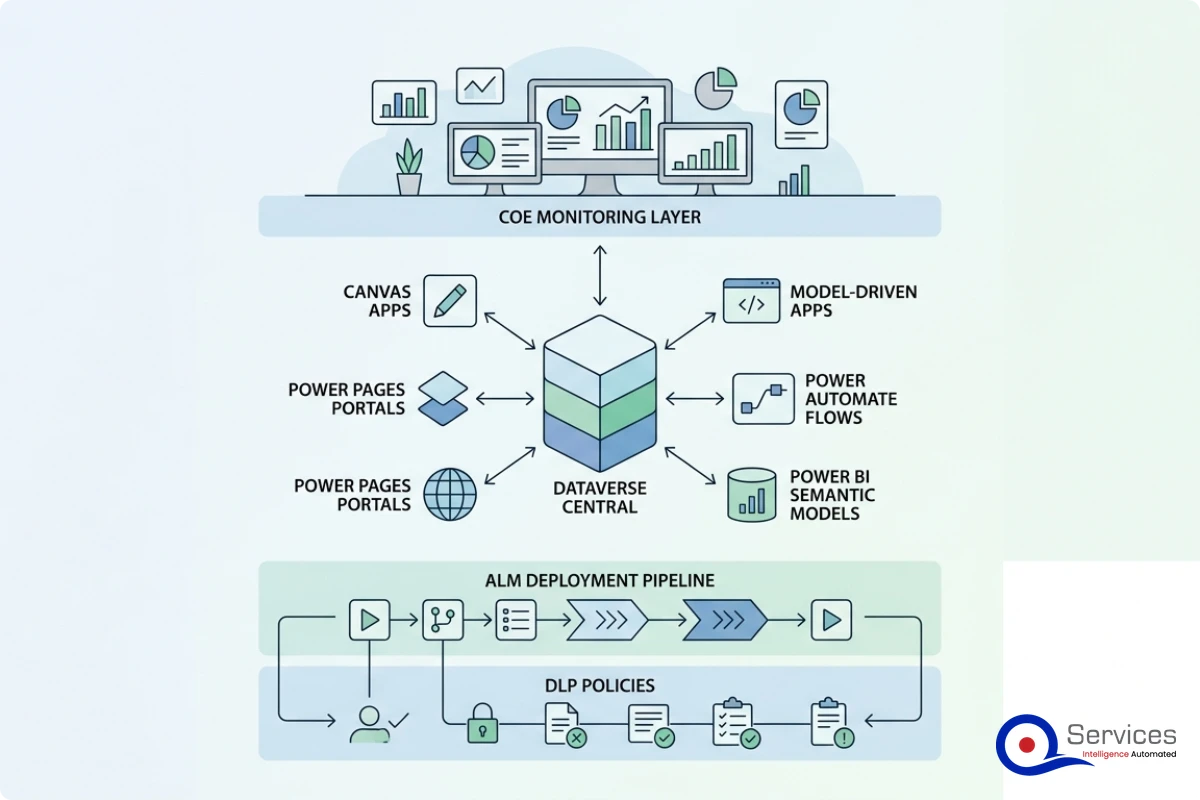
Power Pages lets you build customer, partner, or supplier portals on the same Dataverse data as your internal apps. Power pages development intersects with your security posture in ways internal tools don't.
An ungoverned Power Pages site can expose Dataverse records to anonymous users, accept unvalidated form submissions directly into production tables, and bypass the DLP policies you've configured for internal use. External-facing portals need more scrutiny, not less.
Production Power Pages sites need explicit table permission configuration (not just web role assignments), penetration testing before go-live, Azure AD B2C authentication for protected content, and Dataverse permission reviews by someone who understands how portal access levels interact with table security.
There's a real difference between a firm that has used Power Platform and one that has delivered governed, production-grade solutions in regulated industries. When evaluating a power platform development company, the questions that matter:
For a broader evaluation framework, how to evaluate a Microsoft Azure consulting partner covers the assessment criteria in detail. Most of those questions translate directly to Power Platform specialists.
A strong power platform development company starts power BI consulting services by assessing your current reporting maturity before building anything. Where do your numbers disagree? Which datasets are trusted? Which reports does anyone actually use?
Mature power bi consulting services include dataset architecture, row-level security design, on-premises data gateway configuration, and documentation of all measures and calculated columns. Reports built on undocumented DAX logic are just another form of shadow IT: outputs nobody can explain or maintain when the person who built them leaves.
Shadow IT power platform problems don't need a technical revolution to fix. They need structure. DLP policies, environment strategies, ALM pipelines, and a power platform center of excellence aren't bureaucracy for its own sake. They're the infrastructure that lets your citizen developers build things that last past the next reorganization.
Organizations that get this right treat Power Platform as the enterprise software platform it is, not a collection of departmental experiments. Power platform governance is what separates companies that extract real ROI from their Microsoft investment from those that spend years cleaning up what their citizen developers built without oversight.
If you're dealing with an ungoverned Power Platform tenant today, start with a tenant audit: know what you have before deciding what to fix. QServices has helped healthcare, banking, logistics, and SaaS organizations run that audit and build governance programs that hold. The path forward starts with an honest assessment of your current state.

Written by Rohit Dabra
Co-Founder and CTO, QServices IT Solutions Pvt Ltd
Rohit Dabra is the Co-Founder and Chief Technology Officer at QServices, a software development company focused on building practical digital solutions for businesses. At QServices, Rohit works closely with startups and growing businesses to design and develop web platforms, mobile applications, and scalable cloud systems. He is particularly interested in automation and artificial intelligence, building systems that automate routine tasks for teams and organizations.
Talk to Our ExpertsPower Platform governance is the set of policies, processes, and controls that manage how Power Apps, Power Automate, Power BI, and Power Pages are built, deployed, and maintained across an organization. It includes DLP policies to control connector usage, environment strategies that separate development from production, ALM pipelines for solution deployment, and a Center of Excellence program for ongoing oversight. Without governance, organizations accumulate shadow IT, compliance gaps, and unmanaged technical debt that grows faster than IT can track.
Power Platform governance prevents shadow IT through DLP policies, environment strategies, and approval workflows. The practical steps: restrict the default environment to basic productivity use only, require all citizen developers to register and complete training before building apps, implement DLP policies that separate business and non-business connectors, and deploy Microsoft’s CoE Starter Kit to inventory everything in your tenant. Organizations that implement full CoE programs typically see up to 85% reduction in ungoverned app creation compared to those with no governance structure.
For organizations running on Microsoft 365, Azure, and Dynamics 365, Power BI is typically the better choice. Power BI Pro is included in many M365 enterprise plans, and it integrates natively with Dataverse, SharePoint, Azure SQL, and other Microsoft data sources without custom connector work. Tableau offers stronger cross-platform analytics and more advanced visualization options, but for a Microsoft-stack organization, the additional licensing cost and integration complexity of Tableau rarely justify the switch. The exception: large organizations with existing Tableau investments and cross-platform data needs.
Power Apps supports a wide range of business applications including internal HR portals, warehouse inspection and field service mobile apps, customer onboarding workflows, inventory management systems, approval processes for contracts and purchase orders, and customer-facing portals via Power Pages. Canvas apps work well for flexible, multi-source data scenarios and mobile-first designs. Model-driven apps, built on Dataverse, suit complex business processes requiring audit trails, role-based access, and relational data structures. Custom power apps development by a professional team extends these further with external API integrations, field-level security, and enterprise-scale performance.
Power Platform development cost depends on scope, complexity, and governance requirements. Canvas apps built by citizen developers have near-zero direct cost beyond Microsoft licensing. Professional custom power apps development for production-grade solutions typically ranges from $15,000 to $80,000 depending on integrations, data architecture, and ALM setup. Power Platform consulting engagements for CoE implementation or complex multi-environment governance start at $20,000 to $50,000. Factor in ongoing maintenance, maker training, and governance program overhead when calculating total cost of ownership.
A Power Platform Center of Excellence (CoE) is a team or program that governs how Power Platform is used across an organization. It sets development standards, manages the CoE Starter Kit for tenant-wide monitoring, runs maker registration and training programs, reviews complex apps before production promotion, and manages the lifecycle of orphaned or ungoverned solutions. QServices implements Power Platform Center of Excellence programs using Microsoft’s CoE Starter Kit, customized for each organization’s risk tolerance, compliance requirements, and citizen developer program maturity.
Choose a canvas app when you need a custom UI, a mobile-first design, or need to pull data from multiple different source systems. Canvas apps give you full layout control and connect to hundreds of connectors. Choose a model-driven app when your data lives in Dataverse, involves multiple related tables, requires role-based security, or needs audit trails out of the box. Model-driven apps generate UI from your data model automatically, which speeds development but limits design flexibility. The rule of thumb: if you have relational Dataverse data and a complex process, model-driven wins almost every time.

Shadow IT power platform problems don't announce themselves. They build up quietly: a Power App in the default environment built
Blazor vs React is one of the most actively debated front-end decisions on .NET projects right now, and if you're
PCI-DSS compliant development is not optional when you're building payment-connected applications on Azure. It's the baseline that every fintech software
Supply chain visibility software is the foundation mid-size logistics companies need to stop flying blind in 2026. When a shipment
The debate over azure devops vs github actions has moved from developer forums to executive briefings at mid-size enterprises. If
If you've ever tried to hire a banking software development company without first understanding what that really means, you've probably
Eager to discuss about your project?
Share your project idea with us. Together, we’ll transform your vision into an exceptional digital product!
Book an Appointment now