If you're trying to consolidate SaaS tools with Azure and Power Platform, the first thing to accept is that your software bill didn't get out of control because of bad decisions. It happened because each individual tool made sense at the time.
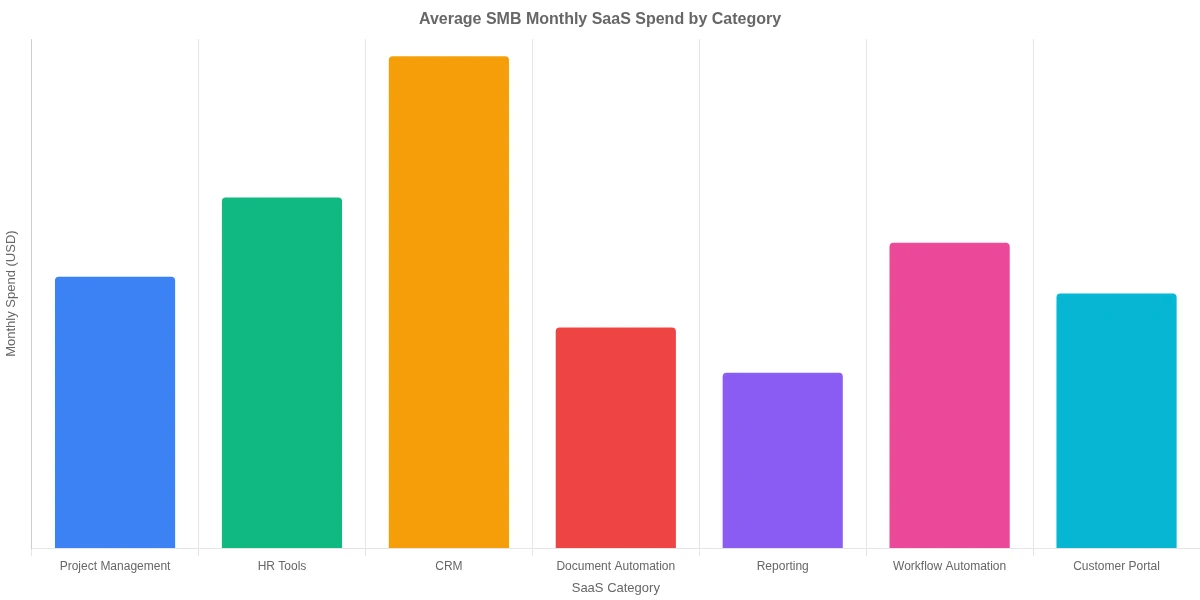
A project management app for $49/month. An e-signature tool for $80/month. A form builder, a workflow automation platform, an HR onboarding tool, a customer portal. Add a few third-party integrations and a separate reporting layer, and suddenly you're looking at $8,000 to $12,000 a month before payroll. That's the SaaS sprawl problem.
The good news: a significant chunk of that spend is replaceable. Azure and Power Platform together can replicate the functionality of 8 to 12 common SMB tools for a fraction of the cost, particularly if you're already paying for Microsoft 365. This post walks through which tools Power Platform can genuinely replace, which Azure services do the heavy lifting, and what a realistic consolidation looks like in terms of cost and timeline.
What SaaS Tool Sprawl Actually Costs SMBs
SaaS tool sprawl is the accumulation of software subscriptions that overlap, duplicate, or go largely unused. According to research from Zylo's SaaS Management Index, organizations waste an average of 44% of their SaaS spend on licenses that are unused or underutilized in any given month.
For SMBs, the math is punishing. Say you're paying $120 per user per month across 12 tools with a 20-person team. That's $28,800 a month, or roughly $345,600 a year. If 35% of that spend is redundant, you're burning over $120,000 annually on software delivering no measurable value.
The hidden costs go further than the invoice. Every additional vendor means:
Another contract to manage and renew on someone's calendar
Another integration point that breaks when either side updates their API
Another security surface to monitor and patch
Another onboarding step for every new hire
Most SMBs don't have dedicated IT staff to manage this complexity, so tools get renewed on autopilot, integrations rot quietly, and the stack grows heavier every year without anyone noticing until the finance team pulls the annual software audit.
How to Consolidate SaaS Tools with Azure and Power Platform
The approach to consolidate SaaS tools with Azure and Power Platform is not a single migration event. It's a phased replacement strategy where you identify high-cost, low-complexity tools first and replace them with Power Platform components or Azure services one at a time.
Here's the framework that works:
Audit your current stack: List every SaaS tool, its monthly cost, the number of active users (check the vendor's admin portal, not the original purchase order), and the business process it owns.
Map to Microsoft equivalents: Cross-reference each tool against Power Apps, Power Automate, Power BI, Dataverse, Azure Logic Apps, and Azure API Management.
Prioritize by ROI: Tools with high monthly cost and low technical complexity are the easiest wins. Start there, not with the hardest problem.
Build incrementally: Replace one tool at a time. A big-bang migration almost always stalls midway through.
Decommission deliberately: Cancel subscriptions only after the replacement has been running in production for at least 30 days.
This is where many SMBs go wrong: they try to replace everything at once, hit friction with a complex migration, and abandon the project three tools in. The incremental approach keeps momentum and delivers cost savings fast enough to justify the next phase.
For a practical breakdown of the automation projects that save the most time, Power Automate for SMBs: cut repetitive work by 60% covers the workflows most teams automate first and what the actual time savings look like.
Which SaaS Tools Can Power Platform Replace?
This is the question that matters most. Not every SaaS tool is a good candidate for replacement, and pretending otherwise will cost you more time and money than keeping the subscription. But a surprising number of common SMB tools fall within the capability range of Power Apps and Power Automate.
Here's a realistic comparison:
SaaS Tool Category
Example Products
Power Platform Alternative
Avg. Monthly Savings
Form builder / data collection
Typeform, JotForm
Power Apps canvas app
$80-$300
Document automation
DocuSign, PandaDoc
Power Automate + Word templates
$150-$400
Workflow approval management
Monday.com workflows, Asana
Power Automate approval flows
$200-$600
Customer portal
Zendesk (basic), Freshdesk
Power Pages
$400-$1,200
Internal reporting dashboards
Tableau (basic), Looker
Power BI
$300-$900
HR onboarding workflows
BambooHR (basic)
Power Automate + SharePoint
$200-$500
Basic CRM workflows
HubSpot Starter
Dataverse + Power Apps
$400-$800
A 20-person SMB replacing even four of these categories saves between $1,130 and $3,000 per month. Replace seven or eight, and you're approaching the $10,000 target.
The honest caveat: Power Platform replacements work best for internal tools and structured processes. If you need a polished consumer-facing product or a highly specialized vertical SaaS with deep domain logic, a custom replacement takes longer to justify. For more on where that line sits, No-code vs low-code vs custom software: 5 factors for SMBs is worth reading before you commit to any replacement project.
Azure Services That Help You Consolidate SaaS Tools
Power Platform handles the front-end workflow layer. Azure handles the plumbing underneath. The two work together, and knowing which Azure service does what changes how you architect replacements.
Azure Logic Apps runs server-side workflows triggered by events: a new file in SharePoint, a new row in Dataverse, an HTTP webhook from a third-party service. For workflows that need to run on a schedule or respond to external events without a human in the loop, Logic Apps is usually cheaper and more reliable than a standalone SaaS automation tool like Zapier or Make. Pricing runs around $0.000025 per action, meaning even a high-volume workflow costs dollars a month, not hundreds.
Azure API Management lets you expose and manage APIs across your entire tech stack. This matters for consolidation because many SaaS tools are really just data stores with APIs attached. If you route requests through your own API management layer, you control the data, the logic, and the integration points instead of depending on a vendor's roadmap or uptime SLA.
Azure Service Bus handles message queuing between systems. This is the piece that prevents integrations from breaking when one service goes down temporarily. Most SaaS-to-SaaS integrations are brittle because they connect directly. Service Bus puts a reliable queue in the middle so a momentary outage doesn't cascade into data loss.
Dataverse (part of Power Platform, backed by Azure) is the data layer: a relational data store with built-in security, auditing, and API access. For SMBs paying separately for a database-as-a-service, a form submission store, and a document management tool, Dataverse frequently consolidates all three.
SaaS Consolidation with Azure: A Real Cost Comparison
Numbers make the case more clearly than principles. Here's a realistic before-and-after for a 20-person SMB that ran a consolidation project over six months:
Before (monthly SaaS spend):
Project management and workflows (Monday.com): $480
E-signature (DocuSign Business Pro): $360
Form builder (Typeform Business): $199
Customer support portal (Zendesk Suite): $1,100
HR workflows (BambooHR): $540
Reporting (Tableau Creator, 2 seats): $900
Automation tool (Zapier Business): $599
Custom API middleware (third-party iPaaS): $800
Total: $4,978/month
After (Azure and Power Platform):
Power Platform per-app plan (20 users): $400
Power BI Premium per user (2 users): $40
Azure Logic Apps (usage-based estimate): $35
Azure Service Bus (Standard tier): $10
Azure API Management (Consumption tier): $20
Total: $505/month
Monthly savings: $4,473. Annual savings: $53,676.
That's one mid-size team. Scale that to an organization running 25 to 30 SaaS tools across 50+ users, and the savings compound fast. The $10,000/month figure in the title is not an outlier; it's what larger SMBs regularly find when they audit their stack properly.
One number worth being honest about: this doesn't include the one-time build cost to create the Power Platform replacements. Depending on complexity, that ranges from $15,000 to $60,000 in development. At $53,676 in annual savings, the payback period sits between 3 and 13 months. That's a strong ROI by most standards, but it does require capital upfront.
According to Microsoft's Power Platform documentation, organizations that adopt Power Platform report an average 188% ROI over three years, based on Forrester Consulting research commissioned by Microsoft. That tracks with what we see in practice: year one is roughly break-even once build costs are factored in, and years two and three are where the savings accumulate without additional investment.
What the Honest Tradeoffs Are
No consolidation project is painless, and this one has real costs you should know going in.
Build time is real. A Power Apps portal that replaces Zendesk takes 4 to 8 weeks to build properly. The equivalent SaaS tool took someone 20 minutes to sign up for. The tradeoff is long-term cost savings and ownership of your own data. The short-term cost is development time and focus taken away from other priorities.
Maintenance is now your responsibility. When you replace a SaaS tool with a custom Power App, you own the support burden. When Microsoft updates Power Platform (which happens on a regular release cycle), you may need to adjust implementations. Budget 5 to 10% of the original build cost annually for maintenance.
Not every tool has a clean replacement. Highly specialized vertical SaaS tools (legal contract management, industry-specific compliance platforms, niche CRMs built for a single sector) often don't have a practical Power Platform equivalent. Forcing a replacement in these cases wastes more than it saves.
Microsoft licensing gets complicated. If your team isn't already on Microsoft 365, factor in licensing costs before running the math. Check current Power Platform pricing directly rather than relying on older blog posts, because it has changed several times in recent years.
User adoption takes deliberate effort. Employees used to a polished SaaS UI may resist a Power Apps replacement, even a functionally equivalent one. Plan for a change management phase with documentation and training, not just a technical cutover.
None of these tradeoffs make consolidation a bad idea. They make it a project that requires planning rather than a quick switch.
Eager to discuss about your project?
Share your project idea with us. Together, we’ll transform your vision into an exceptional digital product!
A realistic timeline for a 20-person SMB targeting five SaaS tool replacements looks like this:
Weeks 1-2: Full SaaS audit, prioritization, and technical scoping
Weeks 3-6: Build and test the first two replacements (start with simpler workflow automation tools)
Weeks 7-10: Deploy replacements and run them in parallel with existing SaaS tools
Week 11: Cancel the first SaaS subscriptions after a 30-day parallel run confirms the replacements work
Weeks 12-20: Build and deploy the remaining three replacements
Weeks 21-24: Final migration, team training, full decommission
Six months for a five-tool consolidation is realistic when working with an external development partner. Compressing this timeline increases the risk of deploying something that isn't ready. The parallel-run phase in particular should not be skipped: you need proof the replacement works before you cancel the original subscription.
If your consolidation includes customer-facing workflows or compliance-sensitive processes, add buffer time. Replacing an onboarding tool with a custom Azure-based flow requires additional testing and regulatory review. Flutter + Azure B2C: 5 steps to a customer onboarding app shows what a properly built Azure-backed onboarding implementation looks like when compliance matters.
How SMBs Can Consolidate SaaS Tools with Azure: Where to Start
The consolidation project starts with one spreadsheet. List every SaaS tool your organization pays for, its monthly cost, the number of people who actively use it, and the business process it owns. Pull active user counts from vendor admin portals, not from your original purchase order: the gap between licenses purchased and licenses used is usually where the biggest savings hide.
Sort by monthly cost. Look at the top five entries. For each one, ask a single question: is this a commodity workflow (approvals, notifications, data collection, reporting) or a specialized function that requires deep domain logic? Commodity workflows are almost always replaceable with Power Platform. Specialized tools need closer examination.
For the replaceable ones, check whether you already have Power Platform licensing. If your team is on Microsoft 365 Business Standard or Premium, you already have access to Power Automate with standard connectors. Full Power Apps capabilities require the per-app plan ($5 per user per month) or the per-user plan ($20 per user per month). The math still works for most teams.
The best starting point for most SMBs is Power Automate. Automating approval flows, notification chains, and data sync between tools is fast to build and delivers immediate savings. 5 Power Platform Low-Code Solutions for SMBs has a practical breakdown of the implementations that deliver the fastest return.
Once you've replaced two or three workflow automation tools, use the savings to fund the next phase: replacing a more complex tool like a customer portal or a reporting platform. Each phase pays for the next.
Conclusion
The decision to consolidate SaaS tools with Azure and Power Platform is not a shortcut. It's a deliberate project with real build time, real tradeoffs, and real savings. For SMBs spending $10,000 or more per month on fragmented SaaS subscriptions, the math almost always justifies the investment within the first year, and the savings compound from there.
The key is starting with a clean audit, prioritizing commodity workflows over specialized tools, and building incrementally so each replacement delivers value before you move to the next.
If you're ready to map your current SaaS stack against what Azure and Power Platform can replace, we can help you run that audit and build a consolidation roadmap tailored to your business. Get in touch to start the conversation.
Co-Founder and CTO, QServices IT Solutions Pvt Ltd
Rohit Dabra is the Co-Founder and Chief Technology Officer at QServices, a software development company focused on building practical digital solutions for businesses. At QServices, Rohit works closely with startups and growing businesses to design and develop web platforms, mobile applications, and scalable cloud systems. He is particularly interested in automation and artificial intelligence, building systems that automate routine tasks for teams and organizations.
SaaS tool sprawl is the accumulation of software subscriptions that overlap, duplicate, or go underused across an organization. For small businesses, it drives up monthly software costs without proportional value: research from Zylo indicates organizations waste an average of 44% of their SaaS spend on unused or underutilized licenses. The secondary effects include broken integrations, security risk from unmanaged vendor access, and time spent managing renewals and onboarding across too many platforms.
Yes, for many common SMB workflows. Power Apps can replace form builders, customer portals, and basic CRM tools. Power Automate can replace standalone workflow automation and approval tools like Zapier or Monday.com workflows. Power BI replaces basic reporting platforms like Tableau or Looker. Power Pages can replace simple customer-facing portals. The key qualifier is complexity: commodity workflows are highly replaceable, while specialized vertical SaaS tools with deep domain logic are harder to justify replacing.
The most effective approach is a phased consolidation: audit every SaaS tool by cost and active usage, map high-cost commodity tools to Azure or Power Platform equivalents, and build replacements incrementally. Azure Logic Apps replaces third-party automation middleware at a fraction of the cost. Power Automate replaces standalone workflow tools. Dataverse replaces separate database and form submission storage. A 20-person SMB replacing five to eight common tools typically saves $3,000 to $8,000 per month.
Four Azure services do most of the work in a consolidation project. Azure Logic Apps handles event-driven and scheduled workflows, replacing tools like Zapier or Make. Azure API Management centralizes API access across your stack, replacing third-party iPaaS middleware. Azure Service Bus provides reliable message queuing between systems, replacing brittle point-to-point SaaS integrations. Dataverse (part of Power Platform) provides a unified data layer that replaces separate databases, form storage tools, and basic document management.
In the medium to long term, yes. The upfront build cost for Power Platform replacements typically runs $15,000 to $60,000 depending on complexity. But a 20-person SMB replacing eight common SaaS tools can save $4,000 to $8,000 per month, putting the payback period at 3 to 13 months. Microsoft reports an average 188% ROI over three years for Power Platform adoption based on Forrester research. Year one is roughly break-even; years two and three deliver pure savings.
A realistic timeline for replacing five SaaS tools is four to six months, working with an experienced development partner. The process includes a two-week audit and scoping phase, followed by incremental build and test cycles for each tool, a 30-day parallel-run period for each replacement, and a final decommission phase. Compliance-sensitive workflows (onboarding, KYC, payments) require additional testing time. Rushing the timeline is the most common cause of failed consolidation projects.
Microsoft’s own Forrester-commissioned research cites an average 188% ROI over three years for Power Platform adoption. In practice, the ROI depends on how many tools you replace and the complexity of the builds required. A conservative estimate for a 20-person SMB replacing five to eight tools: $40,000 to $90,000 in annual savings against a one-time build cost of $20,000 to $50,000. The payback period is typically 6 to 12 months, with compounding savings in years two and three as no additional build costs accrue.
Business intelligence consulting services should give a mid-market company a governed way to make decisions. Attractive dashboards are only the visible part. The useful outcome is a system in which source data, metric definitions, access, releases, ownership, and support still work after the consultants leave.
In a Microsoft Solutions Partner vs Microsoft Partner comparison, the difference is validation. A company can participate in the Microsoft AI Cloud Partner Program without holding a customer-facing Solutions Partner designation. A designated Solutions Partner has met Microsoft’s current threshold in a specific solution pathway: at least 70 out of 100 partner capability points, with more than zero points in every required metric, based on performance, skilling, and customer success data recorded in Partner Center.
Business intelligence consulting services should give a mid-market company a governed way to make decisions. Attractive dashboards are only the visible part. The useful outcome is a system in which source data, metric definitions, access, releases, ownership, and support still work after the consultants leave.
In a Microsoft Solutions Partner vs Microsoft Partner comparison, the difference is validation. A company can participate in the Microsoft AI Cloud Partner Program without holding a customer-facing Solutions Partner designation. A designated Solutions Partner has met Microsoft’s current threshold in a specific solution pathway: at least 70 out of 100 partner capability points, with more than zero points in every required metric, based on performance, skilling, and customer success data recorded in Partner Center.